2023 NISSAN ALTIMA horn
[x] Cancel search: hornPage 14 of 644
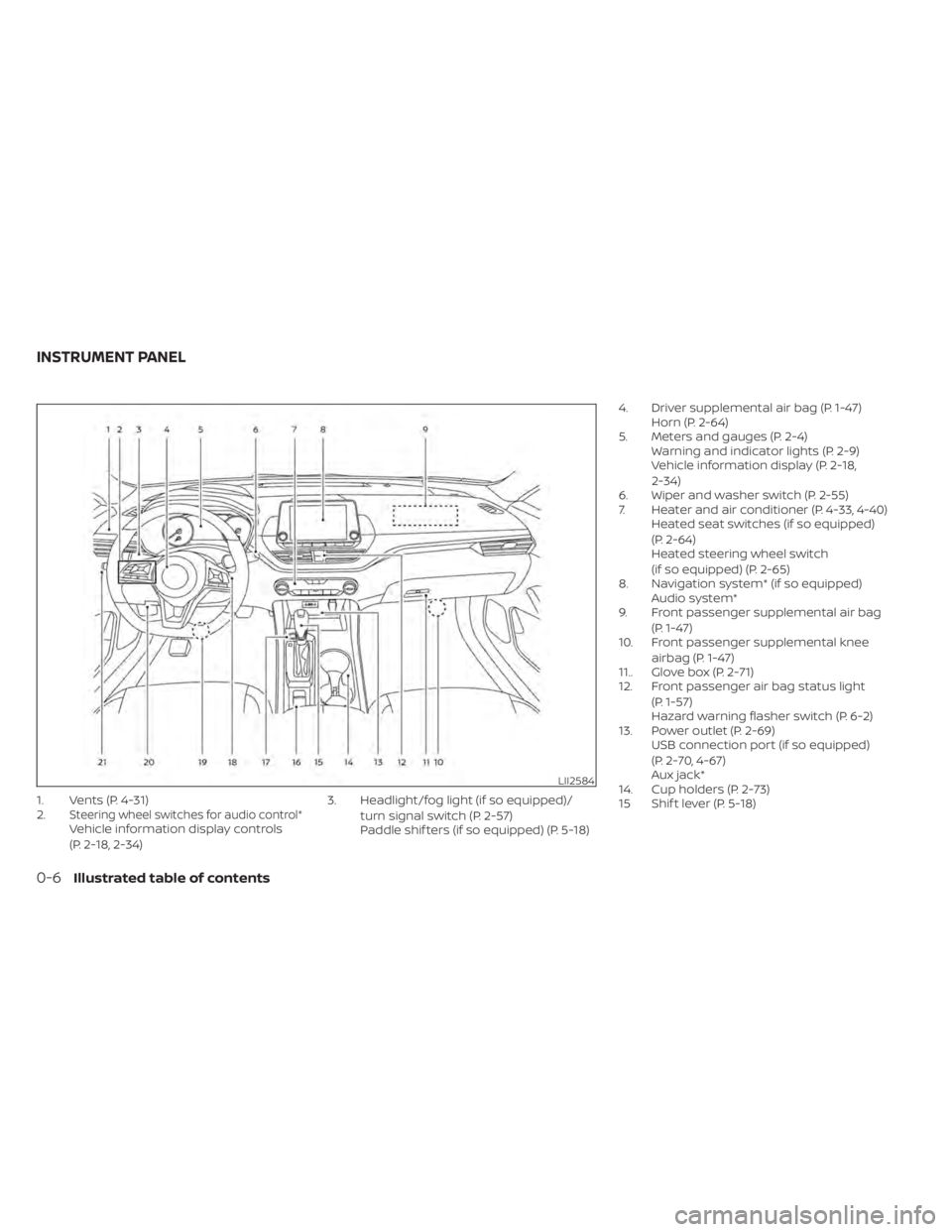
1. Vents (P. 4-31)
2.Steering wheel switches for audio control*Vehicle information display controls
(P. 2-18, 2-34)3. Headlight/fog light (if so equipped)/
turn signal switch (P. 2-57)
Paddle shif ters (if so equipped) (P. 5-18) 4. Driver supplemental air bag (P. 1-47)
Horn (P. 2-64)
5. Meters and gauges (P. 2-4) Warning and indicator lights (P. 2-9)
Vehicle information display (P. 2-18,
2-34)
6. Wiper and washer switch (P. 2-55)
7. Heater and air conditioner (P. 4-33, 4-40) Heated seat switches (if so equipped)
(P. 2-64)
Heated steering wheel switch
(if so equipped) (P. 2-65)
8. Navigation system* (if so equipped) Audio system*
9. Front passenger supplemental air bag
(P. 1-47)
10. Front passenger supplemental knee
airbag (P. 1-47)
11.. Glove box (P. 2-71)
12. Front passenger air bag status light
(P. 1-57)
Hazard warning flasher switch (P. 6-2)
13. Power outlet (P. 2-69) USB connection port (if so equipped)
(P. 2-70, 4-67)
Aux jack*
14. Cup holders (P. 2-73)
15 Shif t lever (P. 5-18)
LII2584
INSTRUMENT PANEL
0-6Illustrated table of contents
Page 90 of 644

2 Instruments and controls
Instrument panel................................2-2
Meters and gauges .............................2-4
Speedometer and odometer .................2-4
Tachometer ..................................2-6
Engine coolant temperature gauge ..........2-6
Fuel gauge ................................... 2-7
Distance To Empty (DTE) .....................2-8
Variable Compression Turbo
(if so equipped) ...............................2-8
Warning lights, indicator lights and audible
reminders .......................................2-9
Checking lights .............................. 2-10
Warning/Indicator lights (red) ...............2-10
Warning/Indicator lights (yellow) ............2-12
Warning/Indicator lights (other) .............2-17
Audible reminders ........................... 2-18
Vehicle information display- 5 inch (13 cm)
Type A (if so equipped) ......................... 2-18
How to use the vehicle information
display ...................................... 2-19
Startup display .............................. 2-19
Resetting the drive computer ...............2-20
Oil control system (if so equipped) ...........2-20
Settings ..................................... 2-21
Vehicle information display warnings
and indicators ............................... 2-28Vehicle information display —7 inch (18 cm)
Type B (if so equipped)
......................... 2-34
How to use the vehicle information
display ...................................... 2-35
Startup display .............................. 2-35
Resetting the drive computer ...............2-35
Oil control system (if so equipped) ...........2-36
Settings ..................................... 2-37
Vehicle information display warnings
and indicators ............................... 2-45
Security systems ............................... 2-52
Vehicle security system .....................2-52
NISSAN Vehicle Immobilizer System .........2-54
Wiper and washer switch .......................2-55
Switch operation ............................ 2-55
Rear window and outside mirror
(if so equipped) defroster switch ...............2-56
Headlight and turn signal switch ...............2-57
Headlight control switch ....................2-57
LED
Daytime Running Lights (DRL)
system (if so equipped) ......................2-62
Instrument brightness control ..............2-62
Turn signal switch ........................... 2-63
Fog light switch (if so equipped) .............2-63
Horn ........................................... 2-64
Page 92 of 644
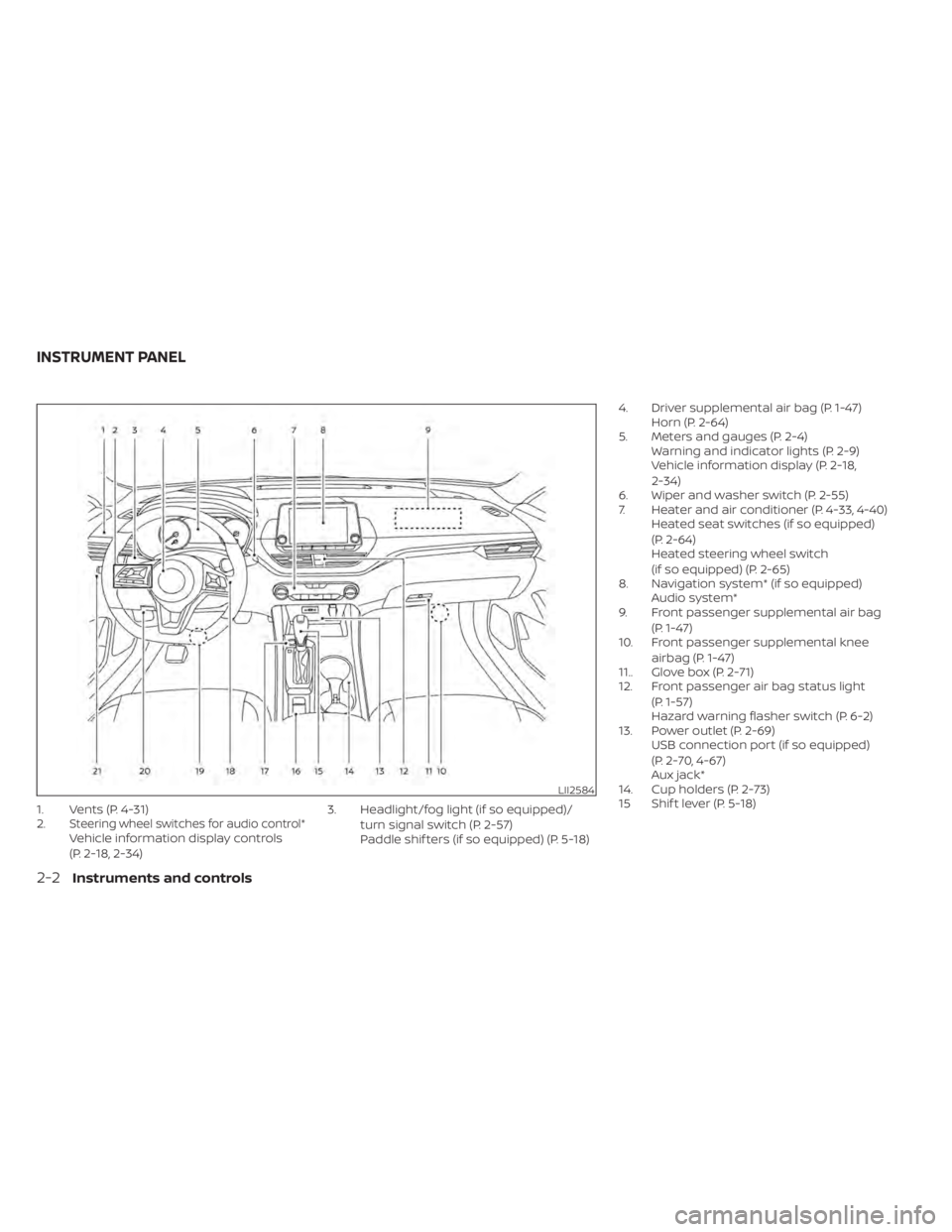
1. Vents (P. 4-31)
2.Steering wheel switches for audio control*Vehicle information display controls
(P. 2-18, 2-34)3. Headlight/fog light (if so equipped)/
turn signal switch (P. 2-57)
Paddle shif ters (if so equipped) (P. 5-18) 4. Driver supplemental air bag (P. 1-47)
Horn (P. 2-64)
5. Meters and gauges (P. 2-4) Warning and indicator lights (P. 2-9)
Vehicle information display (P. 2-18,
2-34)
6. Wiper and washer switch (P. 2-55)
7. Heater and air conditioner (P. 4-33, 4-40) Heated seat switches (if so equipped)
(P. 2-64)
Heated steering wheel switch
(if so equipped) (P. 2-65)
8. Navigation system* (if so equipped) Audio system*
9. Front passenger supplemental air bag
(P. 1-47)
10. Front passenger supplemental knee
airbag (P. 1-47)
11.. Glove box (P. 2-71)
12. Front passenger air bag status light
(P. 1-57)
Hazard warning flasher switch (P. 6-2)
13. Power outlet (P. 2-69) USB connection port (if so equipped)
(P. 2-70, 4-67)
Aux jack*
14. Cup holders (P. 2-73)
15 Shif t lever (P. 5-18)
LII2584
INSTRUMENT PANEL
2-2Instruments and controls
Page 114 of 644
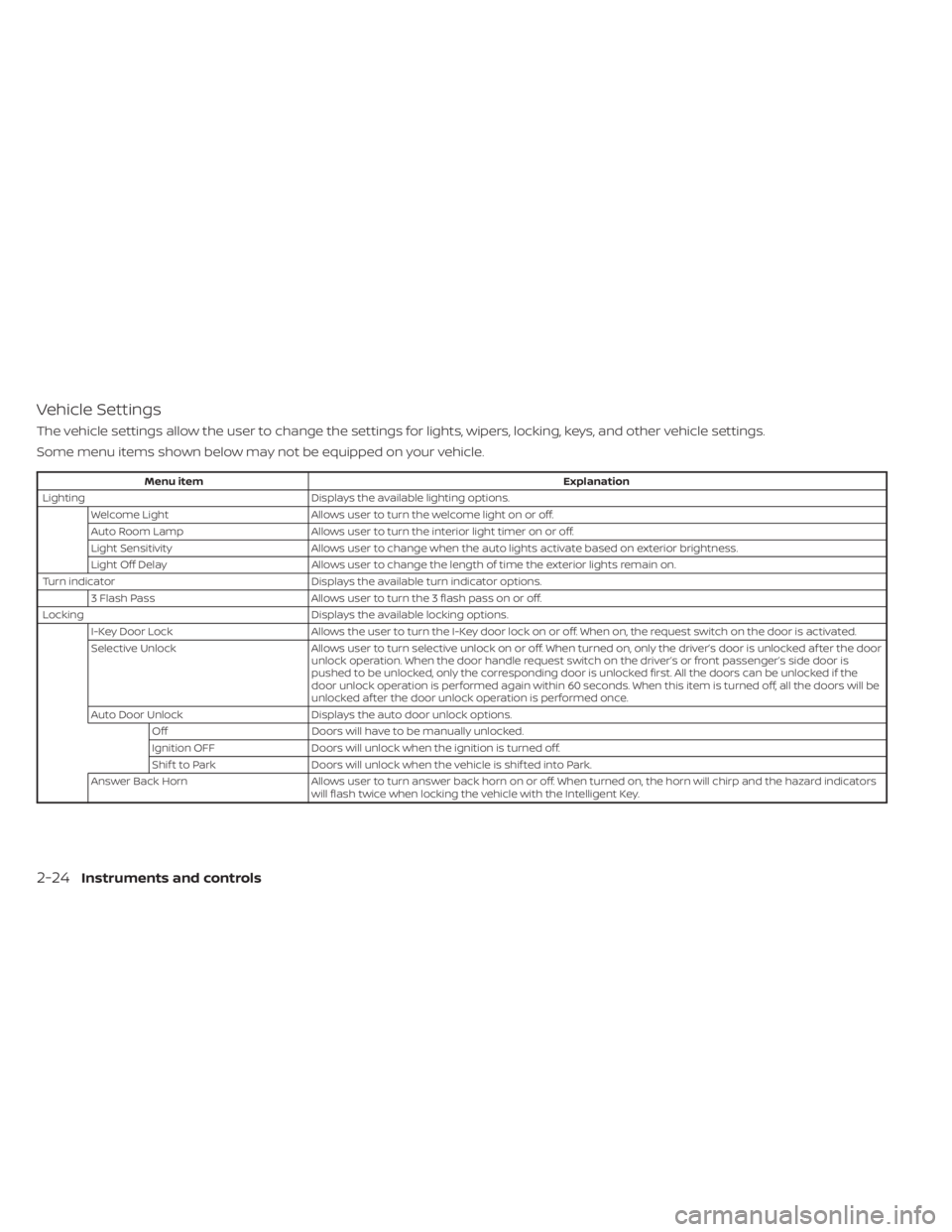
Vehicle Settings
The vehicle settings allow the user to change the settings for lights, wipers, locking, keys, and other vehicle settings.
Some menu items shown below may not be equipped on your vehicle.
Menu itemExplanation
Lighting Displays the available lighting options.
Welcome Light Allows user to turn the welcome light on or off.
Auto Room Lamp Allows user to turn the interior light timer on or off.
Light Sensitivity Allows user to change when the auto lights activate based on exterior brightness.
Light Off Delay Allows user to change the length of time the exterior lights remain on.
Turn indicator Displays the available turn indicator options.
3 Flash Pass Allows user to turn the 3 flash pass on or off.
Locking Displays the available locking options.
I-Key Door Lock Allows the user to turn the I-Key door lock on or off. When on, the request switch on the door is activated.
Selective Unlock Allows user to turn selective unlock on or off. When turned on, only the driver’s door is unlocked af ter the door
unlock operation. When the door handle request switch on the driver’s or front passenger’s side door is
pushed to be unlocked, only the corresponding door is unlocked first. All the doors can be unlocked if the
door unlock operation is performed again within 60 seconds. When this item is turned off, all the doors will be
unlocked af ter the door unlock operation is performed once.
Auto Door Unlock Displays the auto door unlock options.
Off Doors will have to be manually unlocked.
Ignition OFF Doors will unlock when the ignition is turned off.
Shif t to Park Doors will unlock when the vehicle is shif ted into Park.
Answer Back Horn Allows user to turn answer back horn on or off. When turned on, the horn will chirp and the hazard indicators
will flash twice when locking the vehicle with the Intelligent Key.
2-24Instruments and controls
Page 115 of 644
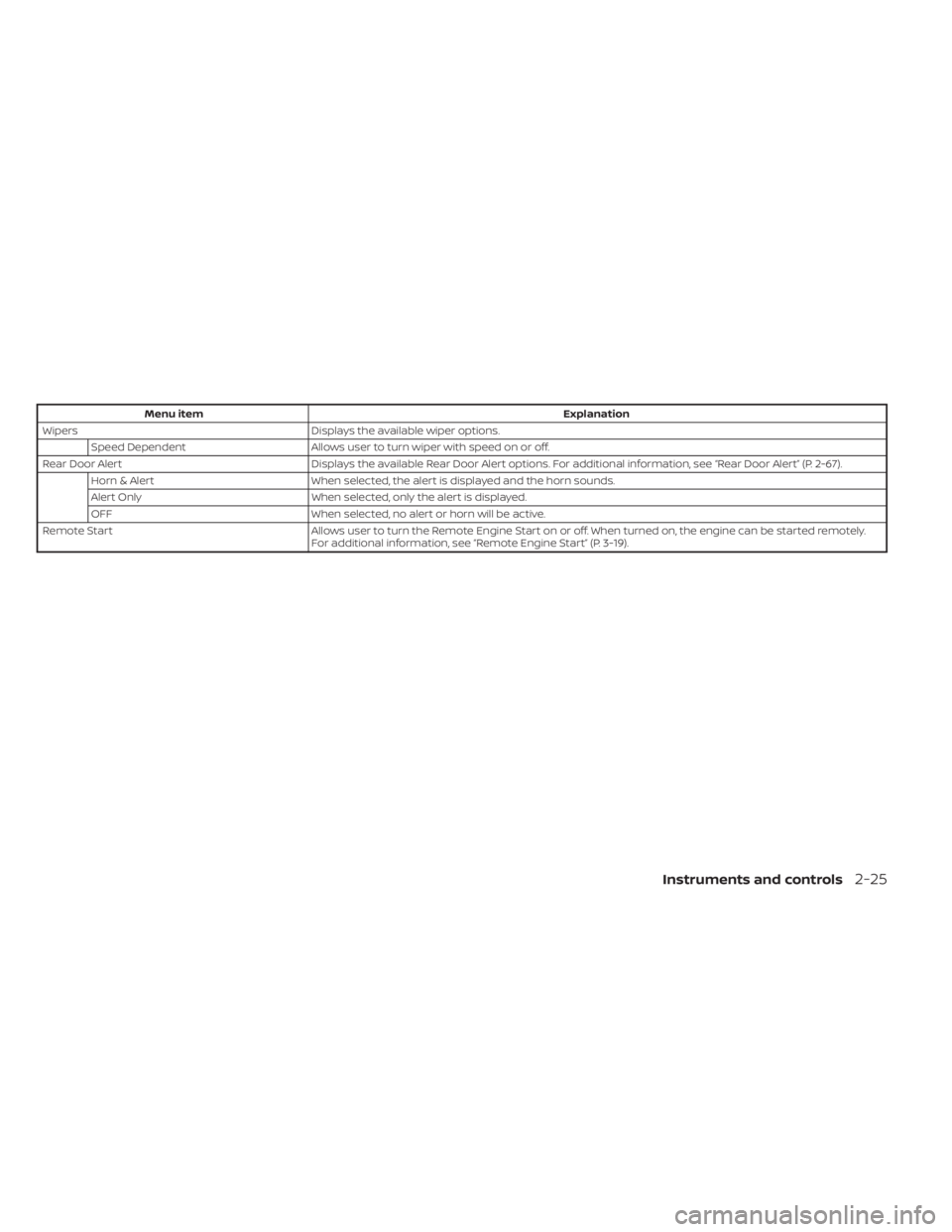
Menu itemExplanation
Wipers Displays the available wiper options.
Speed Dependent Allows user to turn wiper with speed on or off.
Rear Door Alert Displays the available Rear Door Alert options. For additional information, see “Rear Door Alert” (P. 2-67).
Horn & Alert When selected, the alert is displayed and the horn sounds.
Alert Only When selected, only the alert is displayed.
OFF When selected, no alert or horn will be active.
Remote Start Allows user to turn the Remote Engine Start on or off. When turned on, the engine can be started remotely.
For additional information, see “Remote Engine Start” (P. 3-19).
Instruments and controls2-25
Page 119 of 644
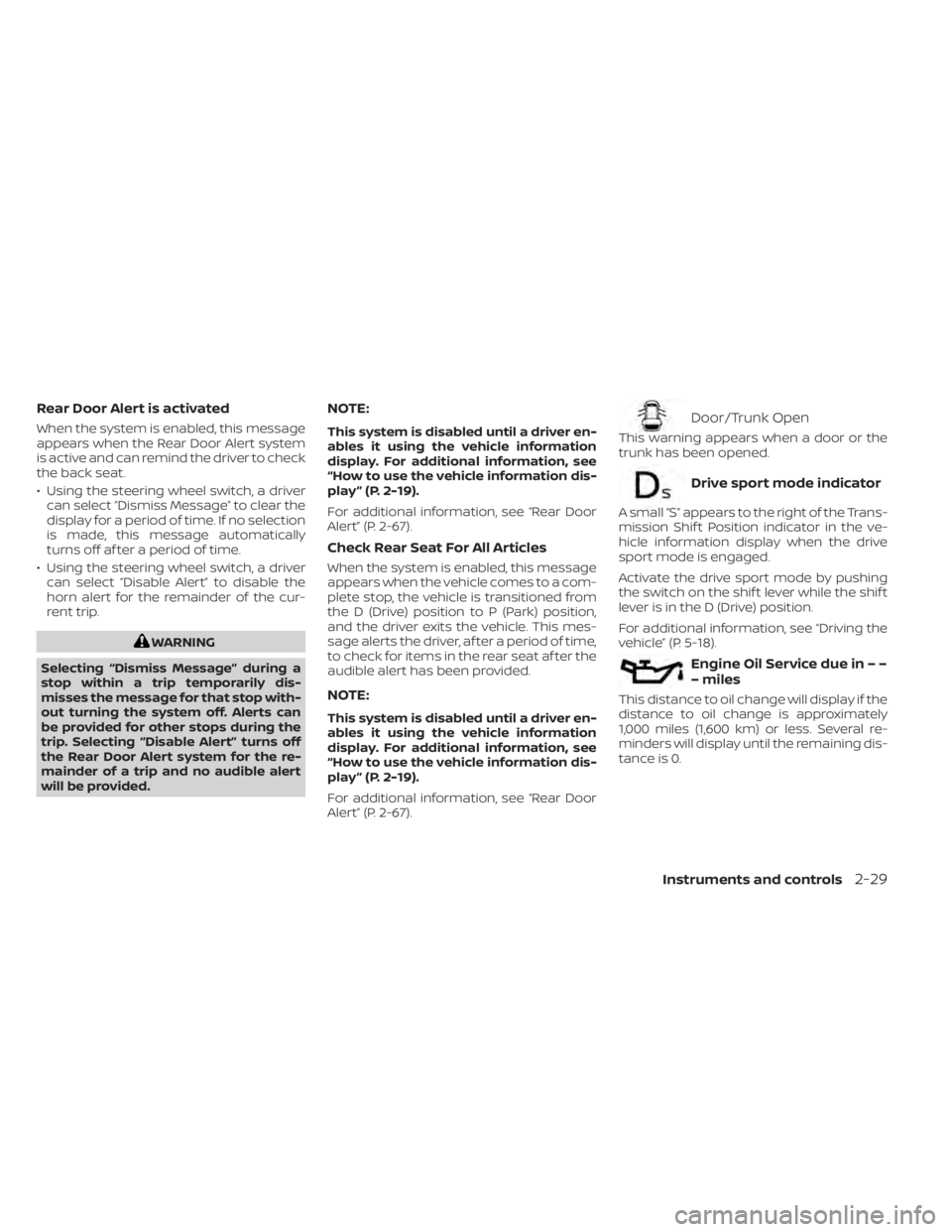
Rear Door Alert is activated
When the system is enabled, this message
appears when the Rear Door Alert system
is active and can remind the driver to check
the back seat.
• Using the steering wheel switch, a drivercan select “Dismiss Message” to clear the
display for a period of time. If no selection
is made, this message automatically
turns off af ter a period of time.
• Using the steering wheel switch, a driver can select “Disable Alert” to disable the
horn alert for the remainder of the cur-
rent trip.
WARNING
Selecting “Dismiss Message” during a
stop within a trip temporarily dis-
misses the message for that stop with-
out turning the system off. Alerts can
be provided for other stops during the
trip. Selecting “Disable Alert” turns off
the Rear Door Alert system for the re-
mainder of a trip and no audible alert
will be provided.
NOTE:
This system is disabled until a driver en-
ables it using the vehicle information
display. For additional information, see
“How to use the vehicle information dis-
play ” (P. 2-19).
For additional information, see “Rear Door
Alert” (P. 2-67).
Check Rear Seat For All Articles
When the system is enabled, this message
appears when the vehicle comes to a com-
plete stop, the vehicle is transitioned from
the D (Drive) position to P (Park) position,
and the driver exits the vehicle. This mes-
sage alerts the driver, af ter a period of time,
to check for items in the rear seat af ter the
audible alert has been provided.
NOTE:
This system is disabled until a driver en-
ables it using the vehicle information
display. For additional information, see
“How to use the vehicle information dis-
play ” (P. 2-19).
For additional information, see “Rear Door
Alert” (P. 2-67).
Door/Trunk Open
This warning appears when a door or the
trunk has been opened.
Drive sport mode indicator
A small “S” appears to the right of the Trans-
mission Shif t Position indicator in the ve-
hicle information display when the drive
sport mode is engaged.
Activate the drive sport mode by pushing
the switch on the shif t lever while the shif t
lever is in the D (Drive) position.
For additional information, see “Driving the
vehicle” (P. 5-18).
Engine Oil Service due in – –
– miles
This distance to oil change will display if the
distance to oil change is approximately
1,000 miles (1,600 km) or less. Several re-
minders will display until the remaining dis-
tance is 0.
Instruments and controls2-29
Page 130 of 644
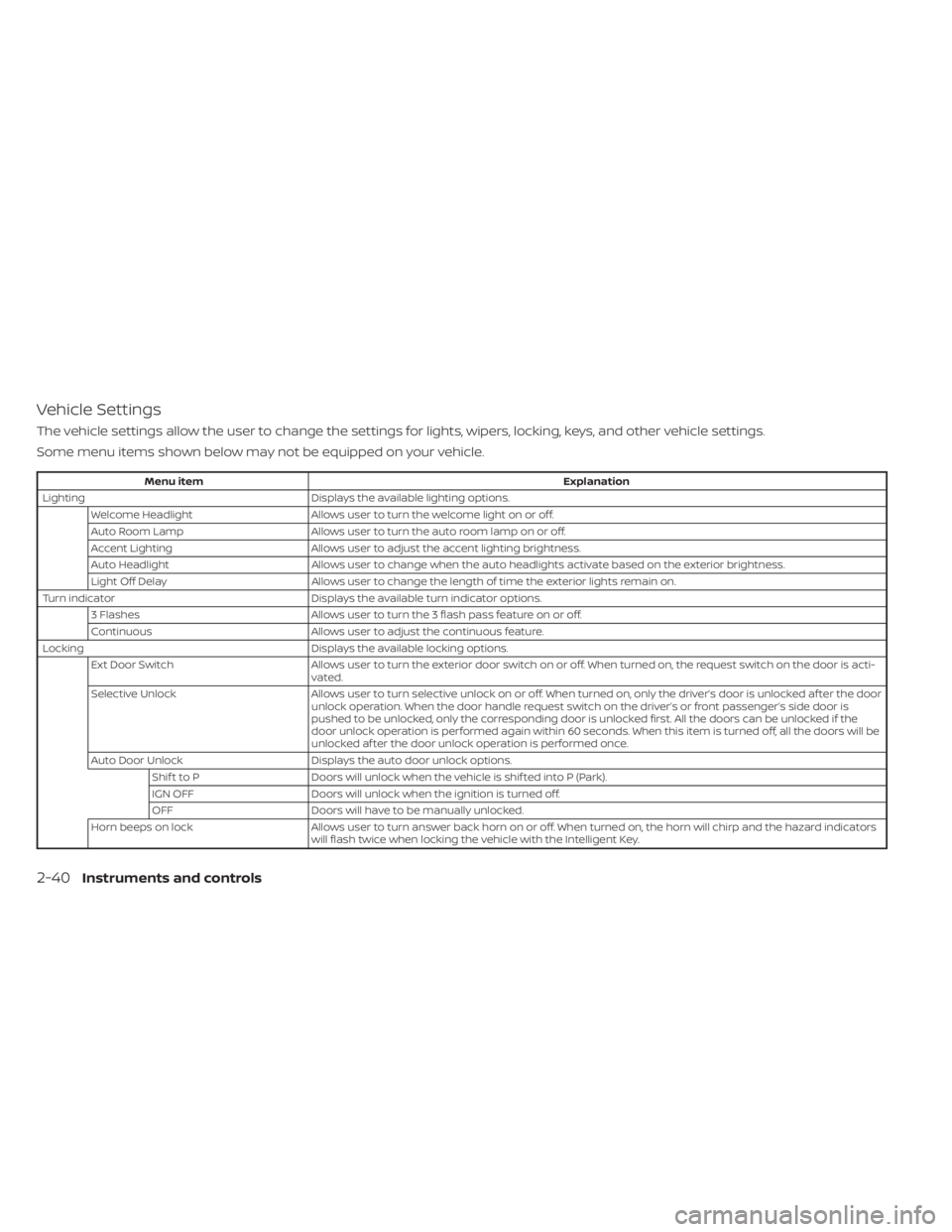
Vehicle Settings
The vehicle settings allow the user to change the settings for lights, wipers, locking, keys, and other vehicle settings.
Some menu items shown below may not be equipped on your vehicle.
Menu itemExplanation
Lighting Displays the available lighting options.
Welcome Headlight Allows user to turn the welcome light on or off.
Auto Room Lamp Allows user to turn the auto room lamp on or off.
Accent Lighting Allows user to adjust the accent lighting brightness.
Auto Headlight Allows user to change when the auto headlights activate based on the exterior brightness.
Light Off Delay Allows user to change the length of time the exterior lights remain on.
Turn indicator Displays the available turn indicator options.
3 Flashes Allows user to turn the 3 flash pass feature on or off.
Continuous Allows user to adjust the continuous feature.
Locking Displays the available locking options.
Ext Door Switch Allows user to turn the exterior door switch on or off. When turned on, the request switch on the door is acti-
vated.
Selective Unlock Allows user to turn selective unlock on or off. When turned on, only the driver’s door is unlocked af ter the door
unlock operation. When the door handle request switch on the driver’s or front passenger’s side door is
pushed to be unlocked, only the corresponding door is unlocked first. All the doors can be unlocked if the
door unlock operation is performed again within 60 seconds. When this item is turned off, all the doors will be
unlocked af ter the door unlock operation is performed once.
Auto Door Unlock Displays the auto door unlock options.
Shif t to P Doors will unlock when the vehicle is shif ted into P (Park).
IGN OFF Doors will unlock when the ignition is turned off.
OFF Doors will have to be manually unlocked.
Horn beeps on lock Allows user to turn answer back horn on or off. When turned on, the horn will chirp and the hazard indicators
will flash twice when locking the vehicle with the Intelligent Key.
2-40Instruments and controls
Page 131 of 644
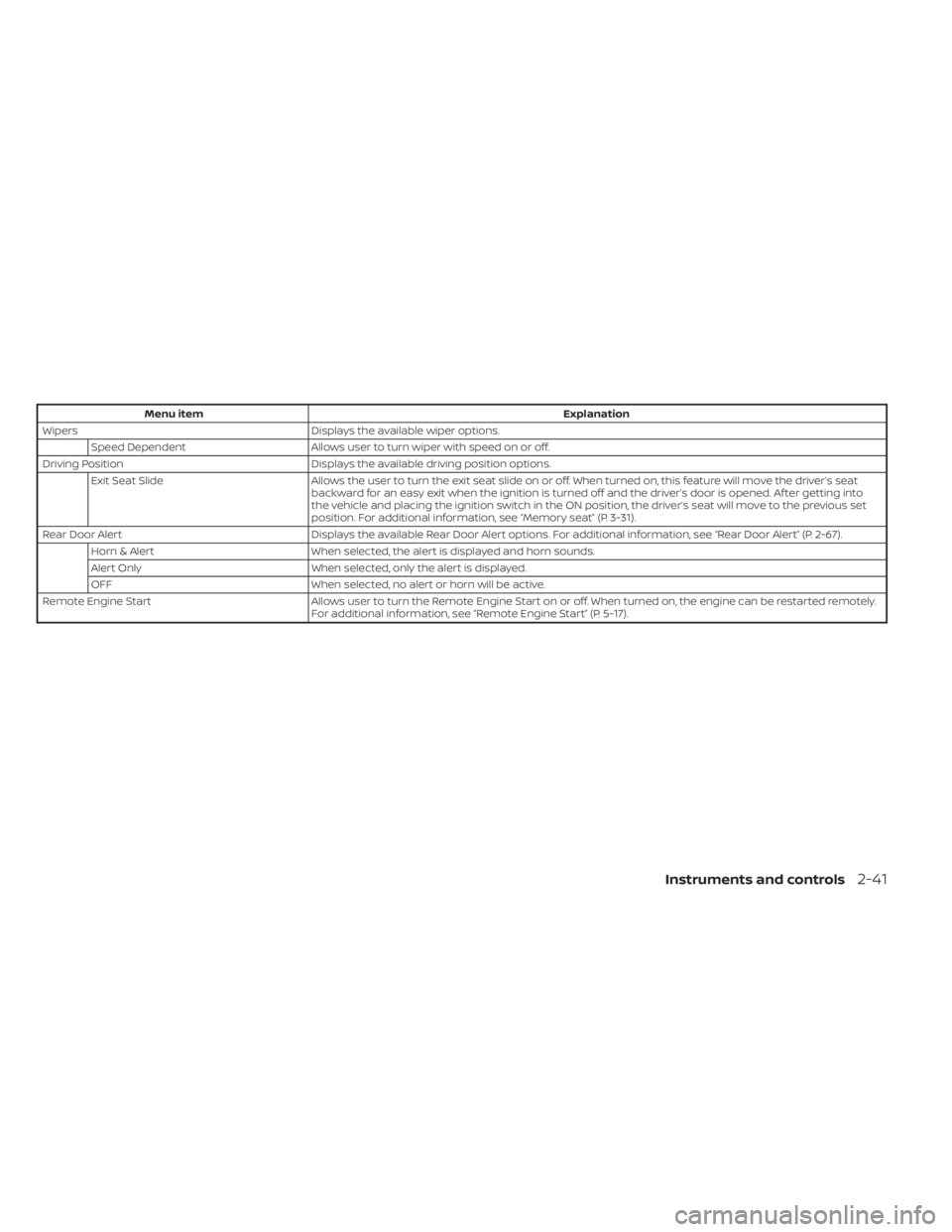
Menu itemExplanation
Wipers Displays the available wiper options.
Speed Dependent Allows user to turn wiper with speed on or off.
Driving Position Displays the available driving position options.
Exit Seat Slide Allows the user to turn the exit seat slide on or off. When turned on, this feature will move the driver’s seat
backward for an easy exit when the ignition is turned off and the driver’s door is opened. Af ter getting into
the vehicle and placing the ignition switch in the ON position, the driver’s seat will move to the previous set
position. For additional information, see “Memory seat” (P. 3-31).
Rear Door Alert Displays the available Rear Door Alert options. For additional information, see “Rear Door Alert” (P. 2-67).
Horn & Alert When selected, the alert is displayed and horn sounds.
Alert Only When selected, only the alert is displayed.
OFF When selected, no alert or horn will be active.
Remote Engine Start Allows user to turn the Remote Engine Start on or off. When turned on, the engine can be restarted remotely.
For additional information, see “Remote Engine Start” (P. 5-17).
Instruments and controls2-41