2023 NISSAN ALTIMA key
[x] Cancel search: keyPage 127 of 644

SETTINGS
The setting mode allows you to change the
information displayed in the vehicle infor-
mation display. It also allows you to change
vehicle functions:
• VDC Setting
• Driver Assistance
• TPMS Setting• Clock
• Vehicle Settings
• Maintenance
• Customize Display
• Unit/Language
• Key-Linked Settings (if so equipped)
• Factory Reset
VDC Setting
The VDC Setting menu allows the user to enable or disable the Vehicle Dynamic Control (VDC) system.
Menu item
Explanation
System Allows the user to turn the VDC system on or off. For additional information, see “Vehicle Dynamic Control
(VDC) system” (P. 5-175).
Instruments and controls2-37
Page 130 of 644
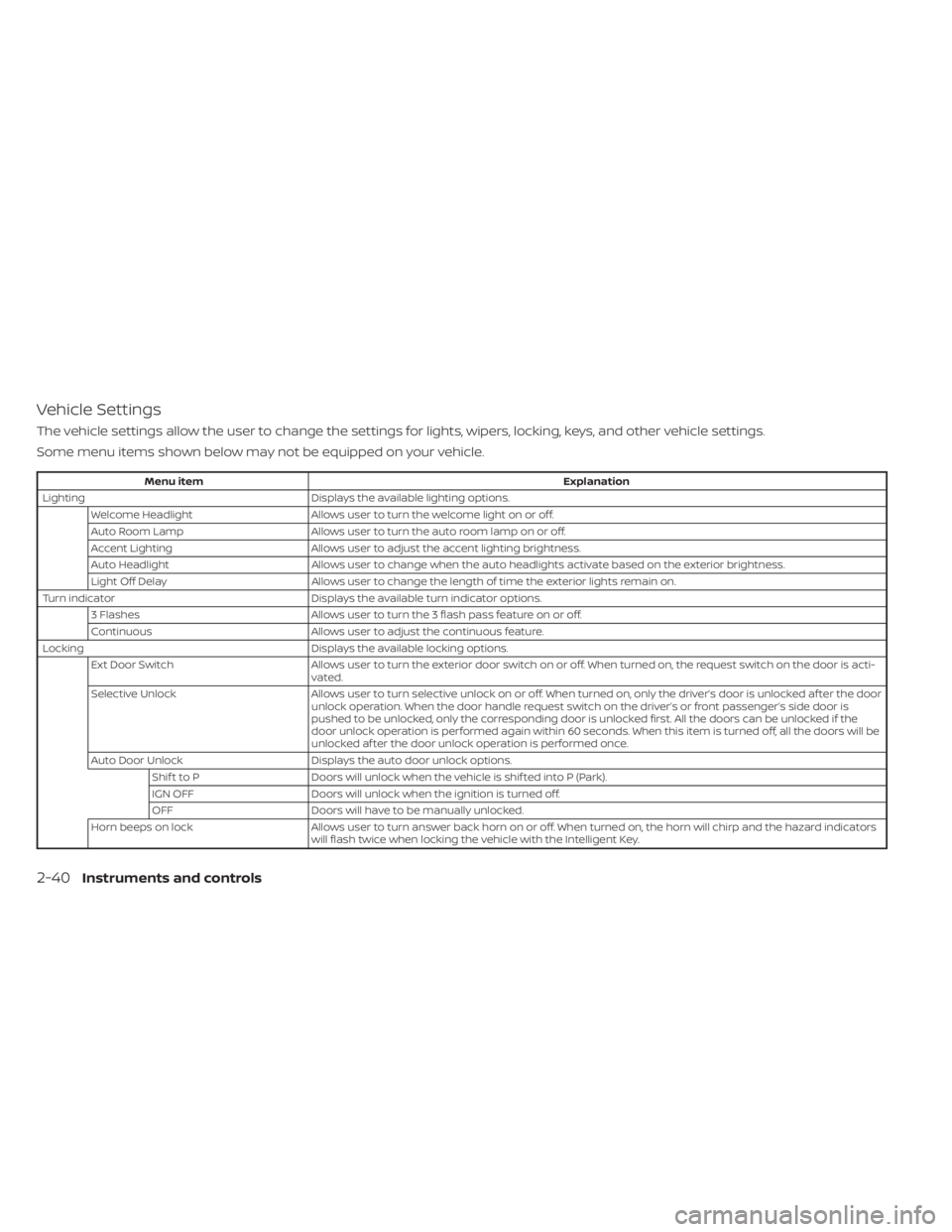
Vehicle Settings
The vehicle settings allow the user to change the settings for lights, wipers, locking, keys, and other vehicle settings.
Some menu items shown below may not be equipped on your vehicle.
Menu itemExplanation
Lighting Displays the available lighting options.
Welcome Headlight Allows user to turn the welcome light on or off.
Auto Room Lamp Allows user to turn the auto room lamp on or off.
Accent Lighting Allows user to adjust the accent lighting brightness.
Auto Headlight Allows user to change when the auto headlights activate based on the exterior brightness.
Light Off Delay Allows user to change the length of time the exterior lights remain on.
Turn indicator Displays the available turn indicator options.
3 Flashes Allows user to turn the 3 flash pass feature on or off.
Continuous Allows user to adjust the continuous feature.
Locking Displays the available locking options.
Ext Door Switch Allows user to turn the exterior door switch on or off. When turned on, the request switch on the door is acti-
vated.
Selective Unlock Allows user to turn selective unlock on or off. When turned on, only the driver’s door is unlocked af ter the door
unlock operation. When the door handle request switch on the driver’s or front passenger’s side door is
pushed to be unlocked, only the corresponding door is unlocked first. All the doors can be unlocked if the
door unlock operation is performed again within 60 seconds. When this item is turned off, all the doors will be
unlocked af ter the door unlock operation is performed once.
Auto Door Unlock Displays the auto door unlock options.
Shif t to P Doors will unlock when the vehicle is shif ted into P (Park).
IGN OFF Doors will unlock when the ignition is turned off.
OFF Doors will have to be manually unlocked.
Horn beeps on lock Allows user to turn answer back horn on or off. When turned on, the horn will chirp and the hazard indicators
will flash twice when locking the vehicle with the Intelligent Key.
2-40Instruments and controls
Page 134 of 644
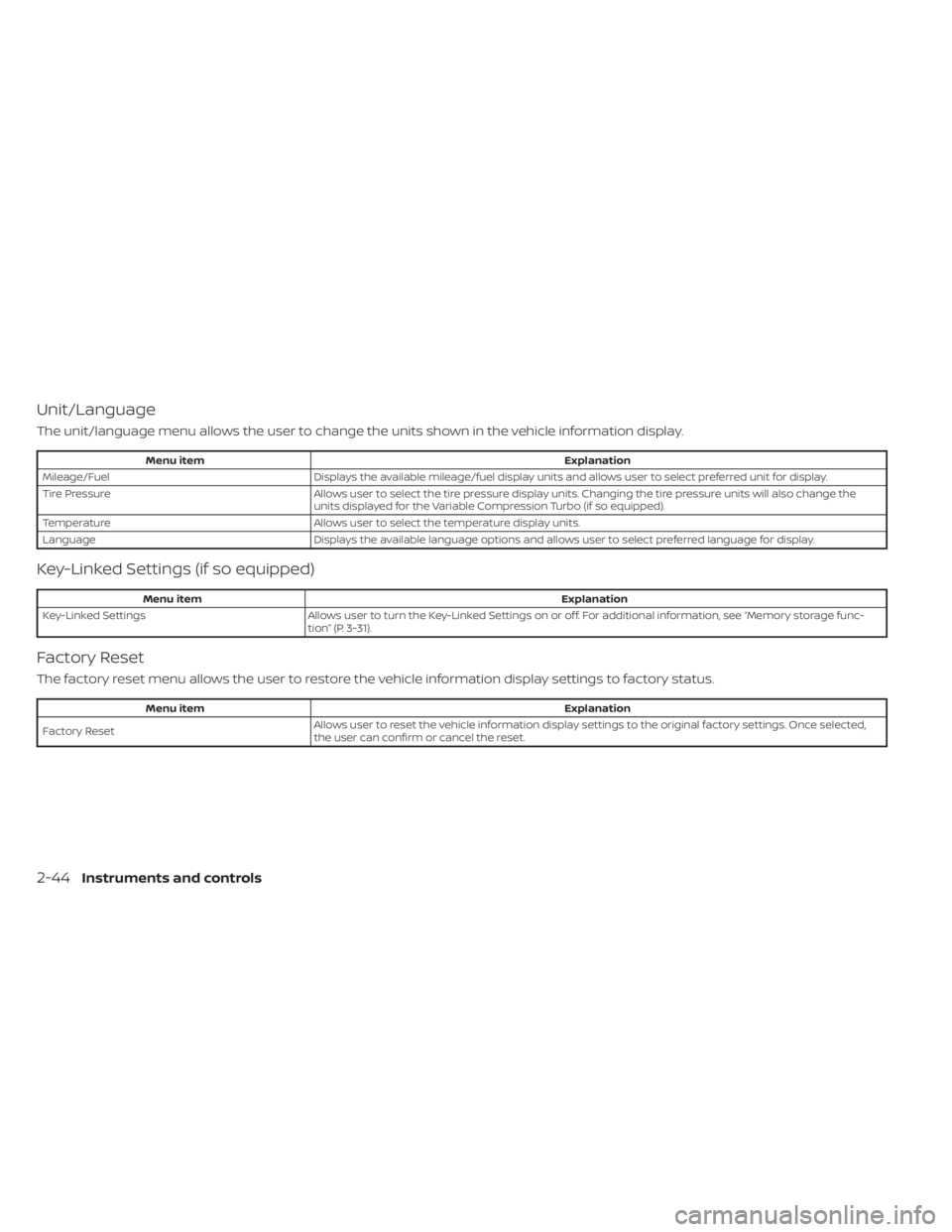
Unit/Language
The unit/language menu allows the user to change the units shown in the vehicle information display.
Menu itemExplanation
Mileage/Fuel Displays the available mileage/fuel display units and allows user to select preferred unit for display.
Tire Pressure Allows user to select the tire pressure display units. Changing the tire pressure units will also change the
units displayed for the Variable Compression Turbo (if so equipped).
Temperature Allows user to select the temperature display units.
Language Displays the available language options and allows user to select preferred language for display.
Key-Linked Settings (if so equipped)
Menu item Explanation
Key-Linked Settings Allows user to turn the Key-Linked Settings on or off. For additional information, see “Memory storage func-
tion” (P. 3-31).
Factory Reset
The factory reset menu allows the user to restore the vehicle information display settings to factory status.
Menu item Explanation
Factory Reset Allows user to reset the vehicle information display setti
ngs to the original factory settings. Once selected,
the user can confirm or cancel the reset.
2-44Instruments and controls
Page 135 of 644
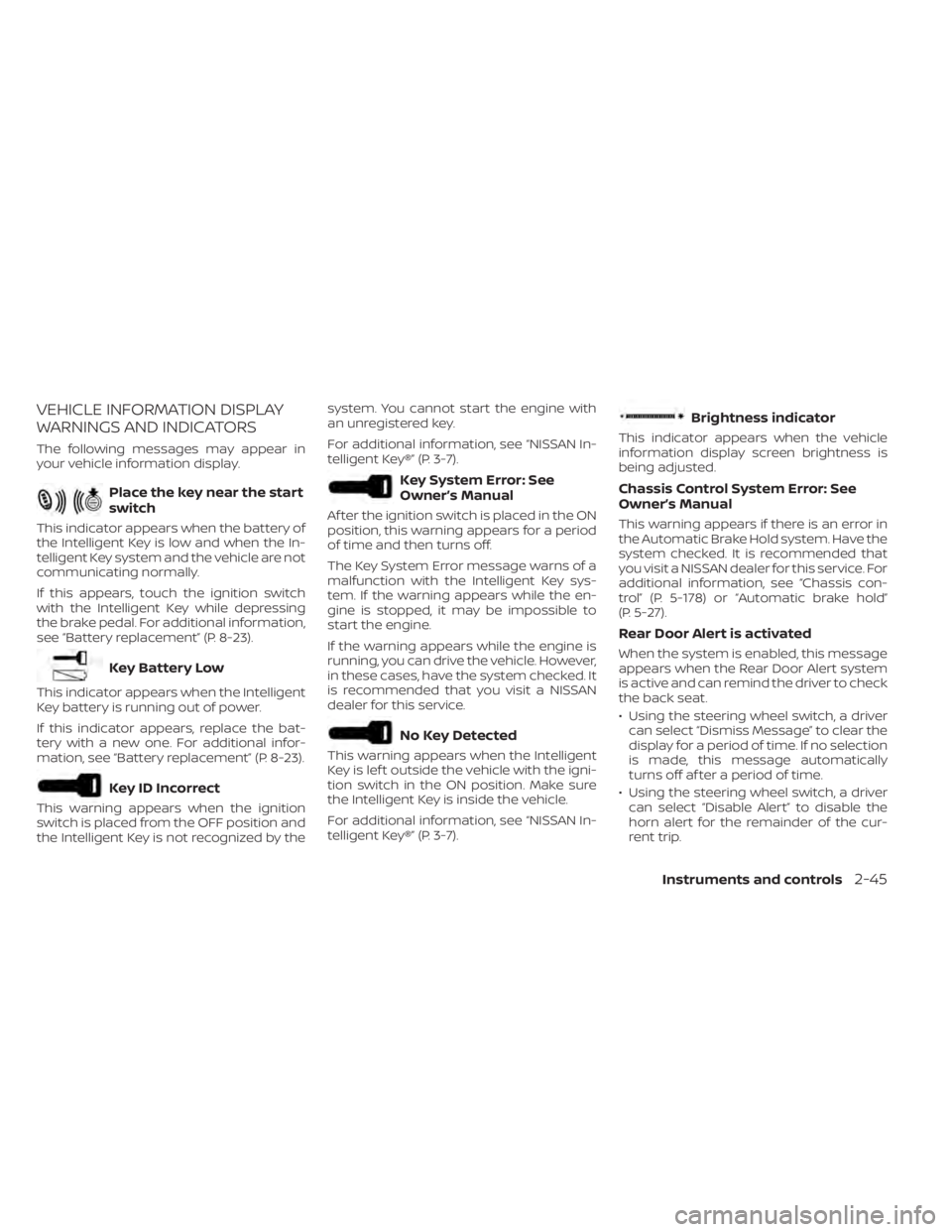
VEHICLE INFORMATION DISPLAY
WARNINGS AND INDICATORS
The following messages may appear in
your vehicle information display.
Place the key near the start
switch
This indicator appears when the battery of
the Intelligent Key is low and when the In-
telligent Key system and the vehicle are not
communicating normally.
If this appears, touch the ignition switch
with the Intelligent Key while depressing
the brake pedal. For additional information,
see “Battery replacement” (P. 8-23).
Key Battery Low
This indicator appears when the Intelligent
Key battery is running out of power.
If this indicator appears, replace the bat-
tery with a new one. For additional infor-
mation, see “Battery replacement” (P. 8-23).
Key ID Incorrect
This warning appears when the ignition
switch is placed from the OFF position and
the Intelligent Key is not recognized by thesystem. You cannot start the engine with
an unregistered key.
For additional information, see “NISSAN In-
telligent Key®” (P. 3-7).
Key System Error: See
Owner’s Manual
Af ter the ignition switch is placed in the ON
position, this warning appears for a period
of time and then turns off.
The Key System Error message warns of a
malfunction with the Intelligent Key sys-
tem. If the warning appears while the en-
gine is stopped, it may be impossible to
start the engine.
If the warning appears while the engine is
running, you can drive the vehicle. However,
in these cases, have the system checked. It
is recommended that you visit a NISSAN
dealer for this service.
No Key Detected
This warning appears when the Intelligent
Key is lef t outside the vehicle with the igni-
tion switch in the ON position. Make sure
the Intelligent Key is inside the vehicle.
For additional information, see “NISSAN In-
telligent Key®” (P. 3-7).
Brightness indicator
This indicator appears when the vehicle
information display screen brightness is
being adjusted.
Chassis Control System Error: See
Owner’s Manual
This warning appears if there is an error in
the Automatic Brake Hold system. Have the
system checked. It is recommended that
you visit a NISSAN dealer for this service. For
additional information, see “Chassis con-
trol” (P. 5-178) or “Automatic brake hold”
(P. 5-27).
Rear Door Alert is activated
When the system is enabled, this message
appears when the Rear Door Alert system
is active and can remind the driver to check
the back seat.
• Using the steering wheel switch, a driver
can select “Dismiss Message” to clear the
display for a period of time. If no selection
is made, this message automatically
turns off af ter a period of time.
• Using the steering wheel switch, a driver can select “Disable Alert” to disable the
horn alert for the remainder of the cur-
rent trip.
Instruments and controls2-45
Page 143 of 644
The system helps deter vehicle thef t but
cannot prevent it, nor can it prevent the
thef t of interior or exterior vehicle compo-
nents in all situations. Always secure your
vehicle even if parking for a brief period.
Never leave your keys in the vehicle, and
always lock the vehicle when unattended.
Be aware of your surroundings, and park in
secure, well-lit areas whenever possible.
Many devices offering additional protec-
tion, such as component locks, identifica-
tion markers, and tracking systems, are
available at auto supply stores and spe-
cialty shops. A NISSAN dealer may also offer
such equipment. Check with your insur-
ance company to see if you may be eligible
for discounts for various thef t protection
features.
How to arm the vehicle security
system
1. Close all windows and the moonroof.The system can be armed even if the
windows and moonroof (if so
equipped) are open.
2. Remove the Intelligent Key from the vehicle. 3. Close all doors, hood and trunk. Lock all
doors. The doors can be locked with the
Intelligent Key, door handle request
switch, or power door lock switch..
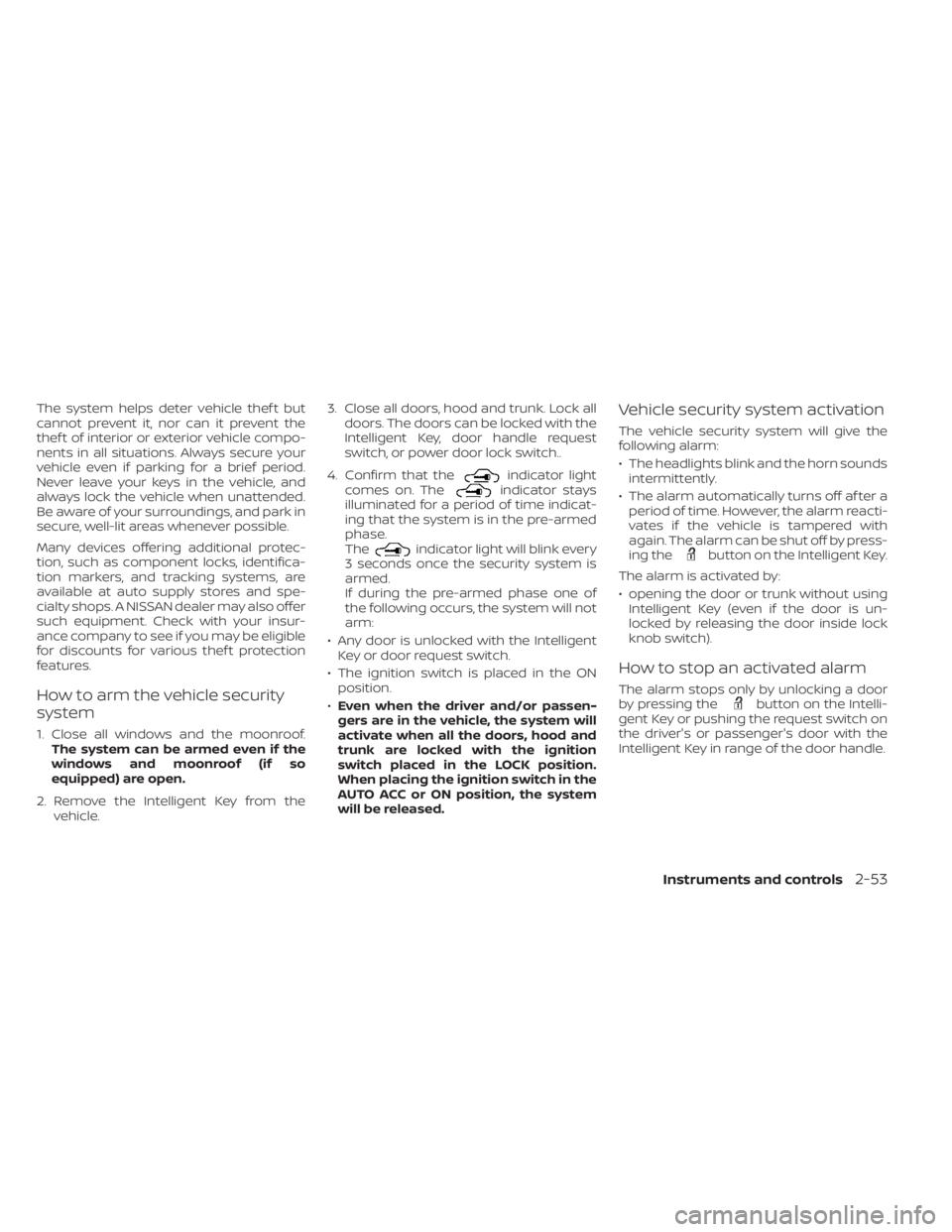
4. Confirm that the
indicator light
comes on. Theindicator stays
illuminated for a period of time indicat-
ing that the system is in the pre-armed
phase.
The
indicator light will blink every
3 seconds once the security system is
armed.
If during the pre-armed phase one of
the following occurs, the system will not
arm:
• Any door is unlocked with the Intelligent Key or door request switch.
• The ignition switch is placed in the ON position.
• Even when the driver and/or passen-
gers are in the vehicle, the system will
activate when all the doors, hood and
trunk are locked with the ignition
switch placed in the LOCK position.
When placing the ignition switch in the
AUTO ACC or ON position, the system
will be released.
Vehicle security system activation
The vehicle security system will give the
following alarm:
• The headlights blink and the horn sounds intermittently.
• The alarm automatically turns off af ter a period of time. However, the alarm reacti-
vates if the vehicle is tampered with
again. The alarm can be shut off by press-
ing the
button on the Intelligent Key.
The alarm is activated by:
• opening the door or trunk without using Intelligent Key (even if the door is un-
locked by releasing the door inside lock
knob switch).
How to stop an activated alarm
The alarm stops only by unlocking a door
by pressing thebutton on the Intelli-
gent Key or pushing the request switch on
the driver's or passenger's door with the
Intelligent Key in range of the door handle.
Instruments and controls2-53
Page 144 of 644
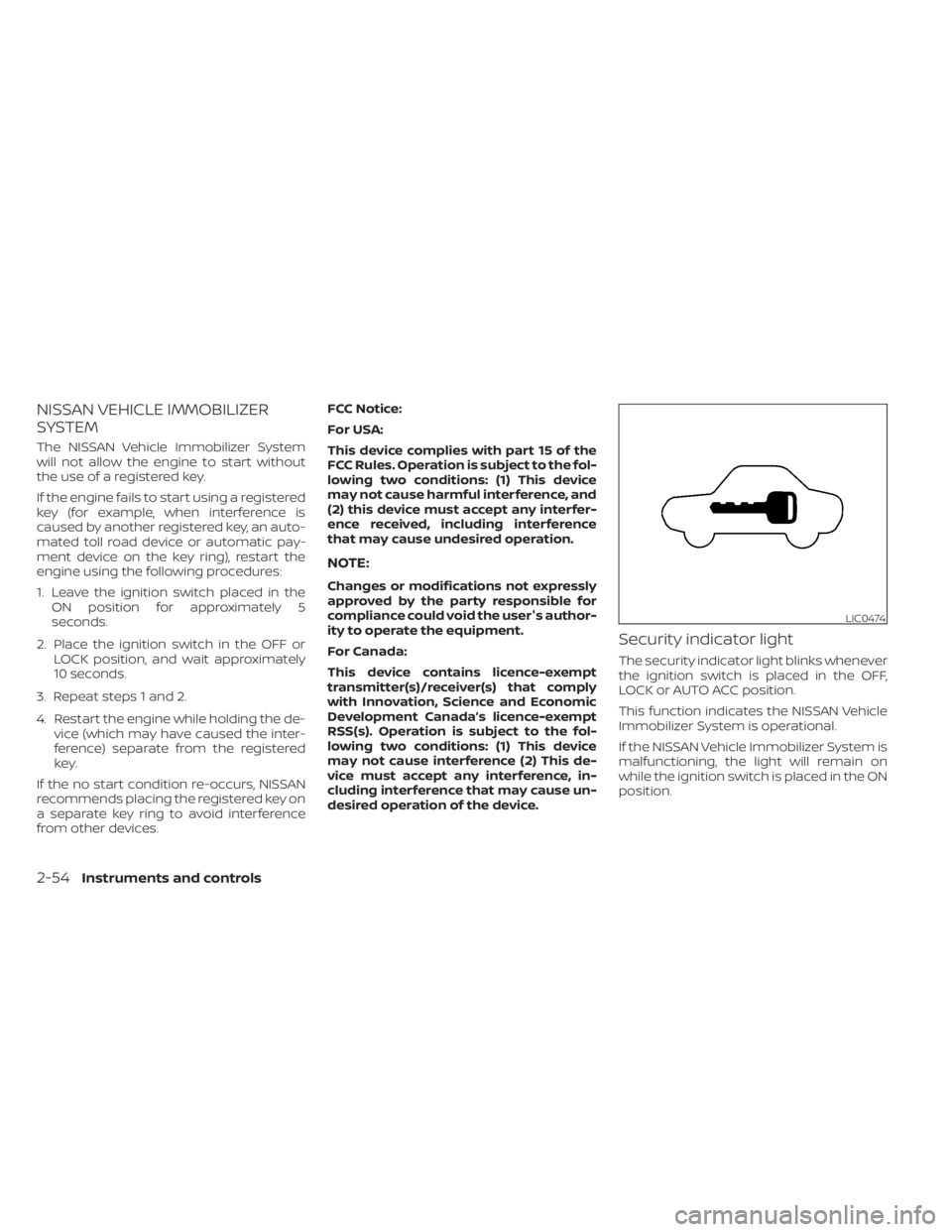
NISSAN VEHICLE IMMOBILIZER
SYSTEM
The NISSAN Vehicle Immobilizer System
will not allow the engine to start without
the use of a registered key.
If the engine fails to start using a registered
key (for example, when interference is
caused by another registered key, an auto-
mated toll road device or automatic pay-
ment device on the key ring), restart the
engine using the following procedures:
1. Leave the ignition switch placed in theON position for approximately 5
seconds.
2. Place the ignition switch in the OFF or LOCK position, and wait approximately
10 seconds.
3. Repeat steps 1 and 2.
4. Restart the engine while holding the de- vice (which may have caused the inter-
ference) separate from the registered
key.
If the no start condition re-occurs, NISSAN
recommends placing the registered key on
a separate key ring to avoid interference
from other devices. FCC Notice:
For USA:
This device complies with part 15 of the
FCC Rules. Operation is subject to the fol-
lowing two conditions: (1) This device
may not cause harmful interference, and
(2) this device must accept any interfer-
ence received, including interference
that may cause undesired operation.
NOTE:
Changes or modifications not expressly
approved by the party responsible for
compliance could void the user's author-
ity to operate the equipment.
For Canada:
This device contains licence-exempt
transmitter(s)/receiver(s) that comply
with Innovation, Science and Economic
Development Canada’s licence-exempt
RSS(s). Operation is subject to the fol-
lowing two conditions: (1) This device
may not cause interference (2) This de-
vice must accept any interference, in-
cluding interference that may cause un-
desired operation of the device.
Security indicator light
The security indicator light blinks whenever
the ignition switch is placed in the OFF,
LOCK or AUTO ACC position.
This function indicates the NISSAN Vehicle
Immobilizer System is operational.
If the NISSAN Vehicle Immobilizer System is
malfunctioning, the light will remain on
while the ignition switch is placed in the ON
position.
LIC0474
2-54Instruments and controls
Page 145 of 644
If the light still remains on and/or the
engine will not start, seek service for the
NISSAN Vehicle Immobilizer System as
soon as possible. Please bring all regis-
tered keys that you have. It is recom-
mended that you visit a NISSAN dealer
for this service.
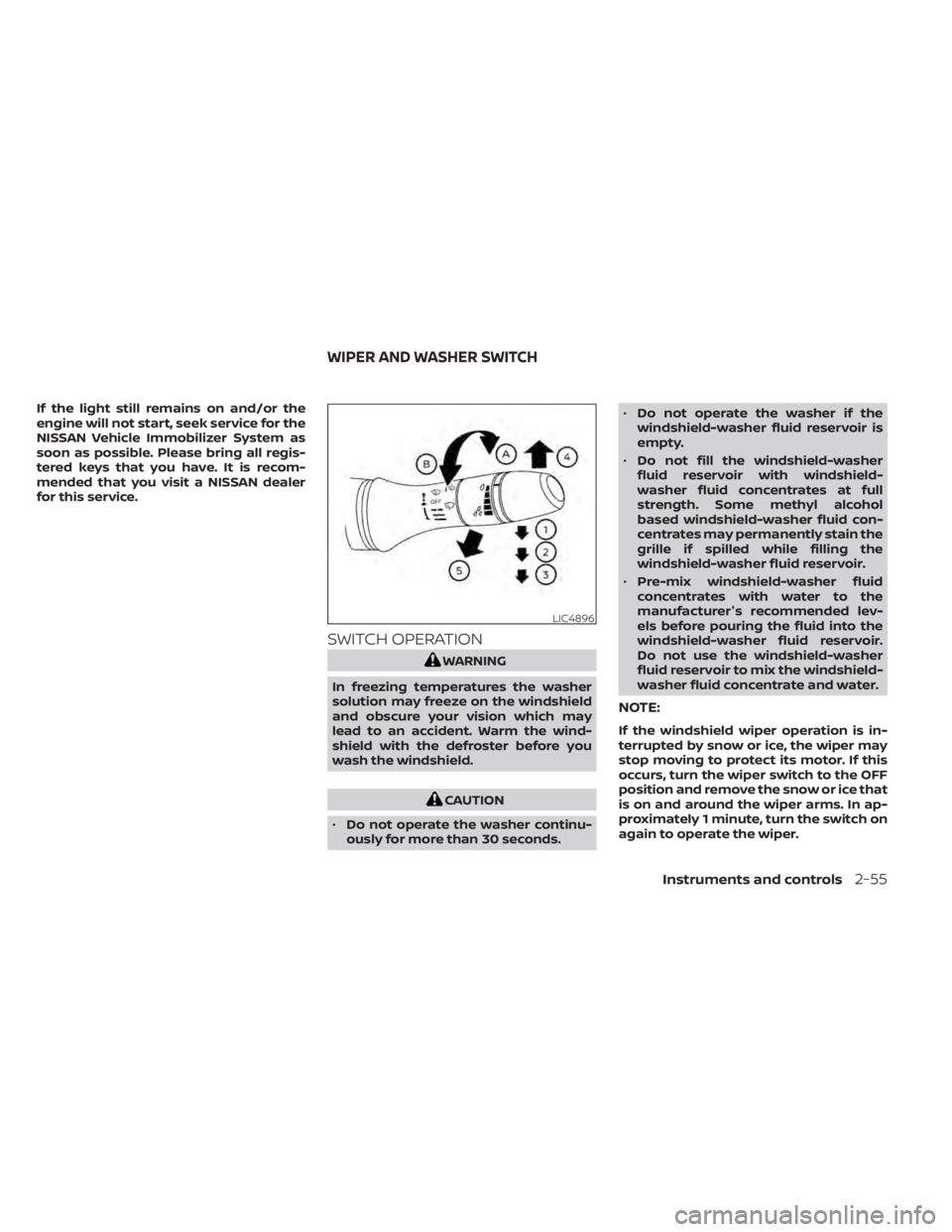
SWITCH OPERATION
WARNING
In freezing temperatures the washer
solution may freeze on the windshield
and obscure your vision which may
lead to an accident. Warm the wind-
shield with the defroster before you
wash the windshield.
CAUTION
• Do not operate the washer continu-
ously for more than 30 seconds. •
Do not operate the washer if the
windshield-washer fluid reservoir is
empty.
• Do not fill the windshield-washer
fluid reservoir with windshield-
washer fluid concentrates at full
strength. Some methyl alcohol
based windshield-washer fluid con-
centrates may permanently stain the
grille if spilled while filling the
windshield-washer fluid reservoir.
• Pre-mix windshield-washer fluid
concentrates with water to the
manufacturer's recommended lev-
els before pouring the fluid into the
windshield-washer fluid reservoir.
Do not use the windshield-washer
fluid reservoir to mix the windshield-
washer fluid concentrate and water.
NOTE:
If the windshield wiper operation is in-
terrupted by snow or ice, the wiper may
stop moving to protect its motor. If this
occurs, turn the wiper switch to the OFF
position and remove the snow or ice that
is on and around the wiper arms. In ap-
proximately 1 minute, turn the switch on
again to operate the wiper.
LIC4896
WIPER AND WASHER SWITCH
Instruments and controls2-55
Page 162 of 644
WARNING
To ensure proper operation of the driv-
er’s and/or front passenger's NISSAN
Advanced Air Bag System (if so
equipped), please observe the follow-
ing items:
• Do not allow a passenger in the rear
seat to push or pull on the seatback
pocket or head restraint/head rest.
• Do not place heavy loads heavier
than 9.1 lbs. (4 kg) on the seatback,
head restraint/head rest or in the
seatback pocket.
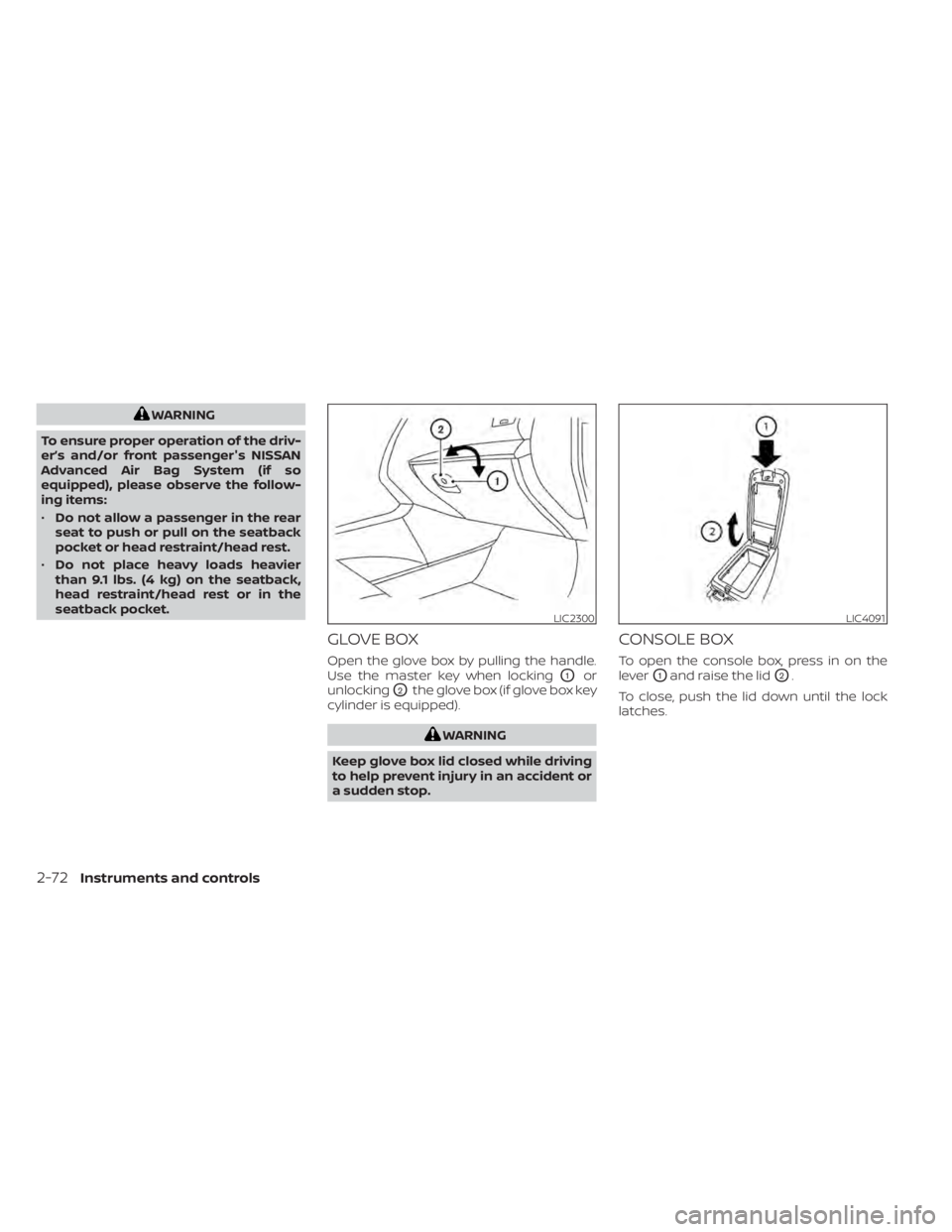
GLOVE BOX
Open the glove box by pulling the handle.
Use the master key when locking
O1or
unlocking
O2the glove box (if glove box key
cylinder is equipped).
WARNING
Keep glove box lid closed while driving
to help prevent injury in an accident or
a sudden stop.
CONSOLE BOX
To open the console box, press in on the
lever
O1and raise the lidO2.
To close, push the lid down until the lock
latches.
LIC2300LIC4091
2-72Instruments and controls