2023 NISSAN ALTIMA display
[x] Cancel search: displayPage 309 of 644
WARNING
Do not operate the push-button igni-
tion switch while driving the vehicle ex-
cept in an emergency. (The engine will
stop when the ignition switch is pushed
three consecutive times in quick suc-
cession or the ignition switch is pushed
and held for more than 2 seconds.) If
the engine stops while the vehicle is
being driven, this could lead to a crash
and serious injury.
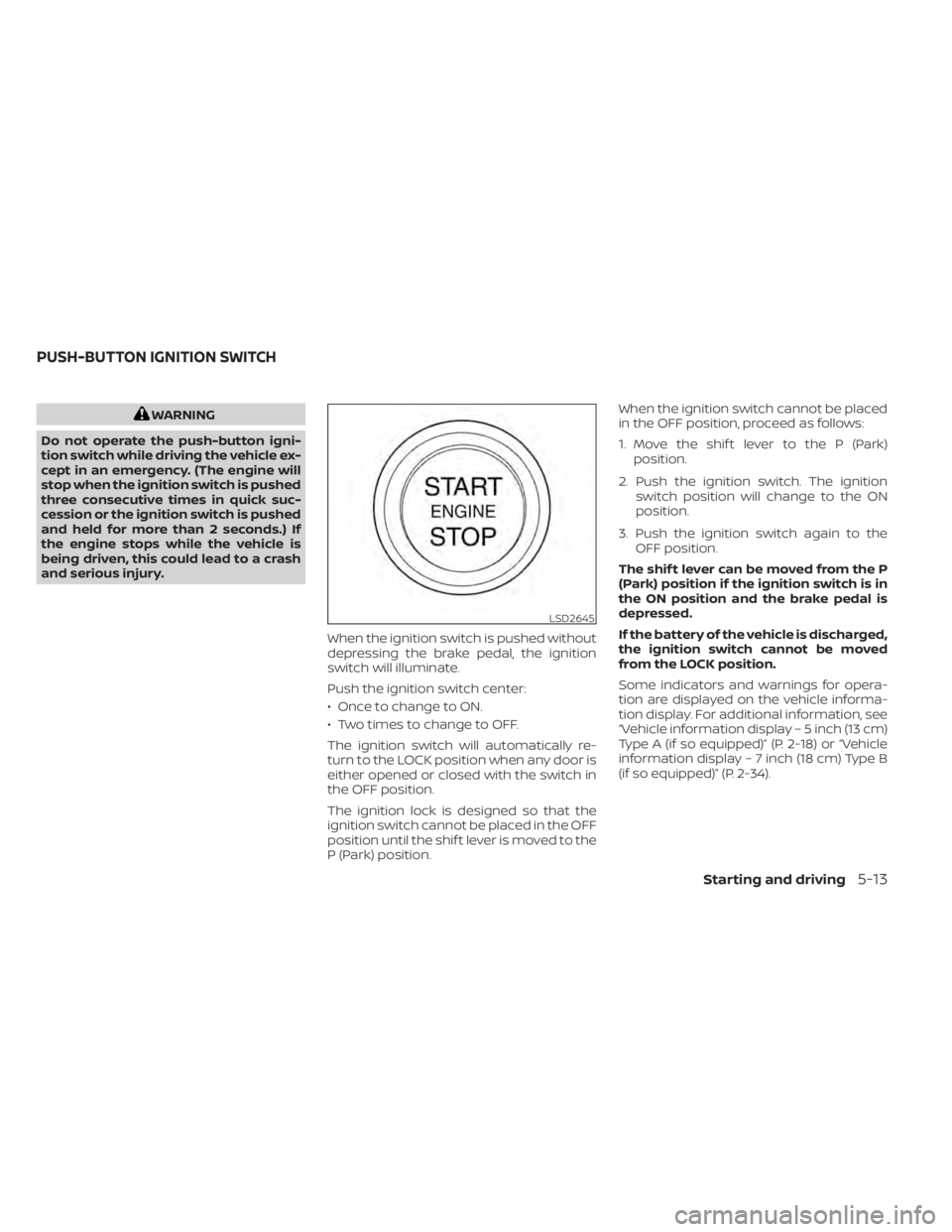
When the ignition switch is pushed without
depressing the brake pedal, the ignition
switch will illuminate.
Push the ignition switch center:
• Once to change to ON.
• Two times to change to OFF.
The ignition switch will automatically re-
turn to the LOCK position when any door is
either opened or closed with the switch in
the OFF position.
The ignition lock is designed so that the
ignition switch cannot be placed in the OFF
position until the shif t lever is moved to the
P (Park) position. When the ignition switch cannot be placed
in the OFF position, proceed as follows:
1. Move the shif t lever to the P (Park)
position.
2. Push the ignition switch. The ignition switch position will change to the ON
position.
3. Push the ignition switch again to the OFF position.
The shif t lever can be moved from the P
(Park) position if the ignition switch is in
the ON position and the brake pedal is
depressed.
If the battery of the vehicle is discharged,
the ignition switch cannot be moved
from the LOCK position.
Some indicators and warnings for opera-
tion are displayed on the vehicle informa-
tion display. For additional information, see
“Vehicle information display – 5 inch (13 cm)
Type A (if so equipped)” (P. 2-18) or “Vehicle
information display – 7 inch (18 cm) Type B
(if so equipped)” (P. 2-34).
LSD2645
PUSH-BUTTON IGNITION SWITCH
Starting and driving5-13
Page 315 of 644
2. A screen is displayed for a period of timethat indicates the status of the driving
aid functions (if so equipped).
– AEB with Pedestrian Detection, LDW, and BSW are enabled when the speci-
fied driving aid is shaded.
– I-LI is enabled when the driving aid is solid.
– Use the
O1orO2button to
navigate the settings screen. For ad-
ditional information, see “How to use
the vehicle information display ”
(P. 2-19) or (P. 2-35)
3. Keep the foot brake pedal depressed and move the shif t lever to a driving
position.
4. Release the foot brake, then gradually start the vehicle in motion.
5. Stop the vehicle completely before mov- ing the shif t lever to the P (Park) position.
WARNING
• Do not depress the accelerator pedal
while shif ting from P (Park) or N (Neu-
tral) to R (Reverse), D (Drive), L (Low) or
manual shif t mode (if so equipped).
Always depress the brake pedal until
shif ting is completed. Failure to do so
could cause you to lose control and
have an accident.
• Cold engine idle speed is high, so use
caution when shif ting into a forward
or reverse gear before the engine has
warmed up.
• Do not downshif t abruptly on slip-
pery roads. This may cause a loss of
control.
• Never shif t to either the P (Park) or R
(Reverse) position while the vehicle is
moving forward and P (Park) or D
(Drive) position while the vehicle is
reversing. This could cause an acci-
dent or damage the transmission.CAUTION
• Except in an emergency, do not shif t
to the N (Neutral) position while driv-
ing. Coasting with the transmission
in the N (Neutral) position may cause
serious damage to the transmission.
• To avoid possible damage to your ve-
hicle, when stopping the vehicle on
an uphill grade, do not hold the ve-
hicle by depressing the accelerator
pedal. The foot brake should be used
for this purpose.
Starting and driving5-19
Page 317 of 644
L(Low)
Use this position for engine braking on
steep downhill gradients/climbing steep
slopes and whenever approaching sharp
bends. Do not use the L (Low) position in
any other circumstances.
Manual shif t mode (if so
equipped)
When the shif t lever is in the D (Drive) posi-
tion and the drive sport mode switch is
pushed, the transmission is ready for the
manual shif t mode. Shif t ranges can be
selected manually by pulling the right-side
or lef t-side paddle shif ter.
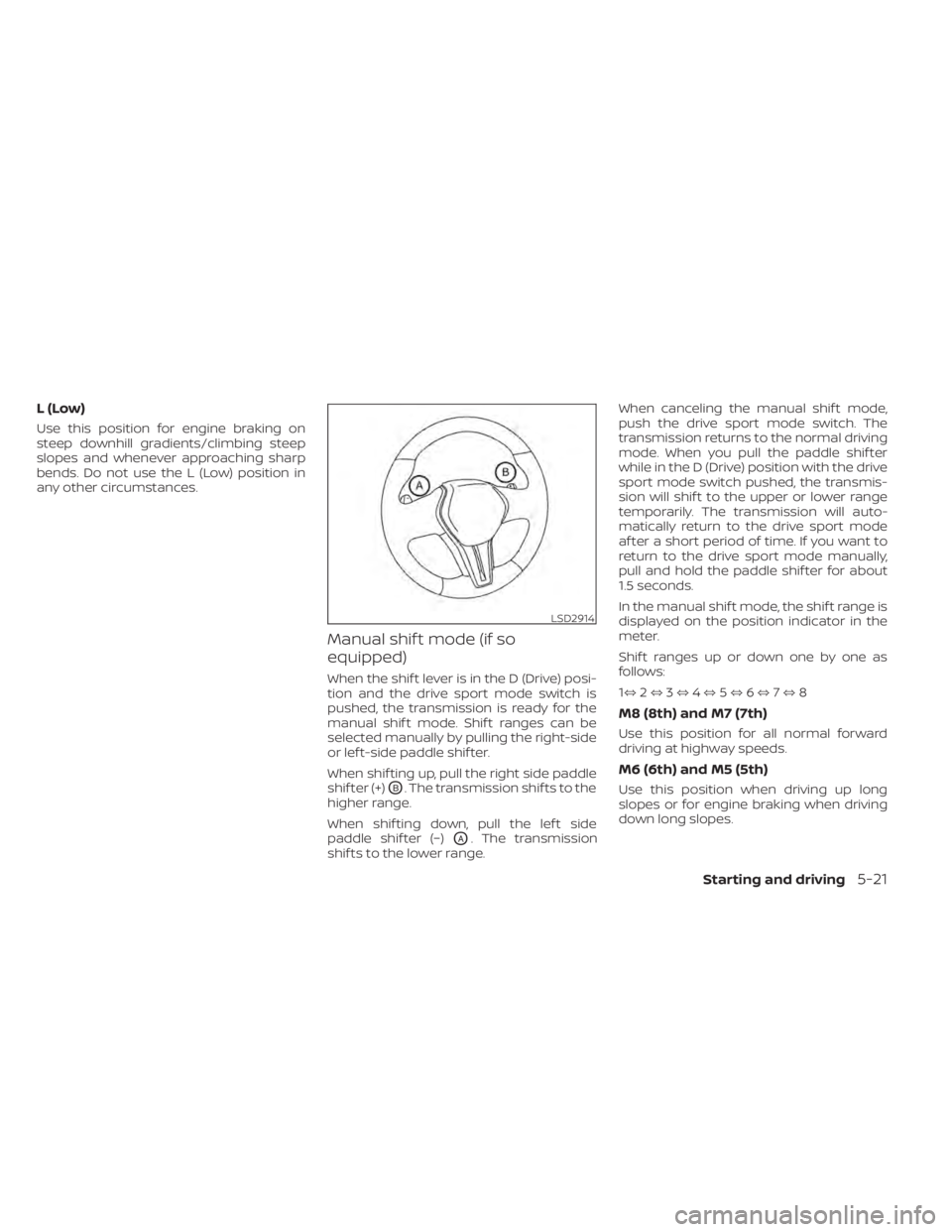
When shif ting up, pull the right side paddle
shif ter (+)
OB. The transmission shif ts to the
higher range.
When shif ting down, pull the lef t side
paddle shif ter (−)
OA. The transmission
shif ts to the lower range. When canceling the manual shif t mode,
push the drive sport mode switch. The
transmission returns to the normal driving
mode. When you pull the paddle shif ter
while in the D (Drive) position with the drive
sport mode switch pushed, the transmis-
sion will shif t to the upper or lower range
temporarily. The transmission will auto-
matically return to the drive sport mode
af ter a short period of time. If you want to
return to the drive sport mode manually,
pull and hold the paddle shif ter for about
1.5 seconds.
In the manual shif t mode, the shif t range is
displayed on the position indicator in the
meter.
Shif t ranges up or down one by one as
follows:
1⇔
2⇔ 3⇔ 4⇔ 5⇔ 6⇔ 7⇔ 8
M8 (8th) and M7 (7th)
Use this position for all normal forward
driving at highway speeds.
M6 (6th) and M5 (5th)
Use this position when driving up long
slopes or for engine braking when driving
down long slopes.
LSD2914
Starting and driving5-21
Page 323 of 644
• While the electronic parking brake isapplied or released, an operating
sound is heard from the lower side of
the rear seat. This is normal and does
not indicate a malfunction.
• When the electronic parking brake is frequently applied and released in a
short period of time, the parking brake
may not operate in order to prevent the
parking brake system from overheat-
ing. If this occurs, operate the elec-
tronic parking brake switch again af ter
waiting approximately 1 minute.
• If the electronic parking brake must be applied while driving in an emergency,
pull up and hold the parking brake
switch. When you release the parking
brake switch, the parking brake will be
released.
• While pulling up the electronic parking brake switch during driving, the park-
ing brake is applied and a chime
sounds. The electronic parking brake
indicator light in the meter and in the
parking brake switch illuminates. This
does not indicate a malfunction. The
electronic parking brake indicator light
in the meter and in the parking brake
switch turns off when the parking
brake is released. • When pulling the electronic parking
brake switch up with the ignition
switch in the OFF or AUTO ACC position,
the parking brake switch indicator
light will continue to illuminate for a
short period of time. The automatic brake hold function main-
tains the braking force without the driver
having to depress the brake pedal when
the vehicle is stopped at a traffic light or
intersection. As soon as the driver de-
presses the accelerator pedal again, the
automatic brake hold function is deacti-
vated and the braking force is released. The
operating status of the automatic brake
hold can be displayed on the vehicle infor-
mation display.
WARNING
• The automatic brake hold function is
not designed to hold the vehicle on a
steep hill or slippery road. Never use
the automatic brake hold when the
vehicle is stopped on a steep hill or
slippery road. Failure to do so may
cause the vehicle to move.
• When the automatic brake hold func-
tion is activated but fails to maintain
the vehicle at a standstill, depress the
brake pedal to stop the vehicle. If the
vehicle unexpectedly moves due to
outside conditions, the chime may
sound and automatic brake hold
warning may illuminate in the vehicle
information display.
AUTOMATIC BRAKE HOLD (if so
equipped)
Starting and driving5-27
Page 324 of 644
•Be sure to deactivate the automatic
brake hold function when using a car
wash or towing your vehicle.
• Make sure to place the shif t lever in
the P (Park) position and apply the
parking brake when parking your ve-
hicle, entering or exiting the vehicle,
or loading luggage. Failure to do so
could cause the vehicle to move or
roll away unexpectedly and result in
serious personal injury or property
damage.
• If any of the following conditions oc-
cur, the automatic brake hold func-
tion may not function. Have the sys-
tem checked promptly. It is
recommended that you visit a
NISSAN dealer for this service. Failure
to operate the vehicle in accordance
with these conditions could cause
the vehicle to move or roll away un-
expectedly and result in serious per-
sonal injury or property damage.
– A warning message appears in the
vehicle information display.
– The indicator light on the auto-
matic brake hold switch does not
illuminate when the switch is
pushed. •
The automatic brake hold function
will not be activated if the slip indica-
tor light, electronic parking brake
warning light or master warning light
illuminate and the chassis control
system fault message appears in the
vehicle information display.
• To maintain the braking force to keep
the vehicle to a standstill, a noise
may be heard. This is not a
malfunction.
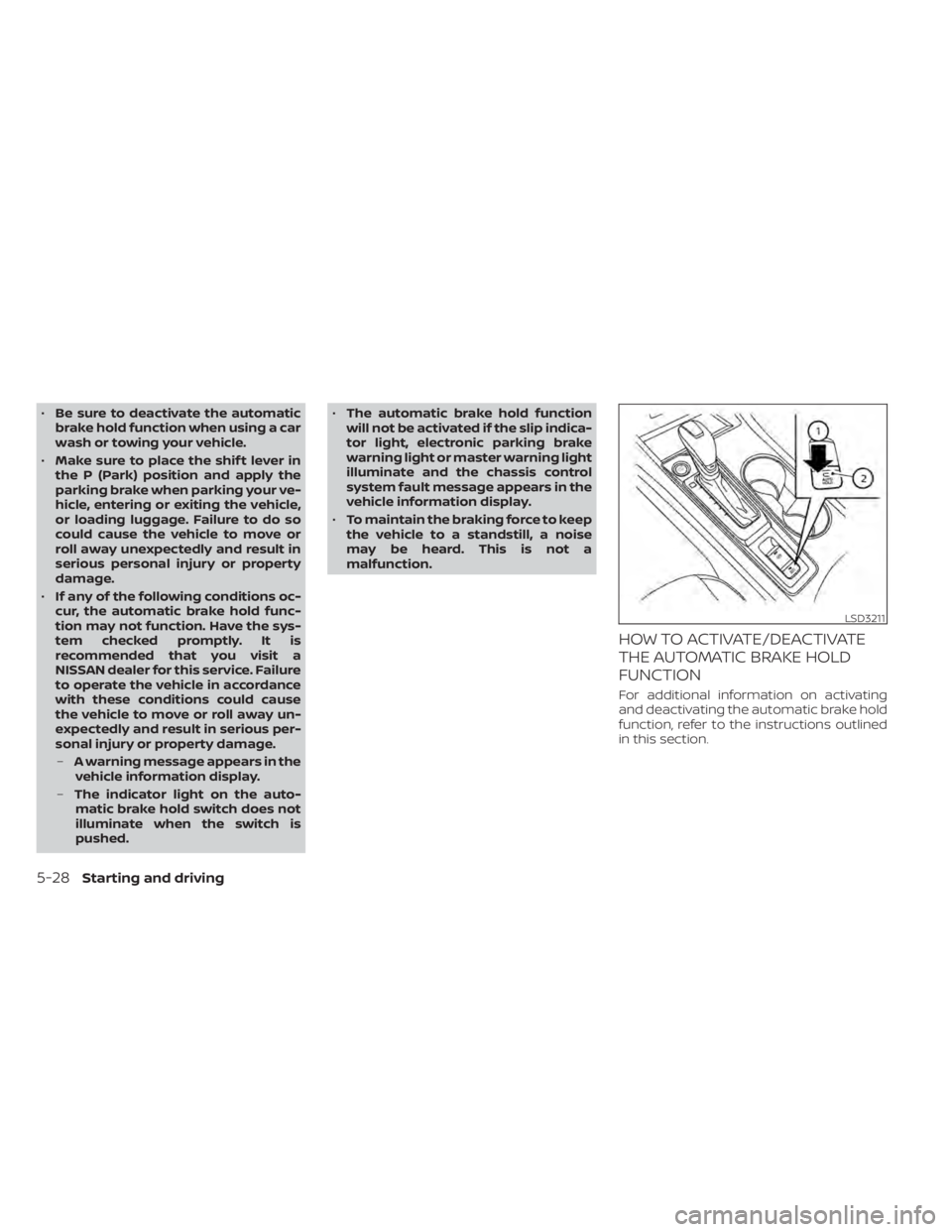
HOW TO ACTIVATE/DEACTIVATE
THE AUTOMATIC BRAKE HOLD
FUNCTION
For additional information on activating
and deactivating the automatic brake hold
function, refer to the instructions outlined
in this section.
LSD3211
5-28Starting and driving
Page 326 of 644
Parking
When the shif t lever is in the P (Park) posi-
tion with the brake force maintained by the
automatic brake hold function, the parking
brake will automatically be applied and the
brake force of the automatic brake hold will
be released. The automatic brake hold in-
dicator light turns off. When the parking
brake is applied with the brake force main-
tained by the automatic brake hold func-
tion, the brake force of the automatic brake
hold will be released. The automatic brake
hold indicator light turns off.
NOTE:
• Under the following conditions, theparking brake will automatically be ap-
plied and the brake force of the auto-
matic brake hold will be released:– The braking force is applied by the automatic brake hold function for 3
minutes or longer.
– The driver's seat belt is unfastened.
– The ignition switch is placed in the OFF position.
– If a malfunction occurs in the auto- matic brake hold function. • When the vehicle stops, but the brake
force is not automatically applied, de-
press the brake pedal firmly until the
automatic brake hold indicator light
(green) illuminates.
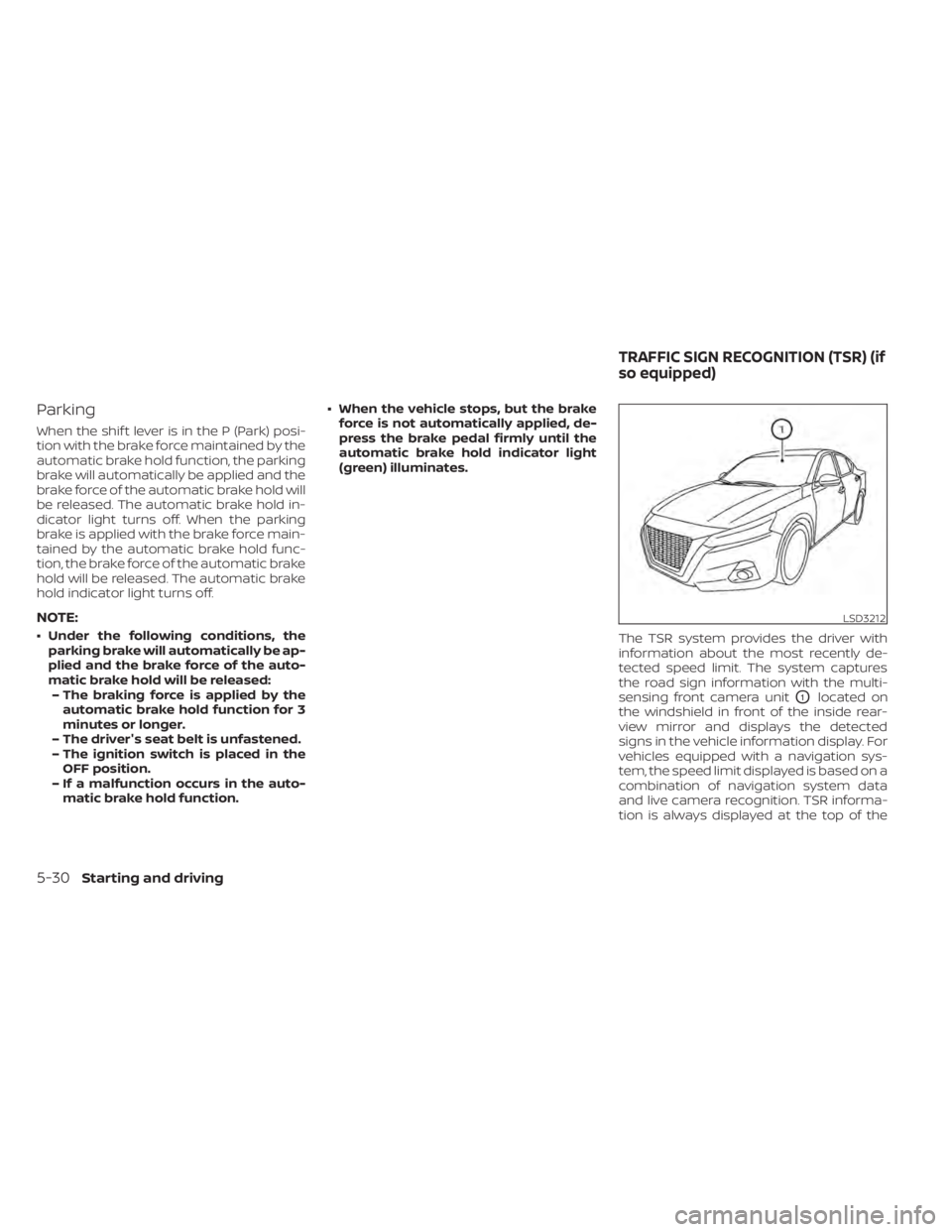
The TSR system provides the driver with
information about the most recently de-
tected speed limit. The system captures
the road sign information with the multi-
sensing front camera unit
O1located on
the windshield in front of the inside rear-
view mirror and displays the detected
signs in the vehicle information display. For
vehicles equipped with a navigation sys-
tem, the speed limit displayed is based on a
combination of navigation system data
and live camera recognition. TSR informa-
tion is always displayed at the top of the
LSD3212
TRAFFIC SIGN RECOGNITION (TSR) (if
so equipped)
5-30Starting and driving
Page 327 of 644
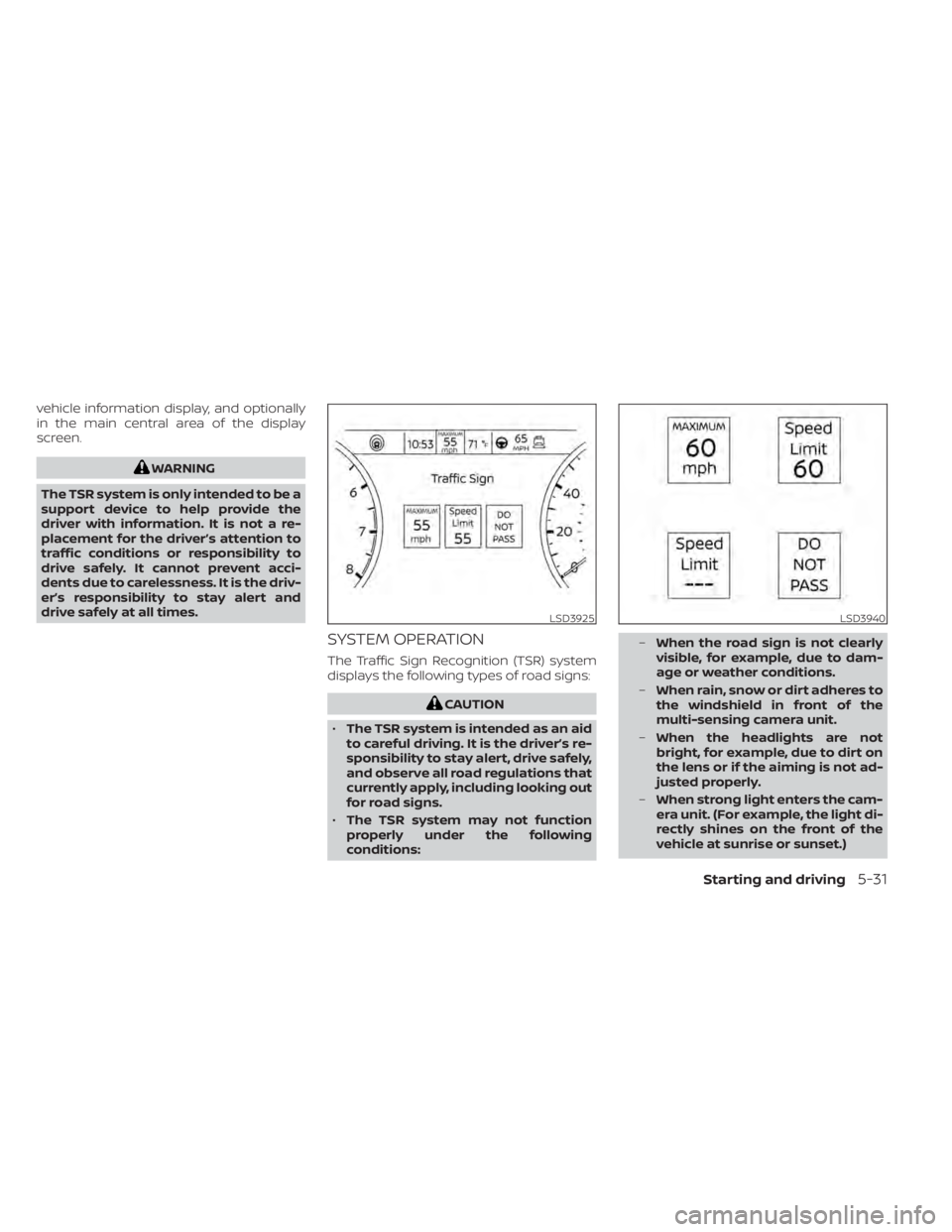
vehicle information display, and optionally
in the main central area of the display
screen.
WARNING
The TSR system is only intended to be a
support device to help provide the
driver with information. It is not a re-
placement for the driver’s attention to
traffic conditions or responsibility to
drive safely. It cannot prevent acci-
dents due to carelessness. It is the driv-
er’s responsibility to stay alert and
drive safely at all times.
SYSTEM OPERATION
The Traffic Sign Recognition (TSR) system
displays the following types of road signs:
CAUTION
• The TSR system is intended as an aid
to careful driving. It is the driver’s re-
sponsibility to stay alert, drive safely,
and observe all road regulations that
currently apply, including looking out
for road signs.
• The TSR system may not function
properly under the following
conditions: –
When the road sign is not clearly
visible, for example, due to dam-
age or weather conditions.
– When rain, snow or dirt adheres to
the windshield in front of the
multi-sensing camera unit.
– When the headlights are not
bright, for example, due to dirt on
the lens or if the aiming is not ad-
justed properly.
– When strong light enters the cam-
era unit. (For example, the light di-
rectly shines on the front of the
vehicle at sunrise or sunset.)
LSD3925LSD3940
Starting and driving5-31
Page 328 of 644
–When a sudden change in bright-
ness occurs. (For example, when
the vehicle enters or exits a tunnel
or under a bridge.)
– If there are deviations in relation
to the navigation, for example due
to changes in the road routing.
– When overtaking buses or trucks
with speed stickers.
TURNING THE TRAFFIC SIGN
RECOGNITION (TSR) SYSTEM ON
AND OFF
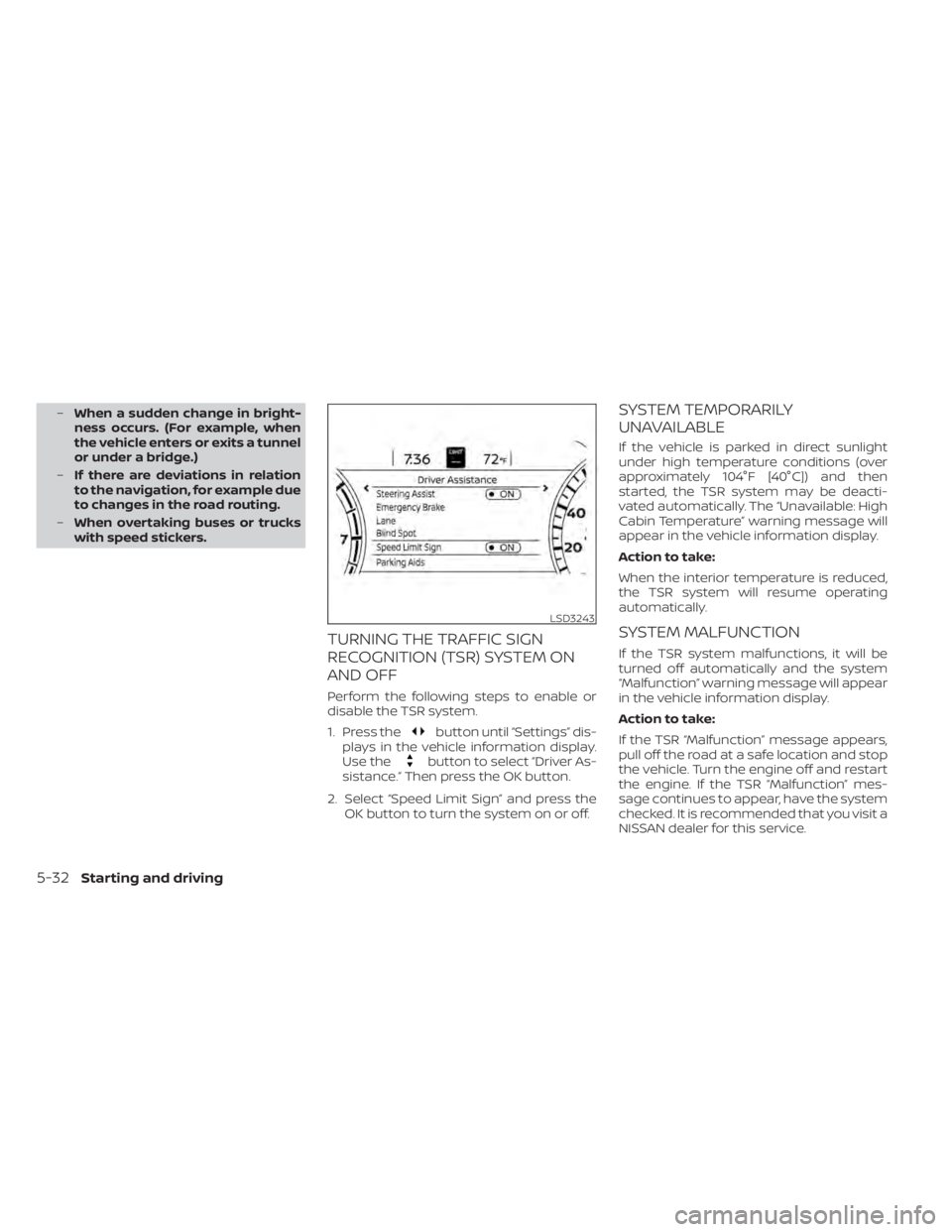
Perform the following steps to enable or
disable the TSR system.
1. Press the
button until “Settings” dis-
plays in the vehicle information display.
Use the
button to select “Driver As-
sistance.” Then press the OK button.
2. Select “Speed Limit Sign” and press the OK button to turn the system on or off.
SYSTEM TEMPORARILY
UNAVAILABLE
If the vehicle is parked in direct sunlight
under high temperature conditions (over
approximately 104°F [40°C]) and then
started, the TSR system may be deacti-
vated automatically. The “Unavailable: High
Cabin Temperature” warning message will
appear in the vehicle information display.
Action to take:
When the interior temperature is reduced,
the TSR system will resume operating
automatically.
SYSTEM MALFUNCTION
If the TSR system malfunctions, it will be
turned off automatically and the system
“Malfunction” warning message will appear
in the vehicle information display.
Action to take:
If the TSR “Malfunction” message appears,
pull off the road at a safe location and stop
the vehicle. Turn the engine off and restart
the engine. If the TSR “Malfunction” mes-
sage continues to appear, have the system
checked. It is recommended that you visit a
NISSAN dealer for this service.
LSD3243
5-32Starting and driving