2023 MAZDA CX9 Beep
[x] Cancel search: BeepPage 460 of 739

Front corner ultrasonic sensor, Rear corner ultrasonic sensor
Distance Detection area Distance between vehicle and obstruction
Beeper sound*1Front corner ultrasonic sensor/Rear corner ultra‐sonic sensor
Far distance Approx. 55―38 cm (21.6―14.9 in)
Medium intermittent sound
Middle distance Approx. 38―25 cm (14.9―9.8 in)
Fast intermittent sound
Close distance Within approx. 25 cm (9.8 in)
Continuous sound
*1 The rate at which the intermitte
nt sound beeps increases as the vehicle approaches the obstruction.
NOTE
If an obstruction is detected in a zone for 6 seconds or more, the beep sound is stopped
(except for the close-distance zone). If the same obstruction is detected in another zone,
the corresponding beep sound is heard.
When Driving
Parking Sensor System (M azda Connect (Type B))
4-295
CX-9_8LJ2-EA-22H_Edition1_old 2022-6-9 13:33:08
Page 461 of 739

▼When Warning Indicator/Beep is Activated
The system notifies the driver
of an abnormality by activating the beep sound and the
indicator light.
Indicator/Beep How to check
The indicator light flashes when
the parking sensor switch is
pressed at a vehicle speed of 10
km/h (6 mph) or less. The system may have a malfunctio
n. Have the vehicle inspected at an Author‐
ized Mazda Dealer as soon as possible.
The beep sound is not heard. The system may have a malfunctio
n. Have the vehicle inspected at an Author‐
ized Mazda Dealer as soon as possible.
The intermittent sound of the
buzzer is heard 5 times. Remove any foreign material from the sensor area. If the system
does not re‐
cover, have the vehicle inspect ed at an Authorized Mazda Dealer .
A certain obstruction detection
indicator is continuously dis‐
played. Refer to Obstruction Detection Indication on page 4-282.
When Driving
Parking Sensor System (M
azda Connect (Type B))
4-296
CX-9_8LJ2-EA-22H_Edition1_old 2022-6-9 13:33:08
Page 485 of 739

Returning to previous operation
To return to the previous operation, say, “Go Back” while in voice recognition mode.
Cancel
To put the Bluetooth
® Hands-Free system in standby mode, say, “Cancel” while in voic e
recognition mode.
To prevent a deterioration in the voice recognition rate and vo ice quality, the following
points should be observed:
The voice recognition cannot be performed while voice guidance or the beep sound is
operating. Wait until the voice g uidance or the beep sound is finished before saying a
command.
Phone related commands are available only when a phone is conne cted via Bluetooth®.
Make sure a phone is connected via Bluetooth
® before you operate phone related voice
commands.
Music play commands, such as Play Artist and Play Album can be used only in USB
audio mode.
Do not speak too slowly or loudly (no loud voice).
Speak clearly, without pausing between words or numbers.
Dialects or different wording ot her than hands-free prompts can not be recognized by
voice recognition. Speak in the wording specified by the voice commands.
It is not necessary to face the microphone or be close to it. Speak the voice commands
while maintaining a safe driving position.
Close the windows and/or the mo onroof to reduce loud noises from outside the vehicle, or
turn down the airflow of the cli mate control system while Bluet ooth
® Hands-Free is being
used.
Make sure the vents are not directing air up towards the microp hone.
Interior Features
Mazda Connect [Mazda Connect (Type A)]
5-24
CX-9_8LJ2-EA-22H_Edition1_old 2022-6-9 13:33:08
Page 502 of 739

▼Audio Remote Control Switch Operation
The audio remote control switch is on the left side of the stee
ring wheel. You can operate
basic audio functions, pick up/hang up the phone, or activate v oice control using the switch.
The shape of the switches may differ depending on the vehicle specifications.
No. Item Explanation
1
Volume adjustment button:
Press the (+) or ( -) button to adjust the volume.
If you adjust the volume during voice guidance, the volume of t he voice guid‐
ance will change.
If you adjust the volume during a hands-free call, the conversa tion volume
will change.
2
(SEEK UP) Seek Switch:Selecting a radio station
Radio stations saved to your Fav
orites can be selected by pressing the seek
switch while listening to FM/AM radio. The station will change to the previ‐
ous or next favorite station each t ime you press the seek switch. If you want
to manually tune to the next available station before or after the currently se‐
lected station, press and hold the seek switch until it beeps a nd the tuner will
select the next available station.
Playback Control
Music and video files can be cued when listening to stored cont ent via USB,
Bluetooth
®, and SiriusXM®, audio, or video.
Slide the volume knob right to s kip to the next track or slide it to the left to go
back to the previous track. You can also slide and hold the vol ume knob to
fast forward or rewind the track.
(SEEK DOWN)
Interior Features
Mazda Connect [Mazda Connect (Type B)]
5-41
CX-9_8LJ2-EA-22H_Edition1_old 2022-6-9 13:33:08
Page 505 of 739

NOTE
The voice command examples shown in this manual are only a partial list of the available
commands. Some commands may be unusable depending on the vehicle specifications.
Some commands cannot be used depending on the device connection conditions and the
use conditions.
When the Barge-In setting is on, voice commands can be made even while the voice
guidance is being announced. For details on Barge-In, refer to the System Settings section
in the Mazda Connec t Owner's Manual.
For details on voice commands which can be used on the navigation screen, refer to the
navigation system manual.
To prevent misunderstood voice commands, be aware of the follow ing points:
Connect your mobile phone to Bluetooth® before operating the mobile phone using voice
recognition.
After pressing the talk/pick-up button, wait for the beep befor e speaking a command.
Speaking in a slightly louder voice will improve voice recognition, but an excessively
loud voice is unnecessary. Try to speak in a slightly louder voice than when talking to
other passengers in the vehicle.
You do not need to speak slowly. Speak at a normal speed.
When calling a person in the device's phonebook, the recognitio n rate increases the longer
the name is. Errors may occur wi th names that are short such as “Mama”, “Home”, or
“wife”.
Speak clearly, without pausing between words or numbers.
Voice commands other than those specified, cannot be recognized . Speak in the wording
specified by the voice commands.
It is not necessary to face the microphone or be near it. Speak the voice commands while
maintaining a safe driving position.
Close the windows and the moonroof* to reduce loud noises from outside the vehicle and
to prevent the airflow of the air-conditioning system from bein g a disturbance when using
Bluetooth
® Hands-Free.
Make sure that the air flow from the air conditioner is not blowing on the microphone.
If the voice recognition is poor with the guidance volume set to high, set the Barge-In to
OFF.
Interior Features
Mazda Connect [Mazda Connect (Type B)]
5-44*Some models.
CX-9_8LJ2-EA-22H_Edition1_old 2022-6-9 13:33:08
Page 636 of 739
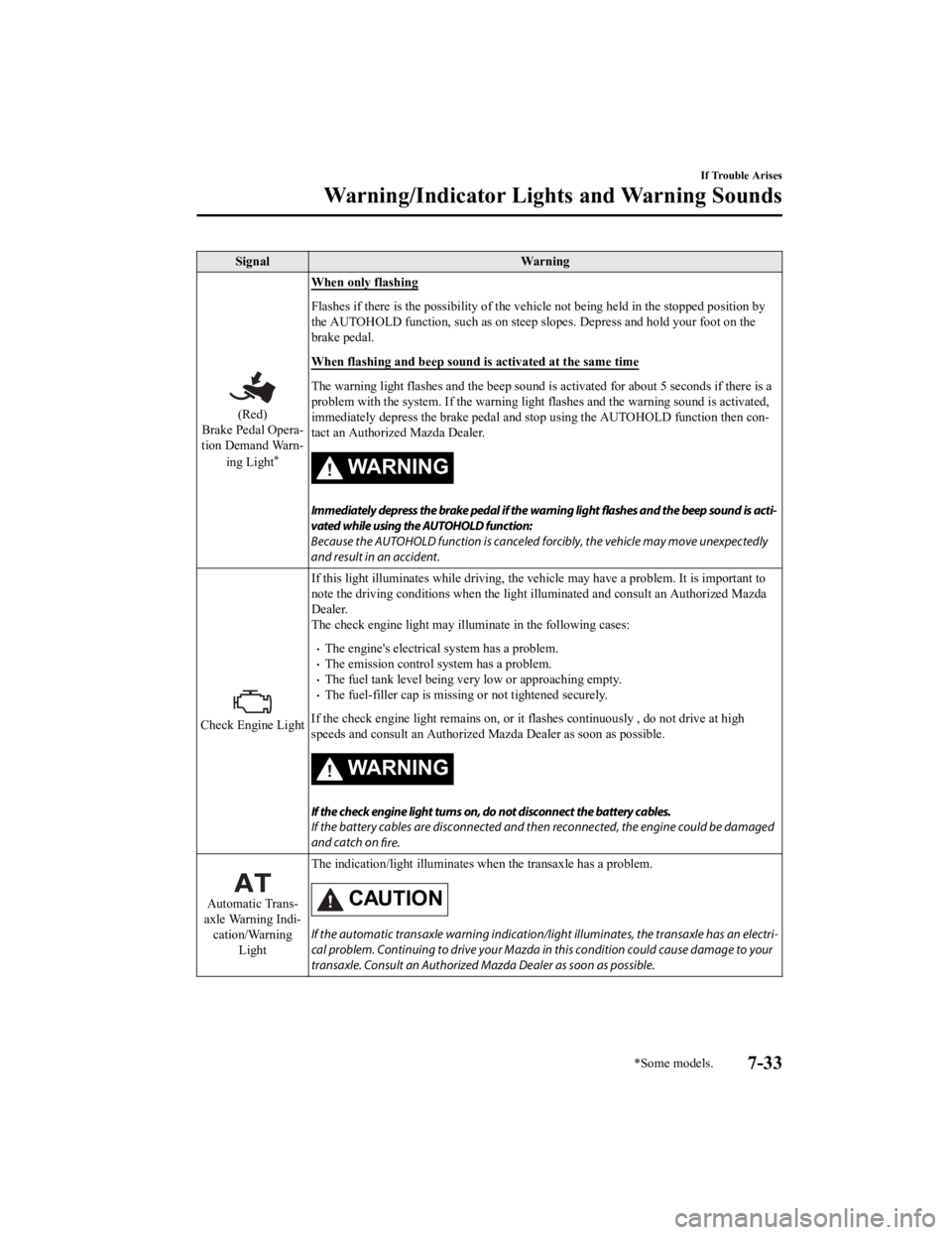
SignalWarning
(Red)
Brake Pedal Opera‐
tion Demand Warn‐
ing Light
*
When only flashing
Flashes if there is the possibility of the vehicle not being he ld in the stopped position by
the AUTOHOLD function, such as o n steep slopes. Depress and hold your foot on the
brake pedal.
When flashing and beep sound is activated at the same time
The warning light flashes and t he beep sound is activated for a bout 5 seconds if there is a
problem with the system. If the warning light flashes and the w arning sound is activated,
immediately depress the brake pe dal and stop using the AUTOHOLD function then con‐
tact an Authorized Mazda Dealer.
WA R N I N G
Immediately depress the brake pedal if the warning light flashes and the beep sound is acti‐
vated while using the AUTOHOLD function:
Because the AUTOHOLD function is canceled forcibly, the vehicle may move unexpectedly
and result in an accident.
Check Engine Light If this light illuminates while dr
iving, the vehicle may have a problem. It is important to
note the driving conditions when the light illuminated and cons ult an Authorized Mazda
Dealer.
The check engine light may illumi nate in the following cases:
The engine's electrical system has a problem.The emission control system has a problem.The fuel tank level being very low or approaching empty.The fuel-filler cap is missing or not tightened securely.
If the check engine light remains on, or it flashes continuously , do not drive at high
speeds and consult an Authorized Mazda Dealer as soon as possible.
WA R N I N G
If the check engine light turns on, do not disconnect the battery cables.
If the battery cables are disconnected and then reconnected, the engine could be damaged
and catch on fire.
Automatic Trans‐
axle Warning Indi‐ cation/Warning Light The indication/light illuminates
when the transaxle has a problem.CAUTION
If the automatic transaxle warning indication/ light illuminates, the transaxle has an electri‐
cal problem. Continuing to drive your Mazda in this condition could cause damage to your
transaxle. Consult an Authorized Mazda Dealer as soon as possible.
If Trouble Arises
Warning/Indicator Lights and Warning Sounds
*Some models.7-33
CX-9_8LJ2-EA-22H_Edition1_old 2022-6-9 13:33:08
Page 638 of 739

SignalWarning
(Flashing)
Tire Pressure Moni‐ toring System
Warning Light If the tire pressure monitoring
system has a malfunction, the t ire pressure warning light
flashes. Have your vehicle checked by an Authorized Mazda Deale r as soon as possible.
WA R N I N G
If the tire pressure monitoring system warning light illuminates or flashes, or the tire pres‐
sure warning beep sound is heard, decrease vehicle speed immediately and avoid sudden
maneuvering and braking:
If the tire pressure monitoring system warning light illuminates or flashes, or the tire pres‐
sure warning beep sound is heard, it is dangerous to drive the vehicle at high speeds, or
perform sudden maneuvering or braking. Vehicle drivability could worsen and result in an
accident.
To determine if you have a slow leak or a
flat, pull over to a safe position where you can
check the visual condition of the tire and determine if you have enough air to proceed to a
place where air may be added and the system monitored again by an Authorized Mazda
Dealer or a tire repair station.
Do not ignore the TPMS Warning Light:
Ignoring the TPMS warning light is dangerous, even if you know why it is illuminated. Have
the problem taken care of as soon as possible before it develops into a more serious situa‐
tion that could lead to tire failure and a dangerous accident.
(Amber)
KEY Warning Indi‐
cation
*
“Keyless System Malfunction” is displayed
This message is displayed if the advanced keyless entry & push button start system has a
problem.
Contact an Authorized Mazda Dealer.
CAUTION
If the message is indicated, or the pu sh button start indicator light (amber)
flashes, the en‐
gine may not start. If the engine cannot be st arted, try starting it using the emergency oper‐
ation for starting the engine, and have the vehicle inspected at an Authorized Mazda Deal‐
er as soon as possible.
Refer to Emergency Operation for Starting the Engine on page 4-9.
“Ignition is On” is displayed
This message is displayed when the driver's door is opened with out switching the ignition
off.
“Key Not Detected” is displayed
This message is displayed when any of the following operations is performed with the key
out of the operational range or placed in areas inside the cabi n where it is difficult for the
key to be detected.
The push button start is pressed with the ignition switched offThe ignition is switched onAll doors are closed withou t switching the ignition off
If Trouble Arises
Warning/Indicator Lights and Warning Sounds
*Some models.7-35
CX-9_8LJ2-EA-22H_Edition1_old 2022-6-9 13:33:08
Page 643 of 739

SignalWarning Action to be taken
Door-Ajar/Lift‐
gate-Ajar Warning In‐
dication/Warning Light The light turns on if any door/liftgate is not
closed securely.
Close the door/liftgate securely.
Tire Pressure Monitoring Sys
tem Warning Light (Turns on)
*
Take the appropriate action and verify that the warning light t urns off.
Wa r n i n g
When the warning light illuminate s, and the warning beep sound is heard when tire pressure is too low in one or
more tires.
WARNING
If the tire pressure monitoring system warning light illuminates or flashes, or the tire pressure warning beep sound
is heard, decrease vehicle speed immediately and avoid sudden maneuvering and braking:
If the tire pressure monitoring system warning light illumin ates or flashes, or the tire pressure warning beep sound
is heard, it is dangerous to drive the vehicle at high speeds, or perform sudden maneuvering or braking. Vehicle
drivability could worsen and result in an accident.
To determine if you have a slow leak or a flat, pull over to a safe position where you can check the visual condition
of the tire and determine if you have enough air to proceed to a place where air may be added and the system
monitored again by an Authorized Mazda Dealer or a tire repair station.
Do not ignore the TPMS Warning Light:
Ignoring the TPMS warning light is da ngerous, even if you know why it is illuminated. Have the problem taken
care of as soon as possible before it develops into a more serious situation that could lead to tire failure and a
dangerous accident.
If Trouble Arises
Warning/Indicator Lights and Warning Sounds
7-40*Some models.
CX-9_8LJ2-EA-22H_Edition1_old 2022-6-9 13:33:08