2023 LINCOLN CORSAIR tow
[x] Cancel search: towPage 244 of 690
WARNING: This equipment hasarcing or sparking parts. Do not expose toflammable vapors. Position this equipmentat least 18 in (450 mm) above the floor.
WARNING: Do not connect ordisconnect any pluggable components ofthe charging equipment when in use orcharging. Failure to follow this instruct cancause damage to the charging equipment.
WARNING: Do not use the chargingequipment in temperatures outside of theoperation range of -22°F (-30°C) to 122°F(50°C).
WARNING: Store the chargingequipment in a clean dry place betweenthe temperatures of -22°F (-30°C) to 185°F(85°C).
WARNING: Do not plug the chargingequipment into an electrical outlet that issubmerged in water or covered in snow.
WARNING: Do not use chargingequipment in severe rain, snow orelectrical storm.
WARNING: Do not allow chargingequipment to be immersed in water orliquids. Failure to follow this warning couldresult in fire, electric shock, or seriouspersonal injury or death.
WARNING: When using the chargingequipment avoid moisture, water, snowand foreign objects at all times.
WARNING: Do not replace the plugon the connector. There are critical safetydevices in the plug, and the chargingequipment will not operate, if the plug isreplaced. Failure to follow this instructioncould result in electric shock, personalinjury, death, or fire.
WARNING: Charging equipmentcontains no user modifiable or repairableparts. If the charging equipment plug doesnot properly fit into the wall outlet, have aqualified electrician install the correct walloutlet. Failure to follow this instructioncould result in personal injury or death.
WARNING: High voltage is presentin your electric meter housing and powerdistribution service panel. Contact withhigh voltage can cause death or seriouspersonal injury.
WARNING: Visually inspect thecharging equipment before each use. Donot use the charging equipment if it isdamaged.
WARNING: Keep charging equipmentinside when not in use. Stow the controlbox on the hanger or all the chargingequipment in the bag after use to preventdamage to the charging equipment andpersonal injury.
240
2023 Corsair (CTF) Canada/United States of America, enUSA, Edition date: 202208, DOMCharging Your Vehicle - Plug-In Hybrid Electric Vehicle (PHEV)
Page 264 of 690
Note:Drive modes could affect when thevehicle shifts into the requested gear.
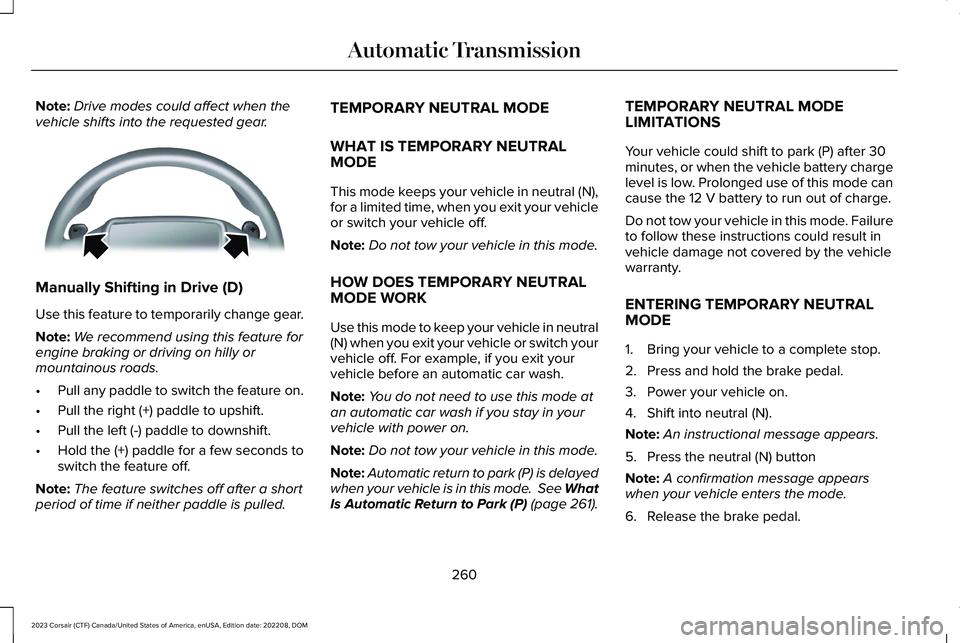
Manually Shifting in Drive (D)
Use this feature to temporarily change gear.
Note:We recommend using this feature forengine braking or driving on hilly ormountainous roads.
•Pull any paddle to switch the feature on.
•Pull the right (+) paddle to upshift.
•Pull the left (-) paddle to downshift.
•Hold the (+) paddle for a few seconds toswitch the feature off.
Note:The feature switches off after a shortperiod of time if neither paddle is pulled.
TEMPORARY NEUTRAL MODE
WHAT IS TEMPORARY NEUTRALMODE
This mode keeps your vehicle in neutral (N),for a limited time, when you exit your vehicleor switch your vehicle off.
Note:Do not tow your vehicle in this mode.
HOW DOES TEMPORARY NEUTRALMODE WORK
Use this mode to keep your vehicle in neutral(N) when you exit your vehicle or switch yourvehicle off. For example, if you exit yourvehicle before an automatic car wash.
Note:You do not need to use this mode atan automatic car wash if you stay in yourvehicle with power on.
Note:Do not tow your vehicle in this mode.
Note:Automatic return to park (P) is delayedwhen your vehicle is in this mode. See WhatIs Automatic Return to Park (P) (page 261).
TEMPORARY NEUTRAL MODELIMITATIONS
Your vehicle could shift to park (P) after 30minutes, or when the vehicle battery chargelevel is low. Prolonged use of this mode cancause the 12 V battery to run out of charge.
Do not tow your vehicle in this mode. Failureto follow these instructions could result invehicle damage not covered by the vehiclewarranty.
ENTERING TEMPORARY NEUTRALMODE
1.Bring your vehicle to a complete stop.
2.Press and hold the brake pedal.
3.Power your vehicle on.
4.Shift into neutral (N).
Note:An instructional message appears.
5.Press the neutral (N) button
Note:A confirmation message appearswhen your vehicle enters the mode.
6.Release the brake pedal.
260
2023 Corsair (CTF) Canada/United States of America, enUSA, Edition date: 202208, DOMAutomatic TransmissionE144821
Page 265 of 690

Note:Your vehicle is free to roll.
7.Switch your vehicle off.
Note:Do not tow your vehicle in this mode.
Note:The neutral (N) indicator on thetransmission selector may flash in this mode.
EXITING TEMPORARY NEUTRALMODE
1.Press the brake pedal.
2.Shift into park (P), or power your vehicleon and shift into drive (D) or reverse (R).
AUTOMATIC RETURN TO PARK (P)
WHAT IS AUTOMATIC RETURN TOPARK (P)
Your vehicle shifts into park (P) if you attemptto exit your vehicle without the vehicle inpark (P).
HOW DOES AUTOMATIC RETURN TOPARK (P) WORK
Your vehicle shifts into park (P) when yourvehicle is stationary and any of the followingoccur:
•You switch the vehicle off.
•You open the driver door with yourseatbelt unlatched.
•You unlatch the driver seatbelt when thedriver door is open.
Note:Do not use automatic return to park(P) when your vehicle is moving, except inan emergency. See Stopping the EngineWhen Your Vehicle is Moving (page 208).
AUTOMATIC RETURN TO PARK (P)LIMITATIONS
Automatic return to park (P) may not work ifthe door ajar sensor or seatbelt sensor aremalfunctioning.
See an authorized dealer if any of thefollowing occur:
•Seatbelt indicator illuminates or tonesounds with the seatbelt fastened.
•Door ajar indicator does not illuminatewith the driver door open.
•Door ajar indicator illuminates with thedriver door closed.
•Transmission not in park messageappears with the driver door closed, afteryou shift out of park (P).
GRADE ASSIST - PLUG-IN HYBRID
ELECTRIC VEHICLE (PHEV)
WHAT IS GRADE ASSIST
Provides additional grade braking with acombination of engine motoring andhigh-voltage battery charging to helpmaintain vehicle speed when descending agrade.
261
2023 Corsair (CTF) Canada/United States of America, enUSA, Edition date: 202208, DOMAutomatic Transmission
Page 267 of 690
2.Remove the access cover located to thebottom left hand side of the steeringcolumn on the lower instrument panelusing a plastic wedge or pry tool.
Note:Do not pull the tether.
3.Sit in the driver seat.
4.Power your vehicle on without your footon the brake pedal.
Note: Do not attempt this procedure whenthe engine is running. Failure to follow thisinstruction could result in vehicle damagenot covered by the vehicle warranty.
5.Press and hold the brake pedal.
6.Pull the tether towards you until the leverengages.
Note:Do not use excessive force. Failure tofollow this instruction could result in vehicledamage not covered by the vehiclewarranty.
Note:A message appears when your vehicleis out of park (P). If you do not receive amessage attempt the procedure again.
Note: A warning lamp could illuminate.
7.Release the parking brake. See WhatIs the Electric Parking Brake (page 272).
8.Switch your vehicle off.
9.Release the brake pedal.
Note:Your vehicle is free to roll.
10.Disconnect the negative battery cablefrom the battery as soon as it is safe todo so.
Note:If your vehicle detects wheel speedwhen the battery is connected, the electronicparking brake could apply.
Returning Your Vehicle to NormalMode
1.Connect the negative battery cable tothe battery as soon as it is safe to do so.
Note:If your vehicle detects wheel speedwhen the battery is connected, the electronicparking brake could apply.
2.Apply the parking brake. See What Isthe Electric Parking Brake (page 272).
Note:If the battery has run out of charge,use an external power source to apply theparking brake.
3.Sit in the driver seat.
4.Press and hold the brake pedal.
Note:Do not start your vehicle.
5.Pull the tether towards you until you feela hard stop.
6.Release tension and return tether to thestowed position.
7.Start your vehicle.
8.Confirm the instrument cluster displayspark (P).
Note:If the instrument cluster does notdisplay park (P), the warning lamp remainsilluminated, or a message persists contactan authorized dealer for service.
9.Switch your vehicle off.
10.Release the brake pedal.
11.Install the access cover.
263
2023 Corsair (CTF) Canada/United States of America, enUSA, Edition date: 202208, DOMAutomatic Transmission
Page 268 of 690
SHIFTING YOUR IMMOBILE
VEHICLE OUT OF PARK (P) -
GASOLINE
WARNING: When doing thisprocedure, you need to take thetransmission out of park (P) which meansyour vehicle can roll freely. To avoidunwanted vehicle movement, apply theparking brake prior to doing thisprocedure. Use wheel chocks ifappropriate.
Use this procedure to shift your vehicle outof park (P) if you cannot start the engine.
Note:If the battery is out of charge, use anexternal power source.
Note:Do not tow your vehicle in this mode.See Temporary Neutral Mode Limitations(page 260).
Shifting Your Vehicle Out of Park (P)
1.Apply the parking brake.
Note:If the battery is out of charge, use anexternal power source to apply the parkingbrake.
2.Power your vehicle on without your footon the brake pedal.
3.Fully press and hold the brake pedal.
4.Fully press and hold the acceleratorpedal.
5.Shift into neutral (N).
6.Press the neutral (N) button.
7.Attempt to start your vehicle.
Note:A confirmation message appearswhen your vehicle enters the mode.
Note:You must complete this procedurewithin 20 seconds. If your vehicle shifts intopark (P) attempt the procedure again.
8.Release accelerator and brake pedals.
9.Release the parking brake.
Note:Your vehicle is free to roll.
10.Switch your vehicle off.
Note:Do not tow your vehicle in this mode.
Returning Your Vehicle to NormalMode
1.Press the brake pedal.
2.Shift into park (P).
AUTOMATIC TRANSMISSION
AUDIBLE WARNINGS
Transmission Not In Park (P) AudibleWarning
Sounds if you open the driver door beforeshifting into park (P).
Park Selection Audible Warning
Sounds when you shift into park (P).
264
2023 Corsair (CTF) Canada/United States of America, enUSA, Edition date: 202208, DOMAutomatic Transmission
Page 273 of 690
the transmission to park (P), switch theengine off and apply the parking brake.Inspect the accelerator pedal for anyinterference. If none are found and thecondition persists, have your vehicle towedto the nearest authorized dealer.
LOCATING THE BRAKE FLUID
RESERVOIR
See Under Hood Overview (page 428).
CHECKING THE BRAKE FLUID
WARNING: Do not use any fluid otherthan the recommended brake fluid as thiswill reduce brake efficiency. Use ofincorrect fluid could result in the loss ofvehicle control, serious personal injury ordeath.
WARNING: Only use brake fluid froma sealed container. Contamination with dirt,water, petroleum products or othermaterials may result in brake systemdamage or failure. Failure to adhere to thiswarning could result in the loss of vehiclecontrol, serious personal injury or death.
WARNING: Do not allow the fluid totouch your skin or eyes. If this happens,rinse the affected areas immediately withplenty of water and contact your physician.
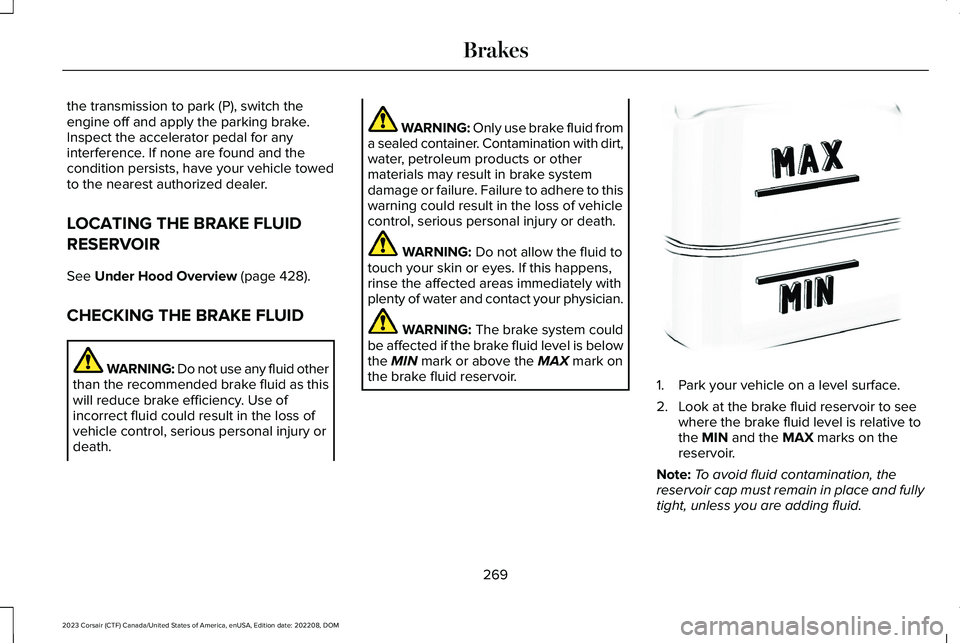
WARNING: The brake system couldbe affected if the brake fluid level is belowthe MIN mark or above the MAX mark onthe brake fluid reservoir.1.Park your vehicle on a level surface.
2.Look at the brake fluid reservoir to seewhere the brake fluid level is relative tothe MIN and the MAX marks on thereservoir.
Note:To avoid fluid contamination, thereservoir cap must remain in place and fullytight, unless you are adding fluid.
269
2023 Corsair (CTF) Canada/United States of America, enUSA, Edition date: 202208, DOMBrakesE170684
Page 276 of 690
WHAT IS THE ELECTRIC PARKING
BRAKE
The electric parking brake is used to holdyour vehicle on slopes and flat roads.
APPLYING THE ELECTRIC
PARKING BRAKE
WARNING: Apply the parking brake,shift into park (P), switch the ignition offand remove the key before you leave yourvehicle. Failure to follow this instructioncould result in personal injury or death.
WARNING: If you drive extendeddistances with the parking brake applied,you could cause damage to the brakesystem.
WARNING: The electric parkingbrake does not operate if the vehiclebattery has run out of charge.
The switch is on the lower part ofthe instrument panel.
Pull the switch up to apply the electricparking brake. The red warning lamp flashes,then steadily illuminates when the parkingbrake is applied.
Note:You can apply the electric parkingbrake when the ignition is off.
Note:The electric parking brake couldautomatically apply when park (P) isselected. See Park (P) (page 258).
APPLYING THE ELECTRIC
PARKING BRAKE IN AN
EMERGENCY
You can use the electric parking brake toslow or stop your vehicle in an emergency.
Pull the switch up and hold it.
The red warning lamp illuminates, a tonesounds and the stoplamps turn on when youuse the electric parking brake in anemergency.
The electric parking brake continues to slowyour vehicle down unless you release theswitch.
Note:Do not apply the electric parking brakewhen your vehicle is moving, except in anemergency. If you repeatedly use the electricparking brake to slow or stop your vehicle,you could cause damage to the brakesystem.
MANUALLY RELEASING THE
ELECTRIC PARKING BRAKE
1.Switch the ignition on.
2.Press and hold the brake pedal.
3.Push the switch down.
The red warning lamp turns off.
Pulling Away on a Hill When Towing aTrailer
1.Press and hold the brake pedal.
2.Pull the switch upward and hold it.
3.Shift into gear.
272
2023 Corsair (CTF) Canada/United States of America, enUSA, Edition date: 202208, DOMElectric Parking BrakeE267156
Page 298 of 690

SWITCHING PARKING AID ON AND
OFF
Press the parking aid button on thetouchscreen and use the menu toswitch the system on and off.
You can also switch the system onand off by pressing the button onthe rear view camera screen.
REAR PARKING AID
WHAT IS THE REAR PARKING AID
Rear parking sensors detect objects behindyour vehicle when in reverse (R).
REAR PARKING AID LIMITATIONS
There is a decreased coverage area at theouter corners.
The rear parking aid sensors are active whenyour vehicle is in reverse (R) and the vehiclespeed is less than 5 mph (8 km/h).
The sensor coverage area is up to 71 in(180 cm) from the rear bumper.
The rear parking aid detects large objectswhen you shift into reverse (R) and any ofthe following occur:
•Your vehicle is moving backward at a lowspeed.
•Your vehicle is stationary but an objectis approaching the rear of your vehicleat a low speed.
•Your vehicle is moving backward at a lowspeed and an object is moving towardsyour vehicle, for example another vehicleat a low speed.
The system shall provide no audible warningfor the object behind the vehicle when inneutral (N) gear.
LOCATING THE REAR PARKING AIDSENSORS
The rear parking aid sensors are in the rearbumper.
294
2023 Corsair (CTF) Canada/United States of America, enUSA, Edition date: 202208, DOMParking AidsPE326188 E139213 E130178