Page 169 of 690
WHAT IS REMOTE START
The system allows you to remotely start yourvehicle and therefore to heat or cool theinterior to a predetermined temperature.
REMOTE START PRECAUTIONS
WARNING: Do not start the enginein a closed garage or in other enclosedareas. Exhaust fumes are toxic. Alwaysopen the garage door before you start theengine. Failure to follow this instructioncould result in personal injury or death.
REMOTE START LIMITATIONS
Remote start does not work if:
•The alarm horn is sounding.
•The hood is open.
•The transmission is not in park (P).
•Remote start is not enabled.
•The ignition is on.
Note:Do not use remote start if your fuellevel is low.
ENABLING REMOTE START
1.Press Settings on the touchscreen.
2.Press Vehicle Settings.
3.Press Remote Start Setup.
4.Switch System on or off.
Note:To use remote start, make sure thatthe modem is enabled. See Enabling andDisabling the Modem (page 514).
REMOTELY STARTING AND
STOPPING THE VEHICLE
Remotely Starting the Vehicle
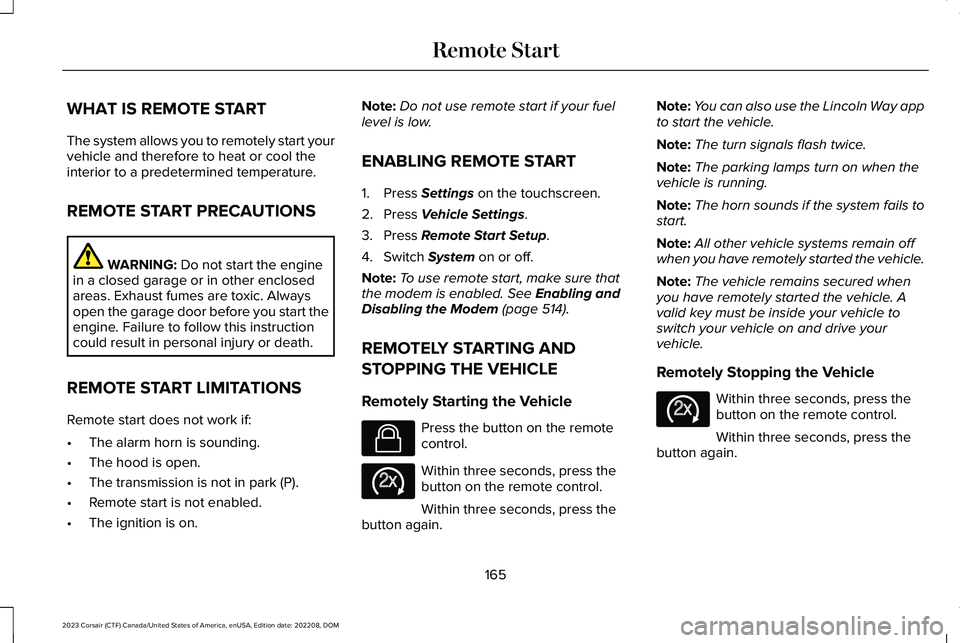
Press the button on the remotecontrol.
Within three seconds, press thebutton on the remote control.
Within three seconds, press thebutton again.
Note:You can also use the Lincoln Way appto start the vehicle.
Note:The turn signals flash twice.
Note:The parking lamps turn on when thevehicle is running.
Note:The horn sounds if the system fails tostart.
Note:All other vehicle systems remain offwhen you have remotely started the vehicle.
Note:The vehicle remains secured whenyou have remotely started the vehicle. Avalid key must be inside your vehicle toswitch your vehicle on and drive yourvehicle.
Remotely Stopping the Vehicle
Within three seconds, press thebutton on the remote control.
Within three seconds, press thebutton again.
165
2023 Corsair (CTF) Canada/United States of America, enUSA, Edition date: 202208, DOMRemote StartE138623 E138625 E138625
Page 170 of 690
EXTENDING THE REMOTE START
DURATION
To extend the engine running durationduring remote start, do the following:
Press the button on the remotecontrol.
Within three seconds, press thebutton on the remote control.
Within three seconds, press thebutton again.
Note:You can extend the engine runningduration to a maximum of 30 minutes.
REMOTE START REMOTE
CONTROL INDICATORS
Remote Control Feedback
An LED on the remote control provides statusfeedback of remote start or stop commands.
StatusLED
Remote startsuccessful.Solid green.
Remote stopsuccessful.Solid red.
Request failed orstatus not received.Blinking red.
Status incomplete.Blinking green.
REMOTE START SETTINGS
Climate Control Settings
1.Press Settings on the touchscreen.
2.Press Vehicle Settings.
3.Press Remote Start Setup.
4.Press Climate Control.
5.Press Auto or Last settings.
Note:If you switch the auto mode on, thesystem attempts to heat or cool the interiorto 72°F (22°C). When you switch the vehicleon, the climate control system returns to thelast used settings.
Note:If you switch the last settings on, thesystem remembers the last used settings.
Heated Seat Settings (If Equipped)
1.Press Settings on the touchscreen.
2.Press Vehicle Settings.
3.Press Remote Start Setup.
4.Press Seats.
5.Press Auto or Off.
Note:If you switch the heated seat settingson, the heated seats turn on during coldweather.
Note:You cannot adjust the heated seatsettings when you remotely start yourvehicle.
Heated Steering Wheel Settings (If
Equipped)
1.Press Settings on the touchscreen.
166
2023 Corsair (CTF) Canada/United States of America, enUSA, Edition date: 202208, DOMRemote StartE138623 E138625
Page 175 of 690
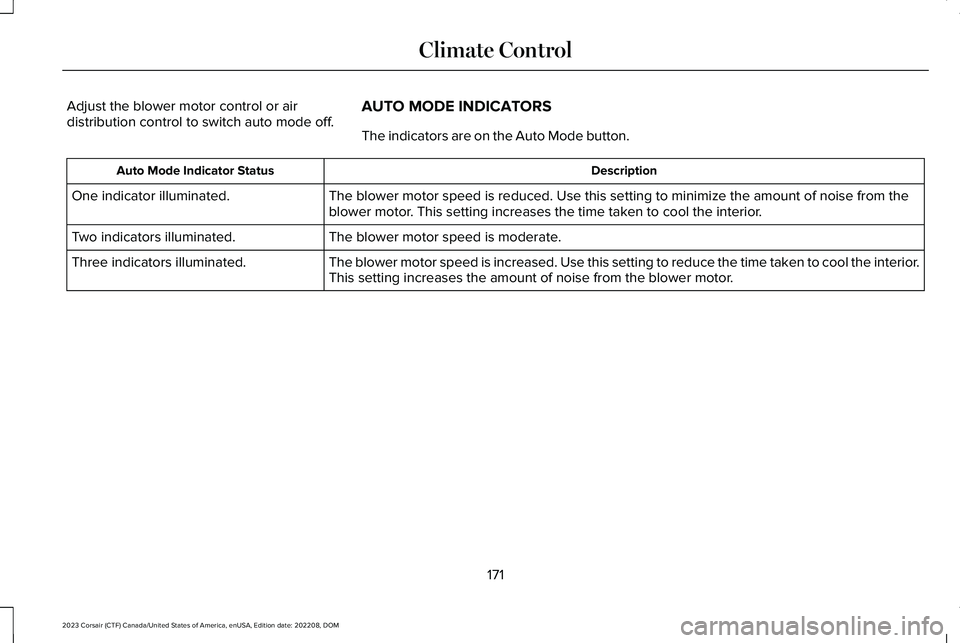
Adjust the blower motor control or airdistribution control to switch auto mode off.AUTO MODE INDICATORS
The indicators are on the Auto Mode button.
DescriptionAuto Mode Indicator Status
The blower motor speed is reduced. Use this setting to minimize the amount of noise from theblower motor. This setting increases the time taken to cool the interior.One indicator illuminated.
The blower motor speed is moderate.Two indicators illuminated.
The blower motor speed is increased. Use this setting to reduce the time taken to cool the interior.This setting increases the amount of noise from the blower motor.Three indicators illuminated.
171
2023 Corsair (CTF) Canada/United States of America, enUSA, Edition date: 202208, DOMClimate Control
Page 176 of 690
SWITCHING DUAL MODE ON AND OFF
Press the button to activate theselection screen.
Press the button.
Note:When dual mode is off, setting thetemperature using the driver side controls,sets the temperature for both sides.
Note:Setting the temperature using thepassenger side controls, sets the passengertemperature and switches dual mode on.
CLIMATE CONTROL HINTS
General Hints
•Prolonged use of recirculated air maycause the windows to fog up.
•You may feel a small amount of air fromthe footwell air vents regardless of theair distribution setting.
•To reduce humidity build-up inside yourvehicle, do not drive with the systemswitched off or with recirculated airalways switched on.
•Do not place objects under the frontseats as this may interfere with theairflow to the rear seats.
•Remove any snow, ice or leaves from theair intake area at the base of thewindshield.
•To improve the time to reach acomfortable temperature in hot weather,drive with the windows open until youfeel cold air through the air vents.
Automatic Climate Control
•Adjusting the settings when your vehicleinterior is extremely hot or cold is notnecessary. Automatic mode is bestrecommended to maintain settemperature.
•The system adjusts to heat or cool theinterior to the temperature you select asquickly as possible.
•For the system to function efficiently, theinstrument panel and side air ventsshould be fully open.
•If you press AUTO during cold outsidetemperatures, the system directs air flowto the windshield and side window airvents.In addition, the blower motor mayrun at a slower speed until the enginewarms up.
•If you press AUTO during hottemperatures and the inside of thevehicle is hot, the system usesrecirculated air to maximize interiorcooling. Blower motor speed may alsoreduce until the air cools.
Quickly Heating the Interior
1.Press AUTO.
2.Adjust the temperature function to thesetting you prefer.
Recommended Settings for Heating
1.Press AUTO.
172
2023 Corsair (CTF) Canada/United States of America, enUSA, Edition date: 202208, DOMClimate ControlE265283 E265280
Page 177 of 690
2.Adjust the temperature function to thesetting you prefer. Use 72°F (22°C) as astarting point, then adjust the setting asnecessary.
Quickly Cooling the Interior
1.Press MAX A/C.
2.Drive with the windows open for a shortperiod of time.
Recommended Settings for Cooling
1.Press AUTO.
2.Adjust the temperature function to thesetting you prefer. Use 72°F (22°C) as astarting point, then adjust the setting asnecessary.
Defogging the Side Windows in ColdWeather
1.Press and release defrost or maximumdefrost.
2.Adjust the temperature control to thesetting you prefer. Use 72°F (22°C) as astarting point, then adjust the setting asnecessary.
173
2023 Corsair (CTF) Canada/United States of America, enUSA, Edition date: 202208, DOMClimate Control
Page 178 of 690

WHAT IS THE CABIN AIR FILTER
Your vehicle is equipped with a cabin airfilter, which gives you and your passengersthe following benefits:
•It improves your driving comfort byreducing particle and odor concentration.
•It improves the interior compartmentcleanliness.
•It protects the climate controlcomponents from particle deposits.
REPLACING THE CABIN AIR FILTER
Replace the filter at regular intervals. SeeScheduled Maintenance (page 563).
Note:Make sure you have a cabin air filterinstalled at all times. This prevents foreignobjects from entering the system. Runningthe system without a filter in place couldresult in degradation or damage to thesystem.
Note:Using an aftermarket cabin air filtercould reduce cabin air filtration and climatecontrol performance.
AUTO AIR REFRESH (IF EQUIPPED)
WHAT IS AUTO AIR REFRESH
Auto air refresh helps improve or maintainthe quality of air within your vehicle cabin.
HOW DOES AUTO AIR REFRESHWORK
Auto air refresh uses an air quality sensor toautomatically adjust the climate controlsystem to change from outside air torecirculated air to help reduce the entry ofoutside odors into the cabin. It uses aparticulate matter sensor in the cabin toestimate and provide information aboutparticulate matter pollution in the cabin. Italso allows you to refresh the cabin air withoutside air on-demand or automatically.
CHECKING THE INTERIOR AIRQUALITY
Press the button on thetouchscreen.
1.Press Auto Air Refresh.
174
2023 Corsair (CTF) Canada/United States of America, enUSA, Edition date: 202208, DOMInterior Air QualityE265283
Page 179 of 690
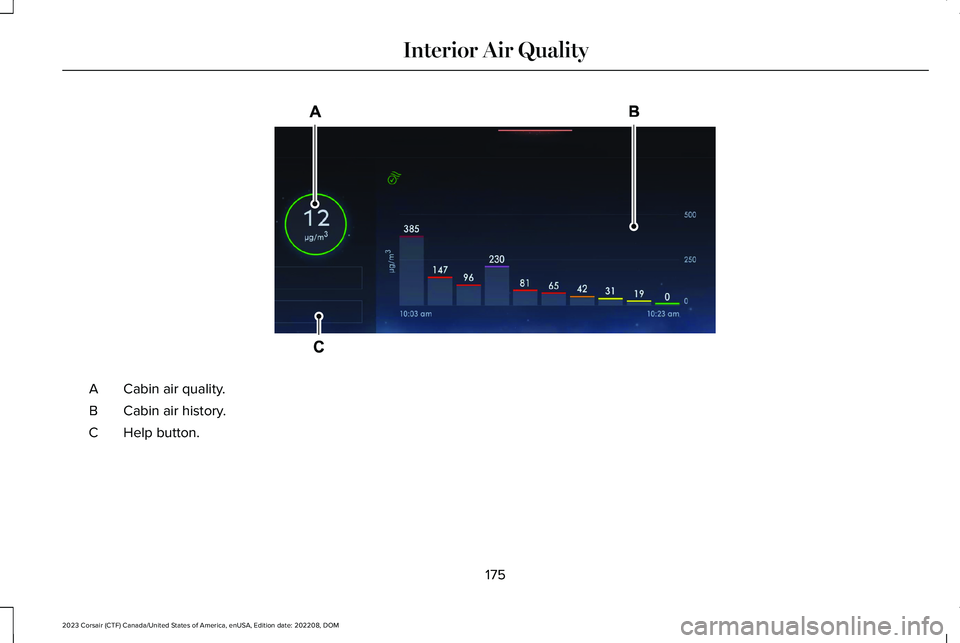
Cabin air quality.A
Cabin air history.B
Help button.C
175
2023 Corsair (CTF) Canada/United States of America, enUSA, Edition date: 202208, DOMInterior Air QualityE373334
Page 180 of 690

Particulate Matter PollutionInformation
Press Help for more information aboutparticulate matter pollution.
The numbers provided by the cabin's PM2.5sensor are estimates of the concentration ofparticles in the cabin air. The measurementunit is µg/m3, representing mass (microgramsof particulates) per unit of air volume (cubicmeter of air).
The colors around the PM2.5 numbersprovide visual cues about the concentrationlevels.
Note:PM2.5 is only one pollution typecontributing to an Air Quality Index and byitself does not represent the Air QualityIndex.
AUTO AIR REFRESH INDICATORS
The indicator area is on the touchscreenfeature bar and displays one of the following:
Indicates blower motor is on forfiltering and PM2.5 is low.
Indicates the blower motor is onfor filtering.
Indicates the blower motor is off.
Indicates the status is not available.
MANUALLY REFRESHING THEINTERIOR AIR
Press the button on thetouchscreen.
1.Press Auto Air Refresh.
2.Press Cabin Refresh.
Note:Climate control settings could changefor about 90 seconds to help flow outsideair into the cabin. You can change theblower motor speed to the settings youprefer.
Note:The climate control must be on tomanually refresh the interior air.
AUTOMATICALLY REFRESHING THEINTERIOR AIR
If the cabin air recirculates continuously forlonger than 35 minutes, climate controlsettings could change automatically for about90 seconds to help flow outside air into thecabin.
Refreshing the Interior Air Upon CabinStart
If the cabin is above 75°F (24°C) and theengine has been off for over 30 minutes,when you start the engine the climate controlsystem settings could change forapproximately 75 seconds to help flowoutside air into the cabin.
Note:Refreshing may also occur if theclimate control and blower motor werepreviously on.
176
2023 Corsair (CTF) Canada/United States of America, enUSA, Edition date: 202208, DOMInterior Air QualityE324585 E283817 E324586 E324587 E265283