2023 LINCOLN CORSAIR ECO mode
[x] Cancel search: ECO modePage 158 of 690
USING THE INSTRUMENT
CLUSTER DISPLAY CONTROLS
WARNING: Driving while distractedcan result in loss of vehicle control, crashand injury. We strongly recommend thatyou use extreme caution when using anydevice that may take your focus off theroad. Your primary responsibility is the safeoperation of your vehicle. We recommendagainst the use of any hand-held devicewhile driving and encourage the use ofvoice-operated systems when possible.Make sure you are aware of all applicablelocal laws that may affect the use ofelectronic devices while driving.
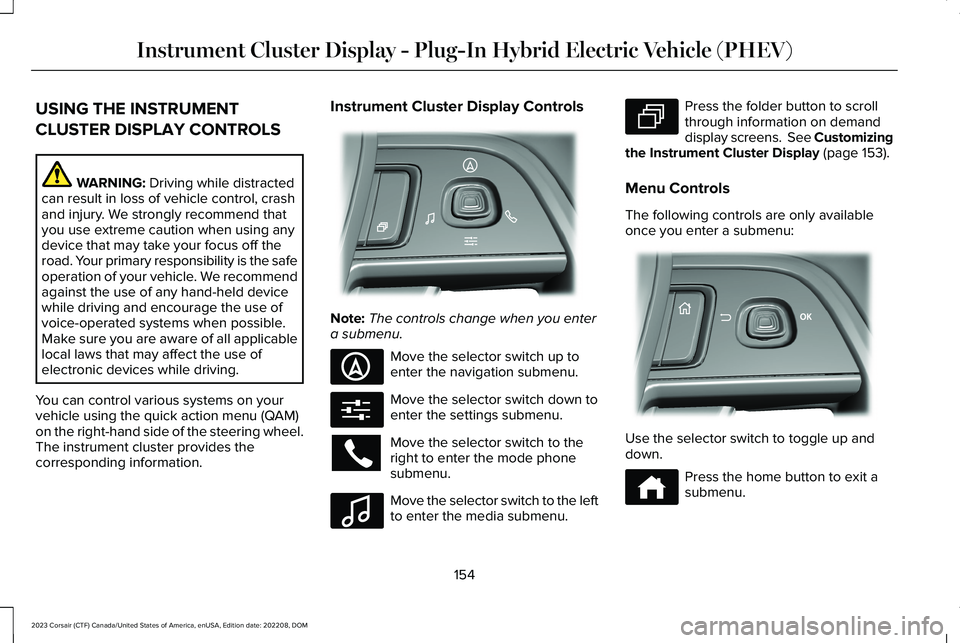
You can control various systems on yourvehicle using the quick action menu (QAM)on the right-hand side of the steering wheel.The instrument cluster provides thecorresponding information.
Instrument Cluster Display Controls
Note:The controls change when you entera submenu.
Move the selector switch up toenter the navigation submenu.
Move the selector switch down toenter the settings submenu.
Move the selector switch to theright to enter the mode phonesubmenu.
Move the selector switch to the leftto enter the media submenu.
Press the folder button to scrollthrough information on demanddisplay screens. See Customizingthe Instrument Cluster Display (page 153).
Menu Controls
The following controls are only availableonce you enter a submenu:
Use the selector switch to toggle up anddown.
Press the home button to exit asubmenu.
154
2023 Corsair (CTF) Canada/United States of America, enUSA, Edition date: 202208, DOMInstrument Cluster Display - Plug-In Hybrid Electric Vehicle (PHEV)E281220 E281481 E280315 E100027 E281483 E299701 E272621
Page 161 of 690
Your electric economy is affected by yourdriving style and route, climate control use,outside temperature and other factors. Besteconomy is achieved with mild to moderateacceleration and braking, moderate speedsand low climate control usage.
Note:Electric economy is a selectablescreen. See Customizing the InstrumentCluster Display (page 155).
BRAKE COACH
The brake coach appears after your vehiclehas come to a stop. It coaches you to brakein a manner that maximizes the amount ofenergy returned through the regenerativebraking system.
The percent displayed indicates theregenerative braking efficiency, with 100%representing the maximum amount of energyrecovered.
Note:While regenerative braking works inall drive modes, brake coach display maynot be available in all drive modes.
You can switch brake coach on or off in thesettings menu. See Instrument ClusterDisplay Main Menu (page 155).
TRIP SUMMARY
The trip summary displays upon shutting offyour vehicle. The values are cumulative sinceyou last started your vehicle.
The information shown is the same as theThis Trip screen. See Trip Data (page 159).
VEHICLE CHARGING STATUS
The vehicle charge status displays when youswitch off your vehicle and when you switchon your vehicle when plugged in. Chargingstatus includes the charge start or chargeend time as appropriate. You can modifyyour charge settings though the touchscreen.See Setting the Charging Schedule andPreferences (page 250).
157
2023 Corsair (CTF) Canada/United States of America, enUSA, Edition date: 202208, DOMInstrument Cluster Display - Plug-In Hybrid Electric Vehicle (PHEV)
Page 169 of 690
WHAT IS REMOTE START
The system allows you to remotely start yourvehicle and therefore to heat or cool theinterior to a predetermined temperature.
REMOTE START PRECAUTIONS
WARNING: Do not start the enginein a closed garage or in other enclosedareas. Exhaust fumes are toxic. Alwaysopen the garage door before you start theengine. Failure to follow this instructioncould result in personal injury or death.
REMOTE START LIMITATIONS
Remote start does not work if:
•The alarm horn is sounding.
•The hood is open.
•The transmission is not in park (P).
•Remote start is not enabled.
•The ignition is on.
Note:Do not use remote start if your fuellevel is low.
ENABLING REMOTE START
1.Press Settings on the touchscreen.
2.Press Vehicle Settings.
3.Press Remote Start Setup.
4.Switch System on or off.
Note:To use remote start, make sure thatthe modem is enabled. See Enabling andDisabling the Modem (page 514).
REMOTELY STARTING AND
STOPPING THE VEHICLE
Remotely Starting the Vehicle
Press the button on the remotecontrol.
Within three seconds, press thebutton on the remote control.
Within three seconds, press thebutton again.
Note:You can also use the Lincoln Way appto start the vehicle.
Note:The turn signals flash twice.
Note:The parking lamps turn on when thevehicle is running.
Note:The horn sounds if the system fails tostart.
Note:All other vehicle systems remain offwhen you have remotely started the vehicle.
Note:The vehicle remains secured whenyou have remotely started the vehicle. Avalid key must be inside your vehicle toswitch your vehicle on and drive yourvehicle.
Remotely Stopping the Vehicle
Within three seconds, press thebutton on the remote control.
Within three seconds, press thebutton again.
165
2023 Corsair (CTF) Canada/United States of America, enUSA, Edition date: 202208, DOMRemote StartE138623 E138625 E138625
Page 170 of 690
EXTENDING THE REMOTE START
DURATION
To extend the engine running durationduring remote start, do the following:
Press the button on the remotecontrol.
Within three seconds, press thebutton on the remote control.
Within three seconds, press thebutton again.
Note:You can extend the engine runningduration to a maximum of 30 minutes.
REMOTE START REMOTE
CONTROL INDICATORS
Remote Control Feedback
An LED on the remote control provides statusfeedback of remote start or stop commands.
StatusLED
Remote startsuccessful.Solid green.
Remote stopsuccessful.Solid red.
Request failed orstatus not received.Blinking red.
Status incomplete.Blinking green.
REMOTE START SETTINGS
Climate Control Settings
1.Press Settings on the touchscreen.
2.Press Vehicle Settings.
3.Press Remote Start Setup.
4.Press Climate Control.
5.Press Auto or Last settings.
Note:If you switch the auto mode on, thesystem attempts to heat or cool the interiorto 72°F (22°C). When you switch the vehicleon, the climate control system returns to thelast used settings.
Note:If you switch the last settings on, thesystem remembers the last used settings.
Heated Seat Settings (If Equipped)
1.Press Settings on the touchscreen.
2.Press Vehicle Settings.
3.Press Remote Start Setup.
4.Press Seats.
5.Press Auto or Off.
Note:If you switch the heated seat settingson, the heated seats turn on during coldweather.
Note:You cannot adjust the heated seatsettings when you remotely start yourvehicle.
Heated Steering Wheel Settings (If
Equipped)
1.Press Settings on the touchscreen.
166
2023 Corsair (CTF) Canada/United States of America, enUSA, Edition date: 202208, DOMRemote StartE138623 E138625
Page 176 of 690
SWITCHING DUAL MODE ON AND OFF
Press the button to activate theselection screen.
Press the button.
Note:When dual mode is off, setting thetemperature using the driver side controls,sets the temperature for both sides.
Note:Setting the temperature using thepassenger side controls, sets the passengertemperature and switches dual mode on.
CLIMATE CONTROL HINTS
General Hints
•Prolonged use of recirculated air maycause the windows to fog up.
•You may feel a small amount of air fromthe footwell air vents regardless of theair distribution setting.
•To reduce humidity build-up inside yourvehicle, do not drive with the systemswitched off or with recirculated airalways switched on.
•Do not place objects under the frontseats as this may interfere with theairflow to the rear seats.
•Remove any snow, ice or leaves from theair intake area at the base of thewindshield.
•To improve the time to reach acomfortable temperature in hot weather,drive with the windows open until youfeel cold air through the air vents.
Automatic Climate Control
•Adjusting the settings when your vehicleinterior is extremely hot or cold is notnecessary. Automatic mode is bestrecommended to maintain settemperature.
•The system adjusts to heat or cool theinterior to the temperature you select asquickly as possible.
•For the system to function efficiently, theinstrument panel and side air ventsshould be fully open.
•If you press AUTO during cold outsidetemperatures, the system directs air flowto the windshield and side window airvents.In addition, the blower motor mayrun at a slower speed until the enginewarms up.
•If you press AUTO during hottemperatures and the inside of thevehicle is hot, the system usesrecirculated air to maximize interiorcooling. Blower motor speed may alsoreduce until the air cools.
Quickly Heating the Interior
1.Press AUTO.
2.Adjust the temperature function to thesetting you prefer.
Recommended Settings for Heating
1.Press AUTO.
172
2023 Corsair (CTF) Canada/United States of America, enUSA, Edition date: 202208, DOMClimate ControlE265283 E265280
Page 186 of 690
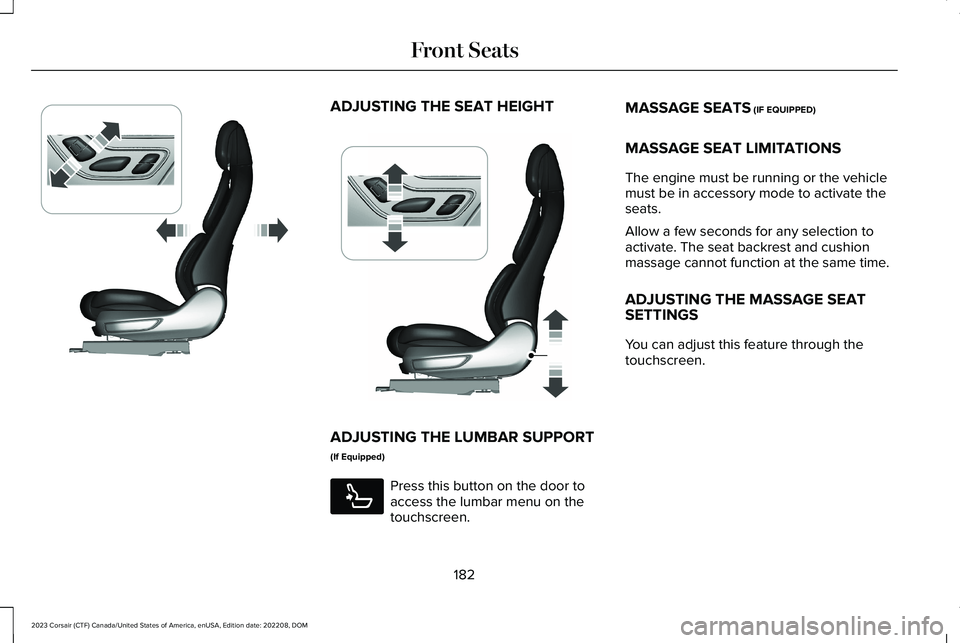
ADJUSTING THE SEAT HEIGHT
ADJUSTING THE LUMBAR SUPPORT
(If Equipped)
Press this button on the door toaccess the lumbar menu on thetouchscreen.
MASSAGE SEATS (IF EQUIPPED)
MASSAGE SEAT LIMITATIONS
The engine must be running or the vehiclemust be in accessory mode to activate theseats.
Allow a few seconds for any selection toactivate. The seat backrest and cushionmassage cannot function at the same time.
ADJUSTING THE MASSAGE SEATSETTINGS
You can adjust this feature through thetouchscreen.
182
2023 Corsair (CTF) Canada/United States of America, enUSA, Edition date: 202208, DOMFront SeatsE348865 E349633 E285278
Page 206 of 690
WHAT IS THE WIRELESS
ACCESSORY CHARGER
The wireless accessory charger allows youto charge one compatible Qi wirelesscharging device on the charging area.
WIRELESS ACCESSORY CHARGER
PRECAUTIONS
WARNING: Wireless chargingdevices can affect the operation ofimplanted medical devices, includingcardiac pacemakers. If you have anyimplanted medical devices, we recommendthat you consult with your physician.
Keep the charging area clean and removeforeign objects prior to charging a device.
Do not place items with a magnetic strip orradio-frequency identification chip, forexample passports, parking tickets,transportation passes or credit cards, nearthe charging area when charging a device.Damage could occur to the magnetic stripor radio-frequency identification chip.
Do not place metal objects, for exampleremote controls, coins and candy wrappers,on or near the charging area when charginga device. Metal objects may heat up anddegrade the charging performance, inaddition to causing interruptions in charging.
Charging could be interrupted, degraded, orcould stop if any of the following occur:
•The system detects a foreign object.
•The device is misaligned on the chargingarea.
•The device moves on the active chargingarea when the vehicle is in motion.
•The vehicle ambient temperature is toohigh.
•You attempt to charge a non-Qicompatible device on the wirelesscharger.
Note:During charging, the device and thecharger could heat up, this is normal. If thebattery gets hotter than usual, the devicemay stop charging.
LOCATING THE WIRELESS
ACCESSORY CHARGER
The charging area is on the centerconsole or in the media bin belowthe instrument panel.
CHARGING A WIRELESS DEVICE
Place the device on the center of thecharging surface with the charging sidedown. The charging stops after your devicereaches a full charge.
You can use the charger when the vehicleis in accessory mode, when the vehicle isrunning, or when SYNC is on.
Displays on the status bar whenwireless charging is in progress.
202
2023 Corsair (CTF) Canada/United States of America, enUSA, Edition date: 202208, DOMWireless Accessory Charger (If Equipped)E297549 E263583
Page 209 of 690
STARTING AND STOPPING THE
ENGINE – PRECAUTIONS
WARNING: Extended idling at highengine speeds can produce very hightemperatures in the engine and exhaustsystem, creating the risk of fire or otherdamage.
WARNING: Do not park, idle or driveyour vehicle on dry grass or other dryground cover. The emission system heatsup the engine compartment and exhaustsystem, creating the risk of fire.
WARNING: Do not start the enginein a closed garage or in other enclosedareas. Exhaust fumes are toxic. Alwaysopen the garage door before you start theengine. Failure to follow this instructioncould result in personal injury or death.
WARNING: Do not use starting fluid,for example ether, in the air intake system.Such fluid could cause immediateexplosive damage to the engine andpossible personal injury.
WARNING: Exhaust leaks may resultin entry of harmful and potentially lethalfumes into the passenger compartment. Ifyou smell exhaust fumes inside yourvehicle, have your vehicle inspectedimmediately. Do not drive if you smellexhaust fumes.
The powertrain control system meets allCanadian interference-causing equipmentstandard requirements regulating theimpulse electrical field or radio noise.
Note:If you use your vehicle regularly abovethe altitude of 7,500 ft (2,286 m) and underthe temperature of -4.0°F (-20°C), it isrecommended to use the alternative engineoil. See Capacities and Specifications(page 495).
If you stop your vehicle and leave the engineidling for long periods, we recommend thatyou do one of the following:
•Open the windows at least 1 in (2.5 cm).
•Set your climate control to outside air.
PUSH BUTTON IGNITION SWITCH
Switching the Ignition Off
When the ignition is on or in accessory mode,press the push button ignition switch oncewithout your foot on the brake pedal.
Switching the Ignition to AccessoryMode
When the ignition is off, press the pushbutton ignition switch once without your footon the brake pedal.
205
2023 Corsair (CTF) Canada/United States of America, enUSA, Edition date: 202208, DOMStarting and Stopping the EngineE321258