Page 53 of 112
![LEXUS RX 2023 Owners Manual 52
RX500h/RX350h_QG_U
■Searching for a destination by category
A destination can be searched for from a list of categories.
1Touch [ ] or [ ] on the map screen.
2Touch [Destinations].
3Touch the des](/manual-img/36/58962/w960_58962-52.png "LEXUS RX 2023 Owners Manual 52
RX500h/RX350h_QG_U
■Searching for a destination by category
A destination can be searched for from a list of categories.
1Touch [ ] or [ ] on the map screen.
2Touch [Destinations].
3Touch the des")
52
RX500h/RX350h_QG_U
■Searching for a destination by category
A destination can be searched for from a list of categories.
1Touch [ ] or [ ] on the map screen.
2Touch [Destinations].
3Touch the desired search method.
[Home]: Touch to set the registered
home as the destination. A point must
be registered as home before using
this function.
*
[Work]: Touch to set the registered
workplace as the destination. A point
must be registered as a workplace
before using this function.
*
[Favorites]: Touch to set a registered favorite as the destination. A point must be regis-
tered as a favorite before using this function.
[Recents]: Touch to set a destination from the destination history as the destination.
[Sent to car]: Send to car enables customer to send a destination or POI to the vehicle
from Lexus app.
[Parking]: Touch to search for a nearby parking lot to set as a destination.
[Fuel/Charging]: Touch to search for a fuel station/charging facility to set as a destina-
tion.
[Food]: Touch to search for a rest aurant to set as a destination.
[Hospitals]: Touch to search for a hospital to set as a destination.
When setting a business as a destination, if your estimated time of arrival is outside of
business hours or near closing time, a notifica tion asking to confirm the destination will
be displayed.
*: Home and Work must be added via Lexus app.
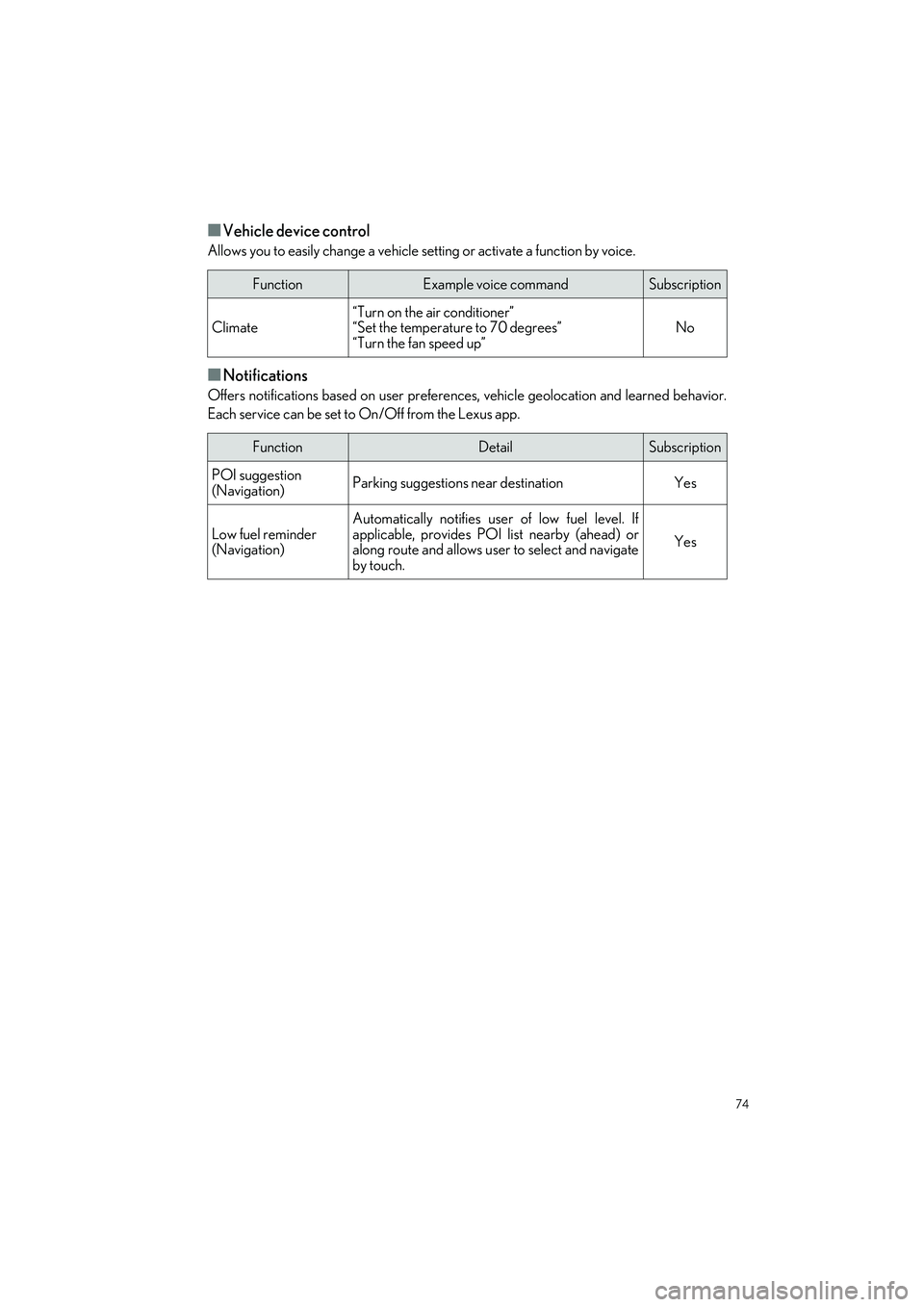
Page 75 of 112
74
RX500h/RX350h_QG_U
■Vehicle device control
Allows you to easily change a vehicle setting or activate a function by voice.
■Notifications
Offers notifications based on user preference s, vehicle geolocation and learned behavior.
Each service can be set to On/Off from the Lexus app.
FunctionExample voice commandSubscription
Climate“Turn on the air conditioner”
“Set the temperature to 70 degrees”
“Turn the fan speed up”No
FunctionDetailSubscription
POI suggestion
(Navigation)Parking suggestions near destinationYes
Low fuel reminder
(Navigation)
Automatically notifies user of low fuel level. If
applicable, provides POI list nearby (ahead) or
along route and allows user to select and navigate
by touch.
Yes
Page 87 of 112
86
RX500h/RX350h_QG_U
●Close all the doors and windows, and turn the power switch off.
● Confirm the type of fuel.
1Press the switch to open the fuel filler
door.
The fuel filler door will open within
about 10 seconds of the switch being
pressed. Before refueling is possible, a
message will be shown on the multi-
information display in the instrument
cluster to indicate the progress of the
fuel filler door opener.
2Turn the fuel tank cap slowly and
remove it, then put it into the holder on
the fuel filler door.
After refueling, turn the fuel tank cap until
you hear a click. Once the cap is released, it
will turn slightly in the opposite direction.
Fuel Tank Cap
Before refueling the vehicle
Opening the fuel tank cap
Closing the fuel tank cap
Page 102 of 112
What to do if...
101
RX500h/RX350h_QG_U
Follow the correction procedures.
Inappropriate pedal
operation warning light
(orange)
LTA indicator
Low fuel level warning
light
(orange)
LDA indicator
Driver’s and front
passenger’s seat belt
reminder light
(orange)
Dynamic radar cruise control
indicator
(Vehicles without a head-up display)Rear passengers’
seat belt reminder
light(orange)
Cruise control indicator
(Vehicles with a
head-up display)(orange)
PDA indicator
(Illuminates without
blinking)
Tire pressure warning
light
*
Driving assist information
indicator
Intuitive parking assist
OFF indicator
(if equipped)
(flashes) (U.S.A.)
Parking brake indicator
(orange)
PCS warning light(flashes)
(Canada)
Stop and check.
High coolant temperature
warning lightHybrid system overheat warn-
ing light
For further information, refe r to the “OWNER’S MANUAL”.