Page 57 of 340
2-17
Using the rear-seat conversation mode
(if equipped)
When the driver's voice cannot be delivered well to the rear seat, you can use the microphone
of the driver's seat for smooth communication.
1 On the All Menus screen, press Passenger Talk.
The passenger talk icon appears at the top right of the system screen to display its status.
2 Make conversation through the microphone of the driver's seat.
A
To end the Passenger Talk mode, press End.
A
When you move to another screen without pressing End, shortly press the End Call
button on the steering wheel to end the passenger talk function.
A
When the Passenger Talk mode is active, the Radio/Media functions are unavailable.
A
To access the online user's manual on the Passenger Talk screen, press
>
User's
Manual on Web (QR Code) and then scan the displayed QR code.
Page 58 of 340
2-18
Using the rear-seat view (if equipped)
You can check the status and safety of rear-seat occupants through the rear-seat camera feed
displayed on the system screen.
ÝWarning
A car accident may occur when focusing on the vehicle display and not pa\
ying attention to
the road while driving.
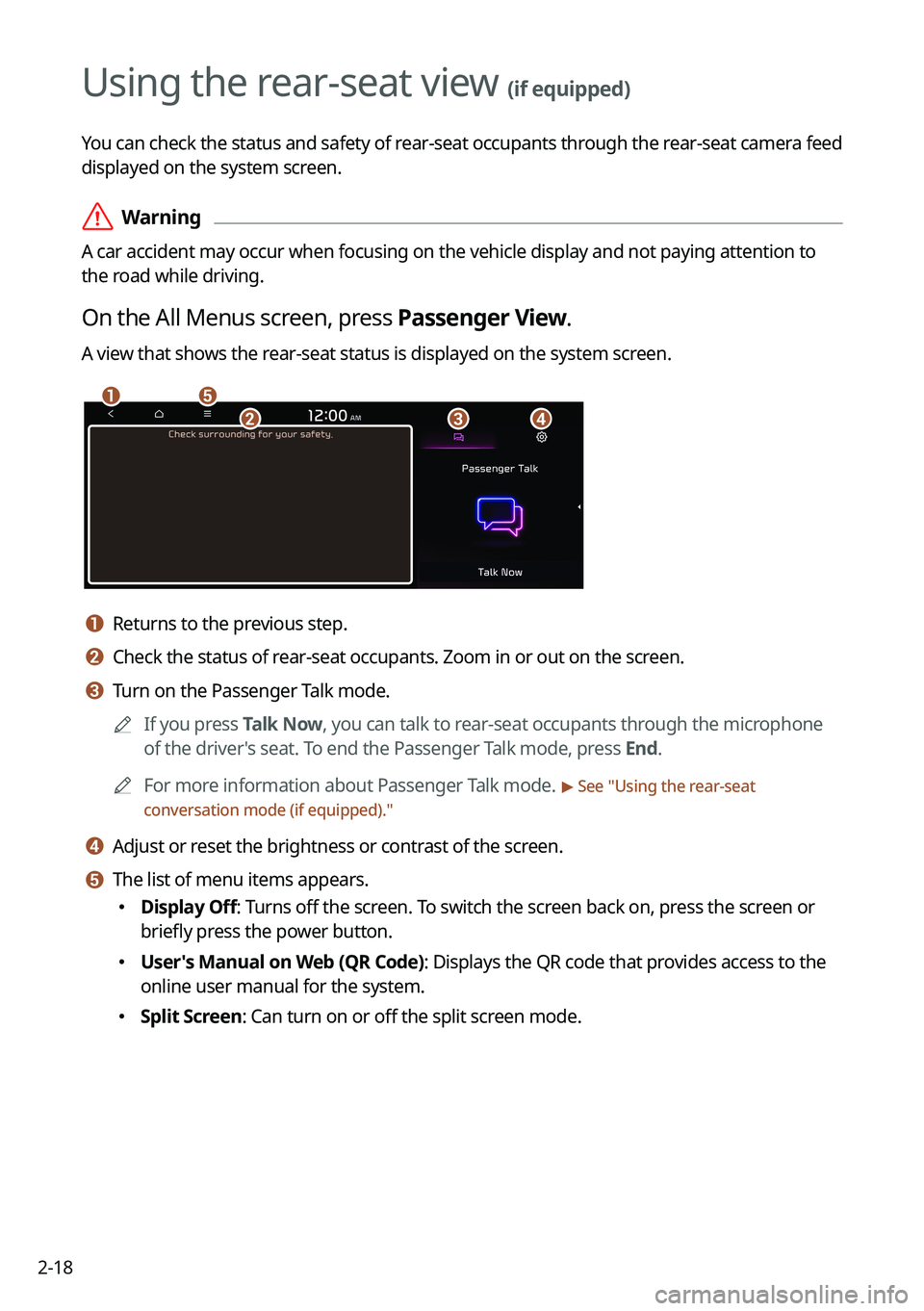
On the All Menus screen, press Passenger View.
A view that shows the rear-seat status is displayed on the system screen.
ae
cbd
a a Returns to the previous step.
b b Check the status of rear-seat occupants. Zoom in or out on the screen.
c c Turn on the Passenger Talk mode.
A
If you press Talk Now, you can talk to rear-seat occupants through the microphone
of the driver's seat. To end the Passenger Talk mode, press End.
A
For more information about Passenger Talk mode.
> See "Using the rear-seat
conversation mode (if equipped)."
d d Adjust or reset the brightness or contrast of the screen.
e e The list of menu items appears.
� Display Off: Turns off the screen. To switch the screen back on, press the screen or
briefly press the power button.
�User's Manual on Web (QR Code): Displays the QR code that provides access to the
online user manual for the system.
�Split Screen: Can turn on or off the split screen mode.
Page 59 of 340
2-19
Using the rear-seat quiet mode (if equipped)
To allow occupants in the rear seat to have rest and sleep, you can set to adjust the system
volume.
1 On the All Menus screen, press Quiet Mode.
2 Press Quiet Mode.
The audio volume in the rear seat is muted. When the volume for the front seats is set too
high, the volume decreases automatically.
A
To end the Quiet mode, press Quiet Mode once more.
A
The screen may differ depending on the vehicle model and specifications.
A
To access the online user's manual on the Quiet Mode screen, press
>
User's
Manual on Web (QR Code) and then scan the displayed QR code.
Page 156 of 340

7-2
Voice recognition
With the voice recognition function, you can access various functions of the infotainmen\
t
system without manipulating the screen or buttons. This function prevents driver distraction
and dangerous situations.
Use voice commands to access various functions easily.
Type1
Type2
A
Depending on vehicle model or specifications, the screen layout and available commands
may differ. Check the screen type for your vehicle model and view the appropriate
instructions.
A
Note the following to ensure accurate recognition of your voice command.
Press the Voice Recognition button. After a beep sound, say your voice command.
Pronounce a command accurately and naturally like a conversation.
The microphone is located above the driver's head. Say your command while
maintaining an upright posture. The microphone location may differ depending on the
vehicle.
A
Voice recognition is automatically ended when:
You make or receive a call.
The front or rear cameras operate (if equipped).
The
[RADIO] or [MEDIA] button is pressed to perform another function.
Rerouting or other unexpected action is made due to deviation from the route during
guidance.
Page 157 of 340
7-3
A
Voice recognition may not work properly when:
The sunroof or windows are open so the wind is strong.
The fan speed of the air conditioner or heater is high.
The vehicle is passing through a tunnel.
The vehicle is driving on an unpaved road and its noise and vibration are loud.
Noise is loud due to a heavy rain or storm.
A
When using speech recognition from the rear seats, some commands may not be
supported depending on the vehicle model and type.
A
Special characters included in a contact are not recognized by voice (e.g., School_John,
John!).
A
Voice recognition is supported only for certain languages. If you change the sy\
stem
language, voice recognition may not be supported.
Using the voice recognition function (Type1)
1 On the steering wheel, press the Voice Recognition button.
Voice recognition starts along with voice guidance.
A
To skip the voice guidance, press the Voice Recognition button on the steering wheel.
2 When a beep sound is heard, say a command to perform (e.g.
navigation, music, call).
> See "Available voice commands (Type1)" or " Viewing the voice
recognition help."
The recognized command appears in text at the top of the screen and the corresponding
function is performed.
A
When an additional command is required to perform, the commands that can be
followed in the next step appear on the screen. Say a command or press a command.
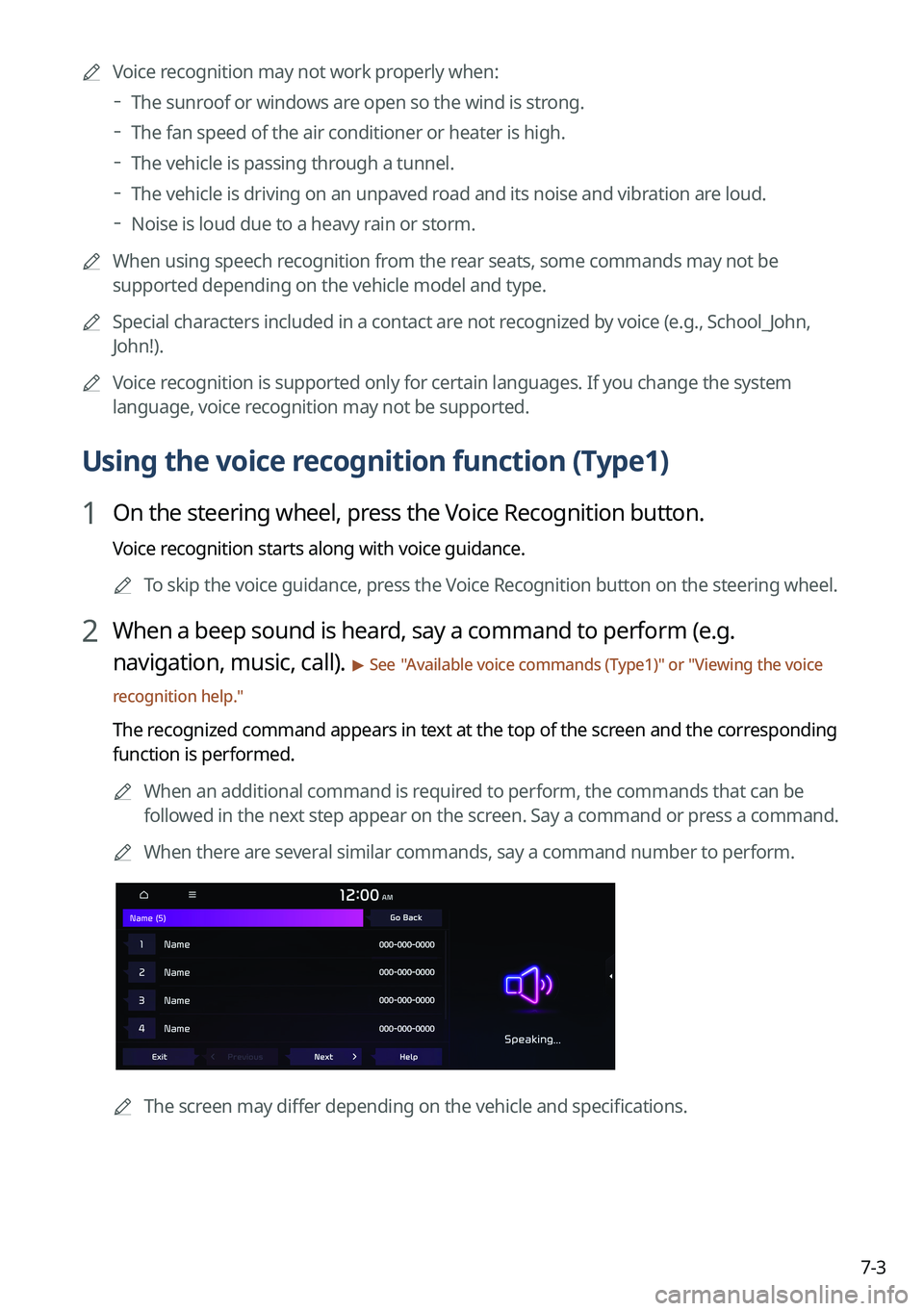
A
When there are several similar commands, say a command number to perform.
A
The screen may differ depending on the vehicle and specifications.
Page 166 of 340

7-12
CommandFunction
Open/Close the rear
windows Open or close all rear-seat windows.
Open/Close the sunroof Open or close the sunroof.
Open/Close the
trunk (liftgate) Open or close the trunk (liftgate).
Turn On/Off the heated
steering wheel Turn on or off the steering wheel heater.
Turn On/Off all seat
warmers Turn on or off the heaters for all seats.
Turn On/Off seat
warmer Turn on or off the driver's seat heater.
Seat warmer
level 1 to 3 Set the driver's seat heater level in the range of 1 to 3.
Turn On/Off the
passenger seat warmer Turn on or off the passenger seat heater.
Passenger's Seat
Warmer Level 1 to 3 Set the passenger seat heater level in the range of 1 to 3.
Turn On/Off the rear
seat warmer Turn on or off the rear-seat heaters.
Turn On/Off all air
ventilation seats Turn on or off the ventilation for all seats.
Turn On/Off air
ventilation seats Turn on or off the driver's seat ventilation.
Air ventilation seat level
1 to 3 Set the driver's seat ventilation level in the range of 1 to 3.
Turn On/Off the
passenger air ventilation
seats Turn on or off the passenger seat ventilation.
Passenger's Air
Ventilation Seat Level
1 to 3 Set the passenger seat ventilation level in the rage of 1 to 3.
Turn On/Off the rear air
ventilation seat Turn on or off the rear-seat ventilation.
Page 167 of 340

Co")
7-13
A
Vehicle control commands are recognizable in English only.
A
Some commands may not be supported, depending on the vehicle model and f\
unctions.
Rear-seat function commands (if equipped)
Command Function
Passenger Talk Turn on the Passenger Talk.
Quiet Mode
Turn off Quiet Mode Turn on or off the Quiet Mode.
A
Some commands may not be supported, depending on the vehicle model and f\
unctions.
Search commands
Command Function
Search settings for
You can search for a setting menu.
For example, say "Search settings for Bluetooth" or "Search
settings for Display."
> See "Configuring system settings."
Other commands
Command
Function
Help Move to the help screen.
Line <1 to 4>* Select an item with the designated number on a list. Simple
numbers, such as "One" or "Two," can be recognized.
Yes* Accept a notification asking for your confirmation in an
exceptional situation.
No* Deny a notification asking for your confirmation in an
exceptional situation.
Next* If there are more than five items on a list, scroll to the next page.
Previous* If you scroll to the next page of a list, scroll back to the previous
page.
Manual Input* When using the Dial Number command, open the keypad to
enter a phone number manually.
Go Back* Returns to the previous step.
Exit End voice recognition.
* These commands are available only in certain situations.
Page 171 of 340

7-17
CommandFunction
Open/Close the rear
windows Open or close all rear-seat windows.
Open/Close the sunroof Open or close the sunroof.
Open/Close the
trunk (liftgate) Open or close the trunk (liftgate).
Turn On/Off the heated
steering wheel Turn on or off the steering wheel heater.
Turn On/Off all seat
warmers Turn on or off the heaters for all seats.
Turn On/Off seat
warmer Turn on or off the driver's seat heater.
Seat warmer
level 1 to 3 Set the driver's seat heater level in the range of 1 to 3.
Turn On/Off the
passenger seat warmer Turn on or off the passenger seat heater.
Passenger's Seat
Warmer Level 1 to 3 Set the passenger seat heater level in the range of 1 to 3.
Turn On/Off the rear
seat warmer Turn on or off the rear-seat heaters.
Turn On/Off all air
ventilation seats Turn on or off the ventilation for all seats.
Turn On/Off air
ventilation seats Turn on or off the driver's seat ventilation.
Air ventilation seat level
1 to 3 Set the driver's seat ventilation level in the range of 1 to 3.
Turn On/Off the
passenger air ventilation
seats Turn on or off the passenger seat ventilation.
Passenger's Air
Ventilation Seat Level
1 to 3 Set the passenger seat ventilation level in the rage of 1 to 3.
Turn On/Off the rear air
ventilation seat Turn on or off the rear-seat ventilation.

