2023 JEEP WRANGLER weight
[x] Cancel search: weightPage 175 of 396

STARTING AND OPERATING173
(Continued)
TRAILER AND TONGUE WEIGHT
Never exceed the maximum tongue weight stamped on
your bumper or trailer hitch.
Weight Distribution
Consider the following items when computing the weight
on the rear axle of the vehicle:
The tongue weight of the trailer.
The weight of any other type of cargo or equipment put
in or on your vehicle.
The weight of the driver and all passengers.
NOTE:Remember that everything put into or on the trailer adds
to the load on your vehicle. Also, additional
factory-installed options or dealer-installed options must
be considered as part of the total load on your vehicle.
Refer to the Tire And Loading Information Placard for the
maximum combined weight of occupants and cargo for
your vehicle.
TOWING REQUIREMENTS
To promote proper break-in of your new vehicle drivetrain
components, the following guidelines are recommended:
WARNING!
Improper towing can lead to a collision. Follow these
guidelines to make your trailer towing as safe as
possible:
Make certain that the load is secured in the trailer
and that it will not shift during travel. When trailering
cargo that is not fully secured, dynamic load shifts
can occur that may be difficult for the driver to
control. You could lose control of your vehicle and
have a collision.
When hauling cargo, or towing a trailer, do not over -
load your vehicle or trailer. Overloading can cause a
loss of control, poor performance, or damage to
brakes, axle, engine, transmission, steering, suspen -
sion, chassis structure, or tires.
Safety chains must always be used between your
vehicle and trailer. Always connect the chains to the
frame or hook retainers of the vehicle hitch. Cross
the chains under the trailer tongue and allow enough
slack for turning corners.
Vehicles with trailers should not be parked on a
grade. When parking, apply the parking brake on the
tow vehicle. Put the tow vehicle transmission in
PARK. Always block or "chock" the trailer wheels.
GCWR must not be exceeded.
Total weight must be distributed between the tow
vehicle and the trailer such that the following four
ratings are not exceeded:
GVWR
GTW
GAWR
Tongue weight rating for the trailer hitch utilized
CAUTION!
Do not tow a trailer at all during the first 500 miles
(805 km) the new vehicle is driven. The engine, axle
or other parts could be damaged.
Then, during the first 500 miles (805 km) that a
trailer is towed, do not drive over 50 mph (80 km/h)
and do not make starts at full throttle. This helps the
engine and other parts of the vehicle wear in at the
heavier loads.
WARNING!
4
23_JL_OM_EN_USC_t.book Page 173
Page 183 of 396

STARTING AND OPERATING181
GETTING HIGH-CENTERED
If you get hung up or high-centered on an object, get out of
the vehicle and try to determine what the vehicle is hung
up on, where it is contacting the underbody and what is
the best direction to recover the vehicle. Depending on
what you are in contact with, jack the vehicle up and place
a few rocks under the tires so the weight is off of the high
point when you let the vehicle down. You can also try
rocking the vehicle or winching the vehicle off the object.
Hill Climbing
Hill climbing requires good judgment and a good
understanding of your abilities and your vehicle's
limitations. Hills can cause serious problems. Some are
just too steep to climb and should not be attempted. You
should always feel confident with the vehicle and your
abilities. You should always climb hills straight up and
down. Never attempt to climb a hill on an angle.
BEFORE CLIMBING A STEEP HILL
As you approach a hill, consider its grade or steepness.
Determine if it is too steep. Look to see what the traction
is on the hill side trail. Is the trail straight up and down?
What is on top and the other side? Are there ruts, rocks,
branches or other obstacles on the path? Can you safely
recover the vehicle if something goes wrong? If everything
looks good and you feel confident, shift the transmission
into a lower gear with 4L engaged, and proceed with
caution, maintaining your momentum as you climb the hill.
DRIVING UP HILL
Once you have determined your ability to proceed and
have shifted into the appropriate gear, line your vehicle up
for the straightest possible run. Accelerate with an easy
constant throttle and apply more power as you start up the
hill. Do not race forward into a steep grade; the abrupt
change of grade could cause you to lose control. If the
front end begins to bounce, ease off the throttle slightly to
bring all four tires back on the ground. As you approach
the crest of the hill, ease off the throttle and slowly
proceed over the top. If the wheels start to slip as you
approach the crest of a hill, ease off the accelerator and
maintain headway by turning the steering wheel no more
than a 1/4 turn quickly back and forth. This will provide a
fresh "bite" into the surface and will usually provide
enough traction to complete the climb. If you do not make
it to the top, place the vehicle in REVERSE and back
straight down the grade using engine resistance along
with the vehicle brakes.
DRIVING DOWNHILL
Before driving down a steep hill, you need to determine if
it is too steep for a safe descent. What is the surface
traction? Is the grade too steep to maintain a slow,
controlled descent? Are there obstacles? Is it a straight
descent? Is there plenty of distance at the base of the hill
to regain control if the vehicle descends to fast? If you feel
confident in your ability to proceed, then make sure you
are in 4L and proceed with caution. Allow engine braking
to control the descent and apply your brakes, if necessary,
but do not allow the tires to lock.
CAUTION!
Do not attempt to cross a log with a greater diameter
than the running ground clearance or the vehicle will
become high-centered.
CAUTION!
Winching or rocking the vehicle off hard objects
increases the risk of underbody damage.
WARNING!
Never attempt to climb a hill at an angle or turn around
on a steep grade. Driving across an incline increases
the risk of a rollover, which may result in severe injury.
WARNING!
Do not descend a steep grade in NEUTRAL. Use vehicle
brakes in conjunction with engine braking. Descending
a grade too fast could cause you to lose control and be
seriously injured or killed.
4
23_JL_OM_EN_USC_t.book Page 181
Page 184 of 396

182STARTING AND OPERATING
DRIVING ACROSS AN INCLINE
If at all possible, avoid driving across an incline. If it is
necessary, know your vehicle's abilities. Driving across an
incline places more weight on the downhill wheels, which
increases the possibilities of a downhill slide or rollover.
Make sure the surface has good traction with firm and
stable soils. If possible, transverse the incline at an angle
heading slightly up or down.
IF YOU STALL OR BEGIN TO LOSE HEADWAY
If you stall or begin to lose headway while climbing a steep
hill, allow your vehicle to come to a stop and immediately
apply the brake. Restart the engine and shift into
REVERSE. Back slowly down the hill allowing engine
braking to control the descent and apply your brakes, if
necessary, but do not allow the tires to lock.
Driving Through Water
Extreme care should be taken crossing any type of water.
Water crossings should be avoided, if possible, and only
be attempted when necessary in a safe, responsible
manner. Only drive through areas which are designated
and approved. Tread lightly and avoid damage to the
environment. Know your vehicle's abilities and be able to
recover it if something goes wrong. Never stop or shut a
vehicle off when crossing deep water unless you ingested
water into the engine air intake. If the engine stalls, do not
attempt to restart it. Determine if it has ingested water
first. The key to any crossing is low and slow. Shift into
FIRST gear (manual transmission), or DRIVE (automatic
transmission), with the transfer case in the 4L position
and proceed very slowly with a constant slow speed of {3
to 5 mph (5 to 8 km/h) maximum} and light throttle. Keep
the vehicle moving; do not try to accelerate through the
crossing. After crossing any water higher than the bottom
of the axle differentials, inspect all of the vehicle fluids for
signs of water ingestion.
BEFORE YOU CROSS ANY TYPE OF WATER
As you approach any type of water, you need to determine
if you can cross it safely and responsibly. If necessary, get
out and walk through the water or probe it with a stick. You
need to be sure of its depth, approach angle, current and
bottom condition. Be careful of murky or muddy waters;
check for hidden obstacles. Make sure you will not be
intruding on any wildlife, and you can recover the vehicle
if necessary. The key to a safe crossing is the water depth,
current and bottom conditions. On soft bottoms, the
vehicle will sink in, effectively increasing the water level on
the vehicle. Be sure to consider this when determining the
depth and the ability to safely cross.
CROSSING PUDDLES, POOLS, FLOODED
AREAS OR OTHER STANDING WATER
Puddles, pools, flooded or other standing water areas
normally contain murky or muddy waters. These water
types normally contain hidden obstacles and make it
difficult to determine an accurate water depth, approach
angle, and bottom condition. Murky or muddy water holes
are where you want to hook up tow straps prior to entering.
This makes for a faster, cleaner and easier vehicle
recovery. If you are able to determine you can safely cross,
than proceed using the low and slow method.
WARNING!
Driving across an incline increases the risk of a rollover,
which may result in severe injury.
WARNING!
If the engine stalls or you lose headway or cannot make
it to the top of a steep hill or grade, never attempt to
turn around. To do so may result in tipping and rolling
the vehicle, which may result in severe injury. Always
back carefully straight down a hill in REVERSE. Never
back down a hill in NEUTRAL using only the vehicle
brakes. Never drive diagonally across a hill, always drive
straight up or down.
CAUTION!
Water ingestion into the axles, transmission, transfer
case, engine or vehicle interior can occur if you drive
too fast or through too deep of water. Water can
cause permanent damage to engine, driveline or
other vehicle components, and your brakes will be
less effective once wet and/or muddy.
When driving through water, do not exceed 5 mph
(8 km/h). Always check water depth before entering
as a precaution, and check all fluids afterward.
Driving through water may cause damage that may
not be covered by the New Vehicle Limited Warranty.
CAUTION!
Muddy waters can reduce the cooling system
effectiveness by depositing debris onto the radiator.
23_JL_OM_EN_USC_t.book Page 182
Page 253 of 396

SAFETY251
Deactivating SSC
SSC will be deactivated but remain available if any of the
following conditions occur:
The driver overrides SSC set speed with throttle or
brake application.
The vehicle speed exceeds 20 mph (32 km/h) but
remains below 40 mph (64 km/h).
The vehicle is shifted into PARK.
Disabling SSC
SSC will deactivate and be disabled if any of the following
conditions occur:
The driver pushes the SSC switch.
The driveline is shifted out of the 4WD Low.
The parking brake is applied.
The vehicle is driven greater than 20 mph (32 km/h)
for greater than 70 seconds.
The vehicle is driven greater than 40 mph (64 km/h).
SSC will exist immediately.
The driver door opens. (Driver door opens if doors are
attached or driver seat belt is unbuckled if doors are
detached).
Feedback To The Driver
The instrument cluster has an SSC icon and the SSC
switch has a lamp that offers feedback to the driver about
the state SSC is in.
The cluster icon and switch lamp will illuminate and
remain on solid when SSC is enabled or activated.
These are the normal operating conditions for SSC.
The cluster icon and switch lamp will flash for several
seconds then extinguish when the driver pushes the
SSC switch but enabled conditions are not met.
The cluster icon and switch lamp will flash for several
seconds then extinguish when SSC disables due to
excess speed.
The cluster icon and switch lamp will flash then extin -
guish when SSC deactivates due to overheated brakes.
Traction Control System (TCS)
TCS monitors the amount of wheel spin of each of the
driven wheels. If wheel spin is detected, the TCS may apply
brake pressure to the spinning wheel(s) and/or reduce
engine power to provide enhanced acceleration and
stability. A feature of the TCS, Brake Limited Differential
(BLD) functions similarly to a limited slip differential and
controls the wheel spin across a driven axle. If one wheel
on a driven axle is spinning faster than the other, the
system will apply the brake of the spinning wheel. This will
allow more engine torque to be applied to the wheel that
is not spinning. BLD may remain enabled even if TCS and
Electronic Stability Control (ESC) are in reduced modes.
Trailer Sway Control (TSC)
TSC uses sensors in the vehicle to recognize an
excessively swaying trailer and will take the appropriate
actions to attempt to stop the sway.
NOTE:TSC cannot stop all trailers from swaying. Always use
caution when towing a trailer and follow the trailer tongue
weight recommendations
Úpage 170.
When TSC is functioning, the ESC Activation/Malfunction
Indicator Light will flash, the engine power may be reduced
and you may feel the brakes being applied to individual
wheels to attempt to stop the trailer from swaying. TSC is
disabled when the ESC system is in the “Partial Off” or
“Full Off” modes.
WARNING!
SSC is only intended to assist the driver in controlling
vehicle speed when driving in off-road conditions. The
driver must remain attentive to the driving conditions
and is responsible for maintaining a safe vehicle speed.
WARNING!
If TSC activates while driving, slow the vehicle down,
stop at the nearest safe location, and adjust the trailer
load to eliminate trailer sway.6
23_JL_OM_EN_USC_t.book Page 251
Page 270 of 396

268SAFETY
until the fault is cleared. In addition, a single chime will
sound to alert you that the Redundant Air Bag Warning
Light has come on and a fault has been detected. If the
Redundant Air Bag Warning Light comes on intermittently
or remains on while driving have an authorized dealer
service the vehicle immediately
Úpage 117.
Front Air Bags
This vehicle has front air bags and lap/shoulder belts for
both the driver and front passenger. The front air bags are
a supplement to the seat belt restraint systems. The driver
front air bag is mounted in the center of the steering
wheel. The passenger front air bag is mounted in the
instrument panel, above the glove compartment. The
words “SRS AIRBAG” or “AIRBAG” are embossed on the air
bag covers.
Front Air Bag/Knee Impact Bolster Locations
Driver And Passenger Front Air Bag
Features
The Advanced Front Air Bag system has multistage driver
and front passenger air bags. This system provides output
appropriate to the severity and type of collision as
determined by the Occupant Restraint Controller (ORC),
which may receive information from the front impact
sensors (if equipped) or other system components.
The first stage inflator is triggered immediately during an
impact that requires air bag deployment. A low energy
output is used in less severe collisions. A higher energy
output is used for more severe collisions. This vehicle may be equipped with a driver and/or front
passenger seat belt buckle switch that detects whether
the driver or front passenger seat belt is buckled. The seat
belt buckle switch may adjust the inflation rate of the
Advanced Front Air Bags.
This vehicle may be equipped with driver and/or front
passenger seat track position sensors that may adjust the
inflation rate of the Advanced Front Air Bags based upon
seat position.
This vehicle has an Occupant Classification System (OCS)
in the front passenger seat. The OCS is designed to
activate or deactivate the Passenger Advanced Front Air
Bag depending on the occupant’s seated weight. It is
designed to deactivate the Passenger Advanced Front Air
Bag for an unoccupied seat and for occupants whose
seated weight classifies them in a category other than a
properly seated adult. This could be a child, teenager, or
even an adult.
The Passenger Air Bag Disable (PAD) Indicator Light (an
amber light located on the overhead sports bar) tells the
driver and front passenger when the Passenger Advanced
Front Air Bag is deactivated. The PAD Indicator Light
illuminates the words “PASSENGER AIR BAG OFF” to show
that the Passenger Advanced Front Air Bag will not deploy
during a collision.
NOTE:When the front passenger seat is empty or when very light
objects are placed on the seat, the Passenger Advanced
Front Air Bag will not deploy even though the Passenger Air
Bag Disable (PAD) System Indicator Light is NOT illumi
-
nated.
1 — Driver And Passenger Front Air Bags
2 — Driver And Passenger Knee Impact Bolsters
WARNING!
Being too close to the steering wheel or instrument
panel during front air bag deployment could cause
serious injury, including death. Air bags need room to
inflate. Sit back, comfortably extending your arms to
reach the steering wheel or instrument panel.
Never place a rear-facing child restraint in front of an
air bag. A deploying passenger front air bag can
cause death or serious injury to a child 12 years or
younger, including a child in a rear-facing child
restraint.
Never install a rear-facing child restraint in the front
seat of a vehicle. Only use a rear-facing child
restraint in the rear seat. If the vehicle does not have
a rear seat, do not transport a rear-facing child
restraint in that vehicle.
23_JL_OM_EN_USC_t.book Page 268
Page 271 of 396

SAFETY269
Front Air Bag Operation
Front Air Bags are designed to provide additional
protection by supplementing the seat belts. Front air bags
are not expected to reduce the risk of injury in rear, side,
or rollover collisions. The front air bags will not deploy in all
frontal collisions, including some that may produce
substantial vehicle damage — for example, some pole
collisions, truck underrides, and angle offset collisions.
On the other hand, depending on the type and location of
impact, front air bags may deploy in crashes with little
vehicle front-end damage but that produce a severe initial
deceleration. Because air bag sensors measure vehicle deceleration
over time, vehicle speed and damage by themselves are
not good indicators of whether or not an air bag should
have deployed.
Seat belts are necessary for your protection in all
collisions, and also are needed to help keep you in
position, away from an inflating air bag.
When the Occupant Restraint Controller (ORC) detects a
collision requiring the front air bags, it signals the inflator
units. A large quantity of non-toxic gas is generated to
inflate the front air bags.
The steering wheel hub trim cover and the upper
passenger side of the instrument panel separate and fold
out of the way as the air bags inflate to their full size. The
front air bags fully inflate in less time than it takes to blink
your eyes. The front air bags then quickly deflate while
helping to restrain the driver and front passenger.
Occupant Classification System (OCS) —
Front Passenger Seat
The Occupant Classification System (OCS) is part of a
Federally regulated safety system for this vehicle. It is
designed to activate or deactivate the Passenger
Advanced Front Air Bag depending on the occupant’s
seated weight. It is designed to deactivate the Passenger
Advanced Front Air Bag for an unoccupied seat and for
occupants whose seated weight classifies them in a
category other than a properly seated adult. This could be
a child, teenager, or even an adult.
The Occupant Classification System (OCS) Consists Of The
Following:
Occupant Restraint Controller (ORC)
Occupant Classification Module (OCM) and Sensor
located in the front passenger seat
Passenger Air Bag Disabled (PAD) Indicator Light – an
amber light located on the overhead sports bar
Air Bag Warning Light
Passenger Seat Belt
Occupant Classification Module (OCM) And Sensor
The Occupant Classification Module (OCM) is located
underneath the front passenger seat. The Sensor is
located beneath the passenger seat cushion foam. Any
weight on the seat will be sensed by the Sensor. The OCM
uses input from the Sensor to determine the front
passenger’s most probable classification. The OCM
communicates this information to the ORC. The ORC uses
the classification to determine whether it should activate
or deactivate the Passenger Advanced Front Air Bag. In
order for the OCS to operate as designed, it is important
for the front passenger to be seated properly and properly
wearing the seat belt. Properly seated passengers are:
Sitting upright
Facing forward
Sitting in the center of the seat with their feet comfort -
ably on or near the floor
Sitting with their back against the seat back and the
seat back in an upright position
WARNING!
No objects should be placed over or near the air bag
on the instrument panel or steering wheel because
any such objects could cause harm if the vehicle is in
a collision severe enough to cause the air bag to
inflate.
Do not put anything on or around the air bag covers
or attempt to open them manually. You may damage
the air bags and you could be injured because the air
bags may no longer be functional. The protective
covers for the air bag cushions are designed to open
only when the air bags are inflating.
Relying on the air bags alone could lead to more
severe injuries in a collision. The air bags work with
your seat belt to restrain you properly. In some colli -
sions, air bags won’t deploy at all. Always wear your
seat belts even though you have air bags.
6
23_JL_OM_EN_USC_t.book Page 269
Page 272 of 396
270SAFETY
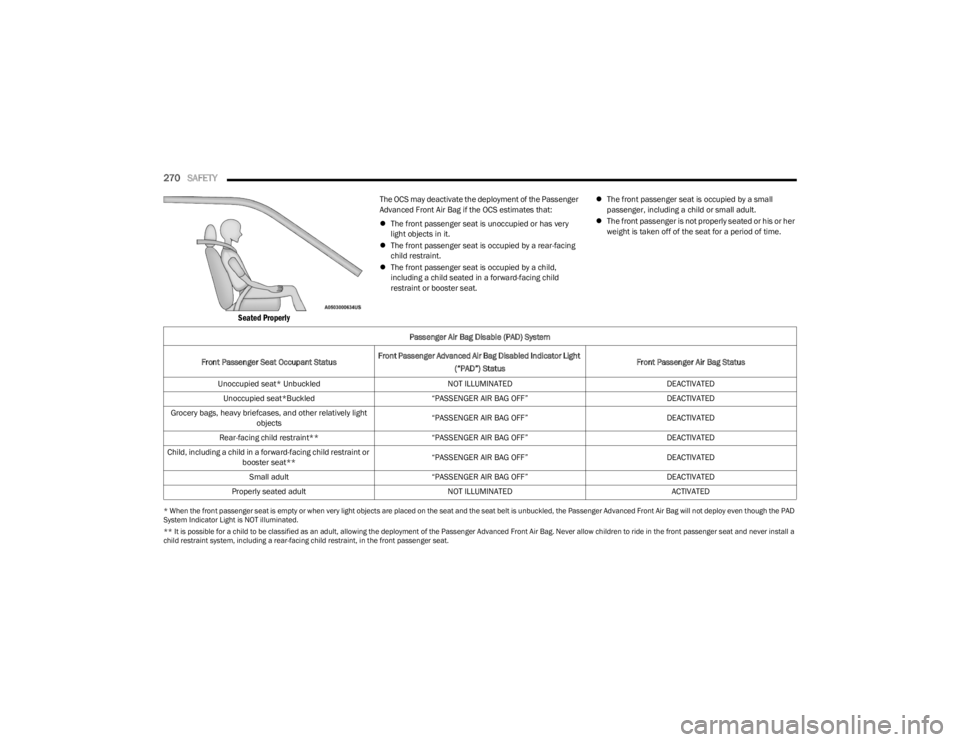
Seated Properly
The OCS may deactivate the deployment of the Passenger
Advanced Front Air Bag if the OCS estimates that:
The front passenger seat is unoccupied or has very
light objects in it.
The front passenger seat is occupied by a rear-facing
child restraint.
The front passenger seat is occupied by a child,
including a child seated in a forward-facing child
restraint or booster seat.
The front passenger seat is occupied by a small
passenger, including a child or small adult.
The front passenger is not properly seated or his or her
weight is taken off of the seat for a period of time.
* When the front passenger seat is empty or when very light objects are placed on the seat and the seat belt is unbuckled, the Passenger Advanced Front Air Bag will not deploy even though the PAD
System Indicator Light is NOT illuminated.
** It is possible for a child to be classified as an adult, allowing the deployment of the Passenger Advanced Front Air Bag. Never allow children to ride in the front passenger seat and never install a
child restraint system, including a rear-facing child restraint, in the front passenger seat.
Passenger Air Bag Disable (PAD) System
Front Passenger Seat Occupant Status Front Passenger Advanced Air Bag Disabled Indicator Light
(“PAD”) Status Front Passenger Air Bag Status
Unoccupied seat* Unbuckled NOT ILLUMINATEDDEACTIVATED
Unoccupied seat*Buckled “PASSENGER AIR BAG OFF” DEACTIVATED
Grocery bags, heavy briefcases, and other relatively light objects “PASSENGER AIR BAG OFF”
DEACTIVATED
Rear-facing child restraint** “PASSENGER AIR BAG OFF” DEACTIVATED
Child, including a child in a forward-facing child restraint or booster seat** “PASSENGER AIR BAG OFF”
DEACTIVATED
Small adult “PASSENGER AIR BAG OFF” DEACTIVATED
Properly seated adult NOT ILLUMINATED ACTIVATED
23_JL_OM_EN_USC_t.book Page 270
Page 273 of 396

SAFETY271
Passenger Advanced Front Air Bag Disabled (PAD)
Indicator Light
The Passenger Advanced Front Air Bag Disabled (PAD)
Indicator Light (an amber light located on the overhead
sports bar) tells the driver and front passenger when the
Passenger Advanced Front Air Bag is deactivated. The PAD
Indicator light illuminates the words “PASSENGER AIR BAG
OFF” to show that the Passenger Advanced Front Air Bag
will not deploy during a collision. When the front
passenger seat is empty or when very light objects are
placed on the seat and the seat belt is unbuckled, the
Passenger Advanced Front Air Bag will not deploy even
though the PAD indicator light is NOT illuminated.
The PAD indicator light should not be illuminated when an
adult passenger is properly seated in the front passenger
seat. The driver and adult passenger should verify that the
PAD Indicator Light is not illuminated when an adult is
riding in the front passenger seat. If an adult is not seated properly, the Passenger Advanced Front Air Bag may
deactivate and the PAD Indicator Light will be illuminated.
The PAD Indicator Light should be illuminated and the
Passenger Advanced Front Air Bag should be deactivated
for most properly seated and restrained children in the
passenger seat and for most properly installed child
restraint systems. However, under certain conditions,
even with a properly installed child restraint system, the
PAD Indicator Light may not be illuminated, even though
the Passenger Advanced Front Air Bag is deactivated. This
can occur if the child restraint is lighter than the lightest
weight necessary to illuminate the PAD Indicator Light.
NEVER
assume the Passenger Advanced Front Air Bag is
deactivated unless the PAD Indicator Light is illuminated
with the words “PASSENGER AIR BAG OFF.”
NOTE:If the seat belt is buckled for an empty seat, the PAD Indi -
cator Light will illuminate.
If The PAD Indicator Light Is Illuminated For An Adult
Passenger:
If an adult passenger is seated in the front passenger seat
and the PAD Indicator Light is illuminated, the passenger
may be sitting improperly. Follow the steps below to allow
the OCS to detect the adult passenger’s seated weight to
activate the Passenger Advanced Front Air Bag:
1. Turn off the vehicle and have the adult passenger step out of the vehicle.
2. Remove any extra materials from the passenger seat, such as cushions, pads, seat covers, seat massagers,
blankets, extra clothing, etc.
3. Place the seatback in the full upright position. 4. Have the adult passenger sit in the center of the seat,
with the passenger’s feet comfortably on or near the
floor, and with their back against the seatback.
5. Restart the vehicle and have the passenger remain in this seated position for two to three minutes after
restarting the vehicle.
WARNING!
Never place a rear-facing child restraint in front of an
air bag. A deploying passenger front air bag can
cause death or serious injury to a child 12 years or
younger, including a child in a rear-facing child
restraint.
Never install a rear-facing child restraint in the front
seat of a vehicle. Only use a rear-facing child
restraint in the rear seat. If the vehicle does not have
a rear seat, do not transport a rear-facing child
restraint in that vehicle.
WARNING!
If the PAD Indicator Light remains illuminated for an
adult passenger, have an authorized dealer service
the air bag system immediately. Failure to do so may
cause serious injury or death. If the PAD Indicator
Light is illuminated with the words "PASSENGER AIR
BAG OFF," the Passenger Advanced Front Air Bag will
not deploy in the event of a collision.
Never place a rear-facing child restraint in front of an
air bag. A deploying passenger front air bag can
cause death or serious injury to a child 12 years or
younger, including a child in a rear-facing child
restraint.
Never install a rear-facing child restraint in the front
seat of a vehicle. Only use a rear-facing child
restraint in the rear seat. If the vehicle does not have
a rear seat, do not transport a rear-facing child
restraint in that vehicle.
Children 12 years or younger should always ride
buckled up in the rear seat of a vehicle with a rear
seat.
6
23_JL_OM_EN_USC_t.book Page 271