2023 HYUNDAI SONATA audio
[x] Cancel search: audioPage 357 of 555
While Driving
6-70
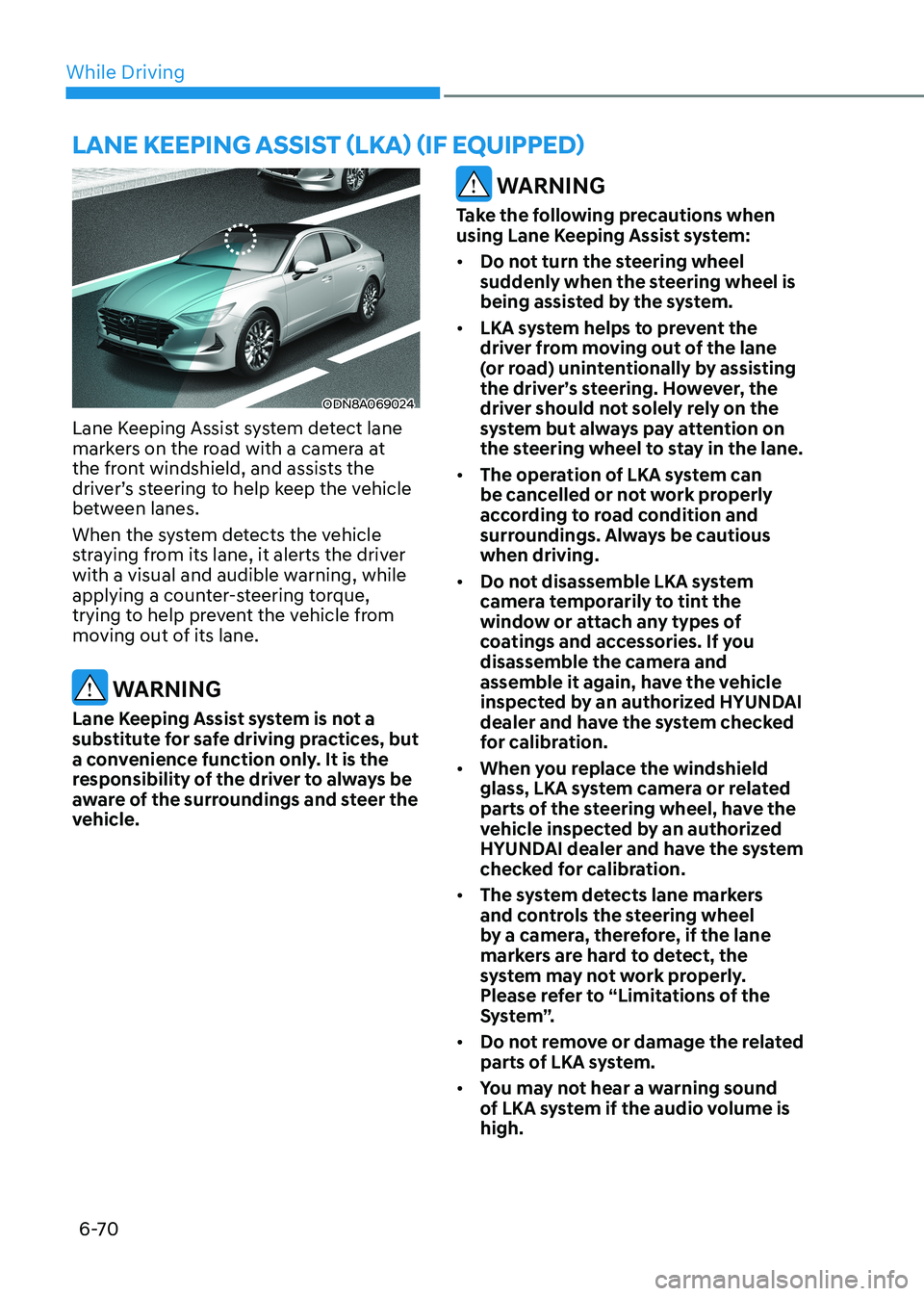
ODN8A069024
Lane Keeping Assist system detect lane
markers on the road with a camera at
the front windshield, and assists the
driver’s steering to help keep the vehicle
between lanes.
When the system detects the vehicle
straying from its lane, it alerts the driver
with a visual and audible warning, while
applying a counter-steering torque,
trying to help prevent the vehicle from
moving out of its lane.
WARNING
Lane Keeping Assist system is not a
substitute for safe driving practices, but
a convenience function only. It is the
responsibility of the driver to always be
aware of the surroundings and steer the
vehicle.
WARNING
Take the following precautions when
using Lane Keeping Assist system: • Do not turn the steering wheel
suddenly when the steering wheel is
being assisted by the system.
• LKA system helps to prevent the
driver from moving out of the lane
(or road) unintentionally by assisting
the driver’s steering. However, the
driver should not solely rely on the
system but always pay attention on
the steering wheel to stay in the lane.
• The operation of LKA system can
be cancelled or not work properly
according to road condition and
surroundings. Always be cautious when driving.
• Do not disassemble LKA system
camera temporarily to tint the
window or attach any types of
coatings and accessories. If you
disassemble the camera and
assemble it again, have the vehicle
inspected by an authorized HYUNDAI
dealer and have the system checked
for calibration.
• When you replace the windshield
glass, LKA system camera or related
parts of the steering wheel, have the
vehicle inspected by an authorized
HYUNDAI dealer and have the system
checked for calibration.
• The system detects lane markers
and controls the steering wheel
by a camera, therefore, if the lane
markers are hard to detect, the
system may not work properly.
Please refer to “Limitations of the
S y s t e m ”.
• Do not remove or damage the related
parts of LKA system.
• You may not hear a warning sound
of LKA system if the audio volume is high.
lane Keeping assist (lKa) (if equippeD)
Page 368 of 555
06
6-81
WARNING
• The warning light on the side view
mirror will illuminate whenever a
vehicle is detected at the rear side by
the system.
To help avoid accidents, do not focus
only on the warning light and neglect
to see the surrounding of the vehicle.
• Drive safely even though the
vehicle is equipped with Blind-Spot
Collision-Avoidance Assist system.
Do not solely rely on the system
but check your surrounding before changing lanes or backing the
vehicle up.
• The system may not alert the driver
in some conditions so always check
your surroundings while driving.
CAUTION
• The driver should always use
extreme caution while operating
the vehicle, whether or not the
warning light on the side view mirror
illuminates or there is a warning alarm.
• Playing the vehicle audio system at
high volume may offset the Blind-
Spot Collision Warning system
warning sounds.
• The warning of Blind-Spot Collision-
Avoidance Assist system may not
sound while other system’s warning sounds. Blind-Spot Collision-Avoidance
Assist
Blind-Spot Collision-Avoidance Assist
system may apply braking power, when
an approaching vehicle is detected
within a certain distance next to or
behind your vehicle.
It gently applies braking power on the
wheel, which is located in the opposite
side of the possibly-colliding point. The
instrument cluster will inform the driver
of the system activation.
Blind-Spot Collision-Avoidance Assist
system is automatically deactivated when:
- The vehicle drives a certain distance away
- The vehicle direction is changed against the possible-colliding point
- The steering wheel is abruptly moved
- The brake pedal is depressed
- After a certain period of time
The driver should drive the vehicle in the
middle of the vehicle lanes to keep the
system in the ready status.
When the vehicle drives too close to one
side of the vehicle lanes, the system may
not properly operate.
In addition, the system may not properly
control your vehicle in accordance with
driving situations. Thus, always pay close
attention to road situations.
Page 387 of 555
While Driving
6-100
Information
The system may suggest a break according
to the driver’s driving pattern or habits
even if the driver doesn’t feel fatigue.
NOTICE
• Driver Attention Warning system
utilizes the camera sensor on the
front windshield for its operation. To
keep the camera sensor in the best
condition, you should observe the
followings:
• Never install any accessories or
stickers on the front windshield, or
tint the front windshield.
• NEVER place any reflective objects
(i.e. white paper, mirror) over the
dashboard. Any light reflection
may cause a malfunction of Driver
Attention Warning system.
• Pay extreme caution to keep the
camera sensor dry.
• Never disassemble the camera
assembly, or apply any impact on the
camera assembly.
If the sensor is forcibly moved out
of proper alignment, the system
may not operate correctly. Have the
vehicle inspected by an authorized
HYUNDAI dealer.
CAUTION
• Driver Attention Warning system may
not provide alerts in the following
situations:
• Driver Attention Warning system
is using the front view camera. To
optimize the function of the front
view camera, the driver should
manage carefully. For detailed
information, please refer to the
warning statements in Lane Keeping
Assist system section.
• The lane detection performance
is limited. (For more information,
refer to “Lane Keeping Assist (LKA)”
section in this chapter.)
• The vehicle is erratically driven
or is abruptly turned for obstacle
avoidance (e.g. construction area,
other vehicles, fallen objects, bumpy
road).
• Forward drivability of the vehicle is
severely undermined (possibly due
to wide variation in tire pressures,
uneven tire wear-out, toe-in/toe-out
alignment).
• The vehicle is driven on a curvy road.
• The vehicle is driven through a windy
area.
• The vehicle is driven on a bumpy
road.
• The vehicle is controlled by the
following driving assist systems:
- Forward Collision-Avoidance Assist
system
- Lane Keeping Assist system
- Smart Cruise Control system
- Lane Following Assist system
CAUTION
Playing the vehicle audio system at
high volume may prevent occupants
from hearing Driver Attention Warning
system warning sounds.
Page 401 of 555
While Driving
6-114
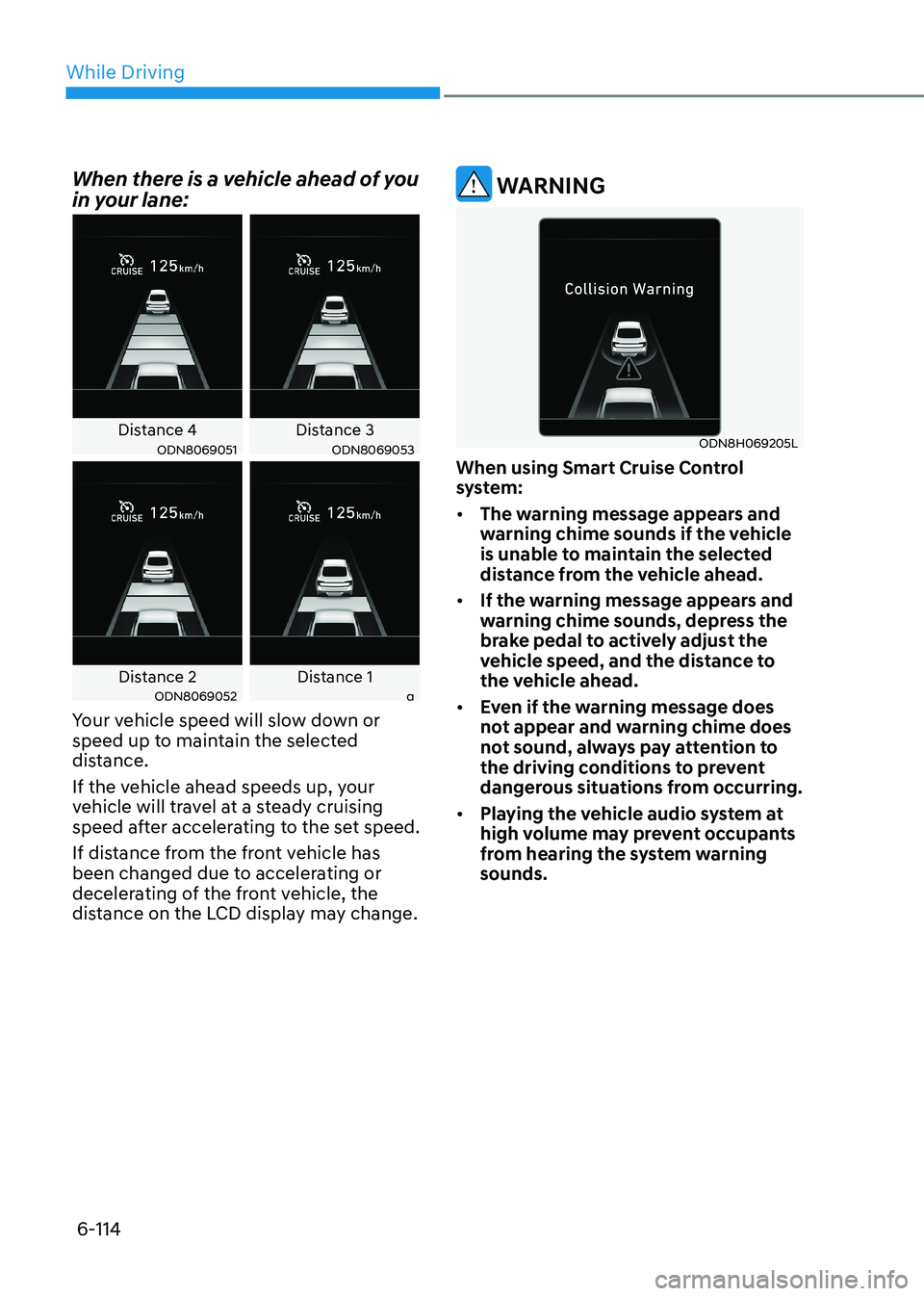
When there is a vehicle ahead of you
in your lane:
Distance 4 Distance 3ODN8069051ODN8069053
Distance 2 Distance 1ODN8069052a
Your vehicle speed will slow down or
speed up to maintain the selected
distance.
If the vehicle ahead speeds up, your
vehicle will travel at a steady cruising
speed after accelerating to the set speed.
If distance from the front vehicle has
been changed due to accelerating or
decelerating of the front vehicle, the
distance on the LCD display may change.
WARNING
ODN8H069205L
When using Smart Cruise Control
system: • The warning message appears and
warning chime sounds if the vehicle
is unable to maintain the selected
distance from the vehicle ahead.
• If the warning message appears and
warning chime sounds, depress the
brake pedal to actively adjust the
vehicle speed, and the distance to
the vehicle ahead.
• Even if the warning message does
not appear and warning chime does
not sound, always pay attention to
the driving conditions to prevent
dangerous situations from occurring.
• Playing the vehicle audio system at
high volume may prevent occupants
from hearing the system warning sounds.
Page 413 of 555
While Driving
6-126
ODN8A069024
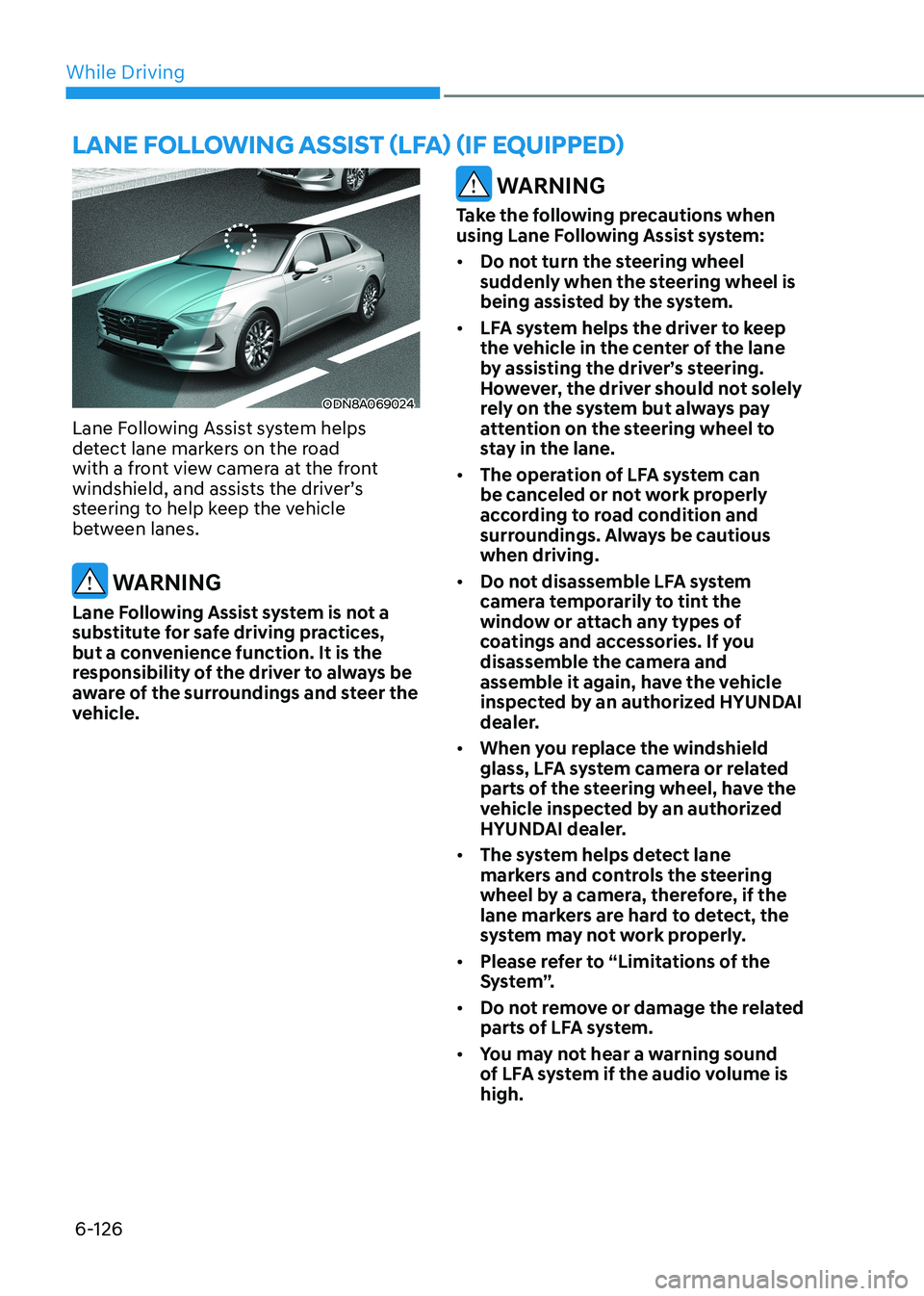
Lane Following Assist system helps
detect lane markers on the road
with a front view camera at the front
windshield, and assists the driver’s
steering to help keep the vehicle
between lanes.
WARNING
Lane Following Assist system is not a
substitute for safe driving practices,
but a convenience function. It is the
responsibility of the driver to always be
aware of the surroundings and steer the
vehicle.
WARNING
Take the following precautions when
using Lane Following Assist system: • Do not turn the steering wheel
suddenly when the steering wheel is
being assisted by the system.
• LFA system helps the driver to keep
the vehicle in the center of the lane
by assisting the driver’s steering.
However, the driver should not solely
rely on the system but always pay
attention on the steering wheel to
stay in the lane.
• The operation of LFA system can
be canceled or not work properly
according to road condition and
surroundings. Always be cautious when driving.
• Do not disassemble LFA system
camera temporarily to tint the
window or attach any types of
coatings and accessories. If you
disassemble the camera and
assemble it again, have the vehicle
inspected by an authorized HYUNDAI
dealer.
• When you replace the windshield
glass, LFA system camera or related
parts of the steering wheel, have the
vehicle inspected by an authorized
HYUNDAI dealer.
• The system helps detect lane
markers and controls the steering
wheel by a camera, therefore, if the
lane markers are hard to detect, the
system may not work properly.
• Please refer to “Limitations of the
S y s t e m ”.
• Do not remove or damage the related
parts of LFA system.
• You may not hear a warning sound
of LFA system if the audio volume is high.
lane following assist (lfa) (if equippeD)
Page 430 of 555
06
6-143
CAUTION
• When the operation condition of
Rear Cross-Traffic Collision Warning
system is satisfied, the warning
will occur every time a vehicle
approaches the side or rear of your
stopped (0 km/h (0 mph) vehicle
speed) vehicle.
• The system’s warning or brake may
not operate properly if the left or
right of your vehicle’s rear bumper is
blocked by a vehicle or obstacle.
• The driver should always use
extreme caution while operating
the vehicle, whether or not the
warning light on the side view mirror
illuminates or there is a warning alarm.
• Playing the vehicle audio system at
high volume may offset the system’s
warning sounds.
• The warning of Rear Cross-Traffic
Collision Warning System may not
sound while other system’s warning sounds.
• If any other warning sound such as
seat belt warning chime is already
generated, Rear Cross-Traffic
Collision Warning system warning
may not sound. WARNING
• Drive safely even though the vehicle
is equipped with Rear Cross-Traffic
Collision Warning system and Rear
Cross-Traffic Collision-Avoidance
Assist system. Do not solely rely
on the system but check your
surrounding when backing the
vehicle up.
• The driver is responsible for accurate
brake control.
• Always pay extreme caution while
driving. Rear Cross-Traffic Collision
Warning system and Rear Cross-
Traffic Collision-Avoidance Assist
system may not operate properly or
unnecessarily operate in accordance
with your driving situations.
• Rear Cross-Traffic Collision-
Avoidance Assist system is not a
substitute for safe driving practices,
but a convenience function only. It
is the responsibility of the driver to
always drive cautiously to prevent
unexpected and sudden situations
from occurring. Pay attention to the
road conditions at all times.
Page 507 of 555
08
8-37
Battery Recharging
WARNING
Always follow these instructions when
recharging your vehicle’s battery to
avoid the risk of SERIOUS INJURY or
DEATH from explosions or acid burns: • Before performing maintenance or
recharging the battery, turn off all
accessories and place the ignition
switch to the LOCK/OFF position.
• Keep all flames, sparks, or smoking
materials away from the battery.
• Always work outdoors or in an area
with plenty of ventilation.
• Wear eye protection when checking
the battery during charging.
• The battery must be removed from
the vehicle and placed in a well
ventilated area.
• Watch the battery during charging,
and stop or reduce the charging
rate if the battery cells begin boiling
violently.
• Vehicle is equipped with the
Absorbent Glass Mat (AGM) battery.
Do not charge the AGM battery with
a general charger. It may damage
or explode the AGM battery. Only
charge the AGM battery with a
charger that has AGM battery
setting.
• The negative battery cable must
be removed first to disconnect
the battery and installed last
to reconnect with the battery.
Disconnect the battery charger in the
following order:
1. Turn off the battery charger main
switch.
2. Unhook the negative clamp from the negative battery terminal.
3. Unhook the positive clamp from the positive battery terminal.
• Always use a genuine HYUNDAI
approved battery when you replace
the battery. By jump starting
After a jump start, idle the engine
with the headlights ON for 20-30
minutes before shutting the engine
off. The vehicle may not restart if you
shut it off before the battery had a
chance to adequately recharge. See
“Jump Starting” in chapter 7 for more
information on jump starting procedures.
Information
An inappropriately disposed battery can be harmful to
the environment and human health. Dispose of the battery
according to your local law(s) or
regulations.
Reset Features
The following items may need to be reset
after the battery has been discharged or
the battery has been disconnected. See
chapter 3 or 4 for: •
Power Windows
• Trip Computer
• Climate Control System
• Clock
• Audio System
• Sunroof
Page 524 of 555
Maintenance
8-54
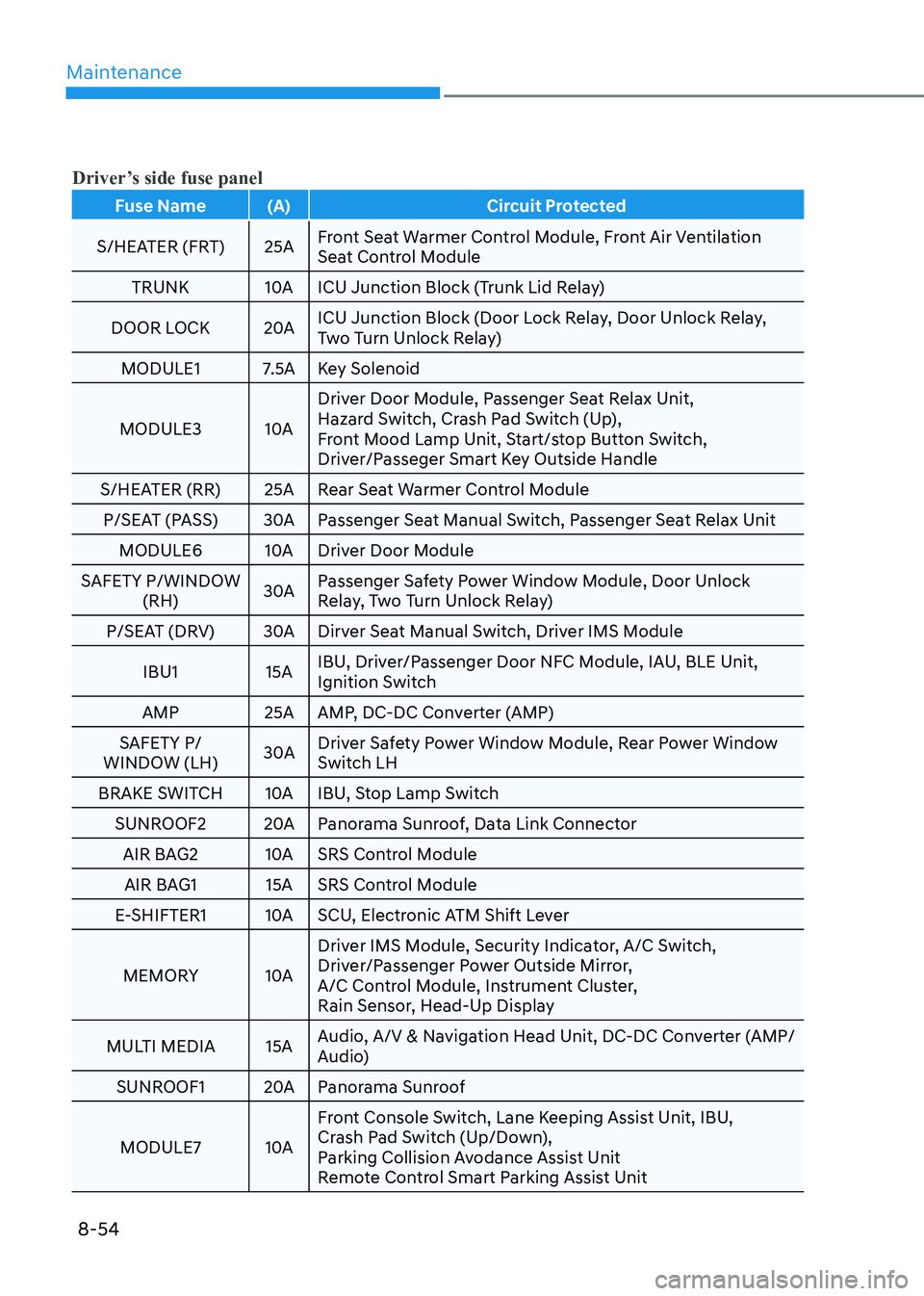
Driver’s side fuse panel
Fuse Name (A) Circuit Protected
S/HEATER (FRT) 25A Front Seat Warmer Control Module, Front Air Ventilation
Seat Control Module
TRUNK 10A ICU Junction Block (Trunk Lid Relay)
DOOR LOCK 20A ICU Junction Block (Door Lock Relay, Door Unlock Relay,
Two Turn Unlock Relay)
MODULE1 7.5A Key Solenoid
MODULE3 10A Driver Door Module, Passenger Seat Relax Unit,
Hazard Switch, Crash Pad Switch (Up),
Front Mood Lamp Unit, Start/stop Button Switch,
Driver/Passeger Smart Key Outside Handle
S/HEATER (RR) 25A Rear Seat Warmer Control Module P/SEAT (PASS) 30A Passenger Seat Manual Switch, Passenger Seat Relax Unit MODULE6 10A Driver Door Module
SAFETY P/WINDOW (RH) 30A Passenger Safety Power Window Module, Door Unlock
Relay, Two Turn Unlock Relay)
P/SEAT (DRV) 30A Dirver Seat Manual Switch, Driver IMS Module
IBU1 15A IBU, Driver/Passenger Door NFC Module, IAU, BLE Unit,
Ignition Switch
AMP 25A AMP, DC-DC Converter (AMP)
SAFETY P/
WINDOW (LH) 30A Driver Safety Power Window Module, Rear Power Window
Switch LH
BRAKE SWITCH 10A IBU, Stop Lamp Switch SUNROOF2 20A Panorama Sunroof, Data Link Connector
AIR BAG2 10A SRS Control Module AIR BAG1 15A SRS Control Module
E-SHIFTER1 10A SCU, Electronic ATM Shift Lever
MEMORY 10A Driver IMS Module, Security Indicator, A/C Switch,
Driver/Passenger Power Outside Mirror,
A/C Control Module, Instrument Cluster,
Rain Sensor, Head-Up Display
MULTI MEDIA 15A Audio, A/V & Navigation Head Unit, DC-DC Converter (AMP/
Audio)
SUNROOF1 20A Panorama Sunroof
MODULE7 10A Front Console Switch, Lane Keeping Assist Unit, IBU,
Crash Pad Switch (Up/Down),
Parking Collision Avodance Assist Unit
Remote Control Smart Parking Assist Unit