2023 HYUNDAI IONIQ 6 towing
[x] Cancel search: towingPage 376 of 582

Driver Assistance System
7-32
Limitations of Lane Keeping Assist
Lane Keeping Assist may not operate
properly or may operate unexpectedly
under the following circumstances:
• The lane is contaminated or difficult to detect because:
- The lane markings (or road edge) are covered with rain, snow, dirt, oil, etc.
- The color of the lane marking (or road edge) is not distinguishable from the
road
- There are markings (or road edges) on the road near the lane or the
markings (or road edges) on the road
look similar to the lane markings (or
road edge)
- The lane marking (or road edge) is indistinct or damaged
- The shadow is on the lane marking (or road edge) by a median strip, trees,
guardrail, noise barriers, etc.
• The lane number increases or decreases, or the lane markings (or
road edges) are crossing
• There are more than two lane markings (or road edges) on the road
• The lane markings (or road edges) are complicated or a structure substitutes
for the lines, such as a construction
area
• There are road markings, such as zigzag lanes, crosswalk markings and road
signs
• The lane suddenly disappears, such as at the intersection
• The lane (or road width) is very wide or narrow
• There is a road edge without a lane
• There is a boundary structure in the roadway, such as a tollbooth, sidewalk,
curb, etc.
• The distance to the front vehicle is extremely short or the vehicle in front is
covering the lane marking (or road
edge)Information For more information on the limitations of the
front view camera, refer to the “Forward
Collision-Avoidance Assist (FCA)” section in
this chapter.
WARNING Take the following precautions when
using Lane Keeping Assist:
• The driver has the responsibility to safely drive and control the vehicle. Do
not solely rely on Lane Keeping Assist.
• The operation of Lane Keeping Assist can be cancelled or not work properly
depending on road conditions and
surroundings. Always be cautious while
driving.
• Refer to the “Limitations of Lane Keeping Assist” if the lane is not
detected properly.
• When you are towing a trailer or another vehicle, turn off Lane Keeping
Assist for safety reasons.
• If the vehicle is driven at high speed, the steering wheel will not be
controlled. The driver must always
follow the speed limit when using Lane
Keeping Assist.
• If any other system’s warning message is displayed or audible warning is
generated, Lane Keeping Assist
warning message may not be displayed
and audible warning may not be
generated.
• You may not hear the warning sound of Lane Keeping Assist if the surrounding
is noisy.
• If you attach objects to the steering wheel, steering may not be assisted
properly.
• Lane Keeping Assist may not operate for 15 seconds after the vehicle is
started, or the front view camera is
initialized.
Hyundai_CE_en_US.book Page 32
Page 386 of 582
Driver Assistance System
7-42
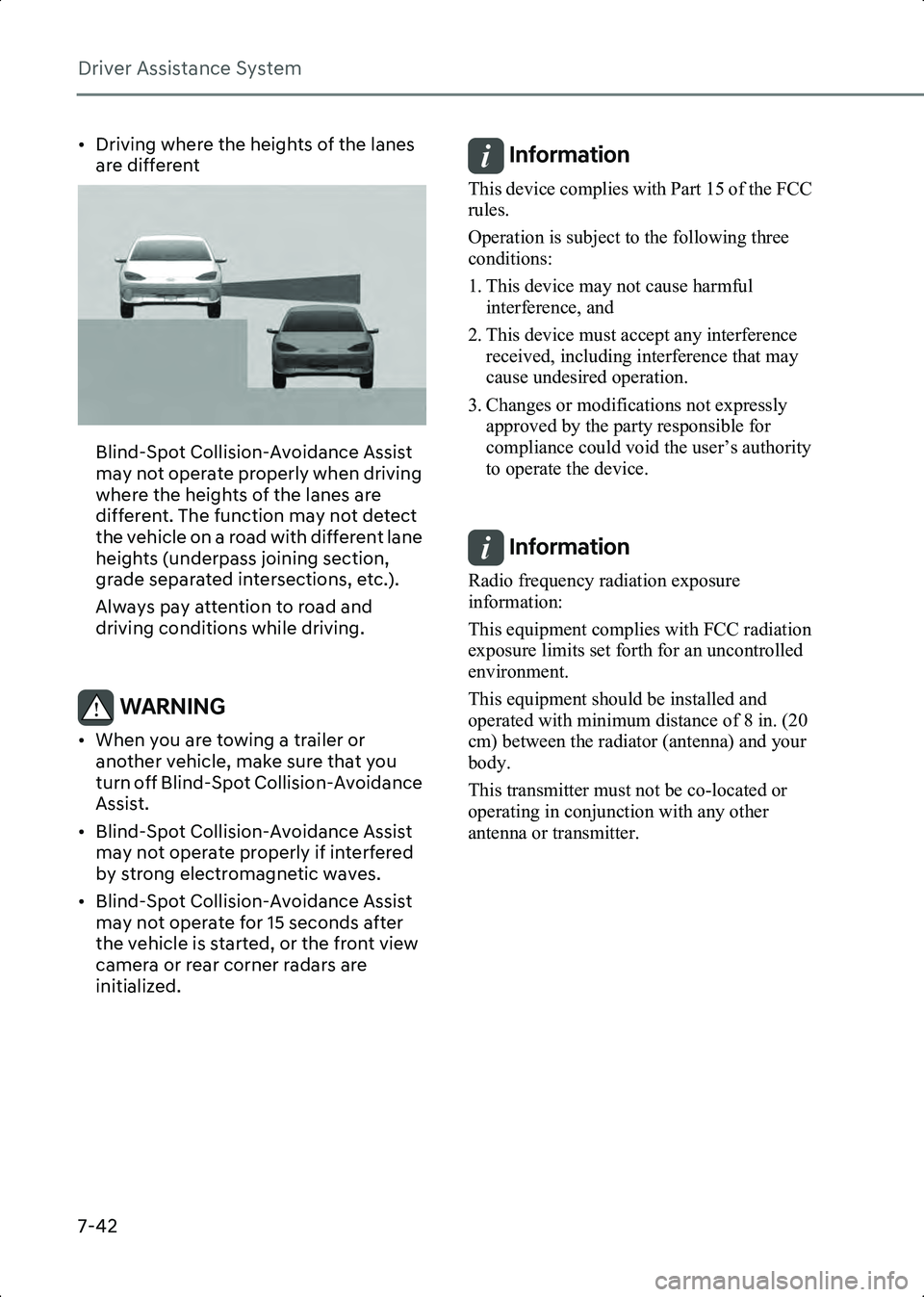
• Driving where the heights of the lanes are different
B7001616
Blind-Spot Collision-Avoidance Assist
may not operate properly when driving
where the heights of the lanes are
different. The function may not detect
the vehicle on a road with different lane
heights (underpass joining section,
grade separated intersections, etc.).
Always pay attention to road and
driving conditions while driving.
WARNING • When you are towing a trailer or another vehicle, make sure that you
turn off Blind-Spot Collision-Avoidance
Assist.
• Blind-Spot Collision-Avoidance Assist may not operate properly if interfered
by strong electromagnetic waves.
• Blind-Spot Collision-Avoidance Assist may not operate for 15 seconds after
the vehicle is started, or the front view
camera or rear corner radars are
initialized.
Information This device complies with Part 15 of the FCC
rules.
Operation is subject to the following three
conditions:
1. This device may not cause harmful interference, and
2. This device must accept any interference received, including interference that may
cause undesired operation.
3. Changes or modifications not expressly approved by the party responsible for
compliance could void the user’s authority
to operate the device.
Information Radio frequency radiation exposure
information:
This equipment complies with FCC radiation
exposure limits set forth for an uncontrolled
environment.
This equipment should be installed and
operated with minimum distance of 8 in. (20
cm) between the radiator (antenna) and your
body.
This transmitter must not be co-located or
operating in conjunction with any other
antenna or transmitter.
Hyundai_CE_en_US.book Page 42
Page 415 of 582
7
7-71
• Always be aware of the selected speed and headway distance.
• Keep a safe distance according to road conditions and vehicle speed. If the
headway distance is too close during
high-speed driving, a serious collision
may result.
• When maintaining distance with the vehicle ahead, if the front vehicle
disappears, Smart Cruise Control may
suddenly accelerate to the set speed.
Always be aware of unexpected and
sudden situations from occurring.
• Vehicle speed may decrease on an upward slope and increase on a
downward slope.
• Always be aware of situations such as when a vehicle cuts in suddenly.
• When you are towing a trailer or another vehicle, turn off Smart Cruise
Control for safety reasons.
• Turn off Smart Cruise Control when your vehicle is being towed.
• Smart Cruise Control may not operate properly if interfered by strong
electromagnetic waves.
• Smart Cruise Control may not detect an obstacle in front and lead to a collision.
Always look ahead cautiously to
prevent unexpected and sudden
situations from occurring.
• Vehicles moving in front of you with a frequent lane change may cause a
delay in Smart Cruise Control reaction
or may cause Smart Cruise Control to
react to a vehicle actually in an adjacent
lane. Always drive cautiously to prevent
unexpected and sudden situations
from occurring.
• Always be aware of the surroundings and drive safely, even though a warning
message does not appear or an audible
warning does not sound.
• If any other system’s warning message is displayed or warning sound is
generated, Smart Cruise Control
warning message may not be displayed and warning sound may not be
generated.
• You may not hear the warning sound of Forward Collision-Avoidance Assist if
the surrounding is noisy.
• The vehicle manufacturer is not responsible for any traffic violation or
accidents caused by the driver.
• Always set the vehicle speed under the speed limit in your area.
• Vehicle distance, acceleration and reaction speed may change if the
driver’s driving style changes.
Information • Smart Cruise Control may not operate for 15 seconds after the vehicle is started or the
front view camera or front radar is
initialized.
• You may hear a sound when the brake is controlled by Smart Cruise Control.
Smart Cruise Control
Malfunction and Limitations
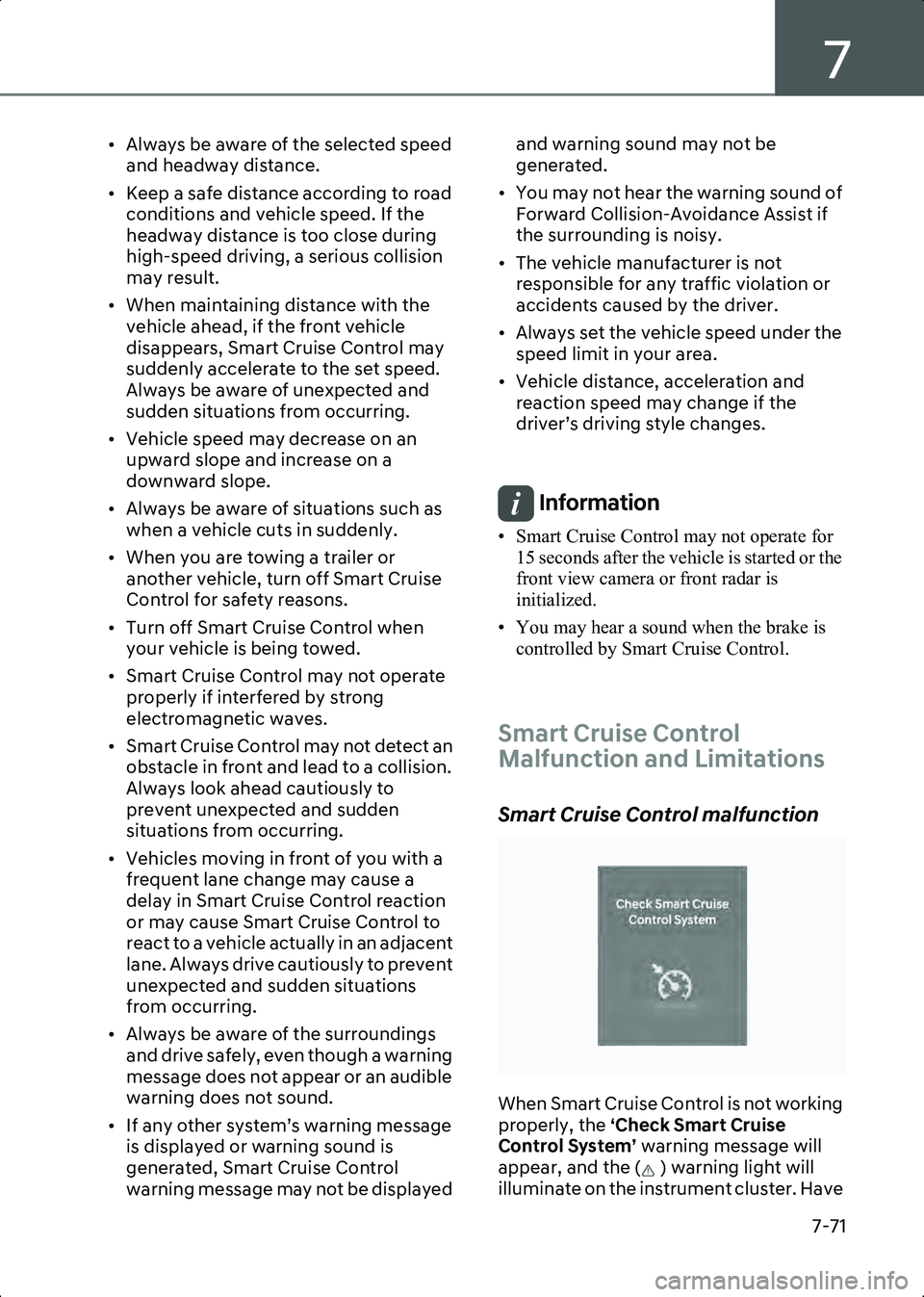
Smart Cruise Control malfunction
B7004401
When Smart Cruise Control is not working
properly, the ‘Check Smart Cruise
Control System’ warning message will
appear, and the ( ) warning light will
illuminate on the instrument cluster. Have
Hyundai_CE_en_US.book Page 71
Page 424 of 582
Driver Assistance System
7-80
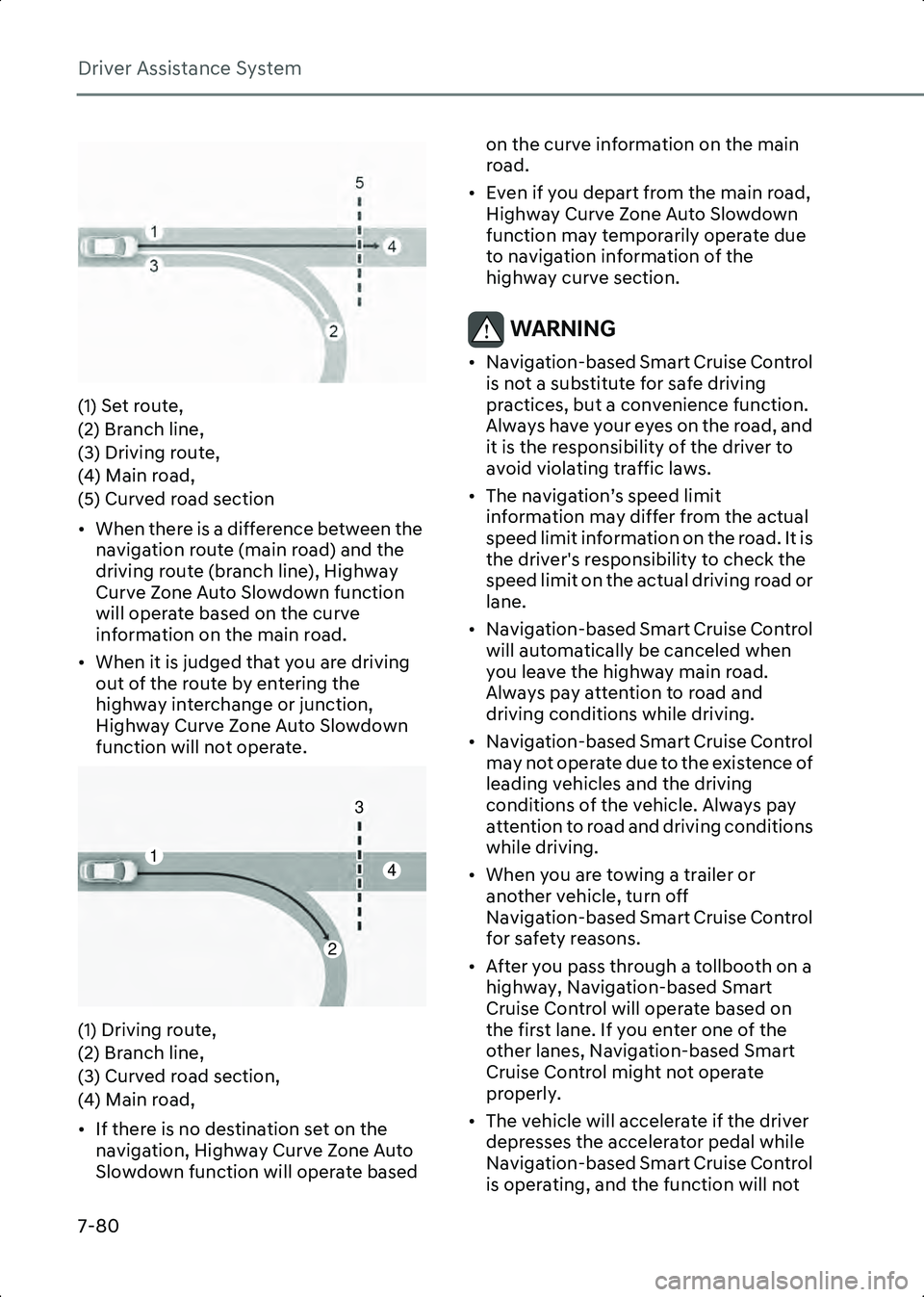
B7004802(1) Set route,
(2) Branch line,
(3) Driving route,
(4) Main road,
(5) Curved road section
• When there is a difference between the navigation route (main road) and the
driving route (branch line), Highway
Curve Zone Auto Slowdown function
will operate based on the curve
information on the main road.
• When it is judged that you are driving out of the route by entering the
highway interchange or junction,
Highway Curve Zone Auto Slowdown
function will not operate.
B7004803(1) Driving route,
(2) Branch line,
(3) Curved road section,
(4) Main road,
• If there is no destination set on the navigation, Highway Curve Zone Auto
Slowdown function will operate based on the curve information on the main
road.
• Even if you depart from the main road, Highway Curve Zone Auto Slowdown
function may temporarily operate due
to navigation information of the
highway curve section.
WARNING • Navigation-based Smart Cruise Control is not a substitute for safe driving
practices, but a convenience function.
Always have your eyes on the road, and
it is the responsibility of the driver to
avoid violating traffic laws.
• The navigation’s speed limit information may differ from the actual
speed limit information on the road. It is
the driver's responsibility to check the
speed limit on the actual driving road or
lane.
• Navigation-based Smart Cruise Control will automatically be canceled when
you leave the highway main road.
Always pay attention to road and
driving conditions while driving.
• Navigation-based Smart Cruise Control may not operate due to the existence of
leading vehicles and the driving
conditions of the vehicle. Always pay
attention to road and driving conditions
while driving.
• When you are towing a trailer or another vehicle, turn off
Navigation-based Smart Cruise Control
for safety reasons.
• After you pass through a tollbooth on a highway, Navigation-based Smart
Cruise Control will operate based on
the first lane. If you enter one of the
other lanes, Navigation-based Smart
Cruise Control might not operate
properly.
• The vehicle will accelerate if the driver depresses the accelerator pedal while
Navigation-based Smart Cruise Control
is operating, and the function will not
2
4
3
1
Hyundai_CE_en_US.book Page 80
Page 438 of 582

Driver Assistance System
7-94
Highway Driving Assist may not detect
possible collisions due to limitations of
the function. Always be aware of the
limitations of the function. Obstacles
such as vehicles, motorcycles, bicycles,
pedestrians, or unspecified objects or
structures such as guardrails, tollbooth,
etc., that may collide with the vehicle
may not be detected.
• Highway Driving Assist will turn off automatically under the following
situations:
- Driving on roads that Highway Driving Assist does not operate, such
as a rest area, intersection, junction,
etc.
- The navigation does not operate properly such as when the navigation
is being updated or restarted
• Highway Driving Assist may inadvertently operate or turn off
depending on road conditions
(navigation information) and
surroundings.
• Lane Following Assist function may be temporarily disabled when the front
view camera cannot detect lanes
properly or the hands-off warning is on.
• You may not hear the warning sound of Highway Driving Assist if the
surrounding is noisy.
• If the vehicle is driven at high speed above a certain speed at a curve, your
vehicle may drive to one side or may
depart from the driving lane.
• When you are towing a trailer or another vehicle, turn off Highway
Driving Assist for safety reasons.
• The hands-off warning message may appear early or late depending on how
the steering wheel is held or road
conditions. Always have your hands on
the steering wheel while driving.
• For your safety, please read the owner's manual before using the Highway
Driving Assist. • Highway Driving Assist will not operate
when the vehicle is started, or when the
detecting sensors or navigation is being
initialized.
Limitation of Highway Driving Assist
Highway Driving Assist and Highway Lane
Change function may not operate
properly, or may not operate under the
following circumstances:
• The map information and the actual road is different because the navigation
is not updated
• The map information and the actual road is different because of real-time
GPS data or map information error
• The infotainment system is overloaded by simultaneously performing
functions such as route search, video
playback, voice recognition, etc.
• GPS signals are blocked in areas such as a tunnel
• The driver goes off course or the route to the destination is changed or
canceled by resetting the navigation
• The vehicle enters a service station or rest area
• Android Auto or Car Play is operating
• The navigation cannot detect the current vehicle position (for example,
elevated roads including overpass
adjacent to general roads or nearby
roads exist in a parallel way)
• White single dotted lane line or road edge cannot be detected
• The road is temporarily controlled due to construction, etc.
• There is no structure, such as a medium strip, guardrails, etc., on the road
• There is a changeable lane in the direction of lane change
• If a trailer, carrier, etc., is installed
Hyundai_CE_en_US.book Page 94
Page 454 of 582
Driver Assistance System
7-110
occurs, the function may unnecessarily
warn the driver and control the brake.
Always check your surroundings while
backing up.
• When the vehicle is parked rearward
B7006909
Rear Cross-Traffic Collision-Avoidance
Assist may detect vehicles passing by
behind you when parking in reverse
into a parking space. If this occurs, the
function may unnecessarily warn the
driver and control the brake.
Always check your surroundings while
backing up.
WARNING • When you are towing a trailer or turn off Rear Cross-Traffic Collision-Avoidance
Assist for safety reasons.
• Rear Cross-Traffic Collision-Avoidance Assist may not operate properly if
interfered by strong electromagnetic
waves.
• Rear Cross-Traffic Collision-Avoidance Assist may not operate for 3 seconds
after the vehicle is started, or the rear
corner radars are initialized.
Forward/Reverse Parking
if equipped
Distance Warning (PDW)
Forward/Reverse Parking Distance
Warning can help warn the driver if an
obstacle is detected within a certain
distance when the vehicle is moving
forward or in reverse at low speeds.
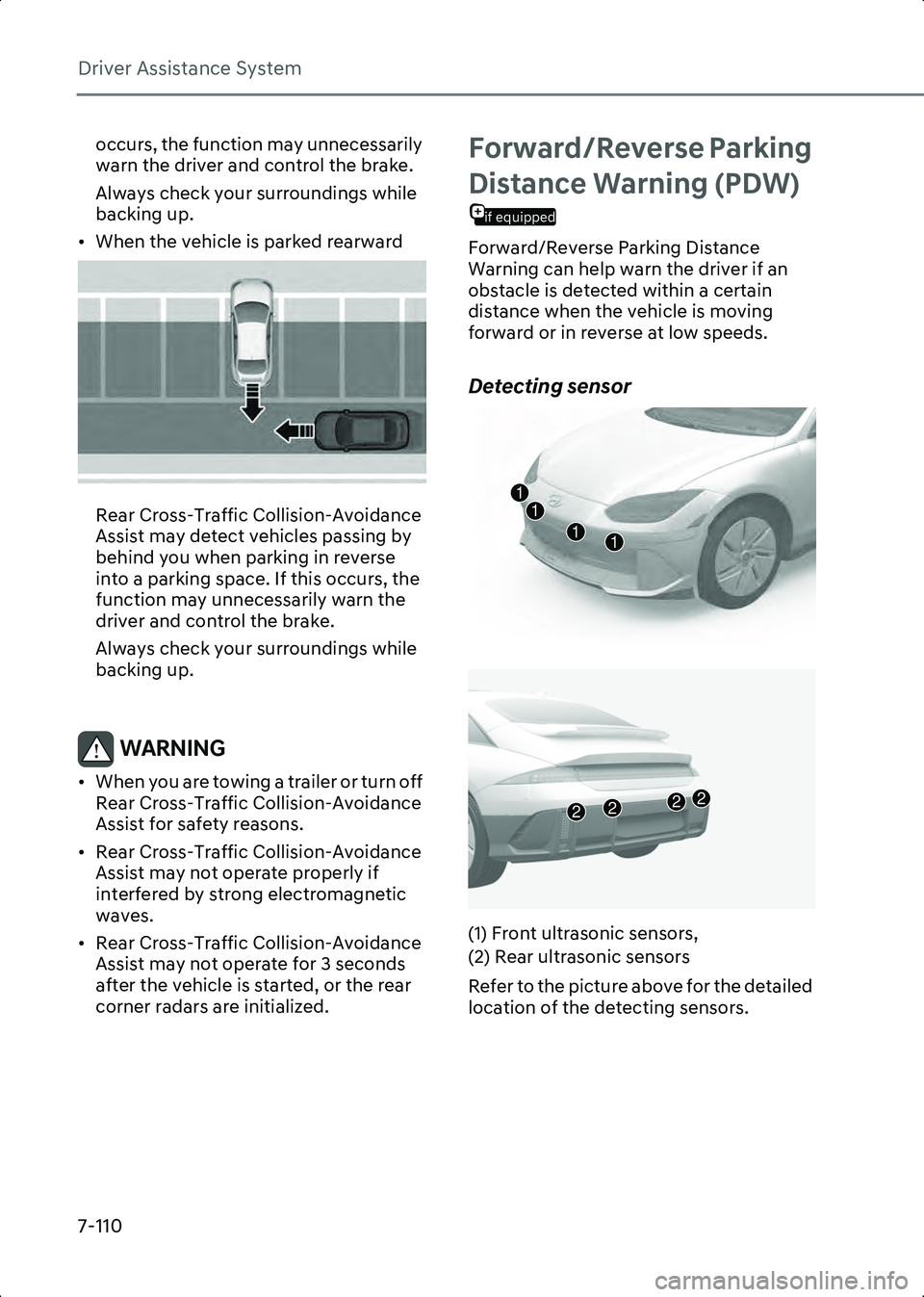
Detecting sensor
B7007001
B7007002
(1) Front ultrasonic sensors,
(2) Rear ultrasonic sensors
Refer to the picture above for the detailed
location of the detecting sensors.
1111
2222
Hyundai_CE_en_US.book Page 110
Page 470 of 582
Driver Assistance System
7-126
CAUTION • Noise may be heard when sudden braking occurs to avoid a collision.
• If any other warning sound such as the seat belt warning chime is already
generated, Parking
Collision-Avoidance Assist warning
may not sound.
• Parking Collision-Avoidance Assist may not work properly if the bumper has
been damaged, replaced or repaired.
• Parking Collision-Avoidance Assist may not operate properly if interfered by
strong electromagnetic waves.
• Playing the vehicle audio system at high volume may prevent passengers
from hearing Parking
Collision-Avoidance Assist warning
sounds.
• Turn off Parking Collision-Avoidance Assist when towing a trailer. If towing
and moving in reverse, Parking
Collision-Avoidance Assist will activate
as it detects the trailer.
• The brake control may not operate properly depending on the status of
ESC (Electronic Stability Control).
There will only be a warning when:
- The ESC (Electronic Stability Control) warning light is on
- ESC (Electronic Stability Control) is engaged in a different function
CAUTION Take the following precautions to
maintain optimal performance of the
detecting sensors:
• Always keep the wide view cameras and ultrasonic sensors clean.
• Do not use any cleanser containing acid or alkaline detergents when cleaning
the camera lens. Use only a mild soap or neutral detergent, and rinse thoroughly
with water.
• Do not spray the wide view cameras or the rear ultrasonic sensors or their
surrounding area directly with a high
pressure washer. It may cause the wide
angle cameras or the ultrasonic sensors
to malfunction.
• Do not apply objects, such as a bumper sticker or a bumper guard, near the
wide angle cameras or ultrasonic
sensors or apply paint to the bumper.
Doing so may adversely affect the
performance of Parking
Collision-Avoidance Assist.
• Never disassemble or apply impact on the wide angle cameras or the
ultrasonic sensors components.
• Do not apply unnecessary force on the wide view cameras or the ultrasonic
sensors. Parking Collision-Avoidance
Assist may not operate properly if the
wide angle cameras or the ultrasonic
sensor(s) is forcibly moved out of
proper alignment. Have the vehicle
inspected by an authorized HYUNDAI
dealer.
Information Parking Collision-Avoidance Assist can
detect a pedestrian or an object when:
• A pedestrian is standing behind the vehicle
• A large obstacle, such as a vehicle is parked in the rear center of your vehicle
Hyundai_CE_en_US.book Page 126
Page 497 of 582

8
8. Emergency Situations
Hazard Warning Flasher .................................................................................................. 8-2
In Case of an Emergency While Driving......................................................................... 8-2If the Vehicle Stalls While Driving ............................................................................... 8-2
If the Vehicle Stalls at A Crossroad or Crossing......................................................... 8-2
If You Have a Flat Tire While Driving .......................................................................... 8-2
If the Vehicle Will Not Start............................................................................................. 8-3 Confirm the EV Battery is not Low on the Charge Gauge......................................... 8-3
Jump Starting (12 V battery) ...........................................................................................8-4
Tire Pressure Monitoring System (TPMS) ...................................................................... 8-7 Check Tire Pressure ..................................................................................................... 8-7
Tire Pressure Monitoring System................................................................................8-8Low Tire Pressure Warning Light ................................................................................8-9Low Tire Pressure Position and Tire Pressure Telltale ...............................................8-9Changing a Tire with TPMS ....................................................................................... 8-10
If You Have a Flat Tire (with Tire Mobility Kit) ..............................................................8-12 Introduction.................................................................................................................8-12
Notes on the Safe Use of the Tire Mobility Kit ......................................................... 8-13
Components of the Tire Mobility Kit ........................................................................ 8-14
Using the Tire Mobility Kit When a Tire is Flat ......................................................... 8-15
How to Adjust Tire Pressure .......................................................................................8-17
Towing ............................................................................................................................ 8-18 Towing Service ........................................................................................................... 8-18
Removable Towing Hook .......................................................................................... 8-19
Hyundai_CE_en_US.book Page 1