2023 HYUNDAI IONIQ 5 ventilated
[x] Cancel search: ventilatedPage 92 of 680

03
3-5
ONE1031077L
Infotainment system
Select ‘Setup � Vehicle Settings � Seat’ from the Settings menu in the infotainment
system screen, you may use various convenience functions. • Seat position change alert : When the seat position changes, details of the change
are shown with a seat image.
• Heated/Ventilated features
- Auto. Controls That Use Climate Control Settings (for driver’s seat) : The seat temperature is automatically controlled.
• Seating easy access
- Steering wheel easy access : Moves the steering wheel when the driver enters or leaves the vehicle.
- Driver seat easy access : The distance (Normal/Extended/Off) the seat automatically moves when the driver enters or leaves the vehicle may be
selected.
For detailed information, refer to the separately supplied infotainment system manual.
Page 112 of 680

03
3-25
„„Climate control panel
ONE1031081
Press WARMER in the front climate
control panel.
ONE1031080L
To activate seat warmer of each front
seats, touch
icon on the infotainment
screen. Adjust the temperature by
pressing either
or icons.
The seat warmer will automatically stop
when the seat temperature reaches
certain level and will automatically
reactivate when the seat temperature
drops below certain temperature. •
Manual temperature control
Refer to the infotainment system
web manual for manual temperature
control.
• Automatic temperature control
The seat warmer starts to
automatically control the seat
temperature in order to prevent
low temperature burns after being manually turned on.
OFF � HIGH ( 3 ) � MIDDLE ( 2 ) � LOW ( 1 )
30 min 60 min
You may manually touch the icon to
increase seat temperature. However,
the seat temperature is automatically
adjusted again.
• Auto. Controls That Use Climate
Control Settings (for driver’s seat)
The seat warmer automatically
controls the seat temperature
depending on the ambient
temperature when the vehicle is running.
To use this function, it must be
enabled from the Settings menu in the
infotainment system screen. Select:
- Setup � Vehicle Settings � Seat �
Heated/Ventilated Features � Auto.
Controls That Use Climate Control
Settings � Seat Warmer/Ventilation
• The seat warmer defaults to the OFF
position whenever the Start/Stop
button is pressed to the ON position.
However, if the Auto. Controls That
Use Climate Control Settings function
is On, the driver’s seat warmer will
turn on and off depending on the
ambient temperature.
Page 114 of 680

03
3-27
ONE1031080L
To activate air ventilation of each front
seats, touch
icon on the infotainment
screen. Adjust the airflow by pressing either
or icons.
• If the air ventilation seat is positioned
at HIGH, the airflow speed will
increase according to vehicle speed.
• Use the air ventilation seat with the
air conditioning on for more effective
ventilation.
• It may take 3~5 minutes after switch
operation to feel the temperature change.
Refer to the infotainment system
web manual for manual temperature
control. •
Auto. Controls That Use Climate
Control Settings (for driver’s seat)
The air ventilation seat automatically
controls the seat temperature
depending on the ambient
temperature when the vehicle is running.
To use this function, it must be
enabled from the Settings menu in the
infotainment system screen. Select:
- Setup � Vehicle Settings � Seat �
Heated/Ventilated Features � Auto.
Controls That Use Climate Control
Settings � Seat Warmer/Ventilation
• The air ventilation seats defaults to the
OFF position whenever the Start/Stop
button is pressed to the ON position.
However, if the Auto. Controls That
Use Climate Control Settings function
is on, the driver’s seat warmer will turn
on and off depending on the ambient
temperature.
Page 239 of 680
05
5-47
ONE1051216L
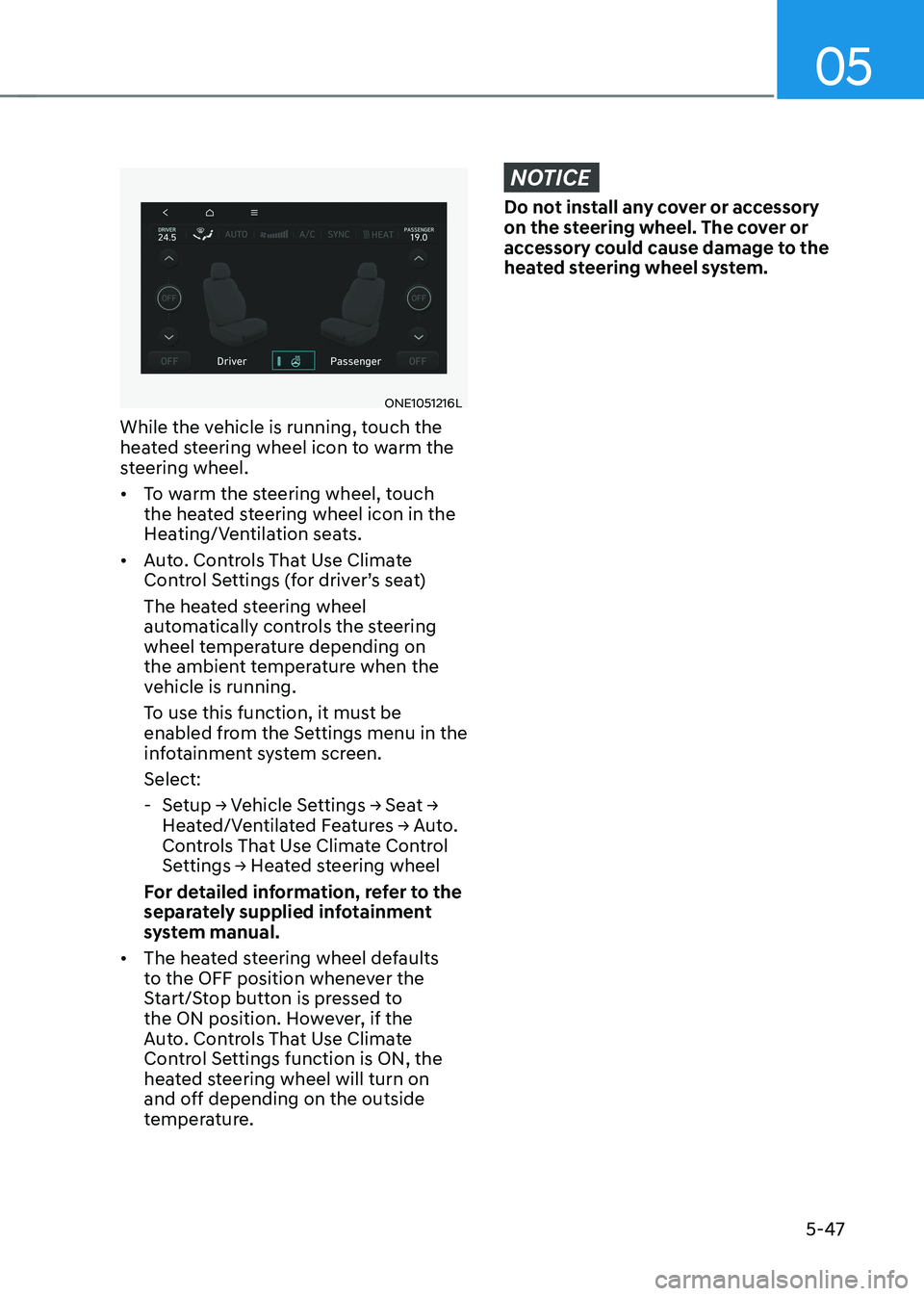
While the vehicle is running, touch the
heated steering wheel icon to warm the
steering wheel. • To warm the steering wheel, touch
the heated steering wheel icon in the
Heating/Ventilation seats.
• Auto. Controls That Use Climate
Control Settings (for driver’s seat)
The heated steering wheel
automatically controls the steering
wheel temperature depending on
the ambient temperature when the
vehicle is running.
To use this function, it must be
enabled from the Settings menu in the
infotainment system screen. Select:
- Setup → Vehicle Settings → Seat →
Heated/Ventilated Features → Auto.
Controls That Use Climate Control
Settings → Heated steering wheel
For detailed information, refer to the
separately supplied infotainment
system manual.
• The heated steering wheel defaults
to the OFF position whenever the
Start/Stop button is pressed to
the ON position. However, if the
Auto. Controls That Use Climate
Control Settings function is ON, the
heated steering wheel will turn on
and off depending on the outside
temperature.
NOTICE
Do not install any cover or accessory
on the steering wheel. The cover or
accessory could cause damage to the
heated steering wheel system.
Page 303 of 680
![HYUNDAI IONIQ 5 2023 Owners Manual 05
5-111
System Maintenance
Climate control air filter
OHI048581L
[A] : Outside air, [B] : Recirculated air
[C] : Climate control air filter, [D] : Blower
[E] : Evaporator core, [F] : PTC & Inner con](/manual-img/35/56168/w960_56168-302.png "HYUNDAI IONIQ 5 2023 Owners Manual 05
5-111
System Maintenance
Climate control air filter
OHI048581L
[A] : Outside air, [B] : Recirculated air
[C] : Climate control air filter, [D] : Blower
[E] : Evaporator core, [F] : PTC & Inner con")
05
5-111
System Maintenance
Climate control air filter
OHI048581L
[A] : Outside air, [B] : Recirculated air
[C] : Climate control air filter, [D] : Blower
[E] : Evaporator core, [F] : PTC & Inner condenser
The cabin air filter is installed behind the
front trunk. It filters the dust or other
pollutants that enter the vehicle through
the heating and air conditioning system.
Have the cabin air filter replaced by an
authorized HYUNDAI dealer according to
the maintenance schedule. If the vehicle
is being driven in severe conditions such
as dusty or rough roads, more frequent
cabin air filter inspections and changes
are required.
If the air flow rate suddenly decreases,
have the system inspected at an
authorized HYUNDAI dealer.
Checking the amount of air
conditioner refrigerant and
compressor lubricant
When the amount of refrigerant is low,
the performance of the air conditioning
is reduced. Overfilling also reduces the
performance of the air conditixoning
system.
Therefore, if abnormal operation is
found, have the system inspected by an
authorized HYUNDAI dealer.
NOTICE
It is important that the correct type and
amount of oil and refrigerant is used.
Otherwise, damage to the compressor
and abnormal system operation may
occur. To prevent damage, the air
conditioning system in your vehicle
should only be serviced by trained and
certified technicians.
NOTICE
The refrigerant system should only
be serviced by trained and certified
technicians to insure proper and safe
operation.
The refrigerant system should be
serviced in a well-ventilated place.
The air conditioning evaporator (cooling
coil) shall never be repaired or replaced
with one removed from a used or
salvaged vehicle and new replacement
MAC evaporators shall be certified
(and labeled) as meeting SAE Standard J2842.
Page 310 of 680

Convenience Features
5-118
Recirculating Air When Washer
Fluid Is Used
Recirculation mode automatically
activates to reduce any objectionable
scent of the washer fluid from entering
the cabin when the windshield washer is used.
Turning Activate upon Washer Fluid
Use ON or OFF
Activate upon Washer Fluid Use can be
turned on and off by selecting ‘Setup →
Vehicle Settings → Climate → Recirculate
Air → Activate upon Washer Fluid Use
(or Interlocking washer fluid)’ from the
infotainment system screen.
For detailed information, refer to the
separately supplied infotainment
system manual.
Auto. Controls That Use Climate
Control Settings (for driver’s
seat)
The temperature of the driver’s seat
warmer, air ventilated seat and heated
steering wheel is automatically
controlled depending on the inside and
outside temperature of the vehicle when
the vehicle is running.
To use these features, it must be
enabled from the Settings menu in the
infotainment system screen. Select: - Setup → Vehicle Settings → Seat →
Heated/Ventilated Features → Heated/
Ventilated Features → Auto. Controls
That Use Climate Control Settings
For more details on Auto Comfort
Control, refer to “Seat Warmers” and
“Air ventilation seats” section in chapter
3 and “Heated Steering Wheel” section
in this chapter.
Smart ventilation
The smart ventilation system maintains
pleasant/fresh air condition inside
the passenger compartment by
automatically detecting/controlling
the temperature and humidity, when
you drive the vehicle with the climate
control system in the OFF position.
When the smart ventilation system
starts to operate, the message “SMART
VENTILATION ON” appears for 5 seconds. • The smart ventilation system stops
operating, when the BLOWER DOWN
OFF button of the climate control
system is selected.
• The smart ventilation system stops
operating, when any button of the
climate control system is selected for
operation.
• The smart ventilation system may not
operate, when the vehicle is driven at
low speed.
Page 622 of 680

09
9-21
WARNING
Always follow these instructions when
recharging your vehicle’s battery to
avoid the risk of SERIOUS INJURY or
DEATH from explosions or acid burns: • Before performing maintenance or
recharging the battery, turn off all
accessories and stop the vehicle.
• Keep all flames, sparks, or smoking
materials away from the battery.
• Always work outdoors or in an area
with plenty of ventilation.
• Wear eye protection when checking
the battery during charging.
• The battery must be removed from
the vehicle and placed in a well
ventilated area.
• Watch the battery during charging,
and stop or reduce the charging
rate if the battery cells begin boiling
violently.
• The negative battery cable must
be removed first and installed last
when the battery is disconnected.
Disconnect the battery charger in the
following order:
1. Turn off the battery charger main
switch.
2. Unhook the negative clamp from the negative battery terminal.
3. Unhook the positive clamp from the positive battery terminal.
• Use batteries for replacement from
an authorized HYUNDAI dealer. By jump starting
After a jump start from a good battery,
drive the vehicle for 20-30 minutes
before it is shutoff. The vehicle may
not restart if you shut it off before the
battery had a chance to adequately
recharge. See “Jump Starting” in chapter
8 for more information on jump starting
procedures.
Information
An inappropriately disposed battery can be harmful to the
environment and human health. Dispose of the battery according
to your local law(s) or regulation.
Reset Items
The following items may need to be reset
after the battery has been discharged or
the battery has been disconnected. •
Driving info/After recharging/
Accumulated info (items in Utility
view) (see chapter 4)
• Integrated memory system (see
chapter 5)
• Power window (see chapter 5)
• Vision roof (see chapter 5)
• Power liftgate (see chapter 5)
• Climate control system (see chapter 5)
• Clock (see Infotainment system manual)
• Infotainment system (see
Infotainment system manual)
Page 661 of 680
Maintenance
9-60
High-corrosion areas
If you live in an area where your vehicle is
regularly exposed to corrosive materials,
corrosion protection is particularly
important. Some of the common causes
of accelerated corrosion are road salts,
dust control chemicals, ocean air and
industrial pollution.
Moisture breeds corrosion
Moisture creates the conditions in
which corrosion is most likely to occur.
For example, corrosion is accelerated
by high humidity, particularly when
temperatures are just above freezing. In
such conditions, the corrosive material is
kept in contact with the vehicle surfaces
by moisture that is slow to evaporate.
Mud is particularly corrosive because
it is slow to dry and holds moisture in
contact with the vehicle. Although the
mud appears to be dry, it can still retain
moisture and promote corrosion.
High temperatures can also accelerate
corrosion of parts that are not properly
ventilated so the moisture can be
dispersed. For all these reasons, it is
particularly important to keep your
vehicle clean and free of mud or
accumulations of other materials. This
applies not only to the visible surfaces
but particularly to the underside of the
vehicle.
To help prevent corrosion
Keep your vehicle clean
The best way to prevent corrosion is
to keep your vehicle clean and free of
corrosive materials. Attention to the
underside of the vehicle is particularly
important. • If you live in a high-corrosion area —
where road salts are used, near the
ocean, areas with industrial pollution,
acid rain, etc.—, you should take extra
care to prevent corrosion. In winter,
hose off the underside of your vehicle
at least once a month and be sure to
clean the underside thoroughly when
winter is over.
• When cleaning underneath the
vehicle, pay particular attention to the
components under the fenders and
other areas that are hidden from view.
Do a thorough job; just dampening
the accumulated mud rather than
washing it away will accelerate
corrosion rather than prevent it. Water
under high pressure and steam are
particularly effective in removing
accumulated mud and corrosive
materials.
• When cleaning lower door panels,
rocker panels and frame members, be
sure that drain holes are kept open so
that moisture can escape and not be
trapped inside to accelerate corrosion.