2023 HYUNDAI IONIQ 5 key
[x] Cancel search: keyPage 225 of 680

05
5-33
NOTICE
• If the door is locked/unlocked
multiple times in rapid succession
with the smart key, door lock button
or door lock switch, the system
may stop operating temporarily in
order to protect the circuit. Also,
the “Approach unlock” system may
not operate. Try operation after a
sufficient time in case the system
does not operate due to multiple
operations.
• “Approach unlock” system is not
operated continuously. Retry after a
certain period of time when all the
doors are closed.
Information
• In cold and wet climates, door lock
and door mechanisms may not work
properly due to freezing conditions.
• If the door is locked/unlocked multiple
times in rapid succession with either
the vehicle key or door lock switch, the system may stop operating temporarily
in order to protect the circuit and
prevent damage to system components.
• When washing the vehicle
- Self car wash
Keep the door locked with the outside
door handle closed.
To keep the door unlocked, push
back the outside door handle by
hand. This function prevents the door
handle from being damaged, and the
door handle pops out again when the
unlock button is pressed.
- Auto car wash
Keep the door locked with the outside
door handle closed. If the Smart Key is not in the vehicle, turn off the vehicle and stay the Smart Key away at least 2 m (78
in.) from the vehicle to prevent the
outside door handle operates.
Digatal key (if equipped)
Refer to ‘HYUNDAI digital key’ of this
chapter to lock or unlock the door from
outside vehicle with digital key.
Pull the outside door handle to open the
door after unlocking the door. Push the
door to close.
Mechanical key
ONE1051015
Press the front part (1) of the door
handle to pull out the rear part of the
door handle. While keep pressing the
front part of the door handle, insert the
mechanical key to the lock.
To lock the door, turn the key toward the
front (left side) of the vehicle. To unlock,
turn the key toward the rear (right side)
of the vehicle.
NOTICE
Do not apply excessive force on the
door and door handle. It may damage the door and door handle.
The mechanical key only locks/unlocks
the driver’s door handle. For more
detail, refer to ‘In case of an emergency’
in this chapter.
Information
When the door handle or the keyhole
freeze and do not open, lightly tap or
indirectly warm (for example, hand
temperature) the keyhole.
Page 226 of 680
Convenience Features
5-34
Operating Door Lock/Unlock
from Inside the Vehicle
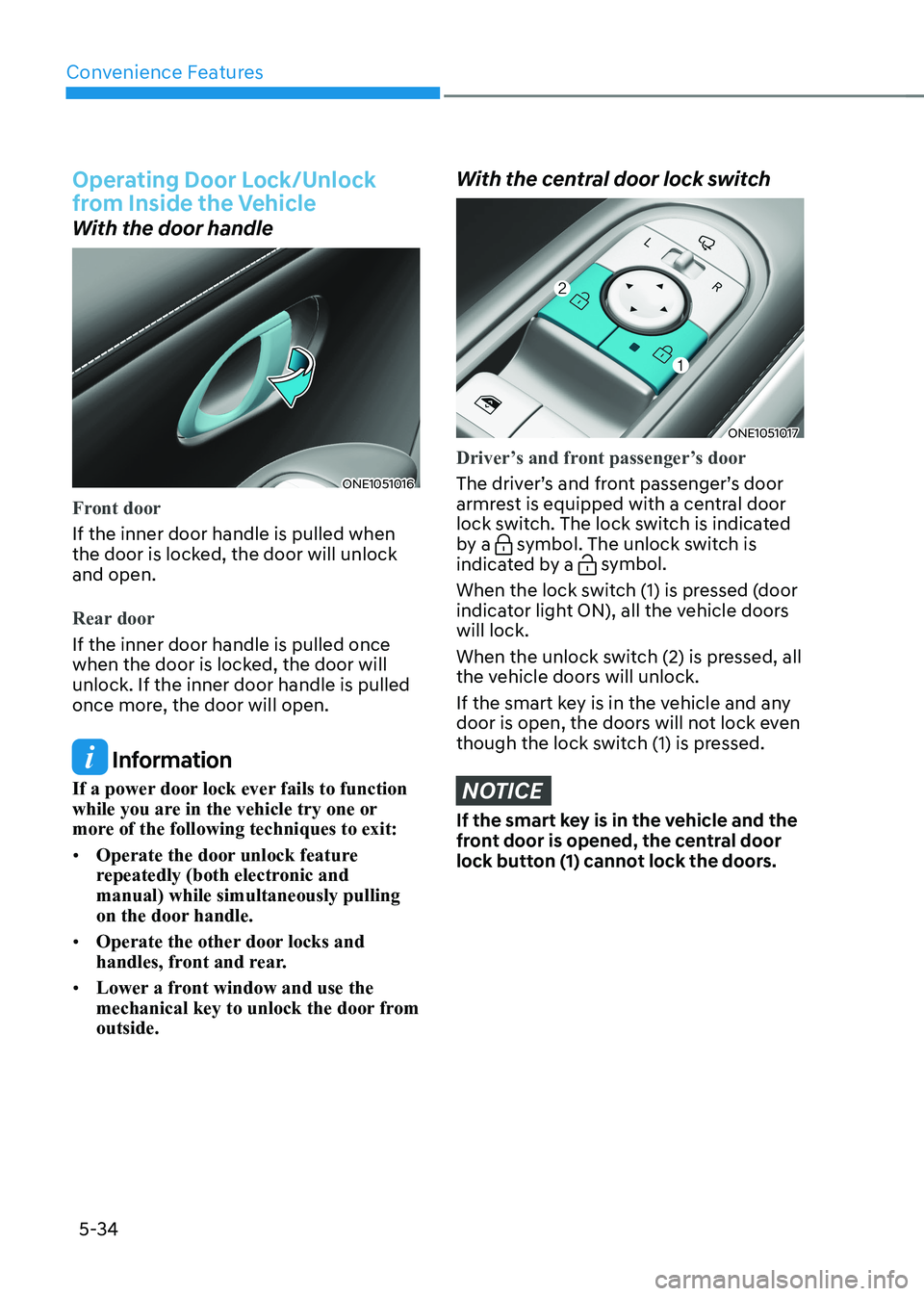
With the door handle
ONE1051016
Front door
If the inner door handle is pulled when
the door is locked, the door will unlock and open.
Rear door
If the inner door handle is pulled once
when the door is locked, the door will unlock. If the inner door handle is pulled
once more, the door will open.
Information
If a power door lock ever fails to function
while you are in the vehicle try one or
more of the following techniques to exit: • Operate the door unlock feature
repeatedly (both electronic and manual) while simultaneously pulling
on the door handle.
• Operate the other door locks and
handles, front and rear.
• Lower a front window and use the
mechanical key to unlock the door from outside.
With the central door lock switch
ONE1051017
Driver’s and front passenger’s door
The driver’s and front passenger’s door
armrest is equipped with a central door
lock switch. The lock switch is indicated
by a
symbol. The unlock switch is
indicated by a symbol.
When the lock switch (1) is pressed (door
indicator light ON), all the vehicle doors will lock.
When the unlock switch (2) is pressed, all
the vehicle doors will unlock.
If the smart key is in the vehicle and any
door is open, the doors will not lock even
though the lock switch (1) is pressed.
NOTICE
If the smart key is in the vehicle and the
front door is opened, the central door
lock button (1) cannot lock the doors.
Page 227 of 680
05
5-35
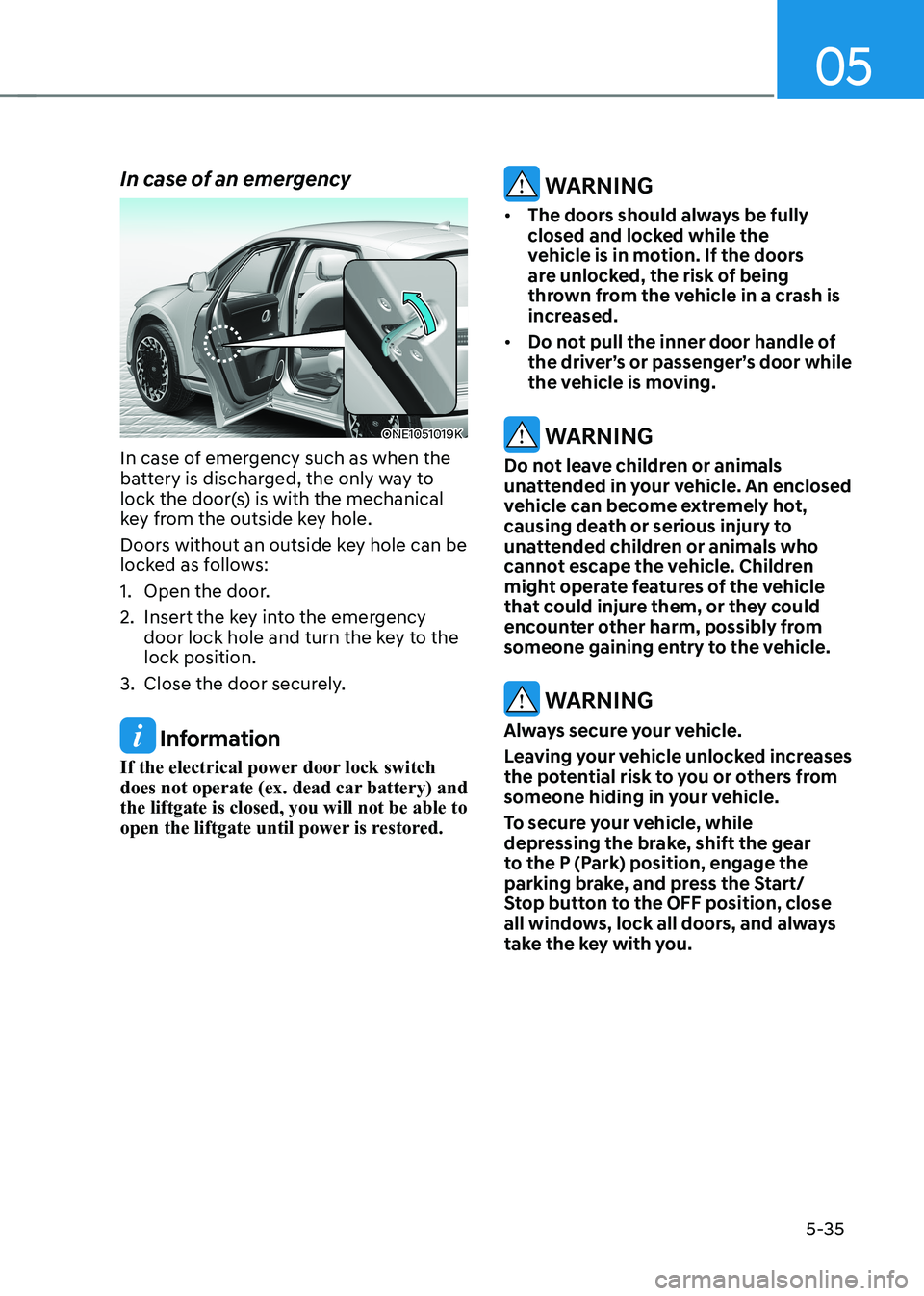
In case of an emergency
ONE1051019K
In case of emergency such as when the
battery is discharged, the only way to
lock the door(s) is with the mechanical
key from the outside key hole.
Doors without an outside key hole can be
locked as follows:
1. Open the door.
2. Insert the key into the emergency door lock hole and turn the key to the lock position.
3. Close the door securely.
Information
If the electrical power door lock switch
does not operate (ex. dead car battery) and the liftgate is closed, you will not be able to
open the liftgate until power is restored.
WARNING
• The doors should always be fully
closed and locked while the
vehicle is in motion. If the doors
are unlocked, the risk of being
thrown from the vehicle in a crash is
increased.
• Do not pull the inner door handle of
the driver’s or passenger’s door while
the vehicle is moving.
WARNING
Do not leave children or animals
unattended in your vehicle. An enclosed
vehicle can become extremely hot,
causing death or serious injury to
unattended children or animals who
cannot escape the vehicle. Children
might operate features of the vehicle
that could injure them, or they could
encounter other harm, possibly from
someone gaining entry to the vehicle.
WARNING
Always secure your vehicle.
Leaving your vehicle unlocked increases
the potential risk to you or others from
someone hiding in your vehicle.
To secure your vehicle, while
depressing the brake, shift the gear
to the P (Park) position, engage the
parking brake, and press the Start/
Stop button to the OFF position, close
all windows, lock all doors, and always
take the key with you.
Page 231 of 680

05
5-39
This system helps to protect your vehicle
and valuables. The horn will sound and
the hazard warning lights will blink
continuously if any of the following occur:
- A door is opened without using the smart key.
- The liftgate is opened without using the smart key.
- The vehicle hood is opened.
The alarm continues for 30 seconds, then
the system resets. To turn off the alarm,
unlock the doors with the smart key.
The Theft Alarm System automatically
sets 30 seconds after you lock the
doors and the liftgate. For the system to
activate, you must lock the doors and
the liftgate from outside the vehicle with
the smart key or by touching the touch
sensor or pressing the button on the
outside door handle with the smart key
in your possession.
The hazard warning lights will blink and
the chime will sound once to indicate the
system is armed.
Once the security system is set, opening
any door, the liftgate, or the hood
without using the smart key will cause
the alarm to activate.
The Theft Alarm System will not set if the
hood, the liftgate, or any door is not fully
closed. If the system will not set, check
the hood, the liftgate, or the doors are fully closed.
Do not attempt to alter this system or
add other devices to it.
Information
• Do not lock the doors until all passengers have left the vehicle. If the
remaining passenger leaves the vehicle when the system is armed, the alarm will be activated.
• If the vehicle is not disarmed with the
smart key, open the doors by using the mechanical key and start the vehicle by
directly pressing the Start/Stop button
with the smart key.
• If the system is disarmed by unlocking
the vehicle, but neither a door or the liftgate is opened within 30 seconds, the
doors will relock and the system will
rearm automatically.
ThefT-alarm sysTem
Page 234 of 680
Convenience Features
5-42
Seat Easy Access
Seat easy access will move the driver’s
seat and steering wheel automatically as
follows: • Exiting the vehicle:
The driver’s seat will move as follows
when the Start/Stop button is in the
OFF position with the gear in P (Park)
and the driver’s door open.
- Driver seat: Moves rearward depending on the distance selected
from the Settings menu in the
infotainment system.
However, the driver’s seat may not
move rearward if there is not enough
space between the driver’s seat and
the rear seats.
• Entering the vehicle:
The driver’s seat will move as follows
when the Start/Stop button is pressed
to the ACC, ON or START position
or while carrying the smart key, the
driver’s door is closed with the Start/
Stop button in the OFF position.
- Driver seat: Moves back to its original position.
• You can set the Seat Easy Access
function from the Settings menu
in the infotainment system screen. Select:
- Driver seat Setup → Vehicle Settings → Seat →
Seating Easy Access → Driver Seat
Easy Access → Normal/Extended/Off
For detailed information, refer to the
separately supplied infotainment
system manual.
Page 252 of 680

Convenience Features
5-60
Adjusting the rearview mirrors
ONE1051028
Adjusting the rearview mirrors:
1. When the START/STOP button is in the ACC, ON or START position, press
either the L (Left side) or R (Right side)
button (1) to select the rearview mirror
you would like to adjust.
2. Use the mirror adjustment control switch (2) to position the selected
mirror up, down, left or right.
3. After adjustment, move the lever (1) to the middle to prevent inadvertent
adjustment.
NOTICE
• The mirrors stop moving when
they reach the maximum adjusting
angles, but the motor continues to
operate while the switch is pressed.
Do not press the switch longer than
necessary, because this can damage
the motor.
• Do not attempt to adjust the
rearview mirrors by hand, because
this can damage the motor. Folding the rearview mirrors
ONE1051029
Folding button
The rearview mirrors can be folded or
unfolded by pressing the button.
Infotainment system setting
•
Enable on door unlock
If ‘Setup → Vehicle Settings → Welcome
Mirror → Enable on Door Unlock’ is
selected from the Settings menu in
the infotainment system screen,
- The mirror will fold or unfold when the door is locked or unlocked by
the smart key.
- The mirror will fold or unfold when the door is locked or unlocked by
the touch sensor or button on the outside door handle.
• Enable on driver approach
If ‘Setup → Vehicle Settings →
Convenience → Welcome Mirror
→ Enable on Driver Approach’ is
selected from the Settings menu in
the infotainment system screen, the
mirror will unfold when the vehicle
is approached with the smart key in possession.
For detailed information, refer to the
separately supplied infotainment
system manual.
Page 256 of 680

Convenience Features
5-64
Power Windows
The Start/Stop button must be in
the ON position to be able to raise or
lower the windows. Each door has a
Power Window switch to control that
door’s window. The driver has a Power
Window Lock button which can block
the operation of passenger windows.
The power windows will operate for
approximately 3 minutes after the
Start/Stop button is in the ACC or OFF
position. However, if the front doors are
opened, the Power Windows will not
operate even within the 3 minute period.
Window opening and closing
ONE1051033
To open:
Press the window switch down to the
first detent position (5). Release the
switch when you want the window to
stop.
To close:
Pull the window switch up to the first
detent position (5). Release the window
switch when you want the window to
stop. Auto up/down window
Pressing the power window switch
momentarily to the second detent
position (6) completely lowers or lifts
the window even when the switch is
released. To stop the window at the
desired position while the window is in
operation, pull up or press down and
release the switch.
WARNING
• Do not leave the vehicle running
and the key in your vehicle with
unsupervised children. Unattended
children could operate the window,
which could result in serious injury.
• Do not extend your head, arms or any
other body parts or objects outside
the window while driving to avoid
serious injury.
Resetting the power windows
If the power windows do not operate
normally, the automatic power window
system must be reset as follows:
1. Press the Start/Stop button to the ON position.
2. Close the window and continue pulling up on the power window
switch for at least one second.
If the power windows do not operate
properly after resetting, have the system
inspected by an authorized HYUNDAI
dealer.
Page 259 of 680
05
5-67
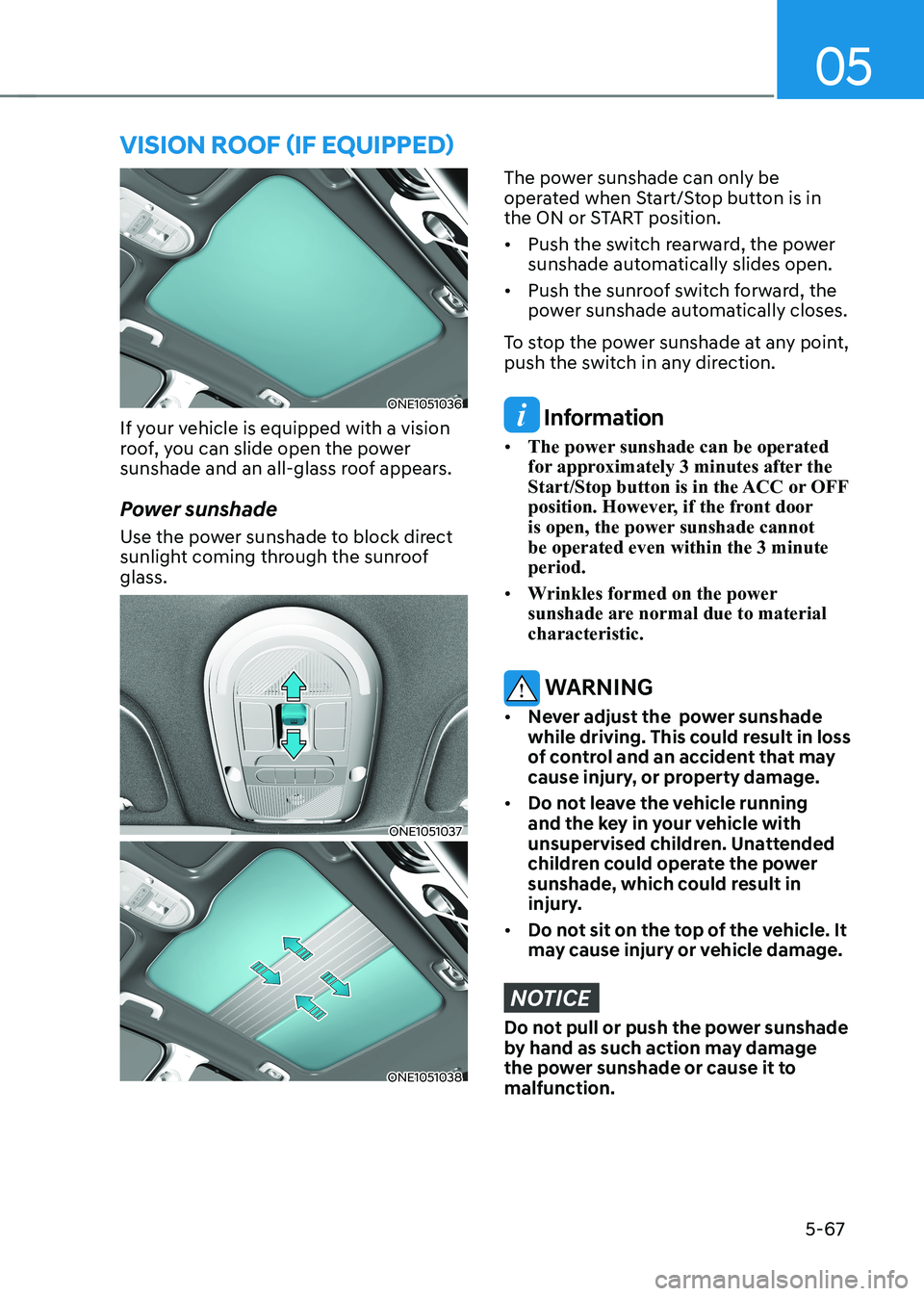
ONE1051036
If your vehicle is equipped with a vision
roof, you can slide open the power
sunshade and an all-glass roof appears.
Power sunshade
Use the power sunshade to block direct
sunlight coming through the sunroof glass.
ONE1051037
ONE1051038
The power sunshade can only be
operated when Start/Stop button is in
the ON or START position. • Push the switch rearward, the power
sunshade automatically slides open.
• Push the sunroof switch forward, the
power sunshade automatically closes.
To stop the power sunshade at any point,
push the switch in any direction.
Information
• The power sunshade can be operated
for approximately 3 minutes after the
Start/Stop button is in the ACC or OFF
position. However, if the front door
is open, the power sunshade cannot be operated even within the 3 minute period.
• Wrinkles formed on the power
sunshade are normal due to material characteristic.
WARNING
• Never adjust the power sunshade
while driving. This could result in loss
of control and an accident that may
cause injury, or property damage.
• Do not leave the vehicle running
and the key in your vehicle with
unsupervised children. Unattended
children could operate the power
sunshade, which could result in
injury.
• Do not sit on the top of the vehicle. It
may cause injury or vehicle damage.
NOTICE
Do not pull or push the power sunshade
by hand as such action may damage
the power sunshade or cause it to malfunction.
VIsIon roof (If eQUIPPed)