2023 HYUNDAI IONIQ 5 warning lights
[x] Cancel search: warning lightsPage 365 of 680

06
6-39
NOTICE
Driving with wheels and tires with
different sizes may cause the ESC
system to malfunction. Before replacing
tires, make sure all four tires and wheels
are the same size. Never drive the
vehicle with different sized wheels and
tires installed. ESC OFF usage
When Driving
The ESC OFF mode should only be used
briefly to help free the vehicle if stuck in
snow or mud, by temporarily stopping
operation of ESC, to maintain wheel
torque.
To turn ESC off while driving, press the
ESC OFF button while driving on a flat
road surface.
NOTICE
To prevent damage to the reduction gear: • Do not allow wheel(s) of one axle to
spin excessively while the ESC, ABS,
and Parking Brake warning lights
are displayed. The repairs would not
be covered by the vehicle warranty.
Reduce motor power and do not spin
the wheel(s) excessively while these
lights are displayed.
• When operating the vehicle
on a dynamometer, make sure
ESC is turned off (ESC OFF light
illuminated).
Information
• Turning ESC off does not affect ABS or standard brake system operation.
• Select 0 step of the regenerative
braking system and depress the brake
pedal around 10 times to efficiently apply brake disc cleaning.
Brake disc cleaning may decrease the
driving distance by restraining the
regenerative braking system. After
brake disc cleaning, the regenerative
braking system may be restored.
If the regenerative braking system
is not restored after the brake disc cleaning, have the vehicle inspected by
an authorized HYUNDAI dealer.
Page 398 of 680
Driving Your Vehicle
6-72
Safety chains
You should always attach chains between
your vehicle and your trailer.
Instructions about safety chains may
be provided by the hitch manufacturer
or trailer manufacturer. Follow the
manufacturer’s recommendation for
attaching safety chains. Always leave just
enough slack so you can turn with your
trailer. And, never allow safety chains to
drag on the ground.
Trailer brakes
If your trailer is equipped with a braking
system, make sure it conforms to
your country’s regulations and that
it is properly installed and operating
correctly.
If your trailer weighs more than the
maximum trailer weight without trailer
brakes loaded, then it needs its own
brakes and they must be adequate. Be
sure to read and follow the instructions
for the trailer brakes so you’ll be able
to install, adjust and maintain them
properly. Be sure not to modify your
vehicle’s brake system.
WARNING
Do not use a trailer with its own brakes
unless you are absolutely certain that
you have properly set up the brake
system. This is not a task for amateurs.
Use an experienced, competent trailer
shop for this work.
Driving with a Trailer
Towing a trailer requires a certain
amount of experience. Before setting
out for the open road, you must get to
know your trailer. Acquaint yourself with
the feel of handling and braking with the
added weight of the trailer. And always
keep in mind that the vehicle you are
driving is now longer and not nearly as
responsive as your vehicle is by itself.
Before you start, check the trailer hitch
and platform, safety chains, electrical
connector(s), lights, tires and brakes.
During your trip, occasionally check
to be sure that the load is secure, and
that the lights and trailer brakes are still
working.
Information
When the ambient temperature is lower
than 32°F (0°C) and the remaining high
voltage battery is low, the power of the
vehicle with a trailer can be dropped,
causing a trouble in acceleration or drop of the speed when driving hills.
When driving with a trailer, be sure to
charge the high voltage battery more than
50% if the ambient temperature is lower
than 32°F (0°C).
Page 399 of 680

06
6-73
Distance
Stay at least twice as far behind the
vehicle ahead as you would when driving
your vehicle without a trailer. This can
help you avoid situations that require
heavy braking and sudden turns.
Passing
You will need more passing distance up
ahead when you’re towing a trailer. And,
because of the increased vehicle length,
you’ll need to go much farther beyond
the passed vehicle before you can return
to your lane. Backing up
Hold the bottom of the steering wheel
with one hand. Then, to move the trailer
to the left, move your hand to the left. To
move the trailer to the right, move your
hand to the right. Always back up slowly
and, if possible, have someone guide
you.
Making turns
When you’re turning with a trailer, make
wider turns than normal. Do this so your
trailer won’t strike soft shoulders, curbs,
road signs, trees, or other objects. Avoid
jerky or sudden maneuvers. Signal well in
advance.
Turn signals
When you tow a trailer, your vehicle has
to have a different turn signal flasher and
extra wiring. The green arrows on your
instrument panel will flash whenever you
signal a turn or lane change. Properly
connected, the trailer lights will also flash
to alert other drivers you’re about to turn,
change lanes, or stop.
When towing a trailer, the green arrows
on your instrument panel will flash for
turns even if the bulbs on the trailer
are burned out. Thus, you may think
drivers behind you are seeing your
signals when, in fact, they are not. It’s
important to check occasionally to be
sure the trailer bulbs are still working.
You must also check the lights every time
you disconnect and then reconnect the
wires.
WARNING
Do not connect a trailer lighting system
directly to your vehicle’s lighting
system. Use an approved trailer wiring
harness. Failure to do so could result
in damage to the vehicle electrical
system and/or personal injury. Consult
an authorized HYUNDAI dealer for
assistance.
Page 419 of 680
07
7-17
CAUTION
• Depending on the condition of the
vehicle, pedestrian and cyclist in
front and the surroundings, the
speed range to operate Forward
Collision-Avoidance Assist may
reduce. Forward Collision-Avoidance
Assist may only warn the driver, or it
may not operate.
• Forward Collision-Avoidance Assist
will operate under certain conditions
by judging the risk level based on
the condition of the oncoming
vehicle, driving direction, speed and
surroundings.
• When a collision with a surrounding
vehicle is expected, Lane-Change
Oncoming, Lane-Change Side and
Evasive Steering Assist functions will
only warn the driver (if equipped).
Information
• In a situation where collision is imminent, braking may be assisted by
Forward Collision-Avoidance Assist when braking is insufficient by the
driver.
• The images and colors in the
instrument cluster may differ
depending on the cluster type or theme
selected from the instrument cluster.
Forward Collision-Avoidance
Assist Malfunction and
Limitations
Forward Collision-Avoidance Assist
malfunction
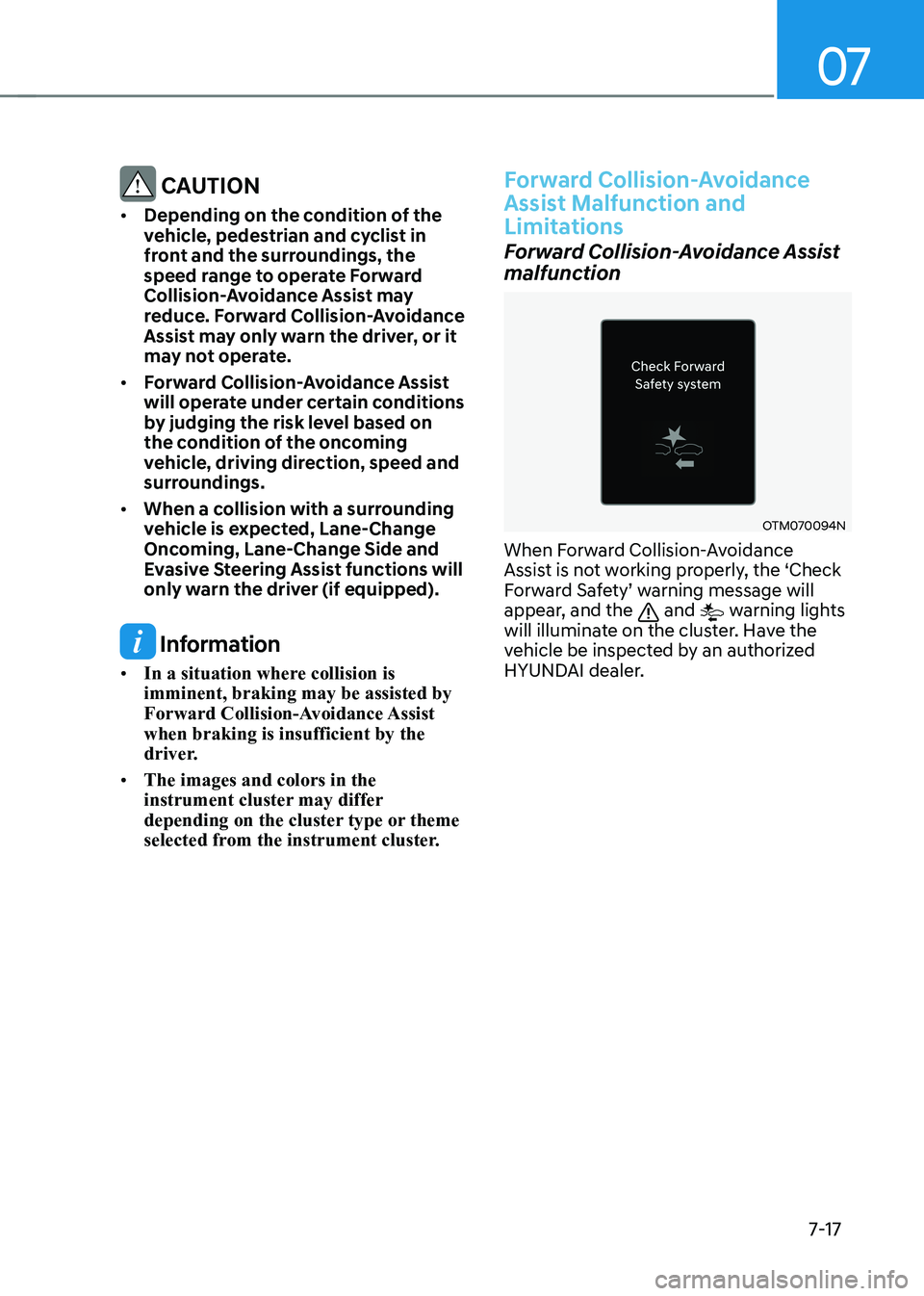
OTM070094N
When Forward Collision-Avoidance
Assist is not working properly, the ‘Check
Forward Safety’ warning message will
appear, and the
and warning lights
will illuminate on the cluster. Have the
vehicle be inspected by an authorized
HYUNDAI dealer.
Page 420 of 680

Driver Assistance System
7-18
Forward Collision-Avoidance Assist disabled
OJX1079005LOJX1079212L
When the front windshield where the
front view camera is located, front radar
cover, bumper or sensor is covered with
foreign material, such as snow or rain, it
can reduce the detecting performance
and temporarily limit or disable Forward
Collision-Avoidance Assist.
If this occurs the ‘Forward Safety system
disabled. Camera obscured’ or the
‘Forward Safety system disabled. Radar
blocked’ warning message, and the
and warning lights will illuminate on
the cluster.
Forward Collision-Avoidance Assist will
operate properly when snow, rain or
foreign material is removed.
If Forward Collision-Avoidance Assist
does not operate properly after
obstruction (snow, rain, or foreign
material) is removed (including trailer,
carrier, etc., from the rear bumper), have
the vehicle inspected by an HYUNDAI
dealer.
WARNING
• Even though the warning message or
warning light does not appear on the
cluster, Forward Collision-Avoidance
Assist may not properly operate.
• Forward Collision-Avoidance Assist
may not properly operate in an area
(for example, open terrain), where
any objects are not detected after
turning ON the vehicle.
Limitations of Forward Collision-
Avoidance Assist
Forward Collision-Avoidance Assist may
not operate properly, or it may operate
unexpectedly under the following
circumstances: • The detecting sensor or the
surroundings are contaminated or damaged
• The temperature around the front
view camera is high or low due to
surrounding environment
• The camera lens is contaminated due
to tinted, filmed or coated windshield,
damaged glass, or sticky foreign
material (sticker, bug, etc.) on the glass
• Moisture is not removed or frozen on the windshield
• Washer fluid is continuously sprayed, or the wiper is on
• Driving in heavy rain or snow, or thick
fog
• The field of view of the front view
camera is obstructed by sun glare
• Street light or light from an oncoming
traffic is reflected on the wet road
surface, such as a puddle on the road
• An object is placed on the dashboard
Page 463 of 680
07
7-61
•
The distance between the vehicle and
the road signs is too far
• The vehicle encounters illuminant
road signs
• Intelligent Speed Limit Assist
incorrectly recognizes numbers in the
street signals or other signs as the speed limit
• The minimum speed limit sign is on
the road
• The brightness changes suddenly, for
example when entering or exiting a tunnel or passing under a bridge
• Headlamps are not used or the
brightness of the headlamps are weak
at night or in the tunnel
• Road signs are difficult to recognize
due to the reflection of sunlight, street
lights, or oncoming vehicles
• The navigation information or GPS
information contain errors.
• The driver does not follow the guide
of the navigation.
• The driver is driving a new road that is
not in the navigation system yet.
• The field of view of the front view
camera is obstructed by sun glare
• Driving on a road that is sharply
curved or continuously curved
• Driving through speed bumps, or
driving up and down or left to right on
steep inclines
• The vehicle is shaking heavily
• There is an error in the navigation map
information or GPS information
• The driver is not driving along the
navigation guide route
• Driving on a newly opened road
Information
For more details on the limitations of the
front view camera, refer to “Forward
Collision-Avoidance Assist (FCA)” section
in this chapter.
WARNING
• Intelligent Speed Limit Assist is a
supplemental function that helps the
driver to comply with the speed limit
on the road, and may not display the
correct speed limit or control the
driving speed properly.
• Always set the vehicle speed to the
speed limit in your country.
Page 576 of 680

Driver Assistance System
7-174
WARNING
Take the following precautions when
using Remote Smart Parking Assist: • The driver is responsible for safe
parking and exit when using Remote
Smart Parking Assist.
• When using Remote Smart Parking
Assist, stay out of the way in the
direction the vehicle moves for your
safety.
• Always check surroundings when
using Remote Smart Parking Assist.
You may collide with pedestrians,
animals, or objects if they are near
the sensor or are in the sensor’s blind
spot area.
• A collision may occur if a pedestrian,
animal, or object suddenly appears
while Remote Smart Parking Assist is
operating.
• Do not use Remote Smart Parking
Assist when under the influence of
alcohol.
• Do not let children or other people to
use the smart key.
• If Remote Smart Parking Assist is
used continuously for a long period,
it may adversely affect Remote
Smart Parking Assist performance.• Remote Smart Parking Assist may not
operate properly if the vehicle needs
wheel alignment adjustment such
as when the vehicle tilts to one side.
Have the vehicle be inspected by an
authorized HYUNDAI dealer.
• Noise may be heard when braking
occurs by Remote Smart Parking
Assist or when the brake pedal is
depressed by the driver.
• Remote Smart Parking Assist may
suddenly apply the brake to avoid
collision.
• Use Remote Smart Parking Assist
only in a parking space that is large
enough for the vehicle to move
safely.
NOTICE
• If the 3rd stage warning (continuous
beep) of the Forward/Reverse
Parking Distance Warning sounds
while Remote Smart Parking
Assist is operating, it means the
obstacle detected is close to your
vehicle. At this time, Remote Smart
Parking Assist will temporarily stop
operating. Make sure there are no
pedestrians, animals, or objects
around your vehicle.
• Depending on brake operation, the
stop lights may come on while the
vehicle is moving.
• If the vehicle is remotely started that
has been parked in cold weather for
a long time, the operation of Remote
Smart Parking function may be
delayed or canceled depending on
vehicle condition.
Page 580 of 680
Emergency Situations
8-2
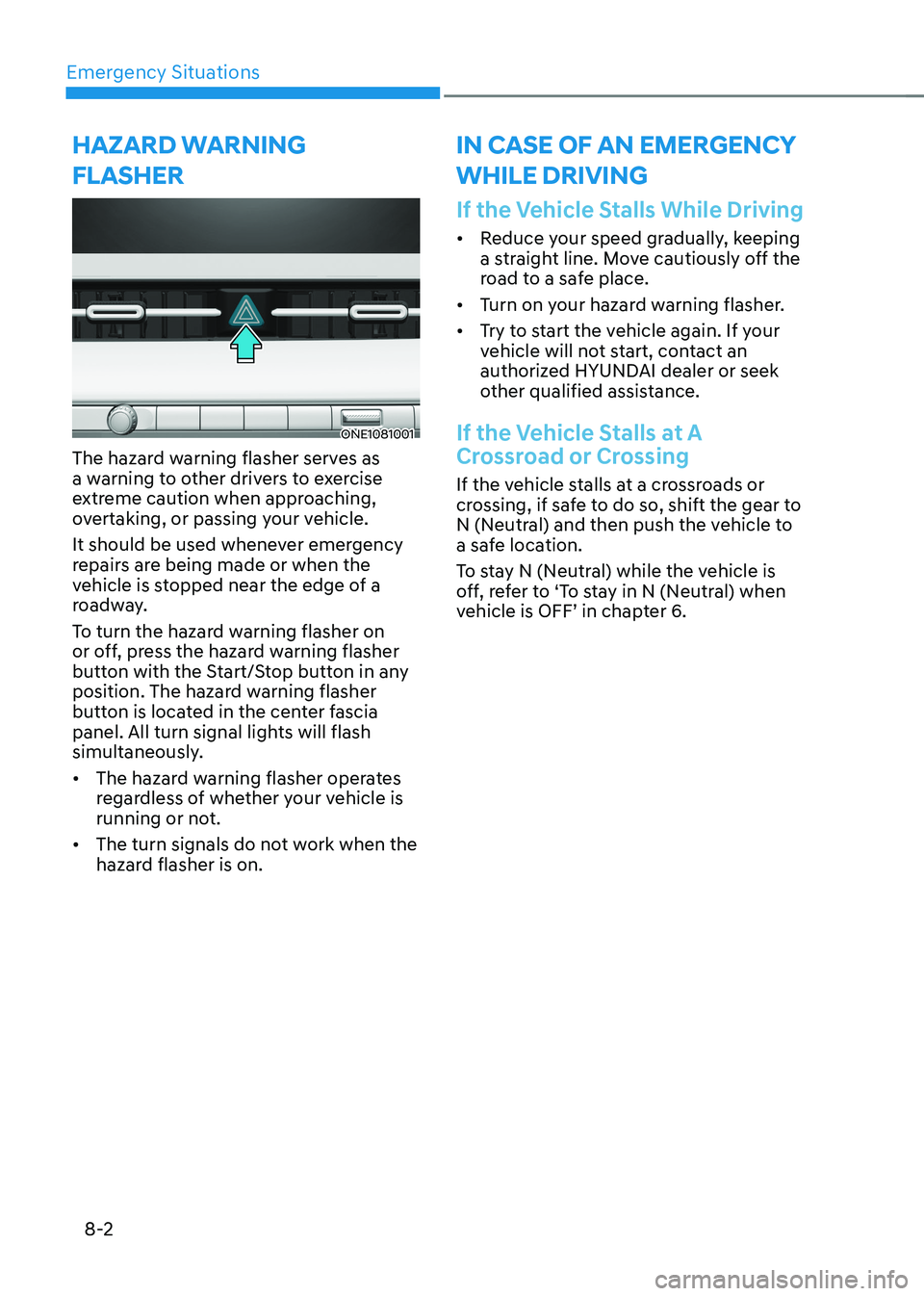
ONE1081001
The hazard warning flasher serves as
a warning to other drivers to exercise
extreme caution when approaching,
overtaking, or passing your vehicle.
It should be used whenever emergency
repairs are being made or when the
vehicle is stopped near the edge of a
roadway.
To turn the hazard warning flasher on
or off, press the hazard warning flasher
button with the Start/Stop button in any
position. The hazard warning flasher
button is located in the center fascia
panel. All turn signal lights will flash
simultaneously. • The hazard warning flasher operates
regardless of whether your vehicle is
running or not.
• The turn signals do not work when the
hazard flasher is on.
If the Vehicle Stalls While Driving
• Reduce your speed gradually, keeping
a straight line. Move cautiously off the
road to a safe place.
• Turn on your hazard warning flasher.
• Try to start the vehicle again. If your
vehicle will not start, contact an
authorized HYUNDAI dealer or seek
other qualified assistance.
If the Vehicle Stalls at A
Crossroad or Crossing
If the vehicle stalls at a crossroads or
crossing, if safe to do so, shift the gear to
N (Neutral) and then push the vehicle to
a safe location.
To stay N (Neutral) while the vehicle is
off, refer to ‘To stay in N (Neutral) when
vehicle is OFF’ in chapter 6.
Hazard warning
flasHer in case of an emergency wHile driving