Page 169 of 533
3-86
Convenient features of your vehicle
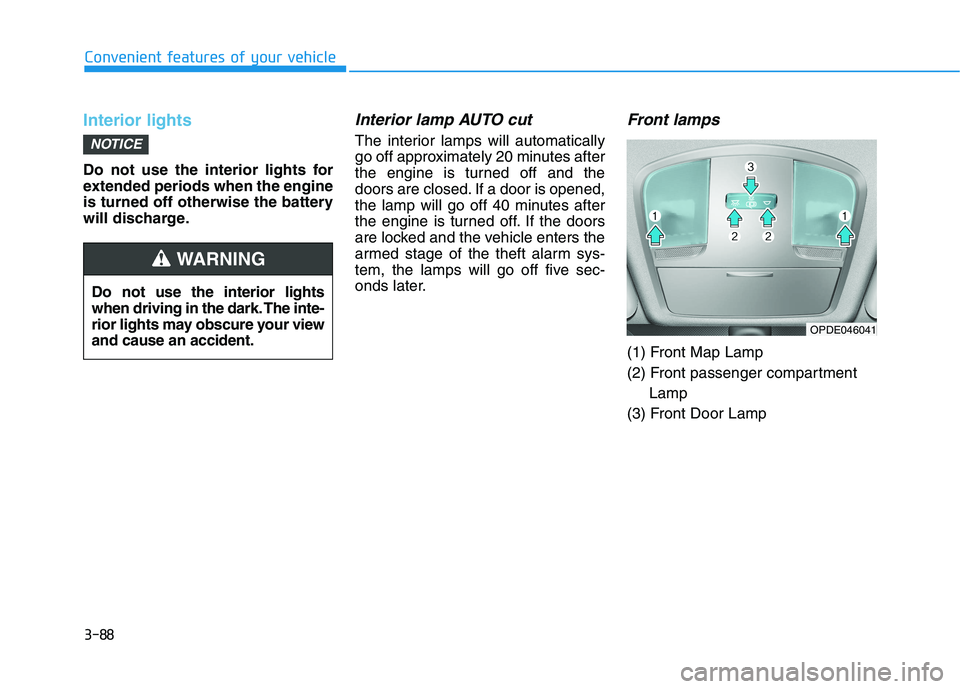
Headlamp levelling device
(if equipped)
Manual type
To adjust the headlamp beam level
according to the number of the pas-
sengers and loading weight in the
luggage compartment, turn the
beam levelling switch.
The higher the number on the switch
position, the lower the headlamp
beam level. Always keep the head-
lamp beam at the proper levelling
position, otherwise headlamps may
dazzle other road users.Listed below are examples of appro-
priate switch settings for varying
loads. For loading conditions other
than those listed, adjust the switch
position to the most similar situation.
Automatic type
It automatically adjusts the head-
lamp beam level according to the
number of passengers and loading
weight in the luggage compartment.
It also adjusts to the appropriate head-
lamp beam level for various situations.
OPED046035R
If the function does not work
properly, we recommend that
the system be inspected by an
authorised HYUNDAI dealer. Do
not attempt to inspect or
replace the wiring yourself.
WARNING
Loading conditionSwitch
position
Driver only0
Driver + Front passenger0
Full passengers (including driver)1
Full passengers (including driver)
+ Maximum permissible loading2
Driver + Maximum permissible
loading 3
Page 171 of 533
3-88
Convenient features of your vehicle
Interior lights
Do not use the interior lights for
extended periods when the engine
is turned off otherwise the battery
will discharge.
Interior lamp AUTO cut
The interior lamps will automatically
go off approximately 20 minutes after
the engine is turned off and the
doors are closed. If a door is opened,
the lamp will go off 40 minutes after
the engine is turned off. If the doors
are locked and the vehicle enters the
armed stage of the theft alarm sys-
tem, the lamps will go off five sec-
onds later.
Front lamps
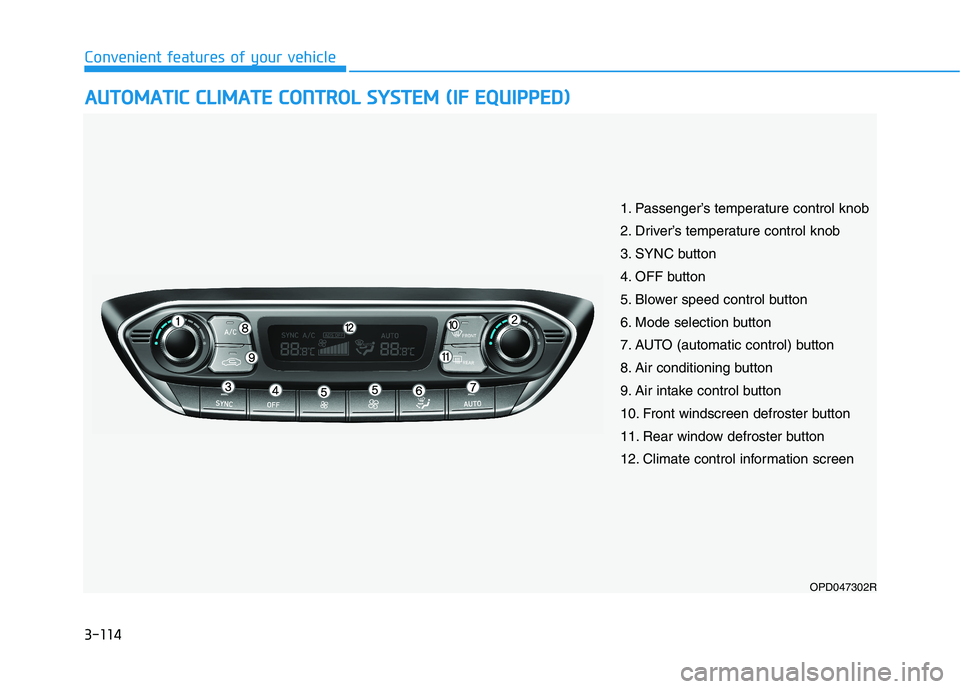
(1) Front Map Lamp
(2) Front passenger compartment
Lamp
(3) Front Door Lamp
NOTICE
Do not use the interior lights
when driving in the dark. The inte-
rior lights may obscure your view
and cause an accident.
WARNING
OPDE046041
Page 176 of 533

3-93
Convenient features of your vehicle
3
AUTO (Automatic) control
(if equipped)
The rain sensor located at the top of
the windscreen, senses the amount
of rainfall and controls the wiping
cycle for the proper interval. The
more it rains, the faster the wiper
operates.
When the rain stops, the wiper stops.
To vary the speed setting, turn the
speed control knob (1).
If the wiper switch is set in AUTO
mode when the ignition switch is in
the ON position, the wiper will oper-
ate once to perform a self-check of
the system. Set the wiper to OFF
position when the wiper is not in use.
When washing the vehicle, set the
wiper switch in the O position to
stop the auto wiper operation. The
wiper may operate and be damaged
if the switch is set in the AUTO
mode whilst washing the vehicle.
Do not remove the sensor cover
located on the top of the passenger
side windscreen glass. Damage to
system parts could occur and may
not be covered by your vehicle war-
ranty.
NOTICE
OPD047448R
To avoid personal injury from the
windscreen wipers, when the
engine is running and the wind-
screen wiper switch is placed in
the AUTO mode:
Do not touch the top of the
windscreen glass facing the
rain sensor.
Do not wipe the top of the
windscreen glass with a damp
or wet cloth.
Do not put pressure on the
windscreen glass.
WARNING
Sensor
Page 184 of 533

3-101
Convenient features of your vehicle
3
This system is a supplemental sys-
tem that senses objects within the
range and location of the sensors. It
cannot detect objects in other areas
where sensors are not installed.Operation of the Parking
Distance Warning
(Reverse/Forward) system
Operating condition
This system will activate when the
Parking Distance Warning
(Reverse/Forward) system button
is pressed with the engine running. The Parking Distance Warning
(Reverse/Forward) system button
turns on automatically and acti-
vates the Parking Distance
Warning (Reverse/Forward) sys-
tem when you move the shift lever
to the R (Reverse) position.
However, if vehicle speed exceeds
10 km/h, the system will not warn
you even though objects are
detected, and if vehicle speed
exceeds 20 km/h, the system will
turn off automatically. To turn on
the system, press the Parking
Distance Warning
(Reverse/Forward) system button.
When more than two objects are
sensed at the same time, the clos-
est one will be recognised first.
ALWAYS look around your vehi-
cle to make sure there are no
objects or obstacles, before
moving the vehicle in any direc-
tion, to prevent a collision.
Always pay close attention
when the vehicle is driven
close to objects, particularly
pedestrians, and especially
children.
Be aware that some objects
may not be visible on the
screen or be detected by the
sensors, due to the objects
distance, size or material, all of
which can limit the effective-
ness of the sensor.
WARNING
OPDE046403R
Page 187 of 533
3-104
Convenient features of your vehicle
D DE
EF
FR
RO
OS
ST
TE
ER
R
To prevent damage to the conduc-
tors bonded to the inside surface
of the rear window, never use
sharp instruments or window
cleaners containing abrasives to
clean the window.
Information
If you want to defrost and defog the
front windscreen, refer to
“Windscreen Defrosting and
Defogging” in this chapter.
Rear window defroster
The defroster heats the window to
remove frost, fog and thin ice from
the interior and exterior of the rear
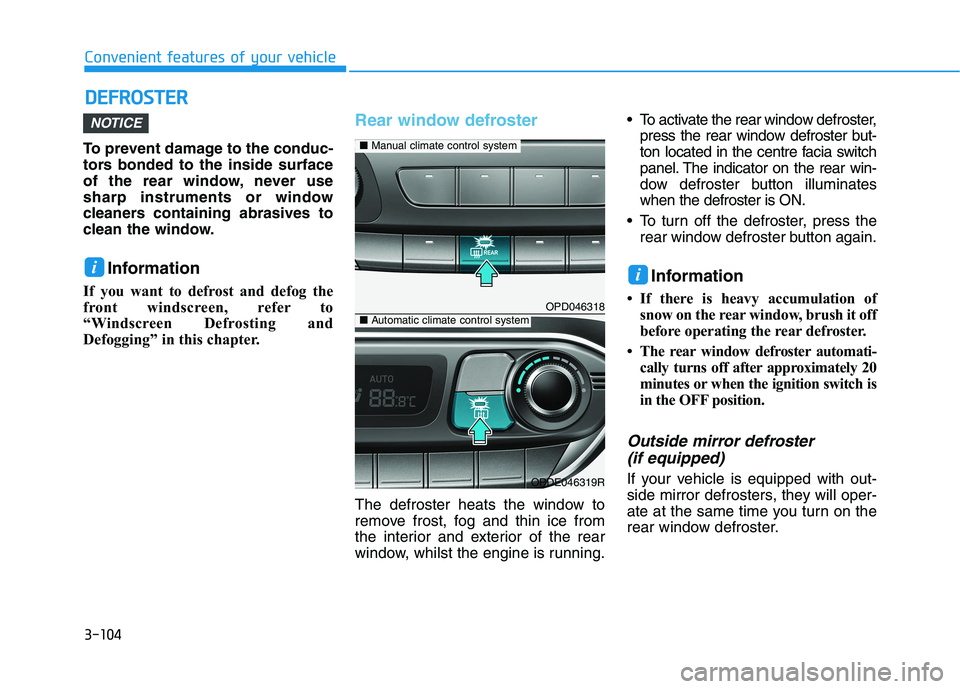
window, whilst the engine is running. To activate the rear window defroster,
press the rear window defroster but-
ton located in the centre facia switch
panel. The indicator on the rear win-
dow defroster button illuminates
when the defroster is ON.
To turn off the defroster, press the
rear window defroster button again.
Information
• If there is heavy accumulation of
snow on the rear window, brush it off
before operating the rear defroster.
• The rear window defroster automati-
cally turns off after approximately 20
minutes or when the ignition switch is
in the OFF position.
Outside mirror defroster
(if equipped)
If your vehicle is equipped with out-
side mirror defrosters, they will oper-
ate at the same time you turn on the
rear window defroster.
NOTICE
ii
OPD046318
OPDE046319R
■Manual climate control system
■Automatic climate control system
Page 190 of 533
3-107
Convenient features of your vehicle
3
Face-Level (B, D, F)
Air flow is directed toward the upper
body and face. Additionally, each
outlet can be controlled to direct the
air discharged from the outlet.
Bi-Level (B, D, C, E, F)
Air flow is directed towards the face
and the floor.
Floor-Level (A, C, D, E, F)
Most of the air flow is directed to the
floor, with a small amount of the air
being directed to the windscreen and
side window defrosters.
Floor/Defrost-Level
(A, C, D, E, F)
Most of the air flow is directed to the
floor and the windscreen with a small
amount directed to the side window
defrosters.
Defrost-Level (A, D)
Most of the air flow is directed to the
windscreenwith a small amount of air
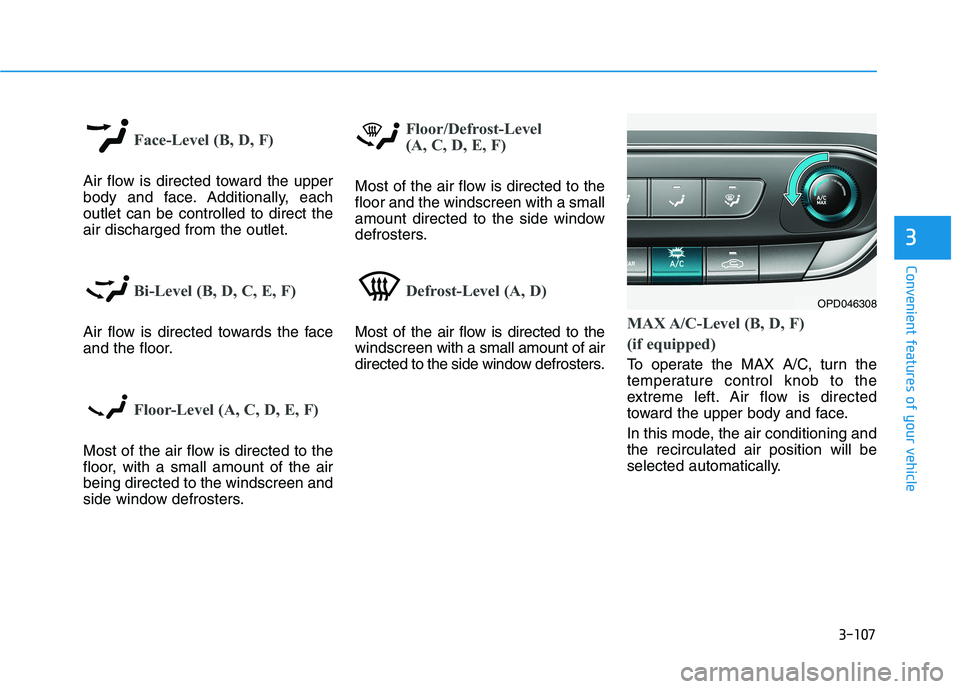
directed to the side window defrosters.MAX A/C-Level (B, D, F)
(if equipped)
To operate the MAX A/C, turn the
temperature control knob to the
extreme left. Air flow is directed
toward the upper body and face.
In this mode, the air conditioning and
the recirculated air position will be
selected automatically.
OPD046308
Page 197 of 533
3-114
Convenient features of your vehicle
A AU
UT
TO
OM
MA
AT
TI
IC
C
C
CL
LI
IM
MA
AT
TE
E
C
CO
ON
NT
TR
RO
OL
L
S
SY
YS
ST
TE
EM
M
(
(I
IF
F
E
EQ
QU
UI
IP
PP
PE
ED
D)
)
OPD047302R
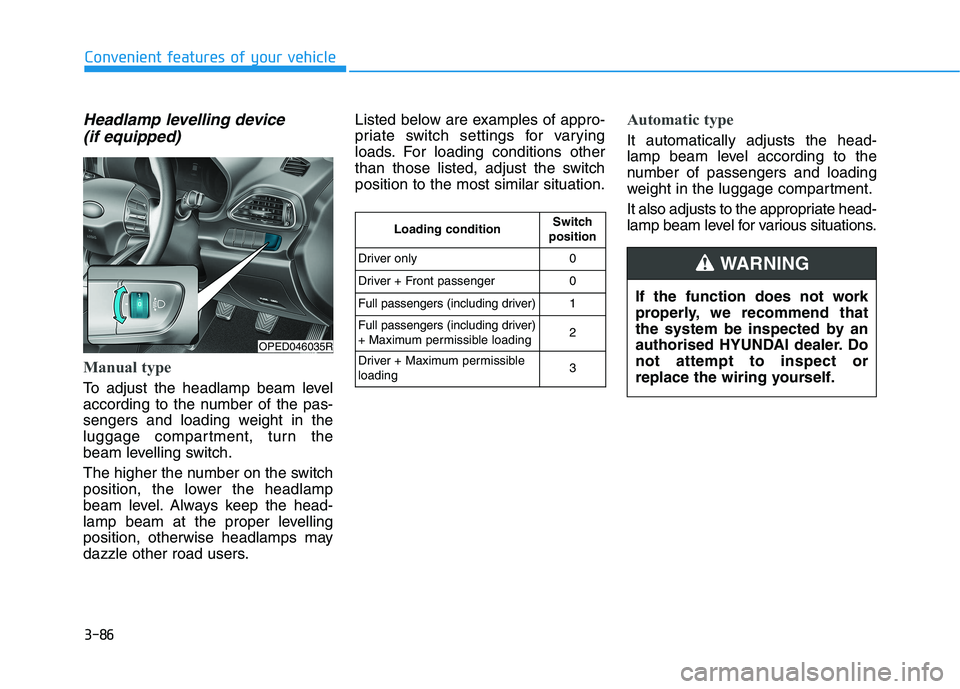
1. Passenger’s temperature control knob
2. Driver’s temperature control knob
3. SYNC button
4. OFF button
5. Blower speed control button
6. Mode selection button
7. AUTO (automatic control) button
8. Air conditioning button
9. Air intake control button
10. Front windscreen defroster button
11. Rear window defroster button
12. Climate control information screen
Page 198 of 533
3-115
Convenient features of your vehicle
3
Automatic heating and air con-
ditioning
The Automatic Climate Control
System is controlled by setting the
desired temperature.
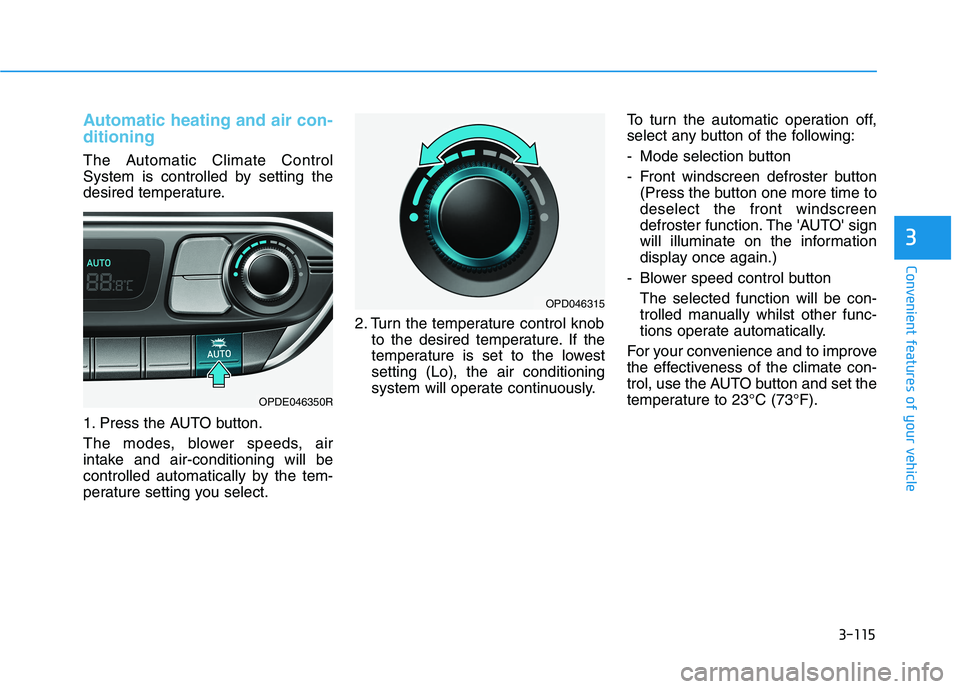
1. Press the AUTO button.
The modes, blower speeds, air
intake and air-conditioning will be
controlled automatically by the tem-
perature setting you select.2. Turn the temperature control knob
to the desired temperature. If the
temperature is set to the lowest
setting (Lo), the air conditioning
system will operate continuously.To turn the automatic operation off,
select any button of the following:
- Mode selection button
- Front windscreen defroster button
(Press the button one more time to
deselect the front windscreen
defroster function. The 'AUTO' sign
will illuminate on the information
display once again.)
- Blower speed control button
The selected function will be con-
trolled manually whilst other func-
tions operate automatically.
For your convenience and to improve
the effectiveness of the climate con-
trol, use the AUTO button and set the
temperature to 23°C (73°F).
OPDE046350R
OPD046315