Page 215 of 533
3-132
Convenient features of your vehicle
Sunglasses holder
(if equipped)
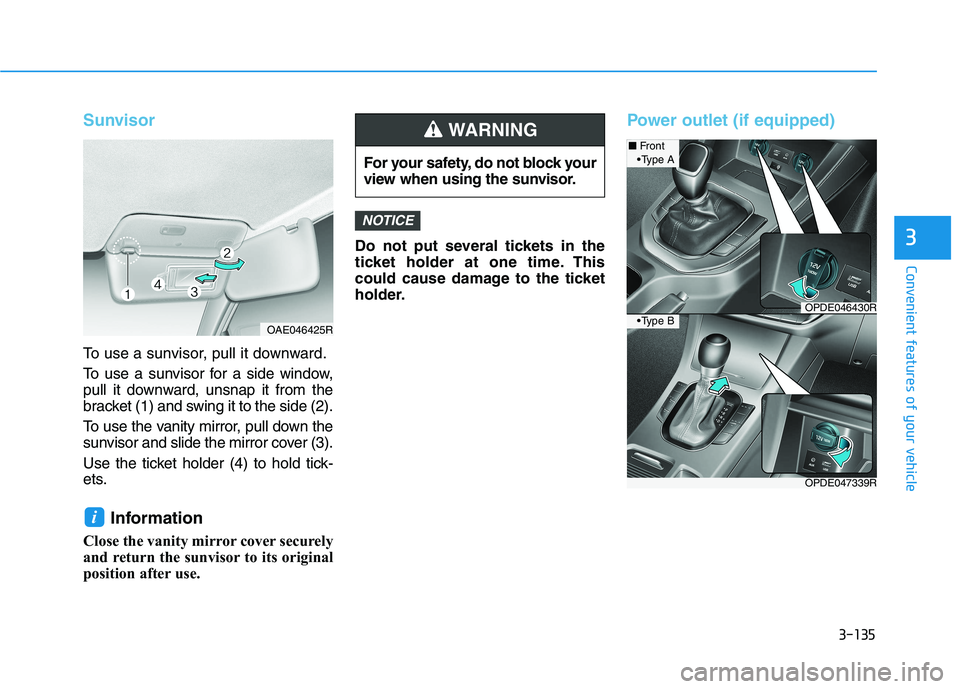
To open:
Press the cover and the holder will
slowly open. Place your sunglasses
in the compartment door with the
lenses facing out.To close:
Push back into position.
Make sure the sunglasses holder is
closed whilst driving.
Multi box (if equipped)
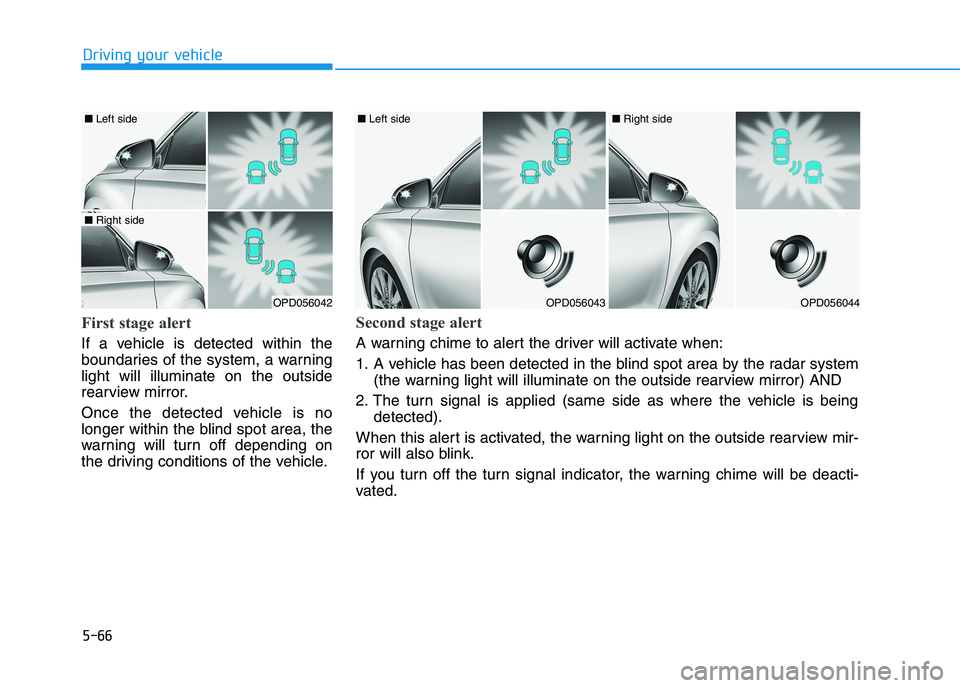
To open the cover, push the lip of the
cover all the way forward.
To close the cover, push and release
the lip of the cover forward and it will
slowly close.OPD046334
Do not keep objects except
sunglasses inside the sun-
glasses holder. Such objects
can be thrown from the holder
in the event of a sudden stop or
an accident, possibly injuring
the passengers in the vehicle.
Do not open the sunglasses
holder whilst the vehicle is
moving. The rear view mirror
of the vehicle can be blocked
by an open sunglasses holder.
Do not attempt to force sun-
glasses into the sunglasses
holder. If the sunglasses
become jammed and you try
to open it forcibly, personal
injury may occur.
WARNING
OPDE047338R
Page 218 of 533
3-135
Convenient features of your vehicle
3
Sunvisor
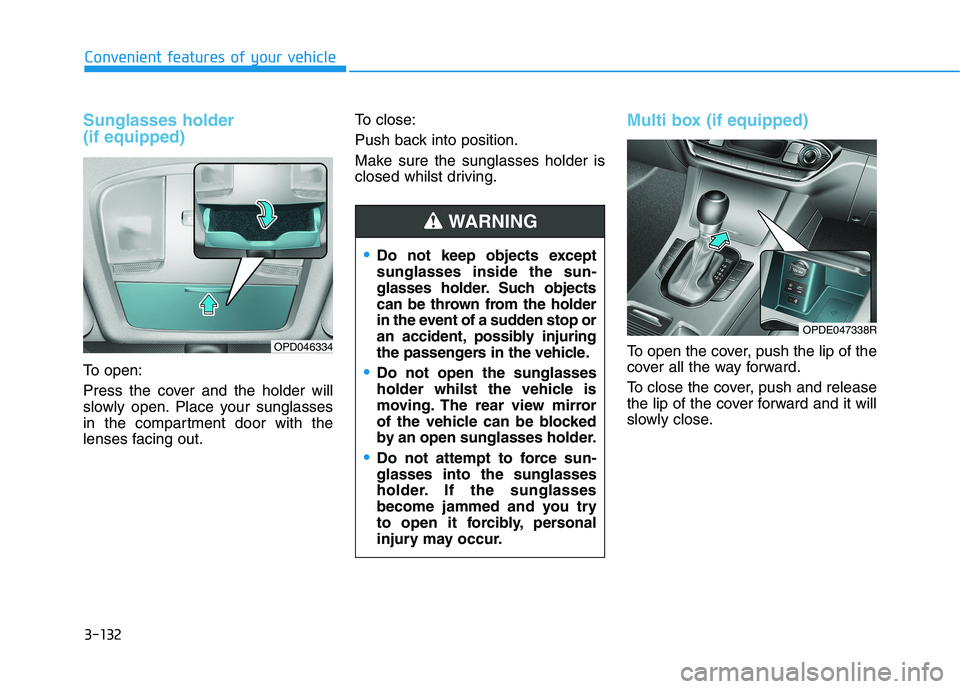
To use a sunvisor, pull it downward.
To use a sunvisor for a side window,
pull it downward, unsnap it from the
bracket (1) and swing it to the side (2).
To use the vanity mirror, pull down the
sunvisor and slide the mirror cover (3).
Use the ticket holder (4) to hold tick-
ets.
Information
Close the vanity mirror cover securely
and return the sunvisor to its original
position after use.Do not put several tickets in the
ticket holder at one time. This
could cause damage to the ticket
holder.
Power outlet (if equipped)
NOTICE
i
For your safety, do not block your
view when using the sunvisor.
WARNING
OAE046425R
OPDE047339R
■Front
OPDE046430R
A
B
Page 270 of 533
5-5
Driving your vehicle
5
Before entering the vehicle
• Be sure all windows, outside mir-
ror(s), and outside lights are clean
and unobstructed.
Remove frost, snow, or ice.
Visually check the tyres for uneven
wear and damage.
Check under the vehicle for any
sign of leaks.
Be sure there are no obstacles
behind you if you intend to reverse.
Before starting
Make sure the bonnet, the tailgate,
and the doors are securely closed
and locked.
Adjust the position of the seat and
steering wheel.
Adjust the inside and outside
rearview mirrors.
Verify all the lights work.
Fasten your seat belt. Check that
all passengers have fastened their
seat belts.
Check the gauges and indicators in
the instrument panel and the mes-
sages on the instrument display
when the ignition switch is in the
ON position.
Check that any items you are car-
rying are stored properly or fas-
tened down securely.
B BE
EF
FO
OR
RE
E
D
DR
RI
IV
VI
IN
NG
G
To reduce the risk of SERIOUS
INJURY or DEATH, take the fol-
lowing precautions:
•ALWAYS wear your seat belt.
All passengers must be prop-
erly restrained whenever the
vehicle is moving. For more
information, refer to "Seat
Belts" in chapter 2.
Always drive defensively.
Assume other drivers or pedes-
trians may be careless and
make mistakes.
Stay focused on the task of
driving. Driver distraction can
cause accidents.
Leave plenty of space between
you and the vehicle in front of
you.
WARNING
Page 329 of 533
![HYUNDAI I30 2023 Owners Manual 5-64
Driving your vehicle
[A] : Blind spot area, [B] : Closing at high speed
The Blind-spot Collision Warning
(BCW) system uses radar sensors in
the rear bumper to monitor and warn
the driver of an a](/manual-img/35/56144/w960_56144-328.png "HYUNDAI I30 2023 Owners Manual 5-64
Driving your vehicle
[A] : Blind spot area, [B] : Closing at high speed
The Blind-spot Collision Warning
(BCW) system uses radar sensors in
the rear bumper to monitor and warn
the driver of an a")
5-64
Driving your vehicle
[A] : Blind spot area, [B] : Closing at high speed
The Blind-spot Collision Warning
(BCW) system uses radar sensors in
the rear bumper to monitor and warn
the driver of an approaching vehicle
in the driver's blind spot area.The system monitors the rear area of
the vehicle and provides information
to the driver with an audible alert and
an indicator on the outside rearview
mirrors.
(1) BCW : Blind spot area
The BCW range varies relative to
vehicle speed. Note that if your
vehicle is traveling much faster
than the vehicles around you, the
warning will not occur.
(2) BCW : Closing at high speed
The BCW-Closing at high speed
feature will alert you when a vehi-
cle is approaching in an adjacent
lane at a high rate of speed. If the
driver activates the turn signal
when the system detects an
oncoming vehicle, the system
sounds an audible alert. Distance
from the approaching vehicle can
be seen differently according to
the relative speed.(3) RCCW (Rear Cross-Traffic
Collision Warning)
The RCCW feature monitors
approaching cross traffic from the
left and right side of the vehicle
when your vehicle is in reverse.
The feature will operate when the
vehicle is moving in reverse below
about 10 km/h. If oncoming cross
traffic is detected a warning chime
will sound.
Distance from the approaching
vehicle can be seen differently
according to the relative speed.
B BL
LI
IN
ND
D-
-S
SP
PO
OT
T
C
CO
OL
LL
LI
IS
SI
IO
ON
N
W
WA
AR
RN
NI
IN
NG
G
(
(B
BC
CW
W)
)
S
SY
YS
ST
TE
EM
M
(
(I
IF
F
E
EQ
QU
UI
IP
PP
PE
ED
D)
)
OOS057099R
Page 330 of 533
5-65
Driving your vehicle
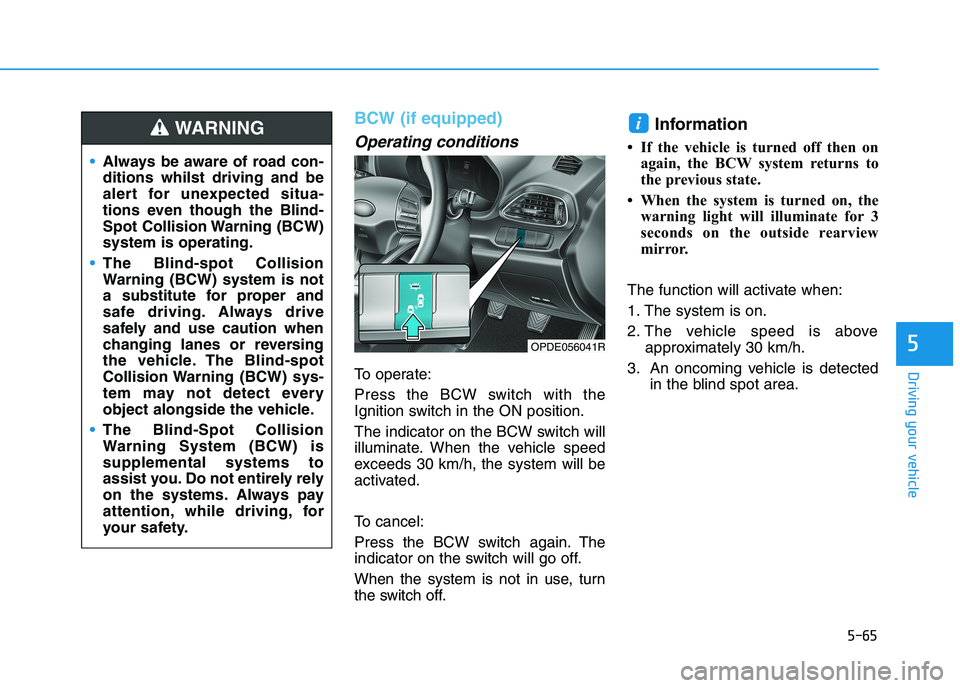
BCW (if equipped)
Operating conditions
To operate:
Press the BCW switch with the
Ignition switch in the ON position.
The indicator on the BCW switch will
illuminate. When the vehicle speed
exceeds 30 km/h, the system will be
activated.
To cancel:
Press the BCW switch again. The
indicator on the switch will go off.
When the system is not in use, turn
the switch off.
Information
• If the vehicle is turned off then on
again, the BCW system returns to
the previous state.
• When the system is turned on, the
warning light will illuminate for 3
seconds on the outside rearview
mirror.
The function will activate when:
1. The system is on.
2. The vehicle speed is above
approximately 30 km/h.
3. An oncoming vehicle is detected
in the blind spot area.
i
5
Always be aware of road con-
ditions whilst driving and be
alert for unexpected situa-
tions even though the Blind-
Spot Collision Warning (BCW)
system is operating.
The Blind-spot Collision
Warning (BCW) system is not
a substitute for proper and
safe driving. Always drive
safely and use caution when
changing lanes or reversing
the vehicle. The Blind-spot
Collision Warning (BCW) sys-
tem may not detect every
object alongside the vehicle.
The Blind-Spot Collision
Warning System (BCW) is
supplemental systems to
assist you. Do not entirely rely
on the systems. Always pay
attention, while driving, for
your safety.
WARNING
OPDE056041R
Page 331 of 533
5-66
Driving your vehicle
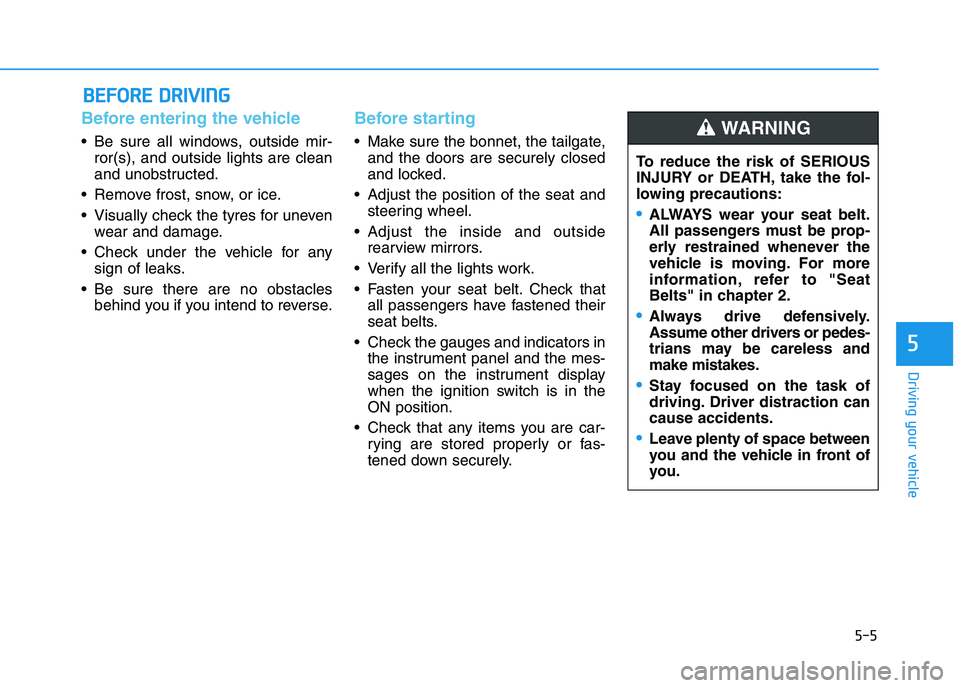
First stage alert
If a vehicle is detected within the
boundaries of the system, a warning
light will illuminate on the outside
rearview mirror.
Once the detected vehicle is no
longer within the blind spot area, the
warning will turn off depending on
the driving conditions of the vehicle.
OPD056042
■ Left side
■ Right side
OPD056043
■ Left side
OPD056044
■ Right side
Second stage alert
A warning chime to alert the driver will activate when:
1. A vehicle has been detected in the blind spot area by the radar system
(the warning light will illuminate on the outside rearview mirror) AND
2. The turn signal is applied (same side as where the vehicle is being
detected).
When this alert is activated, the warning light on the outside rearview mir-
ror will also blink.
If you turn off the turn signal indicator, the warning chime will be deacti-
vated.
Page 333 of 533

5-68
Driving your vehicle
Warning type
If the vehicle detected by the sensors
approaches your vehicle, the warn-
ing chime will sound, the warning
light on the outside rearview mirror
will blink and a message will appear
on the LCD display.
Information
• The warning chime will turn off
when:
- The detected vehicle moves out of
the sensing area or
- when the vehicle is right behind
your vehicle or
- when the vehicle is not approach-
ing your vehicle or
- when the other vehicle slows down.
• The system may not operate proper-
ly due to other factors or circum-
stances. Always pay attention to
your surroundings.
• If the sensing area near the rear
bumper is blocked by either a wall
or barrier or by a parked vehicle,
the system sensing area may be
reduced.
i
■ Left■Right
OPDE056046/OPDE056047
When BCW is activated, the
warning light on the outside
rearview mirror will illuminate
whenever a vehicle is detect-
ed at the rear, by the system.
To avoid accidents, do not
focus only on the warning
light and neglect to see the
surroundings of the vehicle.
Drive safely even though the
vehicle is equipped with a
Blind-spot Collision Warning
(BCW) system and Rear
Cross-Traffic Collision
Warning (RCCW). Do not sole-
ly rely on the system but
check your surroundings
before changing lanes or
reversing the vehicle.
The system may not alert the
driver in some conditions so
always check your surround-
ings whilst driving.
(Continued)
WARNING
Page 335 of 533

5-70
Driving your vehicle
If any of these conditions occur, the
light on the BCW switch and the sys-
tem will turn off automatically.
When the BCW cancelled warning
message is displayed in the cluster,
check to make sure that the rear
bumper is free from any dirt or snow
in the areas where the sensor is
located. Remove any dirt, snow, or
foreign material that could interfere
with the radar sensors.
After any dirt or debris is removed,
the BCW system should operate nor-
mally after about 10 minutes of driv-
ing the vehicle.
If the system still does not operate
normally have your vehicle inspected
by an authorised HYUNDAI dealer.
Information
Turn off the system by pressing the
BCW switch and deselecting Rear
Cross Traffic Collision Warning
(RCCW) from the User Settings mode
on the cluster, when using a trailer or
carrier behind your vehicle.
Check BCW (Blind-spot Collision
Warning) system
If there is a problem with the BCW
system, a warning message will
appear and the light on the switch
will turn off. The system will turn off
automatically. We recommend that
you have your vehicle inspected by
an authorised HYUNDAI dealer.
Non-operating condition
The BCW indicator on the outer
side view mirror may not illuminate
properly when:
The outside rearview mirror hous-
ing is damaged.
The mirror is covered with dirt,
snow, or debris.
The window is covered with dirt,
snow, or debris.
The window is tinted.
i
■Type A■Type B
OOS057078AU/OOS057079AU