Page 241 of 533
4-16
Multimedia System
(6)END(if equipped)
Press in Bluetooth
®Handsfree
mode to end the phone call.
Press in the incoming call screen
to reject the call. Do not stare at the screen
whilst driving. Staring at the
screen for prolonged periods
of time could lead to traffic
accidents.
Do not disassemble, assem-
ble, or modify the audio sys-
tem. Such acts could result in
accidents, fire, or electric
shock.
Using the phone whilst driv-
ing may lead to a lack of atten-
tion of traffic conditions and
increase the likelihood of
accidents. Use the phone fea-
ture after parking the vehicle.
Exercise caution not to spill
water or introduce foreign
objects into the device. Such
acts could lead to smoke, fire,
or product malfunction.
(Continued)WARNING(Continued)
Please refrain from use if the
screen is blank or no sound
can be heard as these signs
may indicate product malfunc-
tion. Continued use in such
conditions could lead to acci-
dents (fires, electric shock) or
product malfunctions.
Do not touch the antenna dur-
ing thunder or lightening as
such acts may lead to light-
ning induced electric shock.
Do not stop or park in park-
ing-restricted areas to operate
the product. Such acts could
lead to traffic accidents.
Use the system with the vehi-
cle engine turned on.
Prolonged use with the igni-
tion turned on only could
result in battery discharge.
Page 242 of 533
4-17
Multimedia System
4
Operating the device whilst driv-
ing could lead to accidents due
to a lack of attention to external
surroundings. First park the
vehicle before operating the
device.
Adjust the volume to levels that
allow the driver to hear sounds
from outside of the vehicle.
Driving in a state where external
sounds cannot be heard may
lead to accidents.
Pay attention to the volume set-
ting when turning the device on.
A sudden output of extreme vol-
ume upon turning the device on
could lead to hearing impair-
ment. (Adjust the volume to a
suitable levels before turning off
the device.)
(Continued)(Continued)
Turn on the car engine before
using this device. Do not oper-
ate the audio system for long
periods of time only with the
ignition turned on as such oper-
ations may lead to battery dis-
charge.
Do not subject the device to
severe shock or impact. Direct
pressure onto the front side of
the monitor may cause damage
to the LCD.
When cleaning the device, make
sure to turn off the device and
use a dry and smooth cloth.
Never use tough materials,
chemical cloths, or solvents
(alcohol, benzene, thinners,
etc.). As such materials may
damage the device panel or
cause colour/quality deteriora-
tion
Do not place beverages close to
the audio system. Spilling bever-
ages may lead to system mal-
function.
(Continued)
NOTICE
Driving whilst distracted can
result in a loss of vehicle con-
trol that may lead to an acci-
dent, severe personal injury,
and death. The driver’s primary
responsibility is in the safe and
legal operation of a vehicle, and
use of any handheld devices,
other equipment, or vehicle sys-
tems which take the driver’s
eyes, attention and focus away
from the safe operation of a
vehicle or which are not permis-
sible by law should never be
used during operation of the
vehicle.
WARNING
Page 249 of 533
![HYUNDAI I30 2023 Owners Manual 4-24
Multimedia System
Information
The repeat folder function is available
only when songs are playing from the
[File] category under [List].
Shuffle play
Select [Shuffle] to enable or disable
‘Shuf](/manual-img/35/56144/w960_56144-248.png "HYUNDAI I30 2023 Owners Manual 4-24
Multimedia System
Information
The repeat folder function is available
only when songs are playing from the
[File] category under [List].
Shuffle play
Select [Shuffle] to enable or disable
‘Shuf")
4-24
Multimedia System
Information
The repeat folder function is available
only when songs are playing from the
[File] category under [List].
Shuffle play
Select [Shuffle] to enable or disable
‘Shuffle’, ‘Shuffle folder’ or ‘Shuffle
category’ play.
Shuffle: Songs are played in
random order.
Shuffle folder: Songs within
the current folder are played in ran-
dom order.
Shuffle category: Songs within
the current category are played in
random order.
Menu
Select [Menu], and select the desired
function.
Save to My Music: Songs on your
USB device can be saved to My
Music.
(1) File: Select a file to save
.
(2) Mark All: Select all files.
(3) Unmark All: Deselect all files.(4) Save: Save the selected file(s)
.
- Select the files you want to save,
and select [Save]. This saves the
selected files to My Music.
- Saving is cancelled if phone calls
are received or made whilst saving.
- Up to 6,000 files can be saved.
- The currently playing file on the
USB device cannot be changed
whilst saving.
- My Music cannot be used whilst
saving.
- Up to 700 MB can be saved.
Information: Detailed information
on the currently playing song is dis-
played.
Sound Settings: Audio sound set-
tings can be changed.i
Page 253 of 533
4-28
Multimedia System
Bluetooth
®Handsfree is a fea-
ture that enables drivers to prac-
tice safe driving. Connecting the
car audio system with a
Bluetooth
®phone allows the
user to conveniently make calls,
receive calls, and manage the
phone book. Before using the
Bluetooth
®, carefully read the
contents of this user’s manual.
Excessive use or operations
whilst driving may lead to negli-
gent driving practices and be
the cause of accidents.
Do not operate the device exces-
sively whilst driving.
Viewing the screen for pro-
longed periods of time is dan-
gerous and may lead to acci-
dents.
When driving, view the screen
only for short periods of time.
Bluetooth®(BT) Audio
(if equipped)
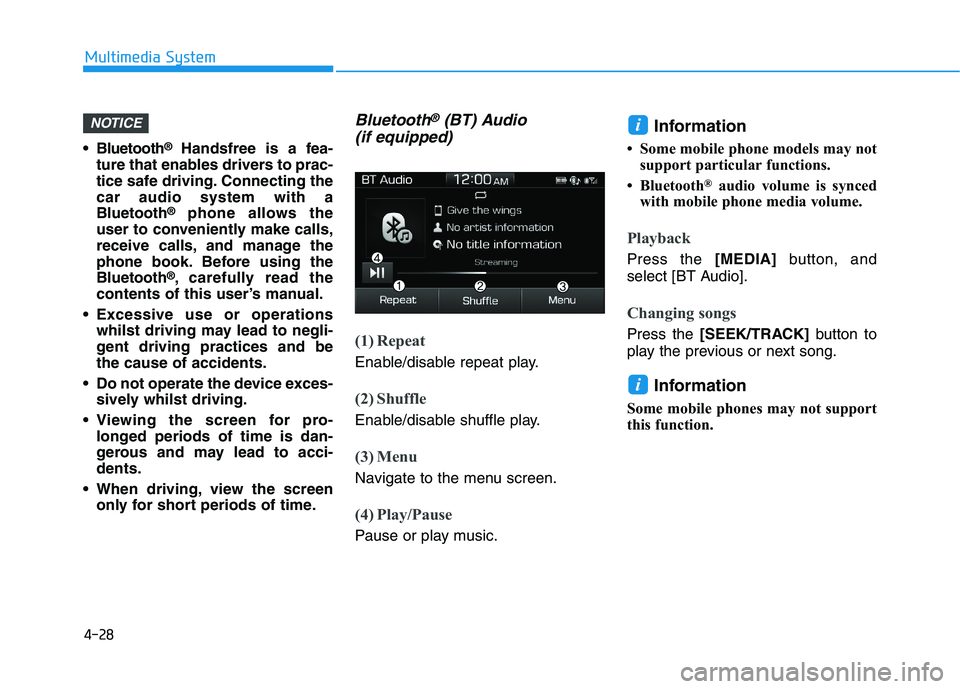
(1) Repeat
Enable/disable repeat play.
(2) Shuffle
Enable/disable shuffle play.
(3) Menu
Navigate to the menu screen.
(4) Play/Pause
Pause or play music.
Information
• Some mobile phone models may not
support particular functions.
• Bluetooth
®audio volume is synced
with mobile phone media volume.
Playback
Press the [MEDIA]button, and
select [BT Audio].
Changing songs
Press the [SEEK/TRACK]button to
play the previous or next song.
Information
Some mobile phones may not support
this function.
i
iNOTICE
Page 255 of 533
4-30
Multimedia System
My Music
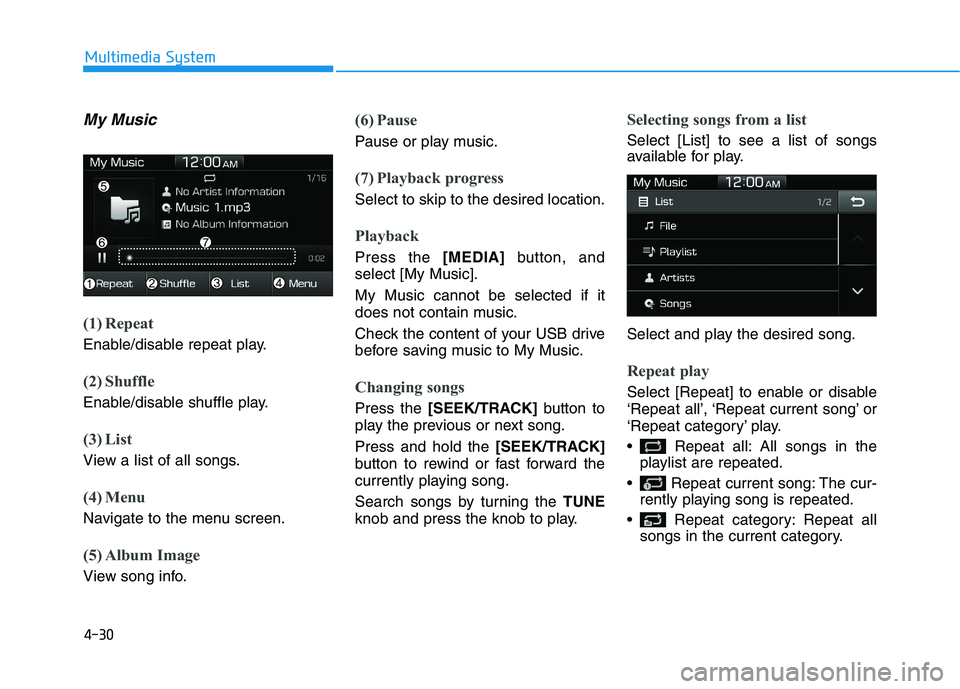
(1) Repeat
Enable/disable repeat play.
(2) Shuffle
Enable/disable shuffle play.
(3) List
View a list of all songs.
(4) Menu
Navigate to the menu screen.
(5) Album Image
View song info.
(6) Pause
Pause or play music.
(7) Playback progress
Select to skip to the desired location.
Playback
Press the [MEDIA]button, and
select [My Music].
My Music cannot be selected if it
does not contain music.
Check the content of your USB drive
before saving music to My Music.
Changing songs
Press the [SEEK/TRACK]button to
play the previous or next song.
Press and hold the [SEEK/TRACK]
button to rewind or fast forward the
currently playing song.
Search songs by turning the TUNE
knob and press the knob to play.
Selecting songs from a list
Select [List] to see a list of songs
available for play.
Select and play the desired song.
Repeat play
Select [Repeat] to enable or disable
‘Repeat all’, ‘Repeat current song’ or
‘Repeat category’ play.
Repeat all: All songs in the
playlist are repeated.
Repeat current song: The cur-
rently playing song is repeated.
Repeat category: Repeat all
songs in the current category.
Page 257 of 533
4-32
Multimedia System
(Continued)
• When Bluetooth
®is connected and
calls are attempted through a con-
nected mobile phone from outside
the vehicle, the call is connected
through the Bluetooth
®Handsfree
function of the vehicle.
• Please be sure to disconnect the
Bluetooth
®Handsfree function
throughyour Bluetooth®device or
the audio screen.
Safety precautions
The Bluetooth®Handsfree function
helps drivers to drive safely. By
connecting a Bluetooth
®-enabled
phone to the vehicle’s audio sys-
tem, phone calls can be made and
received through the audio system
and contacts can be managed.
Consult the user manual before
use.
Excessive manipulation of controls
whilst driving, making it difficult to
pay attention to the road ahead,
can lead to accidents. Do not oper-
ate the device excessively whilst
driving.
Looking at the screen for a pro-
longed time increases the risk of
accidents. Keep time spent looking
at the screen to a minimum.
Precautions when connecting
Bluetooth®devices
The vehicle supports the following
Bluetooth®functions. Some
Bluetooth®devices may not sup-
port some functions.
1) Bluetooth
®Handsfree phone
calls
2) Operations during a call
(Private, Switch, Out Vol. con-
trols)
3) Download call history saved to
the Bluetooth
®device
4) Download contacts saved to the
Bluetooth
®device
5) Automatic contacts/call history
download when Bluetooth
®is
connected
6) Automatic Bluetooth
®device
connection when the vehicle is
started
7) Bluetooth
®audio streaming
playback
Before connecting the audio sys-
tem to your device, make sure your
device supports Bluetooth
®.
Page 258 of 533
4-33
Multimedia System
4
Even if your device supports
Bluetooth®, a Bluetooth®connec-
tion cannot be established if the
device’s Bluetooth
®function is
switched off. Search and connect
with the Bluetooth
®function
enabled.
Pair or connect Bluetooth
®devices
to the audio system with the vehi-
cle at a standstill.
If a Bluetooth
®connection is lost
due to abnormal conditions whilst
a Bluetooth
®device is connected
(communication range exceeded,
device power OFF, communication
errors, etc.), the disconnected
Bluetooth
®device is searched for
and automatically reconnected.
If you want to disable the
Bluetooth
®device auto-connect
function, turn the Bluetooth®func-
tion OFF on your device. Consult
the user manuals for individual
devices to see whether Bluetooth
®
is supported.
Handsfree call quality and volume
may vary depending on the type of
Bluetooth
®device. Some Bluetooth
®devices are sub-
ject to intermittent Bluetooth®con-
nection failures. In this case, use
the following method.
1) Turn the Bluetooth
®function off
on your Bluetooth®device ➟
Turn it on and try again.
2) Delete the paired device from
both the audio system and
Bluetooth
®device, then pair
again.
3) Power down your Bluetooth
®
device ➟Turn it on and try
again.
4) Completely remove the battery
from your Bluetooth
®device;
reinsert it, reboot, and attempt
connection.
5) Restart the vehicle and reat-
tempt connection.
Pairing a Bluetooth®device
Information on pairing Bluetooth®
devices
Pairing refers to the process of
pairing Bluetooth®mobile phones
or devices with the system prior to
connection. This is a necessary
procedure for Bluetooth
®connec-
tion and usage.
Up to five devices can be paired.
Pairing Bluetooth
®device is not
allowed whilst vehicle is moving.
Page 261 of 533
4-36
Multimedia System
If there are connected devices
Press the [PHONE]button on the
audio system ➟Select [Settings] ➟
Select [Connections] ➟Select
Bluetooth
®device to connect ➟Select
[Connect] ➟Connect Bluetooth®.
Information
• Only one Bluetooth®device can be
connected at a time.
• When a Bluetooth
®device is con-
nected, other devices cannot be
paired.
Accepting/rejecting phone calls
Receiving phone calls with
Bluetooth®connected.
(1) Caller name: If the caller number
is in your contacts, the correspon-
ding name is displayed.
(2) Incoming phone number:
Incoming phone number is dis-
played.
(3) Accept: Accept call.
(4) Reject: Reject call.
Information
• When the incoming call screen is
displayed, audio mode and the set-
tings screen cannot be shown. Only
call volume control is supported.
• Some Bluetooth
®devices may not
support the call reject function.
• Some Bluetooth
®devices may not
support the phone number display
function.
i
i
![HYUNDAI I30 2023 Owners Manual 4-36
Multimedia System
If there are connected devices
Press the [PHONE]button on the
audio system ➟Select [Settings] ➟
Select [Connections] ➟Select
Bluetooth
®device to connect ➟Select
[Conne](/manual-img/35/56144/w960_56144-260.png "HYUNDAI I30 2023 Owners Manual 4-36
Multimedia System
If there are connected devices
Press the [PHONE]button on the
audio system ➟Select [Settings] ➟
Select [Connections] ➟Select
Bluetooth
®device to connect ➟Select
[Conne")