Page 121 of 649
4-26
Instrument cluster
LCD display modes
Modes Symbol Explanation
Trip
ComputerThis mode displays driving information such as the tripmeter,
fuel economy, etc.
For more details, refer to "Trip Computer" in this chapter.
Turn By
Turn (TBT)
This mode displays the state of the navigation.
Driving
Assist
- Smart Cruise Control
- Drive Attention Warning
- Intelligent Speed Limit Warning
User
Settings
In this mode, you can change settings of the doors, lamps,
etc.
Warning
- This mode displays warning messages related to the
lamp malfunction, etc.
- Tyre pressure information
The information provided may differ depending on which functions are applicable
to your vehicle.
Page 123 of 649
4-28
Instrument cluster
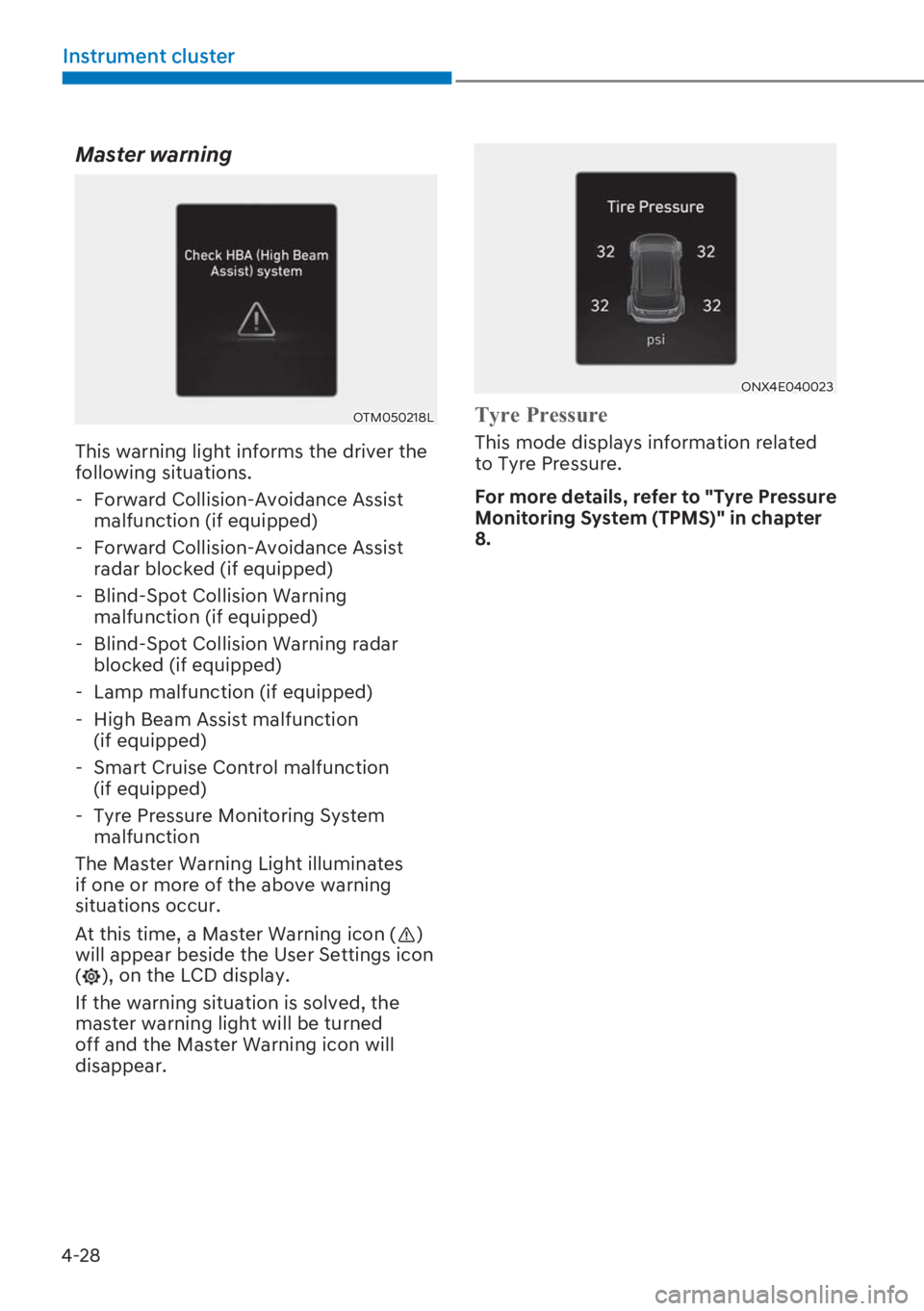
Master warning
OTM050218L
This warning light informs the driver the
following situations.
- Forward Collision-Avoidance Assist
malfunction (if equipped)
- Forward Collision-Avoidance Assist
radar blocked (if equipped)
- Blind-Spot Collision Warning
malfunction (if equipped)
- Blind-Spot Collision Warning radar
blocked (if equipped)
- Lamp malfunction (if equipped)
- High Beam Assist malfunction
(if equipped)
- Smart Cruise Control malfunction
(if equipped)
- Tyre Pressure Monitoring System
malfunction
The Master Warning Light illuminates
if one or more of the above warning
situations occur.
At this time, a Master Warning icon (
)
will appear beside the User Settings icon
(
), on the LCD display.
If the warning situation is solved, the
master warning light will be turned
off and the Master Warning icon will
disappear.
ONX4E040023
7\UH�3UHVVXUH
This mode displays information related
to Tyre Pressure.
For more details, refer to "Tyre Pressure
Monitoring System (TPMS)" in chapter
8.
Page 130 of 649
4-35
04
���8QLWV
ItemsExplanation
Speed unitTo select the speed unit. (km/h, MPH)
Temperature unitTo select the temperature unit. (°C,°F)
Fuel Economy unitTo select the fuel economy unit. (km/L, L/100km, MPG)
Tyre Pressure unitTo select the tyre pressure unit. (psi, kPa, bar)
���/DQJXDJH��LI�HTXLSSHG�
ItemsExplanation
LanguageChoose the language.
���5HVHW
ItemsExplanation
ResetYou can reset the menus in the User Settings Mode. All menus in the
User Settings Mode are reset to factory settings, except language and
service interval
❈ The information provided may differ depending on which functions are applicable
to your vehicle.
Page 181 of 649

5-40
Convenient features
OBC3N050015
3. Pull the fuel filler door out (1) to fully
open.
4. To remove the fuel tank cap (2), turn
it counterclockwise. You may hear a
hissing noise as the pressure inside
the tank equalizes.
5. Place the cap on the fuel filler door
(3).
i Information
,I�WKH�IXHO�ILOOHU�GRRU�GRHV�QRW�RSHQ�
because ice has formed around it, tap
lightly or push on the door to break the
LFH�DQG�UHOHDVH�WKH�GRRU��'R�QRW�SU\�RQ�WKH�
GRRU��,I�QHFHVVDU\��VSUD\�DURXQG�WKH�GRRU�
with an approved de-icer fluid (do not use
UDGLDWRU�DQWL�IUHH]H��RU�PRYH�WKH�YHKLFOH�
to a warm place and allow the ice to melt.
Closing the fuel filler door
1. To install the fuel tank cap, turn it
clockwise until it “Clicks”.
2. Close the fuel filler door until it is
latched securely.
WARNING
3HWURO�LV�KLJKO\�IODPPDEOH�DQG�
H[SORVLYH��)DLOXUH�WR�IROORZ�WKHVH�
guidelines may result in SERIOUS
INJURY or DEATH:
�[�Read and follow all warnings posted
at the gas station.
�[�Before refuelling, note the location
RI�WKH�(PHUJHQF\�3HWURO�6KXW�2II��LI�
available, at the gas station.
�[�Before touching the fuel nozzle, you
should eliminate the potential build-
up of static electricity by touching
a metal part of the vehicle, a safe
distance away from the fuel filler
neck, nozzle, or other gas source,
with your bare hand.
�[�Do not use mobile phones whilst
refuelling. Electric current and/or
electronic interference from mobile
phones can potentially ignite fuel
vapours and cause a fire.
Page 196 of 649

5-55
05
AUTO (Automatic) control
(if equipped)
The rain sensor located at the top of the
windscreen glass senses the amount of
rainfall and controls the wiping cycle for
the proper interval. The wiper operation
time will be automatically controlled,
depending on rainfall.
When the rain stops, the wiper stops. To
vary the speed setting, turn the speed
control knob.
If the wiper switch is set in AUTO mode
when the ignition switch is in the ON
position, the wiper will operate once to
perform a self-check of the system. Set
the wiper to the OFF position when the
wiper is not in use.
WARNING
To avoid personal injury from the
windscreen wipers, when the engine
is running and the windscreen wiper
switch is placed in the AUTO mode:
Do not touch the upper end of the
windscreen glass facing the rain sensor.
Do not wipe the top of the windscreen
glass with a damp or wet cloth.
Do not put pressure on the windscreen
glass.
NOTICE
When washing the vehicle, set the
ZLSHU�VZLWFK�LQ�WKH�2))�SRVLWLRQ�WR�VWRS�
the auto wiper operation. The wiper
may operate and be damaged if the
switch is set in the AUTO mode whilst
washing the vehicle.
Do not remove the sensor cover
located at the top of the passenger side
windscreen glass. Damage to system
parts could occur and may not be
covered by your vehicle warranty.
Windscreen washers
OTLE045168
In the OFF (O) position, pull the lever
gently toward you to spray washer
fluid on the windscreen and to run the
wipers 1-3 cycles. The spray and wiper
operation will continue until you release
the lever. If the washer does not work,
you may need to add washer fluid to the
washer fluid reservoir.
WARNING
When the outside temperature is
below freezing, ALWAYS warm the
windscreen using the defroster to
prevent the washer fluid from freezing
on the windscreen and obscuring your
vision which could result in an accident
and serious injury or death.
Page 206 of 649
5-65
05
WARNING
Vehicles equipped with R-1234yf
Since the refrigerant is
mildly flammable and
operated at high pressure,
the air conditioning system
should only be serviced by
trained and certified
technicians (Refer to the
6$(�-�������,W�LV�LPSRUWDQW�
that the correct type and
amount of oil and
refrigerant are used.
All refrigerants should be reclaimed
with proper equipment.
Venting refrigerants directly to the
atmosphere is harmful to individuals
DQG�HQYLURQPHQW��)DLOXUH�WR�KHHG�WKHVH�
warnings can lead to serious injuries.
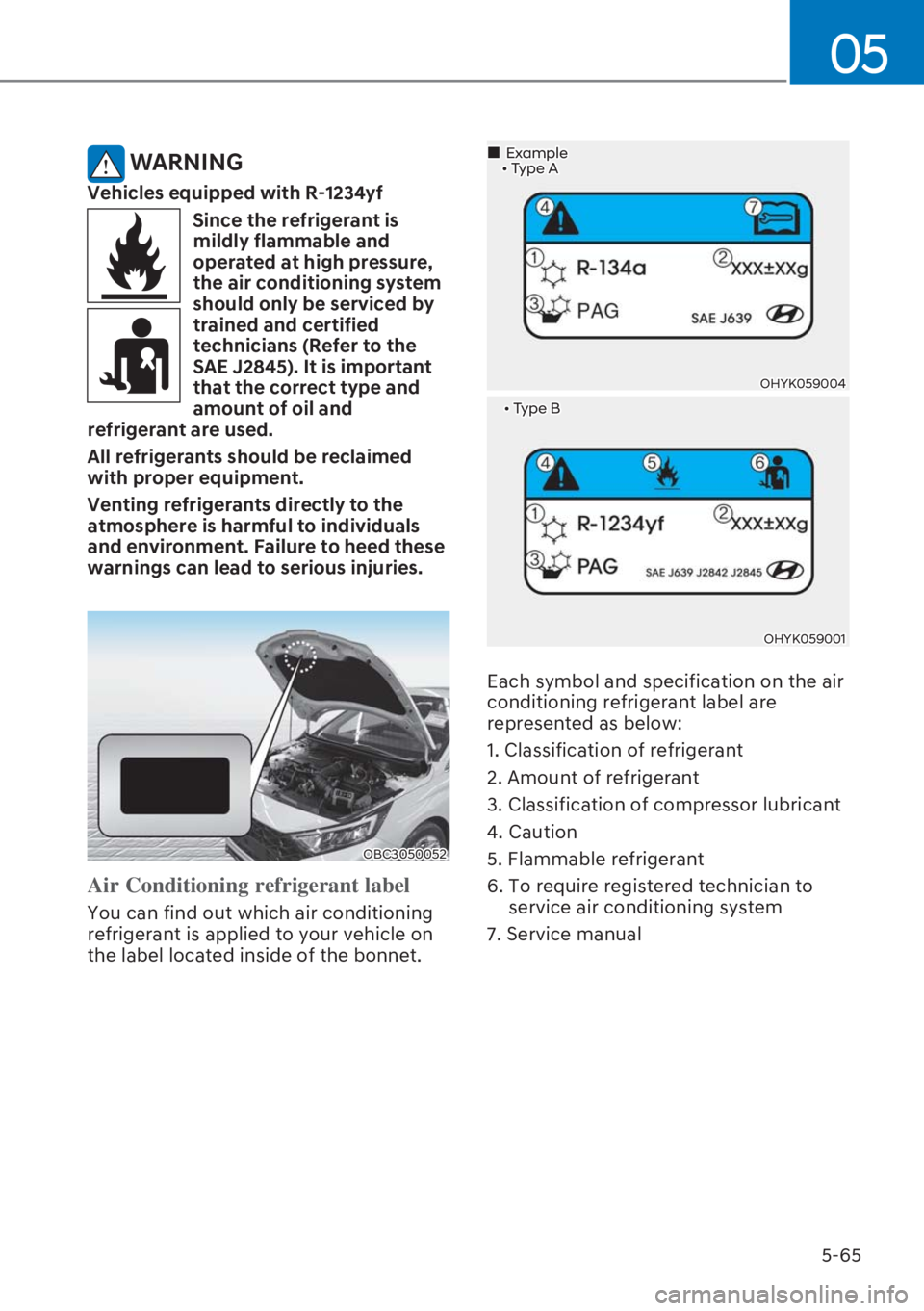
OBC3050052
Air Conditioning refrigerant label
You can find out which air conditioning
refrigerant is applied to your vehicle on
the label located inside of the bonnet.
�����[�7\SH�%
OHYK059001
OHYK059004
�„Example�����[�7\SH�$
Each symbol and specification on the air
conditioning refrigerant label are
represented as below:
1. Classification of refrigerant
2. Amount of refrigerant
3. Classification of compressor lubricant
4. Caution
5. Flammable refrigerant
6. To require registered technician to
service air conditioning system
7. Service manual
Page 217 of 649
5-76
Convenient features
WARNING
Vehicles equipped with R-1234yf
Since the refrigerant is
mildly flammable and
operated at high pressure,
the air conditioning system
should only be serviced by
trained and certified
technicians (Refer to the
6$(�-�������,W�LV�LPSRUWDQW�
that the correct type and
amount of oil and
refrigerant are used.
All refrigerants should be reclaimed
with proper equipment.
Venting refrigerants directly to the
atmosphere is harmful to individuals
DQG�HQYLURQPHQW��)DLOXUH�WR�KHHG�WKHVH�
warnings can lead to serious injuries.
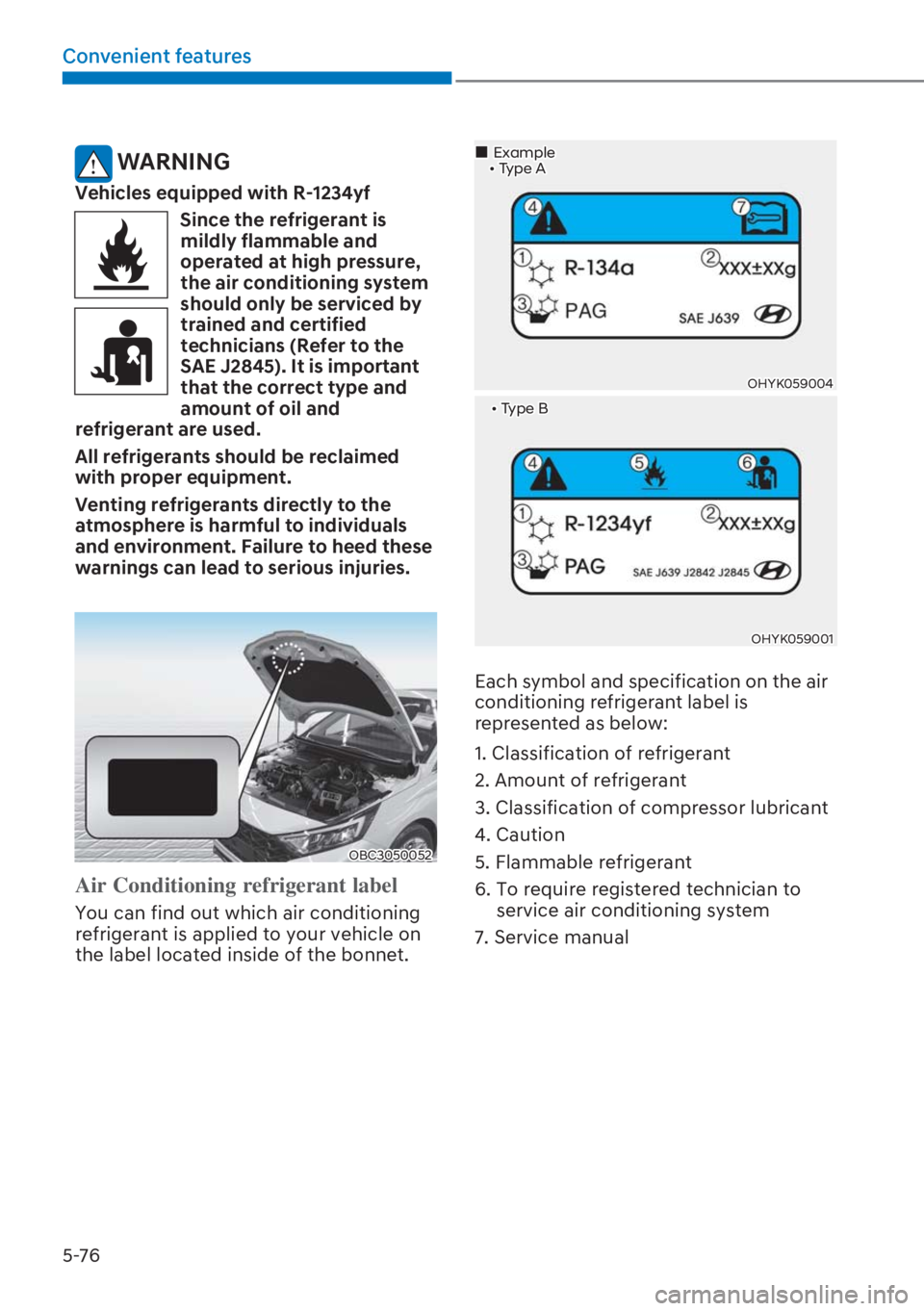
OBC3050052
Air Conditioning refrigerant label
You can find out which air conditioning
refrigerant is applied to your vehicle on
the label located inside of the bonnet.
�����[�7\SH�%
OHYK059001
OHYK059004
�„Example�����[�7\SH�$
Each symbol and specification on the air
conditioning refrigerant label is
represented as below:
1. Classification of refrigerant
2. Amount of refrigerant
3. Classification of compressor lubricant
4. Caution
5. Flammable refrigerant
6. To require registered technician to
service air conditioning system
7. Service manual
Page 234 of 649

5-93
05
Roof rack
OGB046238R
If the vehicle has a roof rack, you can
load cargo on top of your vehicle.
NOTICE
If the vehicle is equipped with a
sunroof, be sure not to position cargo
onto the roof rack in such a way that it
could interfere with sunroof operation.
NOTICE
�[� :KHQ�FDUU\LQJ�FDUJR�RQ�WKH�URRI�
rack, take the necessary precautions
to make sure the cargo does not
damage the roof of the vehicle.
�[� :KHQ�FDUU\LQJ�ODUJH�REMHFWV�RQ�WKH�
roof rack, make sure they do not
exceed the overall roof length or
width.
WARNING
�[� 7KH�IROORZLQJ�VSHFLILFDWLRQ�LV�WKH�
maximum weight that can be loaded
onto the roof rack. Distribute the
load as evenly as possible onto the
roof rack and secure the load firmly.
522)�
5$&.70 kg (154 lbs)
EVENLY DISTRIBUTED
Loading cargo or luggage in excess of
the specified weight limit on the roof
rack may damage your vehicle.
�[� 7KH�YHKLFOH�FHQWUH�RI�JUDYLW\�ZLOO�
be higher when items are loaded
onto the roof rack. Avoid sudden
starts, braking, sharp turns, abrupt
manoeuvres or high speeds that may
result in loss of vehicle control or
rollover resulting in an accident.
�[� $OZD\V�GULYH�VORZO\�DQG�WXUQ�FRUQHUV�
carefully when carrying items on
the roof rack. Severe wind updrafts,
caused by passing vehicles or natural
causes, can cause sudden upward
pressure on items loaded on the
roof rack. This is especially true
when carrying large, flat items such
as wood panels or mattresses. This
could cause the items to fall off the
roof rack and cause damage to your
vehicle or others around you.
�[� 7R�SUHYHQW�GDPDJH�RU�ORVV�RI�FDUJR�
whilst driving, check frequently
before or whilst driving to make
sure the items on the roof rack are
securely fastened.
EXTERIOR FEATURES

