Page 12 of 572
Foreword1-8
VEHICLE DATA COLLECTION
AND EVENT DATA
RECORDERS
This vehicle is equipped with an event
data recorder (EDR). The main purpose
of an EDR is to record, in certain crash
or near crash-like situations, such as
an air bag deployment or hitting a
road obstacle, data that will assist in
understanding how a vehicle’s systems
performed. The EDR is designed to
record data related to vehicle dynamics
and safety systems for a short period of
time, typically 30 seconds or less. The
EDR in this vehicle is designed to record
such data as:
�[� How various systems in your vehicle
were operating;
�[� Whether or not the driver and
passenger safety belts were buckled/
fastened;
�[� How far (if at all) the driver was
depressing the accelerator and/or
brake pedal; and,
�[� How fast the vehicle was traveling.
These data can help provide a better
understanding of the circumstances in
which crashes and injuries occur. NOTE:
EDR data is recorded by your vehicle
only if a non-trivial crash situation
occurs; no data are recorded by the EDR
under normal driving conditions and
no personal data (for example, name,
gender, age, and crash location) are
recorded. However, other parties, such
as law enforcement, could combine the
EDR data with the type of personally
identifying data routinely acquired
during a crash investigation.
To read data recorded by an EDR,
special equipment is required, and
access to the vehicle or the EDR is
needed. In addition to the vehicle
manufacturer, other parties, such as
law enforcement, that have the special
equipment, can read the information if
they have access to the vehicle or the
EDR.
WARNING
CALIFORNIA PROPOSITION 65
WARNING
Items contained in motor vehicles or
emitted from them are known to the
State of California to cause cancer and
birth defects or reproductive harm.
These include:
�[� Gasoline and its vapors
�[� Engine exhaust
�[� Used engine oil
�[� Interior passenger compartment
components and materials
�[� Component parts which are subject
to heat and wear
In addition, battery posts, terminals and
related accessories contain lead, lead
compounds and other chemicals known
to the State of California to cause
cancer and reproductive harm.
For more information go to
https://www.p65warnings.ca.gov/
passenger-vehicle
Page 141 of 572
Convenience Features5-6
If the remote key is in close proximity to
your mobile phone, the signal could be
blocked by your mobile phone’s normal
operational signals. This is specifically
relevant when the phone is active such
as making and receiving calls, text
messaging, and/or sending/receiving
emails.
When possible, avoid placing the remote
key and your mobile phone in the same
location such as a pants or jacket pocket
in order to avoid interference between
the two devices.
Information
This device complies with Part 15 of the
FCC rules.
Operation is subject to the following three
conditions:
1. This device may not cause harmful
interference.
2. This device must accept any
interference received, including
interference that may cause undesired
operation.
3. Changes or modifications not expressly
approved by the party responsible
for compliance could void the user’s
authority to operate the device.
NOTICE
Keep the remote key away from
electromagnetic materials that block
electromagnetic waves to the key
surface.
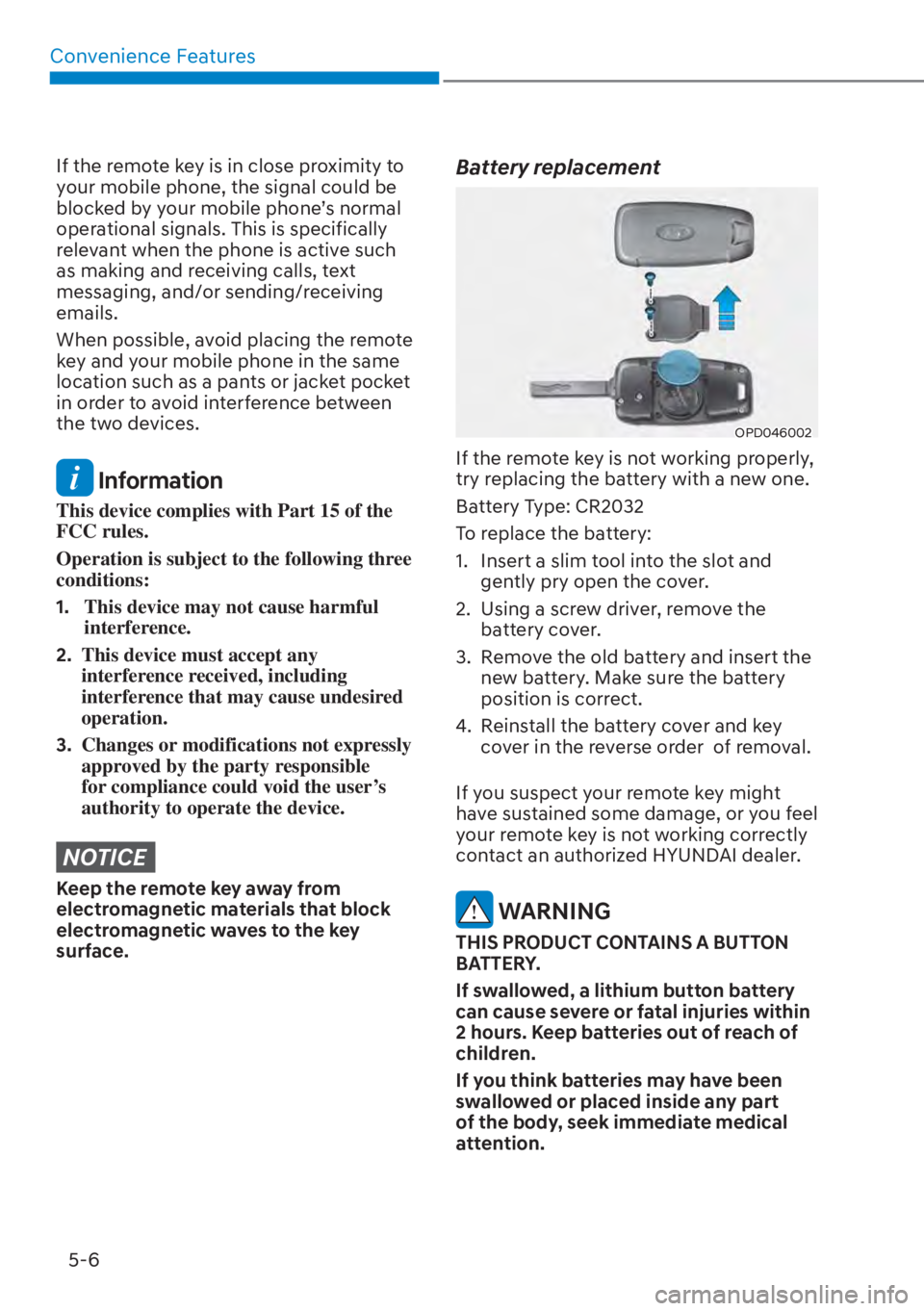
Battery replacement
OPD046002
If the remote key is not working properly,
try replacing the battery with a new one.
Battery Type: CR2032
To replace the battery:
1. Insert a slim tool into the slot and
gently pry open the cover.
2. Using a screw driver, remove the battery cover.
3. Remove the old battery and insert the new battery. Make sure the battery
position is correct.
4. Reinstall the battery cover and key cover in the reverse order of removal.
If you suspect your remote key might
have sustained some damage, or you feel
your remote key is not working correctly
contact an authorized HYUNDAI dealer.
WARNING
THIS PRODUCT CONTAINS A BUTTON
BATTERY.
If swallowed, a lithium button battery
can cause severe or fatal injuries within
2 hours. Keep batteries out of reach of
children.
If you think batteries may have been
swallowed or placed inside any part
of the body, seek immediate medical
attention.
Page 148 of 572
05
5-13
If the smart key does not work correctly,
open and close the door with the
mechanical key. If you have a problem
with the smart key, contact an authorized
HYUNDAI dealer.
If the smart key is in close proximity to
your mobile phone, the signal could be
blocked by your mobile phone’s normal
operational signals. This is specifically
relevant when the phone is active such
as making and receiving calls, text
messaging, and/or sending/receiving
emails. When possible, avoid keeping the
smart key and your mobile phone in the
same location such as a pants or jacket
pocket in order to avoid interference
between the two devices.
Information
This device complies with Part 15 of the
FCC rules.
Operation is subject to the following three
conditions:
1. This device may not cause harmful
interference, and
2. This device must accept any
interference received, including
interference that may cause undesired
operation.
3. Changes or modifications not expressly
approved by the party responsible
for compliance could void the user’s
authority to operate the device.
NOTICE
Keep the smart key away from
electromagnetic materials that blocks
electromagnetic waves to the key
surface.
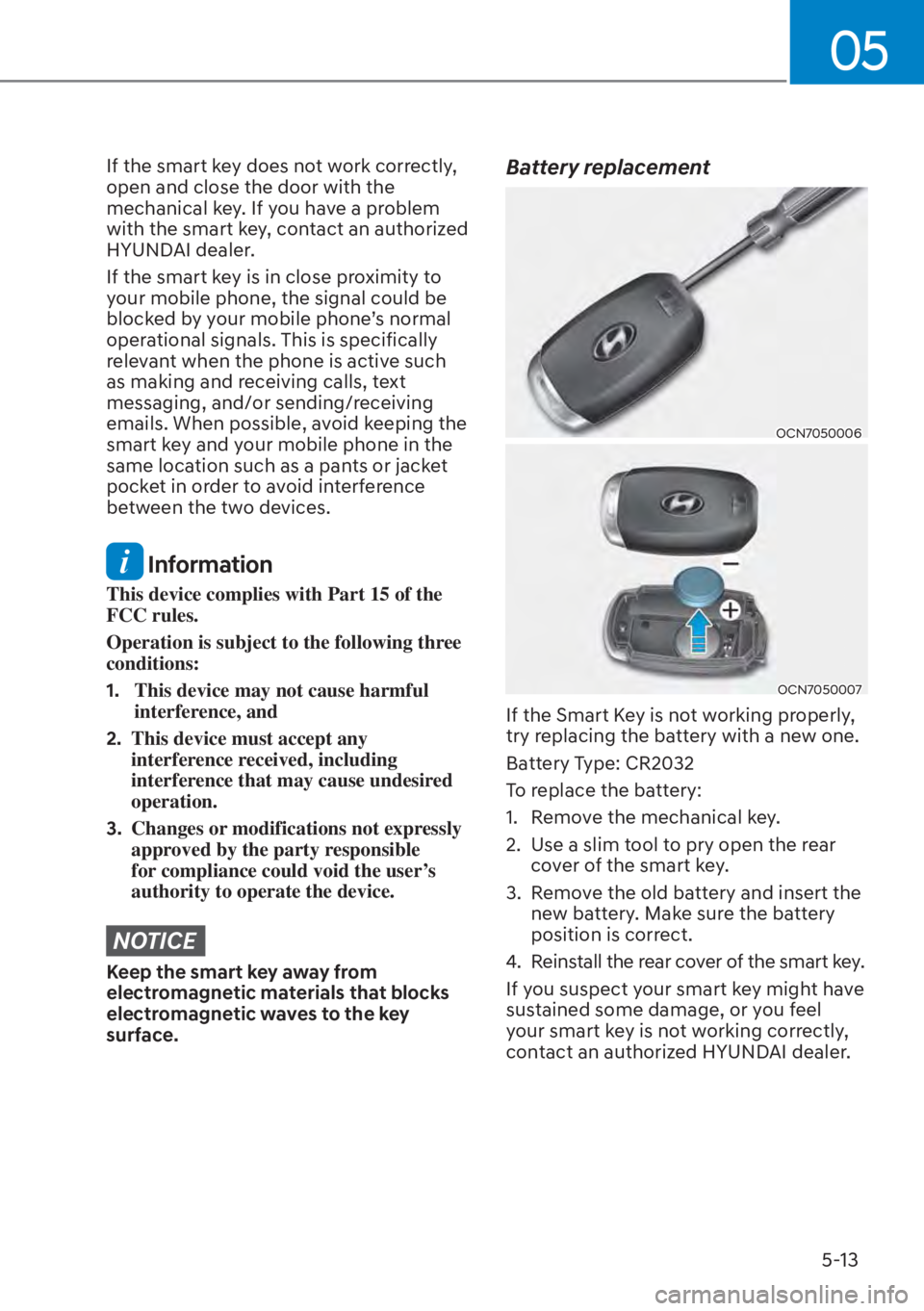
Battery replacement
OCN7050006
OCN7050007
If the Smart Key is not working properly,
try replacing the battery with a new one.
Battery Type: CR2032
To replace the battery:
1. Remove the mechanical key.
2. Use a slim tool to pry open the rear
cover of the smart key.
3. Remove the old battery and insert the new battery. Make sure the battery
position is correct.
4. Reinstall the rear cover of the smart key.
If you suspect your smart key might have
sustained some damage, or you feel
your smart key is not working correctly,
contact an authorized HYUNDAI dealer.