Page 556 of 814

555
uuWhen Driving uVehicle Stability AssistTM (VSA ®), aka Electronic Stability Control (ESC), System
Continued
Driving
Vehicle Stability AssistTM (VSA ®), aka Electronic
Stability Control (ESC), System
VSA ® helps stabilize the vehicle during cornering if the vehicle turns more or less
than what was intended. It also assists in maintaining traction on slippery surfaces.
It does so by regulating engine ou tput and selectively applying the brakes.
When VSA ® activates, you may notice that the
engine does not respond to the accelerator.
You may also notice some noise from the
hydraulic brake system. You will also see the
indicator blink.
■VSA ® Operation
1 Vehicle Stability AssistTM (VSA® ), aka Electronic Stability Control
(ESC), System
The VSA ® may not function properl y if tire type and
size are mixed. Make sure to use the same size and
type of tire, and the air pressures as specified.
When the VSA ® system indicator comes on and stays
on while driving, there ma y be a problem with the
system. While this may not interfere with normal
driving, have your vehi cle checked by a dealer
immediately.
VSA ® cannot enhance stability in all driving situations
and does not control the entire braking system. You
still need to drive and corner at speeds appropriate
for the conditions and always leave a sufficient
margin of safety.
The main function of the VSA ® system is generally
known as Electronic Stability Control (ESC). The
system also includes a traction control function.
The Vehicle Stability Assist
TM (VSA ®) system, Adaptive
Cruise Control (ACC) with Low Speed Follow, brake
system (amber), and safety support indicators may
come on in amber along with a message in the driver
information interface when you set the power mode
to ON after reconnecting the battery.
Drive a short distance at more than 12 mph (20 km/h).
Each indicator should go off. If any do not, have your
vehicle checked by a dealer.
VSA ® System
Indicator
23 PILOT-31T906000_03.book 555 ページ 2022年10月31日 月曜日 午前10時26分
Page 558 of 814
557
uuWhen Driving uAgile Handling Assist
Driving
Agile Handling Assist
Lightly brakes each of the front and rear wheels, as needed, when you turn the
steering wheel, and helps support the vehicle’s stability and performance during
cornering.1 Agile Handling Assist
The agile handling assist ca nnot enhance stability in
all driving situations. You still need to drive and
corner at speeds appropriate for the conditions and
always leave a sufficient margin of safety.
When the VSA ® system indicator comes on and stays
on while driving, the agil e handling assist does not
activate.
You may hear a sound coming from the engine
compartment while the agile handling assist is
activated. This is normal.
23 PILOT-31T906000_03.book 557 ページ 2022年10月31日 月曜日 午前10時26分
Page 575 of 814
574
uuHonda Sensing ®u Collision Mitigation Braking SystemTM (CMBSTM)
Driving
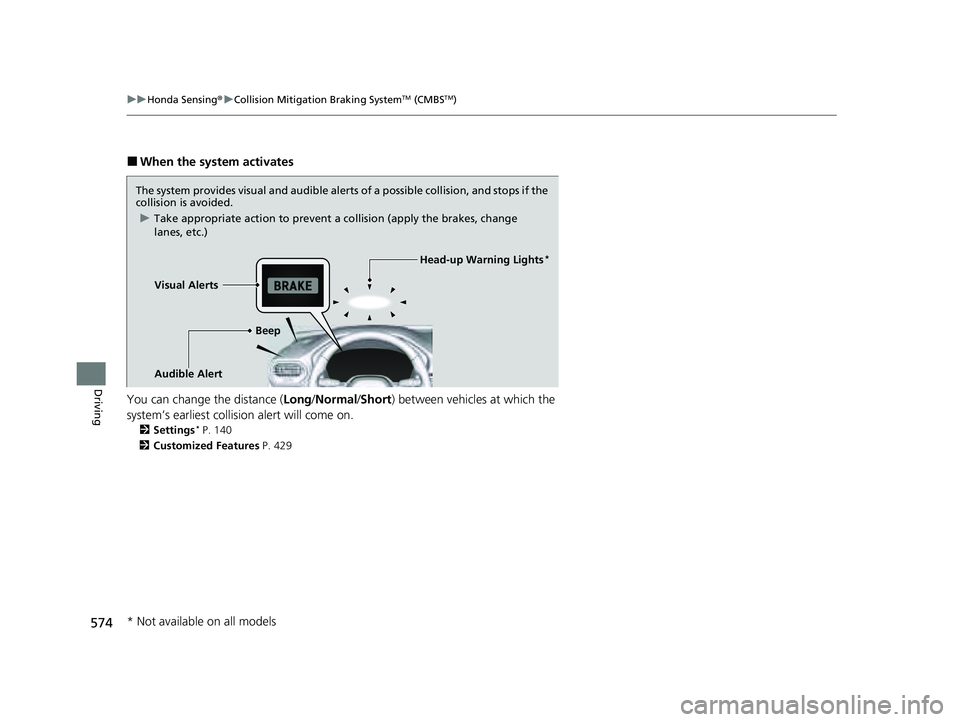
■When the system activates
You can change the distance ( Long/Normal /Short ) between vehicles at which the
system’s earliest collision alert will come on.
2 Settings* P. 140
2 Customized Features P. 429
The system provides visual and audible alerts of a possible collisi on, and stops if the
collision is avoided.
u Take appropriate action to prevent a collision (apply the brakes, change
lanes, etc.)
Visual Alerts Beep
Audible Alert
Head-up Warning Lights*
* Not available on all models
23 PILOT-31T906000_03.book 574 ページ 2022年10月31日 月曜日 午前10時26分
Page 591 of 814

590
uuHonda Sensing ®u Adaptive Cruise Control (ACC) with Low Speed Follow
Driving
Adaptive Cruise Control (A CC) with Low Speed Follow
Helps maintain a constant vehicle speed a nd a set following-interval behind a vehicle
detected ahead of yours and, if the detect ed vehicle comes to a stop, can decelerate
and stop your vehicle, without you having to keep your foot on the brake or the
accelerator.
When ACC with Low Speed Follow slows y our vehicle by applying the brakes, your
vehicle’s brake lights will illuminate.1 Adaptive Cruise Control (ACC) with Low Speed Follow
3WARNING
Improper use of ACC with Low Speed
Follow can lead to a crash.
Use ACC with Low Speed Follow only when
driving on expressways and in good road
and weather conditions.
3WARNING
ACC with Low Speed Follow has limited
braking capability and may not stop your
vehicle in time to avoid a collision with a
vehicle that quickly stops in front of you.
Always be prepared to apply the brake
pedal if the conditions require.
When to use
■Vehicle speed for ACC wi th Low Speed Follow: A vehicle is detected ahead
within ACC with Low Speed Follow range – ACC with Low Speed Follow
operates at speeds up to 90 mph (145 km/h).
No vehicle is detected within ACC with Low Speed Follow range – ACC with
Low Speed Follow operates at the speed of 25 mph (40 km/h) or above.
■Shift position for ACC with Low Speed Follow: In ( D or (S.
A front sensor
camera is located
behind the
rearview mirror.
The radar sensor is
behind the Honda
emblem on the
front grille.
23 PILOT-31T906000_03.book 590 ページ 2022年10月31日 月曜日 午前10時26分
Page 597 of 814
uuHonda Sensing ®u Adaptive Cruise Control (ACC) with Low Speed Follow
596
Driving
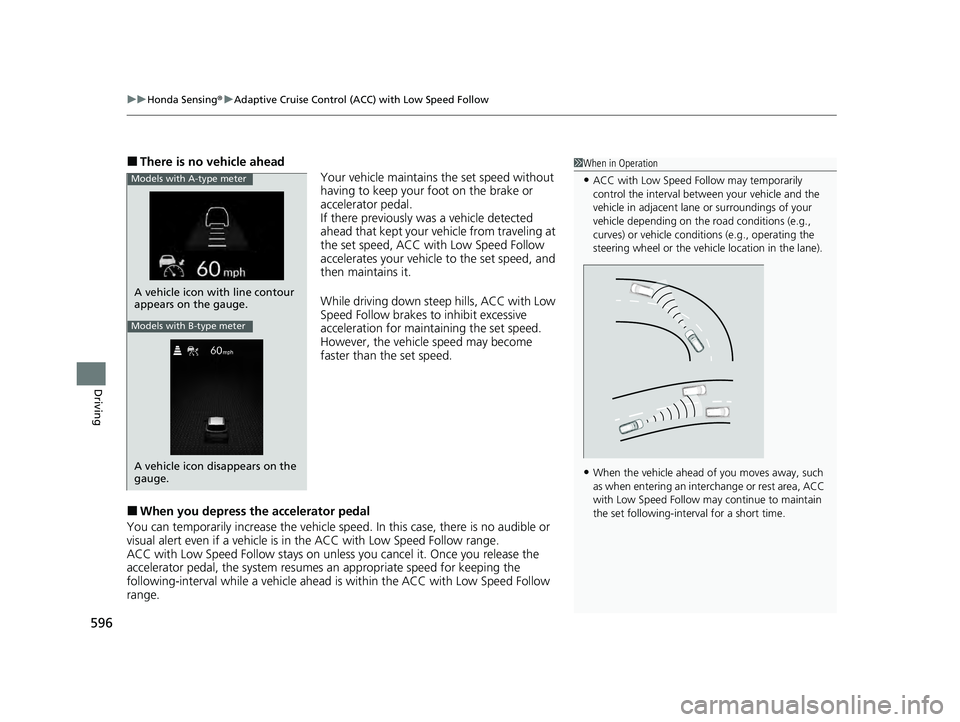
■There is no vehicle ahead
Your vehicle maintains the set speed without
having to keep your foot on the brake or
accelerator pedal.
If there previously was a vehicle detected
ahead that kept your vehicle from traveling at
the set speed, ACC with Low Speed Follow
accelerates your vehicle to the set speed, and
then maintains it.
While driving down steep hills, ACC with Low
Speed Follow brakes to inhibit excessive
acceleration for maintaining the set speed.
However, the vehicle speed may become
faster than the set speed.
■When you depress th e accelerator pedal
You can temporarily increase th e vehicle speed. In this case, there is no audible or
visual alert even if a vehicle is in the ACC with Low Speed Follow range.
ACC with Low Speed Follow stays on unless you cancel it. Once you release the
accelerator pedal, the system resume s an appropriate speed for keeping the
following-interval wh ile a vehicle ahead is within the ACC with Low Speed Follow
range.
1 When in Operation
•ACC with Low Speed Follow may temporarily
control the interval between your vehicle and the
vehicle in adjacent lane or surroundings of your
vehicle depending on the road conditions (e.g.,
curves) or vehicle condi tions (e.g., operating the
steering wheel or the vehicle location in the lane).
•When the vehicle ahead of you moves away, such
as when entering an interchange or rest area, ACC
with Low Speed Follow may continue to maintain
the set following-interval for a short time.
A vehicle icon with line contour
appears on the gauge.
Models with A-type meter
Models with B-type meter
A vehicle icon disappears on the
gauge.
23 PILOT-31T906000_03.book 596 ページ 2022年10月31日 月曜日 午前10時26分
Page 601 of 814

uuHonda Sensing ®u Adaptive Cruise Control (ACC) with Low Speed Follow
600
Driving
■Detection limitations
• A vehicle suddenly crosses in front of you.
• The interval between your vehicle and the vehicle ahead of you is too short.
• A vehicle cuts in front of you at a slow speed, and it brakes suddenly.
• You accelerate rapidly and approach the vehicle ahead of you at high speed.
• The vehicle ahead of you is a motorcycle, bicycle, mobility scooter, or other small
vehicle.
• There are animals in front of your vehicle.
• You drive on a curved or winding or undulating road that makes it difficult for the
sensor to properly detect a vehicle in front of you.
• A vehicle ahead of you stops and the sp eed difference between your vehicle and
the vehicle ahead of you is significantly large.
• An oncoming vehicle suddenly comes in front of you.
• Your vehicle abruptly crosses over in front of an oncoming vehicle.1ACC with Low Speed Follow Conditions and Limitations
If the front of the vehicle is impacted in any of the
following situations, the ra dar sensor may not work
properly. Have your vehi cle checked by a dealer:
•The vehicle mounted onto a bump, curb, chock,
embankment, etc.
•You drive the vehicle where water is deep.
•Your vehicle has a frontal collision.
23 PILOT-31T906000_03.book 600 ページ 2022年10月31日 月曜日 午前10時26分
Page 602 of 814
601
uuHonda Sensing ®u Adaptive Cruise Control (ACC) with Low Speed Follow
Continued
Driving
• Driving through a narrow metal bridge.
• The vehicle ahead of you brakes suddenly.
• The vehicle ahead of yo u has a unique shape.
• Your vehicle or the vehicle ahead of you is driving on one edge of the lane.
Sensor detects upper section of
an empty carrier truck. Panel truck,
tanker truck,
etc.
23 PILOT-31T906000_03.book 601 ページ 2022年10月31日 月曜日 午前10時26分
Page 608 of 814

Continued607
uuHonda Sensing ®u Adaptive Cruise Control (ACC) with Low Speed Follow
Driving
■Automatic cancellation
The beeper sounds and a message appears on the driver information interface when
ACC with Low Speed Follow is automatically canceled. Any of these conditions may
cause the ACC with Low Speed Fo llow to automatically cancel:
• Bad weather (rain, fog, snow, etc.)
• When the radar sensor behind the Honda emblem gets dirty.
• The vehicle ahead of yo u cannot be detected.
• An abnormal tire condition is detected, or the tires are skidding.
• Driving on a mountainous road for extended periods, or driving off road.
• Abrupt steering wheel movement.
• When the ABS, VSA ®, CMBS
TM, or Low Speed Braking Control* is activated.
• When the ABS or VSA ® system indicator comes on.
• When the vehicle is stopped on a very steep slope.
• When you manually apply the parking brake.
• When the detected vehicle within the AC C with Low Speed Follow range is too
close to your vehicle.
• When accelerating rapidly.
• The camera behind the rearview mirror, or the area around the camera, including
the windshield, gets dirty.
• The vehicle has repeatedly applied the brakes to maintain the set speed (for
example, you are descending a long slope).
• When the system doesn't detect any drivi ng actions from the driver for a certain
amount of time while the LKAS is also activated.
• When the Maximum Load Limit is exceeded.
• When passing through an enclosed space, such as tunnel.
• When the parking brake and brake system indicator (amber) comes on.
1To Cancel
The set speed cannot be set or resumed when ACC
with Low Speed Follow has been turned off using the
button. Press the button to activate the
system, then set the desired speed.
(white)
Prior Set Speed (gray)
Models with A-type meter
Models with B-type meter
Prior Set Speed (gray)
(white)
* Not available on all models
23 PILOT-31T906000_03.book 607 ページ 2022年10月31日 月曜日 午前10時26分