2023 HONDA PASSPORT front camera
[x] Cancel search: front cameraPage 171 of 610

uuOperating the Switches Around the Steering Wheel uAuto High-Beam
170
Controls
■Automatic switching between high-beam and low-beam
When auto high-beam is acti ve, the headlights switch between high beam and low
beam based on the following conditions.
■Manual switching between high-beam and low-beam
If you want to manually switch the headlights between high beam and low beam,
follow either of the proced ures below. Note that when you do this, the auto high-
beam indicator will turn off and the auto high-beam will be deactivated.
Using the lever:
Pull the lever toward you fo r flashing the high beams th en release it within about
one second while driving. u To reactivate the auto high-beam, pull the lever toward you for flashing the
high beams then release it while driving. The auto high-beam indicator will
come on.
Using the light switch:
Turn the light switch to . u To reactivate the auto high-be am, turn the light switch to AUTO when the
lever is in the low beam position, the auto high-beam indicator will come on.
Switching to high beam:Switching to low beam:
All of the following conditions must
be met before the high beams turn
on.
●Your vehicle speed is 45mph
(72 km/h) or more.
●There are no preceding or
oncoming vehicles with
headlights or taillights turned on.
●There are few street lights on the
road ahead.
One of the following conditions
must be met before the low beams
turn on.
●Your vehicle speed is 30 mph
(48 km/h) or less.
●There is a preceding or oncoming
vehicles with headlights or
taillights turned on.
●There are many street lights on
the road ahead.
1How to Use the Auto High-Beam
In the following cases, th e auto high-beam system
may not switch the head lights properly or the
switching timing may be ch anged. In case of the
automatic switching operation does not fit for your
driving habits, please swit ch the headlights manually.
•The brightness of the lights from the preceding or
oncoming vehicle is intense or poor.
•Visibility is poor due to the weather (rain, snow,
fog, windshield frost, etc.).
•Surrounding light sources, such as street lights,
electric billboards and traf fic lights are illuminating
the road ahead.
•The brightness level of th e road ahead constantly
changes.
•The road is bumpy or has many curves.•A vehicle suddenly appears in front of you, or a
vehicle in front of you is not in the preceding or
oncoming direction.
•Your vehicle is tilted with a heavy load in the rear.•A traffic sign, mirror, or other reflective object
ahead is reflecting strong light toward the vehicle.
•The oncoming vehicle freq uently disappears under
roadside trees or be hind median barriers.
•The preceding or oncoming vehicle is a motorcycle,
bicycle, mobility scooter, or other small vehicle.
The auto high-beam system keeps the headlight low
beam when:
•Windshield wipers are operating.
•The camera has dete cted a dense fog.
23 PASSPORT-31TGS6400.book 170 ページ 2022年8月5日 金曜日 午後9時2分
Page 172 of 610
171
uuOperating the Switches Around the Steering Wheel uAuto High-Beam
Controls
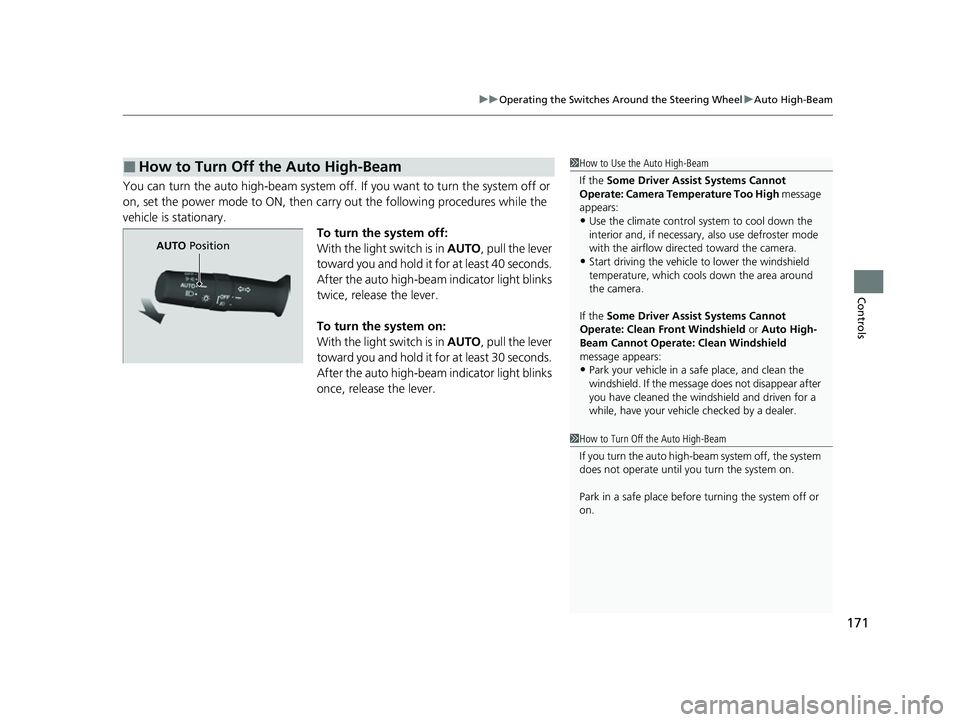
You can turn the auto high-beam system off. If you want to turn the system off or
on, set the power mode to ON, then carry out the following procedures while the
vehicle is stationary.
To turn the system off:
With the light switch is in AUTO, pull the lever
toward you and hold it for at least 40 seconds.
After the auto high-beam indicator light blinks
twice, release the lever.
To turn the system on:
With the light switch is in AUTO, pull the lever
toward you and hold it for at least 30 seconds.
After the auto high-beam indicator light blinks
once, release the lever.
■How to Turn Off the Auto High-Beam1 How to Use the Auto High-Beam
If the Some Driver Assist Systems Cannot
Operate: Camera Temperature Too High message
appears:
•Use the climate control system to cool down the
interior and, if necessary, also use defroster mode
with the airflow directed toward the camera.
•Start driving the vehicle to lower the windshield
temperature, which cool s down the area around
the camera.
If the Some Driver Assist Systems Cannot
Operate: Clean Front Windshield or Auto High-
Beam Cannot Operate: Clean Windshield
message appears:
•Park your vehicle in a sa fe place, and clean the
windshield. If the message does not disappear after
you have cleaned the winds hield and driven for a
while, have your vehicle checked by a dealer.
1 How to Turn Off the Auto High-Beam
If you turn the au to high-beam system off, the system
does not operate until you turn the system on.
Park in a safe place before turning the system off or
on.
AUTO Position
23 PASSPORT-31TGS6400.book 171 ページ 2022年8月5日 金曜日 午後9時2分
Page 378 of 610

377
Driving
This chapter discusses driving and refueling.
Before Driving................................... 378
Towing a Trailer ................................ 384
Off-Highway Driving Guidelines ..... 394
When Driving Starting the Engine .......................... 396
Automatic Transmission ................... 404
Shifting ............................................ 405
Auto Idle Stop .................................. 413
ECON Mode .................................... 418
Intelligent Traction Management...... 419
Vehicle Stability AssistTM (VSA®), aka Electronic
Stability Control (ESC), System ............... 421
Agile Handling Assist ....................... 423
Blind spot information System*........ 424 Intelligent Variable To
rque Management (i-
VTM4
TM) AWD System*.................. 427
Tire Pressure Monitoring System (TPMS) with Tire Fill Assist .......................... 428
Tire Pressure Monitoring System (TPMS) -
Required Federal Explanation ......... 430
Honda Sensing ®................................ 432
Collision Mitigati on Braking System
TM
(CMBSTM) ....................................... 435
Adaptive Cruise Control (ACC)......... 447
Lane Keeping Assist System (LKAS) .. 460
Road Departure Mitigation (RDM)
System ....................................... 469
Front Sensor Camera ....................... 474
Radar Sensor.................................... 476 Braking
Brake System ................................... 477
Anti-lock Brake System (ABS) ........... 479
Brake Assist System ......................... 480
Parking Your Vehicle
When Stopped ................................ 481
Parking Sensor System
*................... 483
Cross Traffic Monitor*..................... 488
Multi-View Rear Camera .................. 492
Refueling Fuel Information .............................. 494
How to Refuel ................................. 495
Fuel Economy and CO
2 Emissions
Improving Fuel Economy and Reducing CO
2 Emissions ................................ 497
* Not available on all models
23 PASSPORT-31TGS6400.book 377 ページ 2022年8月5日 金曜日 午後9時2分
Page 433 of 610
432
Driving
Honda Sensing®
Honda Sensing® is a driver support system which employs the use of two distinctly
different kinds of sensors: a radar sens or located behind the emblem and a front
sensor camera mounted to th e interior side of the windshield, behind the rearview
mirror.
Honda Sensing® has the following functions.
■The functions whic h do not require switch operations to activate
• Collision Mitigation Braking SystemTM (CMBSTM) 2 P. 435
• Road Departure Mitigation (RDM) System 2 P. 469
■The functions wh ich require switch op erations to activate
• Adaptive Cruise Control (ACC)
2 P. 447
• Lane Keeping Assist System (LKAS) 2 P. 460
23 PASSPORT-31TGS6400.book 432 ページ 2022年8月5日 金曜日 午後9時2分
Page 436 of 610

435
uuHonda Sensing ®u Collision Mitigation Braking SystemTM (CMBSTM)
Continued
Driving
Collision Mitigation Braking SystemTM (CMBSTM)
The system can assist you when it determines there is a possibility of your vehicle colliding
with a vehicle or a pedestrian detected in front of your vehicle. The CMBSTM is designed to
alert you when the potential for a collision is determined, as well as to reduce your vehicle
speed to help minimize collision severity when a collision is deemed unavoidable.
■How the system works
1 Collision Mitigation Braking SystemTM (CMBSTM)
Important Safety Reminder
The CMBSTM is designed to reduce the severity of an
unavoidable collision. It do es not prevent a collision nor
stop the vehicle automati cally. It is still your
responsibility to operate th e brake pedal and steering
wheel appropriately according to the driving conditions.
The CMBS
TM may not activate or may not detect a
vehicle in front of your vehicle under certain conditions:
2 CMBSTM Conditions and Limitations P. 439
For directions on the prop er handling of the radar
sensor, refer to the following page. 2 Radar Sensor P. 476
You can read about handling information for the
camera equipped with this system. 2 Front Sensor Camera P. 474
1How the system works
Rapid vibrations on the st eering wheel alert you
when your vehicle speed is between 19 and 62 mph
(30 and 100 km/h) with an oncoming vehicle
detected in front of you.
When the CMBS
TM activates, it may automatically
apply the brake. It will be canceled when your vehicle
stops or a potential colli sion is not determined.
The system starts monitoring the roadway ah ead when your vehicle speed is about
3 mph (5 km/h) or above and will search for a vehicle in front of you. The radar sensor is
behind the emblem.
The CMBS
TM activates when:●The speed difference between your vehicle and a vehicle or pedestrian
detected in front of you becomes about 3 mph (5 km/h) and over with a chance
of a collision.
●Your vehicle speed is about 62 mph (100 km /h) or less and there is a chance of a
collision with an oncoming detected vehicle or a pedestrian in front of you. The camera is
located behind the
rearview mirror.
When to use
23 PASSPORT-31TGS6400.book 435 ページ 2022年8月5日 金曜日 午後9時2分
Page 437 of 610
uuHonda Sensing ®u Collision Mitigation Braking SystemTM (CMBSTM)
436
Driving
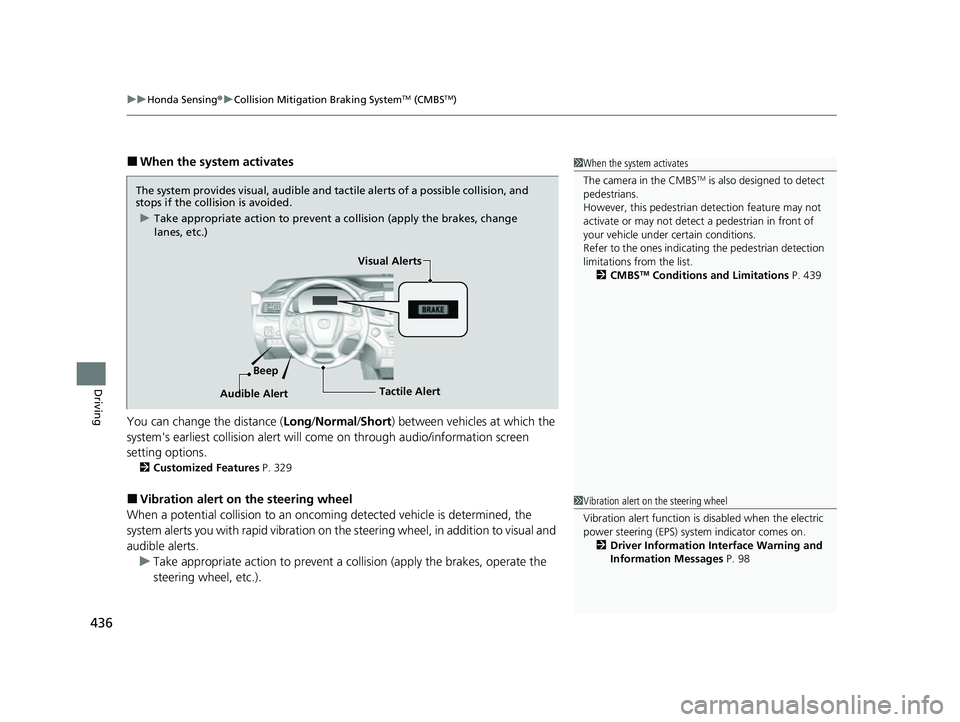
■When the system activates
You can change the distance ( Long/Normal /Short ) between vehicles at which the
system's earliest collision alert will co me on through audio/information screen
setting options.
2 Customized Features P. 329
■Vibration alert on the steering wheel
When a potential collision to an oncoming detected vehicle is determined, the
system alerts you with rapid vibration on the steering wheel, in addition to visual and
audible alerts. u Take appropriate action to prevent a co llision (apply the brakes, operate the
steering wheel, etc.).
1 When the system activates
The camera in the CMBS
TM is also designed to detect
pedestrians.
However, this pedestrian detection feature may not
activate or may not detect a pedestrian in front of
your vehicle under certain conditions.
Refer to the ones indicating the pedestrian detection
limitations from the list. 2 CMBS
TM Conditions and Limitations P. 439
The system provides visual, audible and tactile alerts of a possible collision, and
stops if the collision is avoided.
u Take appropriate action to prevent a collision (apply the brakes, change
lanes, etc.)
Beep Visual Alerts
Audible Alert
Tactile Alert
1 Vibration alert on the steering wheel
Vibration alert function is disabled when the electric
power steering (EPS) system indicator comes on. 2 Driver Information Interface Warning and
Information Messages P. 98
23 PASSPORT-31TGS6400.book 436 ページ 2022年8月5日 金曜日 午後9時2分
Page 440 of 610
439
uuHonda Sensing ®u Collision Mitigation Braking SystemTM (CMBSTM)
Continued
Driving
In the following situations, the radar sensor or camera may be unable to correctly
detect vehicles, pedestrians, moving bicycles, or road conditions, potentially causing
the CMBS
TM to operate improperly.
2 Front Sensor Camera P. 474
2 Radar Sensor P. 476
■Environmental conditions
• Driving in bad weather (rain, fog, snow, etc.).
• Sudden changes between light and dark, such as an entrance or exit of a tunnel.
• There is little contrast between objects and the background.
• Driving into low sunlight (e.g., at dawn or dusk).
• Strong light is reflec ted onto the roadway.
• Driving in the shadows of trees, buildings, etc.
• Roadway objects or structures are misint erpreted as vehicles and pedestrians.
• Reflections on the interi or of the windshield.
• Driving at night or in a dark condition such as a tunnel.
■Roadway conditions
• Driving on a snowy or wet roadway (obs cured lane marking, vehicle tracks,
reflected lights, road spray, high contrast).
• The road is hilly or the vehicle is approaching the crest of a hill.
• Driving on curvy, winding, or undulating roads.
■CMBSTM Conditions and Limitations
23 PASSPORT-31TGS6400.book 439 ページ 2022年8月5日 金曜日 午後9時2分
Page 441 of 610
440
uuHonda Sensing ®u Collision Mitigation Braking SystemTM (CMBSTM)
Driving
■Vehicle conditions
• Headlight lenses are dirty or the headlights are not properly adjusted.
• The outside of the windshie ld is blocked by dirt, mud, leaves, wet snow, etc.
• The inside of the windshield is fogged.
• An abnormal tire or wheel condition (incor rect sizes, varied sizes or construction,
improperly inflated, comp act spare tire, etc.).
• When tire chains are installed.
• The vehicle is tilted due to a heav y load or suspension modifications.
• The camera temperature gets too high.
• Driving with the parking brake applied.
• When the radar sensor in the front grille gets dirty.
• The vehicle is towing a trailer.
23 PASSPORT-31TGS6400.book 440 ページ 2022年8月5日 金曜日 午後9時2分