2023 HONDA PASSPORT roof window
[x] Cancel search: roof windowPage 7 of 610

Contents
This owner’s manual should be considered a permanent part of the
vehicle and should remain with the vehicle when it is sold.
The Navigation Manual is available online at owners.honda.com
(U.S.) or honda.ca (Canada). If you are the first registered owner
of your vehicle, you may request a complimentary printed
copy of the Navigation Manual within the first six months of
vehicle purchase. To request a copy, visit owners.honda.com. In
Canada, please request a copy from your Honda dealer.
This owner’s manual covers all models of your vehicle. You may find
descriptions of equipment and features that are not on your
particular model.
Images throughout this owner’s manu al (including the front cover)
represent features and equipment that are available on some, but
not all, models. Your particular mo del may not have some of these
features.
This owner’s manual is for vehicles sold in the United States and
Canada.
The information and specifications in cluded in this publication were
in effect at the time of approval for printing. Honda Motor Co., Ltd.
reserves the right, however, to discontinue or change specifications
or design at any time without notice and without incurring any
obligation.2 Safe Driving P. 33
For Safe Driving P. 34 Seat Belts P. 39 Airbags P. 49
2Instrument Panel P. 81
Indicators P. 82 Gauges and Displays P. 109
2Controls P. 125
Clock P. 126 Locking and Unlocking the Doors P. 128
Opening and Closing the Windows P. 156 Moonroof* P. 159
Adjusting the Seats P. 183
2 Features P. 223
Audio System P. 224
General Information on the Audio System P. 307
Bluetooth® HandsFreeLink ® P. 351
2 Driving P. 377
Before Driving P. 378 Towing a Trailer P. 384
Parking Your Vehicle P. 481Multi-View Rear Camera P. 492
2Maintenance P. 499
Before Performing Maintenance P. 500 Maintenance MinderTM P. 503
Checking and Maintaining Wiper Blades P. 526
Remote Transmitter Care P. 541
Accessories and Modifications P. 549
2 Handling the Unexpected P. 551
Tools P. 552 If a Tire Goes Flat P. 553
Indicator, Coming On/Blinking P. 570 Fuses P. 575
Refueling P. 582 If You Cannot Open the Tailgate P. 583
2Information P. 585
Specifications P. 586 Identification Numbers P. 588
Emissions Testing P. 591 Warranty Coverages P. 593
23 PASSPORT-31TGS6400.book 6 ページ 2022年8月5日 金曜日 午後9時2分
Page 60 of 610
59
uuAirbags uSide Curtain Airbags
Continued
Safe Driving
Side Curtain Airbags
The side curtain airbags help protect the heads of the driver and passengers in the
outer seating positions during a moderate-to -severe side impact. The side curtain
airbags equipped in this vehicle are also designed to help reduce the likelihood of
partial and complete ejection of vehicle occupants through side windows in crashes,
particularly rollover crashes.
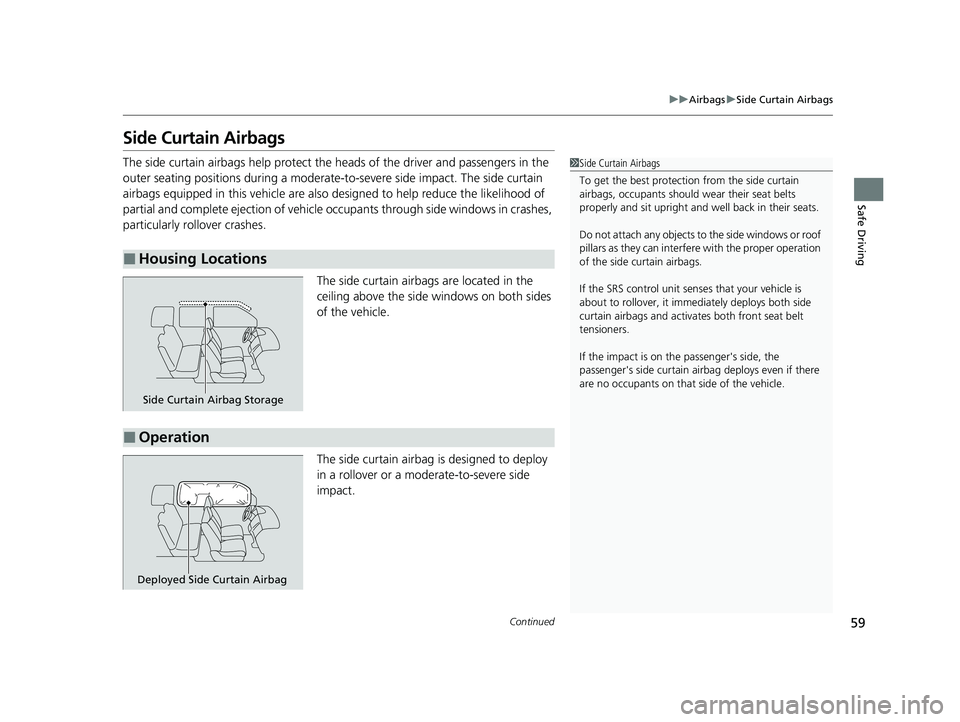
The side curtain airbags are located in the
ceiling above the side windows on both sides
of the vehicle.
The side curtain airbag is designed to deploy
in a rollover or a moderate-to-severe side
impact.
■Housing Locations
1 Side Curtain Airbags
To get the best protecti on from the side curtain
airbags, occupants should wear their seat belts
properly and sit upr ight and well back in their seats.
Do not attach any objects to the side windows or roof
pillars as they can interfere with the proper operation
of the side curtain airbags.
If the SRS control unit sens es that your vehicle is
about to rollover, it imme diately deploys both side
curtain airbags and activates both front seat belt
tensioners.
If the impact is on the passenger's side, the
passenger's side curtain airbag deploys even if there
are no occupants on that side of the vehicle.
Side Curtain Airbag Storage
■Operation
Deployed Side Curtain Airbag
23 PASSPORT-31TGS6400.book 59 ページ 2022年8月5日 金曜日 午後9時2分
Page 126 of 610

125
Controls
This chapter explains how to operate the various controls necessary for driving.
Clock.................................................. 126
Locking and Unlocking the Doors Key Types and Functions .................. 128
Low Keyless Remote Signal Strength .... 130Locking/Unlocking the Doors from the Outside .......................................... 131
Locking/Unlocking the Doors from the Inside ............................................. 139
Childproof Door Locks ..................... 141
Auto Door Locking/Unlocking .......... 142
Opening and Closing the Tailgate ... 143
Security System ................................ 153
Opening and Closing the Windows ..... 156
Moonroof*........................................ 159
Operating the Switches Around the Steering Wheel ENGINE START/STOP Button............. 160
Turn Signals ..................................... 163
Light Switches.................................. 164
Fog Lights
*...................................... 167
Daytime Running Lights ................... 168
Auto High-Beam .............................. 169
Wipers and Washers ........................ 172
Rear Defogger/Heat ed Door Mirror
*
Button ........................................... 175
Brightness Control ........................... 177
Driving Position Memory System
*.... 178 Adjusting the Steering Wheel .......... 180
Adjusting the Mirrors Interior Rearview Mirror ................... 181
Power Door Mirrors ......................... 182
Adjusting the Seats
Front Seats ...................................... 183
Rear Seats........................................ 187
Armrest ........................................... 193
Interior Lights/Interior Convenience
ItemsInterior Lights .................................. 194
Interior Convenience Items .............. 197
Climate Control System ................... 215
* Not available on all models
23 PASSPORT-31TGS6400.book 125 ページ 2022年8月5日 金曜日 午後9時2分
Page 142 of 610
141
uuLocking and Unlocking the Doors uChildproof Door Locks
Controls
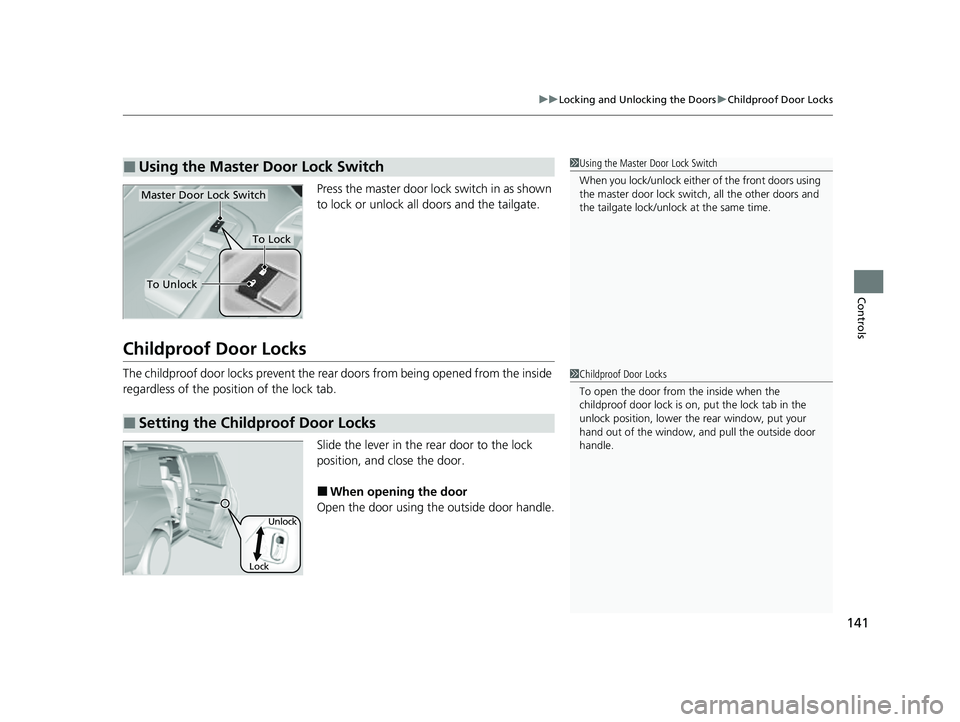
Press the master door lo ck switch in as shown
to lock or unlock all doors and the tailgate.
Childproof Door Locks
The childproof door locks prevent the rear doors from being opened from the inside
regardless of the position of the lock tab.
Slide the lever in the rear door to the lock
position, and close the door.
■When opening the door
Open the door using the outside door handle.
■Using the Master Door Lock Switch1 Using the Master Door Lock Switch
When you lock/unlock either of the front doors using
the master door lock swit ch, all the other doors and
the tailgate lock/unlock at the same time.
To Unlock
Master Door Lock Switch
To Lock
■Setting the Childproof Door Locks
1 Childproof Door Locks
To open the door from the inside when the
childproof door lock is on, put the lock tab in the
unlock position, lower the rear window, put your
hand out of the window, and pull the outside door
handle.
Lock Unlock
23 PASSPORT-31TGS6400.book 141 ページ 2022年8月5日 金曜日 午後9時2分
Page 158 of 610
Continued157
uuOpening and Closing the Windows uOpening/Closing the Power Windows
Controls
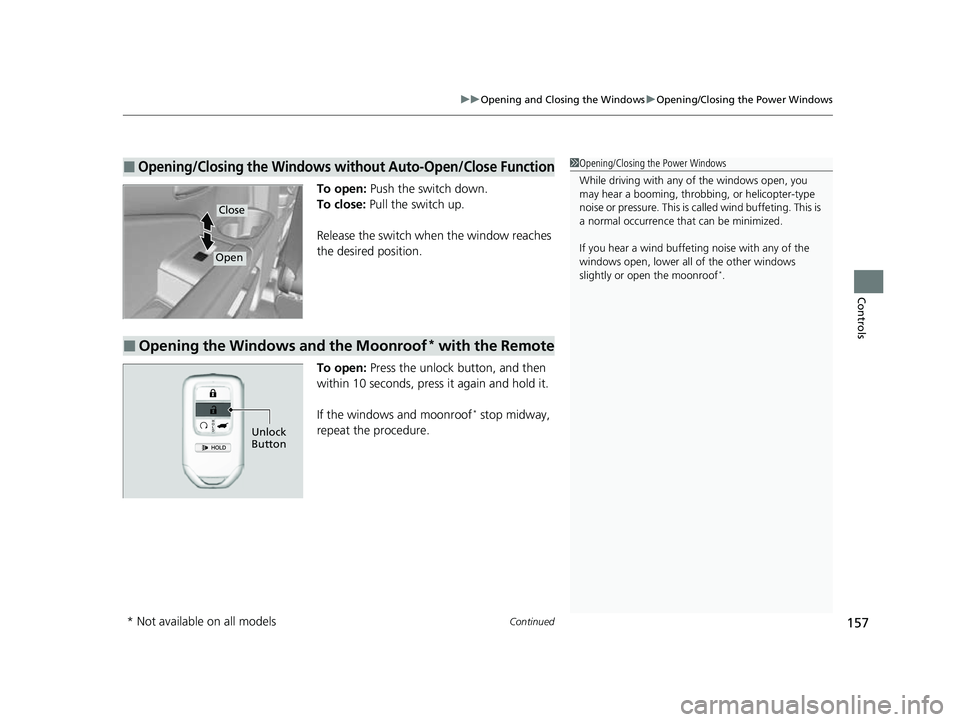
To open: Push the switch down.
To close: Pull the switch up.
Release the switch when the window reaches
the desired position.
To open: Press the unlock button, and then
within 10 seconds, press it again and hold it.
If the windows and moonroof
* stop midway,
repeat the procedure.
■Opening/Closing the Windows without Auto-Open/Close Function1 Opening/Closing the Power Windows
While driving with any of the windows open, you
may hear a booming, throbbi ng, or helicopter-type
noise or pressure. This is ca lled wind buffeting. This is
a normal occurrence th at can be minimized.
If you hear a wind buffeti ng noise with any of the
windows open, lower all of the other windows
slightly or open the moonroof
*.
Close
Open
■Opening the Windows and the Moonroof* with the Remote
Unlock
Button
* Not available on all models
23 PASSPORT-31TGS6400.book 157 ページ 2022年8月5日 金曜日 午後9時2分
Page 159 of 610

158
uuOpening and Closing the Windows uOpening/Closing th e Power Windows
Controls
To open: Unlock the driver’s door with the
key. Within 10 seconds of returning the key to
the central position, turn the key in the unlock
direction and hold it there.
To close: Lock the driver’s door with the key.
Within 10 seconds of re turning the key to the
central position, turn the key in the lock
direction and hold it there.
Release the key to stop the windows/
moonroof
* at the desired position. If you want
further adjustment, repeat the same
operation.
■Opening/Closing the Windows and the Moonroof* with the Key
CloseOpen
* Not available on all models
23 PASSPORT-31TGS6400.book 158 ページ 2022年8月5日 金曜日 午後9時2分
Page 160 of 610

159
Controls
Moonroof*
Opening and Closing the Moonroof
You can operate the moonroof when the power mode is in ON. Use the switch in
the front of the ceiling to open and close the moonroof.
■Automatic operation
To open: Pull the switch back firmly.
To close: Push the switch forward firmly.
The moonroof will automatically open or close
all the way. To stop the moonroof midway,
push the switch briefly.
■Manual operation
To open: Pull the switch back lightly, and
hold it until the desired position is reached.
To close: Push the switch forward lightly, and
hold it until the desired position is reached.
■Tilting the moonroof up
To tilt: Push on the center of the moonroof
switch.
To close: Push the switch fo rward firmly, then
release.
■Using the Moonroof Switch
1 Opening and Closing the Moonroof
NOTICE
Opening the moonroof in below freezing
temperature or when it is covered with snow or ice
can damage the moonr oof panel or motor.
The moonroof can be opera ted for up to 10 minutes
after you set the power mode to OFF.
Opening either front door cancels this function.
When resistance is detected, the auto reverse function
causes the moonroof to chan ge directions, then stop.
Auto reverse stops sensing when the moonroof is
almost closed to ensure that it fully closes.
You can use the remote transmitter or the key to
operate the moonroof. 2 Opening the Windows and the Moonroof
*
with the Remote P. 157
2 Opening/Closing the Windows and the
Moonroof
* with the Key P. 158
3WARNING
Opening or closing the moonroof on
someone’s hands or fingers can cause
serious injury.
Make sure all hands and fingers are clear of
the moonroof before opening or closing it.
Open
CloseTilt
* Not available on all models
23 PASSPORT-31TGS6400.book 159 ページ 2022年8月5日 金曜日 午後9時2分
Page 260 of 610
259
uuAudio System Basic Operation uVoice Control Operation
Continued
Features
Voice Control Operation
Your vehicle has a voice control syst em that allows hands-free operation.
The voice control system uses the (tal k) and (back) buttons on the steering
wheel and a microphone near the map lights on the ceiling.
To achieve optimum voice recognition when using the voice control system:
• Make sure the correct screen is displa yed for the voice command that you are
using.
The system recognizes only certain commands.
Available voice commands:
2 Voice Portal Screen P. 260
•Close the windows and moonroof*.
• Adjust the dashboard and side vents so air does not blow onto the microphone
on the ceiling.
• Speak clearly in a clear, natural speaking voice without pausing between words.
• Reduce any background noise if possibl e. The system may misinterpret your
command if more than one person is speaking at the same time.
■Voice Recognition
1Voice Control Operation
When you press the button, a helpful prompt asks
what you would like to do. Press and release the
button again to bypass th is prompt and give a
command.
1 Voice Recognition
The voice control system can only be used from the
driver’s seat because the microphone unit removes
noises from the front passenger’s side.
* Not available on all models
23 PASSPORT-31TGS6400.book 259 ページ 2022年8月5日 金曜日 午後9時2分