2023 HONDA ODYSSEY remote control
[x] Cancel search: remote controlPage 6 of 707

Contents
This owner’s manual should be considered a permanent part of the
vehicle and should remain with the vehicle when it is sold.
The Navigation Manual is available online at owners.honda.com
(U.S.) or honda.ca (Canada). If you are the first registered owner
of your vehicle, you may request a complimentary printed
copy of the Navigation Manual within the first six months of
vehicle purchase. To request a copy, visit owners.honda.com. In
Canada, please request a copy from your Honda dealer.
This owner’s manual covers all models of your vehicle. You may find
descriptions of equipment and features that are not on your
particular model.
Images throughout this owner’s ma nual (including the front cover)
represent features and equipment that are available on some, but
not all, models. Your particular mo del may not have some of these
features.
This owner’s manual is for vehicles sold in the United States and
Canada.
The information and specifications in cluded in this publication were
in effect at the time of approval for printing. Honda Motor Co., Ltd.
reserves the right, however, to discontinue or change specifications
or design at any time without notice and without incurring any
obligation.2 Safe Driving P. 35
For Safe Driving P. 36 Seat Belts P. 40 Airbags P. 49
2Instrument Panel P. 87
Indicators P. 88 Gauges and Driver Information Interface P. 127
2Controls P. 143
Clock P. 144 Locking and Unlocking the Doors P. 146
Security System P. 181 Windows P. 184
Mirrors P. 209 Seats P. 212
2Features P. 257
Audio System P. 258 Audio System Basic Operation P. 264
Blu-ray/DVD Rear Entertainment System* P. 365
CabinWatch ®* P. 460 CabinTalk®* P. 461
2Driving P. 463
Before Driving P. 464 Towing a Trailer P. 470
Parking Your Vehicle P. 569 Multi-View Rear Camera P. 580
2Maintenance P. 587
Before Performing Maintenance P. 588 Maintenance MinderTM P. 591
Checking and Maintaining Wiper Blades P. 617
Remote Control and Wireless Headphone Care
* P. 633
2 Handling the Unexpected P. 645
Tools P. 646 If a Tire Goes Flat P. 647
Indicator, Coming On/Blinking P. 663 Fuses P. 669
If You Cannot Open the Tailgate P. 678
2Information P. 683
Specifications P. 684 Identification Numbers P. 686
Warranty Coverages P. 691 Authorized Manuals P. 694
23 US ODYSSEY-31THR6500.book 4 ページ 2022年1月24日 月曜日 午前11時35分
Page 7 of 707

Contents
Child Safety P. 67Exhaust Gas Hazard P. 85Safety Labels P. 86
Tailgate P. 161 Sliding Doors P. 172
Moonroof* P. 187 Operating the Switches Around the Steering Wheel P. 188
Interior Convenience Items P. 229 Climate Control System P. 250
Audio Error Messages P. 339General Information on the Audio System P. 341
Customized Features P. 413 HomeLink® Universal Transceiver* P. 432 Bluetooth ® HandsFreeLink ® P. 435
When Driving P. 476 Honda Sensing® P. 509 Braking P. 561
Refueling P. 582 Fuel Economy and CO
2 Emissions P. 585
Maintenance Under the Hood P. 597 Replacing Light Bulbs P. 610
Checking and Maintaining Tires P. 621 Battery P. 630 Remote Transmitter Care P. 632
Climate Control System Maintenance P. 635 Clea ning P. 636 Accessories and Modifications P. 642
Engine Does Not Start P. 656If the Battery Is Dead P. 659Overheating P. 661
Emergency Towing P. 676 If You Cannot Unlock the Fuel Fill Door P. 677
When You Cannot Close the Power S liding Doors P. 680 Refueling P. 681
Devices that Emit Radio Waves P. 687 Reporting Safety Defects P. 688 Emissions Testing P. 689
Customer Service Information P. 695
Quick Reference GuideP. 6
Safe DrivingP. 35
Instrument PanelP. 87
ControlsP. 143
FeaturesP. 257
DrivingP. 463
MaintenanceP. 587
Handling the UnexpectedP. 645
InformationP. 683
IndexP. 696
23 US ODYSSEY-31THR6500.book 5 ページ 2022年1月24日 月曜日 午前11時35分
Page 9 of 707

7
Quick Reference Guide
❚Navigation System Voice Control Buttons*
() See Navigation System Manual
❚Audio Remote Control Buttons (P262)
❚Steering Wheel Adjustments (P208)
❚Brightness Control (P205)
❚ENTER Button (P130)
❚/ Button (P130)34
❚Headlights/Turn Signals (P191, 192)
❚Fog Lights (P195)
❚Bluetooth ® HandsFreeLink ® System
Buttons
(P435)
❚Paddle Shifter (Shift down) (P491)
❚Heated Steering Wheel Button* (P246)
❚Paddle Shifter (Shift up) (P491)
❚Adaptive Cruise Control (ACC) with Low Speed
Follow Buttons
(P524)
❚Interval Button (P533)
❚ENGINE START/STOP Button (P188)
❚ Button (P524, 541)
❚Wipers/Washers (P200)
❚Lane Keeping Assist System (LKAS) Button
(P541)
❚ (home) Button (P130, 262)
❚Horn (Press an area around .)
* Not available on all models
23 US ODYSSEY-31THR6500.book 7 ページ 2022年1月24日 月曜日 午前11時35分
Page 25 of 707

23
Quick Reference Guide
Audio Remote Controls
(P262)
●(+ / (- Bar
Press to adjust the volume up/down.
● / / / /ENTER Buttons
Press or to select Now Playing on
the home screen of the driver
information interface, and then press the
ENTER button.
ENTER Button
/ / / Buttons34
(+ / (- Bar
3434
Press or to cycle through the audio
mode as follows:
Android Auto/Apple CarPlay/SiriusXM ®
*/
Rear Entertainment*/AUX Input/AM/
Bluetooth ® Audio/Social Playlist/FM/My
Honda Music/USB/iPod
Radio: Press / to change the preset station.
USB device/My Honda Music/ Bluetooth®
Audio:
Press / to skip to the
beginning of the next song or
return to the beginning of the
current song.
34
* Not available on all models
23 US ODYSSEY-31THR6500.book 23 ページ 2022年1月24日 月曜日 午前11時35分
Page 122 of 707
120
uuIndicators uDriver Information Interface Wa rning and Information Messages
Instrument Panel
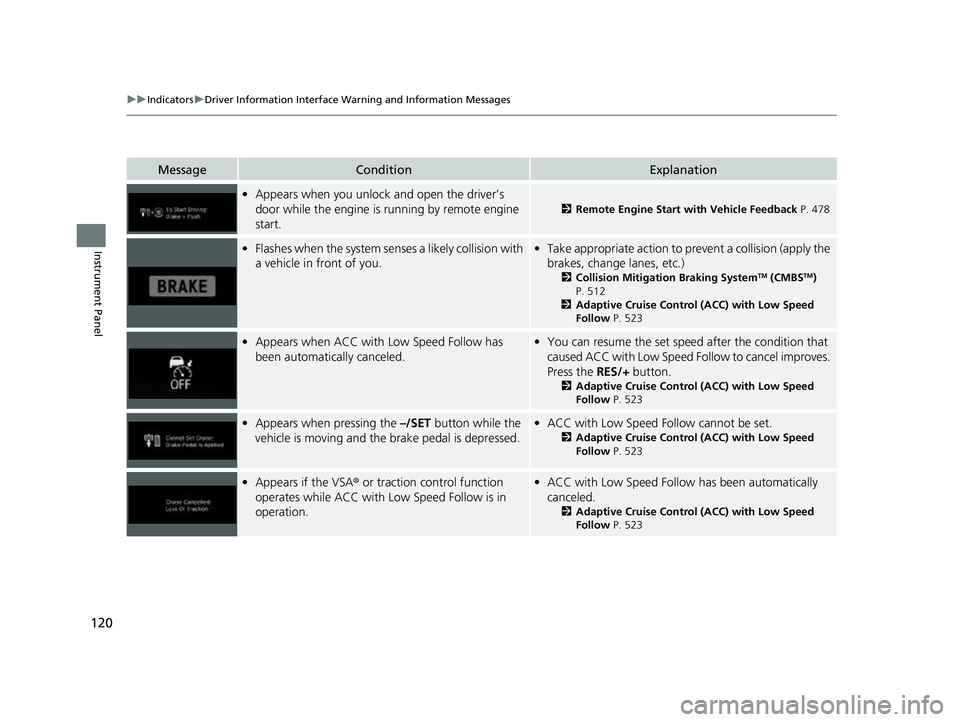
MessageConditionExplanation
•Appears when you unlock and open the driver’s
door while the engine is running by remote engine
start.
2 Remote Engine Start with Vehicle Feedback P. 478
•Flashes when the system senses a likely collision with
a vehicle in front of you.•Take appropriate action to prevent a collision (apply the
brakes, change lanes, etc.)
2 Collision Mitigation Braking SystemTM (CMBSTM)
P. 512
2 Adaptive Cruise Control (ACC) with Low Speed
Follow P. 523
•Appears when ACC with Low Speed Follow has
been automatically canceled.•You can resume the set speed after the condition that
caused ACC with Low Speed Fo llow to cancel improves.
Press the RES/+ button.
2Adaptive Cruise Control (ACC) with Low Speed
Follow P. 523
•Appears when pressing the –/SET button while the
vehicle is moving and the brake pedal is depressed.• ACC with Low Speed Follow cannot be set.
2 Adaptive Cruise Control (ACC) with Low Speed
Follow P. 523
•Appears if the VSA ® or traction control function
operates while ACC with Low Speed Follow is in
operation.• ACC with Low Speed Follow has been automatically
canceled.
2 Adaptive Cruise Control (ACC) with Low Speed
Follow P. 523
23 US ODYSSEY-31THR6500.book 120 ページ 2022年1月24日 月曜日 午前11時35分
Page 145 of 707

143
Controls
This chapter explains how to operate the various controls necessary for driving.
Clock.................................................. 144
Locking and Unlocking the Doors
Key .................................................. 146
Low Keyless Remote Signal Strength 148
Locking/Unlocking the Doors from the
Outside .......................................... 149
Locking/Unlocking the Doors from the Inside ............................................. 156
Childproof Door Locks ..................... 159
Auto Door Locking/Unlocking .......... 160
Tailgate .............................................. 161
Sliding Doors ......................................... 172
Security System
Immobilizer System .............................. 181 Security System Alarm ......................... 181
Windows ............................................... 184
Moonroof
*............................................. 187Operating the Switches Around the Steering Wheel
ENGINE START/STOP Button............. 188
Turn Signals ..................................... 191
Light Switches.................................. 192
Fog Lights ........................................ 195
Daytime Running Lights ................... 196
Auto High-Beam .............................. 197
Wipers and Washers ............................ 200Rear Defogger/Heated Door Mirror Button ....203
Heated Windshield Button ................... 204Canadian models
Brightness Control ................................ 205
Driving Position Memory System*......... 206
Adjusting the Steering Wheel ............... 208
Mirrors Interior Rearview Mirror ........................ 209
Power Door Mirrors .............................. 210
Seats
Front Seats ................................................212
Maintain a Proper Sitting Position ..............224
Head Restraints .........................................225
Interior Convenience Items ........................229
Climate Control System Using Automatic Climate Control ..............250
Automatic Climate Control Sensors ...........256
* Not available on all models
23 US ODYSSEY-31THR6500.book 143 ページ 2022年1月24日 月曜日 午前11時35分
Page 148 of 707

146
Controls
Locking and Unlocking the Doors
Key
This vehicle comes with the following keys:
Use the keys to start and stop the engine, and lock and unlock all the doors, tailgate,
and fuel fill door.1Key
All of the keys have an immobilizer system. The
immobilizer system helps protect against vehicle
theft.
2 Immobilizer System P. 181
Follow the advice below to prevent damage to the
keys:
•Do not leave the keys in direct sunlight, or in
locations with high temperature or high humidity.
•Do not drop the keys or set heavy objects on them.•Keep the keys away from liquids, dust or sand.
•Do not take the keys apart except for replacing the
battery.
If the circuits in the keys are damaged, the engine
may not start, and the remote transmitter may not
work.
If the keys do not work properly, have them
inspected by a dealer.
You can remotely start the engine using the remote
engine start. 2 Remote Engine Start with Vehicle
Feedback P. 478
Models with keyless access system,
power sliding door, and power tailgateModels with keyless access
system and power sliding door
23 US ODYSSEY-31THR6500.book 146 ページ 2022年1月24日 月曜日 午前11時35分
Page 149 of 707

147
uuLocking and Unlocking the Doors uKey
Controls
The built-in key can be used to lock/unlock the
doors and tailgate when the keyless remote
battery becomes weak and the power door
lock/unlock operation is disabled.
To remove the built-in key, slide the release
knob and then pull out the key. To reinstall
the built-in key, push the built-in key into the
keyless remote until it clicks.
Contains a number that you will need if you
purchase a replacement key.
■Built-in Key
Release Knob
Built-in Key
■Key Number Tag
1 Key Number Tag
Keep the key number tag separate from the key in a
safe place outside of your vehicle.
If you wish to purchase an additional key, contact a
dealer.
If you lose your key and you cannot start the engine,
contact a dealer.
23 US ODYSSEY-31THR6500.book 147 ページ 2022年1月24日 月曜日 午前11時35分