2023 HONDA HRV how to refuel
[x] Cancel search: how to refuelPage 8 of 664

Contents
This owner’s manual should be considered a permanent part of the
vehicle and should remain with the vehicle when it is sold.
The Navigation Manual is available online at honda.ca. If you are
the first registered owner of your vehicle, you may request a
complimentary printed copy of the Navigation Manual within
the first six months of vehicle purchase. Please request a copy
from your Honda dealer.
This owner’s manual covers all models of your vehicle. You may find
descriptions of equipment and features that are not on your
particular model.
Images throughout this owner’s ma nual (including the front cover)
represent features and equipment that are available on some, but
not all, models. Your particular mo del may not have some of these
features.
This owner’s manual is for vehicles sold in the United States and
Canada.
The information and specifications in cluded in this publication were
in effect at the time of approval for printing. Honda Motor Co., Ltd.
reserves the right, however, to discontinue or change specifications
or design at any time without notice and without incurring any
obligation.2 Safe Driving P. 33
For Safe Driving P. 34 Seat Belts P. 39 Airbags P. 50
2Instrument Panel P. 85
Indicators P. 86 Gauges and Driver Information Interface P. 104
2Controls P. 133
Clock P. 134 Locking and Unlocking the Doors P. 136
Moonroof* P. 162
Seats P. 180 Interior Convenience Items P. 189
2 Features P. 211
Audio System P. 212 Audio System Basic Operation P. 219, 244
Customized Features P. 337, 345 Bluetooth® HandsFreeLink ® P. 369, 389
2 Driving P. 409
Before Driving P. 410 Towing a Trailer P. 415
Braking P. 528 Parking Your Vehicle P. 537
2Maintenance P. 551
Before Performing Maintenance P. 552 Maintenance MinderTM P. 555
Checking and Maintaining Wiper Blades P. 577
Climate Control System Maintenance P. 595
2Handling the Unexpected P. 603
Tools P. 604If a Tire Goes Flat P. 605
Overheating P. 620 Indicator, Coming On/Blinking P. 622 Fuses P. 628
If You Cannot Open the Ta ilgate P. 636 Refueling P. 637
2Information P. 639
Specifications P. 640 Identification Numbers P. 642
Emissions Testing P. 645 Warranty Coverages P. 647
23 HR-V-313V06000_01.book 6 ページ 2022年4月4日 月曜日 午前10時49分
Page 14 of 664

Visual Index
12
Quick Reference Guide❚Maintenance Under the Hood (P563)
❚Windshield Wipers (P174, 577)
❚Tires (P581, 605)
❚Rear Wiper (P175, 579)
❚How to Refuel (P548)
❚Multi-View Rear Camera (P545)
❚Back-Up Lights and Taillights (P576)
❚Brake Lights, Taillights, Rear Turn Signal
Lights, and Rear Side Marker Lights
(P576)
❚High-Mount Brake Light (P576)
❚Opening/Closing the Tailgate (P153)
❚Tailgate Outer Handle (P154)
❚Lock Button* (P140)
❚Side Turn Signal Lights* (P168, 575)
❚Power Door Mirrors (P179)
❚Headlights (P166, 575)
❚Front Turn Signal Lights (P168, 575)
❚Front Side Marker Lights (P166, 575)
❚Parking/Daytime Running Lights (P170, 575)
❚Rear License Plate Light (P576)
❚Door Lock/Unlock Control (P139)
23 HR-V-313V06000_01.book 12 ページ 2022年4月4日 月曜日 午前10時49分
Page 106 of 664
104
Instrument Panel
Gauges and Driver Information Interface
Gauges
Gauges include the speedometer, fuel gauge, and other related indicators.
They are displayed when the power mode is in ON.
Displays your driving speed in mph or km/h.
Shows the number of engine revolutions per minute.
Displays the amount of fuel left in the fuel tank.
■Speedometer
■Tachometer
■Fuel Gauge
1Speedometer
You can change the Speed/Distance Units.
2 Speed/Distance Units P. 122
2 Settings
* P. 123
2 Customized Features P. 345
1Tachometer
The tachometer can be tu rned on and off using the
driver information interf ace or audio/information
screen. 2 Settings
* P. 123
2 Customized Features P. 345
1Fuel Gauge
NOTICE
You should refuel when the reading approaches .
Running out of fuel can cause the engine to misfire,
damaging the cata lytic converter.
The actual amount of remain ing fuel may differ from
the fuel gauge reading.E
* Not available on all models
23 HR-V-313V06000_01.book 104 ページ 2022年4月4日 月曜日 午前10時49分
Page 128 of 664

126
uuGauges and Driver Information Interface uDriver Information Interface
Instrument Panel
*1:Default Setting Setup Group Customizable Features
Description Selectable Settings
Meter setup
Language selectionChanges the displayed language.English*1/Français /
Español
Adjust outside temp.
displayAdjusts the temperature reading by a few degrees.
-5°F ~ ±0°F*1 ~ +5°F
(U.S.)
-3°C ~ ±0°C
*1 ~ +3°C
(Canada)
“Trip A” reset timingChanges the setting of how to reset trip meter A,
average fuel economy A, average speed A, and elapsed
time A.When fully refueled /
IGN OFF /Manually reset*1
“Trip B” reset timing
Changes the setting of how to reset trip meter B,
average fuel economy B, av erage speed B, and elapsed
time B.When fully refueled /
IGN OFF /Manually reset*1
Adjust alarm volumeChanges the alarm volume, su ch as buzzers, warnings,
turn signal sound, and so on.High /Mid*1/Low
Fuel efficiency backlightTurns the ambient meter feature on and off.ON*1/OFF
Rear seat reminderTurns the Rear Seat Reminder feature on and off.ON*1/OFF
Speed/distance unitsSelects the trip meter units.
km/h∙km/ mph∙miles*1
(U.S.)
km/h∙km
*1/ mph∙miles
(Canada)
TachometerSelects whether the tachomet er is displayed on the
instrument panel.ON*1/ OFF
23 HR-V-313V06000_01.book 126 ページ 2022年4月4日 月曜日 午前10時49分
Page 132 of 664
130
uuGauges and Driver Information Interface uDriver Information Interface
Instrument Panel
■Example of customization settings
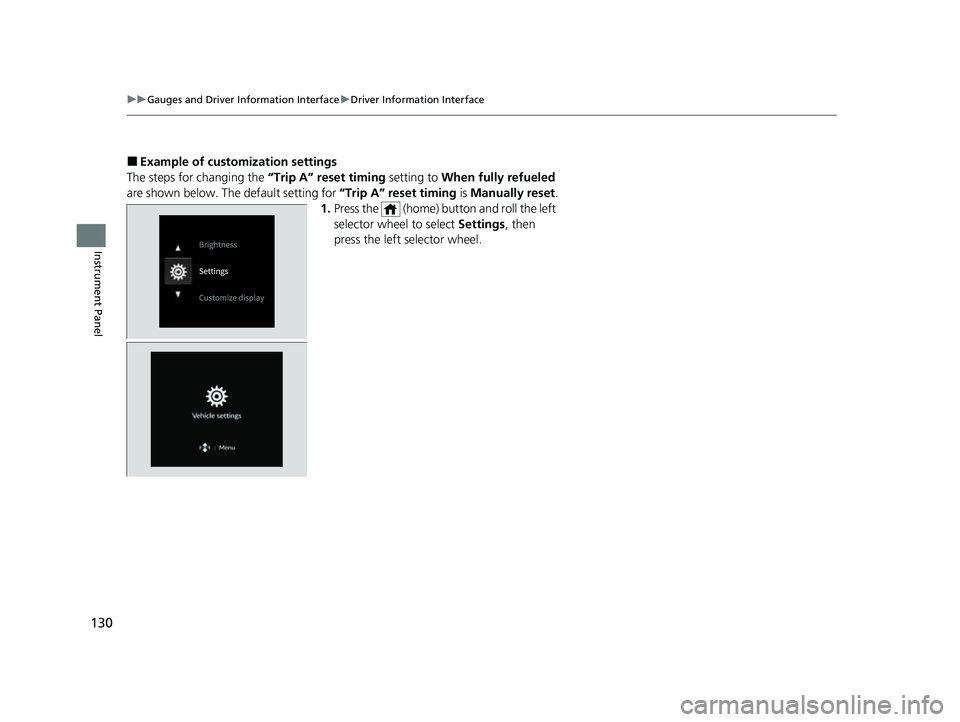
The steps for changing the “Trip A” reset timing setting to When fully refueled
are shown below. The default setting for “Trip A” reset timing is Manually reset.
1. Press the (home) button and roll the left
selector wheel to select Settings, then
press the left selector wheel.
23 HR-V-313V06000_01.book 130 ページ 2022年4月4日 月曜日 午前10時49分
Page 213 of 664

211
Features
This chapter describes how to operate technology features.
Audio System
About Your Audio System ................ 212
USB Ports ......................................... 213
Audio System Theft Protection ......... 214
Audio Remote Controls .................... 215
Audio System Basic Operation ........ 219
Adjusting the Sound ........................ 220
Display Setup ................................... 221
Playing AM/FM Radio ....................... 222
Playing an iPod ................................ 224
Playing a USB Flash Drive ................. 227
Playing Bluetooth ® Audio ................. 230
Siri Eyes Free .................................... 234
Models with 7-in. Color Touchscreen
Smartphone Voice Recognition ........ 23T
Apple CarPlay .................................. 23U
Android Auto
TM................................ 24O
Audio System Basic Operation ........ 244
Start Up ........................................... 245
Audio/Information Screen ................ 246
System Updates ............................... 257
Adjusting the Sound ........................ 263
Display Setup ................................... 264
Voice Control Operation .................. 266
Playing AM/FM Radio ....................... 269
Playing SiriusXM ® Radio ................... 273
Playing an iPod ................................ 284Models with 9-in. Color Touchscreen
Playing a USB Flash Drive ................M 28V
Playing Bluetooth ® Audio ................ 290
HondaLink ®..................................... 293
Smart Shortcuts ............................... 297
Wi-Fi Connection ............................. 300
Apple CarPlay .................................. 301
Android Auto
TM............................... 308
Audio Error Messages ...................... 314
General Information on the Audio System ............................................. 316
Customized Features ................ 337, 345
Bluetooth® HandsFreeLink® ..... 369, 389
Refuel Recommend .......................... 408
23 HR-V-313V06000_01.book 211 ページ 2022年4月4日 月曜日 午前10時49分
Page 410 of 664
408
Features
Refuel Recommend
Your vehicle is equipped with a feature that automatically calculates when to refuel.
This feature will notify you when refueling is recommended as well as enable you to
search for gas stations that are loca ted in the vicinity of your vehicle.
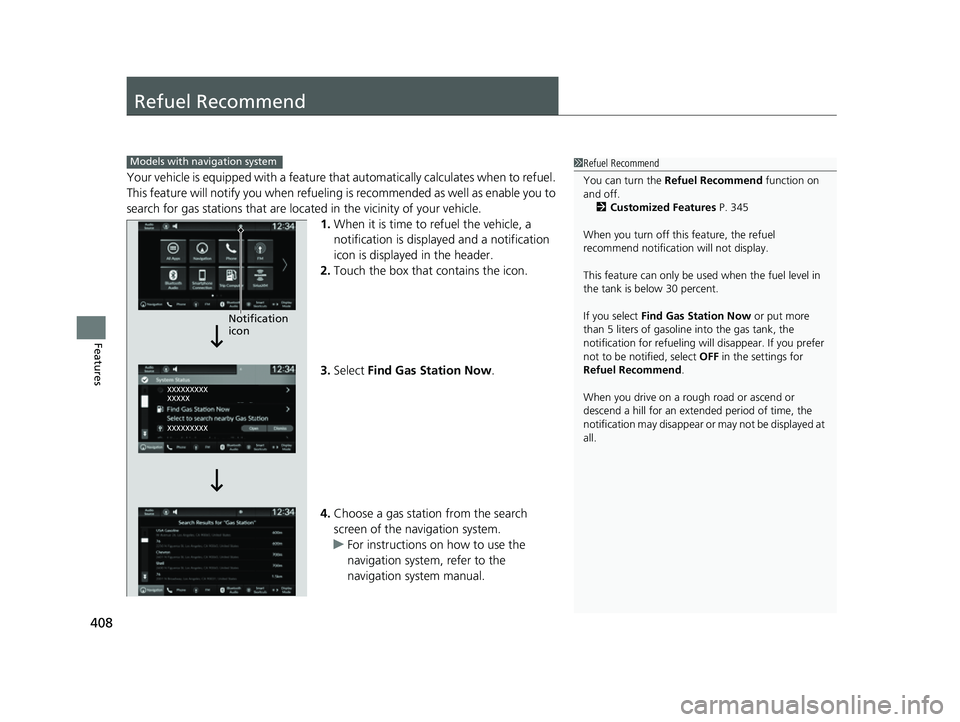
1. When it is time to refuel the vehicle, a
notification is displayed and a notification
icon is displayed in the header.
2. Touch the box that contains the icon.
3. Select Find Gas Station Now .
4. Choose a gas station from the search
screen of the navigation system.
u For instructions on how to use the
navigation system, refer to the
navigation system manual.
1Refuel Recommend
You can turn the Refuel Recommend function on
and off.
2 Customized Features P. 345
When you turn off this feature, the refuel
recommend notification will not display.
This feature can only be used when the fuel level in
the tank is below 30 percent.
If you select Find Gas Station Now or put more
than 5 liters of gasoline into the gas tank, the
notification for refueling will disappear. If you prefer
not to be notified, select OFF in the settings for
Refuel Recommend .
When you drive on a rough road or ascend or
descend a hill for an ex tended period of time, the
notification may disappear or may not be displayed at
all.Models with navigation system
Notification
icon
23 HR-V-313V06000_01.book 408 ページ 2022年4月4日 月曜日 午前10時49分
Page 550 of 664
548
uuRefueling uHow to Refuel
Driving
How to Refuel
Your fuel tank is not equipped with a fuel filler cap. You can insert the filler nozzle
directly into the filler neck. The tank seal s itself again when you pull out the filler
nozzle.
1.Stop your vehicle with the service station
pump on the left side of the vehicle in the
rear.
2. Turn off the engine.
3. Unlock the driver’s door.
u The fuel fill door on the outer side of the
vehicle will unlock.
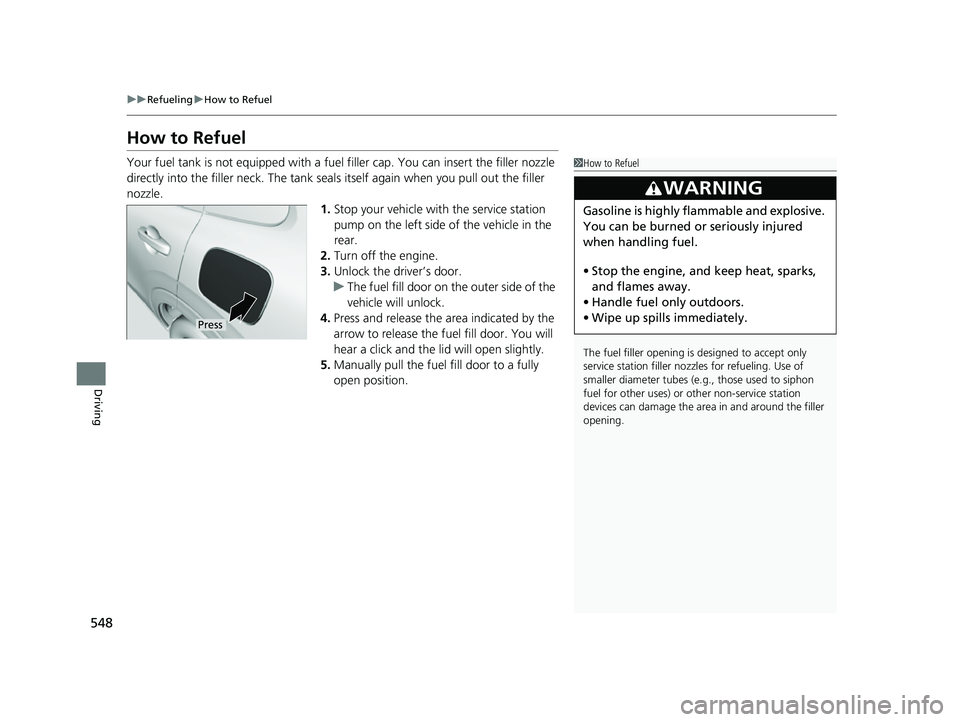
4. Press and release the area indicated by the
arrow to release the fu el fill door. You will
hear a click and the lid will open slightly.
5. Manually pull the fuel fill door to a fully
open position.1How to Refuel
The fuel filler opening is designed to accept only
service station filler nozzles for refueling. Use of
smaller diamet er tubes (e.g., those used to siphon
fuel for other uses) or other non-service station
devices can damage the area in and around the filler
opening.
3WARNING
Gasoline is highly flammable and explosive.
You can be burned or seriously injured
when handling fuel.
• Stop the engine, and keep heat, sparks,
and flames away.
• Handle fuel only outdoors.
• Wipe up spills immediately.
Press
23 HR-V-313V06000_01.book 548 ページ 2022年4月4日 月曜日 午前10時49分