2023 HONDA HRV bumper
[x] Cancel search: bumperPage 28 of 664

26
Quick Reference Guide
Honda Sensing® (P449)
Honda Sensing ® is a driver support system
which employs the use of two distinctly
different kinds of sensors: the sonar sensors
located in the front and rear bumpers, and
the front grille, and a front wide view
camera mounted to the interior side of the
windshield, behind the rearview mirror.
Honda Sensing ® is a driver support system
which employs the use of a front wide view
camera mounted to the interior side of the
windshield, behind the rearview mirror.
Models with Low Speed Braking Control
Models without Low Speed Braking Control
Front Wide View
Camera
Sonar Sensors
*
Collision Mitigation
Braking System
TM
(CMBS
TM) (P453)
The system can assist you when it
determines there is a possibility of your
vehicle colliding with a vehicle (including
motorcycles) ahead from behind, an
oncoming vehicle in front, a pedestrian, or
someone riding a bicycle (moving bicycle).
The CMBS
TM is designed to alert you when
the potential for a collision is determined, as
well as assist in reducing speed, avoiding
collisions, and reducing collision severity.
Low Speed Braking
Control
* (P465)
Using sonar sensors located on the front and
rear bumpers, and the front grille, this
system can detect if there is danger of a
potential collision with a wall or other
obstacle during normal driving or when the
accelerator pedal is depressed with too
much force. The system then assists in
avoiding collisions and reducing damage
from impact through a ssistive braking and/
or assistive driving power suppression.
Adaptive Cruise Control
(ACC) with Low Speed
Follow
(P471)
Helps maintain a constant vehicle speed and
a set following-interval behind a vehicle
detected ahead of yours and, if the detected
vehicle comes to a stop, can decelerate and
stop your vehicle, without you having to
keep your foot on the brake or the
accelerator.
Lane Keeping Assist
System (LKAS)
(P491)
Provides steering input to help keep the
vehicle in the middle of a detected lane and
provides tactile and visual alerts if the
vehicle is detected drifting out of its lane.
23 HR-V-313V06000_01.book 26 ページ 2022年4月4日 月曜日 午前10時49分
Page 107 of 664

Continued105
uuGauges and Driver Information Interface uGauges
Instrument Panel
Shows the total number of miles or kilome ters that your vehicle has accumulated.
Shows the outside temperature in Fahr enheit (U.S.) or Celsius (Canada).
■Adjusting the outside temperature display
Adjust the temperature reading by up to ±5°F or ±3°C if the temperature reading
seems incorrect.
Shows certain detected traffic signs while driving.
The indicator blinks when th e maximum speed of the traffic sign detected by the
Traffic Sign Recognition System is exceeded.
2 Traffic Sign Recognition System P. 519
■Odometer
■Outside Temperature
■Traffic Sign Recognition System
1Outside Temperature
The temperature sensor is in the front bumper.
Road heat and exhaust from another vehicle can
affect the temperature reading when your vehicle
speed is less than 19 mph (30 km/h).
It may take several minutes for the display to be
updated after the temperature reading has stabilized.
You can adjust the temperature reading.
2 Settings
* P. 123
2 Customized Features P. 345
* Not available on all models
23 HR-V-313V06000_01.book 105 ページ 2022年4月4日 月曜日 午前10時49分
Page 447 of 664
445
uuWhen Driving uBlind Spot Information System*
Continued
Driving
Blind Spot Information System*
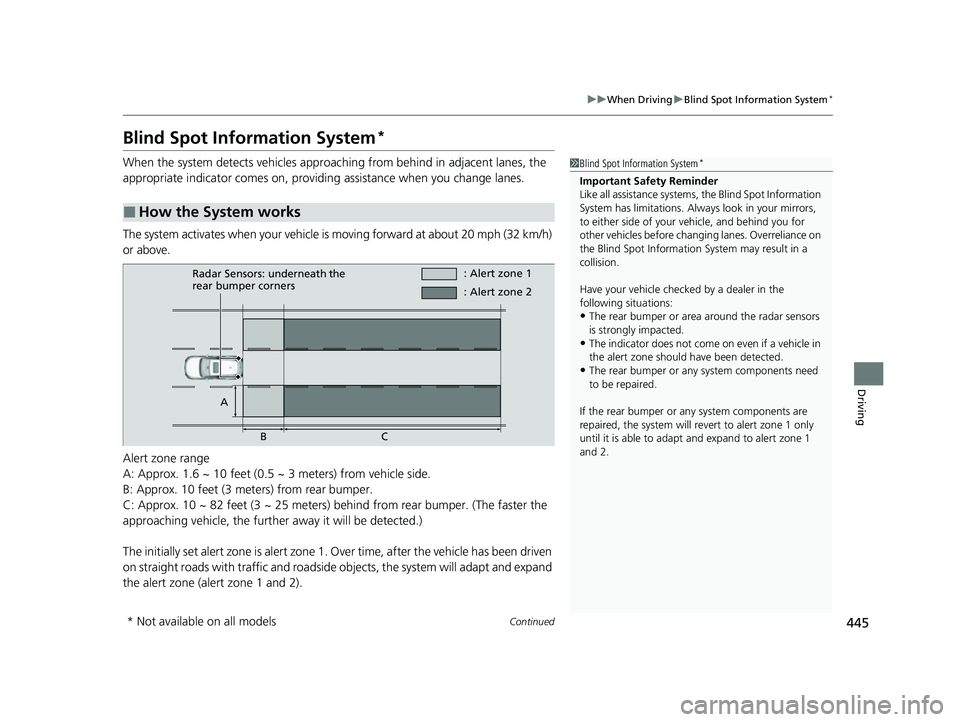
When the system detects vehicles approaching from behind in adjacent lanes, the
appropriate indicator comes on, providin g assistance when you change lanes.
The system activates when your vehicle is moving forward at about 20 mph (32 km/h)
or above.
Alert zone range
A: Approx. 1.6 ~ 10 feet (0.5 ~ 3 meters) from vehicle side.
B: Approx. 10 feet (3 meters) from rear bumper.
C: Approx. 10 ~ 82 feet (3 ~ 25 meters) behind from rear bumper. (The faster the
approaching vehicle, the further away it will be detected.)
The initially set alert zone is alert zone 1. Over time, after the vehicle has been driven
on straight roads with traffic and roadside objects, the system will adapt and expand
the alert zone (alert zone 1 and 2).
■How the System works
1 Blind Spot Information System*
Important Safety Reminder
Like all assistance systems, the Blind Spot Information
System has limitations. Always look in your mirrors,
to either side of your vehicle, and behind you for
other vehicles before changing lanes. Overreliance on
the Blind Spot Information System may result in a
collision.
Have your vehicle checked by a dealer in the
following situations:
•The rear bumper or area around the radar sensors
is strongly impacted.
•The indicator does not come on even if a vehicle in
the alert zone should have been detected.
•The rear bumper or any system components need
to be repaired.
If the rear bumper or any system components are
repaired, the system will re vert to alert zone 1 only
until it is able to adapt and expand to alert zone 1
and 2.
Radar Sensors: underneath the
rear bumper corners : Alert zone 1
A BC : Alert zone 2
* Not available on all models
23 HR-V-313V06000_01.book 445 ページ 2022年4月4日 月曜日 午前10時49分
Page 448 of 664
uuWhen Driving uBlind Spot Information System*
446
Driving
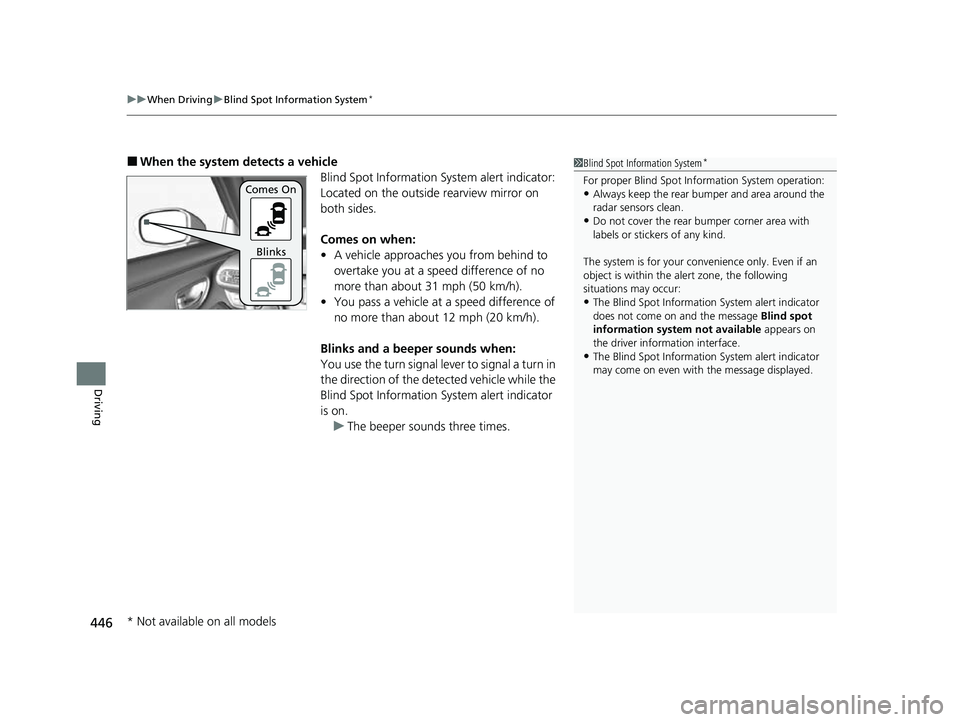
■When the system detects a vehicle
Blind Spot Information System alert indicator:
Located on the outside rearview mirror on
both sides.
Comes on when:
• A vehicle approaches you from behind to
overtake you at a speed difference of no
more than about 31 mph (50 km/h).
• You pass a vehicle at a speed difference of
no more than about 12 mph (20 km/h).
Blinks and a beeper sounds when:
You use the turn signal lever to signal a turn in
the direction of the detected vehicle while the
Blind Spot Information System alert indicator
is on. u The beeper sounds three times.1Blind Spot Information System*
For proper Blind Spot Info rmation System operation:•Always keep the rear bumper and area around the
radar sensors clean.
•Do not cover the rear bumper corner area with
labels or sticke rs of any kind.
The system is for your convenience only. Even if an
object is within the alert zone, the following
situations may occur:
•The Blind Spot Informati on System alert indicator
does not come on and the message Blind spot
information system not available appears on
the driver information interface.
•The Blind Spot Informati on System alert indicator
may come on even with the message displayed.
Comes On
Blinks
* Not available on all models
23 HR-V-313V06000_01.book 446 ページ 2022年4月4日 月曜日 午前10時49分
Page 450 of 664
448
uuWhen Driving uBlind Spot Information System*
Driving
The Blind Spot Information System alert indicator may not come on under the
following conditionsY
• There is a large speed difference betwee n your vehicle and the vehicle in the
adjacent lane.
• A vehicle is parked in a side lane.
• An object not detected by the radar se nsors approaches or passes your vehicle.
• The vehicle driving in the adjacent lane is a motorcycle or other small vehicle.
The Blind Spot Information System may no t operate correctly under the following
conditions:
• Making a turn at an intersection.
• Objects (guard rails, poles, trees, etc.) are detected.
• An object that does not reflect radio wave s well or a motorcycle, is in the alert
zone.
• Driving on a curved road.
• A vehicle is moving from a far lane to the adjacent lane.
• The system picks up signal interference such as other radar sensors from another
vehicle or strong radio wave transmitted from a facility nearby.
• The rear bumper or the area around the radar sensors is covered by dirt, mud,
snow, ice, etc.
• The rear bumper or the area around the radar sensors has been damaged or
deformed.
• In bad weather (heavy rain, snow, and fog).
• Making a short turn or driving on a bumpy road that slightly tilts the vehicle.
• An object such as a bicycle rack is attached to the rear of the vehicle.
■Blind Spot Information System Conditions and Limitations
23 HR-V-313V06000_01.book 448 ページ 2022年4月4日 月曜日 午前10時49分
Page 451 of 664
449Continued
Driving
Honda Sensing®
Honda Sensing® is a driver support system which employs the use of two distinctly
different kinds of sensors: the sonar sens ors located in the front and rear bumpers,
and the front grille, and a front wide view camera mounted to the interior side of
the windshield, behind the rearview mirror.
Honda Sensing ® is a driver support system which employs the use of a front wide
view camera mounted to the interior side of the windshield, behind the rearview
mirror.
Models with Low Speed Braking Control
Models without Low Speed Braking Control
23 HR-V-313V06000_01.book 449 ページ 2022年4月4日 月曜日 午前10時49分
Page 467 of 664

465
uuHonda Sensing ®u Low Speed Braking Control*
Continued
Driving
Low Speed Braking Control*
Using sonar sensors located on the front a nd rear bumpers, and the front grille, this
system can detect if there is danger of a potential collision with a wall or other
obstacle during normal driving or when the accelerator pedal is depressed with too
much force. The system then assists in avoiding collisions and reducing damage
from impact through assistive braking a nd/or assistive driving power suppression.1Low Speed Braking Control*
If the Low Speed Braking Control activates in a
situation where you do not want automatic brake
application (such as when the vehicle is between two
railroad crossing gates), simply press the brake pedal
to deactivate the system and then continue to drive
as intended.
3WARNING
The Low Speed Braking Control System
cannot avoid all collisions and may not
reduce damage in each situation where the
accelerator is mistakenly or aggressively
pressed. Overreliance on the system may
result in a collision with serious injury or
death. Always check your surroundings,
your shift position, and your pedal use.
Driver remains responsible for safely
operating the vehicle.
* Not available on all models
23 HR-V-313V06000_01.book 465 ページ 2022年4月4日 月曜日 午前10時49分
Page 471 of 664

Continued469
uuHonda Sensing ®u Low Speed Braking Control*
Driving
Conditions for assistive driving power suppressionM
• When the accelerator is no longer depressed.
• When the accelerator is depresse d for approximately four seconds.
• When the brake pedal is depressed.
Conditions for assistive braking cancellation.
• A certain amount of time has passed since activation.
The system may not operate correctly in the following conditions:
■Examples of obstacles the sonar sensor cannot detect
• Obstacles that do not reflect sound waves well, such as people, snow, cloth,
sponges, etc.
• Thin obstacles such as fenc es, bicycles, sign posts, etc.
• Short or small obstacles.
• Obstacles immediately in front of the bumper.
• Moving objects or obstacles that suddenly enter the road.
• Obstacles that are not perp endicular to the ground.
■Conditions for Cancellation
■Low Speed Braking Control System Conditions and Limitations
1Conditions for Cancellation
After Low Speed Braking Control has activated once,
it will not activate again for the same obstacle.
They can be activated again after driving for a certain
distance after last activation.
Low Speed Braking Control ac tivates separately when
moving forward and reversing. (For example, if it
activates when moving forwar d, it can be activated
again immediately if reversing.)
However, if assistive braking has been activated, in
order to activate assistiv e driving power suppression
again, it is necessary to drive for a certain distance to
reset the system.
23 HR-V-313V06000_01.book 469 ページ 2022年4月4日 月曜日 午前10時49分