Page 346 of 664
344
uuCustomized Features uDefaulting All the Settings
Features
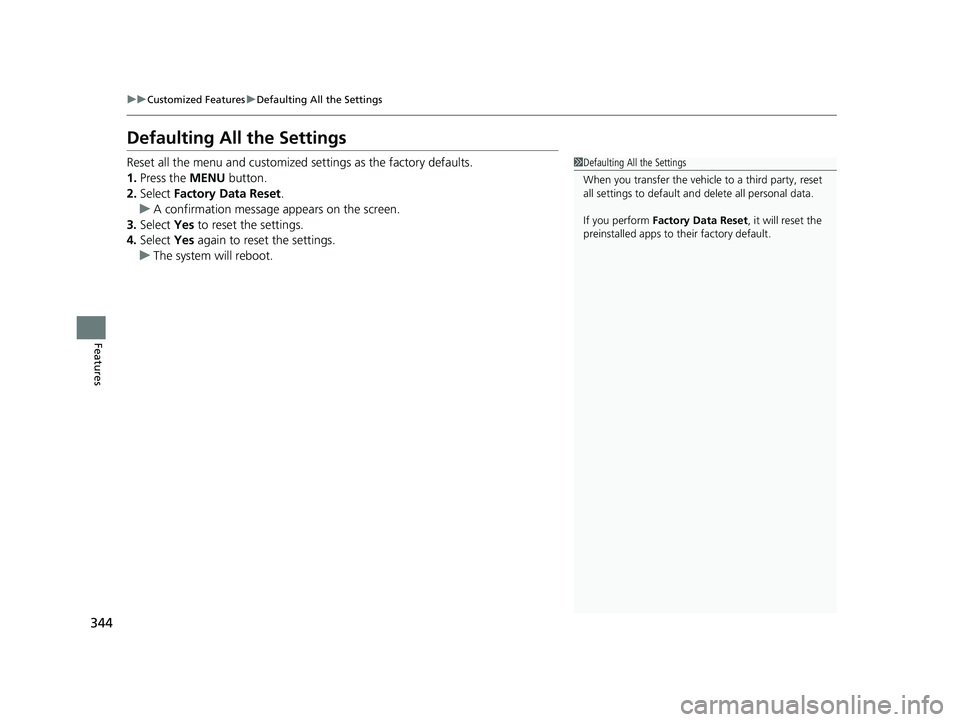
Defaulting All the Settings
Reset all the menu and customized settings as the factory defaults.
1. Press the MENU button.
2. Select Factory Data Reset .
u A confirmation message appears on the screen.
3. Select Yes to reset the settings.
4. Select Yes again to reset the settings.
u The system will reboot.1Defaulting All the Settings
When you transfer the vehicle to a third party, reset
all settings to default a nd delete all personal data.
If you perform Factory Data Reset , it will reset the
preinstalled apps to their factory default.
23 HR-V-313V06000_01.book 344 ページ 2022年4月4日 月曜日 午前10時49分
Page 349 of 664
347
uuCustomized Features u
Continued
Features
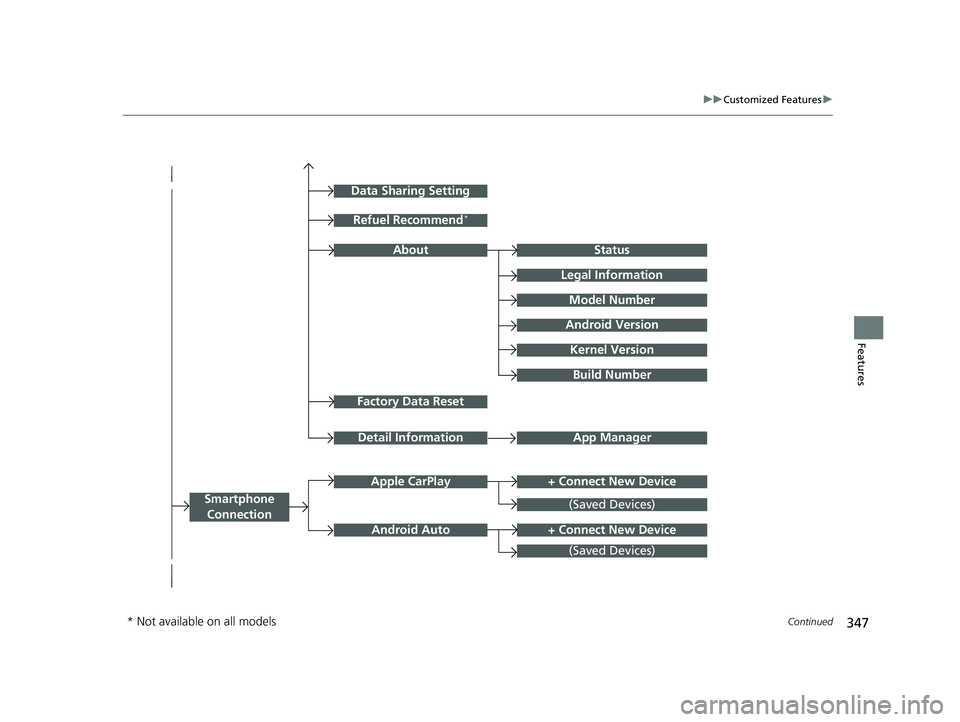
Factory Data Reset
Status
Legal Information
Build Number
Data Sharing Setting
Model Number
Android Version
Kernel Version
App ManagerDetail Information
Refuel Recommend*
About
+ Connect New DeviceApple CarPlay
Smartphone
Connection
Android Auto
(Saved Devices)
+ Connect New Device
(Saved Devices)
* Not available on all models
23 HR-V-313V06000_01.book 347 ページ 2022年4月4日 月曜日 午前10時49分
Page 353 of 664
351
uuCustomized Features u
Continued
Features
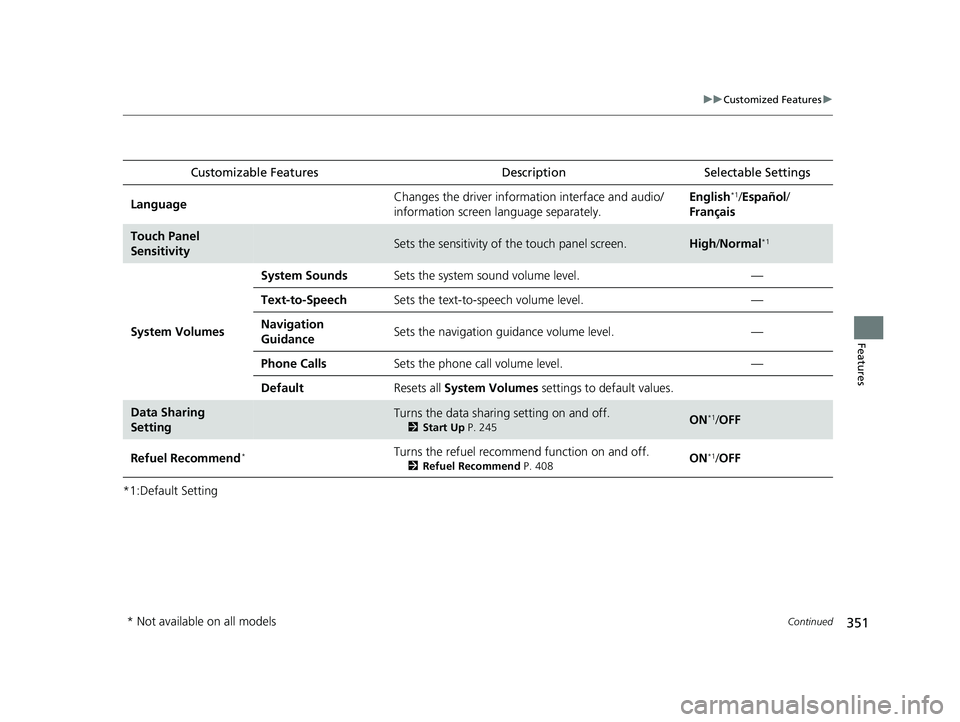
*1:Default SettingCustomizable Features
DescriptionSelectable Settings
LanguageChanges the driver information interface and audio/
information screen language separately.English*1/Español /
Français
Touch Panel
SensitivitySets the sensitivity of the touch panel screen.High /Normal*1
System Volumes
System SoundsSets the system sound volume level.—
Text-to-SpeechSets the text-to-speech volume level.—
Navigation
GuidanceSets the navigation guidance volume level.—
Phone CallsSets the phone call volume level.—
DefaultResets all System Volumes settings to default values.
Data Sharing
SettingTurns the data sharing setting on and off.
2Start Up P. 245ON*1/OFF
Refuel Recommend*Turns the refuel recommend function on and off.
2 Refuel Recommend P. 408ON*1/OFF
* Not available on all models
23 HR-V-313V06000_01.book 351 ページ 2022年4月4日 月曜日 午前10時49分
Page 354 of 664
352
uuCustomized Features u
Features
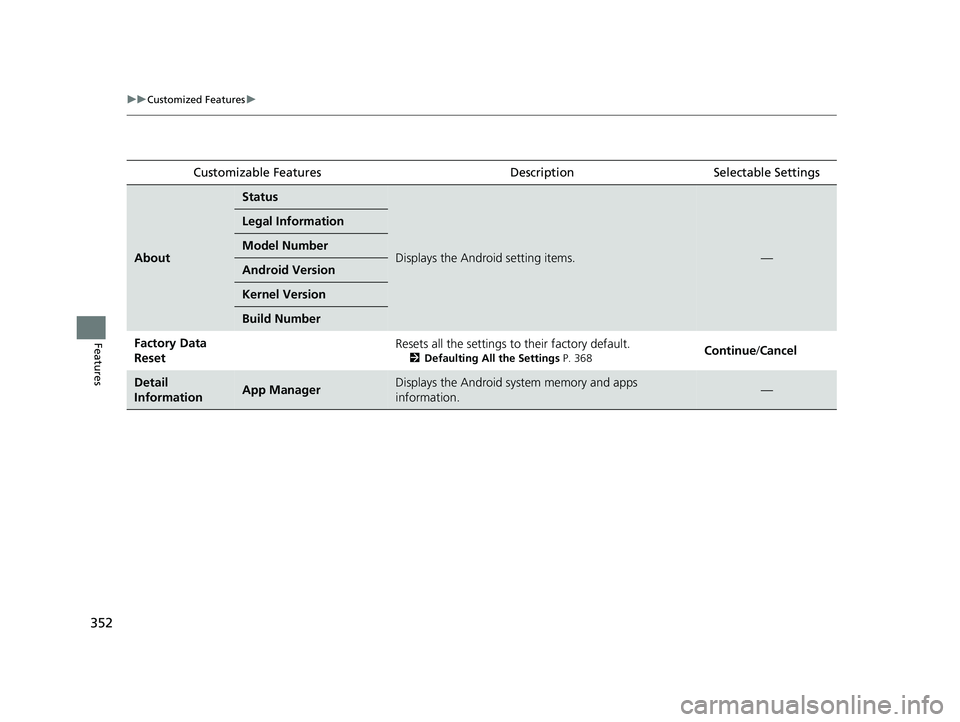
Customizable FeaturesDescriptionSelectable Settings
About
Status
Displays the Android setting items.—
Legal Information
Model Number
Android Version
Kernel Version
Build Number
Factory Data
ResetResets all the settings to their factory default.
2Defaulting All the Settings P. 368Continue/Cancel
Detail
InformationApp ManagerDisplays the Android system memory and apps
information.—
23 HR-V-313V06000_01.book 352 ページ 2022年4月4日 月曜日 午前10時49分
Page 357 of 664
355
uuCustomized Features u
Continued
Features
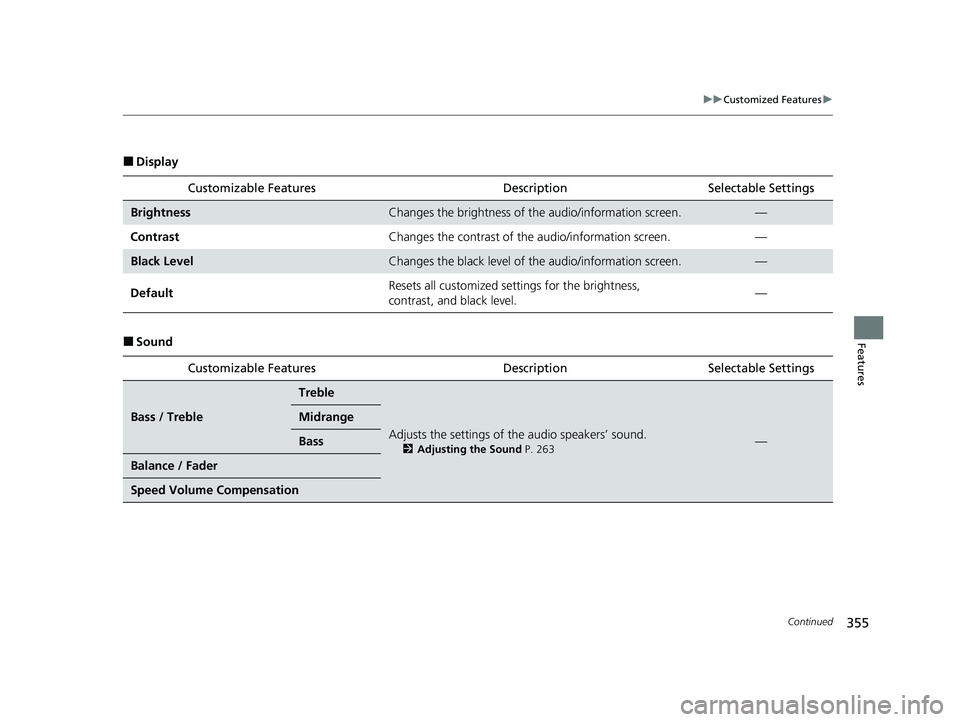
■Display
■SoundCustomizable Features
DescriptionSelectable Settings
BrightnessChanges the brightness of the audio/information screen.—
Contrast Changes the contrast of the audio/information screen. —
Black LevelChanges the black level of the audio/information screen.—
Default Resets all customized sett
ings for the brightness,
contrast, and black level. —
Customizable Features DescriptionSelectable Settings
Bass / Treble
Treble
Adjusts the settings of the audio speakers’ sound.
2Adjusting the Sound P. 263—
Midrange
Bass
Balance / Fader
Speed Volume Compensation
23 HR-V-313V06000_01.book 355 ページ 2022年4月4日 月曜日 午前10時49分
Page 361 of 664
359
uuCustomized Features u
Continued
Features
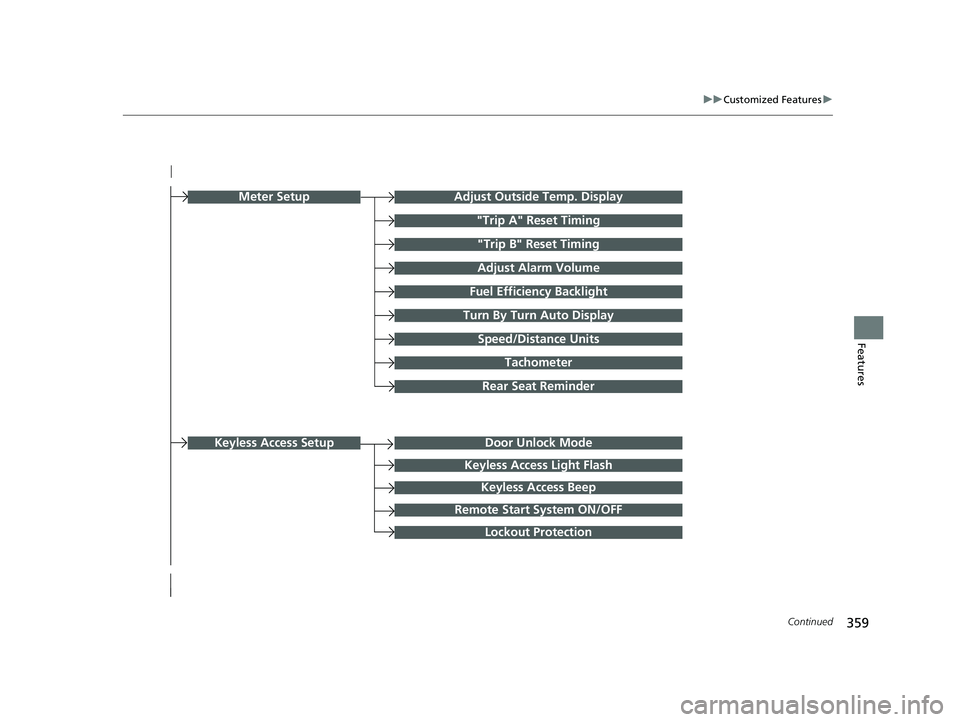
Turn By Turn Auto Display
Speed/Distance Units
Keyless Access Light Flash
Rear Seat Reminder
Door Unlock Mode
Keyless Access Beep
Remote Start System ON/OFF
Lockout Protection
Keyless Access Setup
Meter SetupAdjust Outside Temp. Display
"Trip A" Reset Timing
"Trip B" Reset Timing
Adjust Alarm Volume
Fuel Efficiency Backlight
Tachometer
23 HR-V-313V06000_01.book 359 ページ 2022年4月4日 月曜日 午前10時49分
Page 362 of 664
360
uuCustomized Features u
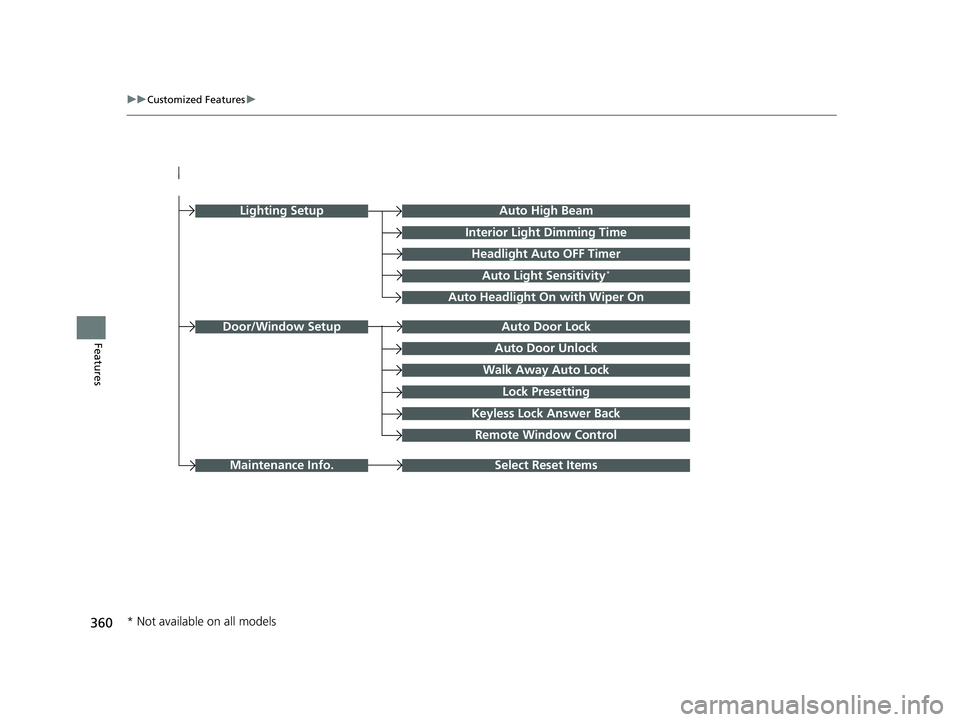
FeaturesAuto Door Unlock
Auto Door Lock
Walk Away Auto Lock
Lock Presetting
Keyless Lock Answer Back
Door/Window Setup
Lighting SetupAuto High Beam
Interior Light Dimming Time
Headlight Auto OFF Timer
Auto Light Sensitivity*
Auto Headlight On with Wiper On
Remote Window Control
Select Reset ItemsMaintenance Info.
* Not available on all models
23 HR-V-313V06000_01.book 360 ページ 2022年4月4日 月曜日 午前10時49分
Page 365 of 664
363
uuCustomized Features u
Continued
Features
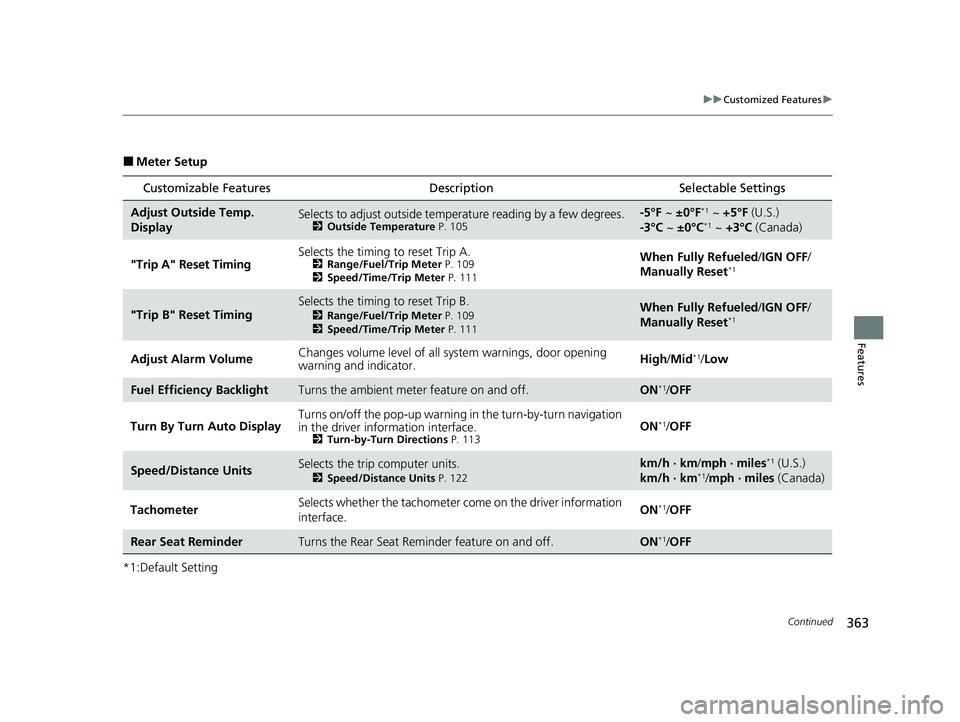
■Meter Setup
*1:Default Setting
Customizable Features Description Selectable Settings
Adjust Outside Temp.
DisplaySelects to adjust outside temperature reading by a few degrees.2Outside Temperature P. 105
-5°F ~ ±0°F*1 ~ +5°F (U.S.)
-3°C ~ ±0°C*1 ~ +3°C (Canada)
"Trip A" Reset Timing Selects the timing
to reset Trip A.
2Range/Fuel/Trip Meter P. 109
2 Speed/Time/Trip Meter P. 111When Fully Refueled/IGN OFF /
Manually Reset*1
"Trip B" Reset TimingSelects the timing to reset Trip B.
2 Range/Fuel/Trip Meter P. 109
2 Speed/Time/Trip Meter P. 111When Fully Refueled/IGN OFF /
Manually Reset*1
Adjust Alarm Volume Changes volume level of all system warnings, door opening
warning and indicator. High
/Mid*1/Low
Fuel Efficien cy BacklightTurns the ambient meter feature on and off.ON*1/OFF
Turn By Turn Auto Display Turns on/off the pop-up warning in
the turn-by-turn navigation
in the driver information interface.
2 Turn-by-Turn Directions P. 113ON*1/OFF
Speed/Distance UnitsSelects the trip computer units.
2 Speed/Distance Units P. 122
km/h · km/mph · miles*1 (U.S.)
km/h · km*1/ mph · miles (Canada)
Tachometer Selects whether the tachometer
come on the driver information
interface. ON
*1/
OFF
Rear Seat ReminderTurns the Rear Seat Reminder feature on and off.ON*1/OFF
23 HR-V-313V06000_01.book 363 ページ 2022年4月4日 月曜日 午前10時49分