Page 132 of 664
130
uuGauges and Driver Information Interface uDriver Information Interface
Instrument Panel
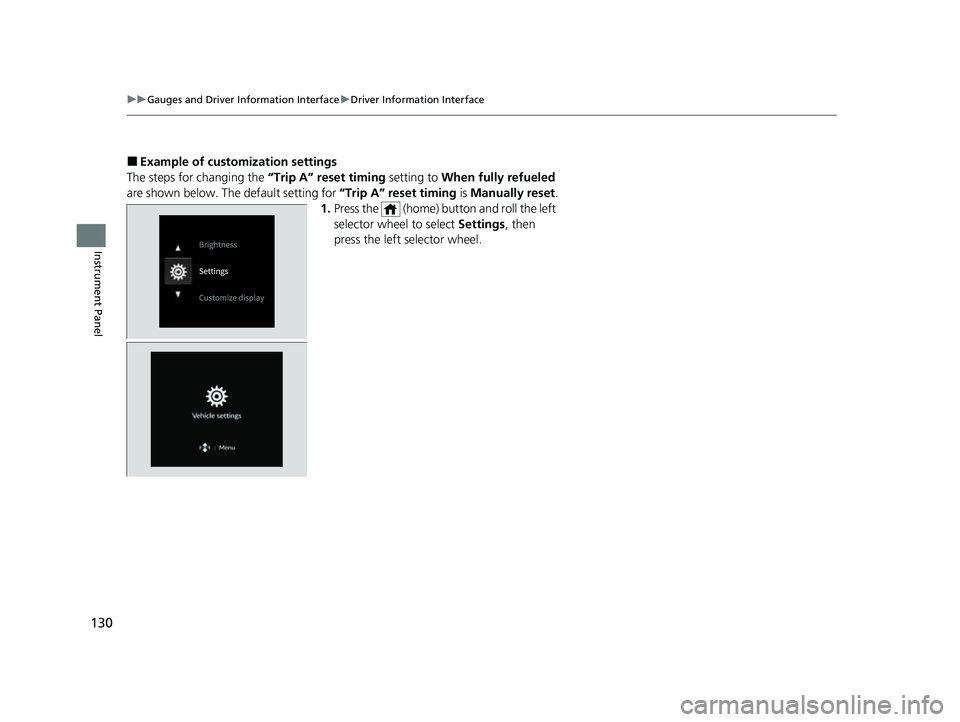
■Example of customization settings
The steps for changing the “Trip A” reset timing setting to When fully refueled
are shown below. The default setting for “Trip A” reset timing is Manually reset.
1. Press the (home) button and roll the left
selector wheel to select Settings, then
press the left selector wheel.
23 HR-V-313V06000_01.book 130 ページ 2022年4月4日 月曜日 午前10時49分
Page 133 of 664
131
uuGauges and Driver Information Interface uDriver Information Interface
Continued
Instrument Panel
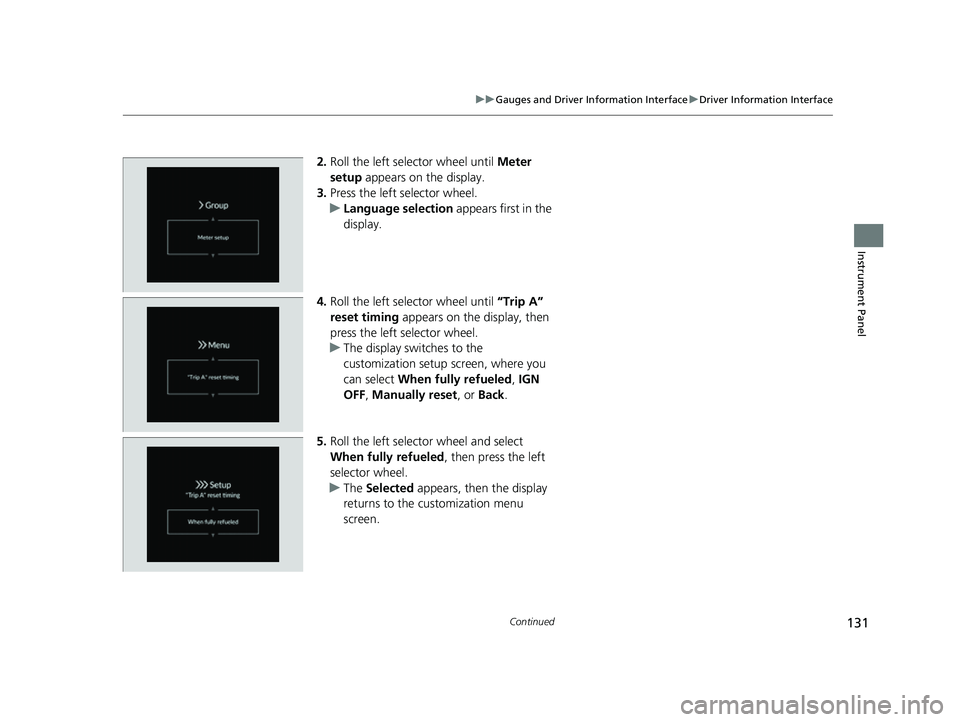
2. Roll the left selector wheel until Meter
setup appears on the display.
3. Press the left selector wheel.
u Language selection appears first in the
display.
4. Roll the left selector wheel until “Trip A”
reset timing appears on the display, then
press the left selector wheel.
u The display swit ches to the
customization setup screen, where you
can select When fully refueled , IGN
OFF , Manually reset , or Back .
5. Roll the left selector wheel and select
When fully refueled , then press the left
selector wheel.
u The Selected appears, then the display
returns to the customization menu
screen.
23 HR-V-313V06000_01.book 131 ページ 2022年4月4日 月曜日 午前10時49分
Page 146 of 664
uuLocking and Unlocking the Doors uLocking/Unlocking the Doors from the Outside
144
Controls
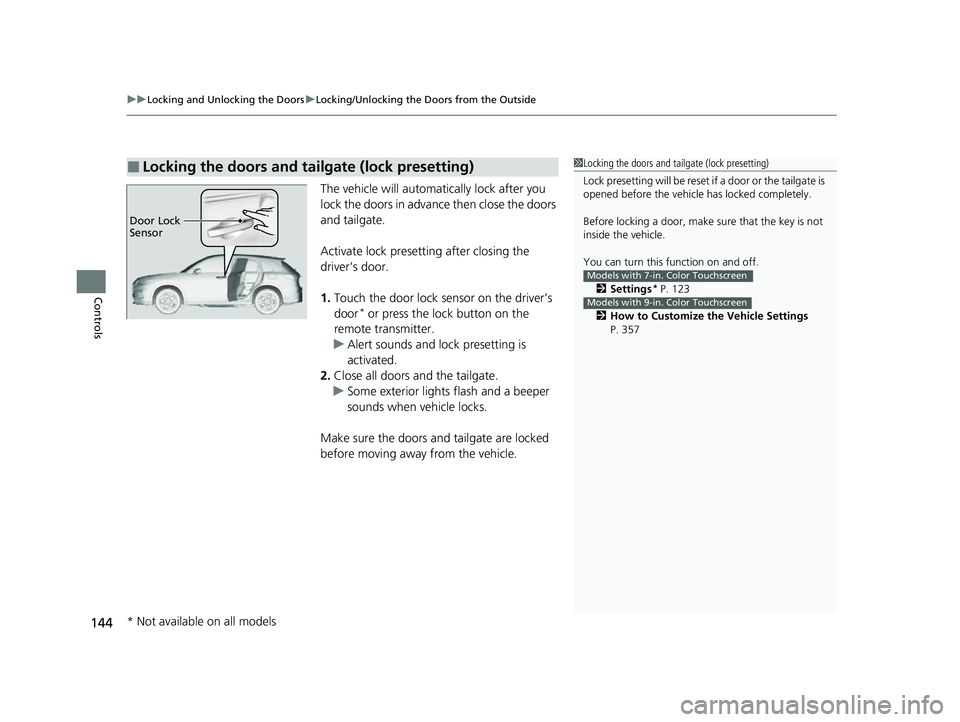
The vehicle will automatically lock after you
lock the doors in advance then close the doors
and tailgate.
Activate lock presetting after closing the
driver’s door.
1. Touch the door lock sensor on the driver’s
door
* or press the lock button on the
remote transmitter.
u Alert sounds and lock presetting is
activated.
2. Close all doors and the tailgate.
u Some exterior lights flash and a beeper
sounds when vehicle locks.
Make sure the doors and tailgate are locked
before moving away from the vehicle.
■Locking the doors and tailgate (lock presetting)1 Locking the doors and tailgate (lock presetting)
Lock presetting will be reset if a door or the tailgate is
opened before the vehicle has locked completely.
Before locking a door, make sure that the key is not
inside the vehicle.
You can turn this function on and off.
2 Settings
* P. 123
2 How to Customize the Vehicle Settings
P. 357
Models with 7-in. Color Touchscreen
Models with 9-in. Color Touchscreen
Door Lock
Sensor
* Not available on all models
23 HR-V-313V06000_01.book 144 ページ 2022年4月4日 月曜日 午前10時49分
Page 200 of 664

uuInterior Convenience Items uOther Interior Convenience Items
198
Controls
■When charging does not start
Perform one of the solution s in the following table.
IndicatorCauseSolution
Green
&
AmberBlinking
simulta- neously
There is an obstacle(s) between
the charging area and the
device.Remove the
obstacle(s).
The device is not within the
charging area. Pick up and reset the
device to the center of
the charging area
where is located.
The temperature of the wireless
charger pad increases. Temporarily suspend
charging the device.
Wait for the
temperature to drop
and attempt to charge
the device again.
AmberBlinkingThe wireless charger is faulty.Contact a dealer for
repairs.
1
Wireless Charger*
This system consumes a lot of power. Do not use the
system for a long time when the engine is not
running. This may weaken the battery, making it
difficult to start the engine.
When using the wireless charger, check the user’s manual
that came with the compatible device you want to charge.
3CAUTION
Metal objects between the charge pad
and the device to be charged will get
hot and can burn you.
• Always remove foreign objects from
the charge pad before charging the
device.
• Be sure the surface is clear of dust and
other debris before charging.
• Do not spill liquids (i. e. water, drinks,
etc.) on the charger and the device.
• Do not use oil, grease, alcohol,
benzine or thinner for cleaning the
charge pad.
• Do not cover the system with towels,
clothing, or other objects while
charging etc.
• Avoid spraying aerosols which may
come in contact with the charge pad
surface.
* Not available on all models
23 HR-V-313V06000_01.book 198 ページ 2022年4月4日 月曜日 午前10時49分
Page 217 of 664

215
uuAudio System uAudio Remote Controls
Continued
Features
Audio Remote Controls
Allow you to operate the audio system whil e driving. The information is shown on
the driver information interface.
SOURCE Button
Cycles through the audio modes as follows:
FMAM USB/iPod/Apple CarPlay/
Android Auto Bluetooth® Audio
VOL
(+/VOL(- (Volume) Switch
Press Up: To increase the volume.
Press Down: To decrease the volume.
/ (Seek/Skip) Buttons
• When listening to the radio
Press : To select the next preset radio station.
Press : To select the previous preset radio station.
Press and hold : To select the next strong station.
Press and hold : To select the previous strong station.
• When listening to an iPod, USB flash drive, Bluetooth® Audio, or Smartphone
Connection
Press : To skip to the next song.
Press : To go back to the beginning of the current or previous song.
• When listening to a USB flash drive or Bluetooth® Audio
Press and hold : To skip to the next folder/group.
Press and hold : To go back to the previous folder/group.
1Audio Remote Controls
Some modes appear only when an appropriate
device or medium is used.
Depending on the Bluetooth® device you connect,
some functions may not be available.Models with 7-in. Color Touchscreen
/ (Seek/Skip) Buttons
SOURCE
ButtonVOL( +/VOL( -
(Volume) Switch
23 HR-V-313V06000_01.book 215 ページ 2022年4月4日 月曜日 午前10時49分
Page 219 of 664
217
uuAudio System uAudio Remote Controls
Continued
Features
/ (Seek/Skip) Buttons
• When listening to the radio
Press : To select the next preset radio station.
Press : To select the previous preset radio station.
Press and hold : To select the next strong station.
Press and hold : To select the previous strong station.
• When listening to an iPod, USB flash drive, Bluetooth® Audio, or Smartphone
Connection
Press : To skip to the next song.
Press : To go back to the beginning of the current or previous song.
• When listening to a USB flash drive
Press and hold : To skip to the next folder.
Press and hold : To go back to the previous folder.
23 HR-V-313V06000_01.book 217 ページ 2022年4月4日 月曜日 午前10時49分
Page 224 of 664
222
uuAudio System Basic Operation uPlaying AM/FM Radio
Features
Playing AM/FM Radio
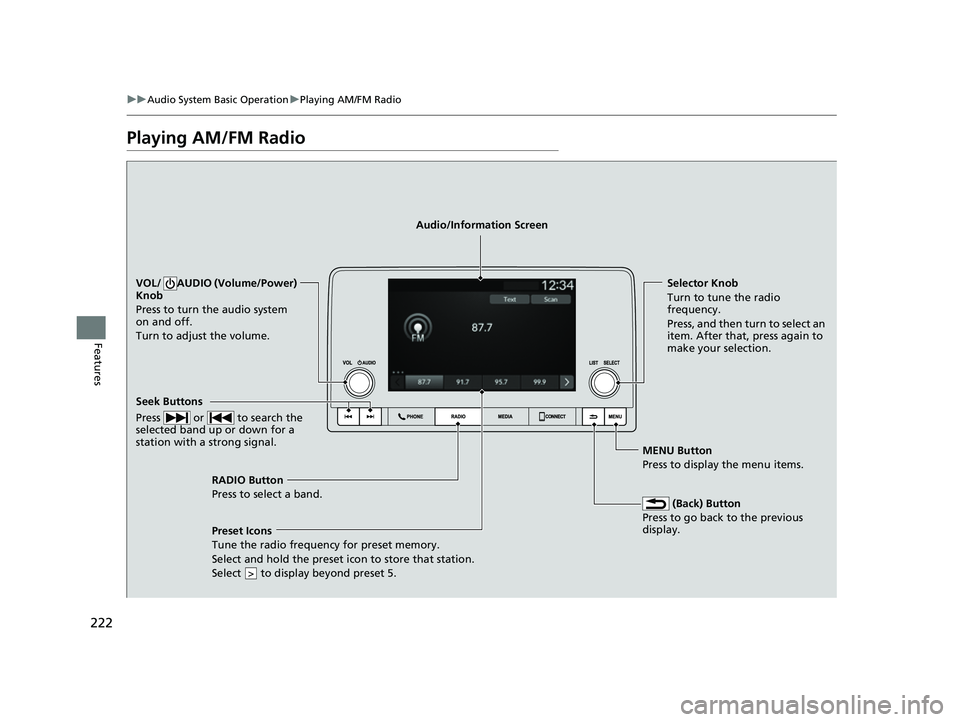
RADIO Button
Press to select a band.
(Back) Button
Press to go back to the previous
display.
Seek Buttons
Press or to search the
selected band up or down for a
station with a strong signal.
VOL/ AUDIO (Volume/Power)
Knob
Press to turn the audio system
on and off.
Turn to adjust the volume.Selector Knob
Turn to tune the radio
frequency.
Press, and then turn to select an
item. After that, press again to
make your selection.
MENU Button
Press to display the menu items.
Audio/Information Screen
Preset Icons
Tune the radio frequency for preset
memory.
Select and hold the preset icon to store that station.
Select to display beyond preset 5.
>
23 HR-V-313V06000_01.book 222 ページ 2022年4月4日 月曜日 午前10時49分
Page 225 of 664
223
uuAudio System Basic Operation uPlaying AM/FM Radio
Features
Provides text data information related to your selected RDS capable FM station.
■To find an RDS station from Station List
1. Press while listening to an FM station.
2. Select the station.
■Update List
Updates your available st ation list at any time.
1. Press while listening to an FM station.
2. Select Refresh .
■Radio text
Displays the radio text information of the selected RDS station.
1. Select Text.
■Scan
Samples each of the strongest stations on the selected band for 10 seconds.
1. Select Scan.
To turn off scan, select Stop or press the button.
■Radio Data System (RDS)1Playing AM/FM Radio
Stereo reproduction in AM is not available.
You can store 12 AM stations and 12 FM stations into
the preset memory.
Switching the Audio Mode
Press the audio source selecting button on the
steering wheel.
2 Audio Remote Controls P. 215
1Radio Data System (RDS)
When you select an RDS-capable FM station, the RDS
automatically turns on, and the station name is
displayed under the frequency. However, when the
signals of that station become weak, the station
name disappears.
23 HR-V-313V06000_01.book 223 ページ 2022年4月4日 月曜日 午前10時49分