2023 HONDA HRV battery
[x] Cancel search: batteryPage 421 of 664
Continued419
uuWhen Driving uStarting the Engine
Driving
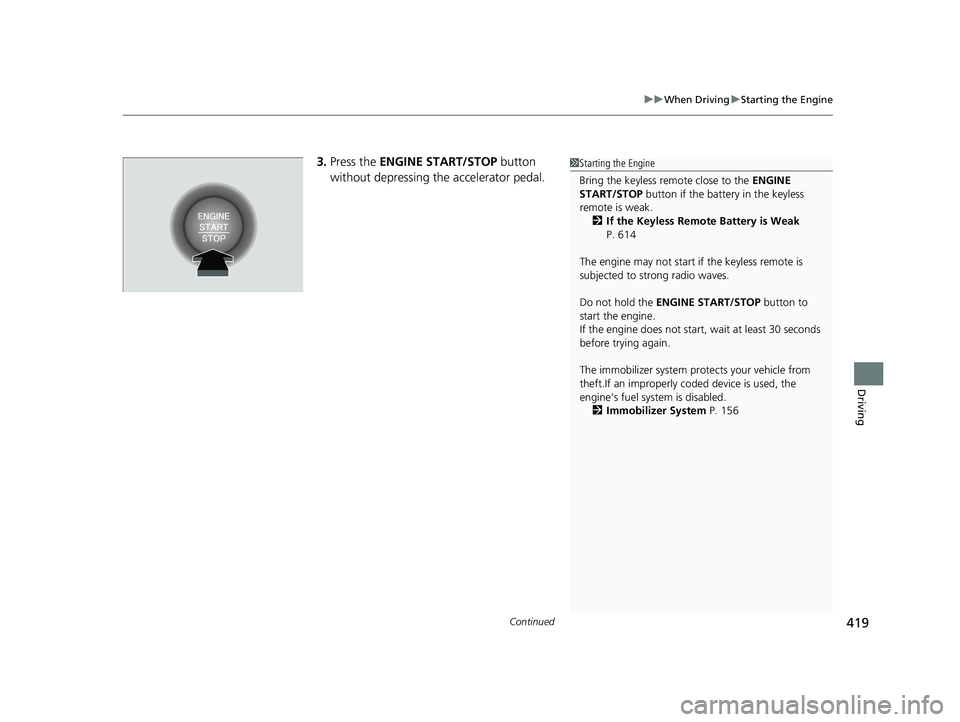
3. Press the ENGINE START/STOP button
without depressing the accelerator pedal.1 Starting the Engine
Bring the keyless remote close to the ENGINE
START/STOP button if the batte ry in the keyless
remote is weak. 2 If the Keyless Remote Battery is Weak
P. 614
The engine may not start if the keyless remote is
subjected to strong radio waves.
Do not hold the ENGINE START/STOP button to
start the engine.
If the engine does not start, wait at least 30 seconds
before trying again.
The immobilizer system pr otects your vehicle from
theft.If an improperly c oded device is used, the
engine’s fuel system is disabled.
2 Immobilizer System P. 156
23 HR-V-313V06000_01.book 419 ページ 2022年4月4日 月曜日 午前10時49分
Page 424 of 664

uuWhen Driving uStarting the Engine
422
Driving
■To stop the engine
Press and hold the button for one
second.
If the engine starts successfully, the exterior
lights flash once.
When the remote is out of the keyless access
system range, the exterior lights will not flash.
The engine will not stop. u Go within the rang e, and try again.1Remote Engine Start*
The engine may stop whil e it is running if:•You do not start the vehicl e within 10 minutes of
starting the engine with the keyless remote.
•The engine is stopped by using the keyless remote.•The security system alarm is not set.
•The door is unlocked with the built-in key.
•The hood is open, or any door, or the tailgate is
unlocked.
•You press the shift lever release button.
•The engine coolant temper ature is extremely high.•The battery is low.
•The engine oil pressure is low.
•The malfunction indicator la mp comes on if there is
a problem with the emissions control systems.
While the engine is running, the vehicle will
automatically preconditi on inside the vehicle.
When it is warm outside:
•The climate control system is activated in
recirculation mode.
When it is cold outside:
•The defroster is activated at a moderately warm
temperature.
•The rear defogger, heated door mirrors*, front seat
heaters* and heated steering wheel* are activated.
2 Rear Defogger/Heated Door Mirror*
Button P. 176
2 Front Seat Heaters
* P. 202
2 Heated Steering Wheel* P. 201
* Not available on all models
23 HR-V-313V06000_01.book 422 ページ 2022年4月4日 月曜日 午前10時49分
Page 436 of 664

434
uuWhen Driving uVehicle Stability AssistTM (VSA ®), aka Electronic Stability Control (ESC), System
Driving
Vehicle Stability AssistTM (VSA ®), aka Electronic
Stability Control (ESC), System
VSA ® helps to stabilize the vehicle during cornering if the vehicle turns more or less
than what was intended. It also assists in maintaining traction on slippery surfaces.
It does so by regulating engine output and select ively applying the brakes.
When VSA ® activates, you may notice that the
engine does not respond to the accelerator.
You may also notice some noise from the
hydraulic brake system. You will also see the
indicator blink.
■VSA ® Operation
1 Vehicle Stability AssistTM (VSA ®), aka Electronic Stability Control
(ESC), System
The VSA ® may not function properl y if tire type and
size are mixed. Make sure to use the same size and
type of tire, and the air pressures as specified.
When the VSA ® system indicator comes on and stays
on while driving, there ma y be a problem with the
system. While this may not interfere with normal
driving, have your vehi cle checked by a dealer
immediately.
VSA ® cannot enhance stability in all driving situations
and does not control the entire braking system. You
still need to drive and corner at speeds appropriate
for the conditions and always leave a sufficient
margin of safety.
The main function of the VSA ® system is generally
known as Electronic Stability Control (ESC). The
system also includes a traction control function.
The Vehicle Stability Assist
TM (VSA ®) system, Vehicle
Stability AssistTM (VSA ®) OFF , Adaptive Cruise Control
(ACC) with Low Speed Follow, low tire pressure/
TPMS
*, parking brake and bra ke system and safety
support indicators may come on in amber along with
a message in the gauge when you set the power
mode to ON after re connecting the battery.
Drive a short distance at more than 12 mph (20 km/h).
Each indicator should go off. If any do not, have your
vehicle checked by a dealer.
VSA ® System
Indicator
* Not available on all models
23 HR-V-313V06000_01.book 434 ページ 2022年4月4日 月曜日 午前10時49分
Page 441 of 664

Continued439
uuWhen Driving uTire Pressure Monitoring System (TPMS)
Driving
You must start TPMS calibration every time you:
• Adjust the pressure in one or more tires.
• Rotate the tires.
• Replace one or more tires.
Before calibrating the TPMS:
• Set the cold tire pressure in all four tires.
2 Checking Tires P. 581
Make sure:
• The vehicle is at a complete stop.
• The transmission is in
(P.
• The power mode is in ON.
■TPMS Calibration
1Tire Pressure Monitoring System (TPMS)
The Vehicle Stability Assist
TM (VSA ®) system, Vehicle
Stability AssistTM (VSA ®) OFF , Adaptive Cruise Control
(ACC) with Low Speed Follow, low tire pressure/
TPMS
*, parking brake and bra ke system and safety
support indicators may come on in amber along with
a message in the gauge when you set the power
mode to ON after re connecting the battery.
Drive a short distance at more than 12 mph (20 km/h).
Each indicator should go off. If any do not, have your
vehicle checked by a dealer.
1 TPMS Calibration
TPMS cannot be calibrated if a co mpact spare tire is installed.
The calibration process requires approximately 30
minutes of cumulative driv ing at speeds between 30-
60 mph (48-97 km/h).
During this period, if the power mode is set to ON
and the vehicle is not moved within 45 seconds, you
may notice the low tire pressure/TPMS indicator
comes on briefly. This is no rmal and indicates that the
calibration process is not yet complete.
If the tire chains are installed, remove them before
calibrating the TPMS.
If the low tire pressure/TPMS indicator comes on even
when the properly inflated specified regular tires are
installed, have your vehi cle checked by a dealer.
We recommend that the tires be replaced with the
same brand, model, and size as the originals. Ask a
dealer for details.
* Not available on all models
23 HR-V-313V06000_01.book 439 ページ 2022年4月4日 月曜日 午前10時49分
Page 459 of 664

Continued457
uuHonda Sensing ®u Collision Mitigation Braking SystemTM (CMBSTM)
Driving
You can turn the system on and off using the driver information interface.
2 Switching the Display P. 107
2 Safety Support P. 118
The CMBSTM is turned on every time you start th e engine, even if you turned it off
the last time you drove the vehicle.
■CMBSTM On and Off1 Collision Mitigation Braking SystemTM (CMBSTM)
You cannot turn the CMBS
TM off while driving.
The CMBS
TM may automatically shut off, and the
safety support indicator (amb er) will come and stay
on under certain conditions: 2 CMBS
TM Conditions and Limitations P. 458
The CMBS
TM is not activated for about 15 seconds
after the engine starts.
The Vehicle Stability Assist
TM (VSA ®) system, Vehicle
Stability AssistTM (VSA ®) OFF , Adaptive Cruise Control
(ACC) with Low Speed Follow*, low tire pressure/
TPMS*, parking brake and bra ke system and safety
support indicators may come on in amber along with
a message in the gauge when you set the power
mode to ON after re connecting the battery.
Drive a short distance at more than 12 mph (20 km/h).
Each indicator should go off. If any do not, have your
vehicle checked by a dealer.
* Not available on all models
23 HR-V-313V06000_01.book 457 ページ 2022年4月4日 月曜日 午前10時49分
Page 470 of 664

uuHonda Sensing ®u Low Speed Braking Control*
468
Driving
You can turn the system on and off us ing the driver information interface.
2Switching the Display P. 107
2 Safety Support P. 118
The system is turned on every time you start the engine, even if you turned it off the
last time you drove the vehicle.
■System On and Off 1 System On and Off
The system may temporarily turn off after
reconnecting the battery.
The system will automatically turn ON after the
vehicle has been moving at over 12 mph (20 km/h)
for some time.
If the system does not turn on, have your vehicle
checked by a dealer.
23 HR-V-313V06000_01.book 468 ページ 2022年4月4日 月曜日 午前10時49分
Page 475 of 664
Continued473
uuHonda Sensing ®u Adaptive Cruise Control (ACC) with Low Speed Follow
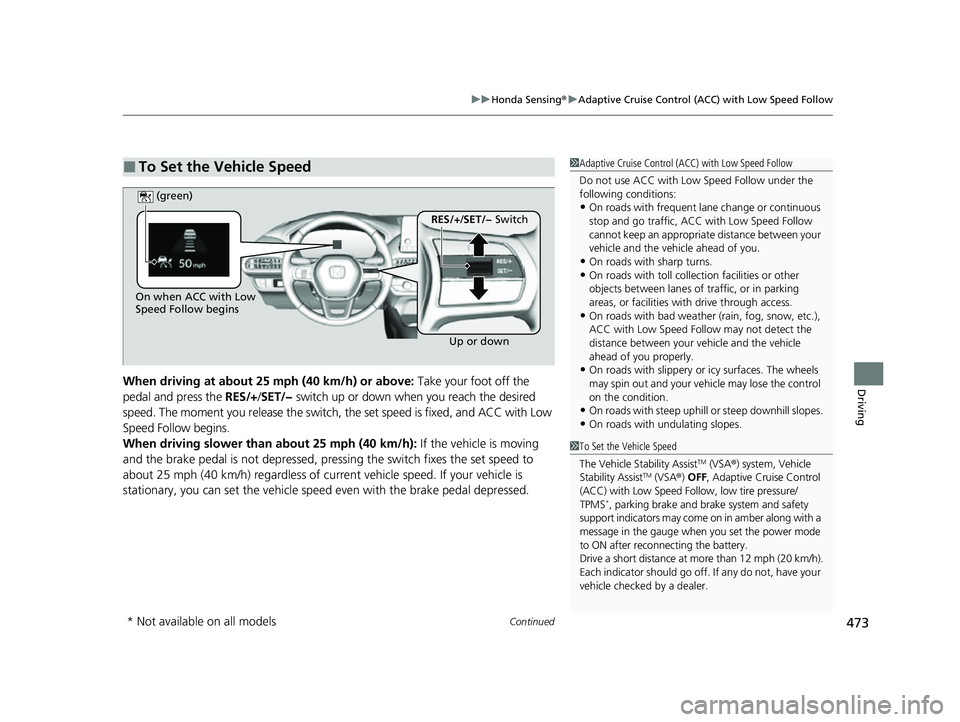
DrivingWhen driving at about 25 mph (40 km/h) or above: Take your foot off the
pedal and press the RES/+/SET/− switch up or down when you reach the desired
speed. The moment you release the switch, the set speed is fixed, and ACC with Low
Speed Follow begins.
When driving slower than about 25 mph (40 km/h): If the vehicle is moving
and the brake pedal is not depressed, pressing the switch fixes the set speed to
about 25 mph (40 km/h) regardless of current vehicle speed. If your vehicle is
stationary, you can set the vehicle speed even with the brake pedal depressed.
■To Set the Vehicle Speed1 Adaptive Cruise Control (ACC) with Low Speed Follow
Do not use ACC with Low Speed Follow under the
following conditions:
•On roads with frequent la ne change or continuous
stop and go traffic, ACC with Low Speed Follow
cannot keep an appropriate distance between your
vehicle and the vehicle ahead of you.
•On roads with sharp turns.•On roads with toll collection facilities or other
objects between lanes of traffic, or in parking
areas, or faci lities with driv e through access.
•On roads with bad weather (rain, fog, snow, etc.),
ACC with Low Speed Follow may not detect the
distance between your vehicle and the vehicle
ahead of you properly.
•On roads with slippery or icy surfaces. The wheels
may spin out and your vehi cle may lose the control
on the condition.
•On roads with steep uphill or steep downhill slopes.
•On roads with undulating slopes.
On when ACC with Low
Speed Follow begins
Up or down
RES/+/SET/− Switch
(green)
1
To Set the Vehicle Speed
The Vehicle Stability Assist
TM (VSA ®) system, Vehicle
Stability AssistTM (VSA ®) OFF , Adaptive Cruise Control
(ACC) with Low Speed Follow, low tire pressure/
TPMS
*, parking brake and brake system and safety
support indicators may come on in amber along with a
message in the gauge when you set the power mode
to ON after reconn ecting the battery.
Drive a short distance at more than 12 mph (20 km/h).
Each indicator should go off. If any do not, have your
vehicle checked by a dealer.
* Not available on all models
23 HR-V-313V06000_01.book 473 ページ 2022年4月4日 月曜日 午前10時49分
Page 516 of 664

uuHonda Sensing ®u Road Departure Mitigation System
514
Driving
You can turn the system on and off us ing the driver information interface.
2Switching the Display P. 107
2 Safety Support P. 118
The Road Departure Mitigation system is in the previously selected on (checked) or
off (unchecked) setting each time you start the engine.
■Road Departure Mitigation system On and Off1Road Departure Mitigation system On and Off
When you have selected Warning only from the
customized options using the driver information
interface
* or audio/information screen*, the system
does not operate the steering wheel. 2 Settings
* P. 123
2 Customized Features P. 345
The Vehicle Stability Assist
TM (VSA ®) system, Vehicle
Stability AssistTM (VSA ®) OFF , Adaptive Cruise Control
(ACC) with Low Speed Follow, low tire pressure/
TPMS
*, parking brake and bra ke system and safety
support indicators may come on in amber along with
a message in the gauge when you set the power
mode to ON after re connecting the battery.
Drive a short distance at more than 12 mph (20 km/h).
Each indicator should go off. If any do not, have your
vehicle checked by a dealer.
* Not available on all models
23 HR-V-313V06000_01.book 514 ページ 2022年4月4日 月曜日 午前10時49分