Page 246 of 664
244
Features
Audio System Basic Operation
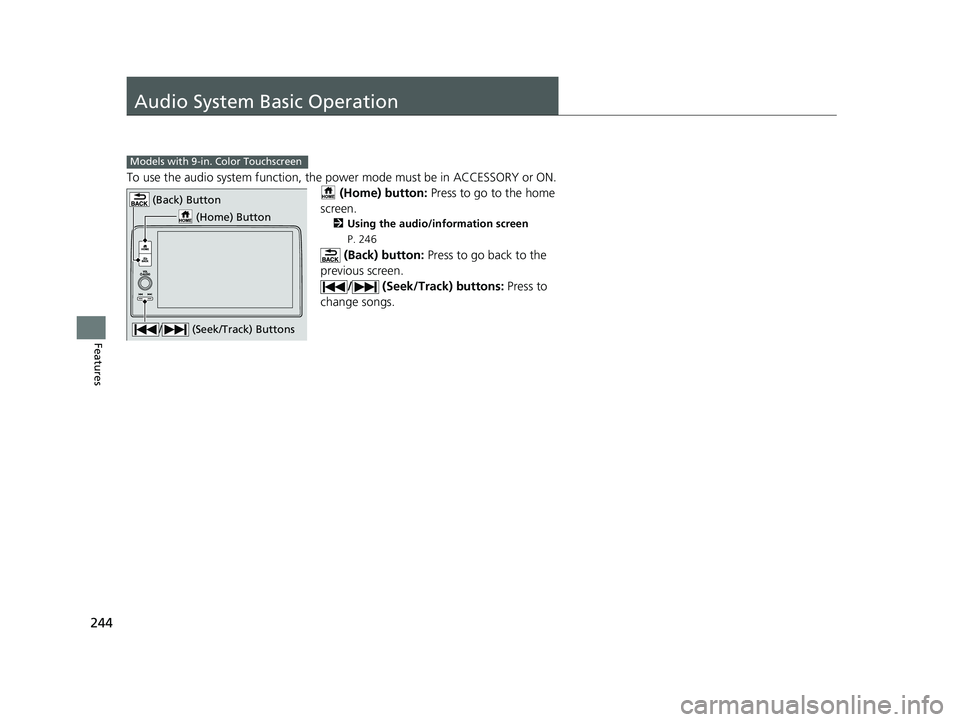
To use the audio system function, the power mode must be in ACCESSORY or ON.
(Home) button: Press to go to the home
screen.
2 Using the audio/information screen
P. 246
(Back) button: Press to go back to the
previous screen. / (Seek/Track) buttons: Press to
change songs.
Models with 9-in. Color Touchscreen
(Home) Button
(Back) Button
/ (Seek/Track) Buttons
23 HR-V-313V06000_01.book 244 ページ 2022年4月4日 月曜日 午前10時49分
Page 271 of 664
269
uuAudio System Basic Operation uPlaying AM/FM Radio
Continued
Features
Playing AM/FM Radio
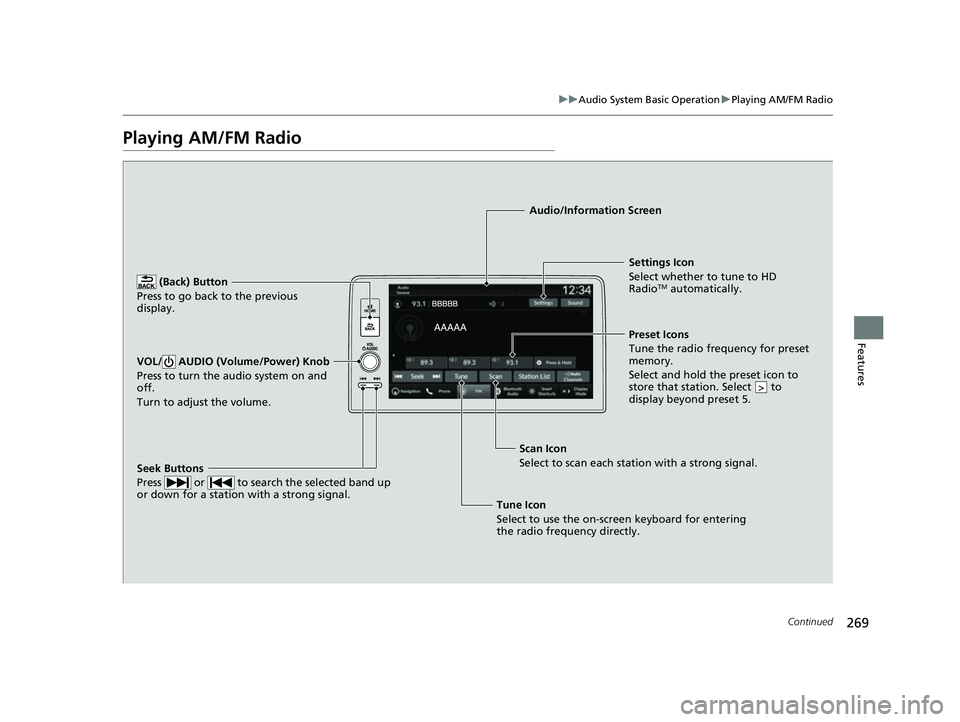
(Back) Button
Press to go back to the previous
display.
Seek Buttons
Press or to search the selected band up
or down for a station with a strong signal.
VOL/ AUDIO (Volume/Power) Knob
Press to turn the audio system on and
off.
Turn to adjust the volume.
Settings Icon
Select whether to tune to HD
Radio
TM automatically.
Tune Icon
Select to use the on-scr een keyboard for entering
the radio frequency directly. Audio/Information Screen
Scan Icon
Select to sca n each
station with a strong signal.Preset Icons
Tune the radio frequency for preset
memory.
Select and hold the preset icon to
store that station. Select to
display beyond preset 5.
>
23 HR-V-313V06000_01.book 269 ページ 2022年4月4日 月曜日 午前10時49分
Page 275 of 664
273
uuAudio System Basic Operation uPlaying SiriusXM ® Radio
Continued
Features
Playing SiriusXM® Radio
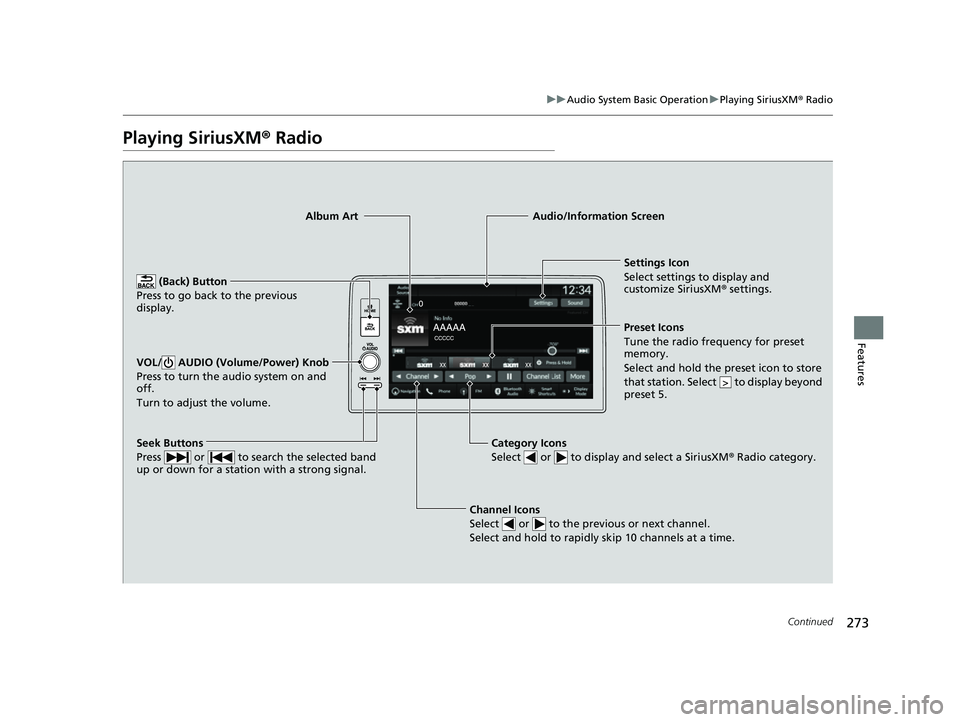
Channel Icons
Select or to the previous or next channel.
Select and hold to rapidly skip 10 channels at a time.
Settings Icon
Select settings to display and
customize SiriusXM ® settings.
Category Icons
Select or to display and select a SiriusXM ® Radio category.
Audio/Information Screen
Preset Icons
Tune the radio frequency for preset
mem
ory.
Select and hold the preset icon to store
that station. Select to display beyond
preset 5.
>
Seek Buttons
Press or to search the selected band
up or down for a station with a strong signal.
Album Art
(Back) Button
Press to go back to the previous
display.
VOL/ AUDIO (Volume/Power) Knob
Press to turn the audio system on and
off.
Turn to adjust the volume.
23 HR-V-313V06000_01.book 273 ページ 2022年4月4日 月曜日 午前10時49分
Page 286 of 664
284
uuAudio System Basic Operation uPlaying an iPod
Features
Playing an iPod
Using your USB connector, connect the iPod to the USB port, then select the USB
mode.
2 USB Ports P. 213
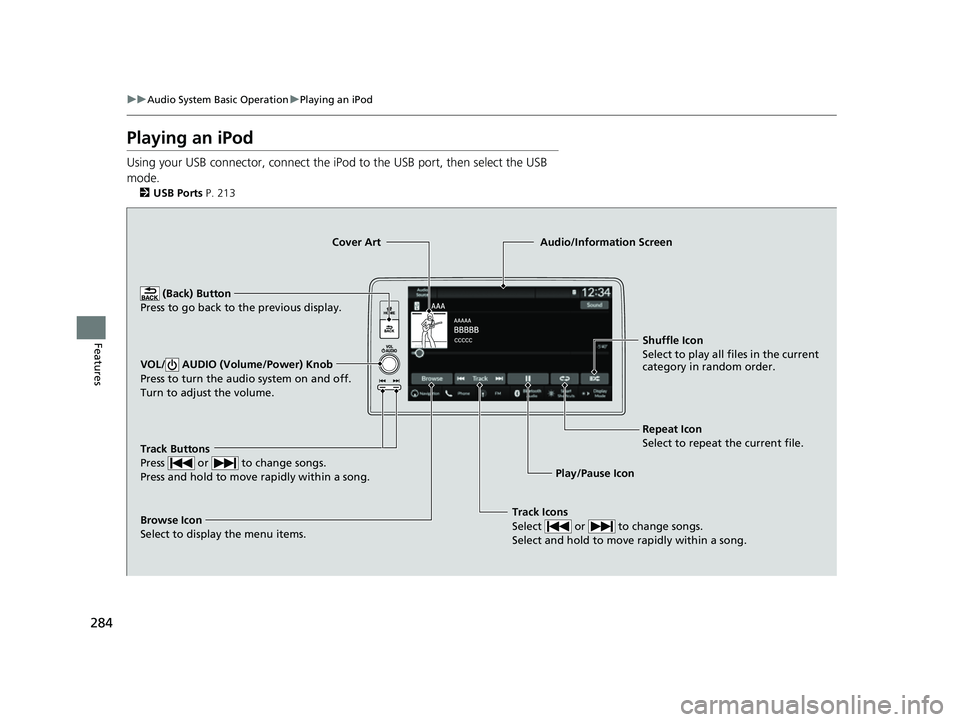
Track Icons
Select or to change songs.
Select and hold to move rapidly within a song.
Shuffle Icon
Select to play all files in the current
category in random order.
Cover Art
Audio/Information Screen
Play/Pause Icon
(B
ack) Button
Pre s
s to go back to the previous display.
VOL/ AUDIO (Volume/Power) Knob
Press to turn the audio system on and off.
Turn to adjust the volume.
Repeat Icon
Select to repeat the current file.
Track Buttons
Press or to change songs.
Press and hold to move rapidly within a song.
Browse Icon
Select to display the menu items.
23 HR-V-313V06000_01.book 284 ページ 2022年4月4日 月曜日 午前10時49分
Page 289 of 664
287
uuAudio System Basic Operation uPlaying a USB Flash Drive
Continued
Features
Playing a USB Flash Drive
Your audio system reads and plays sound files on a USB flash drive in either MP3,
WMA, AAC*1, FLAC, or WAV format.
Connect your USB flash drive to the USB port, then select the USB mode.
2 USB Ports P. 213
*1:Only AAC format files recorded with iTunes are playable on this unit.
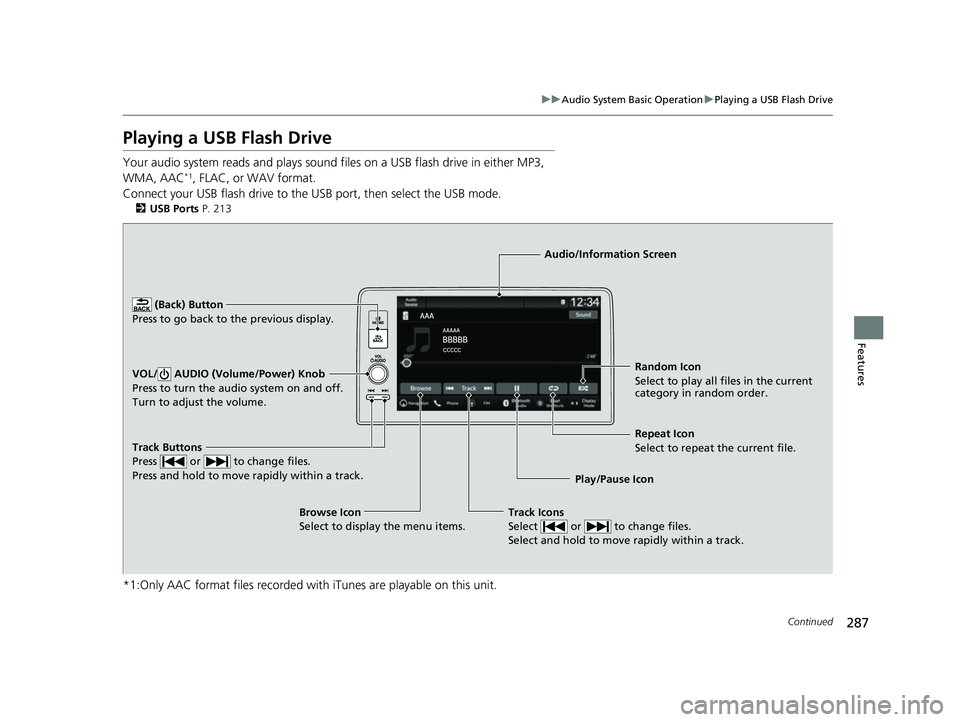
Track Buttons
Press or to change files.
Press and hold to move rapidly within a track.
Random Icon
Select to play all files in the current
category in random order.
Audio/Information Screen
Play/Pause Icon
(Back) Bu
tt
on
Press to go bac
k to the previous display.
VOL/ AUDIO (Volume/Power) Knob
Press to turn the audio system on and off.
Turn to adjust the volume.
Track Icons
Select or to change files.
Select and hold to move rapidly within a track.
Repeat Icon
Select to repeat the current file.
Browse Icon
Select to display the menu items.
23 HR-V-313V06000_01.book 287 ページ 2022年4月4日 月曜日 午前10時49分
Page 371 of 664
369Continued
Features
Bluetooth® HandsFreeLink ®
Bluetooth® HandsFreeLink ® (HFL) allows you to place and receive phone calls using
your vehicle’s audio system, without handling your cell phone.
Using HFL
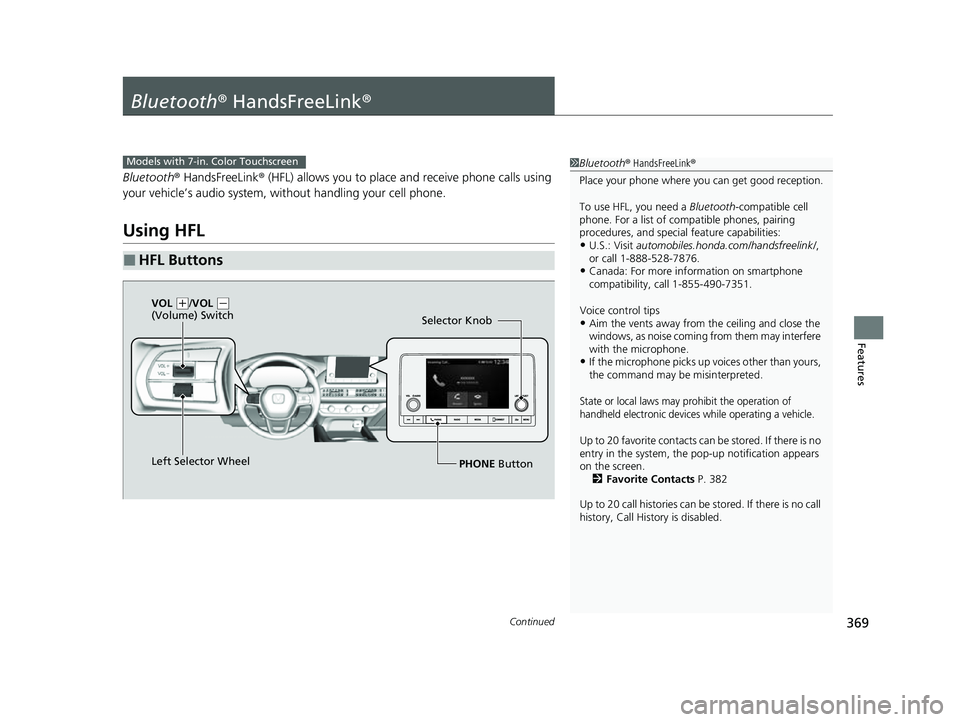
■HFL Buttons
1 Bluetooth ® HandsFreeLink ®
Place your phone where y ou can get good reception.
To use HFL, you need a Bluetooth-compatible cell
phone. For a list of compatible phones, pairing
procedures, and special feature capabilities:
•U.S.: Visit automobiles.honda.com/handsfreelink/ ,
or call 1-888-528-7876.
•Canada: For more info rmation on smartphone
compatibility, call 1-855-490-7351.
Voice control tips
•Aim the vents away from the ceiling and close the
windows, as noise coming from them may interfere
with the microphone.
•If the microphone picks up vo ices other than yours,
the command may be misinterpreted.
State or local laws may pr ohibit the operation of
handheld electronic devices while operating a vehicle.
Up to 20 favorite contacts ca n be stored. If there is no
entry in the system, the pop-up notification appears
on the screen. 2 Favorite Contacts P. 382
Up to 20 call histories can be stored. If there is no call
history, Call History is disabled.
Models with 7-in. Color Touchscreen
Selector Knob
Left Selector Wheel PHONE Button
VOL
(
+/VOL (-
(Volume) Switch
23 HR-V-313V06000_01.book 369 ページ 2022年4月4日 月曜日 午前10時49分
Page 391 of 664
389Continued
Features
Bluetooth® HandsFreeLink ®
Bluetooth® HandsFreeLink ® (HFL) allows you to place and receive phone calls using
your vehicle’s audio system, without handling your cell phone.
Using HFL
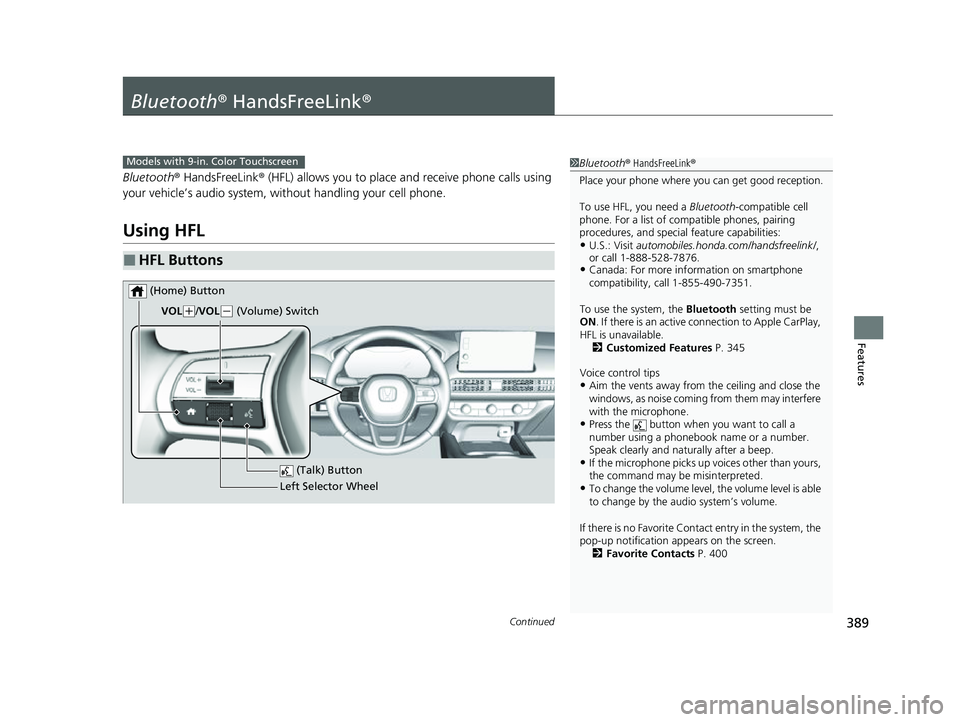
■HFL Buttons
1 Bluetooth ® HandsFreeLink ®
Place your phone where y ou can get good reception.
To use HFL, you need a Bluetooth-compatible cell
phone. For a list of compatible phones, pairing
procedures, and special feature capabilities:
•U.S.: Visit automobiles.honda.com/handsfreelink/ ,
or call 1-888-528-7876.
•Canada: For more info rmation on smartphone
compatibility, call 1-855-490-7351.
To use the system, the Bluetooth setting must be
ON . If there is an active c onnection to Apple CarPlay,
HFL is unavailable. 2 Customized Features P. 345
Voice control tips
•Aim the vents away from the ceiling and close the
windows, as noise coming from them may interfere
with the microphone.
•Press the button when you want to call a
number using a phonebook name or a number.
Speak clearly and naturally after a beep.
•If the microphone picks up vo ices other than yours,
the command may be misinterpreted.
•To change the volume level, the volume level is able
to change by the audio system’s volume.
If there is no Favorite Contact entry in the system, the
pop-up notification appears on the screen. 2 Favorite Contacts P. 400
Models with 9-in. Color Touchscreen
(Talk) Button
Left Selector Wheel
VOL
(
+/VOL(- (Volume) Switch
(Home) Button
23 HR-V-313V06000_01.book 389 ページ 2022年4月4日 月曜日 午前10時49分
Page 506 of 664
uuHonda Sensing ®u Traffic Jam Assist*
504
Driving
Traffic Jam Assist is activated when all of the following conditions exist:
• LKAS is activated.
• The lane in which you are driving has dete ctable lane markers on both sides, and
your vehicle is in the center of the lane.
• The vehicle is traveling between about 0 and 45 mph (0 and 72 km/h).
• You are driving on a straight or slightly curved road.
• The driver is gripping the steering wheel.
• The shift position is in
(D, (S or (L.
Do not use Traffic Jam Assist in any of the following situations:
• You are traveling on a ro ad with sharp curves.
u The system may not allow your vehicle to respond in a manner best suited for
the road conditions.
• You are entering a toll booth, interchange, service area, or parking area.
• You are driving in adverse weat her (rain, fog, snow, etc.).
• The surface of the road is slippery; for ex ample, it is icy or covered with snow.
u The tires may slip, causing you to lose control of the vehicle.
■Traffic Jam Assist Activation1Traffic Jam Assist Activation
Refer to the following pa ge for proper handling of
the Lane Keeping Assist System (LKAS):
2 Lane Keeping Assist System (LKAS) P. 491
Refer to the following page for steering buttons and
displays: 2 Operation Switches for the Adaptive
Cruise Control (ACC) with Low Speed
Follow/Lane Keeping Assist System
(LKAS)/Traffic Jam Assist
* P. 451
* Not available on all models
23 HR-V-313V06000_01.book 504 ページ 2022年4月4日 月曜日 午前10時49分