2023 HONDA HRV ECO mode
[x] Cancel search: ECO modePage 107 of 664

Continued105
uuGauges and Driver Information Interface uGauges
Instrument Panel
Shows the total number of miles or kilome ters that your vehicle has accumulated.
Shows the outside temperature in Fahr enheit (U.S.) or Celsius (Canada).
■Adjusting the outside temperature display
Adjust the temperature reading by up to ±5°F or ±3°C if the temperature reading
seems incorrect.
Shows certain detected traffic signs while driving.
The indicator blinks when th e maximum speed of the traffic sign detected by the
Traffic Sign Recognition System is exceeded.
2 Traffic Sign Recognition System P. 519
■Odometer
■Outside Temperature
■Traffic Sign Recognition System
1Outside Temperature
The temperature sensor is in the front bumper.
Road heat and exhaust from another vehicle can
affect the temperature reading when your vehicle
speed is less than 19 mph (30 km/h).
It may take several minutes for the display to be
updated after the temperature reading has stabilized.
You can adjust the temperature reading.
2 Settings
* P. 123
2 Customized Features P. 345
* Not available on all models
23 HR-V-313V06000_01.book 105 ページ 2022年4月4日 月曜日 午前10時49分
Page 112 of 664
uuGauges and Driver Information Interface uDriver Information Interface
110
Instrument Panel
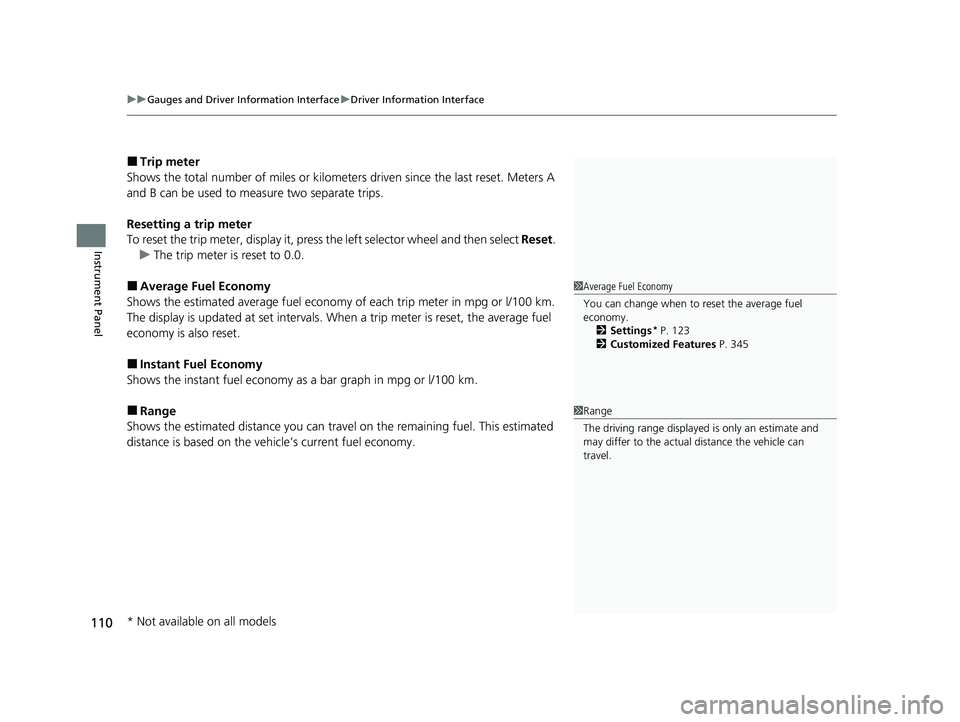
■Trip meter
Shows the total number of miles or kilomete rs driven since the last reset. Meters A
and B can be used to measure two separate trips.
Resetting a trip meter
To reset the trip meter, display it, press the left selector wheel and then select Reset.
u The trip meter is reset to 0.0.
■Average Fuel Economy
Shows the estimated average fuel economy of each trip meter in mpg or l/100 km.
The display is updated at set intervals. When a trip meter is reset, the average fuel
economy is also reset.
■Instant Fuel Economy
Shows the instant fuel economy as a bar graph in mpg or l/100 km.
■Range
Shows the estimated distance you can trave l on the remaining fuel. This estimated
distance is based on the vehicle’s current fuel economy.
1 Average Fuel Economy
You can change when to reset the average fuel
economy.
2 Settings
* P. 123
2 Customized Features P. 345
1Range
The driving range displayed is only an estimate and
may differ to the actual distance the vehicle can
travel.
* Not available on all models
23 HR-V-313V06000_01.book 110 ページ 2022年4月4日 月曜日 午前10時49分
Page 124 of 664
uuGauges and Driver Information Interface uDriver Information Interface
122
Instrument Panel
2 Tachometer P. 104
■Speed/Distance Units
Enables you to show another unit on th e driver information interface and audio/
information screen and set the displayed m easurements to read in either miles and
mph or km and km/h.
Press and hold the left selector wheel when you select No content on the driver
information interface. Each ti me you do this, the unit will change from miles and
mph to km and km/h or vice versa. After this, a confirmation screen will appear for
a few seconds.
You can check if there are any active warning messages.
■No Content
■Warnings
1 No Content
The tachometer can be tu rned on and off using the
driver information interf ace or audio/information
screen. 2 Settings
* P. 123
2 Customized Features P. 345
Even if you have turned off the tachometer on the
driver information interf ace or audio/information
screen, if No content is selected on the driver
information interface, it will change to a tachometer-
only display. 2 Switching the Display P. 107
1Warnings
If there are multiple warnings, you can roll the left
selector wheel to see other warnings.
* Not available on all models
23 HR-V-313V06000_01.book 122 ページ 2022年4月4日 月曜日 午前10時49分
Page 140 of 664
138
uuLocking and Unlocking the Doors uLow Keyless Remote Signal Strength
Controls
Low Keyless Remote Signal Strength
The vehicle transmits radio waves to locate the keyless remote to start the engine,
lock and unlock* all the doors and the fuel fill door, and open the tailgate.
In the following cases, starting the engine, locking/unlocking
* the doors/fuel fill
door, or opening the tailgate may be inhibited or operation may be unstable:
• Strong radio waves are being tra nsmitted by nearby equipment.
• You are carrying the keyless remote together with telecommunications
equipment, laptop computers, ce ll phones, or wireless devices.
• A metallic object is touching or covering the keyless remote.
1Low Keyless Remote Signal Strength
Communication between the keyless remote and the
vehicle consumes the ke yless remote’s battery.
Battery life is about two years, but this varies
depending on re gularity of use.
The battery is consumed whenever the keyless
remote is receivi ng strong radio wave s. Avoid placing
it near electrical appliances such as televisions and
personal computers.
* Not available on all models
23 HR-V-313V06000_01.book 138 ページ 2022年4月4日 月曜日 午前10時49分
Page 141 of 664
139
uuLocking and Unlocking the Doors uLocking/Unlocking the Doors from the Outside
Continued
Controls
Locking/Unlocking the Doors from the Outside
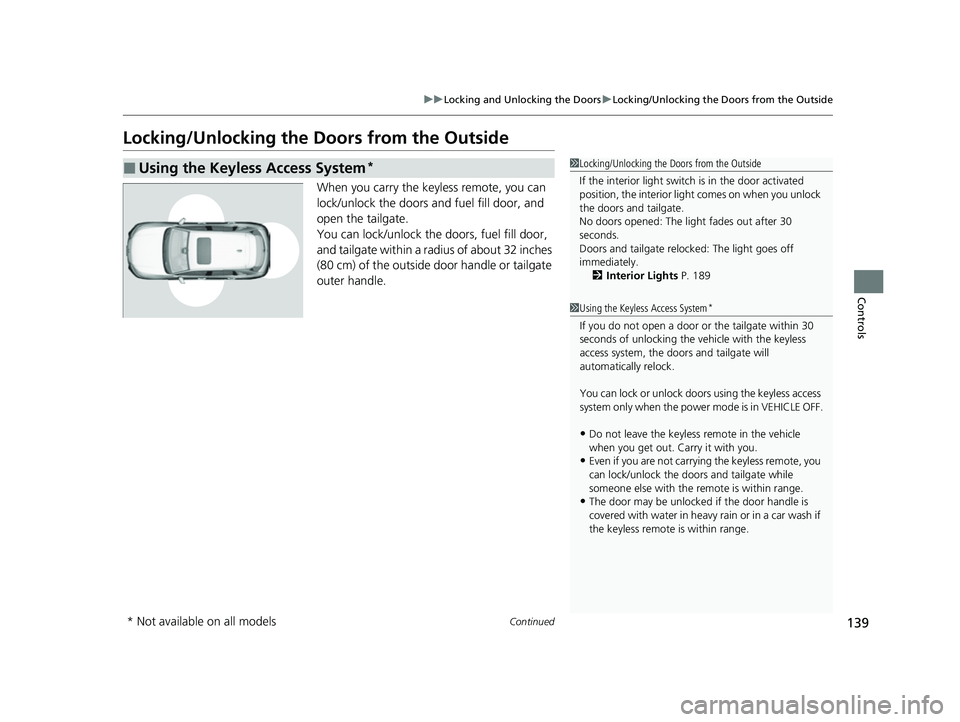
When you carry the keyless remote, you can
lock/unlock the doors and fuel fill door, and
open the tailgate.
You can lock/unlock the doors, fuel fill door,
and tailgate within a radius of about 32 inches
(80 cm) of the outside door handle or tailgate
outer handle.
■Using the Keyless Access System*1Locking/Unlocking the Doors from the Outside
If the interior light switch is in the door activated
position, the interior light comes on when you unlock
the doors and tailgate.
No doors opened: The li ght fades out after 30
seconds.
Doors and tailgate relo cked: The light goes off
immediately. 2 Interior Lights P. 189
1Using the Keyless Access System*
If you do not open a door or the tailgate within 30
seconds of unlocking the vehicle with the keyless
access system, the doors and tailgate will
automatically relock.
You can lock or unlock doors using the keyless access
system only when the power mode is in VEHICLE OFF.
•Do not leave the keyless remote in the vehicle
when you get out. Carry it with you.
•Even if you are not carrying the keyless remote, you
can lock/unlock the doors and tailgate while
someone else with the remote is within range.
•The door may be unlocked if the door handle is
covered with water in heavy rain or in a car wash if
the keyless remote is within range.
* Not available on all models
23 HR-V-313V06000_01.book 139 ページ 2022年4月4日 月曜日 午前10時49分
Page 142 of 664
uuLocking and Unlocking the Doors uLocking/Unlocking the Doors from the Outside
140
Controls
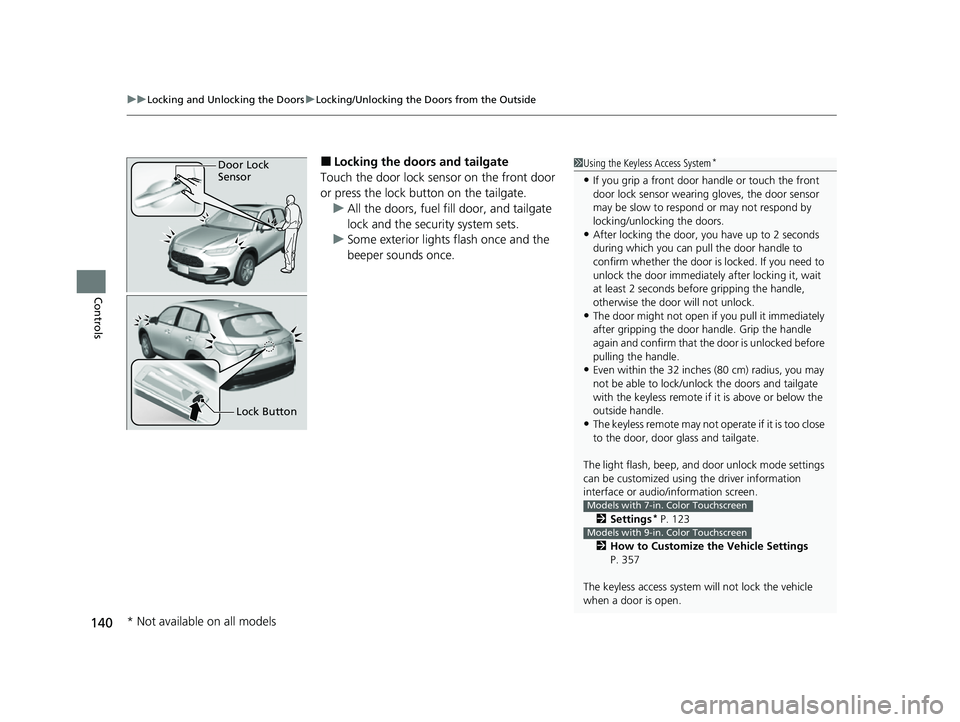
■Locking the doors and tailgate
Touch the door lock sensor on the front door
or press the lock button on the tailgate. u All the doors, fuel fill door, and tailgate
lock and the security system sets.
u Some exterior lights flash once and the
beeper sounds once.1Using the Keyless Access System*
•If you grip a front door handle or touch the front
door lock sensor wearing gloves, the door sensor
may be slow to respon d or may not respond by
locking/unlocking the doors.
•After locking the door, you have up to 2 seconds
during which you can pull the door handle to
confirm whether the door is locked. If you need to
unlock the door immediately after locking it, wait
at least 2 seconds befo re gripping the handle,
otherwise the door will not unlock.
•The door might not open if you pull it immediately
after gripping the door handle. Grip the handle
again and confirm that th e door is unlocked before
pulling the handle.
•Even within the 32 inches (80 cm) radius, you may
not be able to lock/unloc k the doors and tailgate
with the keyless remote if it is above or below the
outside handle.
•The keyless remote may not operate if it is too close
to the door, door glass and tailgate.
The light flash, beep, a nd door unlock mode settings
can be customized using the driver information
interface or audio/ information screen.
2 Settings
* P. 123
2 How to Customize the Vehicle Settings
P. 357
The keyless access system will not lock the vehicle
when a door is open.
Models with 7-in. Color Touchscreen
Models with 9-in. Color Touchscreen
Door Lock
Sensor
Lock Button
* Not available on all models
23 HR-V-313V06000_01.book 140 ページ 2022年4月4日 月曜日 午前10時49分
Page 144 of 664
uuLocking and Unlocking the Doors uLocking/Unlocking the Doors from the Outside
142
Controls
■Locking the doors an d tailgate (Walk
away auto lock ®)
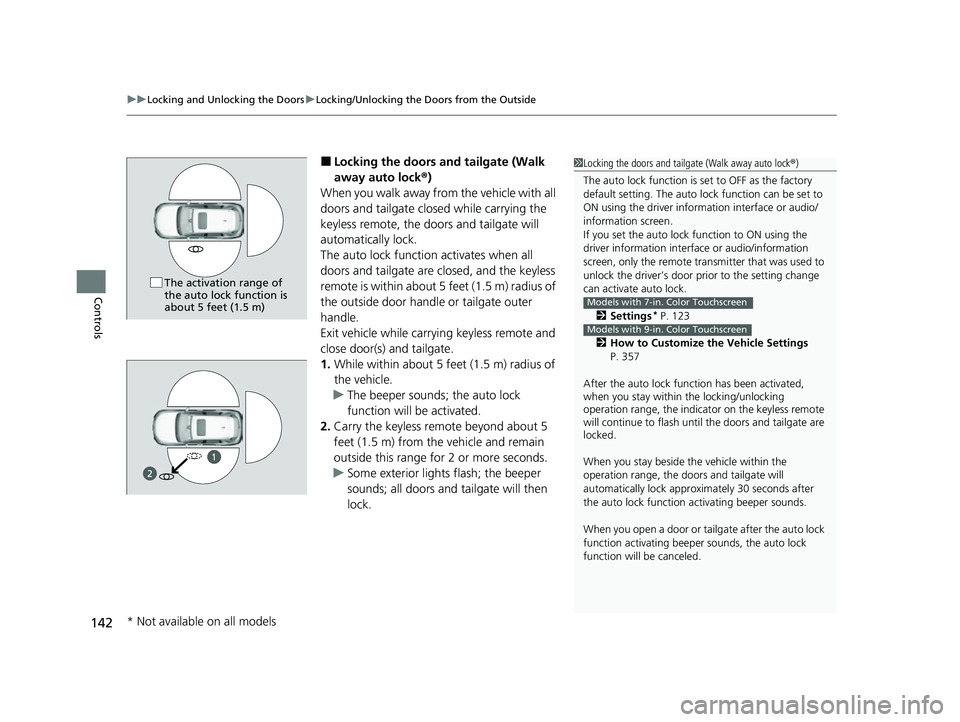
When you walk away from the vehicle with all
doors and tailgate closed while carrying the
keyless remote, the doors and tailgate will
automatically lock.
The auto lock function activates when all
doors and tailgate are closed, and the keyless
remote is within about 5 feet (1.5 m) radius of
the outside door handle or tailgate outer
handle.
Exit vehicle while carrying keyless remote and
close door(s) and tailgate.
1. While within about 5 feet (1.5 m) radius of
the vehicle.
u The beeper sounds; the auto lock
function will be activated.
2. Carry the keyless remote beyond about 5
feet (1.5 m) from the vehicle and remain
outside this range fo r 2 or more seconds.
u Some exterior lights flash; the beeper
sounds; all doors and tailgate will then
lock.1Locking the doors and tailg ate (Walk away auto lock®)
The auto lock function is set to OFF as the factory
default setting. The auto lo ck function can be set to
ON using the driver inform ation interface or audio/
information screen.
If you set the auto lock function to ON using the
driver information interf ace or audio/information
screen, only the remote transmitter that was used to
unlock the driver’s door prio r to the setting change
can activate auto lock.
2 Settings
* P. 123
2 How to Customize the Vehicle Settings
P. 357
After the auto lock function has been activated,
when you stay within the locking/unlocking
operation range, the indicato r on the keyless remote
will continue to flash until the doors and tailgate are
locked.
When you stay beside the vehicle within the
operation range, the door s and tailgate will
automatically lock approx imately 30 seconds after
the auto lock function activating beeper sounds.
When you open a door or tailgate after the auto lock
function activating beeper sounds, the auto lock
function will be canceled.
Models with 7-in. Color Touchscreen
Models with 9-in. Color Touchscreen
The activation range of
the auto lock function is
about 5 feet (1.5 m)
1
* Not available on all models
23 HR-V-313V06000_01.book 142 ページ 2022年4月4日 月曜日 午前10時49分
Page 145 of 664
Continued143
uuLocking and Unlocking the Doors uLocking/Unlocking the Doors from the Outside
Controls
To temporarily deactivate the function:
1. Set the power mode to OFF.
2. Open the driv er’s door.
3. Using the master door lock switch, operate
the lock as follows:
Lock Unlock Lock Unlock.
u The beeper sounds an d the function is
deactivated.
To restore the function:
• Set the power mode to ON.
• Lock the vehicl e without using the auto lock
function
• With the keyless remote on you, move out
of the auto lock function operation range.
• Open any door.1Locking the doors and tailg ate (Walk away auto lock®)
Under the following circumstances, the auto-lock
function will not activate:
•The keyless remote is inside the vehicle.
uThe beeper will not sound.
•The keyless remote is taken out of its operational
range before all the doors are closed.
uThe beeper will sound.
The auto lock function does not operate when any of
the following conditions are met.
•The keyless remote is inside the vehicle.•A door, tailgate or th e hood is not closed.
•The power mode is set to any mode other than
OFF.
•The keyless remote is not located within a radius of
about 5 feet (1.5 m) from the vehicle when you get
out of the vehicle and cl ose the doors and tailgate.
Auto lock function operation stop beeper
After the auto lock function has been activated, the
auto lock operation stop beeper sounds for
approximately two seconds in the following cases.
•The keyless remote is put inside the vehicle through
a window.
•You are located too close to the vehicle.
•The keyless remote is put inside the tailgate.
If the warning beeper sounds, check that you are
carrying the keyless remote. Then, open/close a door
and confirm the auto lock activation beeper sounds
once.
23 HR-V-313V06000_01.book 143 ページ 2022年4月4日 月曜日 午前10時49分