2023 HONDA CRV wheel
[x] Cancel search: wheelPage 33 of 719
32
Quick Reference Guide
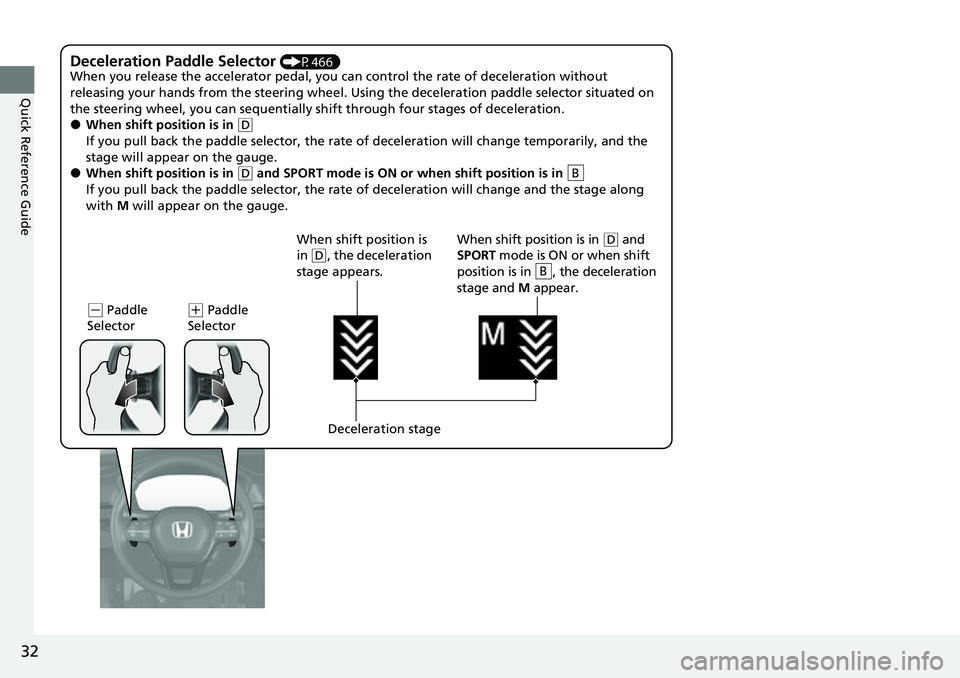
Deceleration Paddle Selector (P466)
When you release the accelerator pedal, you ca n control the rate of deceleration without
releasing your hands from the steering wheel. Using the deceleration paddle selector situated on
the steering wheel, you can sequentially sh ift through four stages of deceleration.
●When shift position is in (D
If you pull back the paddle selector, the rate of deceleration will change temporarily, and the
stage will appear on the gauge.
●When shift position is in (D and SPORT mode is ON or when shift position is in
If you pull back the paddle selector, the rate of deceleration will change and the stage along
with M will appear on the gauge.B
(- Paddle
Selector( + Paddle
Selector
Deceleration stage
When shift position is
in
(
D, the deceleration
stage appears. When shift position is in (
D and
SPORT mode is ON or when shift
position is in , the deceleration
stage and M appear.
B
Page 38 of 719

37
Quick Reference Guide
Maintenance (P599)
Under the Hood (P611)
●Check engine oil, engine coolant, and windshield washer
fluid. Add when necessary.
●Check brake fluid.●Check the 12-volt battery condition monthly.
aPull the hood release handle under the driver's side lower corner
of the dashboard.
bLocate the hood latch lever, push it to the side, and then
raise the hood. Once you have raised the hood slightly, you
can release the lever.
cWhen finished, close the hood and make sure it is firmly
locked in place.
Lights (P623)
●Inspect all lights regularly.
Wiper Blades (P627)
●Replace blades if they leave streaks
across the windshield or become noisy.
Tires (P631)
●Inspect tires and wheels regularly.●Check tire pressures regularly.●Install snow tires for winter
driving.
Page 61 of 719

60
uuAirbags uAirbag System Components
Safe Driving
The front, driver’s knee, front passenger’s
knee, side, and side curtain airbags are
deployed according to the direction and
severity of impact. Both side curtain airbags
are deployed in a ro llover. The airbag
system includes:
aTwo SRS (Supplemental Restraint System)
front airbags. The driver’s airbag is stored
in the center of the steering wheel; the
front passenger’s airbag is stored in the
dashboard. Both are marked SRS
AIRBAG.
bTwo knee airbags. Th e driver’s knee
airbag is stored under the steering
column; the front passenger’s knee
airbag is stored under the glove box.
Both are marked SRS AIRBAG.
cFour side airbags, one for the driver, one
for the front passenger and two for the
rear outboard. The airbags are stored in
the outer edges of the seat-backs. All are
marked SIDE AIRBAG .
dTwo side curtain airbags, one for each
side of the vehicle. The airbags are stored
in the ceiling, above the side windows.
The front and rear pillars are marked
SIDE CURTAIN AIRBAG .
eAn electronic control unit that, when the
power mode is in ON, continually
monitors information about the various
impact sensors, seat and buckle sensors,
rollover sensor, airbag activators, seat
belt tensioners, and other vehicle
information. During a crash event the
unit can record such information.
fAutomatic seat belt tensioners for the
front seats and outer rear seats. In
addition, the driver’s and front
passenger’s seat belt buckles incorporate
sensors that detect whether or not the
belts are fastened.
gDriver’s seat position sensor. This sensor
detects the driver’s seat slide position to
help determine the optimal deployment
of the driver’s airbag.
hWeight sensors in the front passenger’s
seat. The sensors are used for occupant
classification to activa te or deactivate the
front passenger’s airbag.
iImpact sensors that can detect a
moderate-to-severe front or side impact.
jAn indicator on the console panel that
alerts you that the front passenger’s front
airbag has been turned off.
kAn indicator on the instrument panel that
alerts you to a possib le problem with your
airbag system or seat belt tensioners.
lA rollover sensor that can detect if your
vehicle is about to roll over and signal the
control unit to deploy both side curtain
airbags.
mPressure sensors inside each front door
that control side airbag deployment.
Page 62 of 719

61
uuAirbags uAirbag System Components
Safe DrivingAirbags can pose serious hazards. To do their job, airbags must inflate with
tremendous force. So, while airbags help sa ve lives, they can cause burns, bruises,
and other minor injuries, sometimes even fatal ones if occupants are not wearing
their seat belts properl y and sitting correctly.
What you should do: Always wear your seat belt properly and sit upright and as
far back from the steering wheel as possible while allowing full control of the
vehicle. A front passenger should move their seat as far back from the dashboard as
possible.
Remember, however, that no safety system ca n prevent all injuries or deaths that
can occur in a severe crash, even when s eat belts are properly worn and the airbags
deploy.
Do not place hard or sharp objects between yourself and a front airbag.
Carrying hard or sharp objects on your lap, or driving with a pipe or other sharp
object in your mouth, can result in in juries if your front airbag inflates.
Do not attach or place objects on the front, driver's knee and front
passenger's knee airbag covers. Objects on the covers marked SRS AIRBAG
could interfere with the proper operation of the airbags or be propelled inside the
vehicle and hurt someone if the airbags inflate.
■Important Facts About Your Airbags1 Important Facts About Your Airbags
Do not attempt to deactivate your airbags. Together,
airbags and seat belts pr ovide the best protection.
When driving, keep hands and arms out of the
deployment path of the front airbag by holding each
side of the steering wheel. Do not cross an arm over
the airbag cover.
Page 63 of 719

62
uuAirbags uTypes of Airbags
Safe Driving
Types of Airbags
Your vehicle is equipped with four types of airbags:
• Front airbags: Airbags in front of the driver ’s and front passenger’s seats.
• Knee airbags: Airbags under the steering column and under the glove box.
• Side airbags: Airbags in the driv er’s, front passenger's, and rear outer
passenger's seat-backs.
• Side curtain airbags: Airbags above the side windows.
Each is discussed in the following pages.
Front Airbags (SRS)
The front SRS airbags inflate in a moderate-to -severe frontal collision to help protect
the head and chest of the driver and/or front passenger.
SRS (Supplemental Restraint System) indica tes that the airbags are designed to
supplement seat belts, not replace them. Seat belts are the occupant’s primary
restraint system.
The front airbags are housed in the center of the steering wheel for the driver, and
in the dashboard for the front pass enger. Both airbags are marked SRS AIRBAG.
■Housing Locations
1Types of Airbags
The airbags can inflate whenever the power mode is
in ON.
After an airbag inflates in a crash, you may see a
small amount of smoke. This is from the combustion
process of the infl ator material and is not harmful.
People with respiratory pr oblems may experience
some temporary discomfort. If this occurs, get out of
the vehicle as soon as it is safe to do so.
1 Front Airbags (SRS)
During a frontal crash severe enough to cause one or
both front airbags to deploy, the airbags can inflate
at different rates, dependi ng on the severity of the
crash, whether or not the se at belts are latched, and/
or other factors. Frontal airbags are designed to
supplement the seat belts to help reduce the
likelihood of head and chest injuries in frontal
crashes.
Page 66 of 719

Continued65
uuAirbags uFront Airbags (SRS)
Safe DrivingThe airbags have advanced features to he lp reduce the likelihood of airbag related
injuries to smaller occupants. The driver’s advanced airbag system includes a
seat position sensor.
Based on information from this sensor and the
severity of the impact, the advanced airbag
system determines the optimal deployment of
the driver’s airbag.
The front passenger’s ad vanced airbag system
has weight sensors. The sensors are used for
occupant classification to activate or
deactivate the front passenger’s airbag.
For adult size occupant s, the system will
automatically activate the front passenger’s
airbag. If a small adult sits in the front
passenger seat and the system does not
recognize him/her as an adult, see
2 Passenger Airbag Off Indicator P. 76
■Advanced Airbags1Advanced Airbags
If there is a problem with the driver’s seat position
sensor or the passenger’s s eat weight sensors, the
SRS indicator will come on, and in the event of a
crash, the airbag will deploy (regardless of the driver’s
seating position or passenger’s occupant
classification) with a force corresponding to the
severity of the impact. 2 Supplemental Restraint System (SRS)
Indicator P. 75
For the advanced front airbags to work properly,
confirm that:
•The occupant is sitting in an upright position,
wearing the seat belt prope rly and the seat-back is
not excessively reclined.
•The occupant is not leaning against the door or
center console.
•The occupant’s feet are plac ed on the floor in front
of them.
•There are no objects ha nging from the front
passenger’s seat.
•Only small, lightweight objects are in the seat-back
pocket.
•The steering wheel and passenger’s side dashboard
are not obstructed by any object.
•No liquid has been spille d on or under the seat.
Driver’s
Seat
Position
Sensor
Passenger’s Seat
Weight Sensors
Page 118 of 719

117
uuGauges and Driver Information Interface uDriver Information Interface
Continued
Instrument Panel
Driver Information Interface
The driver information interface shows information such as the estimated travelable
distance and fuel economy of the vehicle. It also displays messages such as warnings
and other helpful information.
When a warning message displays, please check the message and contact a dealer
to have the vehicle inspected if necessary. Please refer to the pages below if the
Engine oil pressure low, Engine temperature too hot or Limited stopping
power! message is displayed.
2If the Engine oil pressure low Warning Appears P. 676
2 Overheating P. 674
2 If the Limited stopping power Warning Appears P. 677
Press the (home) button, then roll the left selector wheel to scroll to the content
you want to see. Press the left sele ctor wheel to see detailed information.
■Switching the Display1Switching the Display
You can add or delete the meter contents.
2 Gauge Display Settings P. 134
Page 119 of 719

118
uuGauges and Driver Information Interface uDriver Information Interface
Instrument PanelGauge display
settings
P. 134
Left Selector
Wheel
(Home) Button
Roll the left
selector wheel.No content
P. 132
Speed & time
P. 123
Warnings
P. 134
Power flow
P. 119
Settings
*
P. 135
Driver
attention
P. 126
Seat belts
P. 130
Safety
support
P. 130
Maintenance
P. 130 Phone
P. 124 Audio
P. 124
Navigation
*
P. 125
AWD torque
distribution
*
P. 129
Brightness
P. 133
Range & fuel
P. 121
* Not available on all models