Page 451 of 719
450
uuTowing a Trailer uDriving Safely with a Trailer
Driving
Driving Safely with a Trailer
• Have the trailer properly serviced and keep it in good condition.
• Make sure that all the weights and load in the vehicle and trailer are within limits.
2Towing Load Limits P. 447
•Securely attach the hitch, safety chains, and other necessary parts to the trailer.
• Securely store all the items in and on the tr ailer so that they do not shift while
driving.
• Check if the lights and brakes on the trailer are working properly.
• Check the pressure of the traile r tires, including the spare.
• Turn off the rear parking sensor system.
2 Parking sensor system on and off P. 585
•Turn off the Low Speed Braking Control syst em. It may activate if it detects the
towed object as an obstacle.
2 System On and Off P. 510
•Drive slower than normal.
• Obey posted speed limits for vehicles with trailers.
• Use the
(D position when towing a trailer on level roads.
■Things You Need To Know Before Towing a Trailer
■Towing Speeds and Shift Position
1Driving Safely with a Trailer
Operating speed when towing a trailer must not
exceed 62 mph (100 km/h).
Parking
In addition to the normal precautions, place wheel
chocks at each of the trailer's tires.
When towing a trailer, we recommend that you carry
a full-size spare wheel and tire for both your vehicle
and trailer.
Remember to unhitch the tra iler before changing a
flat tire. Ask the trailer sales or rental agency where
and how to store the trailer’s spare tire.
Models with parking sensor system
1 Towing Speeds and Shift Position
When towing a fixed-sided trailer (e.g., camper), do
not exceed 55 mph (88 km/h). At higher speeds, the
trailer may sway or af fect vehicle handling.
Page 452 of 719
451
uuTowing a Trailer uDriving Safely with a Trailer
Driving
• Turn more slowly and with a wider turning arc than normal.
• Allow more time and distance for braking.
• Do not brake or turn suddenly.
• If the Engine temperature near limit. Av oid heavy acceleration and high
speed. message appear on the driver info rmation interface, turn off the climate
control system and reduce speed.
If the Engine temperature too hot. Do no t drive. Allow engine to cool.
message appear on the driver information interface, pull to the side of the road
safely to cool down the engine.
If the Power system temperature hi gh. Power may be reduced. message
appear on the driver information interface, pu ll to the side of the road safely to
cool down the power system.
■Turning and Braking
■Driving in Hilly Terrain
Page 453 of 719
452
uuTowing a Trailer uTowing Behind a Motorhome
Driving
Towing Behind a Motorhome
Your vehicle is not designed to be towed behind a motor home. If your vehicle needs
to be towed in an emergency, refe r to the emergency towing information.
2Emergency Towing P. 689
Page 481 of 719

480
uuWhen Driving uTire Pressure Monitoring System (TPMS)
Driving
Tire Pressure Monitoring System (TPMS)
Instead of directly measuring the pressu re in each tire, the TPMS on this vehicle
monitors and compares the rolling radius and rotational characteristics of each
wheel and tire while you are driving to determine if one or more tires are
significantly under-inflated. This will cause the low tire pressure/TPMS
indicator to come on and a message to appear
on the gauge.
U.S. models
1 Tire Pressure Monitoring System (TPMS)
The system does not monitor the tires when driving
at low speed.
Conditions such as low ambient temperature and
altitude change directly a ffect tire pressure and can
trigger the low tire pressure/TPMS indicator to come on.
Tire pressure checked and inflated in:
•Warm weather can beco me under-inflated in
colder weather.
•Cold weather can become overinflated in warmer
weather.
The low tire pressure/TPMS indicator will not come
on as a result of overinflation.
The TPMS may not function pr operly if tire type and
size are mixed. Make sure to use the same size and
type of tire. 2 Checking and Maintaining Tires P. 631
The low tire pressure/TPMS indicator may come on
with a delay or may not come on at all when:
•You rapidly accelerate, decelerate, or turn the
steering wheel.
•You drive on snowy or slippery roads.•Tire chains are used.
The low tire pressure/TPMS indicator may come on
under the following conditions:
•There is a heavier and une ven load on the tires,
such as when towing a trailer, than the condition at
calibration.
•Tire chains are used.
Low Tire Pressure/TPMS Indicator
Page 489 of 719
uuWhen Driving uBlind Spot Information System
488
Driving
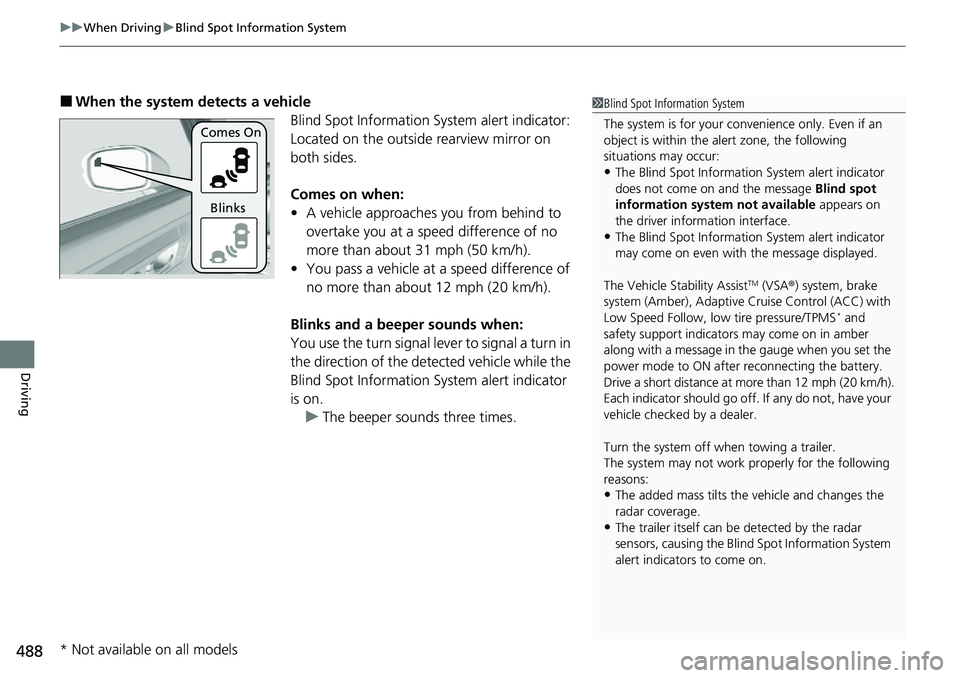
■When the system detects a vehicle
Blind Spot Information System alert indicator:
Located on the outside rearview mirror on
both sides.
Comes on when:
• A vehicle approaches you from behind to
overtake you at a speed difference of no
more than about 31 mph (50 km/h).
• You pass a vehicle at a speed difference of
no more than about 12 mph (20 km/h).
Blinks and a beeper sounds when:
You use the turn signal lever to signal a turn in
the direction of the detected vehicle while the
Blind Spot Information System alert indicator
is on. u The beeper sounds three times.1Blind Spot Information System
The system is for your convenience only. Even if an
object is within the alert zone, the following
situations may occur:
•The Blind Spot Informati on System alert indicator
does not come on and the message Blind spot
information system not available appears on
the driver information interface.
•The Blind Spot Informati on System alert indicator
may come on even with the message displayed.
The Vehicle Stability Assist
TM (VSA ®) system, brake
system (Amber), Adaptive Cruise Control (ACC) with
Low Speed Follow, low tire pressure/TPMS
* and
safety support indicators may come on in amber
along with a message in the gauge when you set the
power mode to ON after reconnecting the battery.
Drive a short distance at more than 12 mph (20 km/h).
Each indicator should go off. If any do not, have your
vehicle checked by a dealer.
Turn the system off when towing a trailer.
The system may not work properly for the following
reasons:
•The added mass tilts the vehicle and changes the
radar coverage.
•The trailer itself can be detected by the radar
sensors, causing the Blind Spot Information System
alert indicators to come on.
Comes On
Blinks
* Not available on all models
Page 502 of 719
501
uuHonda Sensing ®u Collision Mitigation Braking SystemTM (CMBSTM)
Continued
Driving
■Vehicle conditions
• Headlight lenses are dirty or the h eadlights are not properly adjusted.
• The outside of the windshield is blocked by dirt, mud, leaves, wet snow, etc.
• The inside of the windshield is fogged.
• An abnormal tire or wheel condition (inco rrect sizes, varied sizes or construction,
improperly inflated, etc.).
• When tire chains are installed.
• The vehicle is tilted due to a heavy load or suspension modifications.
• The camera temperature gets too high.
• Driving with the parking brake applied.
• When the radar sensor behind the Hond a emblem on the front grille gets dirty.
• The vehicle is towing a trailer.
• Driving at night or in a dark place (e.g., a tunnel) with the headlights off.
• There is residue on the windshi eld from the windshield wipers.
Page 522 of 719

Continued521
uuHonda Sensing ®u Adaptive Cruise Control (ACC) with Low Speed Follow
Driving
The system may automatically shut off u nder certain conditions. Some examples of
these conditions are listed below. Othe r conditions may reduce some of the ACC
with Low Speed Follow functions.
2 Front Sensor Camera P. 568
2 Radar Sensor P. 570
■Environmental conditions
• Driving in bad weather (rain, fog, snow, etc.).
■Roadway conditions
• Driving on a snowy or wet roadway (obs cured lane marking, vehicle tracks,
reflected lights, road spray, high contrast).
■Vehicle conditions
• The outside of the windshield is blocked by dirt, mud, leaves, wet snow, etc.
• An abnormal tire or wheel condition (inco rrect sizes, varied sizes or construction,
improperly inflated, etc.).
• The camera temperature gets too high.
• The parking brake is applied.
• The front grille is dirty.
• The vehicle is tilted due to a heavy load or suspension modifications.
• Tire chains are installed.
• The vehicle is towing a trailer.
■ACC with Low Speed Follow Conditions and Limitations1ACC with Low Speed Follow Conditions and Limitations
If you need the radar sensor to be repaired, or
removed, or the front grille is strongly impacted, turn
off the system by pre ssing the button and take
your vehicle to a dealer.
Have your vehicle checked by a dealer if you find any
unusual behavior of the system (e.g., the warning
message appears too frequently).
Page 545 of 719
544
uuHonda Sensing ®u Lane Keeping Assist System (LKAS)
Driving
■Vehicle conditions
• When lighting is weak due to dirt covering the headlight lenses, or there is poor
visibility in a dark place due to th e headlights being improperly adjusted.
• The front of the camera is covered by dirt, fog, rain, mud, wet snow, seals,
accessories, stickers, or film on the windshield.
• Driving at night or in a dark place (e .g., a tunnel) with the headlights off.
• There is residue on the windshie ld from the windshield wipers.
• An abnormal tire or wheel condition (incorre ct sizes, varied sizes or construction,
improperly inflated, etc.).
• The vehicle is tilted due to a heavy load in the cargo area or rear seats.
• The suspension has been modified.
• Tire chains are installed.
• The vehicle is towing a trailer.