Page 484 of 719
483
uuWhen Driving uTire Pressure Monitoring System (TPMS)
Continued
Driving
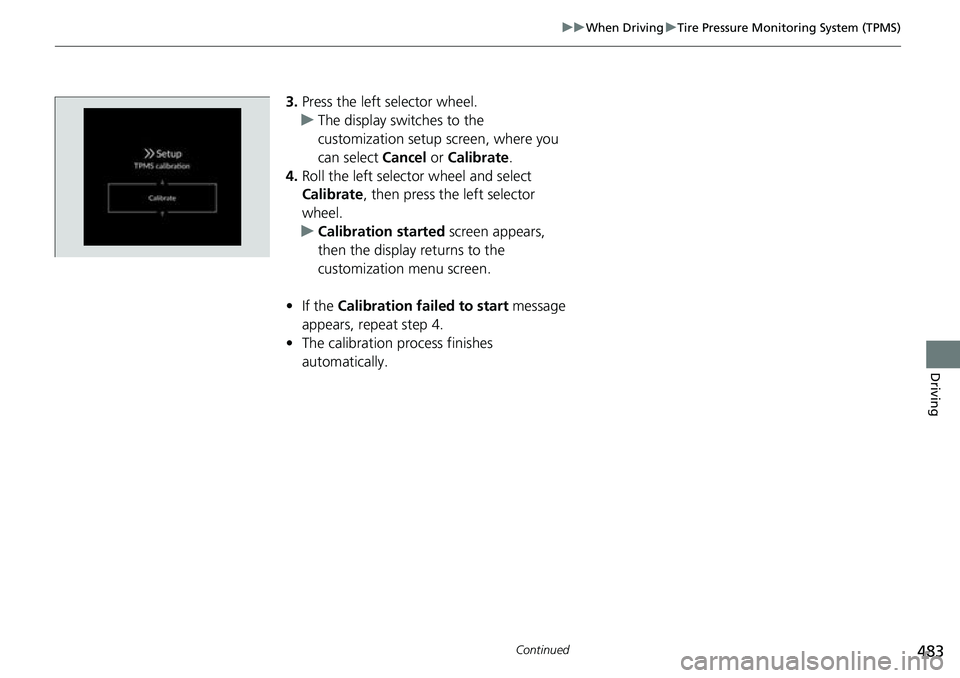
3. Press the left selector wheel.
u The display swit ches to the
customization setup screen, where you
can select Cancel or Calibrate .
4. Roll the left selector wheel and select
Calibrate , then press the left selector
wheel.
u Calibration started screen appears,
then the display returns to the
customization menu screen.
• If the Calibration failed to start message
appears, repeat step 4.
• The calibration process finishes
automatically.
Page 487 of 719
486
uuWhen Driving uTire Pressure Monitoring System (TPMS) - Required Federal Explanation
Driving
Please note that the TPMS is not a substitute for proper tire
maintenance, and it is the driver 's responsibility to maintain
correct tire pressure, even if un der-inflation has not reached the
level to trigger illumina tion of the TPMS low ti re pressure telltale.
Your vehicle has also been eq uipped with a TPMS malfunction
indicator to indicate when the sy stem is not operating properly.
The TPMS malfunction indicator is combined with the low tire
pressure telltale. When the system detects a malfunction, the
telltale will flash fo r approximately one minute and then remain
continuously illuminated. This sequence will continue upon
subsequent vehicle start-ups as long as the malfunction exists.
When the malfunction indicator is illuminated, the system may
not be able to detect or signal low tire pressure as intended.
TPMS malfunctions may occur for a variety of reasons, including
the installation of replacement or alternate tires or wheels on the
vehicle that prevent the TPMS from functioning properly.
Always check the TPMS malfunction telltale after replacing one or
more tires or wheels on your vehicle to ensure that the
replacement or alternate tires and wheels allow the TPMS to
continue to function properly.
Page 496 of 719
495
uuHonda Sensing ®u Collision Mitigation Braking SystemTM (CMBSTM)
Continued
Driving
Collision Mitigation Braking SystemTM (CMBSTM)
The system can assist you when it determines there is a possibility of your vehicle
colliding with a vehicle (including moto rcycles) ahead from behind, an oncoming
vehicle in front, a pedestrian, or someon e riding a bicycle (moving bicycle). The
CMBS
TM is designed to alert you when the potential for a collision is determined, as
well as assist in reducing speed, avoiding collisions, and reducing collision severity.
1 Collision Mitigation Braking SystemTM (CMBSTM)
Important Safety Reminder
The CMBS
TM is designed to reduce the severity of an
unavoidable collision. It does not prevent collisions
nor stop the vehicle automati cally. It is still your
responsibility to operate th e brake pedal and steering
wheel appropriately acco rding to the driving
conditions.
The CMBS
TM may not activate or may not detect a
vehicle in front of y our vehicle under certain
conditions: 2 CMBS
TM Conditions and Limitations P. 500
For directions on the prop er handling of the radar
sensor, refer to the following page. 2 Radar Sensor P. 570
You can read about handling information for the
camera equipped with this system. 2 Front Sensor Camera P. 568
Page 497 of 719

uuHonda Sensing ®u Collision Mitigation Braking SystemTM (CMBSTM)
496
Driving
■How the system works
The CMBS
TM will be canceled when your vehi cle stops or the system determines
there no longer is the potential for a collision.
The CMBS
TM may also be canceled when a driver operates the steering wheel and
the brake or accelerator pedal to avoid a collision.
1 How the system works
The camera in the CMBS
TM is also designed to detect
pedestrians.
However, this pedestrian detection feature may not
activate or may not detect a pedestrian in front of
your vehicle under certain conditions.
Refer to the ones indicating the pedestrian detection
limitations from the list. 2 CMBS
TM Conditions and Limitations P. 500
The radar sensor is behind
the Honda emblem on the
front grille.
A front sensor camera
is located behind the
rearview mirror.
The system starts monitoring the roadway ah ead when your vehicle speed is about
3 mph (5 km/h) or above and will search for a vehicle, pedestrian, or moving bicycle
in front of you.
When to use
The CMBSTM activates when:●The speed difference between your vehicle and a vehicle, pedestrian, or moving
bicycle detected in front of you becomes about 3 mph (5 km/h) and over with a
chance of a collision.
●Your vehicle drives at about 18 mph (30 km/h) or less and there is a chance of in
frontal collision with a detected oncoming vehicle when you turn left at an
intersection.
●Your vehicle speed is about 62 mph (100 km/h) or less and the system determines
there is a chance of a collision with:
- An oncoming or stationary vehicle detected in front of you.
- A pedestrian or moving bicycle detected in front of you.
Page 502 of 719
501
uuHonda Sensing ®u Collision Mitigation Braking SystemTM (CMBSTM)
Continued
Driving
■Vehicle conditions
• Headlight lenses are dirty or the h eadlights are not properly adjusted.
• The outside of the windshield is blocked by dirt, mud, leaves, wet snow, etc.
• The inside of the windshield is fogged.
• An abnormal tire or wheel condition (inco rrect sizes, varied sizes or construction,
improperly inflated, etc.).
• When tire chains are installed.
• The vehicle is tilted due to a heavy load or suspension modifications.
• The camera temperature gets too high.
• Driving with the parking brake applied.
• When the radar sensor behind the Hond a emblem on the front grille gets dirty.
• The vehicle is towing a trailer.
• Driving at night or in a dark place (e.g., a tunnel) with the headlights off.
• There is residue on the windshi eld from the windshield wipers.
Page 504 of 719
503
uuHonda Sensing ®u Collision Mitigation Braking SystemTM (CMBSTM)
Continued
Driving
■Examples of other limitations on detection or system operation
• When the vehicle ahead of you is a small motorcycle, motorcycle with a sidecar,
wheelchair, or other sp ecially shaped vehicle.
• When a vehicle is lower in the rear than the front such as trucks that are not
carrying a load, or a narrow vehicle.
• When the vehicle ahead of you, oncoming vehicle, pedestrian or moving bicycle
is not in front of the vehicle.
• The speed difference between your ve hicle and the vehicle ahead of you,
oncoming vehicle, pedestrian or moving bicycle is significantly large.
• When the vehicle or moving bicycle in front of you slows suddenly.
• When the driver operates the brake peda l and steering wheel to avoid a collision.
• When you approach the vehicle ahead of you, oncoming vehicle, pedestrians or
moving bicycles while accelerating rapidly or operating the steering wheel (except
when turning left at an intersection, etc.)
*1
•When the moving bicycle is a child-sized bi cycle, folding bicycle, three-wheeler or
other bicycle with small tires, or a long bicycle like a tandem bicycle.
• When the radar and camera cannot correct ly identify the shape of the vehicle
ahead of you, oncoming vehicle, pedestrian, or moving bicycle.
• When the minimum ground clearance of a vehicle ahead of you is extremely high.
• When turning left or right and your turn signal is not activated in the same
direction you are turning.
*1 : When there is a possibility of a frontal collision with the oncoming vehicle while turning left, the CMBSTM
is activated. However, it ma y not be activated if you suddenly turn the steering wheel.
Page 513 of 719

512
uuHonda Sensing ®u Low Speed Braking Control*
Driving
■Examples of situations where the sonar sensors cannot detect obstacles
• The sonar sensors are dirty (cover ed by snow, water, mud, etc.).
• The vehicle is too hot or cold.
• The steering wheel is turned sharply when approaching the obstacle at an angle.
■Examples of other cases where the system may not work correctly
• The vehicle is tilted due to heavy load or suspension modifications.
• Bad weather conditions such as heavy rain, fog, snow, sandstorms, etc.
• The ambient temperature/humidity is too high or low.
• When going down a very steep slope.
• When close to other vehicles with sonar sensors or other objects that emit
ultrasonic waves.
• An abnormal tire or wheel condition (incorre ct sizes, varied sizes or construction,
improperly inflated, etc.).
■Situations where the system may activate even without risk of a collision
• When passing through short or narrow gates.
• When driving on uneven surfaces, gr assy areas, or places with steps.
• When a sloped pillar or wall is protruding from a high position.
• When there are obstacles next to the road.
• When driving toward flags, curtains, tree branches, railroad crossing bars, etc.
• When driving on flooded roads.
Page 515 of 719

uuHonda Sensing ®u Adaptive Cruise Control (ACC) with Low Speed Follow
514
Driving
■How to activate the system1Adaptive Cruise Control (ACC) with Low Speed Follow
The radar sensor for ACC with Low Speed Follow is
shared with the Collision Mitigation Braking System
TM
(CMBSTM).
2 Collision Mitigation Braking SystemTM
(CMBSTM) P. 495
ACC with Low Speed Follow may not work properly
under certain conditions.
2 ACC with Low Speed Follow Conditions
and Limitations P. 521
When not using ACC with Low Speed Follow: Turn
off adaptive cruise by pressing the button.
Do not use ACC with Low Speed Follow under the
following conditions:
•On roads with frequent la ne-change or continuous
stop and go traffic, ACC with Low Speed Follow
cannot keep an appropriate distance between your
vehicle and the vehicle ahead of you.
•On roads with sharp turns.•On roads with toll collection facilities or other
objects between lanes of traffic, or in parking
areas, or faci lities with driv e through access.
•On roads with bad weather (rain, fog, snow, etc.),
ACC with Low Speed Follow may not detect the
distance between your vehicle and the vehicle
ahead of you properly.
•On roads with slippery or icy surfaces. The wheels
may spin out and your vehi cle may lose the control
on the condition.
•On roads with steep uphill or steep downhill slopes.•On roads with undulating slopes.
How to use
■Press the button on the
steering wheel.
(white) is on in the gauge.
ACC with Low Speed Follow is ready to use.