2023 FORD SUPER DUTY ECO mode
[x] Cancel search: ECO modePage 320 of 738
HOW DOES THE SPEED
LIMITER WORK
The system allows you to set a speed towhich your vehicle becomes limited. Theset speed sets the effective maximumspeed of your vehicle. You can temporarilyexceed the set speed if required, forexample to overtake.
The controls are on the steering wheel.
SWITCHING THE SPEED
LIMITER ON AND OFF
Press to switch the system on.
The system activates with thecurrent vehicle speed as the setspeed. Press again to switch the systemoff.
SETTING THE SPEED LIMIT
Press with the limiter in standbymode to set the limiter to thecurrent vehicle speed. Speedlimitation activates and thesymbol in the instrument clusterappears green.
CHANGING THE SET SPEED
LIMIT
You can adjust the set speed insmall or large increments. Pressthe toggle button upward ordownward once to adjust the setspeed in small increments. Pressand hold the toggle buttonupward or downward to adjust the setspeed in large increments.
CANCELING THE SET SPEED
LIMIT
Press to cancel the limiter andplace it in standby mode. Thesymbol in the instrument clusterappears grey.
RESUMING THE SET SPEED
LIMIT
Press again to resume thelimiter. The symbol in theinstrument cluster appearsgreen.
INTENTIONALLY EXCEEDING
THE SET SPEED LIMIT
Firmly press the accelerator to temporarilyturn the system off. The system reactivatesonce your vehicle speed drops below theset speed.
SPEED LIMITER INDICATORS
It illuminates in the instrumentcluster when the system isstandby or active.
SPEED LIMITER AUDIBLE
WARNINGS
If you accidently exceed the set speed, theset speed indicator flashes and an audiblewarning tone sounds.
If you intentionally exceed the set speed,only the set speed indicator flashes.
316
2023 Super Duty (TFH) Canada/United States of America, enUSA, Edition date: 202211, DOMSpeed Limiter (If Equipped)E280228 E246884 E246885 E246884 E246885 E308130 E308130 E280228
Page 322 of 738
The lane keeping system may not correctlyoperate in any of the following conditions:
•The lane keeping system does notdetect at least one lane marking.
•You switch the turn signal on.
•You apply direct steering, acceleratefast or brake hard.
•The vehicle speed is less than 40 mph(64 km/h).
•The anti-lock brake, stability control ortraction control system activates.
•The lane is too narrow.
•Something is obscuring the camera orit is unable to detect the lane markingsdue to environment, traffic or vehicleconditions.
•Entering or exiting a tight curve whendriving at high speeds.
The lane keeping system may not correctlane positioning in any of the followingconditions:
•High winds.
•Uneven road surfaces.
•Heavy or uneven loads.
•Incorrect tire pressure.
SWITCHING THE LANE
KEEPING SYSTEM ON AND
OFF
To activate the lane keepingsystem, press the button on thesteering wheel.
To deactivate the lane keeping system,press the button again.
Note:When switching the system on or offa message appears in the instrument clusterdisplay to show the status.
Note:The system stores the on or offsetting until manually changed.
SWITCHING THE LANE
KEEPING SYSTEM MODE
The lane keeping system has differentsettings that you can view or adjust usingthe instrument cluster display.
The system stores the last known selectionfor each of these settings. You do not needto readjust your settings each time youswitch on the system.
To change the lane keeping system mode,use the touchscreen:
1.Press Features on the touchscreen.
2.Press Driver Assistance.
3.Press Lane-Keeping System.
4.Press Lane-Keeping Mode.
5.Select a mode.
Note:The system remembers the lastsetting when you start your vehicle.
ALERT MODE
WHAT IS ALERT MODE
Alert mode vibrates the steering wheelwhen it detects an unintended lanedeparture.
HOW DOES ALERT MODE WORK
318
2023 Super Duty (TFH) Canada/United States of America, enUSA, Edition date: 202211, DOMLane Keeping System (If Equipped)E308131 E165515
Page 376 of 738
WHAT IS THE INTEGRATED
TRAILER BRAKE CONTROLLER
The trailer brake controller assists insmooth and effective trailer braking basedon the towing vehicle’s brake pressure.
INTEGRATED TRAILER BRAKE
CONTROLLER PRECAUTIONS
WARNING: Use the integratedtrailer brake controller to properly adjustthe trailer brakes and check allconnections before towing a trailer.Failure to follow this instruction couldresult in the loss of control of yourvehicle, personal injury or death.
•Only use the manual control lever forproper adjustment of the gain duringtrailer setup. Misuse, such asapplication during trailer sway, couldcause instability of trailer or towvehicle.
•Avoid towing in adverse weatherconditions. The trailer brake controllerdoes not provide anti-lock control ofthe trailer wheels. Trailer wheels canlock up on slippery surfaces, resultingin reduced stability of trailer and towvehicle.
•The trailer brake controller is only afactory-installed or dealer-installeditem. Ford is not responsible forwarranty or performance of thecontroller due to misuse or customerinstallation.
Note:Do not attempt removal of the trailerbrake controller without consulting theWorkshop Manual. Damage to the unit mayresult.
Note:Make sure to set the integrated trailerbrake controller gain to 0 if you are using anaftermarket trailer brake controller.
USING THE INTEGRATED
TRAILER BRAKE CONTROLLER
1.Make sure the trailer brakes are in goodworking condition, functioning normallyand properly adjusted. See your trailerdealer if necessary.
Note:An authorized dealer can diagnosethe trailer brake controller to determineexactly which trailer fault has occurred. Yourvehicle warranty does not cover issues withyour trailer.
2.Hook up the trailer and make theelectrical connections according to thetrailer manufacturer's instructions.
Note:Select default mode if the trailer hassurge brakes, or no brakes at all. The systemhas no effect on the braking performanceof the trailer in either of these cases.
Note:If a trailer is connected by a four-pinconnector, the trailer braking function willnot be supported.
3.When you plug in a trailer with electricor electric-over-hydraulic brakes, amessage confirming connectionappears in the information display.
4.Use the gain adjustment to find thedesired starting point. A gain setting of6.0 is a good starting point for heavierloads.
Note:Use the following steps to adjust thegain setting whenever road, weather andtrailer, or vehicle loading conditions, changefrom when you initially set the gain.
5.In a traffic-free environment, tow thetrailer on a dry, level surface andsqueeze the manual control levercompletely.
372
2023 Super Duty (TFH) Canada/United States of America, enUSA, Edition date: 202211, DOMIntegrated Trailer Brake Controller
Page 378 of 738
ADJUSTING THE INTEGRATED
TRAILER BRAKE CONTROLLER
MODE
Select the correct integrated trailer brakecontroller mode option using thetouchscreen.
Note:Trailer brake gain settings are savedto the active trailer profile.
Selecting the Trailer Brake Type
1.Press Default for trailers withelectromagnetic drum brake systemsor press Electric over Hydraulic fortrailers with electrically actuatedhydraulic brake systems.
2.Press Save.
Selecting the Trailer Brake Effort
1.Select a setting for your trailer.
Note:The default value is Low and is therecommended setting for most trailers.Select a different setting if your trailer'sbrakes require more initial voltage, or youprefer more aggressive trailer braking.
2.Press Save.
374
2023 Super Duty (TFH) Canada/United States of America, enUSA, Edition date: 202211, DOMIntegrated Trailer Brake Controller
Page 388 of 738

WHAT IS ONBOARD SCALES
Onboard scales provides the estimatedpayload of your vehicle and warns whenyour vehicle is overloaded.
HOW DOES ONBOARD SCALES
WORK
Onboard scales uses sensors mounted tothe suspension to calculate the vehicle'spayload.
ONBOARD SCALES
LIMITATIONS
You cannot use the system if any of thefollowing occur:
•The wheels are not pointed straightahead.
•Your vehicle is not in park (P).
•Your vehicle is not on a level surface.
•The tire pressures are below therecommended levels.
•Your vehicle is off.
USING ONBOARD SCALES
1.Press Features on the touchscreen.
2.Press Onboard Scales.
Note:You can also access onboard scalesusing the FordPass app.
Settings menu.A
Estimated payload.B
Taillamps on and off.C
Taillamps
Press to see the vehicle's estimatedpayload on the vehicle's taillamp.
Onboard Scales Settings
Vehicle Mode
Press to return to the onboard scalesscreen.
Scale Mode
Press to see a representation of the weightadded to the vehicle's current payload andto reset the scale to zero.
Note:The scale settings remain betweenkey cycles.
Passenger and Cargo Load Reminder
Press to switch the load reminder on or off.
Set Passenger and Cargo Load Reminder
Press to set the estimated payload that isnot in the vehicle when you use on-boardscale.
384
2023 Super Duty (TFH) Canada/United States of America, enUSA, Edition date: 202211, DOMOnboard Scales (If Equipped)E390703
Page 397 of 738
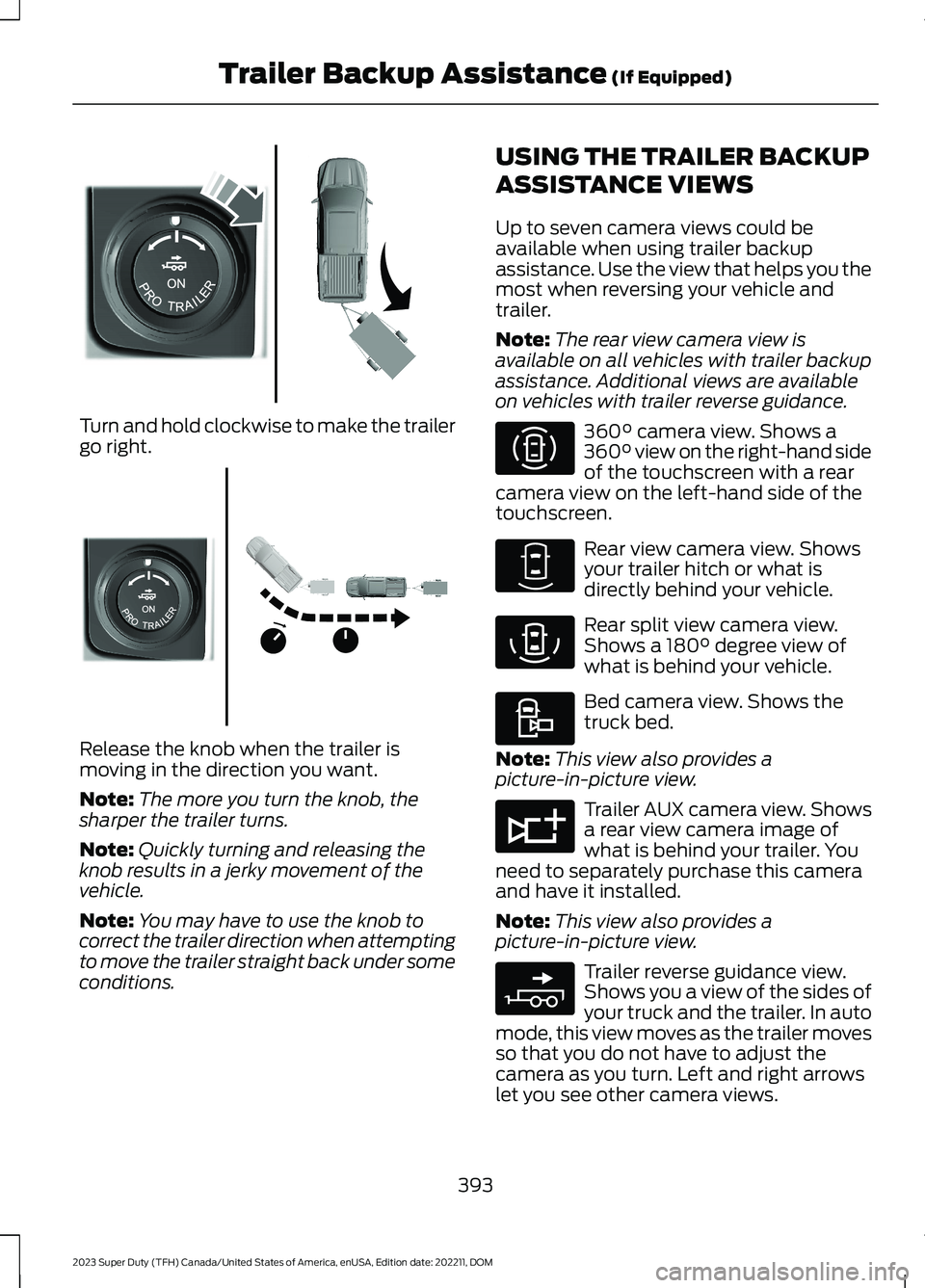
Turn and hold clockwise to make the trailergo right.
Release the knob when the trailer ismoving in the direction you want.
Note:The more you turn the knob, thesharper the trailer turns.
Note:Quickly turning and releasing theknob results in a jerky movement of thevehicle.
Note:You may have to use the knob tocorrect the trailer direction when attemptingto move the trailer straight back under someconditions.
USING THE TRAILER BACKUP
ASSISTANCE VIEWS
Up to seven camera views could beavailable when using trailer backupassistance. Use the view that helps you themost when reversing your vehicle andtrailer.
Note:The rear view camera view isavailable on all vehicles with trailer backupassistance. Additional views are availableon vehicles with trailer reverse guidance.
360° camera view. Shows a360° view on the right-hand sideof the touchscreen with a rearcamera view on the left-hand side of thetouchscreen.
Rear view camera view. Showsyour trailer hitch or what isdirectly behind your vehicle.
Rear split view camera view.Shows a 180° degree view ofwhat is behind your vehicle.
Bed camera view. Shows thetruck bed.
Note:This view also provides apicture-in-picture view.
Trailer AUX camera view. Showsa rear view camera image ofwhat is behind your trailer. Youneed to separately purchase this cameraand have it installed.
Note:This view also provides apicture-in-picture view.
Trailer reverse guidance view.Shows you a view of the sides ofyour truck and the trailer. In automode, this view moves as the trailer movesso that you do not have to adjust thecamera as you turn. Left and right arrowslet you see other camera views.
393
2023 Super Duty (TFH) Canada/United States of America, enUSA, Edition date: 202211, DOMTrailer Backup Assistance (If Equipped)E313026 E313027 E310996 E310967 E310974 E310995 E311776 E310965
Page 409 of 738
Note:If the trailer was connected just priorto turning the system on, you may need todrive forward to initialize the system. Followthe instructions on the touchscreen toactivate the system.
USING TRAILER REVERSE
GUIDANCE VIEWS
Up to seven camera views could beavailable when using trailer reverseguidance. Use the view that helps you themost when reversing your vehicle andtrailer.
360° camera view. Shows a360° view on the right-hand sideof the touchscreen with a rearcamera view on the left-hand side of thetouchscreen.
Rear view camera view. Showsyour trailer hitch or what isdirectly behind your vehicle.
Bed camera view. Shows thetruck bed.
Note:This view also provides apicture-in-picture view.
Trailer AUX camera view. Showsa rear view camera image ofwhat is behind your trailer. Youneed to separately purchase this cameraand have it installed.
Note:This view also provides apicture-in-picture view.
Trailer reverse guidance view.Shows you a view of the sides ofyour truck and the trailer. In automode, this view moves as the trailer movesso that you do not have to adjust thecamera as you turn. Left and right arrowslet you see other camera views.
Straight backup mode. Showswhich way to turn your steeringwheel to keep the trailer straight.Use this view when you want to keep yourtrailer completely in line with your truck.
Note:This view also provides apicture-in-picture view.
Note: It may be helpful to shift your vehicleinto drive (D), pull forward and straightenout the vehicle and trailer before engagingstraight backup mode.
Picture-in-picture view. Showsa main view and a secondaryview when in bed camera view,trailer AUX camera view or straight backupmode.
Note:If you have a 8 in (20 cm)touchscreen, picture-in-picture is off bydefault. Press the picture-in-picture icon onthe touchscreen to switch picture-in-pictureview on and off.
Note:If you have a 12 in (30 cm)touchscreen, picture-in-picture is on bydefault for bed camera view and trailer AUXcamera view and cannot be switched off.Press the picture-in-picture icon on thetouchscreen to switch picture-in-pictureview on and off in straight backup mode.
Swap. Press to swap betweenpicture-in-picture views.
This takes you back to the 360°camera system and out of thetrailer reverse guidance feature.
Auto. Press to return to autoview.
Note:Auto mode is the default setting.
405
2023 Super Duty (TFH) Canada/United States of America, enUSA, Edition date: 202211, DOMTrailer Reverse Guidance (If Equipped)E310996 E310967 E310995 E311776 E310965 E224484 E351663 E351662 E224486 E315644
Page 418 of 738
Maximum WadingCapabilityModel
22 in (560 mm)1Vehicles withoutTremor or XL Off-Road Packages
30 in (762 mm)XL Off-RoadPackage
33 in (838 mm)Tremor Package
1 Bottom of the doors.
When you are driving through water do notexceed 4 mph (7 km/h).
Never stop or shut a vehicle off whencrossing deep water unless your vehicleingested water into the engine air intake.If the engine stalls, do not attempt torestart it. Keep the doors fully closed duringa water crossing.
Extra care must be taken crossing any typeof water. Do not drive into water unlessnecessary. Only drive through areas thatare designated and approved. Determineexit points that are downstream of yourentry point to allow for drifting. If there areother vehicles ahead, wait until they haveleft the water. Unsettled water can makea safe passage more challenging.
High currents even in shallow water canwash the dirt out from around your tires orpush your vehicle across slippery rocks orsurfaces. Never attempt to cross flowingwater that is deeper than your vehicle'sground clearance. Even in low currents yourvehicle's body surface area can be pusheddownstream and out of control. Do notcross any body of water that is fast flowingand rising, wait for the flow rate to reduce.
Vehicles used to traverse water regularlyshould be periodically inspected for signsof water ingestion in all of the vehicle'sfluids. If water is found inside your vehiclefluids, service your vehicle or see anauthorized dealer.
After driving through water and as soon asit is safe to do so, check the brakes, horn,lights, and steering wheel to make sureeverything is still in working order.
AFTER DRIVING YOUR VEHICLEOFF-ROAD
WARNING: After off-road use,before returning to the road, check thewheels and tires for damage. Off-roaduse may cause damage to your wheelsand tires that can lead to tire failure, lossof vehicle control, serious injury or death.
WARNING: Always re-inflate tiresto recommended tire pressures beforethe vehicle is operated on-road. Therecommended pressure is located on thetire label or safety certification label,located on the B-pillar, inside the driver'sdoor.
Driving off-road places more stress on yourvehicle than most on-road driving. Afterdriving off-road check for damage to yourvehicle and, if necessary, have your vehiclefixed as soon as possible.
Inspect the underbody of your vehicle bychecking tires, body structure, steering,suspension, and exhaust system fordamage.
Check the radiator for mud and debris andclean as needed.
Remove accumulations of plants or brush.These things could be a fire hazard or hidedamage to the fuel lines, brake hoses, andpropeller shafts.
414
2023 Super Duty (TFH) Canada/United States of America, enUSA, Edition date: 202211, DOMDriving Hints