2023 FORD SUPER DUTY tow
[x] Cancel search: towPage 137 of 738
Switching Auto-fold On and Off
1.Press Settings on the touchscreen.
2.Press Vehicle Settings.
3.Press Mirrors.
4.Switch Autofold on and off.
Loose Mirror
If you manually fold your power-foldingmirrors, they may not work properly evenafter you reposition them. You need toreset them if:
•The mirrors vibrate when you drive.
•The mirrors feel loose.
•The mirrors do not stay in the folded orunfolded position.
•One of the mirrors is not in its normaldriving position.
To reset the mirrors, perform the followingsteps:
1.By hand, fold or retract both mirrors.
2.Using the power folding/powertelescoping mirror control switch,operate the mirrors until you hear anaudible click.
3.Operate the power folding or powertelescoping mirrors an additional 3 to4 times to synchronize the mirrors.
EXTENDING THE EXTERIOR
MIRRORS
This optional feature lets you extend themirror about 3 in (75 mm). It is useful whentowing a trailer. You can manually pull outor push in the mirrors to various positions.
Power Telescoping Mirrors (If
Equipped)
This feature lets you position both mirrorsat the same time.
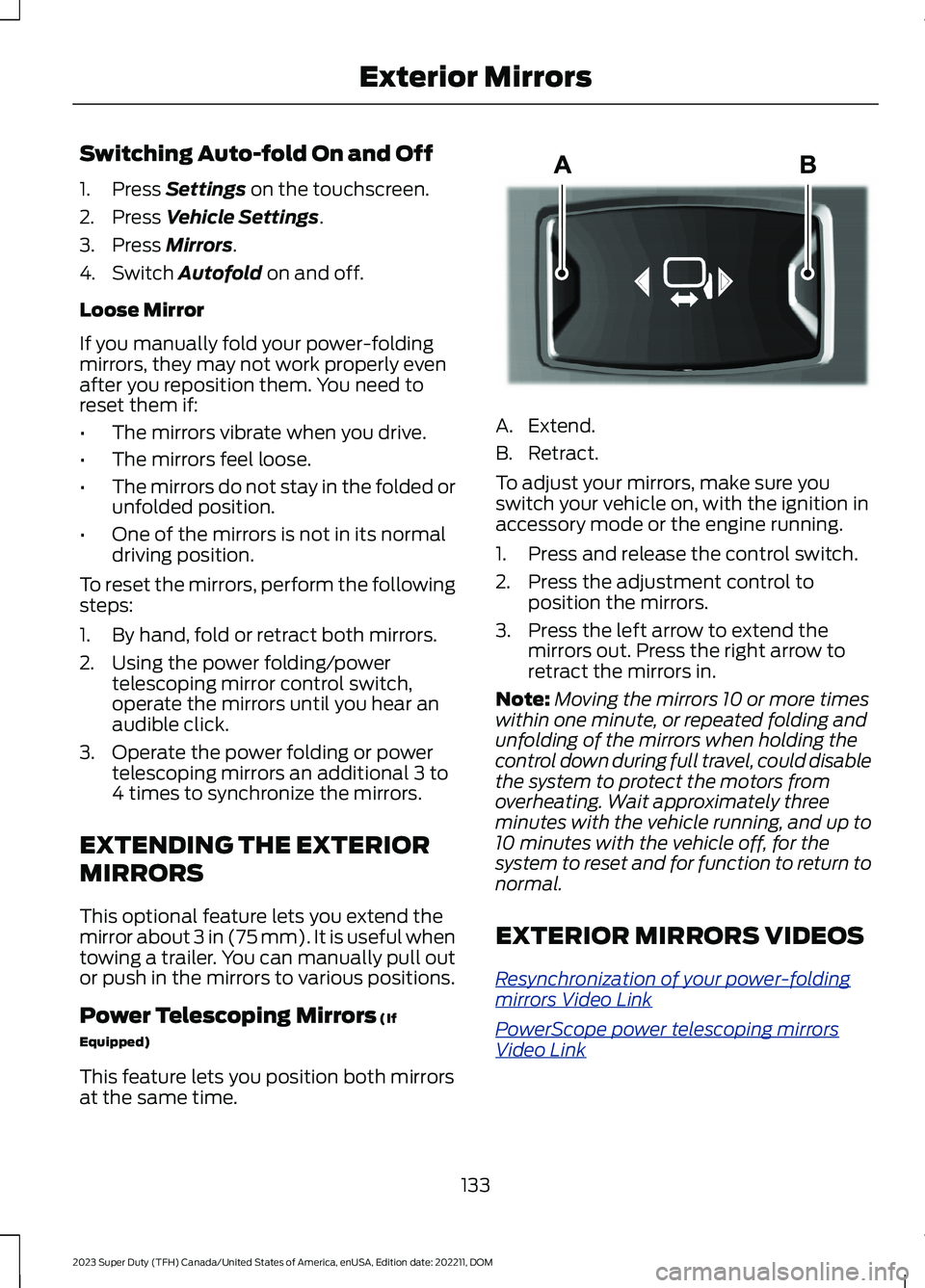
A.Extend.
B.Retract.
To adjust your mirrors, make sure youswitch your vehicle on, with the ignition inaccessory mode or the engine running.
1.Press and release the control switch.
2.Press the adjustment control toposition the mirrors.
3.Press the left arrow to extend themirrors out. Press the right arrow toretract the mirrors in.
Note:Moving the mirrors 10 or more timeswithin one minute, or repeated folding andunfolding of the mirrors when holding thecontrol down during full travel, could disablethe system to protect the motors fromoverheating. Wait approximately threeminutes with the vehicle running, and up to10 minutes with the vehicle off, for thesystem to reset and for function to return tonormal.
EXTERIOR MIRRORS VIDEOS
Resynchronization of your power-foldingmirrors Video Link
PowerScope power telescoping mirrorsVideo Link
133
2023 Super Duty (TFH) Canada/United States of America, enUSA, Edition date: 202211, DOMExterior MirrorsE218902
Page 147 of 738
USING THE INSTRUMENT
CLUSTER DISPLAY CONTROLS
WARNING: Driving while distractedcan result in loss of vehicle control, crashand injury. We strongly recommend thatyou use extreme caution when using anydevice that may take your focus off theroad. Your primary responsibility is thesafe operation of your vehicle. Werecommend against the use of anyhand-held device while driving andencourage the use of voice-operatedsystems when possible. Make sure youare aware of all applicable local lawsthat may affect the use of electronicdevices while driving.
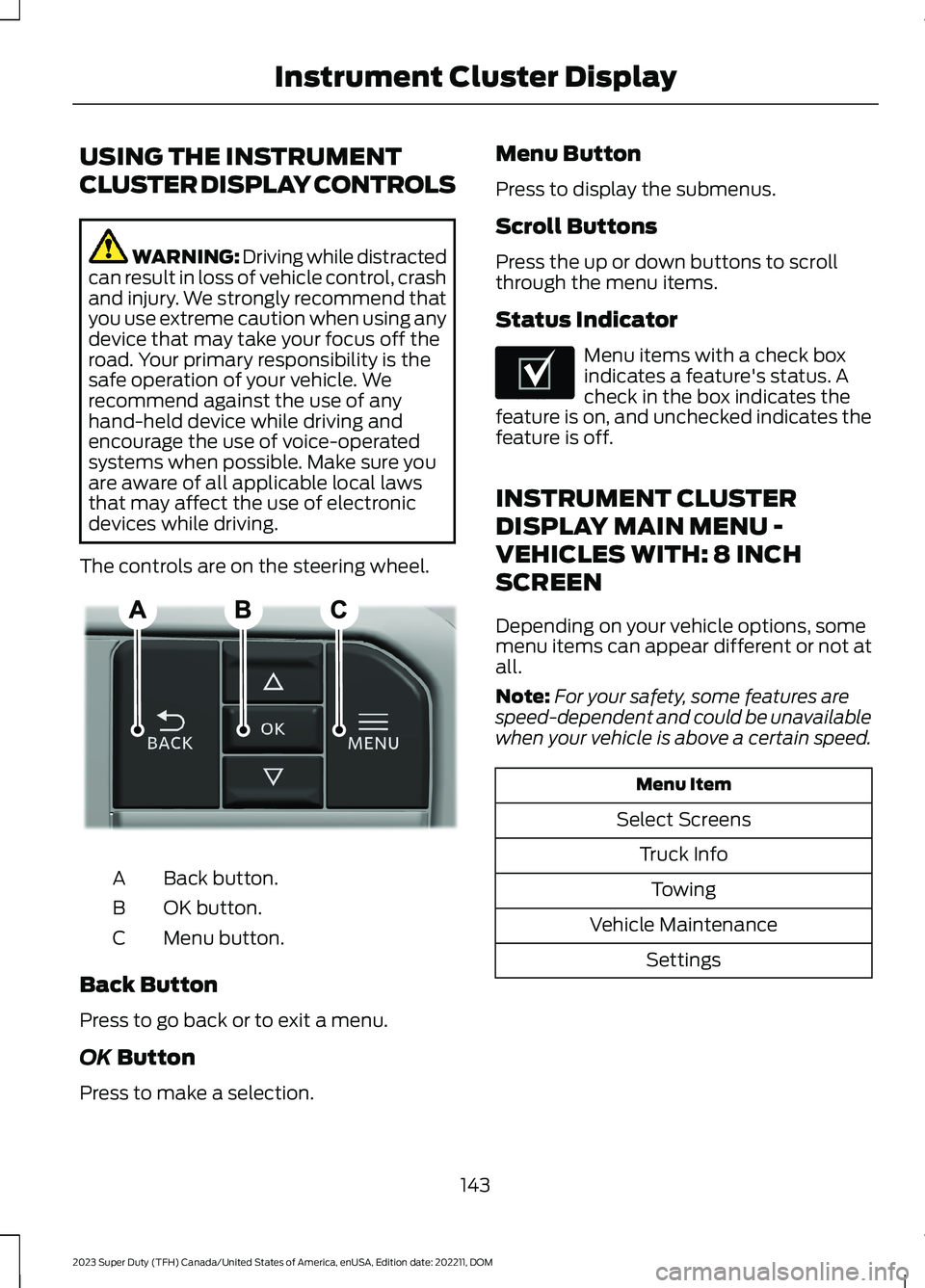
The controls are on the steering wheel.
Back button.A
OK button.B
Menu button.C
Back Button
Press to go back or to exit a menu.
OK Button
Press to make a selection.
Menu Button
Press to display the submenus.
Scroll Buttons
Press the up or down buttons to scrollthrough the menu items.
Status Indicator
Menu items with a check boxindicates a feature's status. Acheck in the box indicates thefeature is on, and unchecked indicates thefeature is off.
INSTRUMENT CLUSTER
DISPLAY MAIN MENU -
VEHICLES WITH: 8 INCH
SCREEN
Depending on your vehicle options, somemenu items can appear different or not atall.
Note:For your safety, some features arespeed-dependent and could be unavailablewhen your vehicle is above a certain speed.
Menu Item
Select Screens
Truck Info
Towing
Vehicle Maintenance
Settings
143
2023 Super Duty (TFH) Canada/United States of America, enUSA, Edition date: 202211, DOMInstrument Cluster DisplayE309379 E204495
Page 148 of 738
INSTRUMENT CLUSTER
DISPLAY MAIN MENU -
VEHICLES WITH: 12 INCH
SCREEN
Depending on your vehicle options, somemenu items can appear different or not atall.
Note:For your safety, some features arespeed-dependent and could be unavailablewhen your vehicle is above a certain speed.
Menu Item
MyView
Trip/Fuel
HUD
Gauges
Off Road
Towing
Status/Information
Navigation
Phone
Audio
Vehicle Maintenance
Settings
CUSTOMIZING THE
INSTRUMENT CLUSTER
DISPLAY - VEHICLES WITH: 8
INCH SCREEN
Adding Screens Using SelectScreens
1.Select Select Screens.
2.Use the controls on the steering wheelto highlight a screen to add.
3.Press the OK button.
Note:The number of screens you can addis limited. If the selected screen does notappear you must deselect screens from theSelect Screens menu.
Configuring Gauges
1.Select Settings using the instrumentcluster display controls.
2.Select Gauge Selection.
3.Select to swap or change left-handside and right-hand side gauges.
CUSTOMIZING THE
INSTRUMENT CLUSTER
DISPLAY - VEHICLES WITH: 12
INCH SCREEN
Adding Screens Using MyView
1.Using the instrument cluster displaycontrols on the steering wheel, selectMyView.
2.Select Configure MyView.
3.Select a screen.
4.Press the OK button.
Note:The number of screens you can addis limited. If the selected screen does notappear you must deselect screens from theMyView menu.
Configuring Gauges
1.Select Settings.
2.Select Configure Gauges.
3.Select to swap or change left-handside and right-hand side gauges.
144
2023 Super Duty (TFH) Canada/United States of America, enUSA, Edition date: 202211, DOMInstrument Cluster Display
Page 163 of 738
Recommended Settings forHeating
1.Adjust the blower motor speed to thecenter setting.
2.Adjust the temperature control to themidway point of the hot settings.
3.Direct air to the footwell air vents.
Quickly Cooling the Interior
1.Turn the temperature controlcounterclockwise past the lowestsetting.
2.Drive with the windows open for a shortperiod of time.
Recommended Settings forCooling
1.Adjust the blower motor speed to thecenter setting.
2.Adjust the temperature control to themidway point of the cold settings.
3.Direct air to the instrument panel airvents.
Defogging the Side Windows inCold Weather
1.Direct air to the instrument panel andwindshield air vents.
2.Press and release A/C.
3.Adjust the temperature control to thesetting you prefer.
4.Adjust the blower motor speed to thehighest setting.
5.Direct air toward the side windows.
6.Close the instrument panel air vents.
CLIMATE CONTROL VIDEOS
Heated Mirrors
159
2023 Super Duty (TFH) Canada/United States of America, enUSA, Edition date: 202211, DOMClimate Control - Vehicles With: Manual Temperature Control
Page 164 of 738
WHAT IS THE CABIN AIR
FILTER
The cabin air filter improves the quality ofair in your vehicle by trapping dust, pollenand other particles.
REPLACING THE CABIN AIR
FILTER
Replace the filter at regular intervals.
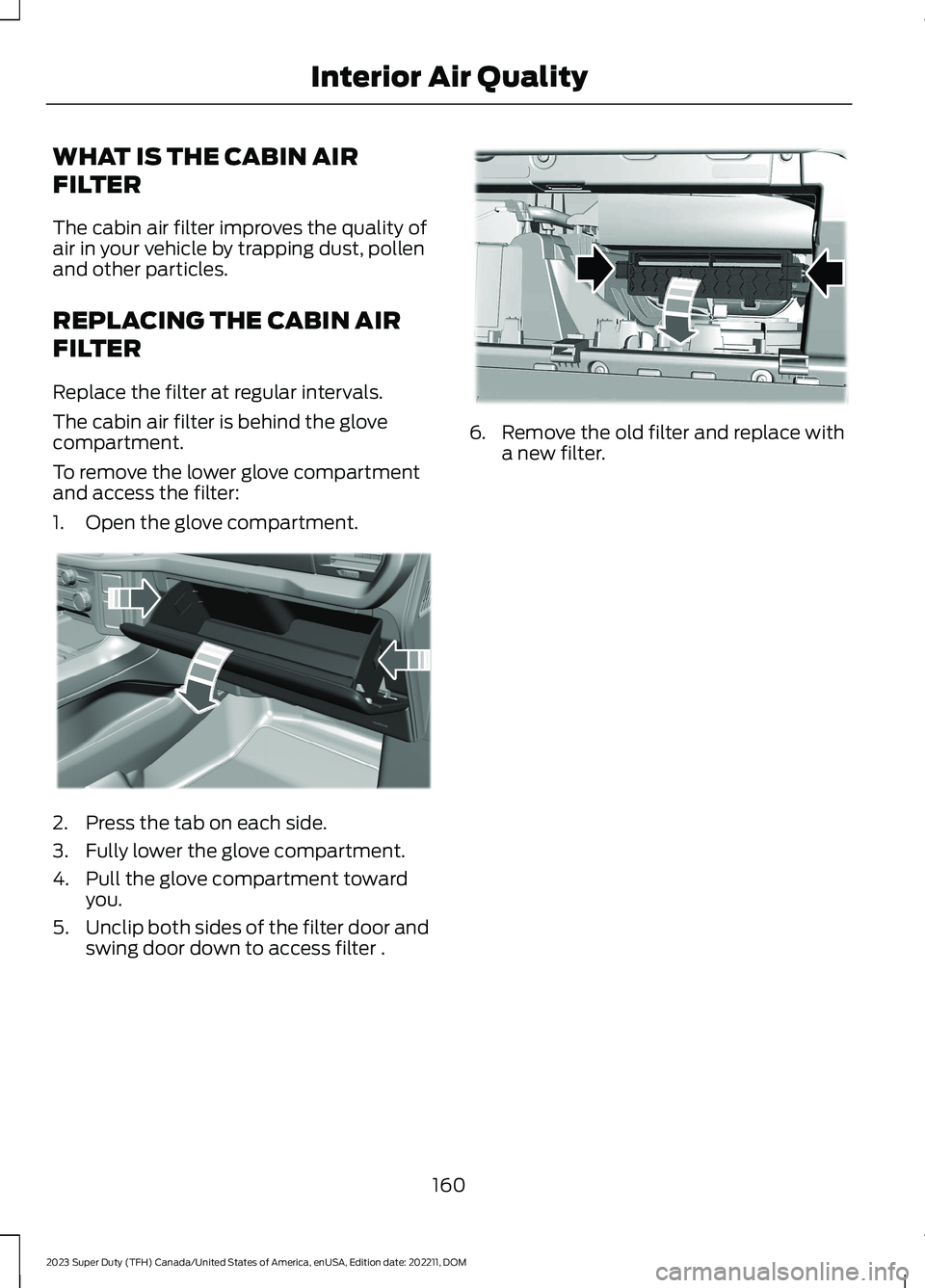
The cabin air filter is behind the glovecompartment.
To remove the lower glove compartmentand access the filter:
1.Open the glove compartment.
2.Press the tab on each side.
3.Fully lower the glove compartment.
4.Pull the glove compartment towardyou.
5.Unclip both sides of the filter door andswing door down to access filter .
6.Remove the old filter and replace witha new filter.
160
2023 Super Duty (TFH) Canada/United States of America, enUSA, Edition date: 202211, DOMInterior Air QualityE311296 E371239
Page 167 of 738
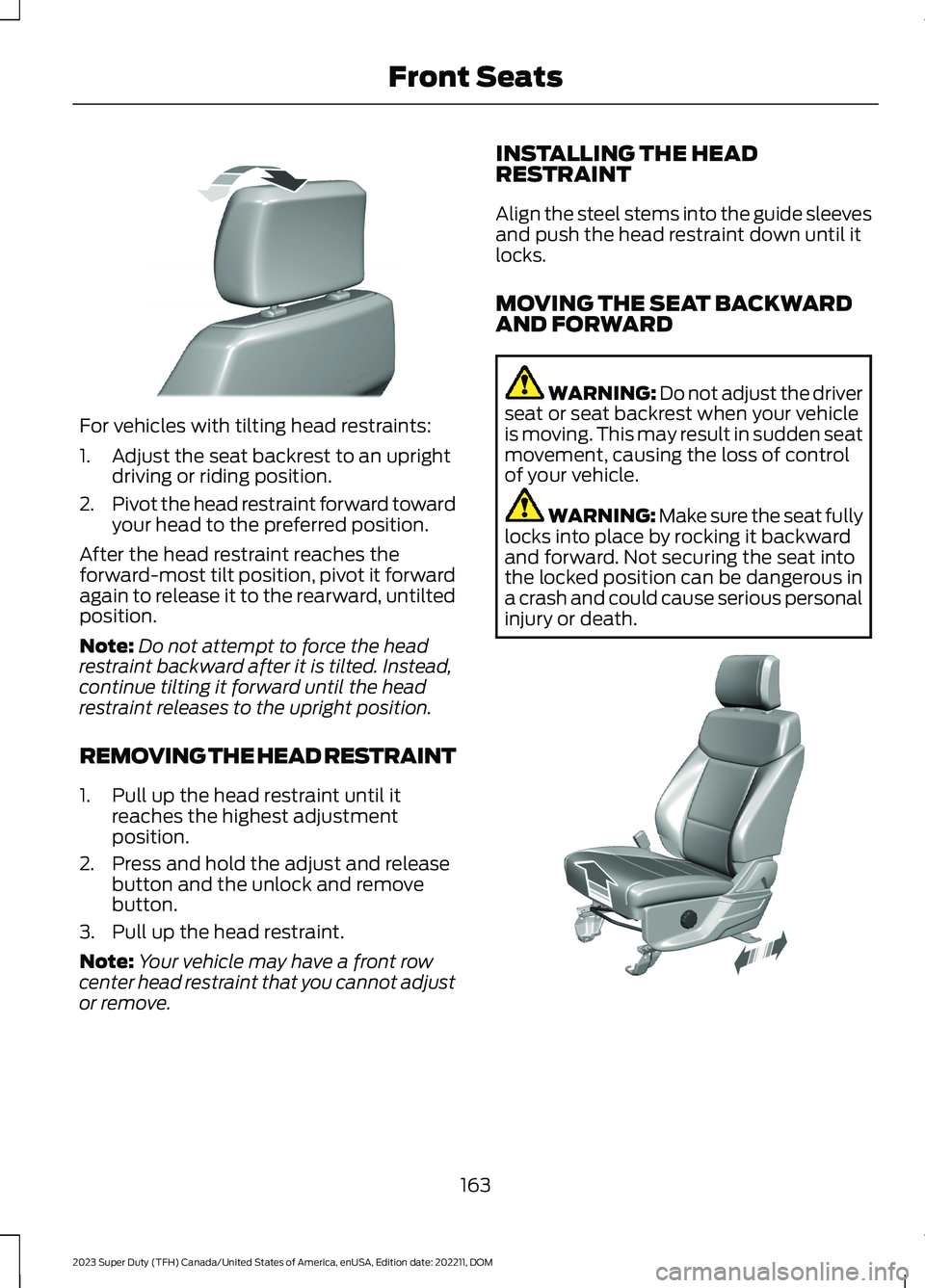
For vehicles with tilting head restraints:
1.Adjust the seat backrest to an uprightdriving or riding position.
2.Pivot the head restraint forward towardyour head to the preferred position.
After the head restraint reaches theforward-most tilt position, pivot it forwardagain to release it to the rearward, untiltedposition.
Note:Do not attempt to force the headrestraint backward after it is tilted. Instead,continue tilting it forward until the headrestraint releases to the upright position.
REMOVING THE HEAD RESTRAINT
1.Pull up the head restraint until itreaches the highest adjustmentposition.
2.Press and hold the adjust and releasebutton and the unlock and removebutton.
3.Pull up the head restraint.
Note:Your vehicle may have a front rowcenter head restraint that you cannot adjustor remove.
INSTALLING THE HEADRESTRAINT
Align the steel stems into the guide sleevesand push the head restraint down until itlocks.
MOVING THE SEAT BACKWARDAND FORWARD
WARNING: Do not adjust the driverseat or seat backrest when your vehicleis moving. This may result in sudden seatmovement, causing the loss of controlof your vehicle.
WARNING: Make sure the seat fullylocks into place by rocking it backwardand forward. Not securing the seat intothe locked position can be dangerous ina crash and could cause serious personalinjury or death.
163
2023 Super Duty (TFH) Canada/United States of America, enUSA, Edition date: 202211, DOMFront SeatsE327919 E308316
Page 169 of 738
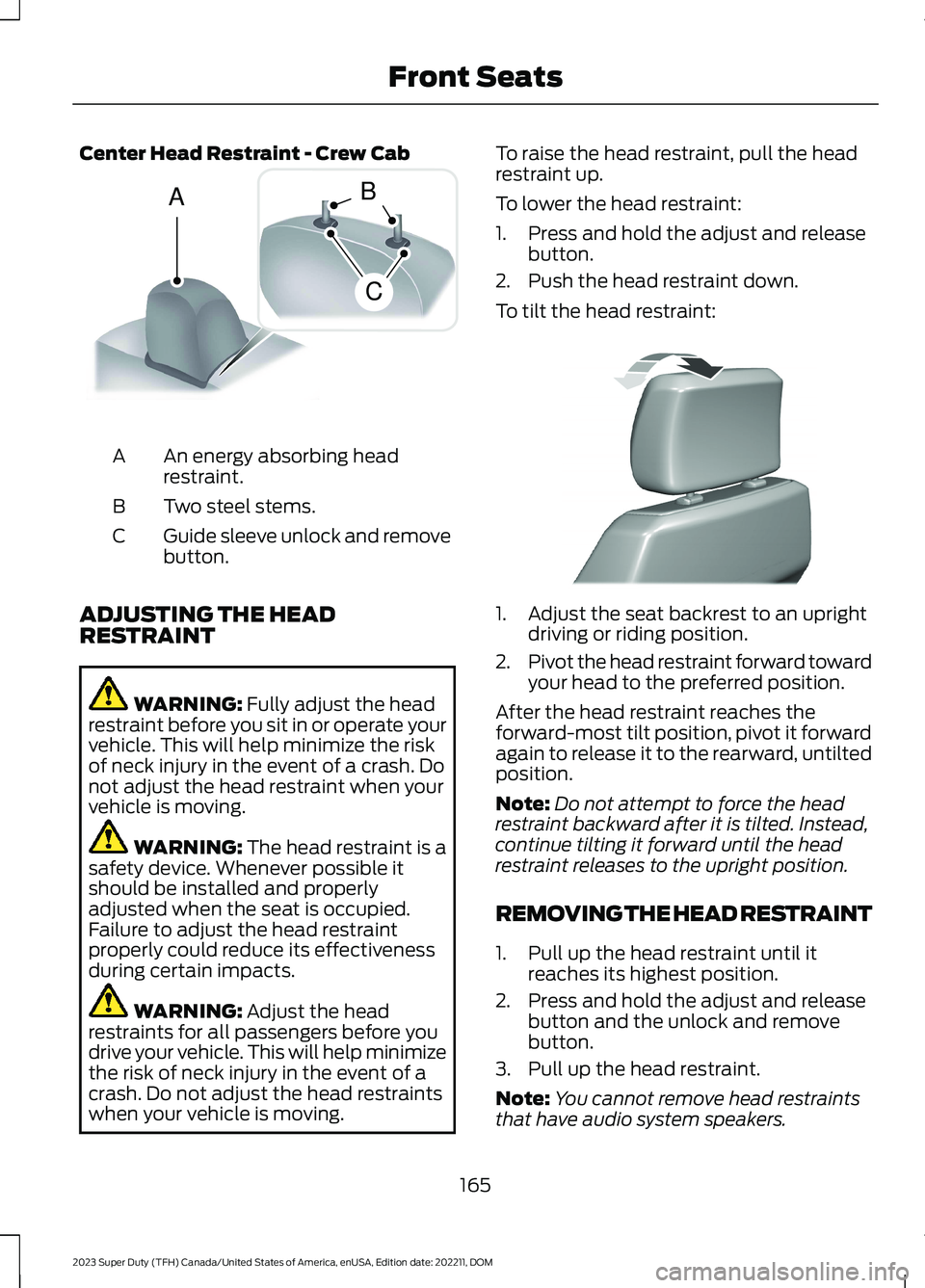
Center Head Restraint - Crew Cab
An energy absorbing headrestraint.A
Two steel stems.B
Guide sleeve unlock and removebutton.C
ADJUSTING THE HEADRESTRAINT
WARNING: Fully adjust the headrestraint before you sit in or operate yourvehicle. This will help minimize the riskof neck injury in the event of a crash. Donot adjust the head restraint when yourvehicle is moving.
WARNING: The head restraint is asafety device. Whenever possible itshould be installed and properlyadjusted when the seat is occupied.Failure to adjust the head restraintproperly could reduce its effectivenessduring certain impacts.
WARNING: Adjust the headrestraints for all passengers before youdrive your vehicle. This will help minimizethe risk of neck injury in the event of acrash. Do not adjust the head restraintswhen your vehicle is moving.
To raise the head restraint, pull the headrestraint up.
To lower the head restraint:
1.Press and hold the adjust and releasebutton.
2.Push the head restraint down.
To tilt the head restraint:
1.Adjust the seat backrest to an uprightdriving or riding position.
2.Pivot the head restraint forward towardyour head to the preferred position.
After the head restraint reaches theforward-most tilt position, pivot it forwardagain to release it to the rearward, untiltedposition.
Note:Do not attempt to force the headrestraint backward after it is tilted. Instead,continue tilting it forward until the headrestraint releases to the upright position.
REMOVING THE HEAD RESTRAINT
1.Pull up the head restraint until itreaches its highest position.
2.Press and hold the adjust and releasebutton and the unlock and removebutton.
3.Pull up the head restraint.
Note:You cannot remove head restraintsthat have audio system speakers.
165
2023 Super Duty (TFH) Canada/United States of America, enUSA, Edition date: 202211, DOMFront SeatsACB E162872 E327919
Page 171 of 738
If you fully recline the passenger seat andthe vehicle is moving, a message appearson the instrument cluster and a tonesounds. To switch the warning off, returnthe seat to an upright position.
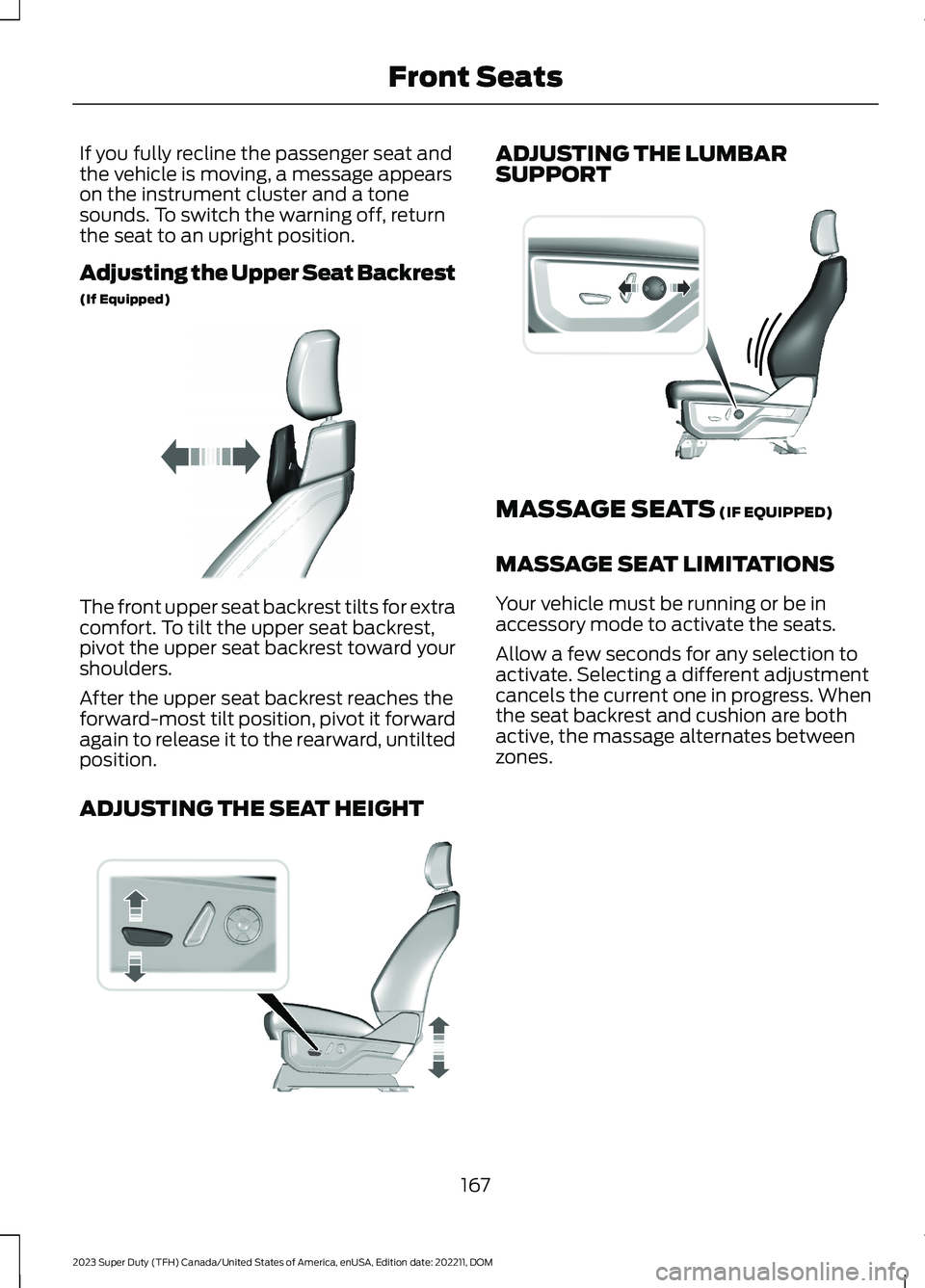
Adjusting the Upper Seat Backrest
(If Equipped)
The front upper seat backrest tilts for extracomfort. To tilt the upper seat backrest,pivot the upper seat backrest toward yourshoulders.
After the upper seat backrest reaches theforward-most tilt position, pivot it forwardagain to release it to the rearward, untiltedposition.
ADJUSTING THE SEAT HEIGHT
ADJUSTING THE LUMBARSUPPORT
MASSAGE SEATS (IF EQUIPPED)
MASSAGE SEAT LIMITATIONS
Your vehicle must be running or be inaccessory mode to activate the seats.
Allow a few seconds for any selection toactivate. Selecting a different adjustmentcancels the current one in progress. Whenthe seat backrest and cushion are bothactive, the massage alternates betweenzones.
167
2023 Super Duty (TFH) Canada/United States of America, enUSA, Edition date: 202211, DOMFront SeatsE311333 E308337 E327927