2023 FORD SUPER DUTY maintenance
[x] Cancel search: maintenancePage 148 of 738
INSTRUMENT CLUSTER
DISPLAY MAIN MENU -
VEHICLES WITH: 12 INCH
SCREEN
Depending on your vehicle options, somemenu items can appear different or not atall.
Note:For your safety, some features arespeed-dependent and could be unavailablewhen your vehicle is above a certain speed.
Menu Item
MyView
Trip/Fuel
HUD
Gauges
Off Road
Towing
Status/Information
Navigation
Phone
Audio
Vehicle Maintenance
Settings
CUSTOMIZING THE
INSTRUMENT CLUSTER
DISPLAY - VEHICLES WITH: 8
INCH SCREEN
Adding Screens Using SelectScreens
1.Select Select Screens.
2.Use the controls on the steering wheelto highlight a screen to add.
3.Press the OK button.
Note:The number of screens you can addis limited. If the selected screen does notappear you must deselect screens from theSelect Screens menu.
Configuring Gauges
1.Select Settings using the instrumentcluster display controls.
2.Select Gauge Selection.
3.Select to swap or change left-handside and right-hand side gauges.
CUSTOMIZING THE
INSTRUMENT CLUSTER
DISPLAY - VEHICLES WITH: 12
INCH SCREEN
Adding Screens Using MyView
1.Using the instrument cluster displaycontrols on the steering wheel, selectMyView.
2.Select Configure MyView.
3.Select a screen.
4.Press the OK button.
Note:The number of screens you can addis limited. If the selected screen does notappear you must deselect screens from theMyView menu.
Configuring Gauges
1.Select Settings.
2.Select Configure Gauges.
3.Select to swap or change left-handside and right-hand side gauges.
144
2023 Super Duty (TFH) Canada/United States of America, enUSA, Edition date: 202211, DOMInstrument Cluster Display
Page 221 of 738
•Follow the recommended servicemaintenance intervals. See GeneralMaintenance Information (page 594).
•Do not store biodiesel fuel in the fueltank for more than 1 month.
•Consider changing brands or reducingbiodiesel content if you have coldtemperature fuel gelling issues or afrequently appearing LOW FUELPRESSURE message.
Use of biodiesel in concentrations greaterthan 20% can cause damage to yourvehicle, including engine and/or exhaustafter-treatment hardware (exhaustcatalyst and particulate filter) failures.Concentrations greater than 20% can alsocause fuel filter restrictions that couldresult in a lack of power or damage to fuelsystem components, including fuel pumpand fuel injector failures.
We recommend SAE 5W-40 oil for fuelswith greater than 5% biodiesel (B5). Formore information about oil changeintervals and other maintenance whenoperating on biodiesel. See SpecialOperating Conditions ScheduledMaintenance (page 603).
Look for a label on the fuel pump toconfirm the amount of biodiesel containedin diesel fuel. Ask the service stationattendant to confirm the biodiesel contentof diesel fuel, if you do not see a label onthe fuel pump.
If you plan to park or store your vehicle formore than 1 month, then you should emptyyour vehicle fuel tank of biodiesel fuel. Youshould fill the tank with a purepetroleum-based diesel fuel and run yourvehicle for a minimum of 30 minutes.
Note:Degraded or oxidized biodiesel candamage fuel system seals and plastics andcorrode steel parts.
During cold weather, if you have problemsoperating on biodiesel, you may need touse diesel fuel with lower biodieselcontent, try another brand or discontinuethe use of biodiesel.
Diesel Fuel Additives
It should not be necessary to add anyaftermarket additives to your fuel if youuse a high-quality diesel fuel that conformsto ASTM industry specifications.Aftermarket additives can damage the fuelinjector system or engine.
Use Motorcraft® cetane booster or anequivalent cetane booster additive if yoususpect fuel has low cetane. UseMotorcraft® anti-gel and performanceimprover or an equivalent additive if thereis fuel gelling.
Do not use alcohol-based additives toimprove cetane quality, to prevent fuelgelling or any other use. The use of alcoholadditives could result in damage to the fuelinjectors and system.
Your Warranty may not cover repairsneeded to correct the effects of using anaftermarket product that does not meetour specifications in your fuel.
RUNNING OUT OF FUEL
FILLING A PORTABLE FUELCONTAINER
WARNING: Flow of fuel through afuel pump nozzle can produce staticelectricity. This can cause a fire if you arefilling an ungrounded fuel container.
217
2023 Super Duty (TFH) Canada/United States of America, enUSA, Edition date: 202211, DOMFuel and Refueling
Page 237 of 738
WHAT IS THE CATALYTIC
CONVERTER
The catalytic converter is part of yourvehicle's emissions system and filtersharmful pollutants from the exhaust gas.
CATALYTIC CONVERTER
PRECAUTIONS
WARNING: Do not park, idle ordrive your vehicle on dry grass or otherdry ground cover. The emission systemheats up the engine compartment andexhaust system, creating the risk of fire.
WARNING: The normal operatingtemperature of the exhaust system isvery high. Never work around or attemptto repair any part of the exhaust systemuntil it has cooled. Use special care whenworking around the catalytic converter.The catalytic converter heats up to a veryhigh temperature after only a shortperiod of engine operation and stays hotafter the engine is switched off.
WARNING: Exhaust leaks mayresult in entry of harmful and potentiallylethal fumes into the passengercompartment. If you smell exhaustfumes inside your vehicle, have yourvehicle inspected immediately. Do notdrive if you smell exhaust fumes.
To avoid damaging the catalytic converter:
•Do not crank the engine for more than10 seconds at a time.
•Do not run the engine with a spark pluglead disconnected.
•Do not push-start or tow-start yourvehicle. Use booster cables. See JumpStarting the Vehicle (page 422).
•Use the correct fuel. See Fuel andRefueling (page 214).
•Do not switch the ignition off when yourvehicle is moving.
•Avoid running out of fuel.
•Have the items listed in scheduledmaintenance information performedaccording to the specified schedule.
Note:Do not make any unauthorizedchanges to your vehicle or engine. By law,vehicle owners and anyone whomanufactures, repairs, or services a fleet ofvehicles are not permitted to intentionallyremove an emission control device orprevent it from working.
CATALYTIC CONVERTER –
TROUBLESHOOTING
CATALYTIC CONVERTER –WARNING LAMPS
Your vehicle has an on-board diagnosticssystem that monitors the emission controlsystem. If any of the following warninglamps illuminate, this may indicate thatthe on-board diagnostics system hasdetected an emission control systemmalfunction.
Continuing to drive your vehicle may causereduced power or the engine to stop.Failure to respond to a warning lamp maycause damage that your vehicle Warrantymay not cover. Have your vehicle checkedas soon as possible.
233
2023 Super Duty (TFH) Canada/United States of America, enUSA, Edition date: 202211, DOMCatalytic ConverterE103308 E67021 E67028
Page 259 of 738
ELECTRIC PARKING BRAKE – INFORMATION MESSAGES
ActionMessage
The electric parking brake is set and a manual releaseis attempted without the brake pedal being pressed.To Release: Press Brake andSwitch
The electric parking brake is set and an automaticrelease is attempted but cannot be performed.Perform a manual release.
Park Brake Use Switch toRelease
The electric parking brake is set and your vehicle speedexceeds 3 mph (5 km/h). Release the electric parkingbrake before continuing to drive.
Release Park Brake
The electric parking brake is not fully applied.Park Brake Not Applied
The electric parking brake is not fully released.Park Brake Not Released
The electric parking brake system has been put into aspecial mode to allow brake service. Have the systemchecked as soon as possible.
Brake maintenance mode
The electric parking brake system has detected acondition that requires service. Some functionalitymay still be available. Have the system checked assoon as possible.
Park Brake Limited FunctionService Required
The electric parking brake system has detected acondition that requires service. Have the systemchecked as soon as possible.
Park Brake Malfunction ServiceNow
255
2023 Super Duty (TFH) Canada/United States of America, enUSA, Edition date: 202211, DOMElectric Parking Brake
Page 284 of 738
The electronic torque overlay steeringsystem adds supplemental steering assistto the hydraulic gear when needed,dependent on vehicle conditions such asvehicle speed, steering wheel angle, andsteering wheel torque. The hydraulicsteering system provides the majority ofsteering assistance. The electronic torqueoverlay enables features such as pro trailerbackup assistance and lane departurewarning.
If your vehicle loses electrical power whileyou are driving, your vehicle loses electricpower steering assistance. The steeringsystem still operates, and you can steeryour vehicle with hydraulic assist. Steeringyour vehicle with only hydraulic assistrequires more effort.
Extreme continuous steering may increasethe effort required for you to steer yourvehicle. This increased effort preventsoverheating and permanent damage tothe steering system. You do not lose theability to steer your vehicle manually.Typical steering and driving maneuversallow the system to cool and return tonormal operation.
LOCATING THE HYDRAULICPOWER STEERING FLUIDRESERVOIR
The hydraulic power steering fluid reservoiris found in the engine compartment. SeeUnder Hood Overview (page 441).
CHECKING THE HYDRAULICPOWER STEERING FLUID
Check the power steering fluid. SeeScheduled Maintenance (page 591). Ifadding fluid is necessary, use onlyMERCON LV ATF.
Check the fluid level when it is at ambienttemperature.
1.Check the fluid level in the reservoir. Itshould be between the MIN and MAXrange. Do not add fluid if the level iswithin this range.
2.If the fluid level is low, add fluid to bringthe fluid level up to between the MINand MAX range.
3.Switch the engine on.
4.While the engine idles, turn the steeringwheel left and right several times.
5.Switch the engine off.
6.Recheck the fluid level in the reservoir.Do not add fluid if the level is betweenthe MIN and MAX range.
7.If the fluid is low, add fluid in smallamounts, continuously checking thelevel until it is between the MIN andMAX range. For proper fluid type, SeeCapacities and Specifications (page520). Be sure to put the cap back on thereservoir.
STEERING –
TROUBLESHOOTING
STEERING – WARNINGINDICATORS
The electric power steeringsystem indicator illuminates ifthe system detects a fault duringthe continuous diagnostic checks.
Note:If a red warning message displays,stop your vehicle as soon as it is safe to doso.
280
2023 Super Duty (TFH) Canada/United States of America, enUSA, Edition date: 202211, DOMSteeringE223375
Page 363 of 738
CONNECTING A TRAILER
PRECAUTIONS
Do not tow a trailer until you drive yourvehicle at least 1,000 mi (1,600 km).
Consult your local motor vehicle laws fortowing a trailer.
See the instructions included with towingaccessories for the proper installation andadjustment specifications.
Service your vehicle more frequently if youtow a trailer. See Normal ScheduledMaintenance (page 600).
If you use a rental trailer, follow theinstructions the rental agency gives you.
When attaching the trailer wiring connectorto your vehicle, only use a proper fittingconnector that works with the vehicle andtrailer functions.
Account for the trailer coupler weight aspart of your vehicle load when calculatingthe total vehicle weight.
Do not exceed the load limits. SeeCalculating the Load Limit (page 353).
HITCHES
INSTALLING A HITCH
WARNING: You must use theheavy-duty drawbar pin supplied withyour vehicle when using the heavy-dutyhitch. Failure to follow this instructioncould result in the loss of control of yourvehicle, personal injury or death.
WARNING: You must use thedrawbar pin supplied with your vehicleor a pin that is designed to meet themaximum rating of your hitch. Failure tofollow this instruction could cause thetrailer to disconnect resulting in the lossof control of your vehicle, personal injuryor death.
Do not use a hitch that either clamps ontothe bumper or attaches to the axle.Distribute the load in your trailer so that10-15% for conventional towing or 15-25%for fifth wheel towing of the total weightof the trailer is on the tongue. Do notexceed the tongue load rating indicatedon the conventional hitch receiver.
Note:On pickup trucks, the trailer hitchprovided on the vehicle enhances crashprotection for the fuel system. Do notremove.
Hitch Components
The following components are required.Some are provided in certain vehicles.
•A trailer hitch with a 3 inch receiver anda 5/8 inch hitch pin. Check thestamped rating number on the pin todetermine the 21,200 lb (9,616 kg) or24,200 lb (10,976 kg) hitch pincapacity.
•A hitch pin sleeve stored in the glovecompartment to use when mountingthe 3 inch drawbar with the 3/4 inchpinhole.
•A cotter pin to help keep the hitch pinin place.
•A trailer hitch with a 3 inch receiver anda 5/8 inch hitch pin. Check thestamped rating number on the pin todetermine the 30,000 lb (13,607 kg)hitch pin capacity.
359
2023 Super Duty (TFH) Canada/United States of America, enUSA, Edition date: 202211, DOMConnecting a Trailer
Page 365 of 738
WebsiteMarket
https://www.fleet.ford.com/towing-guides/
United States ofAmerica
https://www.fleet.ford.ca/towing-guides/
Canada
FIFTH-WHEEL TRAILER HITCH
Your vehicle has a fifth-wheel preppackage. This package enables yourvehicle to accept certain fifth-wheel trailerhitches and gooseneck ball hitches. Thefifth-wheel trailer hitch attaches to the fourmounting pads in the pick-up bed. A 7-pintrailer wiring connector could be in the bedas well. The gooseneck ball hitch is aseparate mounting pad from thefifth-wheel hitch in the center of the bed.
Shorter pick-up boxes provide lessclearance between the cab and thefifth-wheel and gooseneck trailercompared to longer box pick-ups. Whenselecting a trailer and tow vehicle, it iscritical to check that this combinationprovides clearance between the front ofthe trailer and tow vehicle for turns up to90°. Failure to follow this recommendationcould result in the trailer contacting thecab of the tow vehicle during tight turnsthat are typical during low-speed parkingand turning maneuvers. This contact couldresult in damage to the trailer and towvehicle.
Note:Contact an authorized dealer topurchase gooseneck and fifth-wheel hitchesthat are compatible with your vehicle.
Note:The mounting pads in the bed arespecifically designed for certain fifth-wheeltrailer hitches and gooseneck ball hitches.Do not use these mounting pads for otherpurposes.
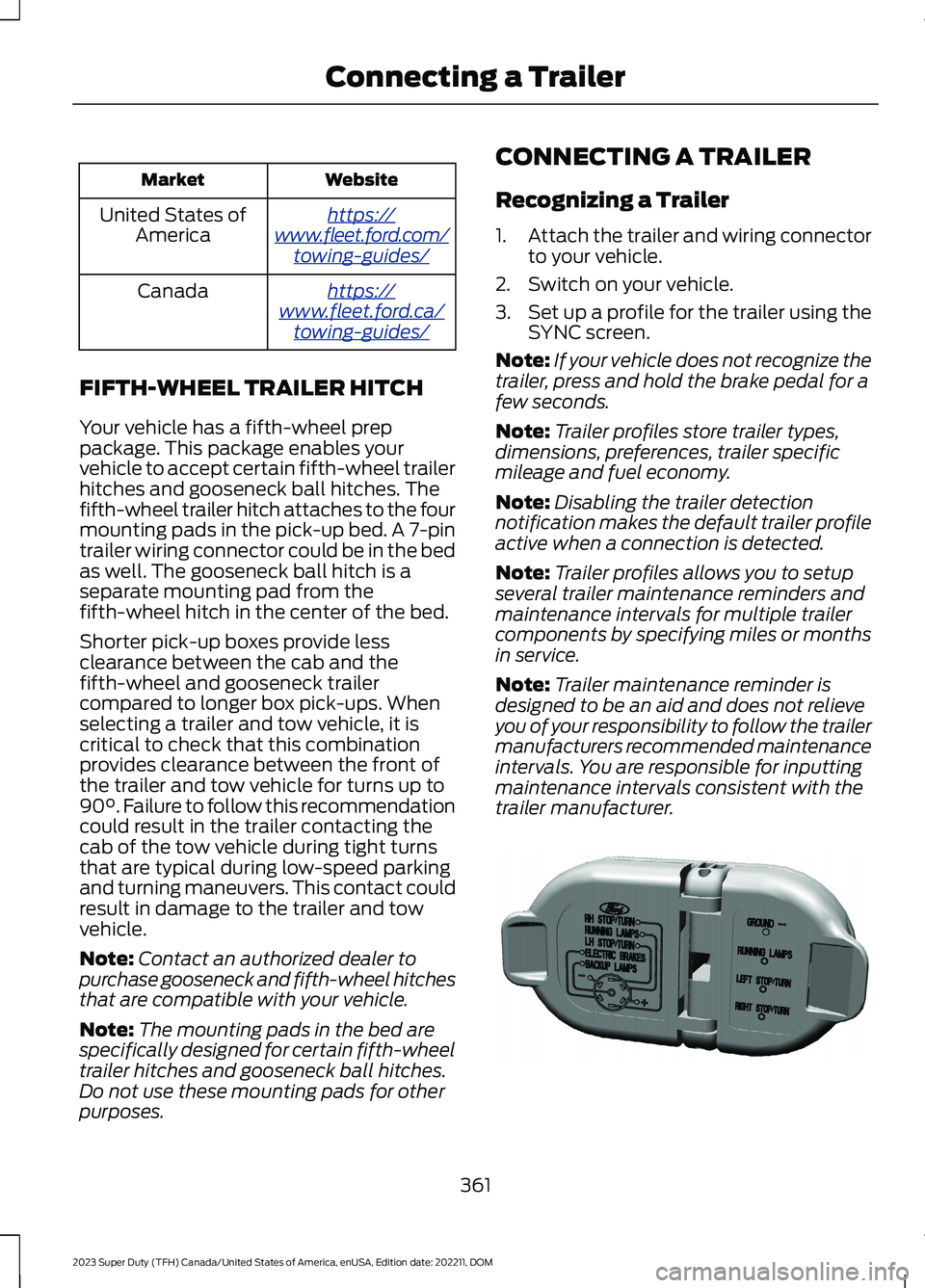
CONNECTING A TRAILER
Recognizing a Trailer
1.Attach the trailer and wiring connectorto your vehicle.
2.Switch on your vehicle.
3.Set up a profile for the trailer using theSYNC screen.
Note:If your vehicle does not recognize thetrailer, press and hold the brake pedal for afew seconds.
Note:Trailer profiles store trailer types,dimensions, preferences, trailer specificmileage and fuel economy.
Note:Disabling the trailer detectionnotification makes the default trailer profileactive when a connection is detected.
Note:Trailer profiles allows you to setupseveral trailer maintenance reminders andmaintenance intervals for multiple trailercomponents by specifying miles or monthsin service.
Note:Trailer maintenance reminder isdesigned to be an aid and does not relieveyou of your responsibility to follow the trailermanufacturers recommended maintenanceintervals. You are responsible for inputtingmaintenance intervals consistent with thetrailer manufacturer.
361
2023 Super Duty (TFH) Canada/United States of America, enUSA, Edition date: 202211, DOMConnecting a TrailerE163167
Page 420 of 738
DRIVING ON SNOW AND ICE
WARNING: If you are driving inslippery conditions that require tirechains or cables, then it is critical thatyou drive cautiously. Keep speeds down,allow for longer stopping distances andavoid aggressive steering to reduce thechances of a loss of vehicle controlwhich can lead to serious injury or death.If the rear end of your vehicle slides whilecornering, steer in the direction of theslide until you regain control of yourvehicle.
On ice and snow, you should drive moreslowly than usual. Your vehicle has a fourwheel anti-lock brake system, do not pumpthe brake pedal. See Anti-Lock BrakingSystem Limitations (page 249).
BREAKING-IN
Your vehicle requires a break-in period. Forthe first 1,000 mi (1,600 km), avoid drivingat high speeds, heavy braking, aggressiveshifting or using your vehicle to tow. Duringthis time, your vehicle may exhibit someunusual driving characteristics.
DRIVING ECONOMICALLY
The following helps to improve fuelconsumption:
•Drive smoothly, accelerate gently andanticipate the road ahead to avoidheavy braking.
•Regularly check your tire pressures andmake sure that they are inflated to thecorrect pressure.
•Follow the recommended maintenanceschedule and carry out therecommended checks.
•Plan your journey and check the trafficbefore you set off. It is more efficientto combine errands into a single tripwhenever possible.
•Avoid idling the engine in cold weatheror for extended periods. Start theengine only when you are ready to setoff.
•Do not carry unnecessary weight in yourvehicle as extra weight wastes fuel.
•Do not add unnecessary accessoriesto the exterior of your vehicle, forexample running boards. If you use aroof rack, remember to fold it down orremove it when not in use.
•Do not shift into neutral when you arebraking or when your vehicle is slowingdown.
•Shut all windows when driving at highspeeds.
•Switch off all electric systems whennot in use, for example air conditioning.Make sure that you unplug anyaccessories from the auxiliary powerpoints when not in use.
DRIVING IN SPECIAL
CONDITIONS
DRIVING THROUGH MUD ANDWATER
WARNING: Do not spin the wheelsat over 34 mph (55 km/h). The tires mayfail and injure a passenger or bystander.
416
2023 Super Duty (TFH) Canada/United States of America, enUSA, Edition date: 202211, DOMDriving Hints