2023 FORD SUPER DUTY warning
[x] Cancel search: warningPage 286 of 738

PARKING AID PRECAUTIONS
WARNING: To help avoid personalinjury, always use caution when inreverse (R) and when using the sensingsystem.
WARNING: The system may notdetect objects with surfaces that absorbreflection. Always drive with due careand attention. Failure to take care mayresult in a crash.
WARNING: Traffic control systems,fluorescent lamps, inclement weather,air brakes, external motors and fans mayaffect the correct operation of thesensing system. This may cause reducedperformance or false alerts.
WARNING: The system may notdetect small or moving objects,particularly those close to the ground.
WARNING: The parking aid systemcan only assist you to detect objectswhen your vehicle is moving at parkingspeeds. To help avoid personal injury youmust take care when using the parkingaid system.
WARNING: The system may notfunction if the sensor is blocked.
WARNING: In cold and severeweather conditions the system may notfunction. Rain, snow and spray can alllimit sensor performance.
WARNING: If damage occurs in theimmediate area surrounding the sensor,have your vehicle checked as soon aspossible.
Note:If your vehicle sustains damageleaving the sensors misaligned, this willcause inaccurate measurements or falsealerts.
When you connect a trailer to your vehicle,the rear parking aid detects the trailer andprovides an alert. Disable the parking aidwhen you connect a trailer to prevent thealert.
Note:Connected trailers might be detectedby the vehicle and parking aid turns offautomatically in those instances.
Note:Certain add-on devices installedaround the bumper or fascia may createfalse alerts, for example, large trailerhitches, bike or surfboard racks, license platebrackets, bumper covers or any other devicethat could block the normal detection zoneof the parking aid system. Aftermarket sparetires or spare tire covers mounted to the reartailgate could cause false alerts from thepark aid system. Remove the add-on deviceto prevent false alerts.
Note: Keep the sensors free from snow, iceand large accumulations of dirt. If thesensors are covered, the system's accuracycan be affected.
Do not clean the sensors with sharpobjects.
SWITCHING PARKING AID ON
AND OFF - VEHICLES WITH:
FRONT PARKING AID
Muting the Audible Tone
Press the parking aid button toswitch the system's audible toneon and off.
Switching Parking Aid On and OffLong-Term
The system can be set to stay disabled inbetween ignition cycles.
282
2023 Super Duty (TFH) Canada/United States of America, enUSA, Edition date: 202211, DOMParking Aids (If Equipped)E383616
Page 287 of 738
1.Press Settings on the touchscreen.
2.Press Driver Assistance.
3.Press Park Aid sensors.
4.Switch Front Sensors (Always) orRear Sensors (Always) on or off.
SWITCHING PARKING AID ON
AND OFF - VEHICLES WITH:
REAR PARKING AID
Muting the Audible Tone
Shift into reverse (R) and pressthe button on the rear viewcamera display screen to switchthe system's audible tone on and off.
Switching Parking Aid On and OffLong-Term
The system can be set to stay disabled inbetween ignition cycles.
1.Press Settings on the touchscreen.
2.Press Driver Assistance.
3.Press Park Aid sensors.
4.Switch Front Sensors (Always) orRear Sensors (Always) on or off.
REAR PARKING AID
WHAT IS THE REAR PARKING AID
Rear parking sensors detect objects behindyour vehicle when in reverse (R).
REAR PARKING AID LIMITATIONS
There is a decreased coverage area at theouter corners.
The rear parking aid sensors are activewhen your vehicle is in reverse (R) and thevehicle speed is less than 5 mph (8 km/h).
The sensor coverage area is up to 71 in(180 cm) from the rear bumper.
The rear parking aid detects large objectswhen you shift into reverse (R) and any ofthe following occur:
•Your vehicle is moving backward at alow speed.
•Your vehicle is stationary but an objectis approaching the rear of your vehicleat a low speed.
•Your vehicle is moving backward at alow speed and an object is movingtowards your vehicle, for exampleanother vehicle at a low speed.
The system shall provide no audiblewarning for the object behind the vehiclewhen in neutral (N) gear.
LOCATING THE REAR PARKINGAID SENSORS
The rear parking aid sensors are in the rearbumper and in the tailgate.
Note:Rear parking sensors in the tailgateactivate and provide object detection whenthe tailgate is down.
Note:Reverse braking assist is unavailablewhen the tailgate is down.
283
2023 Super Duty (TFH) Canada/United States of America, enUSA, Edition date: 202211, DOMParking Aids (If Equipped)E383616 E231381
Page 288 of 738

REAR PARKING AID AUDIBLEWARNINGS
A warning tone sounds when your vehicleapproaches an object. As your vehiclemoves closer to an object, the rate of thetone increases. The warning tonecontinuously sounds when an object is 12 in(30 cm) or less from the rear bumper.
If your vehicle remains stationary for a fewseconds, the audible warning turns off. Ifyour vehicle moves backward the tonesounds again.
Note:When the parking aid system soundsa tone, the audio system could reduce theset volume.
FRONT PARKING AID
WHAT IS THE FRONT PARKINGAID
Front parking sensors detect objects infront of your vehicle.
FRONT PARKING AIDLIMITATIONS
The front parking aid sensors are activewhen your vehicle is in any position otherthan park (P) and the vehicle speed is lessthan 5 mph (8 km/h).
The sensor coverage area is up to 47 in(120 cm) from the bumper.
If your vehicle is in reverse (R), the frontparking aid detects objects when yourvehicle is moving at a low speed or anobject is moving toward your vehicle andprovides an audible warning, for exampleanother vehicle at a low speed. If yourvehicle remains stationary for a fewseconds, the audible warning turns off.Visual indication is always active in reverse(R).
If your vehicle is in any forward gear, thefront parking aid provides audible warningsand visual indication when your vehicle ismoving at a speed of 5 mph (8 km/h) orbelow and the system detects an objectwithin the detection zone. If your vehicleremains stationary for a few seconds, thevisual indication and audible warning turnsoff.
If your vehicle is in neutral (N), the frontand rear sensors provide visual indicationonly when your vehicle is moving below aspeed of 5 mph (8 km/h) and obstaclesare detected inside the detection areas.Once your vehicle stops, the visualindication and audible warning stops aftera few seconds.
LOCATING THE FRONT PARKINGAID SENSORS
The front parking aid sensors are in thefront bumper.
FRONT PARKING AID AUDIBLEWARNINGS
A warning tone sounds when there is anobject within 47 in (120 cm) from the frontbumper. As your vehicle moves closer toan object, the rate of the tone increases.
284
2023 Super Duty (TFH) Canada/United States of America, enUSA, Edition date: 202211, DOMParking Aids (If Equipped)E310332
Page 289 of 738

The warning tone continuously soundswhen an object is 12 in (30 cm) or less fromthe front bumper.
Note:If the detected object is 12 in (30 cm)or less from your vehicle, visual indicationremains on.
PARKING AID INDICATORS
The system provides object distanceindication through the center display.
•As the distance to the objectdecreases, the indicator blocksilluminate and move toward the vehicleicon.
•If there is no object detected, thedistance indicator blocks are grey.
Visual indication remains on when thetransmission is in reverse (R). When youstop your vehicle, visual indication turnsoff after four seconds.
If the parking aids are not available, thedistance indicator blocks do not display.
PARKING AIDS –
TROUBLESHOOTING
PARKING AIDS – INFORMATIONMESSAGES
If a fault is present in the parking aids, awarning message appears in theinstrument cluster or the touchscreen.
ActionMessage
The system detects a condition thatrequires service. Have your vehicle checkedas soon as possible.
Park Aid Fault
Inclement weather, ice, mud, or water isblocking the sensor, causing the system tobecome unavailable. You can typicallyclean the sensor to resolve.
Sensor Blocked
A correct trailer connection is sensed duringa given ignition cycle.Trailer Connected
285
2023 Super Duty (TFH) Canada/United States of America, enUSA, Edition date: 202211, DOMParking Aids (If Equipped)E388639
Page 291 of 738
WHAT IS THE REAR VIEW
CAMERA
The rear view camera provides a videoimage of the area behind your vehicle whenthe transmission is in reverse (R).
The rear view camera button isabove the center display.
REAR VIEW CAMERA
PRECAUTIONS
WARNING: The rear view camerasystem is a reverse aid supplementdevice that still requires the driver to useit in conjunction with the interior andexterior mirrors for maximum coverage.
WARNING: Objects that are closeto either corner of the bumper or underthe bumper, might not be seen on thescreen due to the limited coverage of thecamera system.
WARNING: Reverse your vehicleslowly. Failure to follow this instructioncould result in the loss of control of yourvehicle, personal injury or death.
WARNING: Use caution when thetailgate is ajar. If the tailgate is ajar, thecamera is out of position and the videoimage could be incorrect. All guide linesdisappear when the tailgate is ajar.Failure to follow this instruction couldresult in personal injury.
WARNING: Use caution whenturning camera features on or off whenthe transmission is not in park (P). Makesure your vehicle is not moving.
Note: When towing, the camera only seeswhat you are towing. This might not provideadequate coverage and you might not seesome objects. In some vehicles, the guidelines may disappear when you connect thetrailer tow connector.
LOCATING THE REAR VIEW
CAMERA
The rear view camera is on the tailgate. Itprovides a video image of the area behindyour vehicle.
287
2023 Super Duty (TFH) Canada/United States of America, enUSA, Edition date: 202211, DOMRear View CameraE332186
Page 292 of 738
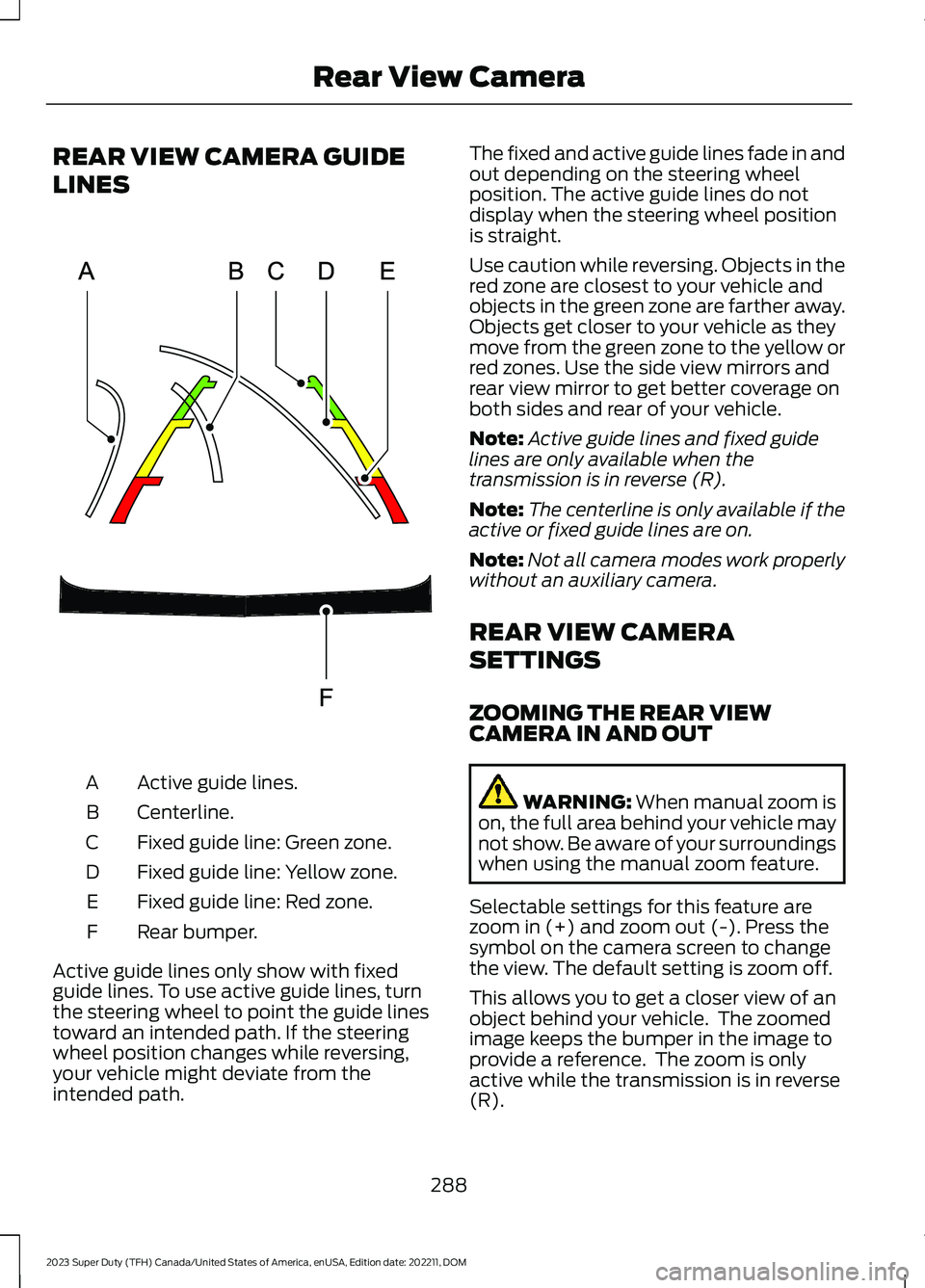
REAR VIEW CAMERA GUIDE
LINES
Active guide lines.A
Centerline.B
Fixed guide line: Green zone.C
Fixed guide line: Yellow zone.D
Fixed guide line: Red zone.E
Rear bumper.F
Active guide lines only show with fixedguide lines. To use active guide lines, turnthe steering wheel to point the guide linestoward an intended path. If the steeringwheel position changes while reversing,your vehicle might deviate from theintended path.
The fixed and active guide lines fade in andout depending on the steering wheelposition. The active guide lines do notdisplay when the steering wheel positionis straight.
Use caution while reversing. Objects in thered zone are closest to your vehicle andobjects in the green zone are farther away.Objects get closer to your vehicle as theymove from the green zone to the yellow orred zones. Use the side view mirrors andrear view mirror to get better coverage onboth sides and rear of your vehicle.
Note:Active guide lines and fixed guidelines are only available when thetransmission is in reverse (R).
Note:The centerline is only available if theactive or fixed guide lines are on.
Note:Not all camera modes work properlywithout an auxiliary camera.
REAR VIEW CAMERA
SETTINGS
ZOOMING THE REAR VIEWCAMERA IN AND OUT
WARNING: When manual zoom ison, the full area behind your vehicle maynot show. Be aware of your surroundingswhen using the manual zoom feature.
Selectable settings for this feature arezoom in (+) and zoom out (-). Press thesymbol on the camera screen to changethe view. The default setting is zoom off.
This allows you to get a closer view of anobject behind your vehicle. The zoomedimage keeps the bumper in the image toprovide a reference. The zoom is onlyactive while the transmission is in reverse(R).
288
2023 Super Duty (TFH) Canada/United States of America, enUSA, Edition date: 202211, DOMRear View CameraE306774
Page 294 of 738
WHAT IS THE 360 DEGREE
CAMERA
The 360 degree camera system consistsof front, side and rear cameras whichprovide visibility around your vehicle.
HOW DOES THE 360 DEGREE
CAMERA WORK
The 360 Degree Camera system:
•Allows you to see what is directly infront of or behind your vehicle.
•Provides a cross traffic view in front ofand behind your vehicle.
•Allows you to see a top-down view ofthe area outside your vehicle, includingthe blind spots and obstacles near yourvehicle.
360 DEGREE CAMERA
PRECAUTIONS
WARNING: The 360 degreecamera system still requires the driverto use it in conjunction with looking outof the windows, and checking the interiorand exterior mirrors for maximumcoverage.
WARNING: Objects that are closeto either corner of the bumper or underthe bumper, might not be seen on thescreen due to the limited coverage of thecamera system.
WARNING: Do not switch thecamera features on or off when yourvehicle is moving.
WARNING: You are responsible forcontrolling your vehicle at all times. Thesystem is designed to be an aid and doesnot relieve you of your responsibility todrive with due care and attention. Failureto follow this instruction could result inthe loss of control of your vehicle,personal injury or death.
WARNING: Use caution when thetailgate is ajar. If the tailgate is ajar, thecamera is out of position and the videoimage could be incorrect. All guide linesdisappear when the tailgate is ajar.Failure to follow this instruction couldresult in personal injury.
WARNING: When manual zoom ison, the full area behind your vehicle maynot show. Be aware of your surroundingswhen using the manual zoom feature.
LOCATING THE 360 DEGREE
CAMERAS
Rear View Camera
The rear view camera is on the tailgate. Itprovides a video image of the area behindyour vehicle.
Front View Camera
The front view camera is in the grille. Itprovides a video image of the area in frontof your vehicle.
Side View Camera
The side view camera is on the outsidemirror. It provides a video image of the areaon the sides of your vehicle to aid you whenparking or when backing up a trailer.
290
2023 Super Duty (TFH) Canada/United States of America, enUSA, Edition date: 202211, DOM360 Degree Camera (If Equipped)
Page 298 of 738
WHAT IS CRUISE CONTROL
Cruise control lets you maintain a setspeed without keeping your foot on theaccelerator pedal.
Requirements
Use cruise control when the vehicle speedis greater than 20 km/h in metric units or15 mph in imperial units.
SWITCHING CRUISE CONTROL
ON AND OFF
WARNING: Do not use cruisecontrol on winding roads, in heavy trafficor when the road surface is slippery. Thiscould result in loss of vehicle control,serious injury or death.
The cruise controls are on the steeringwheel.
Switching Cruise Control On
Press the button to activate thesystem. When the systemactivates, the set speed is equalto the current vehicle speed or 20 km/h (15mph), whichever is greater. If the speed istoo low, or other conditions are not correctfor cruise control activation, the systementers standby mode.
Switching Cruise Control Off
Press the button when thesystem is active or switch theignition off.
Note:When you switch cruise control off,the set speed clears.
SETTING THE CRUISE
CONTROL SPEED
WARNING: When you are goingdownhill, your vehicle speed couldincrease above the set speed. Thesystem does not apply the brakes.
Drive to the speed you prefer.
Press either the SET+ or SET-buttons to set the current speed.
Take your foot off the accelerator pedal.
Note:The indicator changes color in theinformation display.
Changing the Set Speed
Press the SET+ button toincrease the set speed in smallincrements. Press and hold theSET+ button to accelerate. Release thebutton when you have reached yourpreferred speed.
Press the SET- button todecrease the set speed in smallincrements. Press and hold theSET- button to decelerate. Release thebutton when you have reached yourpreferred speed.
Note: If you accelerate by pressing theaccelerator pedal, the set speed does notchange. When you release the acceleratorpedal, your vehicle returns to the speed thatyou previously set.
294
2023 Super Duty (TFH) Canada/United States of America, enUSA, Edition date: 202211, DOMCruise ControlE332905 E332905 E246884 E246885 E246884 E246885