2023 FORD MUSTANG CD player
[x] Cancel search: CD playerPage 405 of 535

Automatic crash notificationsystem off.
Cell phone network signalstrength.
Vehicle data sharing on.
Vehicle location sharing on.
Vehicle data and vehicle locationsharing on.
Wireless charger active.
Feature Bar
Select to use the radio, a USB, amedia player or a Bluetooth®device. See Entertainment(page 409).
Select to adjust climate settingsSee Climate (page 419).
Select to make calls and accessthe phonebook on your cellphone. See Phone (page 421).
Select to use the navigationsystem. See Navigation (page423).
Select to search for and usecompatible apps on your iOS orAndroid device. See Apps (page428).
Select to adjust system settings.See Settings (page 431).
Cleaning the Touchscreen
See Cleaning the Interior (page 296).
Updating the System
Updating the System Using a USB Drive
Downloading an Update
1.Go to the SYNC update page on thelocal Ford website.
2.Download the update.
Note:The website notifies you if an updateis available.
3.Insert a USB drive into your computer.
Note:The USB drive needs to be empty andmeet the minimum requirements detailedon the website.
4.Follow the instructions provided todownload the update to the USB drive.
Installing an Update
Note:You can use the system when aninstallation is in progress.
1.Disconnect all other USB devices fromthe USB ports.
2.Connect the USB drive with the updateto a USB port.
Note:Installation starts automaticallywithin 10 minutes.
Updating the System Using a Wi-FiNetwork Connection
Connecting to a Wi-Fi Network
Select the settings option on thefeature bar.
1.Select Automatic Updates.
2.Select System Wi-Fi.
3.Switch System Wi-Fi on.
4.Select Available Wi-Fi Networks.
5.Select an available Wi-Fi network.
Note:Enter the network password toconnect to a secure network.
401
2023 Mustang (CZG) Canada/United States of America, Vehicles Built From: 14-11-2022, enUSA, Edition date: 202209, First-PrintingSYNC™ 3 (If Equipped) E263583 E100027 E283811 E280315 E280315
Page 415 of 535

SiriusXM® Satellite Radio (IfActivated)
Note: This feature may not be available inall markets and requires an activesubscription.
SiriusXM satellite radio is asubscription-based satellite radio servicethat broadcasts a variety of music, sports,news, weather, traffic and entertainmentprogramming. Your factory-installedSiriusXM satellite radio system includeshardware and a limited subscription termthat begins on the date of sale or lease ofyour vehicle. See an authorized dealer foravailability.
For more information on extendedsubscription terms (a service fee isrequired), the online media player and alist of SiriusXM satellite radio channels,and other features, please visitwww.siriusxm.com in the United States,www.siriusxm.ca in Canada, or callSiriusXM at 1-888-539-7474.
Note:SiriusXM reserves the unrestrictedright to change, rearrange, add or deleteprogramming including canceling, movingor adding particular channels, and its prices,at any time, with or without notice to you.Neither SiriusXM and its affiliates nor FordMotor Company and its affiliates will beliable to you or any third party for any suchmodification, suspension or termination.
Note:This receiver includes the eCosreal-time operating system. eCos ispublished under the eCos License.
The following buttons are available for SiriusXM:
Action and DescriptionMenu Item
Touch this button to see a list of available stations.Browse
A pop-up appears, allowing you to type in the call numbers ofa station.Direct Tune
Once you enter the stations call numbers, you can select:
The system tunes to the station you select.Enter
You exit the pop-up and the current stationcontinues to play.Cancel
You can press the backspace button to delete the previousnumber.
411
2023 Mustang (CZG) Canada/United States of America, Vehicles Built From: 14-11-2022, enUSA, Edition date: 202209, First-PrintingSYNC™ 3 (If Equipped)E234451
Page 422 of 535
FunctionButton
Playlists
Artist
Albums
Songs
Genres
Podcasts
Audio books
Composers
This button allows you to choose a specificletter to view within the category you arebrowsing.
A-Z Jump
If available, this allows you to browse thefolders and files on your USB device.Explore Device
USB Ports
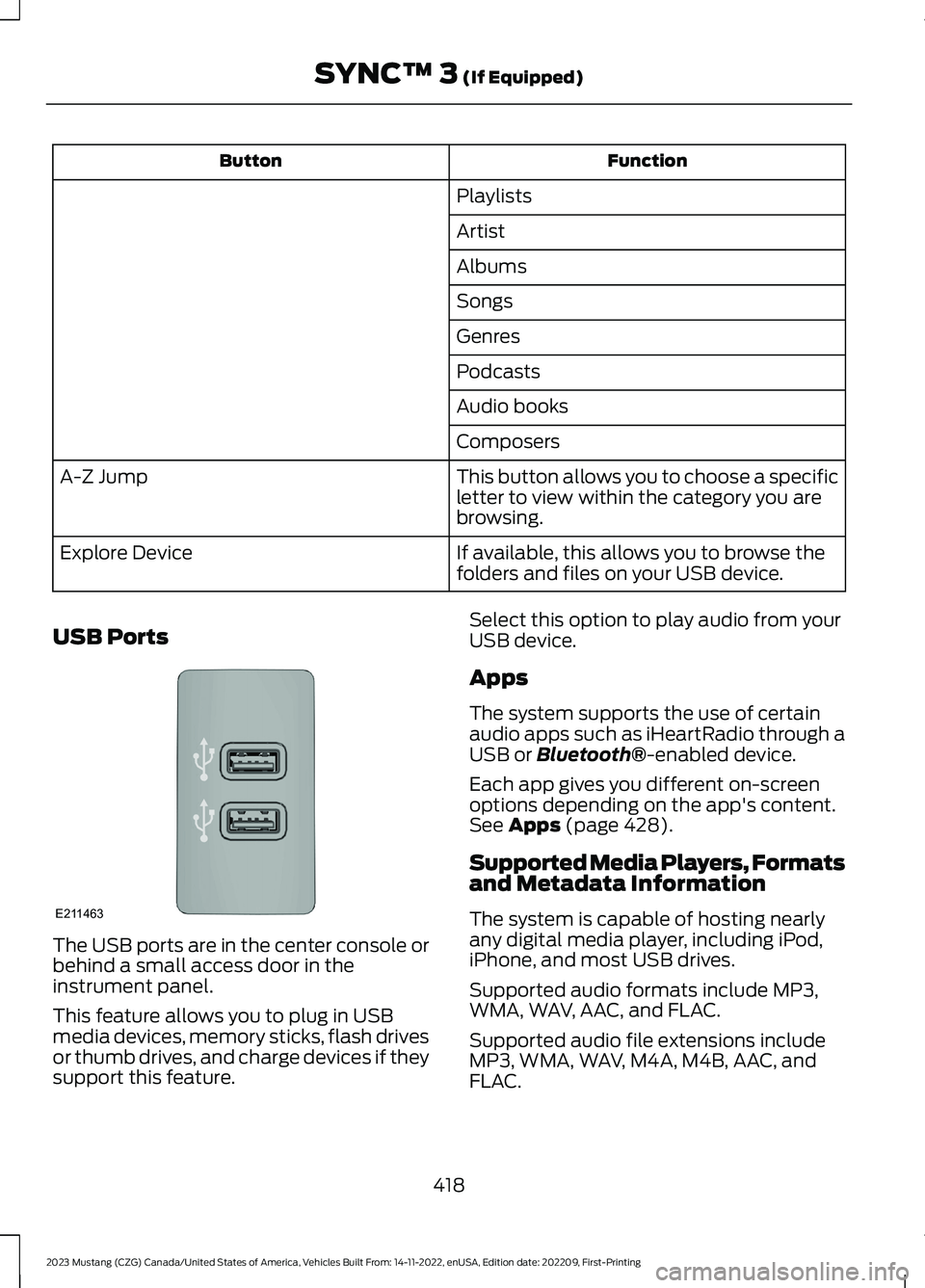
The USB ports are in the center console orbehind a small access door in theinstrument panel.
This feature allows you to plug in USBmedia devices, memory sticks, flash drivesor thumb drives, and charge devices if theysupport this feature.
Select this option to play audio from yourUSB device.
Apps
The system supports the use of certainaudio apps such as iHeartRadio through aUSB or Bluetooth®-enabled device.
Each app gives you different on-screenoptions depending on the app's content.See Apps (page 428).
Supported Media Players, Formatsand Metadata Information
The system is capable of hosting nearlyany digital media player, including iPod,iPhone, and most USB drives.
Supported audio formats include MP3,WMA, WAV, AAC, and FLAC.
Supported audio file extensions includeMP3, WMA, WAV, M4A, M4B, AAC, andFLAC.
418
2023 Mustang (CZG) Canada/United States of America, Vehicles Built From: 14-11-2022, enUSA, Edition date: 202209, First-PrintingSYNC™ 3 (If Equipped)E211463
Page 439 of 535
Possible Cause and ResolutionSymptom
–Incorrect device settings.
•Make sure that your device does not have an auto-install program or active security settings.
•Check that your device is not set only to charge.
–Device lock screen enabled.
•Unlock your device before connecting it.
The system does not recog-nize my device.–Device limitation.
•Do not leave your device in your vehicle during veryhot or very cold weather conditions.
–Cable connection issue.
•Correctly connect the cable to your device and thevehicle USB port.
–Incompatible cable.
•Use the cable recommended by the manufacturerof your device.
The system does not under-stand the name of a track orartist.
–Device limitation.Bluetooth® does not support voicecommands.
•Connect your device to a USB port.
•If you have an iOS device, press and hold the voicecontrol button on the steering wheel to use Siri toplay specific tracks.
I cannot stream audio frommy Bluetooth® device.–Incompatible device.
•Check the compatibility of your device on ourwebsite.
–Device not connected.
•Pair your device. See Phone (page 421).
–Media player not running.
•Start the media player on your device.
The system does not recog-nize the music on my device.–Missing or incorrect audio file metadata, for exampleartist, song title, album or genre.
•Repair the files on your device.
–Corrupt files.
•Repair the files on your device.
435
2023 Mustang (CZG) Canada/United States of America, Vehicles Built From: 14-11-2022, enUSA, Edition date: 202209, First-PrintingSYNC™ 3 (If Equipped)
Page 535 of 535

Traction Control.............................................174Principle of Operation.......................................174Transmission..................................................163Technical Specifications - Mach 1................168Transporting the Vehicle - Mach 1.........223Transporting the Vehicle...........................238
U
Under Hood Overview - 2.3LEcoBoost™.................................................259Under Hood Overview - 5.0L, Mach1.........................................................................261Under Hood Overview - 5.0L..................260USB Port.........................................................382Using Adaptive Cruise Control................185Using MyKey With Remote StartSystems..........................................................65Using Snow Chains.....................................325Using Stability Control................................176Using Summer Tires...................................322Using SYNC™ With Your MediaPlayer............................................................390Using SYNC™ With Your Phone...........386Using Traction Control................................174Using Voice Recognition...........................384Using Winter Tires.......................................325Utilizing the Mediation/ArbitrationProgram (Canada Only).........................242
V
Vehicle Care....................................................291General Information..........................................291General Information - Mach 1.........................291Vehicle Identification Number................345Vehicle Storage............................................298Vehicle Wi-Fi Hotspot................................372VentilationSee: Climate Control.........................................126VINSee: Vehicle Identification Number............345Voice Control....................................................75
W
Warning Lamps and Indicators.................93Warranty Information................................493
Washer Fluid Check.....................................275WashersSee: Cleaning the Exterior..............................293See: Cleaning the Exterior - Mach 1............293See: Wipers and Washers.................................78Waxing.............................................................295Welcome Lighting..........................................83What Is a Connected Vehicle..................368What Is Automatic High BeamControl............................................................84What Is Cruise Control...............................184What Is MyKey.................................................63What Is Remote Start.................................123What Is the Cabin Air Filter........................132What Is the Garage Door Opener...........140Wheel NutsSee: Changing a Road Wheel.......................330Wheels and Tires..........................................301General Information..........................................301Technical Specifications.................................336Wi FiSee: Changing the Vehicle Wi-Fi HotspotName or Password.......................................372See: Connecting the Vehicle to a Wi-FiNetwork...........................................................368See: Creating a Vehicle Wi-Fi Hotspot.......372See: Vehicle Wi-Fi Hotspot.............................372Windows and Mirrors...................................86Windshield Washers.....................................79Windshield Wipers.........................................78Winter TiresSee: Using Winter Tires....................................325Wiper BladesSee: Checking the Wiper Blades..................276Wipers and Washers.....................................78Wrecker TowingSee: Transporting the Vehicle - Mach 1.......223
531
2023 Mustang (CZG) Canada/United States of America, Vehicles Built From: 14-11-2022, enUSA, Edition date: 202209, First-PrintingIndex