Page 334 of 496
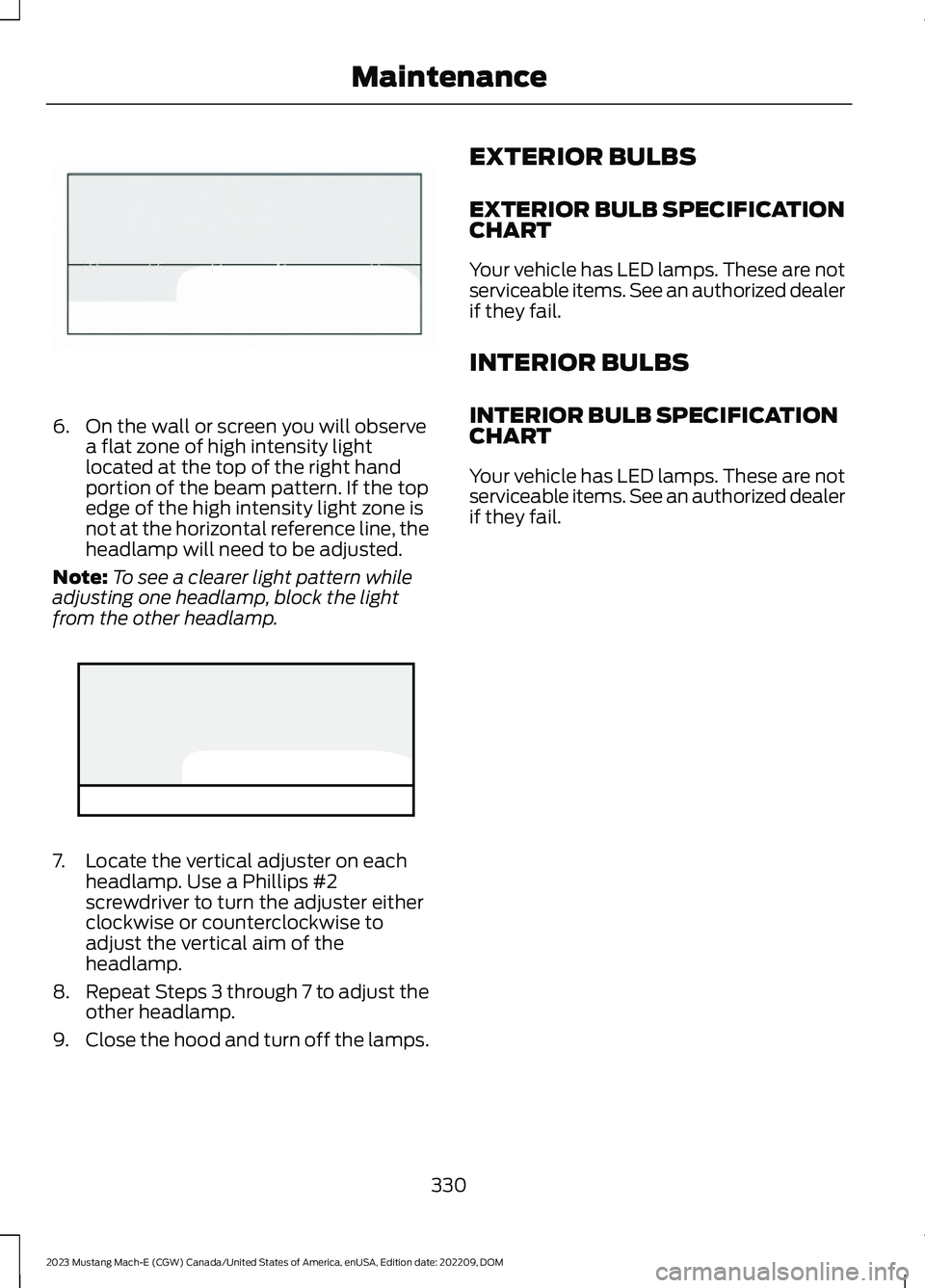
6.On the wall or screen you will observea flat zone of high intensity lightlocated at the top of the right handportion of the beam pattern. If the topedge of the high intensity light zone isnot at the horizontal reference line, theheadlamp will need to be adjusted.
Note:To see a clearer light pattern whileadjusting one headlamp, block the lightfrom the other headlamp.
7.Locate the vertical adjuster on eachheadlamp. Use a Phillips #2screwdriver to turn the adjuster eitherclockwise or counterclockwise toadjust the vertical aim of theheadlamp.
8.Repeat Steps 3 through 7 to adjust theother headlamp.
9.Close the hood and turn off the lamps.
EXTERIOR BULBS
EXTERIOR BULB SPECIFICATIONCHART
Your vehicle has LED lamps. These are notserviceable items. See an authorized dealerif they fail.
INTERIOR BULBS
INTERIOR BULB SPECIFICATIONCHART
Your vehicle has LED lamps. These are notserviceable items. See an authorized dealerif they fail.
330
2023 Mustang Mach-E (CGW) Canada/United States of America, enUSA, Edition date: 202209, DOMMaintenanceE142465 E335000
Page 361 of 496
3.Fasten the hose to the tire valve byturning the connector clockwise.Tighten the connection securely.
4.Plug the power cable into the 12-voltpower point in the vehicle.
5.Remove the warning sticker found onthe casing/housing and place it on thetop of the instrument panel or thecenter of the dash.
6.Turn dial (A) clockwise to the sealantposition. Turn the kit on by pressing theon/off button (B).
7.Inflate the tire to the pressure listed onthe tire label located on the driver dooror the door jamb area. Check the finaltire pressure with the compressorturned off to get an accurate pressurereading.
357
2023 Mustang Mach-E (CGW) Canada/United States of America, enUSA, Edition date: 202209, DOMTire Sealant and Inflator Kit E175979 E175981
Page 362 of 496

8.When the recommended tire pressureis reached, turn off the kit, unplug thepower cable, and disconnect the hosefrom the tire valve. Re-install the valvecap on the tire valve and return the kitto the rear of the vehicle.
9.Drive the vehicle 4 mi (6 km) todistribute the sealant evenly inside thetire.
Note:If you experience any unusualvibration, ride disturbance or noise whiledriving, reduce your speed until you cansafely pull off to the side of the road to callfor roadside assistance. Do not proceed tothe second stage of this operation.
Second Stage: Checking the tirepressure with the inflator kit
WARNING: If the tire does notinflate to the recommended tire pressurewithin 15 minutes, stop and call roadsideassistance.
WARNING: The power plug mayget hot after use and should be handledcarefully when unplugging.
Check the air pressure of your tires asfollows:
1.Remove the valve cap from the tirevalve.
2.Firmly screw the air compressor hoseonto the valve stem by turningclockwise.
3.Push and turn the dial clockwise to theair position.
4.If required, turn on the compressor andadjust the tire to the recommendedinflation pressure.
5.Unplug the hoses, re-install the valvecap on the tire and return the kit to therear of the vehicle.
358
2023 Mustang Mach-E (CGW) Canada/United States of America, enUSA, Edition date: 202209, DOMTire Sealant and Inflator KitE175982 E175983
Page 374 of 496

VEHICLE IDENTIFICATION
NUMBER
LOCATING THE VEHICLEIDENTIFICATION NUMBER
The vehicle identification number is on theleft-hand side of the instrument panel.
Note:In the illustration, XXXX isrepresentative of your vehicle identificationnumber.
VEHICLE IDENTIFICATIONNUMBER OVERVIEW
The vehicle identification number containsthe following information:
World manufacturer identifier.A
Brake system, gross vehicleweight rating, restraint devicesand their locations.
B
Make, vehicle line, series, bodytype.C
Engine or motor type.D
Check digit.E
Model year.F
Assembly plant.G
Production sequence number.H
INSTALLING THE VEHICLE
IDENTIFICATION CARD
Install any devices that use radio frequencyidentification, for example, toll readers orvehicle identification cards, to the specifiedarea on the windshield.
Note:Follow the vehicle identification cardprovider's installation instructions.
Note:When installing the radio frequencyidentification device, do not block objectssuch as the rain sensor and theauto-dimming sensor.
370
2023 Mustang Mach-E (CGW) Canada/United States of America, enUSA, Edition date: 202209, DOMVehicle IdentificationE311767 E142477
Page 377 of 496

CONNECTED VEHICLE –
TROUBLESHOOTING
CONNECTED VEHICLE –FREQUENTLY ASKED QUESTIONS- VEHICLES WITH: MODEM
Why can I not confirm theconnection of my FordPassaccount to the modem?
•The modem is not enabled. Switchvehicle connectivity on.
•The network signal is weak. Move yourvehicle closer to a place where thenetwork signal is not obstructed.
CONNECTED VEHICLE –FREQUENTLY ASKED QUESTIONS- VEHICLES WITH: SYNC 4
Why can I not confirm theconnection of my FordPassaccount to the modem?
•The modem is not enabled. Switchvehicle connectivity on.
•The network signal is weak. Move yourvehicle closer to a place where thenetwork signal is not obstructed.
Why can I not connect to a Wi-Finetwork?
•You entered the wrong networkpassword. Enter the correct password.
•The network signal is weak. Move yourvehicle closer to the Wi-Fi router or toa place where the network signal is notobstructed.
•There are multiple access points inrange with the same network name.Choose a unique name for yournetwork. Do not use the default nameunless it contains a unique identifier,for example as part of the MACaddress.
Why does the Wi-Fi connectiondisconnect after successfulconnection?
•The network signal is weak. Move yourvehicle closer to the Wi-Fi router or toa place where the network signal is notobstructed.
What can I do if I am close to a Wi-Fi router but the network signalstrength is weak?
•If your vehicle has a heated windshield,position your vehicle so that thewindshield is not facing the Wi-Firouter.
•If your vehicle has metallic tinting onthe windows but not on the windshield,position your vehicle so that thewindshield is facing the Wi-Fi router oropen the windows that are facing therouter.
•If your vehicle has metallic tinting onthe windows and the windshield, openthe windows that are facing the router.
•If your vehicle is in a garage and youhave the garage door closed, open thegarage door as it could block the signal.
373
2023 Mustang Mach-E (CGW) Canada/United States of America, enUSA, Edition date: 202209, DOMConnected Vehicle
Page 382 of 496

2.Press and hold a memory preset buttonon the touchscreen.
Note:The audio mutes briefly while thesystem saves the preset and returns once itis stored.
Note:You can save presets from multiplesources to the memory preset bar.
MUTING THE AUDIO
Press to mute the signal. Pressagain to restore the signal.
ADJUSTING THE SOUND
SETTINGS
To access the sound settings menu:
1.
Press the button on thetouchscreen.
2.Press Sound.
From the menu, you can adjust thefollowing:
•Balance and fade.
•Tone settings.
•Speed compensated volume.
•Volume settings.Occupancy mode.
•Sound mode.
SETTING THE CLOCK AND
DATE
1.
Press the button on thetouchscreen.
2.Press General.
3.Press Clock.
4.Set the time.
Note:The AM and PM options are notavailable if 24-hour mode is on.
Switching Automatic TimeUpdates On and Off
1.
Press the button on thetouchscreen.
2.Press General.
3.Press Clock.
4.Switch Automatic time zone updateon or off.
FM RADIO
FM RADIO LIMITATIONS
The further you travel from a FM station,the weaker the signal and the weaker thereception.
Hills, mountains, tall buildings, bridges,tunnels, freeway overpasses, parkinggarages, dense tree foliage andthunderstorms can interfere with thereception.
When you pass a ground-based broadcastrepeating tower, a stronger signal mayovertake a weaker one and result in theaudio system muting.
378
2023 Mustang Mach-E (CGW) Canada/United States of America, enUSA, Edition date: 202209, DOMAudio System E386797 E386797 E386797
Page 389 of 496
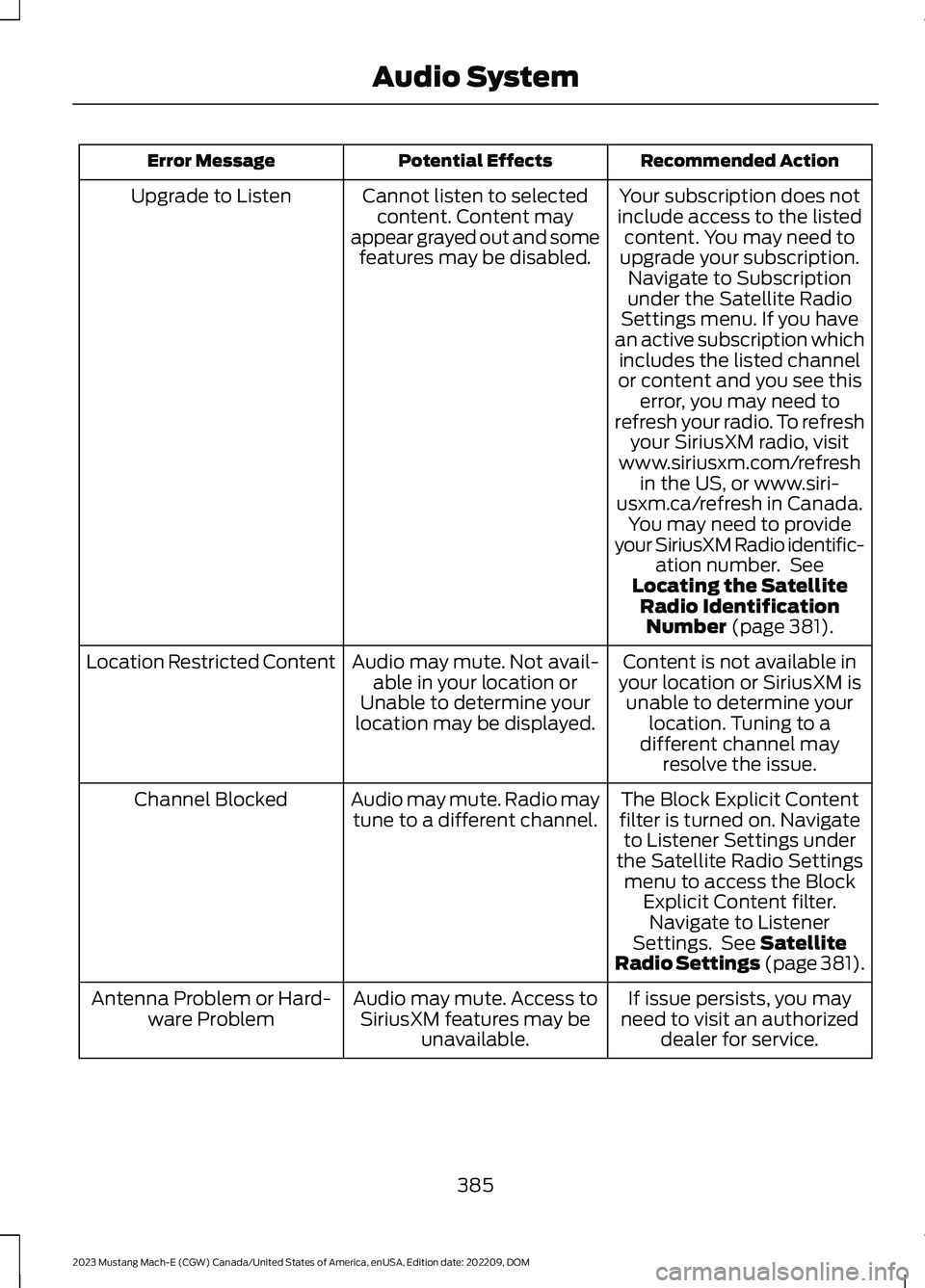
Recommended ActionPotential EffectsError Message
Your subscription does notinclude access to the listedcontent. You may need toupgrade your subscription.Navigate to Subscriptionunder the Satellite RadioSettings menu. If you havean active subscription whichincludes the listed channelor content and you see thiserror, you may need torefresh your radio. To refreshyour SiriusXM radio, visitwww.siriusxm.com/refreshin the US, or www.siri-usxm.ca/refresh in Canada.You may need to provideyour SiriusXM Radio identific-ation number. SeeLocating the SatelliteRadio IdentificationNumber (page 381).
Cannot listen to selectedcontent. Content mayappear grayed out and somefeatures may be disabled.
Upgrade to Listen
Content is not available inyour location or SiriusXM isunable to determine yourlocation. Tuning to adifferent channel mayresolve the issue.
Audio may mute. Not avail-able in your location orUnable to determine yourlocation may be displayed.
Location Restricted Content
The Block Explicit Contentfilter is turned on. Navigateto Listener Settings underthe Satellite Radio Settingsmenu to access the BlockExplicit Content filter.Navigate to ListenerSettings. See SatelliteRadio Settings (page 381).
Audio may mute. Radio maytune to a different channel.Channel Blocked
If issue persists, you mayneed to visit an authorizeddealer for service.
Audio may mute. Access toSiriusXM features may beunavailable.
Antenna Problem or Hard-ware Problem
385
2023 Mustang Mach-E (CGW) Canada/United States of America, enUSA, Edition date: 202209, DOMAudio System
Page 392 of 496

Vehicle Data
Wi-Fi available.
Wi-Fi connected.
Vehicle data sharing on.
Vehicle data sharing off.
Vehicle location sharing on.
Vehicle data and vehicle locationsharing on.
Wireless Accessory Charger
Wireless accessory chargeractive.
Action Area
The action area is on the left side of thestatus bar and contains status updatesthat may require your action. Press theicons in the action area to learn more.
Vehicle Software Update
See Software Update Indicators (page405).
CENTER DISPLAY SETTINGS
Valet Mode
Valet mode allows you to lock the system.No information is accessible until thesystem is unlocked with the correct PIN.
When you select valet mode, a pop upappears informing you that a four digitcode must be entered to enable anddisable valet mode. You can use any PINyou choose, but you must use the samePIN to disable valet mode. The systemasks you to input the code.
Note:If the system is locked and youcannot remember the PIN, please contactthe customer relationship center.
To enable valet mode, enter your chosenPIN. The system then asks to confirm yourPIN by reentering it. The system then locks.
To unlock the system, enter the same PINnumber. The system reconnects to yourphone and all of your options are availableagain.
REBOOTING THE CENTER
DISPLAY
You can reboot the center display usingthe controls on the steering wheel.
1.Simultaneously press and hold theseek forward and volume down buttonfor 10 seconds.
388
2023 Mustang Mach-E (CGW) Canada/United States of America, enUSA, Edition date: 202209, DOMCenter Display OverviewE353219 E335292 E353214
