Page 81 of 556
KEYLESS ENTRY –
TROUBLESHOOTING
KEYLESS ENTRY – FREQUENTLYASKED QUESTIONS
Why does the keyless entry system notfunction?
If the system does not function it maybe limited. See Keyless EntryLimitations (page 76). If the systemstill does not function use the remotecontrol or the key blade to lock andunlock your vehicle.
Why can I not lock my vehicle?
If you electronically lock your vehiclewith a rear door or the tailgate open,the system searches for a passive keyinside your vehicle after you close thelast door. If the system detects a key,all doors unlock indicating that a keyis inside. Your vehicle locks if anotherpassive key is within the detectionrange after you close the last door.
77
2023 Maverick (CFE) Canada/United States of America, enUSA, Edition date: 202208, First-PrintingKeyless Entry (If Equipped)
Page 83 of 556
Hints:
•Do not set a code that uses five of thesame number.
•Do not use five numbers in sequentialorder.
•The five-digit master code works evenif you have set your own personal code.
Erasing a Personal Code
1.Enter the five-digit master code.
2.Press and release 1·2 on the keypadwithin five seconds.
3.Press and hold 1·2 for two seconds.You must do this within five secondsof completing Step 2.
All personal codes erase and only thefive-digit master code works.
Anti-Scan Feature
The keypad goes into an anti-scan modeif you enter the wrong code seven times.This mode turns off the keypad for oneminute and the keypad lamp flashes.
The anti-scan feature turns off after:
•One minute of keypad inactivity.
•You press the unlock button on theremote control.
•You switch the ignition on.
•You unlock your vehicle using keylessentry.
USING THE KEYLESS ENTRY
KEYPAD
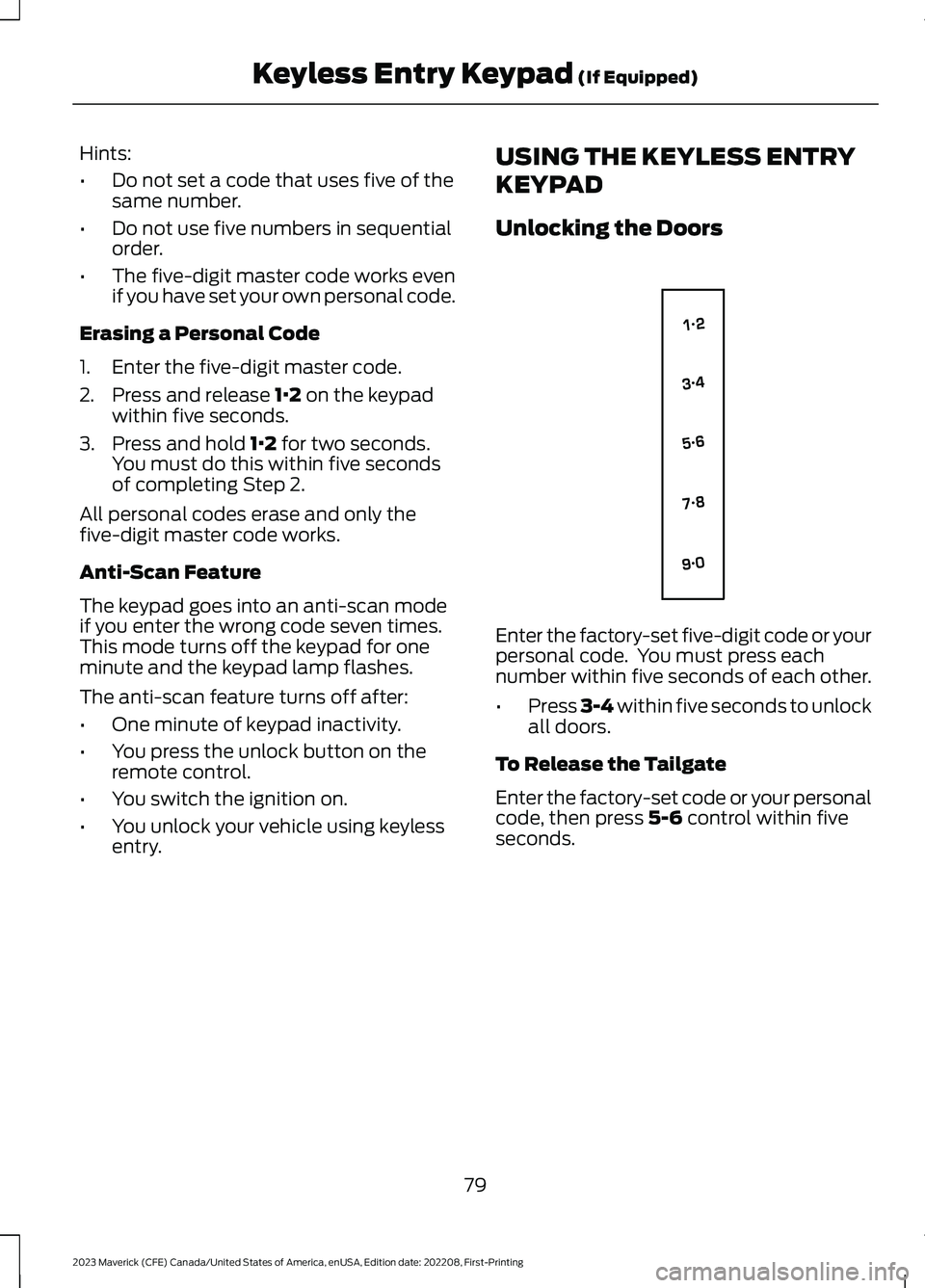
Unlocking the Doors
Enter the factory-set five-digit code or yourpersonal code. You must press eachnumber within five seconds of each other.
•Press 3-4 within five seconds to unlockall doors.
To Release the Tailgate
Enter the factory-set code or your personalcode, then press 5-6 control within fiveseconds.
79
2023 Maverick (CFE) Canada/United States of America, enUSA, Edition date: 202208, First-PrintingKeyless Entry Keypad (If Equipped)E138637
Page 86 of 556
When hauling cargo using the tailgatemiddle position, make sure the load isevenly distributed and supported using thesupport locations in the pickup bed. SeeLocating the Pickup Bed Slots (page264).
Note:Secure all cargo.
Note:The maximum load capacity for themiddle position is 500 lb (226 kg) evenlydistributed to the 2 pickup box wheelhouselocations and the tailgate.
LOCKING AND UNLOCKING
THE TAILGATE
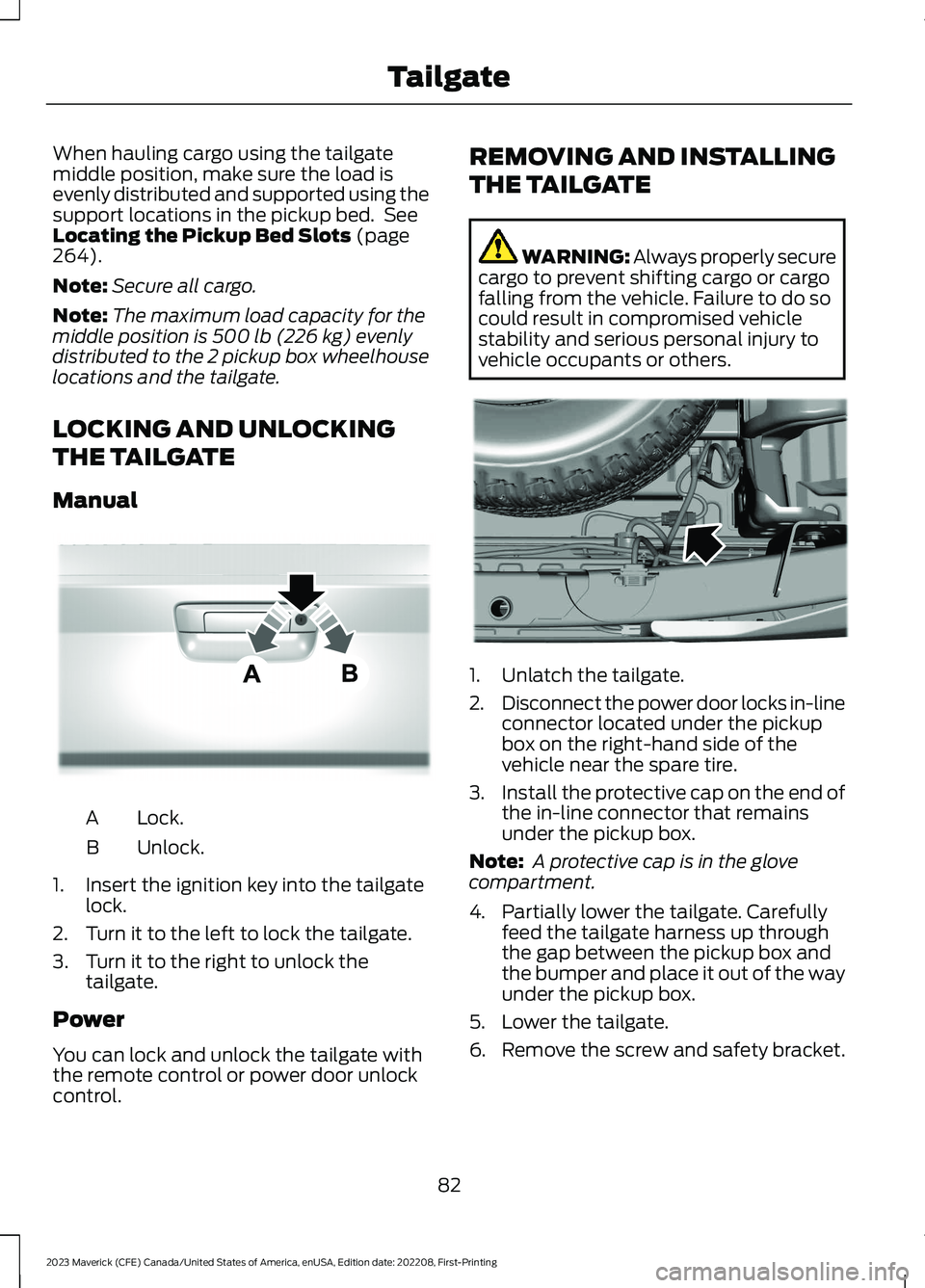
Manual
Lock.A
Unlock.B
1.Insert the ignition key into the tailgatelock.
2.Turn it to the left to lock the tailgate.
3.Turn it to the right to unlock thetailgate.
Power
You can lock and unlock the tailgate withthe remote control or power door unlockcontrol.
REMOVING AND INSTALLING
THE TAILGATE
WARNING: Always properly securecargo to prevent shifting cargo or cargofalling from the vehicle. Failure to do socould result in compromised vehiclestability and serious personal injury tovehicle occupants or others.
1.Unlatch the tailgate.
2.Disconnect the power door locks in-lineconnector located under the pickupbox on the right-hand side of thevehicle near the spare tire.
3.Install the protective cap on the end ofthe in-line connector that remainsunder the pickup box.
Note: A protective cap is in the glovecompartment.
4.Partially lower the tailgate. Carefullyfeed the tailgate harness up throughthe gap between the pickup box andthe bumper and place it out of the wayunder the pickup box.
5.Lower the tailgate.
6.Remove the screw and safety bracket.
82
2023 Maverick (CFE) Canada/United States of America, enUSA, Edition date: 202208, First-PrintingTailgateE348035 E189556
Page 88 of 556

PASSIVE ANTI-THEFT
SYSTEM
WHAT IS THE PASSIVE ANTI-THEFT SYSTEM
The passive anti-theft system preventssomeone from starting the vehicle with anincorrectly coded key.
Note:Do not leave a duplicate coded keyin your vehicle. Always take the keys andlock all the doors when leaving your vehicle.
HOW DOES THE PASSIVE ANTI-THEFT SYSTEM WORK
The passive anti-theft system arms whenyou switch the ignition off.
It disarms when the ignition is switched onwith a correctly coded key.
Note:The system is not compatible withnon-Ford aftermarket remote start systems.
Note:Do not leave a duplicate coded keyin your vehicle. Always take the keys andlock all doors when leaving your vehicle.
ANTI-THEFT ALARM SYSTEM
(IF EQUIPPED)
WHAT IS THE ANTI-THEFT ALARMSYSTEM
The anti-theft alarm system warns you ofan unauthorized entry to your vehicle.
HOW DOES THE ANTI-THEFTALARM SYSTEM WORK
When armed, the anti-theft alarm istriggered in any of the following ways:
•If someone opens a door, the liftgateor the hood without a correctly codedkey or remote control.
•If you turn the power on without acorrectly coded key.
•If the interior sensors detect movementinside your vehicle.
•If the inclination sensors detect anattempt to raise your vehicle.
•If someone disconnects the vehiclebattery or the battery backup alarm.
If the anti-theft alarm is triggered, thealarm horn sounds for 30 seconds and thedirection indicators flash for 5 minutes.
Any further attempts to carry out one ofthe above sounds the alarm again.
WHAT IS THE PERIMETER ALARM
The perimeter alarm is designed to detectunauthorized access to your vehicle.
WHAT ARE THE INTERIORSENSORS
The interior sensors are designed to detectany movement inside your vehicle.
The interior sensors are in the overheadconsole.
Note:Do not cover the interior sensors.
WHAT ARE THE INCLINATIONSENSORS
The inclination sensor is designed to detectan attempt to raise your vehicle, forexample to remove a wheel or to tow itaway.
84
2023 Maverick (CFE) Canada/United States of America, enUSA, Edition date: 202208, First-PrintingSecurity
Page 89 of 556

WHAT IS THE BATTERY BACKUPALARM
The battery backup alarm is an additionalalarm sounder that has its own battery. Itcan detect if the vehicle battery isdisconnected to overcome the alarmsystem.
ARMING THE ANTI-THEFT ALARMSYSTEM
The alarm is ready to arm when yourvehicle is switched off.
Lock your vehicle with your remote controlto arm the alarm.
DISARMING THE ANTI-THEFTALARM SYSTEM
Disarm the alarm by performing any of thefollowing actions:
•Unlock the doors or luggagecompartment with the remote control.
•Switch your vehicle on or start yourvehicle.
ANTI-THEFT ALARM SYSTEM
SETTINGS
WHAT ARE THE ALARM SECURITYLEVELS
You can select two levels of alarm security,all sensors and perimeter sensing.
All Sensors
All sensors is the standard setting.
In all sensors, all equipped sensors are onwhen you arm the alarm.
Note:Do not arm the alarm with all sensorsif passengers, animals or other movingobjects are inside your vehicle.
Perimeter Sensing
In perimeter sensing, the interior sensorsare off when you arm the alarm.
All the other equipped sensors activatewhen you arm the alarm in this mode.
SETTING THE ALARM SECURITYLEVEL
To select a different security level, use theinstrument cluster display:
1.Select Settings.
2.Select Vehicle.
3.Select Alarm.
4.Select a setting.
WHAT IS ASK ON EXIT
You can choose which level of security yourequire after you switch the ignition off.
Note:If you do not choose a setting, thesystem defaults to all sensors.
SWITCHING ASK ON EXIT ON ANDOFF
To switch the system on or off, use theinstrument cluster display:
1.Select Settings.
2.Select Vehicle.
3.Select Alarm.
4.Switch Ask on exit on or off.
85
2023 Maverick (CFE) Canada/United States of America, enUSA, Edition date: 202208, First-PrintingSecurity
Page 91 of 556
SECURITY – FREQUENTLY ASKEDQUESTIONS
What should I do if there is anypotential alarm problem with myvehicle?
Take all remote controls to anauthorized dealer if there is anypotential alarm problem with yourvehicle.
What should I do if the vehicle is unableto start with a correctly coded key?
Have your vehicle checked as soon aspossible.
87
2023 Maverick (CFE) Canada/United States of America, enUSA, Edition date: 202208, First-PrintingSecurity
Page 92 of 556

ADJUSTING THE STEERING
WHEEL
WARNING: Do not adjust thesteering wheel when your vehicle ismoving.
Note:Make sure that you are sitting in thecorrect position. See Sitting in the CorrectPosition (page 135).
1.Unlock the steering column.
2.Adjust the steering wheel to the desiredposition.
3.Lock the steering column.
HORN
Press on the center of thesteering wheel near the horn iconto activate the horn.
SWITCHING THE HEATED
STEERING WHEEL ON AND OFF
(IF EQUIPPED)
To activate the heated steeringwheel, press the button on theclimate control unit. An indicatoron the button illuminates when the heatedsteering wheel is on.
Note:The engine must be running to usethis feature.
Note:A sensor regulates the temperatureof the steering wheel.
Note:The heated steering wheel mayremain on after remote starting your vehicle,depending on the remote start settings. Itmay also turn on when you start your vehicleif it was on the last time the engine wasswitched off.
88
2023 Maverick (CFE) Canada/United States of America, enUSA, Edition date: 202208, First-PrintingSteering WheelE377742 E270945 E256621
Page 102 of 556
SWITCHING ALL OF THE
INTERIOR LAMPS ON AND OFF
The lamps turn on under the followingconditions:
•You open any door.
•You press a button on the remotecontrol.
•You press the all lamps on button onthe overhead console.
Press to switch all interior lampson or off.
SWITCHING THE FRONT
INTERIOR LAMPS ON AND OFF
Press the edge of the lamp lens.
SWITCHING THE REAR
INTERIOR LAMPS ON AND OFF
Press the edge of the lamp lens.
Note:If you switch the rear lamps onthrough the overhead console, you cannotswitch them off with the rear lamp switch.
INTERIOR LAMP FUNCTION
WHAT IS THE INTERIOR LAMPFUNCTION
The interior lamp function switches thecourtesy and door lamps on or off.
SWITCHING THE INTERIOR LAMPFUNCTION ON AND OFF
Set the switch to the middle position.
ADJUSTING THE INSTRUMENT
PANEL LIGHTING
BRIGHTNESS
The instrument lighting dimmer buttonsare on the lighting control.
Repeatedly press one of thebuttons to adjust the brightness.
AMBIENT LIGHTING
SWITCHING AMBIENT LIGHTINGON AND OFF - VEHICLESWITHOUT: SYNC 3
1.Press Settings on the touchscreen.
2.Press Vehicle Settings.
3.Press Ambient Light.
Drag the slider above zero brightness toswitch ambient lighting on.
Drag the slider to zero brightness to switchambient lighting off.
98
2023 Maverick (CFE) Canada/United States of America, enUSA, Edition date: 202208, First-PrintingInterior LightingE259649 E249791 E299443 E291299 E296433