2023 FORD MAVERICK cruise control
[x] Cancel search: cruise controlPage 229 of 556

SWITCHING FROM ADAPTIVE
CRUISE CONTROL TO CRUISE
CONTROL
WARNING: Normal cruise controlwill not brake when your vehicle isapproaching slower vehicles. Always beaware of which mode you have selectedand apply the brakes when necessary.
Use the instrument cluster display to selectthe following:
1.Select Settings.
2.Select Driver Assistance.
3.Select Cruise Control.
4.Select Normal.
The cruise control indicatorreplaces the adaptive cruisecontrol indicator if you selectnormal cruise control. The gap settingdoes not display, and the system does notrespond to lead vehicles. Automaticbraking remains active to maintain setspeed. The system remembers the lastsetting when you start your vehicle.
LANE CENTERING
HOW DOES LANE CENTERINGWORK
Adaptive cruise control with lane centeringuses the vehicle's front radar sensor andfront windshield camera sensor, togetherwith the steering sensor to operate.
Using these sensors, the system appliescontinuous steering assistance towardsdriving in the middle of the lane you chooseon highway roads.
Note:The gap setting for adaptive cruisecontrol with lane centering, operates in thesame way as normal adaptive cruise control.
LANE CENTERING PRECAUTIONS
WARNING: Do not use the systemwhen towing a trailer. Failure to followthis instruction could result in the loss ofcontrol of your vehicle, personal injury ordeath.
WARNING: Do not use the systemif any changes or modifications to thesteering wheel have been made. Anychanges or modifications to the steeringwheel could affect the functionality orperformance of the system. Failure tofollow this instruction could result in theloss of control of your vehicle, personalinjury or death.
Adaptive cruise control precautions applyto lane centering unless stated otherwiseor contradicted by a lane centeringprecaution. See Adaptive Cruise ControlPrecautions (page 219).
LANE CENTERINGREQUIREMENTS
You must keep your hands on the steeringwheel at all times.
Lane centering only activates when all ofthe following occur:
•Adaptive cruise control with lanecentering is enabled in your informationand entertainment screen. SeeSwitching Lane Centering On andOff (page 226).
•You have adaptive cruise control withstop and go enabled and set.
•The steering sensor detects your handson the steering wheel.
225
2023 Maverick (CFE) Canada/United States of America, enUSA, Edition date: 202208, First-PrintingAdaptive Cruise Control (If Equipped)E71340
Page 230 of 556

•The system detects both lane markingswhen driving on a straight road.
•Your vehicle is initially centered in thelane between two visible line markings.
Note:If the system does not detect validlane line markings, the system will remainin standby until valid line markings areavailables.
LANE CENTERING LIMITATIONS
Adaptive cruise control limitations applyto lane centering unless stated otherwiseor contradicted by a lane centeringlimitation. See Adaptive Cruise ControlLimitations (page 220).
Lane centering may not correctly operatein any of the following conditions:
•The lane width is too narrow or wide.
•The curve in the road is too small.
•The system does not detect theminimum required lane markings orwhen lanes merge or split.
•When the required steering effort tomaintain lane center exceeds the lanecentering system limit.
•When driving in areas that are underconstruction or when road work is inprogress.
•If the front windshield camera and/orthe front radar are blocked.
•When using a spare tire.
•Inclement weather conditionsincluding, but not limited to, high wind,heavy rain, and fog.
•Driving into direct sunlight.
•When modification to the steeringsystem has been made, includingalterations to the steering wheel.
•When towing a trailer.
See Lane Centering Precautions (page225).
Note:The system steering assistance islimited and may not have sufficient effortfor all driving situations and/or conditions,such as driving through tight curves ordriving through curves at high speeds.
Note:In exceptional conditions, the systemmay deviate from the lane center.
SWITCHING LANE CENTERING ONAND OFF
You must keep your hands on the steeringwheel at all times.
The controls are on the steering wheel.
Press the button.
The indicator appears in the informationdisplay. When the system is on, the colorof the indicator changes to indicate thesystem status.
You can override the system at any timeby steering your vehicle.
Note:The correct requirements must bemet before you can switch the system on.See Lane Centering Requirements (page225).
LANE CENTERING ALERTS
You must keep your hands on the steeringwheel at all times.
When the system is active and detects nosteering activity for a period of time, thesystem alerts you to put your hands on thesteering wheel. If you do not reactappropriately to the warnings the adaptivecruise control with lane centering systemcancels and slows your vehicle down toidle speeds while maintaining steeringcontrol. See Lane Centering AutomaticCancellation (page 227).
226
2023 Maverick (CFE) Canada/United States of America, enUSA, Edition date: 202208, First-PrintingAdaptive Cruise Control (If Equipped)E262175
Page 231 of 556
The system also alerts you if your vehiclecrosses lane line markings withoutdetected steering activity.
Note:The system could detect a light gripor light touch on the steering wheel ashands-off driving.
LANE CENTERING AUTOMATICCANCELLATION
When an external condition cancels thesystem, and your hands are on the steeringwheel, a tone sounds and a messageappears in the instrument cluster display.
When an external condition cancels thesystem, and your hands are not on thesteering wheel, the system immediatelyalerts you to take control of the vehicle. Ifthis alert is ignored, the system slows thevehicle while maintaining steeringassistance when lane markings areavailable. When no lane markings areavailable, the vehicle comes to a stop.
If your vehicle starts to slowdown after system cancellation,you must take full control of thevehicle. To re-enable adaptive cruisecontrol with lane centering aftercancellation, press and release the resumebutton.
Automatic cancellation can also occur if:
•The lane becomes too wide or narrow.
•The system cannot detect valid lanemarkings.
•Lane markings cross over one another.
•The curve of the road is too sharp.
Note:If your vehicle slows down due to yourinactivity twice within a key cycle, thesystem disables. To reset the system, whenthe vehicle is stationary, return the gearselector to park (P) and turn the vehicle off.Then, restart the vehicle with your foot onthe brake pedal.
LANE CENTERING MANUALCANCELLATION
When you perform the following actions,adaptive cruise control with lane centeringwill cancel:
•The brake pedal is pressed.
•Adaptive cruise control button isswitched off on the steering wheel.
The lane centering system is momentarilysuppressed when either of the followingactions are performed:
•Turn signal indicator is latched ortapped.
•You steer the vehicle out of lane.
LANE CENTERING INDICATORS
Illuminates when you switchlane centering on. The color ofthe indicator changes to indicatethe system status.
Gray status indicates the system is on butin standby mode.
Green status indicates the system isenabled and applying steering assistanceto keep the vehicle in the center of the lane.
Amber status with an audible tone, thatthen changes to gray status, indicates asystem automatic cancellation.
227
2023 Maverick (CFE) Canada/United States of America, enUSA, Edition date: 202208, First-PrintingAdaptive Cruise Control (If Equipped)E308130 E297977
Page 232 of 556
ADAPTIVE CRUISE CONTROL
– TROUBLESHOOTING
ADAPTIVE CRUISE CONTROL –INFORMATION MESSAGES -VEHICLES WITH: ADAPTIVECRUISE CONTROL WITH LANECENTERING
Note:Depending on your vehicle optionsand instrument cluster type, somemessages can appear different or not at all.
ActionMessage
You must return your hands to the steering wheel and providesteering input to cancel the message.Keep Hands on SteeringWheel
Lane centering is currently not available, due to conditionsthat prevent the system from becoming active. To reset thesystem, when the vehicle is stationary, return the gear selectorto park (P) and turn the vehicle off. Then, restart the vehiclewith your foot on the brake pedal.
Lane Centering AssistNot Available
Adaptive cruise control with lane centering is about to cancel.You must immediately take full control of the vehicle.Resume Control
Adaptive cruise control with lane centering is in standby mode.When safe to do so, you can resume adaptive cruise controlwith lane centering by applying pressure on the acceleratorpedal. Alternatively, you can also re-enable adaptive cruisecontrol with lane centering by pressing the resume button onthe steering wheel.
Press Accelerator Pedalto Resume
ADAPTIVE CRUISE CONTROL –INFORMATION MESSAGES -VEHICLES WITH: STOP AND GO
Note:Depending on your vehicle optionsand instrument cluster type, not allmessages display or are available.
Note:The system could abbreviate orshorten certain messages depending uponwhich cluster type you have.
228
2023 Maverick (CFE) Canada/United States of America, enUSA, Edition date: 202208, First-PrintingAdaptive Cruise Control (If Equipped)
Page 233 of 556

ActionMessage
A malfunction is preventing the adaptive cruise from engaging.Adaptive CruiseMalfunction
Front Sensor Not AlignedContact an authorized dealer to have the radar checked forproper coverage and operation.
Conditions exist preventing the system from being available.Adaptive Cruise NotAvailable
You have a blocked radar because of poor radar visibility dueto inclement weather or ice, mud, or water in front of the radar.You can typically clean the sensor to resolve this.
Adaptive Cruise NotAvailable SensorBlocked See ManualDue to the nature of radar technology, it is possible to get ablockage warning with no actual block. This happens, forexample, when driving in sparse rural or desert environments.A false blocked condition either self clears, or clears after yourestart your vehicle.
You have selected normal cruise control. The system doesnot brake or react to traffic.Normal Cruise ActiveAdaptive Braking Off
Displays when the adaptive cruise control is going to canceland you must take control.Adaptive Cruise - DriverResume Control
Displays when the vehicle speed is too slow to activate theadaptive cruise control and there is no lead vehicle in range.Adaptive Cruise SpeedToo Low to Activate
229
2023 Maverick (CFE) Canada/United States of America, enUSA, Edition date: 202208, First-PrintingAdaptive Cruise Control (If Equipped)
Page 241 of 556
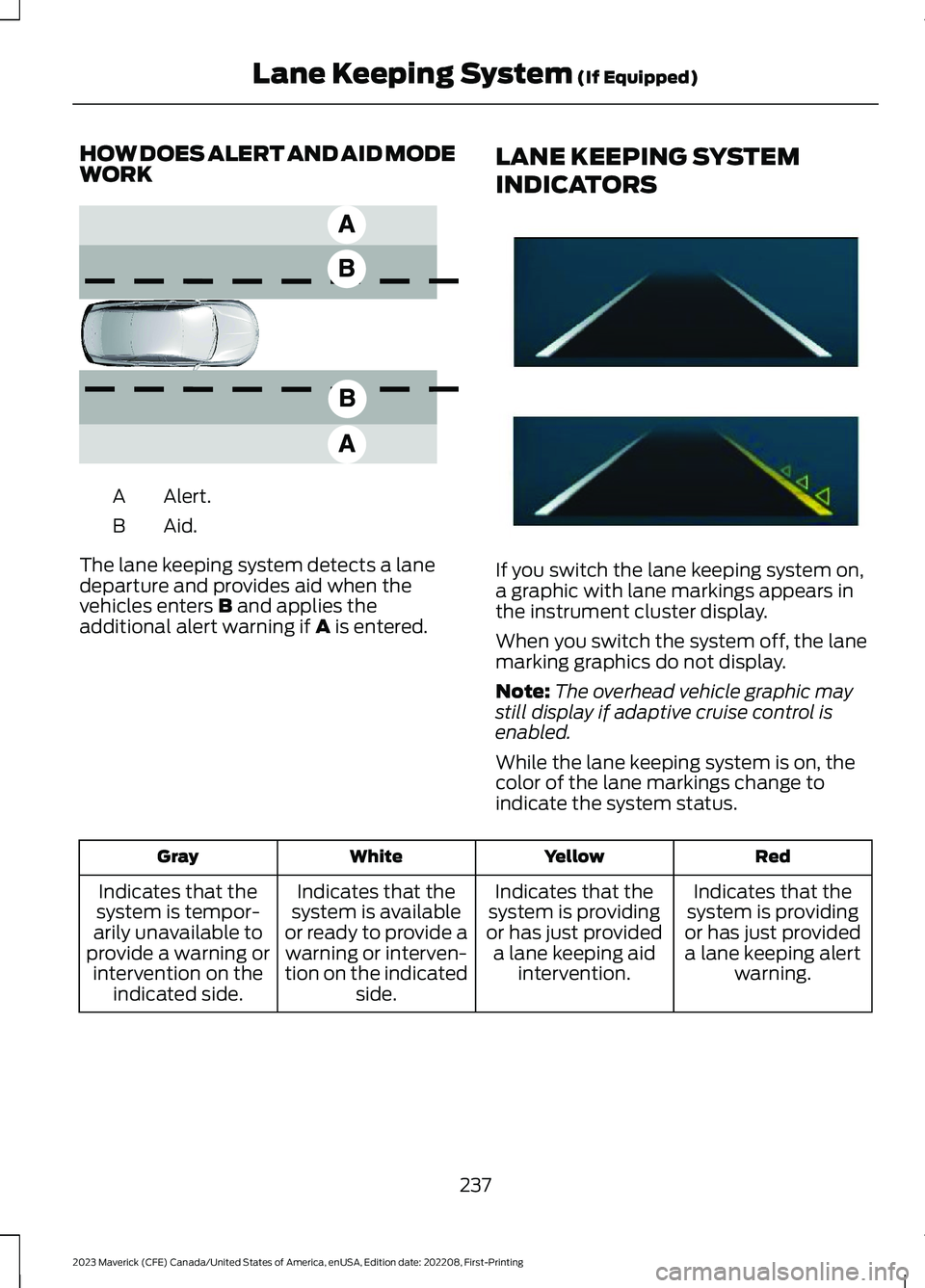
HOW DOES ALERT AND AID MODEWORK
Alert.A
Aid.B
The lane keeping system detects a lanedeparture and provides aid when thevehicles enters B and applies theadditional alert warning if A is entered.
LANE KEEPING SYSTEM
INDICATORS
If you switch the lane keeping system on,a graphic with lane markings appears inthe instrument cluster display.
When you switch the system off, the lanemarking graphics do not display.
Note:The overhead vehicle graphic maystill display if adaptive cruise control isenabled.
While the lane keeping system is on, thecolor of the lane markings change toindicate the system status.
RedYellowWhiteGray
Indicates that thesystem is providingor has just provideda lane keeping alertwarning.
Indicates that thesystem is providingor has just provideda lane keeping aidintervention.
Indicates that thesystem is availableor ready to provide awarning or interven-tion on the indicatedside.
Indicates that thesystem is tempor-arily unavailable toprovide a warning orintervention on theindicated side.
237
2023 Maverick (CFE) Canada/United States of America, enUSA, Edition date: 202208, First-PrintingLane Keeping System (If Equipped)E165517 E294544
Page 252 of 556

WARNING: The system mayoperate with reduced function duringcold and inclement weather conditions.Snow, ice, rain, spray and fog canadversely affect the system. Keep thefront camera and radar free of snow andice. Failure to follow this instruction mayresult in the loss of control of yourvehicle, serious personal injury or death.
WARNING: Take additional care ifyour vehicle is heavily loaded or you aretowing a trailer. These conditions couldresult in reduced performance of thissystem. Failure to follow this instructioncould result in the loss of control of yourvehicle, personal injury or death.
WARNING: The system cannothelp prevent all crashes. Do not rely onthis system to replace driver judgmentand the need to maintain a safe distanceand speed.
WARNING: System performancecould be reduced in situations where thevehicle camera has limited detectioncapability. These situations include butare not limited to direct or low sunlight,vehicles at night without tail lights,unconventional vehicle types, andpedestrians and cyclists with complex,partially obscured backgrounds. Failureto take care may result in the loss ofcontrol of your vehicle, personal injury ordeath.
PRE-COLLISION ASSIST
LIMITATIONS
Pre-collision assist depends on thedetection ability of its camera and sensors.Any obstructions or damage to these areascan limit detection or prevent the systemfrom functioning. See Locating thePre-Collision Assist Sensors (page 249).
The system is active at 3 mph (5 km/h)and above.
Note:Brake support and automaticemergency braking are active at speeds upto 75 mph (120 km/h). If your vehicle has aradar sensor included with adaptive cruisecontrol, then brake support and automaticemergency braking are active up to themaximum speed of the vehicle.
Pedestrian Detection Limitations
Pedestrian detection is active at speedsup to 50 mph (80 km/h).
Pedestrian detection operates optimallywhen detected hazards are clearlyidentifiable. System performance mayreduce in situations where pedestrians arerunning, partly obscured, have a complexbackground, or cannot be distinguishedfrom a group.
SWITCHING PRE-COLLISION
ASSIST ON AND OFF
You cannot switch the system off.
248
2023 Maverick (CFE) Canada/United States of America, enUSA, Edition date: 202208, First-PrintingPre-Collision Assist
Page 253 of 556

Adjusting the Pre-Collision AssistSettings
You can adjust the following settings byusing the controls in the pre-collision assistmenu:
•Change alert and distance alertsensitivity to one of three possiblesettings.
•Switch distance indication and alert onor off.
•If required, switch automaticemergency braking on or off.
•If required, switch evasive steeringassist on or off.
Note:Automatic emergency braking andevasive steering automatically turns onevery time you switch the ignition on.
Note:If you switch automatic emergencybraking off, evasive steering assist switchesoff.
LOCATING THE PRE-
COLLISION ASSIST SENSORS
Camera.1.
Radar sensor (if equipped).2.
If a message regarding a blocked sensoror camera appears in the informationdisplay, something is obstructing the radarsignals or camera images. The radar sensoris behind the fascia cover in the center ofthe lower grille. With a blocked sensor orcamera, the system may not function, orperformance may reduce. SeePre-Collision Assist – InformationMessages (page 253).
Note:Proper system operation requires aclear view of the road by the camera. Repairany windshield damage in the area of thecamera's field of view.
Note:If something hits the front end of yourvehicle or damage occurs and your vehiclehas a radar sensor, the radar sensing zonecould change. This could cause missed orfalse vehicle detections. Have your vehicleserviced to have the radar checked forproper coverage and operation.
Note:If your vehicle detects excessive heatat the camera or a potential misalignmentcondition, a message could display in theinformation display indicating temporarysensor unavailability. When operationalconditions are correct, the messagedeactivates. For example, when the ambienttemperature around the sensor decreasesor the sensor recalibrates successfully.
DISTANCE INDICATION (IF
EQUIPPED)
WHAT IS DISTANCE INDICATION
Distance indication displays the gapbetween your vehicle and the vehicleahead of you.
Note:The graphic does not display if youswitch on cruise control or adaptive cruisecontrol.
249
2023 Maverick (CFE) Canada/United States of America, enUSA, Edition date: 202208, First-PrintingPre-Collision Assist12E355015