2023 FORD F150 vehicle storage
[x] Cancel search: vehicle storagePage 11 of 786

Garage Door Opener AdditionalAssistance...................................................211
USB Ports
Locating the USB Ports - Excluding:Raptor..........................................................212
Locating the USB Ports - Raptor...........212
Playing Media Using the USB Port........213
Charging a Device........................................213
Power Outlet - Vehicles With:120V Power Outlet
What Is the Power Outlet.........................214
Power Outlet Precautions........................214
Power Outlet Limitations.........................214
Locating the Power Outlets.....................214
Power Outlet Indicators............................215
Power Outlet - Vehicles With:12V Power Outlet
What Is the Power Outlet.........................216
Power Outlet Precautions........................216
Locating the Power Outlets.....................216
Onboard Generator
What Is the Onboard Generator.............217
Onboard Generator Precautions -Vehicles With: 2kW..................................217
Onboard Generator Precautions -Vehicles With: 2.4kW/7.2kW...............218
Locating the Outlets...................................219
Onboard Generator Indicators...............219
Switching the Outlets On and Off.......220
What Is Utility Idle Mode - Vehicles With:Flip Key.........................................................221
Switching Utility Idle Mode On and Off -Vehicles With: Flip Key...........................221
What Is Generator Mode...........................221
Switching Generator Mode On and Off.........................................................................221
Resetting Ground Fault Detection.........221
Resetting the Circuit Breaker - VehiclesWith: 7.2kW................................................222
Onboard Generator – Troubleshooting........................................................................223
Center Console Work Surface
Using the Center Console Work Surface- Vehicles With: Column Shift............225
Using the Center Console Work Surface- Vehicles With: Console Shift...........226
Center Console Work Surface –Troubleshooting......................................227
Wireless Accessory Charger
What Is the Wireless Accessory Charger........................................................................228
Wireless Accessory Charger Precautions........................................................................228
Locating the Wireless Accessory Charger........................................................................228
Charging a Wireless Device.....................228
Storage
Cup Holders..................................................229
Glove Compartment.................................229
Under Seat Storage...................................230
Glasses Holder.............................................232
Starting and Stopping theEngine
Starting and Stopping the Engine –Precautions...............................................233
Ignition Switch.............................................233
Push Button Ignition Switch...................234
Starting the Engine....................................234
Engine Block Heater..................................236
Stopping the Engine...................................237
Police Engine Idle - Vehicles With: PolicePack.............................................................238
Automatic Engine Stop - Vehicles With:Keyless Entry and Push Button Start........................................................................239
7
2023 F-150 (TFD) Canada/United States of America, enUSA, Edition date: 202206, DOMTable of Contents
Page 19 of 786

Jump Starting the Vehicle......................480
Post-Crash Alert System.........................482
Automatic Crash Shutoff........................482
Recovery Towing.........................................483
Transporting the Vehicle.........................484
Towing Your Vehicle
Towing Your Vehicle Precautions.........485
Recreationally Towing Your Vehicle -4x4...............................................................485
Recreationally Towing Your Vehicle - 4x2........................................................................487
Emergency Towing.....................................487
Towing Your Vehicle – Troubleshooting........................................................................487
Fuses
Fuse Precautions.......................................488
Under Hood Fuse Box..............................488
Body Control Module Fuse Box............494
Identifying Fuse Types..............................497
Fuses – Troubleshooting.........................497
Maintenance
Maintenance Precautions.......................498
Opening and Closing the Hood............498
Under Hood Overview - 2.7L EcoBoost™.......................................................................499
Under Hood Overview - 3.3L.................500
Under Hood Overview - 3.5L Ecoboost™.........................................................................501
Under Hood Overview - 3.5L, HybridElectric Vehicle (HEV)..........................502
Under Hood Overview - 5.0L.................503
Under Hood Overview - 5.2L, Raptor.......................................................................504
Engine Oil......................................................505
Checking the Coolant...............................506
Engine Air Filter............................................510
Changing the Fuel Filter.............................511
Changing the 12V Battery.........................512
Adjusting the Headlamps - VehiclesWith: LED Headlamps...........................514
Adjusting the Headlamps - VehiclesWith: Halogen Headlamps..................515
Exterior Bulbs................................................517
Interior Bulbs................................................526
Drive Belt Routing - 2.7L EcoBoost™,Vehicles With: Dual Generators........526
Drive Belt Routing - 2.7L EcoBoost™,Vehicles With: Single Generator.......526
Drive Belt Routing - 3.3L..........................526
Drive Belt Routing - 3.5L Ecoboost™,Vehicles With: Dual Generators.........527
Drive Belt Routing - 3.5L Ecoboost™,Vehicles With: Single Generator........527
Drive Belt Routing - 3.5L, Hybrid ElectricVehicle (HEV)...........................................527
Drive Belt Routing - 5.0L, Vehicles With:Dual Generators......................................527
Drive Belt Routing - 5.0L, Vehicles With:Single Generator.....................................528
Drive Belt Routing - 5.2L..........................528
Vehicle Care
Cleaning Products......................................529
Cleaning the Exterior.................................530
Cleaning the Interior..................................532
Repairing Minor Paint Damage.............534
Waxing Your Vehicle..................................534
Storing Your Vehicle
Preparing Your Vehicle for Storage......535
Removing Your Vehicle From Storage........................................................................536
Wheel and Tire Information
Locating the Tire label..............................537
Department of Transportation UniformTire Quality Grades................................537
Information on the Tire Sidewall..........538
Glossary of Tire Terminology.................543
Tire Replacement Requirements.........544
15
2023 F-150 (TFD) Canada/United States of America, enUSA, Edition date: 202206, DOMTable of Contents
Page 34 of 786
SERVICE DATA
Service data recorders in your vehicle arecapable of collecting and storingdiagnostic information about your vehicle.This potentially includes information aboutthe performance or status of varioussystems and modules in the vehicle, suchas engine, throttle, steering or brakesystems. In order to properly diagnose andservice your vehicle, Ford Motor Company(Ford of Canada in Canada), and serviceand repair facilities may access or shareamong them vehicle diagnosticinformation received through a directconnection to your vehicle whendiagnosing or servicing your vehicle.Additionally, Ford Motor Company (Fordof Canada, in Canada) may, wherepermitted by law, use vehicle diagnosticinformation for vehicle improvement orwith other information we may have aboutyou, for example, your contact information,to offer you products or services that mayinterest you. Data may be provided to ourservice providers such as part suppliersthat may help diagnose malfunctions, andwho are similarly obligated to protect data.We retain this data only as long asnecessary to perform these functions or tocomply with law. We may provideinformation where required in response toofficial requests to law enforcement orother government authorities or thirdparties acting with lawful authority or courtorder, and such information may be usedin legal proceedings. For U.S. only (ifequipped), if you choose to use connectedapps and services, you consent that certaindiagnostic information may also beaccessed electronically by Ford MotorCompany and Ford authorized servicefacilities, and that the diagnosticinformation may be used to provideservices to you, personalizing yourexperience, troubleshoot, and to improveproducts and services and offer youproducts and services that may interest
you, where permitted by law. For Canadaonly, for more information, please reviewthe Ford of Canada privacy policy atwww.ford.ca, including our U.S. datastorage and use of service providers inother jurisdictions who may be subject tolegal requirements in Canada, the UnitedStates and other countries applicable tothem, for example, lawful requirements todisclose personal information togovernmental authorities in thosecountries.
EVENT DATA
This vehicle is equipped with an event datarecorder. The main purpose of an eventdata recorder is to record, in certain crashor near crash-like situations, such as anairbag deployment or hitting a roadobstacle; this data will assist inunderstanding how a vehicle’s systemsperformed. The event data recorder isdesigned to record data related to vehicledynamics and safety systems for a shortperiod of time, typically 30 seconds or less.
The event data recorder in this vehicle isdesigned to record such data as:
•How various systems in your vehiclewere operating.
•Whether or not the driver andpassenger seatbelts werebuckled/fastened.
•How far (if at all) the driver wasdepressing the accelerator and/or thebrake pedal.
•How fast the vehicle was traveling.
•Where the driver was positioning thesteering wheel.
This data can help provide a betterunderstanding of the circumstances inwhich crashes and injuries occur.
30
2023 F-150 (TFD) Canada/United States of America, enUSA, Edition date: 202206, DOMData Privacy
Page 104 of 786

Audio System Volume Limit
The audio system maximum volumereduces. A message appears on thetouchscreen if you attempt to exceed thevolume limit. Automatic volume controlturns off.
911 Assist
If you set 911 assist to always on, youcannot switch it off with a MyKey.
Do Not Disturb
If you set do not disturb to always on, youcannot switch it off with a MyKey.
Note:If a phone is connected using AppleCarPlay or Android Auto while driving witha MyKey, the driver can receive phone callsand text messages even if the do not disturbrestriction is on. And if the vehicle comeswith satellite radio, there is no restriction onthe adult content.
Traction and Stability Control
If you set traction control or stabilitycontrol to always on, you cannot switch itoff with a MyKey.
CREATING A MYKEY
Vehicles with a center console shifter:
1.Remove the mat from the centerconsole cup holder.
2.Remove the key blade from the remotecontrol.
3.Place the remote control in the backupslot with the buttons facing toward therear of the vehicle.
4.Switch the ignition on using the key youwant to create as MyKey.
5.Press Settings on the touchscreen.
6.Press Vehicle Settings.
7.Press MyKey.
8.Press Create MyKey.
9.Press Yes.
10.Switch the ignition off.
Note:You successfully created a MyKey.We recommend that you label this key soyou can distinguish it from the admin keys.
Note:The programmed restrictions applywhen you switch the vehicle off, open andclose the driver door and restart your vehiclewith the programmed key or remote control.
Vehicles with a column shifter:
1.Raise the center console storagecompartment lid.
2.Remove the key blade from the remotecontrol.
100
2023 F-150 (TFD) Canada/United States of America, enUSA, Edition date: 202206, DOMMyKey™ - Vehicles With: MyKey (If Equipped)E312216 E269950
Page 221 of 786
WHAT IS THE ONBOARD
GENERATOR
Pro-Power On-Board
The vehicle functions as a portablegenerator and can power devices thatrequire up to the rating listed on the poweroutlet label.
ONBOARD GENERATOR
PRECAUTIONS - VEHICLES
WITH: 2KW
WARNING: Do not connect anyvehicle power outlets to any premises.This can create a backfeed to utility lines.Failure to follow this instruction couldresult in property damage, fire, electricalshock or death.
WARNING: Do not keep electricaldevices plugged into the power outletwhenever the device is not in use. Theoutlet provides power when the vehicleis on. Failure to follow this instructioncould result in personal injury.
WARNING: Do not start the enginein a closed garage or in other enclosedareas. Exhaust fumes are toxic. Alwaysopen the garage door before you startthe engine. Failure to follow thisinstruction could result in personal injuryor death.
WARNING: Exhaust leaks mayresult in entry of harmful and potentiallylethal fumes into the passengercompartment. If you smell exhaustfumes inside your vehicle, have yourvehicle inspected immediately. Do notdrive if you smell exhaust fumes.
WARNING: The vehicle's engineruns while the generator is switched on.Running engines emit carbon monoxide.Only use the generator when the vehicleis outdoors. Failure to follow thisinstruction could result in personal injuryor death.
When you switch the power outlets on, thevehicle power down timer is disabled andthe vehicle continues to be powered on.
Note:We recommend using UL approveddevices for use with the power outlet.
Note:Make sure that plugged in devices donot exceed the ratings displayed on theoutlet covers.
Note:Unplug electrical devices from thepower outlet when they are not switchedon.
Note:Make sure there is no damage to theoutlets before driving your vehicle.
Note:Power could be limited duringextreme hot or cold temperatures tooptimize system performance.
Note:Close all outlet covers when not inuse.
Note:Automatic engine stop is disabledand the gasoline engine will continue to idlewhen the outlet is switched on.
Note:Make sure that objects are notblocking the inverter inlet and exhaust nearthe rear underseat storage compartment.
Note:The climate control system may turnon and power may be limited during extremehot or cold temperatures to optimize systemperformance.
Note:When the outlet is switched on andthe vehicle is in park (P) the engine turns off30 minutes after the low fuel warning isdisplayed. After the vehicle is turned off,generator mode only operates while drivingor until the vehicle is refueled.
217
2023 F-150 (TFD) Canada/United States of America, enUSA, Edition date: 202206, DOMOnboard Generator (If Equipped)
Page 222 of 786

Grounding Type
Neutral Floating
The neutral of the inverter generator isisolated from system ground.
Note:If additional grounding measures arerequired, consult with a qualified electrician.
ONBOARD GENERATOR
PRECAUTIONS - VEHICLES
WITH: 2.4KW/7.2KW
WARNING: Do not connect anyvehicle power outlets to any premises.This can create a backfeed to utility lines.Failure to follow this instruction couldresult in property damage, fire, electricalshock or death.
WARNING: Do not keep electricaldevices plugged into the power outletwhenever the device is not in use. Theoutlet provides power when the vehicleis on. Failure to follow this instructioncould result in personal injury.
WARNING: Do not start the enginein a closed garage or in other enclosedareas. Exhaust fumes are toxic. Alwaysopen the garage door before you startthe engine. Failure to follow thisinstruction could result in personal injuryor death.
WARNING: Exhaust leaks mayresult in entry of harmful and potentiallylethal fumes into the passengercompartment. If you smell exhaustfumes inside your vehicle, have yourvehicle inspected immediately. Do notdrive if you smell exhaust fumes.
WARNING: The vehicle's engineruns while the generator is switched on.Running engines emit carbon monoxide.Only use the generator when the vehicleis outdoors. Failure to follow thisinstruction could result in personal injuryor death.
When you switch the power outlets on, thevehicle power down timer is disabled andthe vehicle continues to be powered on.
Note:We recommend using UL approveddevices for use with the power outlet.
Note:Make sure that plugged in devices donot exceed the ratings displayed on theoutlet covers.
Note:Unplug electrical devices from thepower outlet when they are not switchedon.
Note:Make sure there is no damage to theoutlets before driving your vehicle.
Note:Power could be limited duringextreme hot or cold temperatures tooptimize system performance.
Note:Close all outlet covers when not inuse.
Note:The gasoline engine may start andstop to provide power when the outlet isswitched on.
Note:Make sure that objects are notblocking the inverter inlet and exhaust nearthe rear underseat storage compartment.
Note:The climate control system may turnon and power may be limited during extremehot or cold temperatures to optimize systemperformance.
Note:When the outlet is switched on andthe vehicle is in park (P) the engine turns off30 minutes after the low fuel warning isdisplayed. After the vehicle is turned off,generator mode only operates while drivingor until the vehicle is refueled.
218
2023 F-150 (TFD) Canada/United States of America, enUSA, Edition date: 202206, DOMOnboard Generator (If Equipped)
Page 244 of 786
ACCESSING THE PASSIVE KEY
BACKUP POSITION -
VEHICLES WITH: KEYLESS
ENTRY AND PUSH BUTTON
START
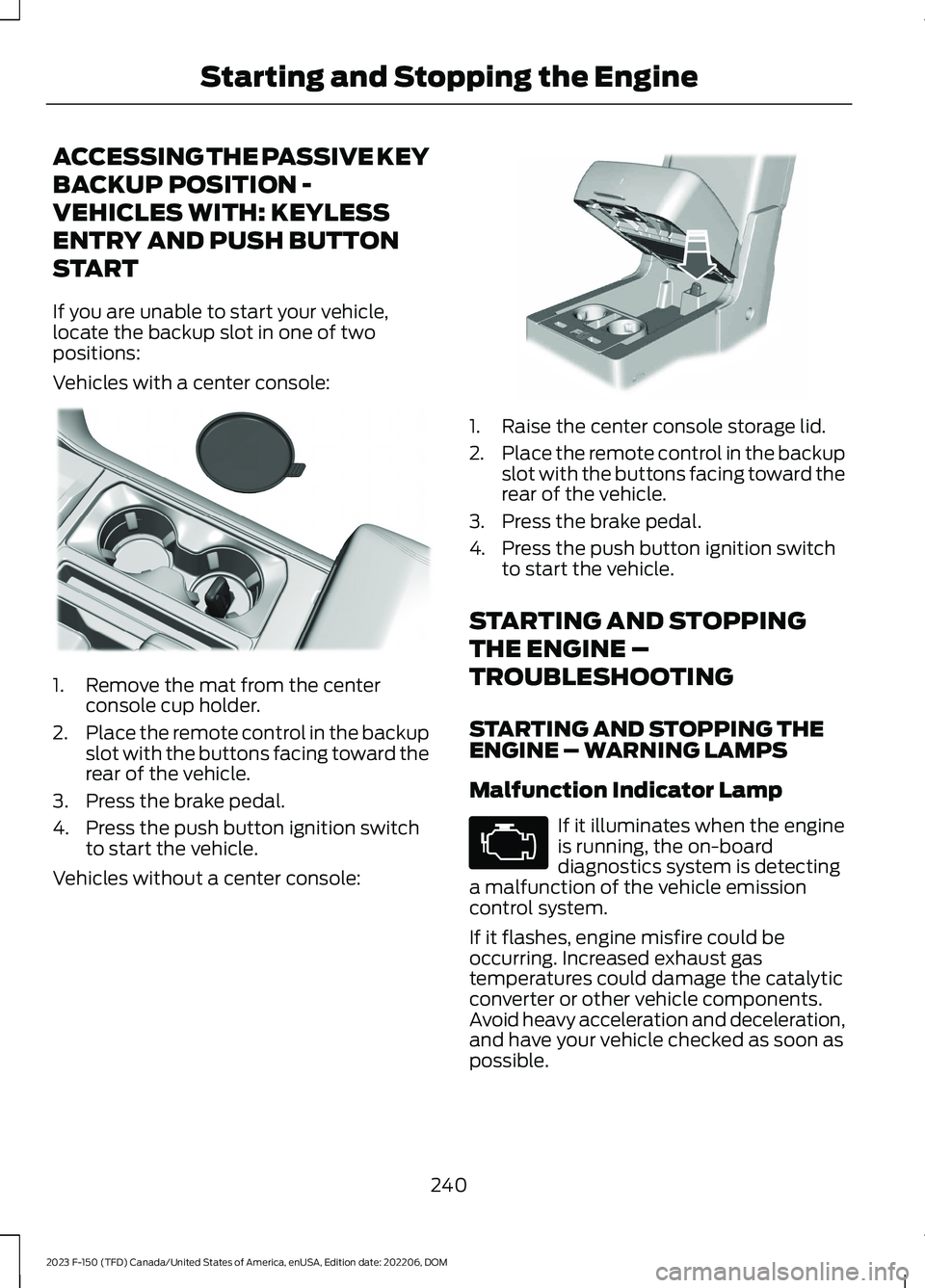
If you are unable to start your vehicle,locate the backup slot in one of twopositions:
Vehicles with a center console:
1.Remove the mat from the centerconsole cup holder.
2.Place the remote control in the backupslot with the buttons facing toward therear of the vehicle.
3.Press the brake pedal.
4.Press the push button ignition switchto start the vehicle.
Vehicles without a center console:
1.Raise the center console storage lid.
2.Place the remote control in the backupslot with the buttons facing toward therear of the vehicle.
3.Press the brake pedal.
4.Press the push button ignition switchto start the vehicle.
STARTING AND STOPPING
THE ENGINE –
TROUBLESHOOTING
STARTING AND STOPPING THEENGINE – WARNING LAMPS
Malfunction Indicator Lamp
If it illuminates when the engineis running, the on-boarddiagnostics system is detectinga malfunction of the vehicle emissioncontrol system.
If it flashes, engine misfire could beoccurring. Increased exhaust gastemperatures could damage the catalyticconverter or other vehicle components.Avoid heavy acceleration and deceleration,and have your vehicle checked as soon aspossible.
240
2023 F-150 (TFD) Canada/United States of America, enUSA, Edition date: 202206, DOMStarting and Stopping the EngineE312216 E269950 E67028
Page 539 of 786

PREPARING YOUR VEHICLE
FOR STORAGE
If you plan on storing your vehicle for 30days or more, the following maintenancerecommendations ensures your vehiclestays in good operating condition.
Under various conditions, long-termstorage may lead to degraded engineperformance or failure unless you usespecific precautions to preserve yourvehicle.
General
•Store all vehicles in a dry, ventilatedplace.
•If vehicles are stored outside, theyrequire regular maintenance to protectagainst rust and weather damage.
•Make sure all linkages, cables, leversand pins under your vehicle are coveredwith grease to prevent rust.
•Move vehicles at least 25 ft (7.5 m)every 15 days to lubricate working partsand prevent corrosion.
•Fill the fuel tank with high-quality fueluntil the first automatic shutoff of thefuel pump nozzle.
Engine
•Change the engine oil and filter prior tostorage because used engine oilcontains contaminants which maycause engine damage.
•Start the engine every 15 days for aminimum of 15 minutes. Run at fastidle with the climate controls set todefrost until the engine reaches normaloperating temperature.
•With your foot on the brake, shiftthrough all the gears while the engineis running.
Body
•Wash your vehicle thoroughly toremove dirt, grease, oil, tar or mud fromexterior surfaces, rear wheel housingsand the underside of front fenders.
•Periodically wash your vehicle if it isstored in exposed locations.
•Touch-up exposed or primed metal toprevent rust.
•Cover chrome and stainless steel partswith a thick coat of auto wax to preventdiscoloration. Rewax as necessarywhen you wash your vehicle.
•Lubricate all hood, door and luggagecompartment hinges and latches witha light grade oil.
•Cover interior trim to prevent fading.
•Keep all rubber parts free from oil andsolvents.
12 Volt Battery
•When storing your vehicle for greaterthan 30 days the state of chargeshould be approximately 50%.Additionally, we recommenddisconnecting the 12v battery whichwill reduce system loads on thebattery.
•Check and recharge as necessary. Keepconnections clean.
Note:It is necessary to reset memoryfeatures if you disconnect the batterycables.
Brakes
Make sure the brakes and parking brakerelease fully.
Note:If you intend on parking your vehiclefor an extended period after cleaning thewheels with a wheel cleaner, drive yourvehicle for a few minutes before doing so toreduce the risk of increased corrosion of thebrake discs, brake pads and linings.
535
2023 F-150 (TFD) Canada/United States of America, enUSA, Edition date: 202206, DOMStoring Your Vehicle