2023 FORD F150 tailgate
[x] Cancel search: tailgatePage 304 of 786

REVERSE BRAKING ASSIST –FREQUENTLY ASKED QUESTIONS
Why is reverse braking assist unavailable?
•Make sure the reverse braking assist ison. See Switching Reverse BrakingAssist On and Off (page 298).
•Make sure that all doors, liftgate ortailgate and hood are closed. Drive thevehicle on a straight road for a shortperiod. If the message remains, havethe system checked.
•Make sure the cross traffic alert systemis on if equipped. See Switching CrossTraffic Alert On and Off (page 388).
•Make sure the rear parking aid systemis on. See Rear Parking Aid (page 324).
•Make sure the traction control is on.See Switching Traction Control Onand Off (page 307).
Note:The traction control automaticallyturns off if four-wheel drive low and certaindrive modes such as mud/ruts andsnow/sand is activated.
•The vehicle may have sustained a rearend impact. Have the sensors checkedfor proper coverage and operation.
•An anti-lock brake, traction control orstability control event may haveoccurred. Reverse braking assistresumes operation when the event iscomplete.
•Make sure the rear view camera and360 degree camera are not dirty orobstructed. If dirty, clean the camera.If the message still appears aftercleaning the camera, wait a short timefor the message to clear. If themessage does not clear, have thesystem checked.
•Make sure the cross traffic alert andrear parking aid sensors are notblocked or faulty. See Locating theCross Traffic Alert Sensors (page388). See Locating the Rear ParkingAid Sensors (page 324).
•You recently had your vehicle serviced,or the battery disconnected. Drive yourvehicle a short distance to resumesystem operation.
•Reverse braking assist does notfunction when you connect a trailer.Operation resumes when youdisconnect the trailer.
Note:If the answers to why the system isunavailable do not assist in returning reversebraking assist to available, have the systemchecked as soon as possible.
300
2023 F-150 (TFD) Canada/United States of America, enUSA, Edition date: 202206, DOMReverse Braking Assist (If Equipped)
Page 327 of 786

PARKING AID PRECAUTIONS
WARNING: To help avoid personalinjury, always use caution when inreverse (R) and when using the sensingsystem.
WARNING: The system may notdetect objects with surfaces that absorbreflection. Always drive with due careand attention. Failure to take care mayresult in a crash.
WARNING: Traffic control systems,fluorescent lamps, inclement weather,air brakes, external motors and fans mayaffect the correct operation of thesensing system. This may cause reducedperformance or false alerts.
WARNING: The system may notdetect small or moving objects,particularly those close to the ground.
WARNING: The parking aid systemcan only assist you to detect objectswhen your vehicle is moving at parkingspeeds. To help avoid personal injury youmust take care when using the parkingaid system.
WARNING: The system may notfunction if the sensor is blocked.
WARNING: In cold and severeweather conditions the system may notfunction. Rain, snow and spray can alllimit sensor performance.
WARNING: If damage occurs in theimmediate area surrounding the sensor,have your vehicle checked as soon aspossible.
Note:If your vehicle sustains damageleaving the sensors misaligned, this willcause inaccurate measurements or falsealerts.
When you connect a trailer to your vehicle,the rear parking aid detects the trailer andprovides an alert. Disable the parking aidwhen you connect a trailer to prevent thealert.
Note:Connected trailers might be detectedby the vehicle and parking aid turns offautomatically in those instances.
Note:Certain add-on devices installedaround the bumper or fascia may createfalse alerts, for example, large trailerhitches, bike or surfboard racks, license platebrackets, bumper covers or any other devicethat could block the normal detection zoneof the parking aid system. Aftermarket sparetires or spare tire covers mounted to the reartailgate could cause false alerts from thepark aid system. Remove the add-on deviceto prevent false alerts.
Note: Keep the sensors free from snow, iceand large accumulations of dirt. If thesensors are covered, the system's accuracycan be affected.
Do not clean the sensors with sharpobjects.
Note: When using a programmed MyKey,you cannot switch the parking aids off. SeeMyKey™ (page 99).
SWITCHING PARKING AID ON
AND OFF - VEHICLES
WITHOUT: ACTIVE PARK
ASSIST
Press the parking aid button toswitch the system on and off.
323
2023 F-150 (TFD) Canada/United States of America, enUSA, Edition date: 202206, DOMParking AidsE139213
Page 333 of 786

WHAT IS THE REAR VIEW
CAMERA
The rear view camera provides a videoimage of the area behind your vehicle whenthe transmission is in reverse (R).
The rear view camera button ison the instrument panel.
REAR VIEW CAMERA
PRECAUTIONS
WARNING: The rear view camerasystem is a reverse aid supplementdevice that still requires the driver to useit in conjunction with the interior andexterior mirrors for maximum coverage.
WARNING: Objects that are closeto either corner of the bumper or underthe bumper, might not be seen on thescreen due to the limited coverage of thecamera system.
WARNING: Reverse your vehicleslowly. Failure to follow this instructioncould result in the loss of control of yourvehicle, personal injury or death.
WARNING: Use caution when therear cargo door is ajar. If the rear cargodoor is ajar, the camera will be out ofposition and the video image could beincorrect. All guide lines disappear whenthe rear cargo door is ajar. Failure tofollow this instruction could result inpersonal injury.
WARNING: Do not switch thecamera features on or off when yourvehicle is moving.
Note: When towing, the camera only seeswhat you are towing. This might not provideadequate coverage and you might not seesome objects. In some vehicles, the guidelines may disappear when you connect thetrailer tow connector.
LOCATING THE REAR VIEW
CAMERA
The rear view camera is on the tailgate. Itprovides a video image of the area behindyour vehicle.
329
2023 F-150 (TFD) Canada/United States of America, enUSA, Edition date: 202206, DOMRear View CameraE332186
Page 336 of 786

WHAT IS THE 360 DEGREE
CAMERA
The 360 degree camera system consistsof front, side and rear cameras whichprovide visibility around your vehicle.
HOW DOES THE 360 DEGREE
CAMERA WORK
The 360 Degree Camera system:
•Allows you to see what is directly infront of or behind your vehicle.
•Provides a cross traffic view in front ofand behind your vehicle.
•Allows you to see a top-down view ofthe area outside your vehicle, includingthe blind spots and obstacles near yourvehicle.
360 DEGREE CAMERA
PRECAUTIONS
WARNING: The 360 degreecamera system still requires the driverto use it in conjunction with looking outof the windows, and checking the interiorand exterior mirrors for maximumcoverage.
WARNING: Objects that are closeto either corner of the bumper or underthe bumper, might not be seen on thescreen due to the limited coverage of thecamera system.
WARNING: Do not switch thecamera features on or off when yourvehicle is moving.
WARNING: You are responsible forcontrolling your vehicle at all times. Thesystem is designed to be an aid and doesnot relieve you of your responsibility todrive with due care and attention. Failureto follow this instruction could result inthe loss of control of your vehicle,personal injury or death.
WARNING: Use caution when thetailgate is ajar. If the tailgate is ajar, thecamera is out of position and the videoimage could be incorrect. All guide linesdisappear when the tailgate is ajar.Failure to follow this instruction couldresult in personal injury.
WARNING: When manual zoom ison, the full area behind your vehicle maynot show. Be aware of your surroundingswhen using the manual zoom feature.
LOCATING THE 360 DEGREE
CAMERAS - EXCLUDING:
RAPTOR/TREMOR
Cargo Bed Camera
Rear View Camera
The rear view camera is on the tailgate. Itprovides a video image of the area behindyour vehicle.
Front View Camera
The front view camera is in the grille. Itprovides a video image of the area in frontof your vehicle.
Side View Camera
The side view camera is on the outsidemirror. It provides a video image of the areaon the sides of your vehicle to aid you whenparking or when backing up a trailer.
332
2023 F-150 (TFD) Canada/United States of America, enUSA, Edition date: 202206, DOM360 Degree Camera (If Equipped)
Page 337 of 786

Bed Camera
The bed camera is mounted within thehigh-mount stop lamp. It displays thecontents of your truck bed. The cameracontains a dynamic guideline to help locatethe center of your vehicle. This view canbe accessed while in drive (D) or reverse(R).
Auxiliary Camera
The auxiliary camera is a variant of the rearview camera and is accessed by pressingthe AUX button on the display screen whenmoving in reverse (R) or in drive (D). Itdisplays a rear view image from the backof a trailer while in reverse.
LOCATING THE 360 DEGREE
CAMERAS - RAPTOR/TREMOR
Cargo Bed Camera
Rear View Camera
The rear view camera is on the tailgate. Itprovides a video image of the area behindyour vehicle.
Front View Camera
The front view camera is in the grille. Itprovides a video image of the area in frontof your vehicle.
Note:The front camera switches on whenyou are in mud/ruts, deep snow/sand, rockcrawl, baja mode or in four-wheel drive low.
Side View Camera
The side view camera is on the outsidemirror. It provides a video image of the areaon the sides of your vehicle to aid you whenparking or when backing up a trailer.
Bed Camera
The bed camera is in the high-mount stoplamp. It displays the contents of your truckbed. The camera contains a dynamicguideline to help locate the center of yourvehicle. You can access this view while indrive (D) or reverse (R).
Auxiliary Camera
The auxiliary camera is a variant of the rearview camera and you can access theauxiliary view by pressing the AUX buttonon the display screen when moving inreverse (R) or in drive (D). It displays a rearview image from the back of a trailer whilein reverse.
360 DEGREE CAMERA GUIDE
LINES
Note:Active guide lines are only availablewhen the transmission is in reverse (R).
333
2023 F-150 (TFD) Canada/United States of America, enUSA, Edition date: 202206, DOM360 Degree Camera (If Equipped)
Page 414 of 786
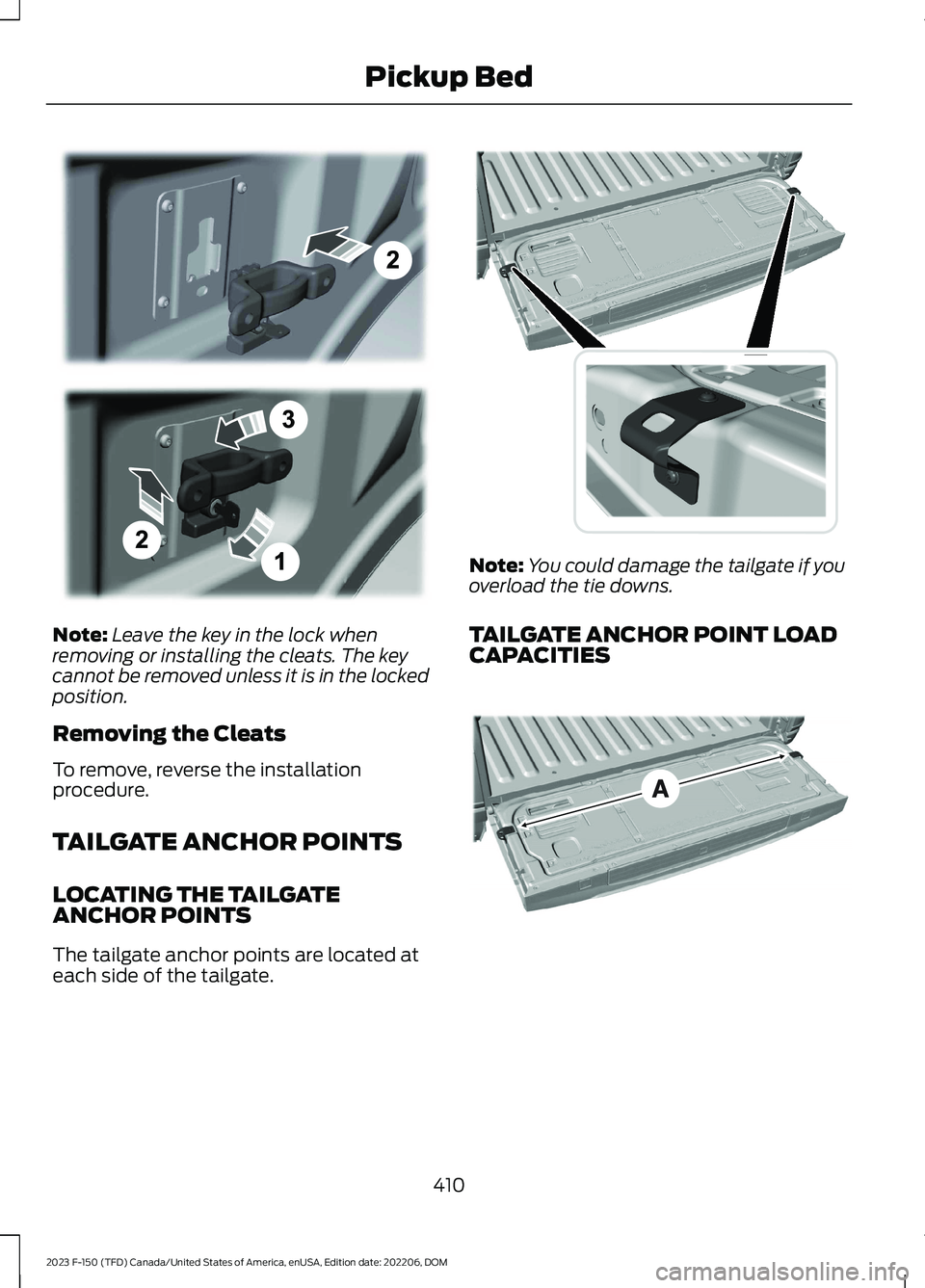
Note:Leave the key in the lock whenremoving or installing the cleats. The keycannot be removed unless it is in the lockedposition.
Removing the Cleats
To remove, reverse the installationprocedure.
TAILGATE ANCHOR POINTS
LOCATING THE TAILGATEANCHOR POINTS
The tailgate anchor points are located ateach side of the tailgate.
Note:You could damage the tailgate if youoverload the tie downs.
TAILGATE ANCHOR POINT LOADCAPACITIES
410
2023 F-150 (TFD) Canada/United States of America, enUSA, Edition date: 202206, DOMPickup BedE327575 E327594 E327790
Page 415 of 786

A
The maximum force between the tailgateanchor points 400 lb (181 kg).
Note:Do not secure cargo from a pickupbed anchor point to a tailgate anchor point.This could cause the tailgate to detach.
PICKUP BED RAMPS
PICKUP BED RAMPPRECAUTIONS
WARNING: When sliding the rampup or down, take care not to get yourfingers or hands caught in themechanism. Failure to follow thisinstruction could result in personal injury.
WARNING: Make sure that youcorrectly install the ramp to the tailgateplate. Failure to follow this instructioncould result in personal injury.
WARNING: Do not step or sit onthe ramp when it is in the stowedposition. Failure to follow this instructioncould result in personal injury.
WARNING: Only install the rampwithin the prescribed ramp angles.Failure to follow this instruction couldresult in personal injury.
Note:Each pickup bed ramp has amaximum capacity of 400 lb (181.4 kg).
Note:Verify the ramp is on stable groundbefore usage.
Note:For loading and unloadingequipment, your ramp should be setbetween 10 degrees upward and 26 degreesdownward to avoid damage to the rampclaw and tailgate plate.
Note:When using your vehicle for off-roadoperation, remove the bed ramps from thevehicle and store them in a safe locationaway from your vehicle.
INSTALLING AND REMOVING THEPICKUP BED RAMP HOLDER
Installing the Ramp Holder
1.Hook the top of the ramp holder overthe mounting plate and rotate theramp holder into position.
2.Slide the ramp holder studs upwardsinto the installed position.
411
2023 F-150 (TFD) Canada/United States of America, enUSA, Edition date: 202206, DOMPickup BedE194387 E194388
Page 416 of 786
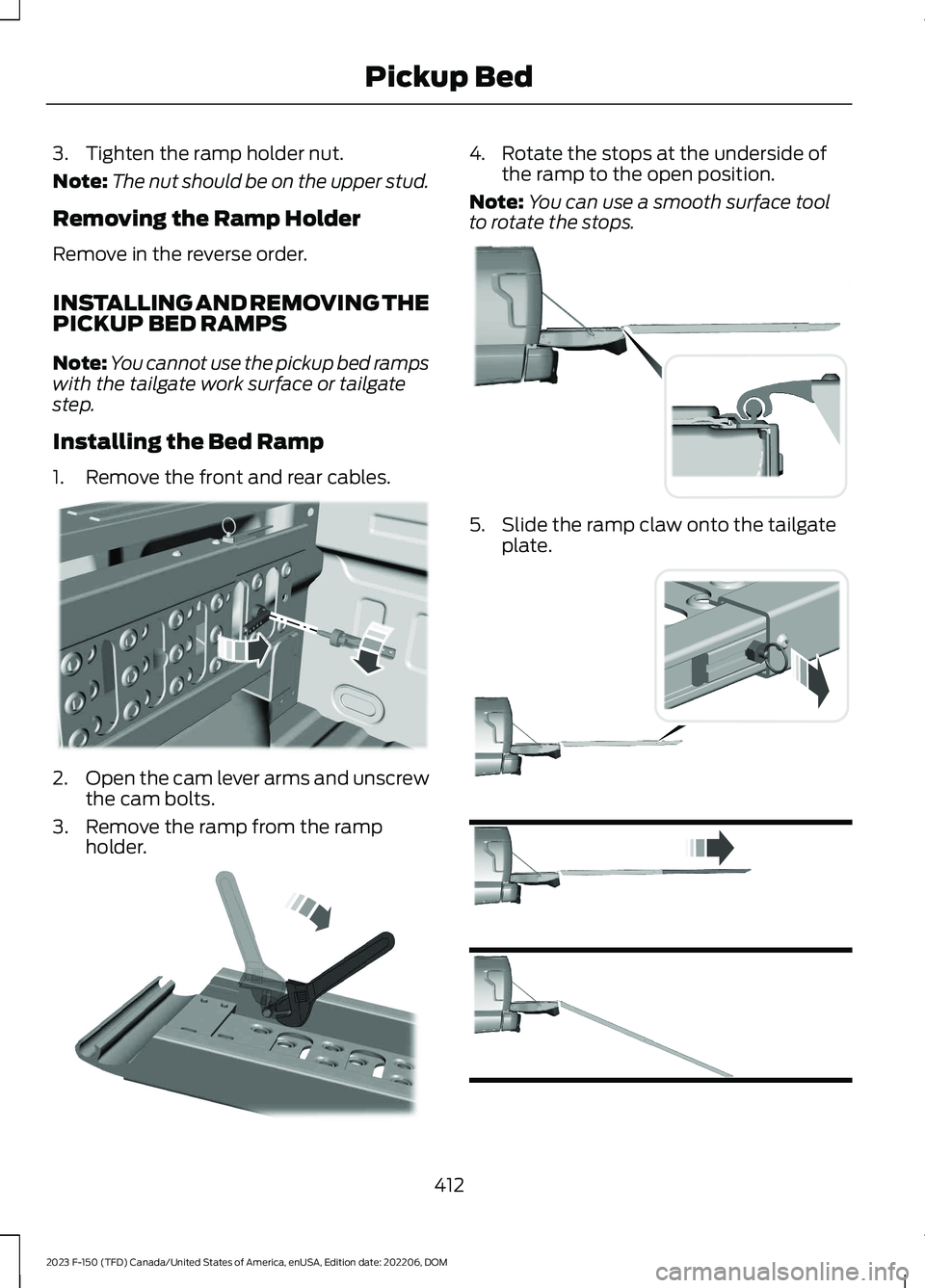
3.Tighten the ramp holder nut.
Note:The nut should be on the upper stud.
Removing the Ramp Holder
Remove in the reverse order.
INSTALLING AND REMOVING THEPICKUP BED RAMPS
Note:You cannot use the pickup bed rampswith the tailgate work surface or tailgatestep.
Installing the Bed Ramp
1.Remove the front and rear cables.
2.Open the cam lever arms and unscrewthe cam bolts.
3.Remove the ramp from the rampholder.
4.Rotate the stops at the underside ofthe ramp to the open position.
Note:You can use a smooth surface toolto rotate the stops.
5.Slide the ramp claw onto the tailgateplate.
412
2023 F-150 (TFD) Canada/United States of America, enUSA, Edition date: 202206, DOMPickup BedE194380 E211150 E194382 E194383