2023 FORD F150 buttons
[x] Cancel search: buttonsPage 362 of 786

The driver-facing camera may not operatecorrectly due to any of the following:
•You have a pre-existing eye condition,such as an eye misalignment, or havehad eye surgery.
•You cover your facial features by amask, hat or other items.
•The lighting conditions changesignificantly.
•You are not in the field of view of thecamera.
•You position or tilt yourself to one side.
•You are moving around extensively.
•You are wearing glasses or sunglassesthat are too dark or reflective.
Note:The system has limited steeringassistance and may not be sufficient for alldriving situations.
Note:In exceptional conditions, such asinclement weather or direct sunlight, thesystem could deviate from the center line.
Note:The information provided by thenavigation map data could be inaccurate orout of date.
BLUECRUISE SETTINGS
Enabling BlueCruise
1.Press Features on the touchscreen.
2.Press Driver Assistance.
3.Press Cruise Control.
4.Press Lane Centering withHands-Free.
Enabling Activation Prompts
1.Press Features on the touchscreen.
2.Press Driver Assistance.
3.Press Cruise Control.
4.Press Activation Prompts.
SWITCHING BLUECRUISE ON
AND OFF
Switching BlueCruise On
The controls are on the steering wheel.
Using Activation Prompts
When the prompt appears, pressthe button to switch BlueCruiseon.
The indicator appears in the instrumentcluster. When the system is on, the colorof the indicator changes to indicate thesystem status.
Note:You must enable activation promptsin the touchscreen.
Using Steering Wheel Controls
Using the adaptive cruise controland lateral support buttons,make sure both systems areactive. BlueCruise activates.
Switching BlueCruise Off
Press either the lateral supportor adaptive cruise control buttonwhen system is active or instandby mode.
BlueCruise turns off througheach ignition cycle.
358
2023 F-150 (TFD) Canada/United States of America, enUSA, Edition date: 202206, DOMBlueCruise (If Equipped)E144529 E308131 E144529 E308131 E144529
Page 389 of 786
5.Trailer length measurement. The trailerlength is the distance between thetrailer hitch ball and the rear of thetrailer. The maximum length that thesystem can support is 33 ft (10.1 m).
6.Enter the length of trailer. The defaultsetting is 18 ft (5.5 m). Toggling up ordown using the menu buttonsincreases or decreases themeasurement by 1 ft (0.3 m). Select alength that is equal to or within 1 ft(0.3 m) of the actual measured length.For example, if the actual measurelength is 23 ft (7 m), toggle the lengthin the menu to 24 ft (7.2 m). Thesystem setup saves when you enter thelength of the trailer.
Note:If the trailer is a bike rack or cargorack with electrical lighting, enter a lengthof around 3 ft (1 m). Cross traffic alertremains on for trailers with a length of 3 ft(1 m) or less.
Note:The system requires propermeasurement and measure entry to functionproperly.
SELECTING A TRAILER
When you connect a trailer to your vehicle,the trailer set up menu appears in thetouchscreen. This menu allows you to setup a new trailer or choose from apreviously set up trailer. A warningmessage appears and the system turns offif you do not choose or add a new trailer.
Note:The warning message may notappear until your vehicle reaches 22 mph(35 km/h).
BLIND SPOT INFORMATION
SYSTEM INDICATORS
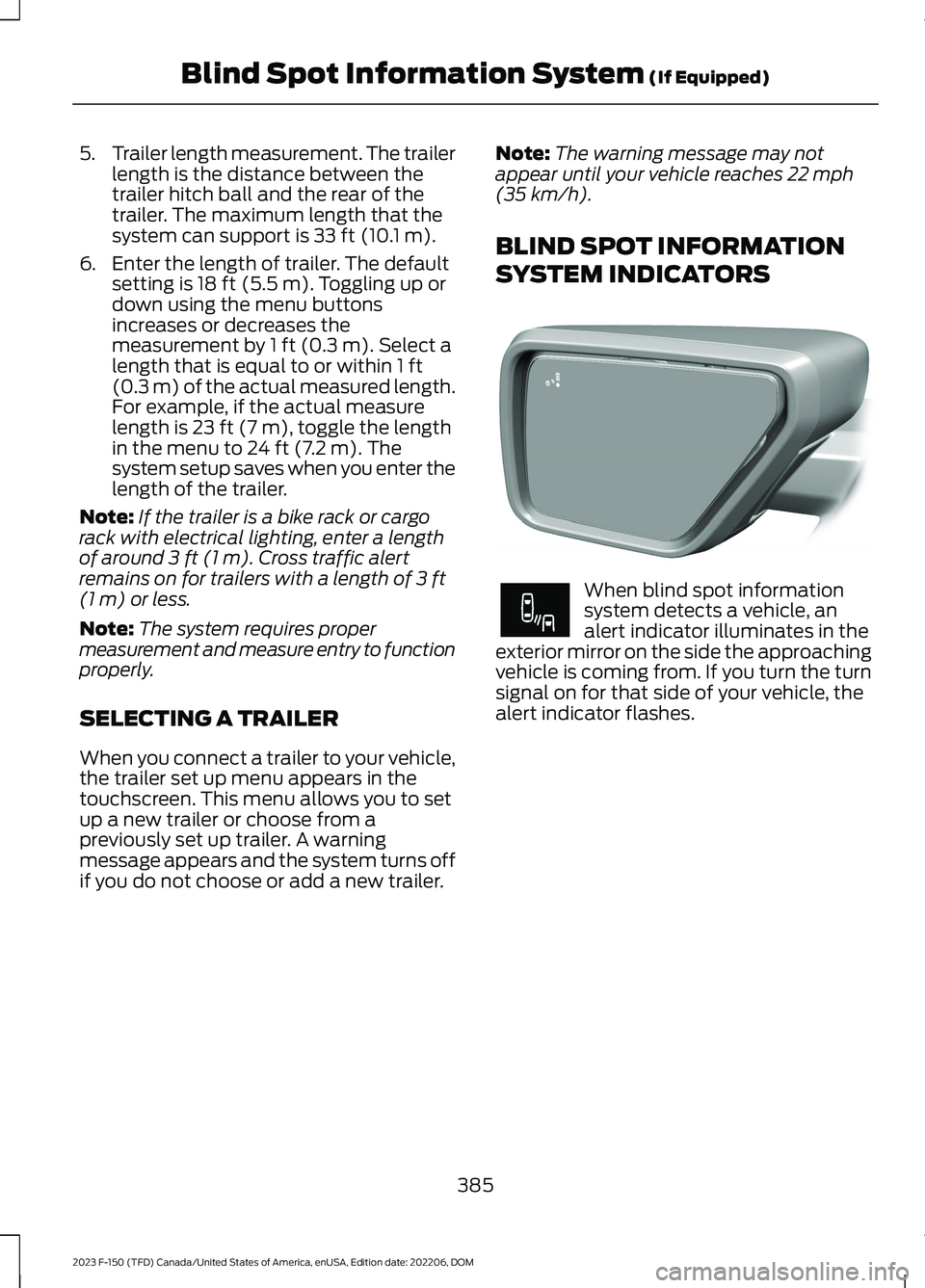
When blind spot informationsystem detects a vehicle, analert indicator illuminates in theexterior mirror on the side the approachingvehicle is coming from. If you turn the turnsignal on for that side of your vehicle, thealert indicator flashes.
385
2023 F-150 (TFD) Canada/United States of America, enUSA, Edition date: 202206, DOMBlind Spot Information System (If Equipped)E309137 E249861E249861
Page 430 of 786
6.If the trailer wheels lock up, indicatedby squealing tires, reduce the gainsetting. If the trailer wheels turn freely,increase the gain setting. Repeat Steps5 and 6 until the gain setting is at apoint just below trailer wheel lock-up.If towing a heavier trailer, trailer wheellock-up may not be attainable evenwith the maximum gain setting of 10.
Note:Only perform this procedure atspeeds of approximately 20–25 mph(30–40 km/h).
Note:The trailer brake controller reducesoutput at vehicle speeds below 11 mph(18 km/h) so that trailer and vehicle brakingis not jerky or harsh. This feature is onlyavailable when applying the brakes usingyour vehicle's brake pedal, not thecontroller.
Note:Your vehicle's brake system and thetrailer brake system work independently ofeach other. Changing the gain setting on thecontroller does not affect the operation ofyour vehicle's brakes whether you attach atrailer or not.
Note:With the proper electrical connection,pressing your vehicle brake pedal or usingthe manual control lever illuminates bothtrailer and vehicle brake lamps.
Note:When you switch the engine off, thecontroller output is disabled and the displayand module shut down. The controllermodule and display turn on when you switchthe ignition on.
Note:Trailer braking is suspended duringstop/start events to minimize battery draw.
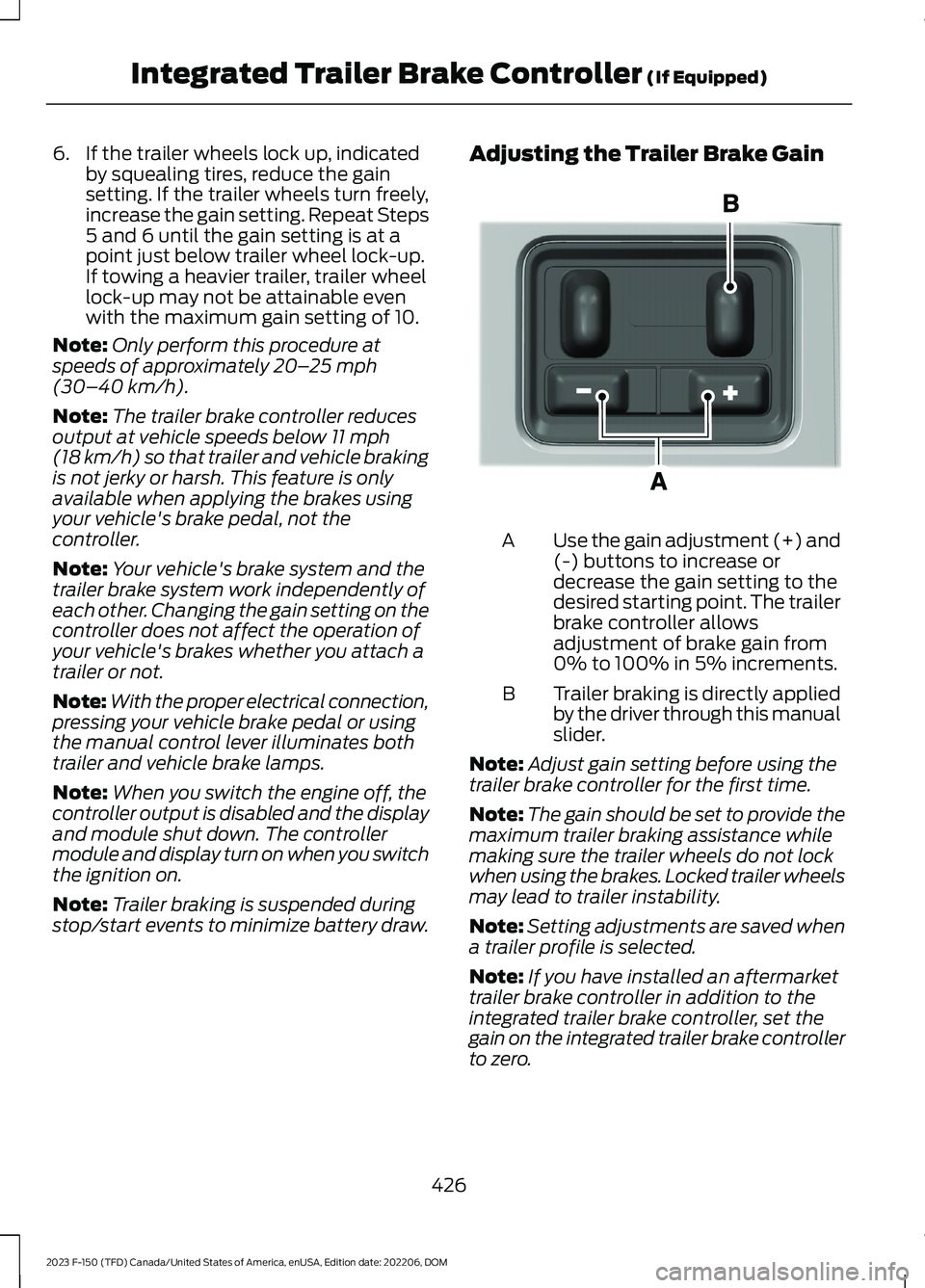
Adjusting the Trailer Brake Gain
Use the gain adjustment (+) and(-) buttons to increase ordecrease the gain setting to thedesired starting point. The trailerbrake controller allowsadjustment of brake gain from0% to 100% in 5% increments.
A
Trailer braking is directly appliedby the driver through this manualslider.
B
Note:Adjust gain setting before using thetrailer brake controller for the first time.
Note:The gain should be set to provide themaximum trailer braking assistance whilemaking sure the trailer wheels do not lockwhen using the brakes. Locked trailer wheelsmay lead to trailer instability.
Note:Setting adjustments are saved whena trailer profile is selected.
Note:If you have installed an aftermarkettrailer brake controller in addition to theintegrated trailer brake controller, set thegain on the integrated trailer brake controllerto zero.
426
2023 F-150 (TFD) Canada/United States of America, enUSA, Edition date: 202206, DOMIntegrated Trailer Brake Controller (If Equipped)E333154
Page 631 of 786

ADJUSTING THE VOLUME
Turn to adjust the volume.
Some vehicles may be able to adjust thevolume using buttons on the steeringwheel.
SWITCHING SHUFFLE MODE
ON AND OFF
Press the button on thetouchscreen to switch shufflemode on or off.
Note:Not all sources have shuffle mode.
SWITCHING REPEAT MODE ON
AND OFF
Press the button on thetouchscreen to switch repeatmode on or off.
Note:Not all sources have repeat mode.
SETTING A MEMORY PRESET
1.Select a station or channel.
2.Press and hold a memory preset buttonon the touchscreen.
Note:The audio mutes briefly while thesystem saves the preset and returns once itis stored.
Note:You can save presets from multiplesources to the memory preset bar.
MUTING THE AUDIO
Press to mute the signal. Pressagain to restore the signal.
ADJUSTING THE SOUND
SETTINGS
Balance and Fade (If Equipped)
1.Press Settings on the touchscreen.
2.Press Sound Settings.
3.Press Balance / Fade.
4.Press the arrows to adjust the settings.
Tone Settings
1.Press Settings on the touchscreen.
2.Press Sound Settings.
3.Press Tone Settings.
4.Press the arrows or slider bar to adjustthe settings.
Speed Compensated Volume
1.Press Settings on the touchscreen.
2.Press Sound Settings.
3.Press Speed Compensated Volume.
4.Press a setting.
627
2023 F-150 (TFD) Canada/United States of America, enUSA, Edition date: 202206, DOMAudio SystemE248939
Page 755 of 786

ELECTROMAGNETIC
COMPATIBILITY
WARNING: Do not place objectsor mount equipment on or near theairbag cover, on the side of the front orrear seatbacks, or in areas that maycome into contact with a deployingairbag. Failure to follow theseinstructions may increase the risk ofpersonal injury in the event of a crash.
WARNING: Do not fasten antennacables to vehicle wiring, fuel pipes andbrake pipes.
WARNING: Keep antenna andpower cables at least 4 in (10 cm) fromany electronic modules and airbags.
Note:We test and certify your vehicle tomeet electromagnetic compatibilitylegislation. It is your responsibility to makesure that any equipment an authorizeddealer installs on your vehicle complies withapplicable local legislation and otherrequirements. Installation of someaftermarket electronic devices coulddegrade the performance of vehiclefunctions, which use radio frequency signalssuch as broadcast radio receiver, tirepressure monitoring system, push buttonstart,Bluetooth® connectivity or satellitenavigation.
Note:Any radio frequency transmitterequipment in your vehicle (such as cellulartelephones and amateur radio transmitters)must keep to the parameters in thefollowing illustrations and table. We do notprovide any other special provisions orconditions for installations or use.
Car/SUV
751
2023 F-150 (TFD) Canada/United States of America, enUSA, Edition date: 202206, DOMAppendicesE239120
Page 761 of 786
Auto Hold Indicators..................................305Autolamps......................................................148Autolamp Settings.............................................148What Are Autolamps........................................148Autolock...........................................................105Autolock Requirements...................................105What Is Autolock................................................105Automatically Releasing the ElectricParking Brake.............................................295Automatic Crash Shutoff.........................482Automatic Crash ShutoffPrecautions.....................................................482Re-Enabling Your Vehicle...............................482What Is Automatic Crash Shutoff...............482Automatic Emergency Braking..............396Switching Automatic Emergency BrakingOn and Off......................................................396What Is Automatic EmergencyBraking..............................................................396Automatic Engine Stop - Vehicles With:Keyless Entry and Push ButtonStart...............................................................239How Does Automatic Engine StopWork...................................................................239Overriding Automatic Engine Stop.............239Switching Automatic Engine Stop On andOff.......................................................................239What Is Automatic Engine Stop...................239Automatic High Beam Control................152Automatic High Beam ControlIndicators..........................................................154Automatic High Beam ControlLimitations........................................................153Automatic High Beam ControlPrecautions......................................................153Automatic High Beam ControlRequirements..................................................153How Does Automatic High Beam ControlWork....................................................................152Overriding Automatic High BeamControl...............................................................154Switching Automatic High Beam ControlOn and Off.......................................................154Automatic High Beam Control –Troubleshooting.........................................154Automatic High Beam Control –Information Messages.................................154
Automatic Locking Mode...........................66Disengaging Automatic Locking Mode........67Engaging Automatic Locking Mode..............66What Is Automatic Locking Mode.................66When to Use Automatic LockingMode....................................................................66Automatic Return to Park (P)................269Automatic Return to Park (P)Limitations.......................................................270How Does Automatic Return to Park (P)Work...................................................................270What Is Automatic Return to Park(P)......................................................................269Automatic Transmission AudibleWarnings.......................................................273Automatic Transmission..........................264Automatic Return to Park (P)......................269Automatic Transmission Positions.............264Manually Shifting Gears.................................266Manual Park Release.........................................271Temporary Neutral Mode...............................268Automatic TransmissionPositions......................................................264Drive (D)................................................................264Manual (M)..........................................................265Neutral (N)..........................................................264Park (P).................................................................264Reverse (R)..........................................................264Automatic TransmissionPrecautions.................................................264Auto Mode......................................................186Auto Mode Indicators.......................................186Switching Auto Mode On and Off................186Switching Dual Mode On and Off.................187Auto-Start-Stop..........................................248Auto-Start-Stop – Troubleshooting..........249Auto-Start-Stop Indicators.....................248Auto-Start-Stop Precautions.................248Auto-Start-Stop –Troubleshooting........................................249Auto-Start-Stop – Frequently AskedQuestions........................................................250Auto-Start-Stop – InformationMessages.........................................................249Autounlock.....................................................105Autounlock Requirements..............................105Switching Autounlock On and Off...............105What Is Autounlock...........................................105
757
2023 F-150 (TFD) Canada/United States of America, enUSA, Edition date: 202206, DOMIndex
Page 772 of 786

Launching or Retrieving a Boat orPersonal Watercraft................................420Linking or Unlinking a PersonalProfile............................................................652Live Traffic......................................................654Switching Live Traffic On and Off...............654What Is Live Traffic...........................................654Load Carrying...............................................404Load Carrying Precautions......................404Loading Your Trailer.....................................419Locating the 360 Degree Cameras -Excluding: Raptor/Tremor.....................332Locating the 360 Degree Cameras -Raptor/Tremor...........................................333Locating the Auxiliary Switches.............661Locating the Auxiliary SwitchWiring............................................................662Locating the Blind Spot InformationSystem Sensors........................................383Locating the Brake Fluid Reservoir.........291Locating the Cross Traffic AlertSensors........................................................388Locating the Fuel Filler Funnel...............254Locating the Keyless Entry Keypad........110Locating the Memory FunctionButtons.........................................................207Locating the Outlets....................................219Locating the Power Outlets......................214Locating the Pre-Collision AssistSensors.........................................................393Locating the Rear View Camera............329Locating the Safety ComplianceCertification Labels.................................405Locating the Tire label...............................537Locating the USB Ports - Excluding:Raptor.............................................................212Locating the USB Ports - Raptor............212Locating the Wireless AccessoryCharger.........................................................228Locating Your Vehicle...................................92Locking and Unlocking the Tailgate........113Locking the Rear Window Controls.......162
M
Maintenance.................................................498Engine Air Filter...................................................510Engine Oil.............................................................505
Exterior Bulbs........................................................517Interior Bulbs.......................................................526Maintenance Precautions........................498Making and Receiving a PhoneCall................................................................646Manually Dimming the InteriorMirror..............................................................163Manually Releasing the Electric ParkingBrake.............................................................294Manually Shifting Gears...........................266Shifting Using the Buttons on the SelectorLever...................................................................267Shifting Using the Paddle Shifters.............266Manual Park Release...................................271Manual Park Release Precautions................271Using Manual Park Release.............................271What Is Manual Park Release.........................271Manual Seats.................................................194Adjusting the Head Restraint.........................194Adjusting the Lumbar Support.....................195Adjusting the Seat Backrest...........................195Folding the Seats...............................................202Head Restraint Components.........................194Installing the Head Restraint.........................195Moving the Seat Backward andForward.............................................................195Removing the Head Restraint.......................194Unfolding the Seats..........................................203Massage Seats..............................................199Adjusting the Massage Seat Settings........199Massage Seat Limitations..............................199Memory Function.........................................207Memory Function Precautions...............207Mislock.............................................................105Mislock Limitations............................................105Switching Mislock On and Off.......................105What Is Mislock...................................................105Mobile CommunicationsEquipment...................................................722Mobile Device Data........................................32Moonroof Bounce-Back.............................167Overriding Moonroof Bounce-Back.............167What Is Moonroof Bounce-Back...................167Moonroof.........................................................166Moonroof Bounce-Back...................................167Motorcraft Parts - 2.7LEcoBoost™.................................................585Motorcraft Parts - 3.3L..............................586
768
2023 F-150 (TFD) Canada/United States of America, enUSA, Edition date: 202206, DOMIndex
Page 778 of 786
What is the Side Parking Aid.........................326Signing Into Your Account........................642Sitting in the Correct Position..................193Smart Hitch Limitations............................435Smart Hitch...................................................435Snow Plowing Precautions......................475Snow Plowing...............................................475Snowplow Mode.................................................477Snowplow Mode..........................................477Switching Snowplow Mode On andOff.......................................................................477What Is Snowplow Mode................................477Software Update Indicators...................658Software Update Settings.......................657Software UpdateSee: Software Update Settings....................657See: Vehicle Software Updates....................657Sounding the Panic Alarm..........................92Special Operating Conditions ScheduledMaintenance - Raptor.............................676Special Operating Conditions ScheduledMaintenance...............................................673Speed ControlSee: Cruise Control...........................................340Speedometer.................................................170Speed Sign RecognitionIndicators.....................................................402Speed Sign RecognitionLimitations...................................................401Speed Sign RecognitionPrecautions.................................................401Speed Sign Recognition............................401Speed Sign Recognition –Troubleshooting............................................402Speed Sign Recognition –Troubleshooting........................................402Speed Sign Recognition – Frequently AskedQuestions........................................................403Speed Sign Recognition – InformationMessages.........................................................402Stability Control Indicator..........................311Stability Control..........................................309Starter SwitchSee: Ignition Switch...........................................233Starting and Stopping the Engine –Precautions.................................................233
Starting and Stopping the Engine.........233Automatic Engine Stop - Vehicles With:Keyless Entry and Push ButtonStart...................................................................239Engine Block Heater.........................................236Police Engine Idle - Vehicles With: PolicePack...................................................................238Starting and Stopping the Engine –Troubleshooting............................................240Starting the Engine...........................................234Stopping the Engine..........................................237Starting and Stopping the Engine –Troubleshooting........................................240Starting and Stopping the Engine –Frequently Asked Questions.....................242Starting and Stopping the Engine –Information Messages.................................241Starting and Stopping the Engine –Warning Lamps.............................................240Starting the Engine.....................................234Restarting the Engine After Stoppingit...........................................................................236Starting a Gasoline Engine.............................234Starting a Hybrid Electric VehicleSystem..............................................................235Status Bar.......................................................637Steering...........................................................320Electric Power Steering...................................320Steering – Troubleshooting............................321Steering – Troubleshooting......................321Steering – Information Messages................322Steering – Warning Indicators........................321Steering Wheel - Excluding: Raptor/Police Responder........................................35Steering Wheel - Police Responder.........37Steering Wheel - Raptor..............................36Steering Wheel.............................................140Stopping the Engine...................................248Stopping the Engine When Your Vehicle isMoving...............................................................237Stopping the Engine When Your Vehicle isStationary.........................................................237Storage............................................................229Cup Holders.........................................................229Glasses Holder....................................................232Glove Compartment.........................................229Under Seat Storage..........................................230Storing Your Vehicle....................................535
774
2023 F-150 (TFD) Canada/United States of America, enUSA, Edition date: 202206, DOMIndex