2023 FORD F150 traction control
[x] Cancel search: traction controlPage 315 of 786
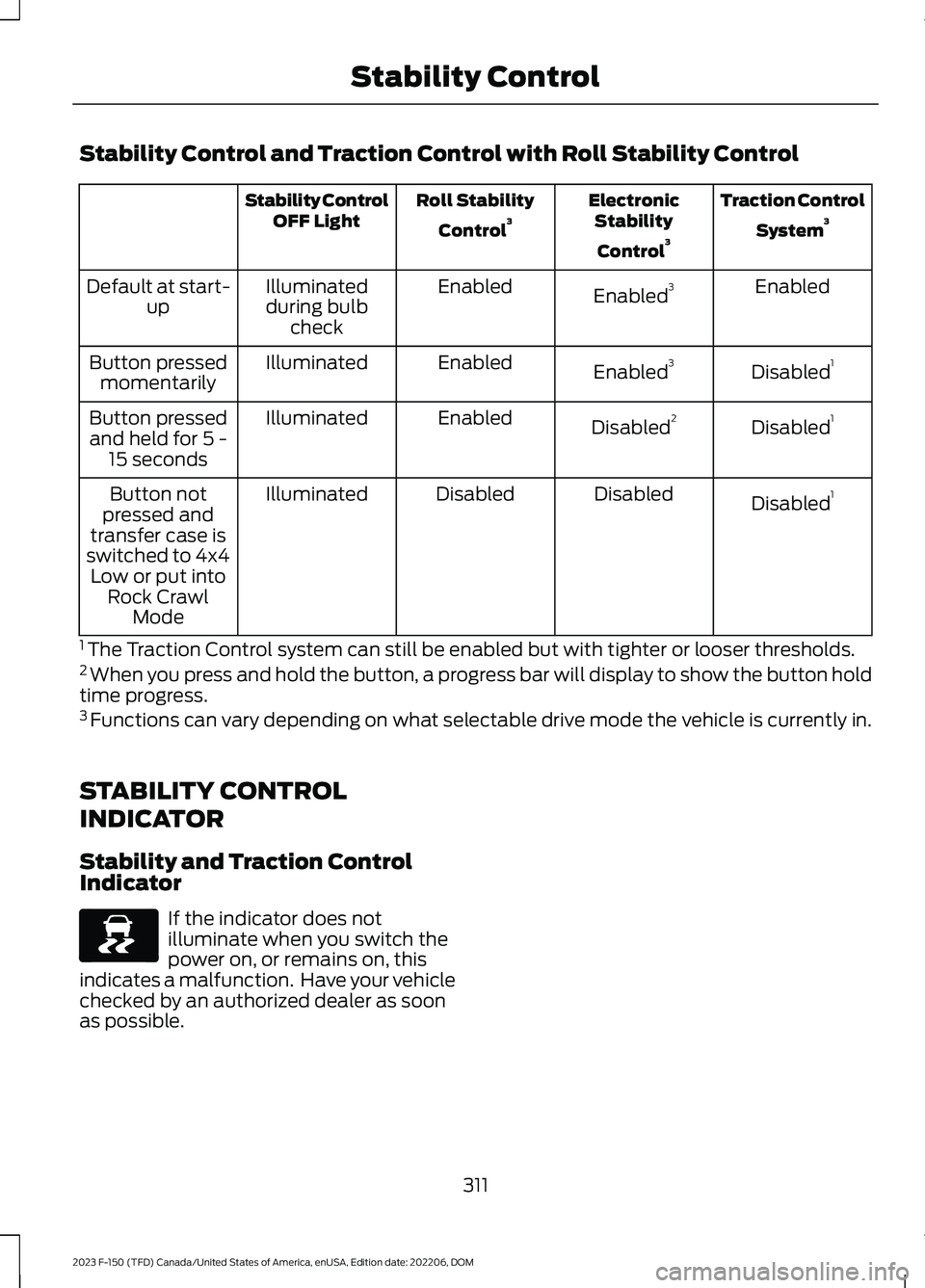
Stability Control and Traction Control with Roll Stability Control
Traction Control
System3ElectronicStability
Control3
Roll Stability
Control3Stability ControlOFF Light
EnabledEnabled3EnabledIlluminatedduring bulbcheck
Default at start-up
Disabled1Enabled3EnabledIlluminatedButton pressedmomentarily
Disabled1Disabled2EnabledIlluminatedButton pressedand held for 5 -15 seconds
Disabled1DisabledDisabledIlluminatedButton notpressed andtransfer case isswitched to 4x4Low or put intoRock CrawlMode
1 The Traction Control system can still be enabled but with tighter or looser thresholds.2 When you press and hold the button, a progress bar will display to show the button holdtime progress.3 Functions can vary depending on what selectable drive mode the vehicle is currently in.
STABILITY CONTROL
INDICATOR
Stability and Traction ControlIndicator
If the indicator does notilluminate when you switch thepower on, or remains on, thisindicates a malfunction. Have your vehiclechecked by an authorized dealer as soonas possible.
311
2023 F-150 (TFD) Canada/United States of America, enUSA, Edition date: 202206, DOMStability ControlE138639
Page 316 of 786
WHAT IS TRAIL CONTROL
WARNING: The system does notcontrol speed in low traction conditionsor extremely steep slopes. The systemis designed to be an aid and does notrelieve you of your responsibility to drivewith due care and attention. Failure tofollow this instruction could result inpersonal injury.
Trail control lets you focus on steeringduring low-speed and off-road use bycontrolling your vehicle's acceleration andbraking to maintain the speed that you set.
You may hear a noise from the anti-lockbrake system pump motor when you usethe system. This is normal.
TRAIL CONTROL LIMITATIONS
Trail control is unavailable when any of thefollowing occur:
•Your vehicle speed is greater than20 mph (32 km/h) in two-wheel drivehigh (2H) or four-wheel drive high (4H)modes.
•Your vehicle speed is greater than9 mph (15 km/h) in four-wheel drivelow (4L) mode.
•Your vehicle speed is greater than5 mph (8 km/h) in reverse (R).
•The transmission is in park (P).
•The driver side door is open or yourseatbelt is off when the driver side dooris removed.
•Cruise control is on.
•Pro trailer backup assist is on.
SWITCHING TRAIL CONTROL
ON AND OFF
Press the button.
The system switches off if you press thebutton again or exceed 40 mph (64 km/h).
SETTING THE TRAIL CONTROL
SPEED
Note:The buttons are located on thesteering wheel.
Drive to your preferred speed.
Press button to increase the setcurrent speed.
Press button to decrease the setcurrent speed.
Note:The indicator changes color.
You can adjust the set speed in small orlarge increments. Press the toggle buttonupward or downward once to adjust theset speed in small increments. Press andhold the toggle button upward ordownward to adjust the set speed in largeincrements.
You can also adjust the set speed bybraking.
Note:Pressing the brake pedal does notswitch off the system.
CANCELING THE SET SPEED
Press the button.
312
2023 F-150 (TFD) Canada/United States of America, enUSA, Edition date: 202206, DOMTrail Control - Raptor/Tremor (If Equipped)E332910 E246884 E246885 E350925
Page 322 of 786
WHAT IS HILL DESCENT
CONTROL
Hill descent control allows the driver to setand maintain vehicle speed whiledescending steep slopes in various surfaceconditions.
HOW DOES HILL DESCENT
CONTROL WORK
Hill descent control can maintain vehiclespeeds on downhill slopes between2–20 mph (3–32 km/h). Above 20 mph(32 km/h), the system remains on but thedescent speed cannot be set ormaintained.
Note:The system does not function below2 mph (3 km/h).
The system requires a cool down intervalafter a period of sustained use. Hill descentcontrol provides a warning in the messagecenter and a tone sounds when the systemis about to disengage for cooling. At thistime, manually apply the brakes as neededto maintain descent speed.
Note:The amount of time that the systemcan remain active before cooling varies withconditions.
HILL DESCENT CONTROL
PRECAUTIONS
WARNING: The system does notcontrol speed in low traction conditionsor extremely steep slopes. The systemis designed to be an aid and does notrelieve you of your responsibility to drivewith due care and attention. Failure tofollow this instruction could result inpersonal injury.
WARNING: Hill descent controlcannot control descent in all surfaceconditions and circumstances, such asice or extremely steep grades. Hilldescent control is a driver assist systemand cannot substitute for good judgmentby the driver. Failure to do so may resultin loss of vehicle control, crash or seriousinjury.
WARNING: The system does notreplace the parking brake. When youleave your vehicle, always apply theparking brake and shift the transmissioninto park (P) for automatic transmissionor first gear for manual transmission.
SWITCHING HILL DESCENT
CONTROL ON AND OFF
Press the button on theinstrument panel. A lightilluminates and a tone soundswhen the system is active.
SETTING THE HILL DESCENT
SPEED
To increase or decrease the descent speed,press the accelerator or brake pedal, or usethe SET + and SET - buttons on thesteering wheel. Once you reach thepreferred speed remove your feet from thepedals.
HILL DESCENT CONTROL
INDICATOR
Illuminates when you switch hilldescent control on.
318
2023 F-150 (TFD) Canada/United States of America, enUSA, Edition date: 202206, DOMHill Descent Control (If Equipped)E163171 E163171
Page 330 of 786

The warning tone continuously soundswhen an object is 12 in (30 cm) or less fromthe front bumper.
Note:If the detected object is 12 in (30 cm)or less from your vehicle, visual indicationremains on.
SIDE PARKING AID (IF EQUIPPED)
WHAT IS THE SIDE PARKING AID
The front and rear outermost parking aidsensors map objects that are near to thesides of your vehicle.
SIDE PARKING AID LIMITATIONS
The sensor coverage is up to 24 in (60 cm)from the sides of your vehicle.
The side parking aid may not function if:
•Your vehicle remains stationary for overtwo minutes.
•The anti-lock brake system activates.
•The traction control system activates.
•Your vehicle is in park (P).
•The steering wheel angle informationis not available. You must drive at least492 ft (150 m) above 19 mph(30 km/h) to reset the steering wheelangle information.
Note:If you switch traction control off, theside sensing system also turns off.
To reinitialize the system, drive the lengthof your vehicle.
The side parking aid does not detect anobject that is moving toward the side ofyour vehicle, for example another vehiclemoving at a low speed, if it does not passa front or rear parking aid sensor.
If the transmission is in reverse (R), the sidesensing system provides audible warnings.When your vehicle is moving slowly,obstacles are detected within 24 in(60 cm) and are inside the driving path ofyour vehicle. If your vehicle remainsstationary for a few seconds, the audiblewarning turns off. Visual indication isalways present in reverse (R).
If your vehicle is in neutral (N), the sidesensing system provides visual indicationonly when your vehicle is moving slowlyand there is a front or rear parking aidobstacle detected, and the side obstacleis within 24 in (60 cm) from the side ofyour vehicle. If your vehicle remainsstationary for a few seconds, the visualindication turns off.
If the transmission is in drive (D) or anyother forward gear, the side sensing systemprovides audible and visual warnings.When your vehicle is moving slowly,obstacles are detected within 24 in(60 cm) and are inside the driving path ofyour vehicle. If your vehicle remainsstationary for a few seconds, the visualindication and audible warning turns off.
LOCATING THE SIDE PARKING AIDSENSORS
326
2023 F-150 (TFD) Canada/United States of America, enUSA, Edition date: 202206, DOMParking AidsE310321
Page 342 of 786

4.Use the turn signal to choose thedirection to exit the parking space.
5.Press and hold the brake pedal.
6.Release the steering wheel and shiftinto neutral (N).
7.Release the parking brake.
8.Press and hold the parking aid button.
9.Release the brake pedal to allow yourvehicle to move.
Note:After active park assist drives yourvehicle to a position where you can exit theparking space in a forward movement, amessage appears instructing you to take fullcontrol of your vehicle.
10.Take control of your vehicle.
Note:You can slow down your vehicle atany time by pressing the brake pedal.
ACTIVE PARK ASSIST –
TROUBLESHOOTING
ACTIVE PARK ASSIST –INFORMATION MESSAGES
ActionMessage
The systemrequires service.Have your vehiclechecked as soon aspossible.
Active Park Fault
ACTIVE PARK ASSIST –FREQUENTLY ASKED QUESTIONS
Why does active park assist notoperate correctly?
The system is unable to detect avehicle, curb or object to park next toor in between. The system needsboundary objects to operate correctly.
Why does active park assist not searchfor a parking space?
You have switched traction control off.
Why does active park assist not searchfor a parking space?
The transmission is in reverse (R). Yourvehicle must be moving forward to beable to detect a parking space.
Why does active park assist not offera parking space?
The sensors could be blocked. Forexample, snow, ice or largeaccumulations of dirt. Blocked sensorscan affect how the system functions.
Why does active park assist not offera parking space?
The sensors in the front or rear bumpercould be damaged.
Why does active park assist not offera parking space?
There is not enough room in theparking space for your vehicle to safelypark.
Why does active park assist not offera parking space?
There is not enough space for theparking maneuver on the opposite sideof the parking space.
Why does active park assist not offera parking space?
The parking space is more than 5 ft(1.5 m) or less than 2 ft (0.5 m) awayfrom your vehicle.
Why does active park assist not offera parking space?
Your vehicle's speed is greater than22 mph (35 km/h) for parallel parkingor greater than 19 mph (30 km/h) forperpendicular parking.
338
2023 F-150 (TFD) Canada/United States of America, enUSA, Edition date: 202206, DOMActive Park Assist (If Equipped)
Page 349 of 786

Switching Adaptive Cruise ControlOff
Press the button when thesystem is in standby mode orswitch the ignition off.
Note:When you switch the system off, theset speed clears.
ADAPTIVE CRUISE CONTROL
AUTOMATIC CANCELLATION
The system may cancel if:
•The tires lose traction.
•You apply the parking brake.
The system may cancel and set the parkingbrake if:
•You unbuckle the seatbelt and openthe driver door after adaptive cruisecontrol stops your vehicle.
•Adaptive cruise control holds yourvehicle at a stop continuously for morethan three minutes.
The system may deactivate or preventactivating when requested if:
•The vehicle has a blocked sensor.
•The brake temperature is too high.
•There is a failure in the system or arelated system.
SETTING THE ADAPTIVE
CRUISE CONTROL SPEED
Drive to the speed you prefer.
Press the SET+ or SET- buttonsto set the current speed.
Take your foot off the accelerator pedal.
The indicator, current gap setting and setspeed appear in the instrument clusterdisplay.
A vehicle image illuminates if there is avehicle detected in front of you.
Note:When adaptive cruise control isactive, the speedometer may vary slightlyfrom the set speed displayed in theinstrument cluster display.
Setting the Adaptive Cruise Speedfrom a Complete Stop
Press the SET+ or SET- buttonswhile keeping the brake pedalfully depressed.
The set speed adjusts to 20 km/h when inmetric units or 15 mph when in imperialunits.
The indicator, current gap setting and setspeed appear in the instrument clusterdisplay.
Note:The system activates from acomplete stop only when it detects a leadvehicle in close proximity.
345
2023 F-150 (TFD) Canada/United States of America, enUSA, Edition date: 202206, DOMAdaptive Cruise Control (If Equipped)E144529 E246884 E246885 E337576 E246884 E246885
Page 366 of 786
WHAT IS DRIVE MODE
CONTROL
Your vehicle has various drive modes thatyou can select for different drivingconditions. Depending on the drive modethat you select, the system adjusts variousvehicle settings.
HOW DOES DRIVE MODE
CONTROL WORK
Selectable drive modes change variouselectronic and mechanical settings withinyour vehicle to tailor its performance anddriving characteristics to on-road oroff-road driving conditions. Steering feeland effort, traction control, stabilitycontrol, chassis controls, powertrainresponse, transmissions shift points,four-wheel driveline setting, exhaust noiselevel and suspension dampening areautomatically altered to a pre-determinedsetting depending upon the drive modethat is selected.
Note:Your vehicle has diagnostic checksthat continuously monitor all systems forproper operation. If a drive mode isunavailable due to a system fault, yourvehicle defaults to normal mode and thedriveline remains in the four-wheel drivesetting that was last selected prior to thesystem fault.
Note:Your vehicle reverts to normal modeeach time it is started. If you shut yourvehicle off in a drive mode other thannormal mode, at startup the instrumentcluster screen displays a pop-up asking ifyou would like to return to your last useddrive mode. If you select yes to the pop-up,your vehicle returns to the last selected drivemode and the default four-wheel drivelinesetting associated with that drive mode. Ifyou select no, your vehicle remains in normalmode and the default four-wheel drivelinesetting associated with that drive mode. Ifyou do not select yes or no the pop upmessage times out, your vehicle remains innormal mode, and the four-wheel drivelinesetting remains in its last used setting.
HOW DOES DRIVE MODE
CONTROL WORK - RAPTOR
Selectable drive modes change variouselectronic and mechanical settings withinyour vehicle to tailor its performance anddriving characteristics to on-road oroff-road driving conditions. Steering feeland effort, traction control, stabilitycontrol, chassis controls, powertrainresponse, transmission shift points,four-wheel driveline settings, exhaust noiselevel and suspension dampening areautomatically altered to a pre-determinedsetting depending upon the drive modethat you select.
Note:Your vehicle has diagnostic checksthat continuously monitor all systems forproper operation. If a drive mode isunavailable due to a system fault, yourvehicle defaults to normal mode and thedriveline remains in the four-wheel drivesetting that you last selected prior to thesystem fault.
362
2023 F-150 (TFD) Canada/United States of America, enUSA, Edition date: 202206, DOMDrive Mode Control
Page 369 of 786
•Baja – Loudest setting for off-road useonly. Maximum exhaust noise under alldriving conditions.
•Quiet – Quietest setting for maximumcomfort under all driving conditions.
MyMode
You can use MyMode to createone custom vehicleconfiguration based on thecurrent state of your vehicle.
When you have your vehicle configured toyour desired settings, you can press andhold the button for a few seconds to saveas MyMode.
Double-pressing the button activates yoursaved MyMode.
You can check the saved MyMode settingswith a single press of the button.
You can save the following settings asMyMode:
•Drive mode.
•Steering mode.
•Suspension mode.
•Exhaust mode.
•Four-wheel drive mode.
•Stop and start on or off.
•Rear electronic locking differential onor off.
Note:MyMode can only be set withconfigurations that are available for eachdrive mode. See Drive Modes (page 365).
Note:You can save or view MyMode at anytime, regardless of your vehicle's speed ortransmission selection, as long as yourvehicle is running and it meets systemconditions.
Note:When activating MyMode, yourvehicle must meet all preconditions for thedrive mode and various settings before itactivates. A message appears if it does notmeet system conditions.
DRIVE MODES
BAJA - RAPTOR
For high speed off-road driving.Baja mode optimizes the throttlecontrol for better response andtorque delivery.
Four-wheel drive high is the defaultfour-wheel drive mode. Four-wheel driveauto is not available in baja mode.
Off-road is the default steering andsuspension modes. All steering andsuspension modes are available.
Baja is the default exhaust mode. Allexhaust modes are available.
The system tunes the engine andtransmission controls to baja mode.
The system tunes the stability and tractioncontrols to baja mode.
The electronic locking differential isavailable at all speeds in four-wheel drive.See Switching the Electronic LockingDifferential On and Off (page 285).
Note:Using baja mode on dry, hardsurfaces could produce some vibration,driveline bind up, and potential excessivetire and vehicle wear depending on thefour-wheel drive mode selection.
365
2023 F-150 (TFD) Canada/United States of America, enUSA, Edition date: 202206, DOMDrive Mode ControlE359278 E225314