2023 FORD F150 change time
[x] Cancel search: change timePage 366 of 786
WHAT IS DRIVE MODE
CONTROL
Your vehicle has various drive modes thatyou can select for different drivingconditions. Depending on the drive modethat you select, the system adjusts variousvehicle settings.
HOW DOES DRIVE MODE
CONTROL WORK
Selectable drive modes change variouselectronic and mechanical settings withinyour vehicle to tailor its performance anddriving characteristics to on-road oroff-road driving conditions. Steering feeland effort, traction control, stabilitycontrol, chassis controls, powertrainresponse, transmissions shift points,four-wheel driveline setting, exhaust noiselevel and suspension dampening areautomatically altered to a pre-determinedsetting depending upon the drive modethat is selected.
Note:Your vehicle has diagnostic checksthat continuously monitor all systems forproper operation. If a drive mode isunavailable due to a system fault, yourvehicle defaults to normal mode and thedriveline remains in the four-wheel drivesetting that was last selected prior to thesystem fault.
Note:Your vehicle reverts to normal modeeach time it is started. If you shut yourvehicle off in a drive mode other thannormal mode, at startup the instrumentcluster screen displays a pop-up asking ifyou would like to return to your last useddrive mode. If you select yes to the pop-up,your vehicle returns to the last selected drivemode and the default four-wheel drivelinesetting associated with that drive mode. Ifyou select no, your vehicle remains in normalmode and the default four-wheel drivelinesetting associated with that drive mode. Ifyou do not select yes or no the pop upmessage times out, your vehicle remains innormal mode, and the four-wheel drivelinesetting remains in its last used setting.
HOW DOES DRIVE MODE
CONTROL WORK - RAPTOR
Selectable drive modes change variouselectronic and mechanical settings withinyour vehicle to tailor its performance anddriving characteristics to on-road oroff-road driving conditions. Steering feeland effort, traction control, stabilitycontrol, chassis controls, powertrainresponse, transmission shift points,four-wheel driveline settings, exhaust noiselevel and suspension dampening areautomatically altered to a pre-determinedsetting depending upon the drive modethat you select.
Note:Your vehicle has diagnostic checksthat continuously monitor all systems forproper operation. If a drive mode isunavailable due to a system fault, yourvehicle defaults to normal mode and thedriveline remains in the four-wheel drivesetting that you last selected prior to thesystem fault.
362
2023 F-150 (TFD) Canada/United States of America, enUSA, Edition date: 202206, DOMDrive Mode Control
Page 367 of 786
Note:Your vehicle reverts to normal modeeach time you start it. If you shut yourvehicle off in a drive mode other thannormal mode, at startup the instrumentcluster screen displays a pop-up asking ifyou would like to return to your last useddrive mode. If you select yes to the pop-up,your vehicle returns to the last selected drivemode and the default four-wheel drivelinesetting associated with that drive mode. Ifyou select no, your vehicle remains in normalmode and the default four-wheel drivelinesetting associated with that drive mode. Ifyou do not select yes or no, the pop-upmessage times out, your vehicle remains innormal mode, and the four-wheel drivelinesetting remains in its last used setting.
Note:Do not use the electronic lockingdifferential on dry, hard surfaces. Doing soproduces excessive noise, vibration andincreases tire wear. See Electronic LockingDifferential (page 284).
SELECTING A DRIVE MODE -
KING RANCH/LARIAT/
LIMITED/PLATINUM/XL/XLT
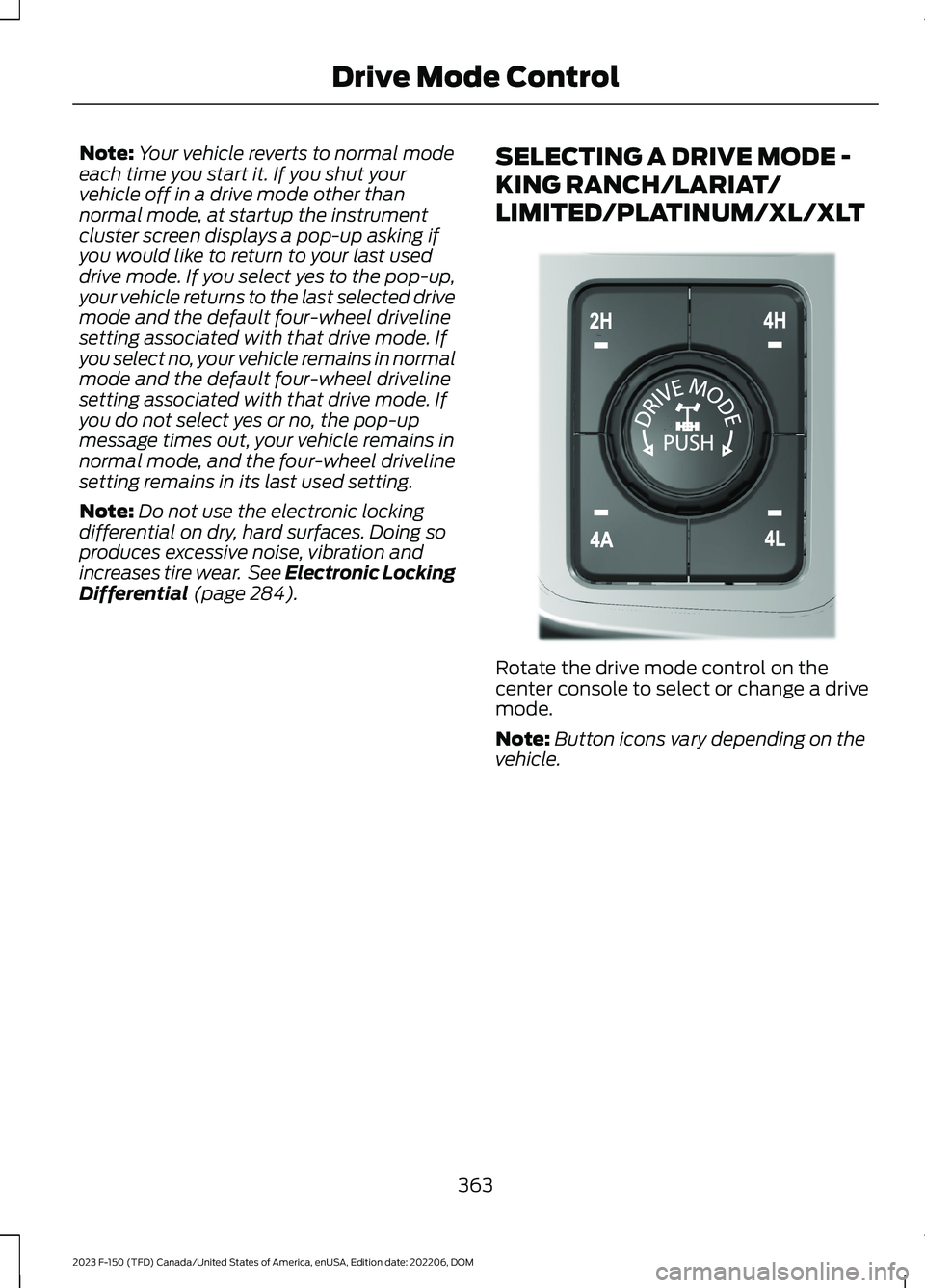
Rotate the drive mode control on thecenter console to select or change a drivemode.
Note:Button icons vary depending on thevehicle.
363
2023 F-150 (TFD) Canada/United States of America, enUSA, Edition date: 202206, DOMDrive Mode ControlE308146
Page 380 of 786
The lane keeping system may not correctlyoperate in any of the following conditions:
•The lane keeping system does notdetect at least one lane marking.
•You switch the turn signal on.
•You apply direct steering, acceleratefast or brake hard.
•The vehicle speed is less than 40 mph(64 km/h).
•The anti-lock brake, stability control ortraction control system activates.
•The lane is too narrow.
•Something is obscuring the camera orit is unable to detect the lane markingsdue to environment, traffic or vehicleconditions.
•Entering or exiting a tight curve whendriving at high speeds.
The lane keeping system may not correctlane positioning in any of the followingconditions:
•High winds.
•Uneven road surfaces.
•Heavy or uneven loads.
•Incorrect tire pressure.
SWITCHING THE LANE
KEEPING SYSTEM ON AND
OFF
To activate the lane keepingsystem, press the button on thesteering wheel.
To deactivate the lane keeping system,press the button again.
Note:When switching the system on or offa message appears in the information andentertainment display to show the status.
Note:The system stores the on or offsetting until manually changed, unless itdetects a MyKey™. If the system detects aMyKey™, it defaults to the last setting forthat MyKey™.
Note: If the system detects a MyKey™,pressing the button does not affect the onor off status of the system. You can onlychange the mode and intensity settings.
SWITCHING THE LANE
KEEPING SYSTEM MODE
The lane keeping system has differentsettings that you can view or adjust usingthe information display.
The system stores the last known selectionfor each of these settings. You do not needto readjust your settings each time youswitch on the system.
To change the lane keeping system mode,use the touchscreen:
1.Press Features on the touchscreen.
2.Press Driver Assistance.
3.Press Lane-Keeping System.
4.Press Lane-Keeping Mode.
5.Select a mode.
Note:The system remembers the lastsetting when you start your vehicle. If thesystem detects a MyKey™, it defaults to thelast setting for that MyKey™.
ALERT MODE
WHAT IS ALERT MODE
Alert mode vibrates the steering wheelwhen it detects an unintended lanedeparture.
376
2023 F-150 (TFD) Canada/United States of America, enUSA, Edition date: 202206, DOMLane Keeping System (If Equipped)E334922
Page 384 of 786

LANE KEEPING SYSTEM – FREQUENTLY ASKED QUESTIONS
Why is the feature not available (lane markings are gray) when I can see the lane markingson the road?
Your vehicle speed is less than 40 mph (65 km/h).
The sun is shining directly into the camera lens.
A quick intentional lane change has occurred.
Your vehicle stays too close to the lane markings for an extended interval of time.
Driving at high speeds in curves.
The last alert warning or aid intervention occurred a short time ago.
Ambiguous lane markings, for example, in construction zones.
Rapid transition from light to dark, or from dark to light.
Sudden offset in lane markings.
ABS or AdvanceTrac™ is active.
There is a camera blockage due to dirt, grime, fog, frost or water on the windshield.
You are driving too close to the vehicle in front of you.
Transitioning between no lane markings to lane markings, or vice versa.
There is standing water on the road.
Faint lane markings, for example, partial yellow lane markings on concrete roads.
Lane width is too narrow or too wide.
You have not calibrated the camera after a windshield replacement.
Driving on tight or on uneven roads.
380
2023 F-150 (TFD) Canada/United States of America, enUSA, Edition date: 202206, DOMLane Keeping System (If Equipped)
Page 396 of 786

Intersection Assist (If Equipped)
If your vehicle comes with a radar sensorincluded in the adaptive cruise control, thepre-collision assist system may operate ina scenario where you are turning across anoncoming vehicle's path. Detection ofvehicles driving in an oncoming directionis active if your vehicle is driving at speedsup to 50 mph (80 km/h).
SWITCHING PRE-COLLISION
ASSIST ON AND OFF - POLICE
RESPONDER
To switch the system on or off, use thetouchscreen:
1.Press Features on the touchscreen.
2.Press Driver Assistance.
3.Press Pre-Collision Assist.
4.Switch the feature on or off.
You can switch the entire systemoff at any time by pressing thebutton above the touchscreen.
Adjusting the Pre-Collision AssistSettings
You can adjust the following settings byusing the touchscreen controls in thepre-collision assist menu:
•Change alert sensitivity to one of threepossible settings.
•If required, switch automaticemergency braking on or off.
•If required, switch the entirepre-collision assist feature on or off.
Note:Automatic emergency braking turnson every time you switch the ignition on.
SWITCHING PRE-COLLISION
ASSIST ON AND OFF
To switch the system on or off, use thetouchscreen:
1.Press Features on the touchscreen.
2.Press Driver Assistance.
3.Press Pre-Collision Assist.
4.Switch the feature on or off.
Adjusting the Pre-Collision AssistSettings
You can adjust the following settings byusing the touchscreen controls in thepre-collision assist menu:
•Change alert and distance alertsensitivity to one of three possiblesettings.
•Switch distance indication and alert onor off.
•If required, switch automaticemergency braking on or off.
•If required, switch the entirepre-collision assist feature on or off.
•If required, switch evasive steeringassist on or off.
392
2023 F-150 (TFD) Canada/United States of America, enUSA, Edition date: 202206, DOMPre-Collision Assist (If Equipped)E309750 E296163
Page 397 of 786

Note:Automatic emergency braking andevasive steering turn on every time youswitch the ignition on.
Note:If your vehicle has a radar sensor, werecommend that you switch the system offif you install a snow plow or similar objectin such a way that it may block the radarsensor. Your vehicle remembers the selectedsetting across key cycles.
Note:If you switch automatic emergencybraking off, evasive steering assist switchesoff.
LOCATING THE PRE-
COLLISION ASSIST SENSORS
Camera.1.
Radar sensor (if equipped).2.
If a message regarding a blocked sensoror camera appears in the informationdisplay, something is obstructing the radarsignals or camera images. The radar sensoris behind the fascia cover in the center ofthe lower grille. With a blocked sensor orcamera, the system may not function, orperformance may reduce. SeePre-Collision Assist – InformationMessages (page 397).
Note:Proper system operation requires aclear view of the road by the camera. Haveany windshield damage in the area of thecamera's field of view repaired.
Note:If something hits the front end of yourvehicle or damage occurs and your vehiclehas a radar sensor, the radar sensing zonecould change. This could cause missed orfalse vehicle detections. Have your vehicleserviced to have the radar checked forproper coverage and operation.
Note:If your vehicle detects excessive heatat the camera or a potential misalignmentcondition, a message could display in theinformation display indicating temporarysensor unavailability. When operationalconditions are correct, the messagedeactivates. For example, when the ambienttemperature around the sensor decreasesor the sensor recalibrates successfully.
DISTANCE INDICATION
WHAT IS DISTANCE INDICATION
Distance indication displays the gapbetween your vehicle and the vehicleahead of you.
Note:The graphic does not display if youswitch on cruise control or adaptive cruisecontrol.
393
2023 F-150 (TFD) Canada/United States of America, enUSA, Edition date: 202206, DOMPre-Collision Assist (If Equipped)E328125
Page 454 of 786

TRAILER BACKUP ASSISTANCE– FREQUENTLY ASKEDQUESTIONS
What does it mean if the systemdoes not detect a trailer that issetup with a sticker?
•The system could be having troubleidentifying the sticker. The systemrequires a clear view of the stickerplaced on the trailer. You must keepthe camera lens and sticker clean forthe system to correctly operate. If thesystem cannot initially detect thetrailer, it could be necessary for you tochange the lighting conditions bymoving your vehicle and trailer orwaiting until the conditions change.See Applying the Trailer ReversingAid Sticker (page 441). Deleting thetrailer and repeating the setup andcalibration could improve performance,but some trailers are not compatiblewith the sticker and camera system. Ifthe system consistently does notdetect the trailer with the sticker setup,you may choose to setup the trailerwith a sensor.
Note:The system is designed to be usedwith the same trailer connection every timeyou choose the trailer from the touchscreen.When using a different drawbar or adifferent pin hole on drawbars with morethan one, connecting the drawbar to yourvehicle affects the trailer position and youmay need to repeat the trailer setup andcalibration process.
Why does the trailer not reversestraight?
•The road conditions, such as roadcamber and road slope, could affecthow straight the system can reverse.You can compensate for the trailerdrifting to the right or left by slowlyturning the knob until the trailer isfollowing your desired path and thenholding the knob in that position.
•Other factors, such as the hitchconnection or trailer suspension, couldaffect how straight the system canreverse the trailer. You cancompensate for the trailer drifting tothe right or left by slowly turning theknob until the trailer is following yourdesired path and then holding the knobin that position.
•The sensor could be incorrectlyinstalled. Make sure the sensor iscorrectly installed.
What does it mean if the systemremains on one message for anextended time during calibrationwhen setting up the system withthe sticker?
•The camera could require cleaning.
•You could have a blocked sticker. Verifythe sticker is in the proper location. SeeApplying the Trailer Reversing AidSticker (page 441).
•The drawbar could be outside of theallowed range of 4–19 in (10–48 cm).
450
2023 F-150 (TFD) Canada/United States of America, enUSA, Edition date: 202206, DOMTrailer Backup Assistance (If Equipped)
Page 455 of 786

•The system could have difficultiesrecognizing the sticker based onenvironmental factors. You could needto move to a different area to changethe lighting and background or youcould need to change the direction youare driving. You could also try settingup the system at a different time ofday.
•Some trailers are not compatible withthe sticker and camera system. If theissue persists, set up the trailer with asensor purchased from your authorizeddealer. See Trailer SensorInstallation (page 441).
What does it mean if the systempauses during calibration?
•There could be steering input or trailermovement during the straight driveportion of the calibration process.
What does it mean if the systemdisplays hold steering steadyduring turn?
•Part of the calibration process for thesticker setup requires a steady turn. Ifyou are continually moving the steeringwheel during the turn, this delays thecalibration process. To enable thecalibration process, hold the steeringwheel at the same position whenturning.
What does it mean if the systemdisplays that it is not available?
•There could be a sub-system that thesystem uses that is not correctlyoperating. If the system continues todisplay it is not available, visit yourauthorized dealer to have your vehiclechecked.
•There could be a battery voltage issue.Make sure the battery is correctlycharged. If the system continues todisplay it is not available, visit yourauthorized dealer to have your vehiclechecked.
What does it mean if the systemdisplays that driving is required toinitialize steering?
•The steering system needs to learninternal parameters to fully turn on thefeature. Drive your vehicle straightforward above 25 mph (40 km/h) forapproximately 5 minutes.
•Your vehicle is new, there is a batteryvoltage issue or you have serviced thesteering system.
What does it mean if the systemrequires you to pull forward toinitialize?
•This occurs when the vehicle has notmoved during the current key cycleafter you connect and select the trailerin the touchscreen, or you operate thesystem at speeds below 1 mph(1 km/h) for an extended period oftime. Drive forward above 2 mph(3 km/h) and the system indicateswhen it initializes.
451
2023 F-150 (TFD) Canada/United States of America, enUSA, Edition date: 202206, DOMTrailer Backup Assistance (If Equipped)