2023 FORD F150 automatic transmission
[x] Cancel search: automatic transmissionPage 287 of 786
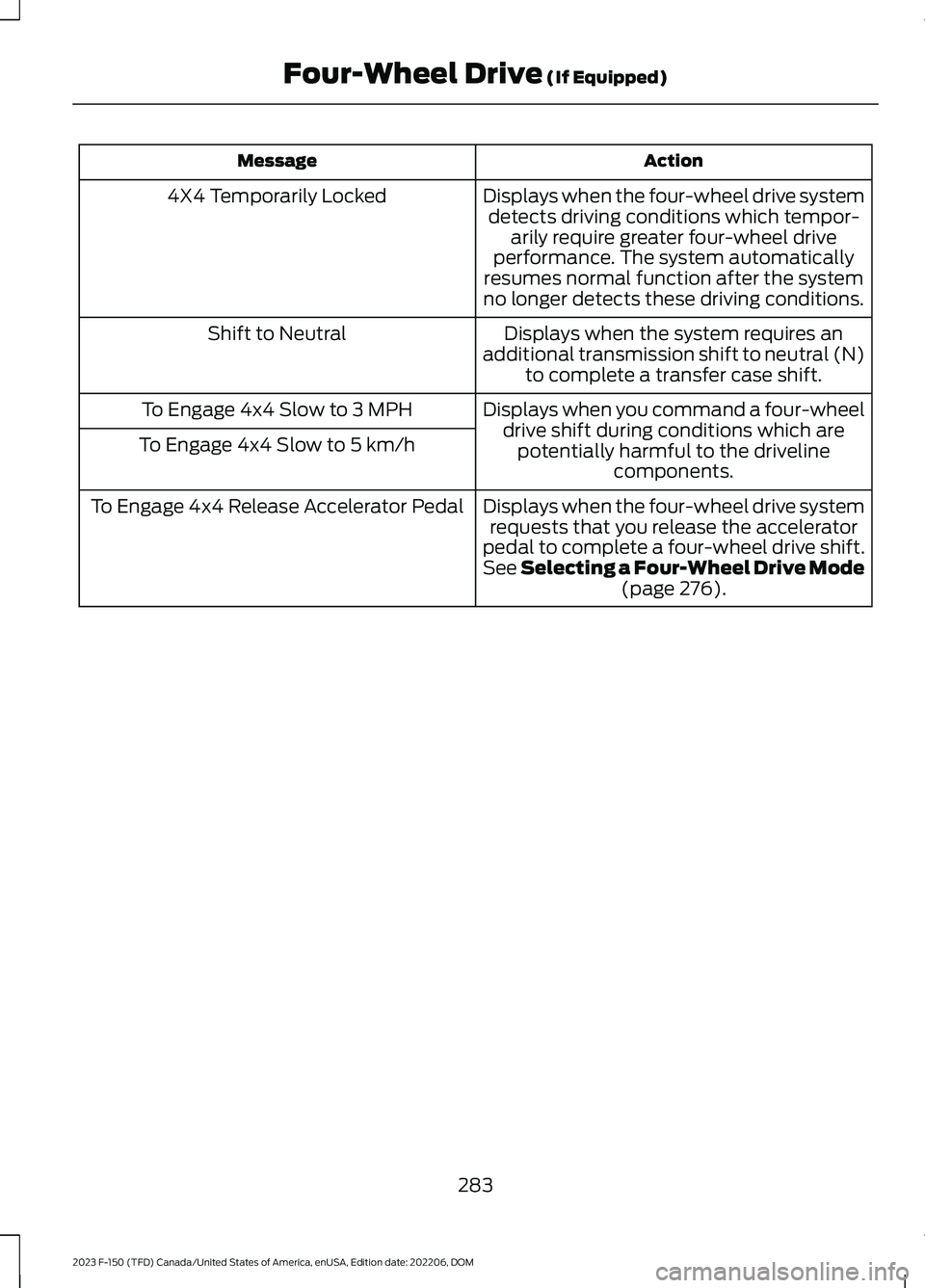
ActionMessage
Displays when the four-wheel drive systemdetects driving conditions which tempor-arily require greater four-wheel driveperformance. The system automaticallyresumes normal function after the systemno longer detects these driving conditions.
4X4 Temporarily Locked
Displays when the system requires anadditional transmission shift to neutral (N)to complete a transfer case shift.
Shift to Neutral
Displays when you command a four-wheeldrive shift during conditions which arepotentially harmful to the drivelinecomponents.
To Engage 4x4 Slow to 3 MPH
To Engage 4x4 Slow to 5 km/h
Displays when the four-wheel drive systemrequests that you release the acceleratorpedal to complete a four-wheel drive shift.See Selecting a Four-Wheel Drive Mode(page 276).
To Engage 4x4 Release Accelerator Pedal
283
2023 F-150 (TFD) Canada/United States of America, enUSA, Edition date: 202206, DOMFour-Wheel Drive (If Equipped)
Page 317 of 786
TRAIL CONTROL INDICATORS
TRAIL ONE PEDAL DRIVE
WHAT IS TRAIL ONE PEDAL DRIVE
Trail one pedal drive allows you toaccelerate and brake using only theaccelerator pedal. The system assistswhen driving through difficult off-roadterrain. Pressing the accelerator pedaldown accelerates your vehicle andreleasing pressure on the acceleratorpedal, with your foot still on the pedal,slows your vehicle down. Releasing theaccelerator pedal may allow your vehicleto come to a complete stop, somesituations may require you to press thebrake pedal to come to a complete stop.
TRAIL ONE PEDAL DRIVEPRECAUTIONS
WARNING: This system is an extradriving aid. It does not replace yourattention and judgment, or the need toapply the brakes. This system does NOTautomatically brake your vehicle. If youfail to press the brake pedal whennecessary, you may collide with anothervehicle.
Shifting into drive (D) or reverse (R) doesnot cause the vehicle to move.
You can press the brake pedal to increasebraking. This does not turn the system off.
Trail one pedal drive could apply theparking brake when your vehicle is notmoving and not in park (P).
Note:Always check the transmissionselection before accelerating.
Note:Only use trail one pedal drive onslippery or loose surfaces. Using trail onepedal drive on dry, hard surfaces couldproduce some vibration, driveline bind upand potential excessive tire and vehiclewear.
TRAIL ONE PEDAL DRIVELIMITATIONS
Trail one pedal drive is unavailable whenany of the following occur:
•Your vehicle is not in four-wheel drivehigh (4H) or four-wheel drive low (4L)modes.
•Using cruise control.
•Using trail control.
•You exceed 30 mph (48 km/h).
Releasing the accelerator pedal may allowyour vehicle to come to a complete stop,some situations may require you to pressthe brake pedal to come to a completestop.
SWITCHING TRAIL ONE PEDALDRIVE ON AND OFF
Switching Trail One Pedal Drive On
Press the trail features buttonwhen in four-wheel drive high orfour-wheel drive low to activatetrail one pedal drive.
Switching Trail One Pedal DriveOff
Press the trail features button again toswitch trail one pedal drive off.
Selecting a driveline mode other thanfour-wheel drive high or four-wheel drivelow switches trail one pedal drive off.
313
2023 F-150 (TFD) Canada/United States of America, enUSA, Edition date: 202206, DOMTrail Control - Raptor/Tremor (If Equipped)E272858 E332910
Page 322 of 786
WHAT IS HILL DESCENT
CONTROL
Hill descent control allows the driver to setand maintain vehicle speed whiledescending steep slopes in various surfaceconditions.
HOW DOES HILL DESCENT
CONTROL WORK
Hill descent control can maintain vehiclespeeds on downhill slopes between2–20 mph (3–32 km/h). Above 20 mph(32 km/h), the system remains on but thedescent speed cannot be set ormaintained.
Note:The system does not function below2 mph (3 km/h).
The system requires a cool down intervalafter a period of sustained use. Hill descentcontrol provides a warning in the messagecenter and a tone sounds when the systemis about to disengage for cooling. At thistime, manually apply the brakes as neededto maintain descent speed.
Note:The amount of time that the systemcan remain active before cooling varies withconditions.
HILL DESCENT CONTROL
PRECAUTIONS
WARNING: The system does notcontrol speed in low traction conditionsor extremely steep slopes. The systemis designed to be an aid and does notrelieve you of your responsibility to drivewith due care and attention. Failure tofollow this instruction could result inpersonal injury.
WARNING: Hill descent controlcannot control descent in all surfaceconditions and circumstances, such asice or extremely steep grades. Hilldescent control is a driver assist systemand cannot substitute for good judgmentby the driver. Failure to do so may resultin loss of vehicle control, crash or seriousinjury.
WARNING: The system does notreplace the parking brake. When youleave your vehicle, always apply theparking brake and shift the transmissioninto park (P) for automatic transmissionor first gear for manual transmission.
SWITCHING HILL DESCENT
CONTROL ON AND OFF
Press the button on theinstrument panel. A lightilluminates and a tone soundswhen the system is active.
SETTING THE HILL DESCENT
SPEED
To increase or decrease the descent speed,press the accelerator or brake pedal, or usethe SET + and SET - buttons on thesteering wheel. Once you reach thepreferred speed remove your feet from thepedals.
HILL DESCENT CONTROL
INDICATOR
Illuminates when you switch hilldescent control on.
318
2023 F-150 (TFD) Canada/United States of America, enUSA, Edition date: 202206, DOMHill Descent Control (If Equipped)E163171 E163171
Page 366 of 786
WHAT IS DRIVE MODE
CONTROL
Your vehicle has various drive modes thatyou can select for different drivingconditions. Depending on the drive modethat you select, the system adjusts variousvehicle settings.
HOW DOES DRIVE MODE
CONTROL WORK
Selectable drive modes change variouselectronic and mechanical settings withinyour vehicle to tailor its performance anddriving characteristics to on-road oroff-road driving conditions. Steering feeland effort, traction control, stabilitycontrol, chassis controls, powertrainresponse, transmissions shift points,four-wheel driveline setting, exhaust noiselevel and suspension dampening areautomatically altered to a pre-determinedsetting depending upon the drive modethat is selected.
Note:Your vehicle has diagnostic checksthat continuously monitor all systems forproper operation. If a drive mode isunavailable due to a system fault, yourvehicle defaults to normal mode and thedriveline remains in the four-wheel drivesetting that was last selected prior to thesystem fault.
Note:Your vehicle reverts to normal modeeach time it is started. If you shut yourvehicle off in a drive mode other thannormal mode, at startup the instrumentcluster screen displays a pop-up asking ifyou would like to return to your last useddrive mode. If you select yes to the pop-up,your vehicle returns to the last selected drivemode and the default four-wheel drivelinesetting associated with that drive mode. Ifyou select no, your vehicle remains in normalmode and the default four-wheel drivelinesetting associated with that drive mode. Ifyou do not select yes or no the pop upmessage times out, your vehicle remains innormal mode, and the four-wheel drivelinesetting remains in its last used setting.
HOW DOES DRIVE MODE
CONTROL WORK - RAPTOR
Selectable drive modes change variouselectronic and mechanical settings withinyour vehicle to tailor its performance anddriving characteristics to on-road oroff-road driving conditions. Steering feeland effort, traction control, stabilitycontrol, chassis controls, powertrainresponse, transmission shift points,four-wheel driveline settings, exhaust noiselevel and suspension dampening areautomatically altered to a pre-determinedsetting depending upon the drive modethat you select.
Note:Your vehicle has diagnostic checksthat continuously monitor all systems forproper operation. If a drive mode isunavailable due to a system fault, yourvehicle defaults to normal mode and thedriveline remains in the four-wheel drivesetting that you last selected prior to thesystem fault.
362
2023 F-150 (TFD) Canada/United States of America, enUSA, Edition date: 202206, DOMDrive Mode Control
Page 422 of 786

TOWING A TRAILER
PRECAUTIONS
WARNING: Do not exceedthe GVWR or the GAWRspecified on the certificationlabel.
WARNING: Towing trailersbeyond the maximumrecommended gross trailerweight exceeds the limit of yourvehicle and could result in enginedamage, transmission damage,structural damage, loss ofvehicle control, vehicle rolloverand personal injury.
WARNING: Do not exceedthe lowest rating capacity foryour vehicle or trailer hitch.Overloading your vehicle ortrailer hitch can impair yourvehicle stability and handling.Failure to follow this instructioncould result in the loss of controlof your vehicle, personal injury ordeath.
WARNING: Make sure thatthe vertical load on the tow ballis between the minimum andmaximum recommended weightat all times. Failure to follow thisinstruction could result in theloss of control of your vehicle,personal injury or death.
WARNING: Do not cut,drill, weld or modify the trailerhitch. Modifying the trailer hitchcould reduce the hitch rating.
WARNING: The anti-lockbrake system does not controlthe trailer brakes.
TRAILER BRAKE
PRECAUTIONS
WARNING: Do not connect atrailer's hydraulic brake system directlyto your vehicle's brake system. Yourvehicle may not have enough brakingpower and your chances of having acollision greatly increase.
WARNING: Do not tow a trailerfitted with electric trailer brakes unlessyour vehicle is fitted with a compatibleaftermarket electronic trailer brakecontroller. Failure to follow thisinstruction could result in the loss ofcontrol of your vehicle, personal injury ordeath. For additional information andassistance, we recommend that youcontact an authorized dealer.
Electric brakes and manual, automatic orsurge-type trailer brakes are safe if youinstall them properly and adjust them tothe manufacturer's specifications. Thetrailer brakes must meet local and federalregulations.
The rating for the tow vehicle's brakingsystem operation is at the gross vehicleweight rating, not the gross combinedweight rating.
418
2023 F-150 (TFD) Canada/United States of America, enUSA, Edition date: 202206, DOMTowing a Trailer
Page 459 of 786
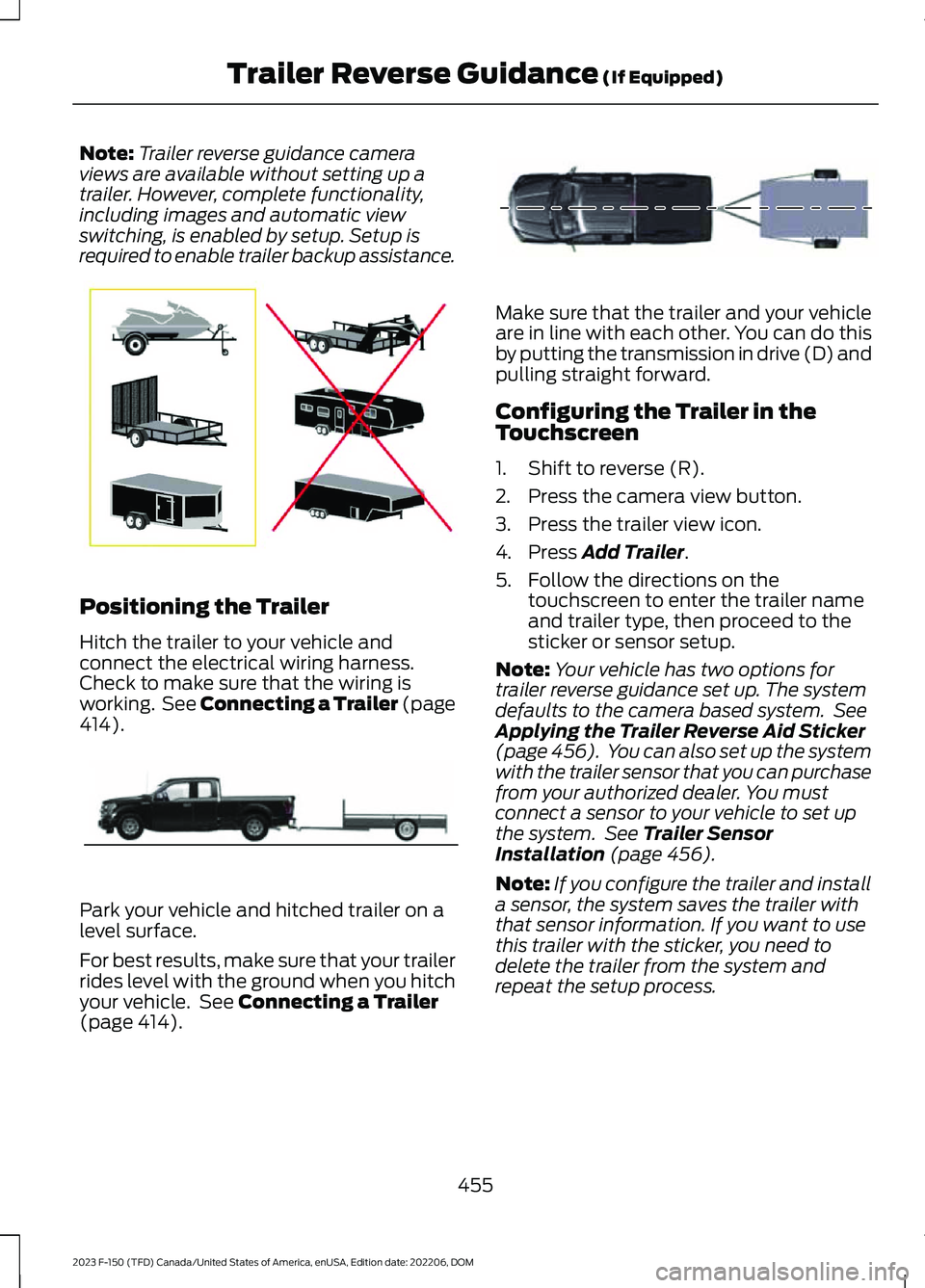
Note:Trailer reverse guidance cameraviews are available without setting up atrailer. However, complete functionality,including images and automatic viewswitching, is enabled by setup. Setup isrequired to enable trailer backup assistance.
Positioning the Trailer
Hitch the trailer to your vehicle andconnect the electrical wiring harness.Check to make sure that the wiring isworking. See Connecting a Trailer (page414).
Park your vehicle and hitched trailer on alevel surface.
For best results, make sure that your trailerrides level with the ground when you hitchyour vehicle. See Connecting a Trailer(page 414).
Make sure that the trailer and your vehicleare in line with each other. You can do thisby putting the transmission in drive (D) andpulling straight forward.
Configuring the Trailer in theTouchscreen
1.Shift to reverse (R).
2.Press the camera view button.
3.Press the trailer view icon.
4.Press Add Trailer.
5.Follow the directions on thetouchscreen to enter the trailer nameand trailer type, then proceed to thesticker or sensor setup.
Note:Your vehicle has two options fortrailer reverse guidance set up. The systemdefaults to the camera based system. SeeApplying the Trailer Reverse Aid Sticker(page 456). You can also set up the systemwith the trailer sensor that you can purchasefrom your authorized dealer. You mustconnect a sensor to your vehicle to set upthe system. See Trailer SensorInstallation (page 456).
Note:If you configure the trailer and installa sensor, the system saves the trailer withthat sensor information. If you want to usethis trailer with the sticker, you need todelete the trailer from the system andrepeat the setup process.
455
2023 F-150 (TFD) Canada/United States of America, enUSA, Edition date: 202206, DOMTrailer Reverse Guidance (If Equipped)E209766 E209759 E209760
Page 484 of 786

Post-Incident
1.Do not store a severely damagedvehicle with a lithium-ion battery insidea structure or within 50 ft (15 m) of anystructure or vehicle.
2.Make sure that passenger and luggagecompartments remain ventilated.
3.As with any vehicle, call emergencyassistance immediately if you seesparks, smoke or flames coming fromthe vehicle.
SWITCHING THE HAZARD
FLASHERS ON AND OFF
The hazard flasher button is onthe instrument panel. Press thebutton to switch the hazardflashers on if your vehicle is creating asafety hazard for other road users.
When you switch the hazard flashers on,all front and rear direction indicators flash.
Note:The hazard flashers operate whenthe ignition is in any position, or if the key isnot in the ignition. The battery loses chargeand could have insufficient power to restartyour vehicle.
Press the button again to switch them off.
JUMP STARTING THE VEHICLE
JUMP STARTING PRECAUTIONS
WARNING: Batteries normallyproduce explosive gases which cancause personal injury. Therefore, do notallow flames, sparks or lightedsubstances to come near the battery.When working near the battery, alwaysshield your face and protect your eyes.Always provide correct ventilation.
WARNING: Keep batteries out ofreach of children. Batteries containsulfuric acid. Avoid contact with skin,eyes or clothing. Shield your eyes whenworking near the battery to protectagainst possible splashing of acidsolution. In case of acid contact with skinor eyes, flush immediately with water fora minimum of 15 minutes and get promptmedical attention. If acid is swallowed,call a physician immediately.
WARNING: Use only adequatelysized cables with insulated clamps.
WARNING: Make sure that thecables are clear of any moving parts andfuel delivery system parts.
WARNING: Connect batteries withonly the same nominal voltage.
WARNING: If the engine is runningwhile the hood is open, stay clear ofmoving engine components. Failure tofollow this warning could result in seriouspersonal injury or death.
Do not attempt to push-start an automatictransmission vehicle. This could causetransmission damage.
Do not disconnect the battery of thedisabled vehicle. This could damage yourvehicle's electrical system.
PREPARING THE VEHICLE
Use only a 12 volt supply to start yourvehicle.
Park the booster vehicle close to the hoodof the disabled vehicle, making sure thetwo vehicles do not touch.
480
2023 F-150 (TFD) Canada/United States of America, enUSA, Edition date: 202206, DOMCrash and Breakdown InformationE75790
Page 517 of 786

If you replace the battery make sure itmatches the electrical requirements ofyour vehicle.
If you disconnect or replace the batteryand your vehicle has an automatictransmission, it must relearn its adaptivestrategy. Because of this, the transmissionmay shift firmly when first driven. This isnormal operation while the transmissionfully updates its operation to optimumshift feel.
Battery Sensor Reset
When you install a new battery, reset thebattery sensor by doing the following:
1.Switch the ignition on, and leave theengine off.
Note:Complete Steps 2 and 3 within 10seconds.
2.Flash the high beam headlamps fivetimes, ending with the high beams off.
3.Press and release the brake pedal threetimes.
The battery warning lamp flashes threetimes to confirm that the reset issuccessful.
Battery Management System (If
Equipped)
The system monitors battery conditionsand takes actions to extend battery life. Ifexcessive battery drain is detected, thesystem temporarily disables someelectrical systems to protect the battery.
Systems included are:
•Heated rear window.
•Heated seats.
•Climate control.
•Heated steering wheel.
•Audio unit.
•Navigation system.
A message may appear in the informationdisplay to alert you that battery protectionactions are active. This message is only fornotification that an action is taking place,and not intended to indicate an electricalproblem or that the battery requiresreplacement.
After battery replacement, or in somecases after charging the battery with anexternal charger, the battery managementsystem requires eight hours of vehicle sleeptime to relearn the battery state of charge.During this time, your vehicle must remainfully locked with the ignition switched off.
Note:Prior to relearning the battery stateof charge, the battery management systemmay temporarily disable some electricalsystems.
Electrical Accessory Installation
To make sure the battery managementsystem works correctly, do not connect anelectrical device ground connectiondirectly to the battery negative post. Thiscan cause inaccurate measurements ofthe battery condition and potentialincorrect system operation.
Note:If you add electrical accessories orcomponents to the vehicle, it may adverselyaffect battery performance and durability.This may also affect the performance ofother electrical systems in the vehicle.
Remove and Reinstall the Battery
Install a battery approved for use by ourspecifications. See Capacities andSpecifications (page 578).
To disconnect or remove the battery, dothe following:
1.Apply the parking brake and switch theignition off.
2.Switch all electrical equipment off, forexample lights and radio.
513
2023 F-150 (TFD) Canada/United States of America, enUSA, Edition date: 202206, DOMMaintenance