2023 FORD F150 fog light
[x] Cancel search: fog lightPage 178 of 786
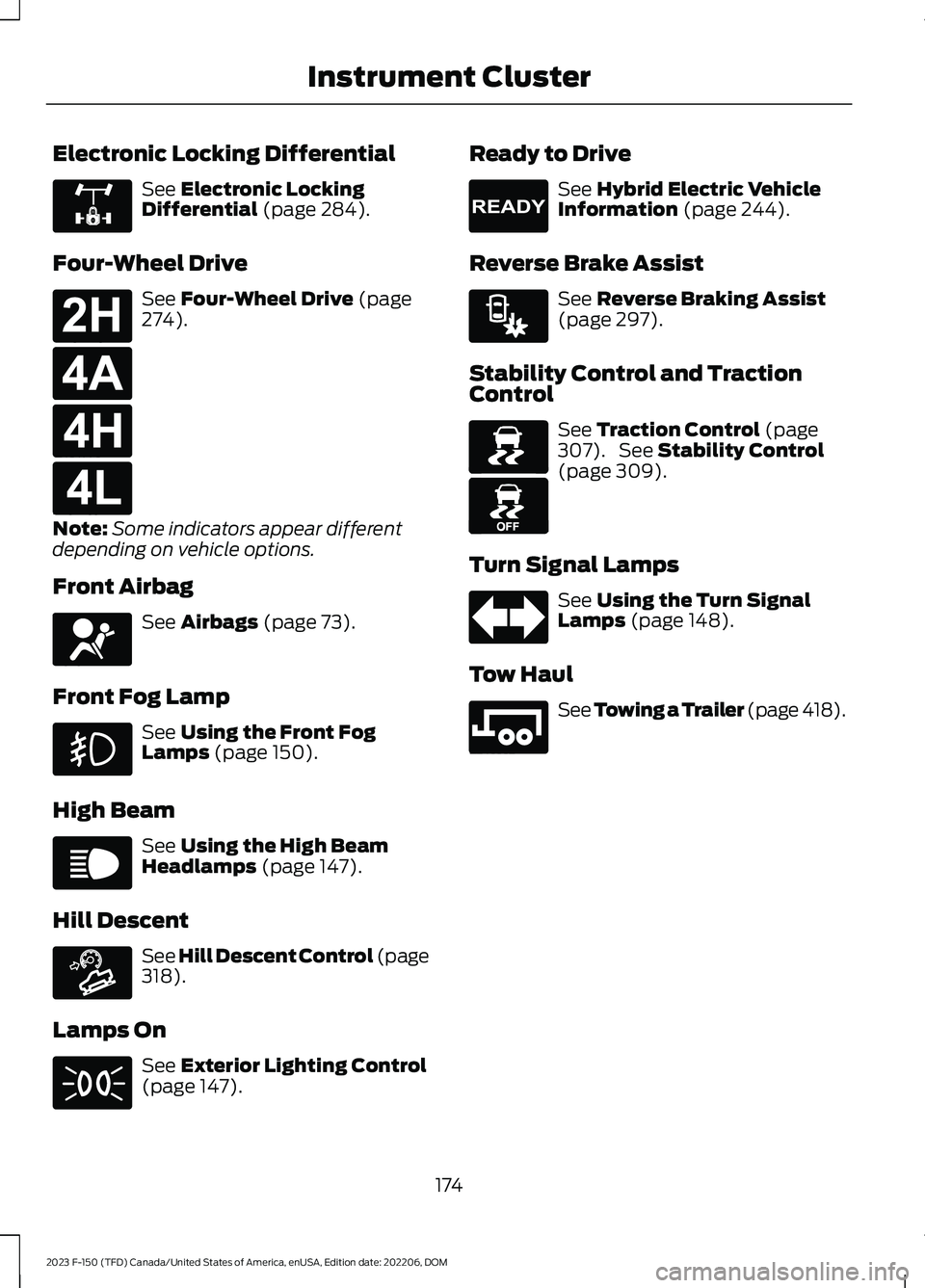
Electronic Locking Differential
See Electronic LockingDifferential (page 284).
Four-Wheel Drive
See Four-Wheel Drive (page274).
Note:Some indicators appear differentdepending on vehicle options.
Front Airbag
See Airbags (page 73).
Front Fog Lamp
See Using the Front FogLamps (page 150).
High Beam
See Using the High BeamHeadlamps (page 147).
Hill Descent
See Hill Descent Control (page318).
Lamps On
See Exterior Lighting Control(page 147).
Ready to Drive
See Hybrid Electric VehicleInformation (page 244).
Reverse Brake Assist
See Reverse Braking Assist(page 297).
Stability Control and TractionControl
See Traction Control (page307). See Stability Control(page 309).
Turn Signal Lamps
See Using the Turn SignalLamps (page 148).
Tow Haul
See Towing a Trailer (page 418).
174
2023 F-150 (TFD) Canada/United States of America, enUSA, Edition date: 202206, DOMInstrument ClusterE325779 E181778 E181781 E181779 E181780 E67017 E67019 E163171 E71341 E224090 E293490 E138639 E130458 E67018 E246592
Page 194 of 786

SWITCHING MAXIMUM
COOLING ON AND OFF
Turn the temperature controlcounterclockwise past thelowest setting to maximizecooling.
Note:The temperature control springs backto the lowest setting.
Note:When you switch maximum coolingoff, air conditioning remains on.
SWITCHING THE HEATED
REAR WINDOW ON AND OFF
Press the button to clear the rearwindow of thin ice and fog. Theheated rear window turns offafter a short period of time.
Note:Do not use harsh chemicals, razorblades or other sharp objects to clean orremove decals from the inside of the heatedrear window as this could cause damage tothe heated rear window grid lines notcovered by the vehicle Warranty.
SETTING THE BLOWER MOTOR
SPEED
Note:Lights on the control illuminate toindicate the blower motor speed.
Note: When you switch the blower motoroff, air conditioning turns off and thewindows could fog up.
SWITCHING THE HEATED
MIRRORS ON AND OFF
Heated Mirrors
Press the button.
SETTING THE TEMPERATURE
Turn the temperature controlcounterclockwise for cooler temperaturesettings.
Turn the temperature control clockwisefor warmer temperature settings.
DIRECTING THE FLOW OF AIR
Directing Air to the Windshield AirVents
Press the button.
Directing Air to the InstrumentPanel Air Vents
Press the button.
190
2023 F-150 (TFD) Canada/United States of America, enUSA, Edition date: 202206, DOMClimate Control - Vehicles With: Manual Temperature Control E266189 E244106 E244097
Page 356 of 786

WARNING: Pay close attention tochanging road conditions. You may needto override the system by pressing thebrake or accelerator pedal if the adjustedspeed becomes higher or lower thannecessary.
WARNING: The system onlyprovides limited braking. Your vehiclemay not always decelerate quicklyenough to avoid a crash without driverintervention. Apply the brakes whennecessary.
WARNING: The system does notactivate the turn signal.
Adaptive cruise control precautions applyto predictive speed assist unless statedotherwise or contradicted by a predictivespeed assist precaution. See AdaptiveCruise Control Precautions (page 342).
The system only applies limited braking.You can override the system with theaccelerator pedal or cancel the system byapplying the brakes.
The system may adapt to various factorssuch as time of day, lane width. This couldinfluence speed adjustments andaccelerations.
The system may adapt to various drivemodes. See Drive Mode Control (page362).This could influence speedadjustments and accelerations.
Note:The system does not activate theturn signal automatically.
PREDICTIVE SPEED ASSISTLIMITATIONS
WARNING: The system may notalways adjust vehicle speed in certainroad or weather conditions such ascrossing traffic, yield or stop signs, rightof way, traffic lights, speed bumps, rain,snow, fog. You must always apply thebrake or accelerator pedal whennecessary.
The road geometry and speed limitinformation provided by the navigationmap data could be inaccurate or out ofdate.
The system may not detect and readspeed limit signs with conditionalinformation, for example, when a sign isflashing, during specific time ranges, orwhen children are present.
Note:The system does not set the vehiclespeed to speed limits shown with asupplementary traffic sign.
Under certain conditions, the system maynot adjust the vehicle speed until after yourvehicle passes the speed limit.
Detection of road geometry operates onlywhere related information is available.Road geometry information may not beavailable in some areas.
SWITCHING PREDICTIVE SPEEDASSIST MODE ON AND OFF
1.Press Features on the touchscreen.
2.Press Driver Assistance.
3.Press Cruise Control.
4.Press Adaptive Cruise Control.
5.Switch Predictive Speed Assist on oroff.
352
2023 F-150 (TFD) Canada/United States of America, enUSA, Edition date: 202206, DOMAdaptive Cruise Control (If Equipped)
Page 384 of 786

LANE KEEPING SYSTEM – FREQUENTLY ASKED QUESTIONS
Why is the feature not available (lane markings are gray) when I can see the lane markingson the road?
Your vehicle speed is less than 40 mph (65 km/h).
The sun is shining directly into the camera lens.
A quick intentional lane change has occurred.
Your vehicle stays too close to the lane markings for an extended interval of time.
Driving at high speeds in curves.
The last alert warning or aid intervention occurred a short time ago.
Ambiguous lane markings, for example, in construction zones.
Rapid transition from light to dark, or from dark to light.
Sudden offset in lane markings.
ABS or AdvanceTrac™ is active.
There is a camera blockage due to dirt, grime, fog, frost or water on the windshield.
You are driving too close to the vehicle in front of you.
Transitioning between no lane markings to lane markings, or vice versa.
There is standing water on the road.
Faint lane markings, for example, partial yellow lane markings on concrete roads.
Lane width is too narrow or too wide.
You have not calibrated the camera after a windshield replacement.
Driving on tight or on uneven roads.
380
2023 F-150 (TFD) Canada/United States of America, enUSA, Edition date: 202206, DOMLane Keeping System (If Equipped)
Page 395 of 786

WARNING: The system mayoperate with reduced function duringcold and inclement weather conditions.Snow, ice, rain, spray and fog canadversely affect the system. Keep thefront camera and radar free of snow andice. Failure to follow this instruction mayresult in the loss of control of yourvehicle, serious personal injury or death.
WARNING: Take additional care ifyour vehicle is heavily loaded or you aretowing a trailer. These conditions couldresult in reduced performance of thissystem. Failure to follow this instructioncould result in the loss of control of yourvehicle, personal injury or death.
WARNING: The system cannothelp prevent all crashes. Do not rely onthis system to replace driver judgmentand the need to maintain a safe distanceand speed.
WARNING: System performancecould be reduced in situations where thevehicle camera has limited detectioncapability. These situations include butare not limited to direct or low sunlight,vehicles at night without tail lights,unconventional vehicle types,pedestrians or cyclists with complexbackgrounds, running pedestrians or fastmoving cyclists, partly obscuredpedestrians or cyclists, pedestrians orcyclists that the system cannotdistinguish from a group. Failure to takecare may result in the loss of control ofyour vehicle, personal injury or death.
PRE-COLLISION ASSIST
LIMITATIONS
Pre-collision assist depends on thedetection ability of its camera and sensors.Any obstructions or damage to these areascan limit detection or prevent the systemfrom functioning. See Locating thePre-Collision Assist Sensors (page 393).
The system is active at 3 mph (5 km/h)and above.
Note:The pre-collision assist systemautomatically disables when you selectfour-wheel drive low, manually disableAdvanceTrac™, or select rock crawl mode,if your vehicle comes with it.
Note:Brake support and automaticemergency braking are active up to themaximum speed of the vehicle.
Pedestrian Detection Limitations
Pedestrian detection is active at speedsup to 50 mph (80 km/h).
Pedestrian detection operates optimallywhen detected hazards are clearlyidentifiable. System performance mayreduce in situations where pedestrians arerunning, partly obscured, have a complexbackground, or when the system cannotdistinguish pedestrians from a group.
Cyclist Detection Limitations
Cyclist detection is active at speeds up to50 mph (80 km/h).
Cyclist detection functions optimally whendetected hazards are clearly identifiable.The system’s detection level may be lessin situations where cyclists are moving fast,partly hidden, have a complex background,or the system cannot distinguish the cyclistfrom a group.
391
2023 F-150 (TFD) Canada/United States of America, enUSA, Edition date: 202206, DOMPre-Collision Assist (If Equipped)
Page 481 of 786

When operating your vehicle with asnowplow:
•Do not exceed 45 mph (72 km/h).
•Your engine could run at a highertemperature than normal.
•If you are driving more than 15 mi(24 km) at temperatures abovefreezing, angle the plow bladeeither full left or full right to providemaximum airflow to the radiator.
•If you are driving less than 15 mi(24 km) at speeds up to 45 mph(72 km/h) in cold weather, you donot need to worry about bladeposition to provide maximumairflow.
•Shift to 4L when plowing in small areasat speeds below 5 mph (8 km/h).
•Shift to 4H when plowing larger areasor light snow at higher speeds above5 mph (8 km/h). Do not exceed15 mph (24 km/h).
•Do not shift the transmission from aforward gear to reverse (R) until theengine is at idle and the wheels havestopped.
Note:Careless or high-speed driving whensnowplowing, which results in significantvehicle decelerations, can deploy the airbag.Such driving also increases the risk ofaccidents.
Note:Drive your vehicle at least 500 mi(800 km) before using your vehicle forsnowplowing.
SNOWPLOW MODE
WHAT IS SNOWPLOW MODE
Snowplow mode reduces vehicle electricalload to allow the electrical system to havesufficient power to support residentialsnowplow use.
SWITCHING SNOWPLOW MODEON AND OFF
Vehicles receive a physical button in theinstrument panel or an option in the SYNCmenu to enable snowplow mode.
Snowplow mode does not remember thesetting when you switch your vehicle off.You must re-enable the mode every timeyou wish to use it.
The following features turn off and aredisabled in snowplow mode and cannotbe turned back on until snowplow modeis switched off:
•120 V inverter.
•Fog lamps.
•Heated and cooled front seats.
The body module also activates thesnowplow relay that provides power toaftermarket snowplow controls.
Note:The electrical system supports theaddition of a residential snowplow of up to60 A continuous, and snowplow lights ofup to 20 A continuous using snowplowmode. The system does not supportsnowplow usage with additional electricalaftermarket accessories.
Push Button (If Equipped)
Press the snowplow button on theinstrument panel to switch on snowplowmode. The snowplow button illuminatesand a message displays.
Press the snowplow button or switch offthe vehicle to switch off snowplow mode.
Using SYNC (If Equipped)
1.Press Features on the touchscreen.
2.Press Snow Plow Mode.
3.Switch Snow Plow Mode on or off.
477
2023 F-150 (TFD) Canada/United States of America, enUSA, Edition date: 202206, DOMSnow Plowing - Vehicles With: Snow Plow Mode
Page 521 of 786

EXTERIOR BULBS
EXTERIOR BULB SPECIFICATIONCHART
Replacement bulbs are specified in thechart below. Headlamp bulbs must be
marked with an authorized D.O.T. markingfor North America to make sure they havethe proper lamp performance, lightbrightness, light pattern and safe visibility.The correct bulbs will not damage thelamp assembly or void the lamp assemblywarranty and will provide quality bulbillumination time.
Power (Watt)SpecificationLamp
16912Central high mounted stop lamp.
LEDLEDCentral high mounted cargo lamp.Vehicles with cargo box.
LEDLEDDaytime running lamp (XLT optional,Lariat, Platinum, King Ranch, Limited,Raptor).
55H11Daytime running lamp (XLT optional,XL).
LEDLEDFront turn signal and parking lamp(XLT optional, Lariat, Platinum, KingRanch, Limited).
21/54257NAFront turn signal and parking lamp(XLT optional, XL).
LEDLEDFront fog lamp (XLT optional, Lariat,Platinum, King Ranch, Limited,Raptor).
559140Front fog lamp (XL and XLT optional).
LEDLEDFront side marker lamp (Lariatoptional, Platinum, King Ranch,Limited).
5W5WFront side marker lamp (Lariatoptional, XL, XLT).
LEDLEDHeadlamp (XLT optional, Lariat, Plat-inum, King Ranch, Limited).
55H11Headlamp low beam (XLT optional,XL).
659005Headlamp high beam (XLT optional,XL).
517
2023 F-150 (TFD) Canada/United States of America, enUSA, Edition date: 202206, DOMMaintenance
Page 767 of 786

Exterior Bulbs.................................................517Changing a Front Fog Lamp Bulb................523Changing a Front Side Marker LampBulb....................................................................522Changing a Front Turn Signal LampBulb.....................................................................521Changing a Headlamp Bulb...........................519Changing a High Mounted StoplampBulb....................................................................525Changing a License Plate Lamp Bulb........525Changing a Rear Lamp Bulb..........................523Changing a Rear Turn Signal LampBulb....................................................................524Changing a Reversing Lamp Bulb...............525Changing a Stoplamp Bulb...........................524Exterior Bulb Specification Chart..................517Removing a Rear Lamp Assembly...............519Exterior Lamps..............................................148Exterior Lamp Indicators...................................151Exterior Lamps On Audible Warning............151How Do Cornering Lamps Work...................149Switching Off Road Driving Lamps On andOff.........................................................................151Switching the Cargo Lamps On....................150Switching the Daytime Running Lamps Onand Off..............................................................149Switching the Spot Lamps On andOff.......................................................................150Using the Front Fog Lamps............................150Using the Turn Signal Lamps.........................148Exterior Lighting Control - Excluding:Police Responder.......................................147Exterior Lighting Control - PoliceResponder....................................................147Exterior Lighting.............................................147Adaptive Front Lighting....................................157Autolamps............................................................148Automatic High Beam Control......................152Automatic High Beam Control –Troubleshooting.............................................154Exterior Lamps....................................................148Exterior Zone Lighting........................................151Glare Free Lighting.............................................155Glare Free Lighting –Troubleshooting..............................................157Headlamps............................................................147Headlamps – Troubleshooting.....................148
Exterior Mirrors..............................................164Auto-Dimming Exterior Mirror.......................165Exterior Zone Lighting..................................151Exterior Zone Lighting Settings.....................152Using the Exterior Zone Lighting....................151What Is Exterior Zone Lighting........................151
F
Fastening and Unfastening theSeatbelts........................................................65Feature Bar....................................................638Flat TireSee: Changing a Flat Tire - Excluding:Raptor................................................................561See: Changing a Flat Tire - Raptor.............568Floor Mats.......................................................473Folding the Exterior Mirrors - VehiclesWith: Manual Folding Mirrors................164Folding the Exterior Mirrors - VehiclesWith: Power Folding Mirrors..................164Foot PedalsSee: Adjusting the Pedals................................142Ford Assistant..............................................640Ford Assistant – Frequently AskedQuestions........................................................640Ford Assistant Settings..................................640Using Ford Assistant........................................640Ford Performance...........................................21Ford Power-UpSee: Software Update Settings....................657See: Vehicle Software Updates....................657Ford Protect..................................................665Four-Wheel Drive.........................................274Four-Wheel Drive Modes................................278Four-Wheel Drive –Troubleshooting...........................................280Four-Wheel Drive Indicators....................279Four-Wheel Drive Limitations.................275Four-Wheel Drive Modes..........................278Four-Wheel Drive Auto....................................279Four-Wheel Drive High.....................................279Four-Wheel Drive Low.....................................279Two-Wheel Drive High.....................................278Four-Wheel Drive Precautions................275
763
2023 F-150 (TFD) Canada/United States of America, enUSA, Edition date: 202206, DOMIndex