2023 FORD EXPLORER Camera
[x] Cancel search: CameraPage 9 of 573

Traction Control
Principle of Operation...............................220
Using Traction Control..............................220
Stability Control
Principle of Operation................................221
Using Stability Control..............................222
Hill Descent Control
What Is Hill Descent Control..................224
Switching Hill Descent Control On andOff................................................................224
Setting the Hill Descent Speed.............224
Hill Descent Control Indicator................224
Parking Aids
Principle of Operation...............................225
Rear Parking Aid..........................................225
Front Parking Aid.........................................227
Side Sensing System.................................229
Active Park Assist.......................................230
Rear View Camera......................................234
360 Degree Camera...................................237
Cruise Control
What Is Cruise Control..............................239
Switching Cruise Control On and Off........................................................................239
Setting the Cruise Control Speed.........239
Canceling the Set Speed.........................240
Resuming the Set Speed........................240
Cruise Control Indicators.........................240
Adaptive Cruise Control
How Does Adaptive Cruise Control WithStop and Go Work...................................241
What Is Adaptive Cruise Control WithLane Centering.........................................241
What Is Intelligent Adaptive CruiseControl.........................................................241
Adaptive Cruise Control Precautions -Vehicles With: Lane Centering............241
Adaptive Cruise Control Precautions -Vehicles With: Stop and Go.................241
Adaptive Cruise Control Limitations -Vehicles With: Lane Centering...........242
Adaptive Cruise Control Limitations -Vehicles With: Stop and Go................243
Switching Adaptive Cruise Control Onand Off.......................................................245
Setting the Adaptive Cruise ControlSpeed..........................................................245
Setting the Adaptive Cruise Control Gap........................................................................246
Canceling the Set Speed.........................247
Resuming the Set Speed.........................247
Overriding the Set Speed.........................247
Adaptive Cruise Control Indicators -Vehicles With: Intelligent AdaptiveCruise Control..........................................248
Adaptive Cruise Control Indicators -Vehicles With: Lane Centering..........248
Adaptive Cruise Control Indicators -Vehicles With: Stop and Go...............248
Switching From Adaptive Cruise Controlto Cruise Control.....................................248
Switching Lane Centering On and Off........................................................................249
Switching Intelligent Mode On and Off........................................................................250
Adjusting the Set Speed Tolerance......250
Adaptive Cruise Control –Troubleshooting.....................................250
Driving Aids
Driver Alert.....................................................254
Lane Keeping System...............................255
Blind Spot Information System............259
Cross Traffic Alert.......................................263
Speed Sign Recognition..........................266
Steering..........................................................268
Pre-Collision Assist...................................268
5
2023 Explorer (CTW) Canada/United States of America, enUSA, Edition date: 202209, First-PrintingTable of Contents
Page 78 of 573
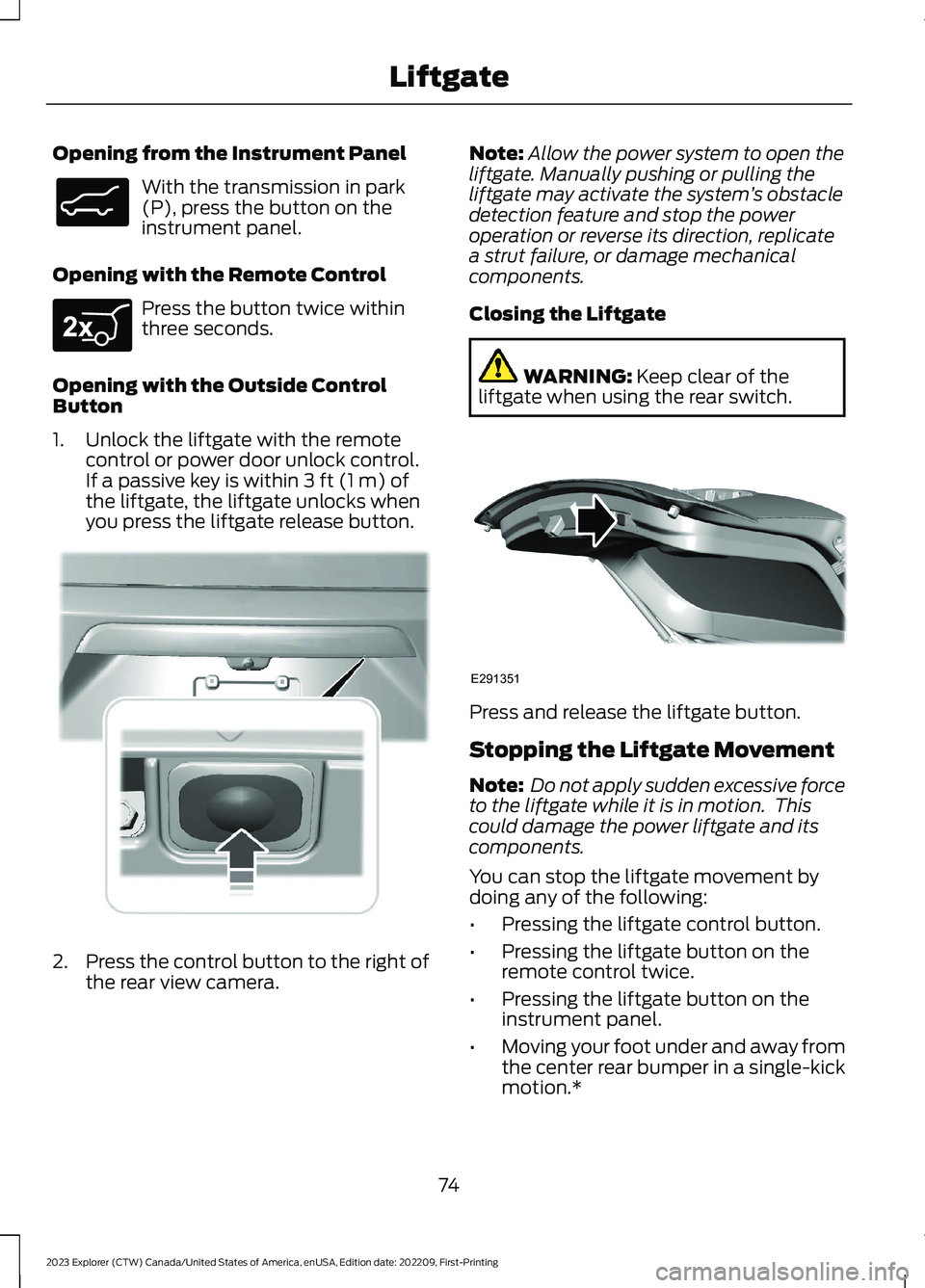
Opening from the Instrument Panel
With the transmission in park(P), press the button on theinstrument panel.
Opening with the Remote Control
Press the button twice withinthree seconds.
Opening with the Outside ControlButton
1.Unlock the liftgate with the remotecontrol or power door unlock control.If a passive key is within 3 ft (1 m) ofthe liftgate, the liftgate unlocks whenyou press the liftgate release button.
2.Press the control button to the right ofthe rear view camera.
Note:Allow the power system to open theliftgate. Manually pushing or pulling theliftgate may activate the system’s obstacledetection feature and stop the poweroperation or reverse its direction, replicatea strut failure, or damage mechanicalcomponents.
Closing the Liftgate
WARNING: Keep clear of theliftgate when using the rear switch.
Press and release the liftgate button.
Stopping the Liftgate Movement
Note: Do not apply sudden excessive forceto the liftgate while it is in motion. Thiscould damage the power liftgate and itscomponents.
You can stop the liftgate movement bydoing any of the following:
•Pressing the liftgate control button.
•Pressing the liftgate button on theremote control twice.
•Pressing the liftgate button on theinstrument panel.
•Moving your foot under and away fromthe center rear bumper in a single-kickmotion.*
74
2023 Explorer (CTW) Canada/United States of America, enUSA, Edition date: 202209, First-PrintingLiftgateE138633 E267940 E291352 E291351
Page 89 of 573
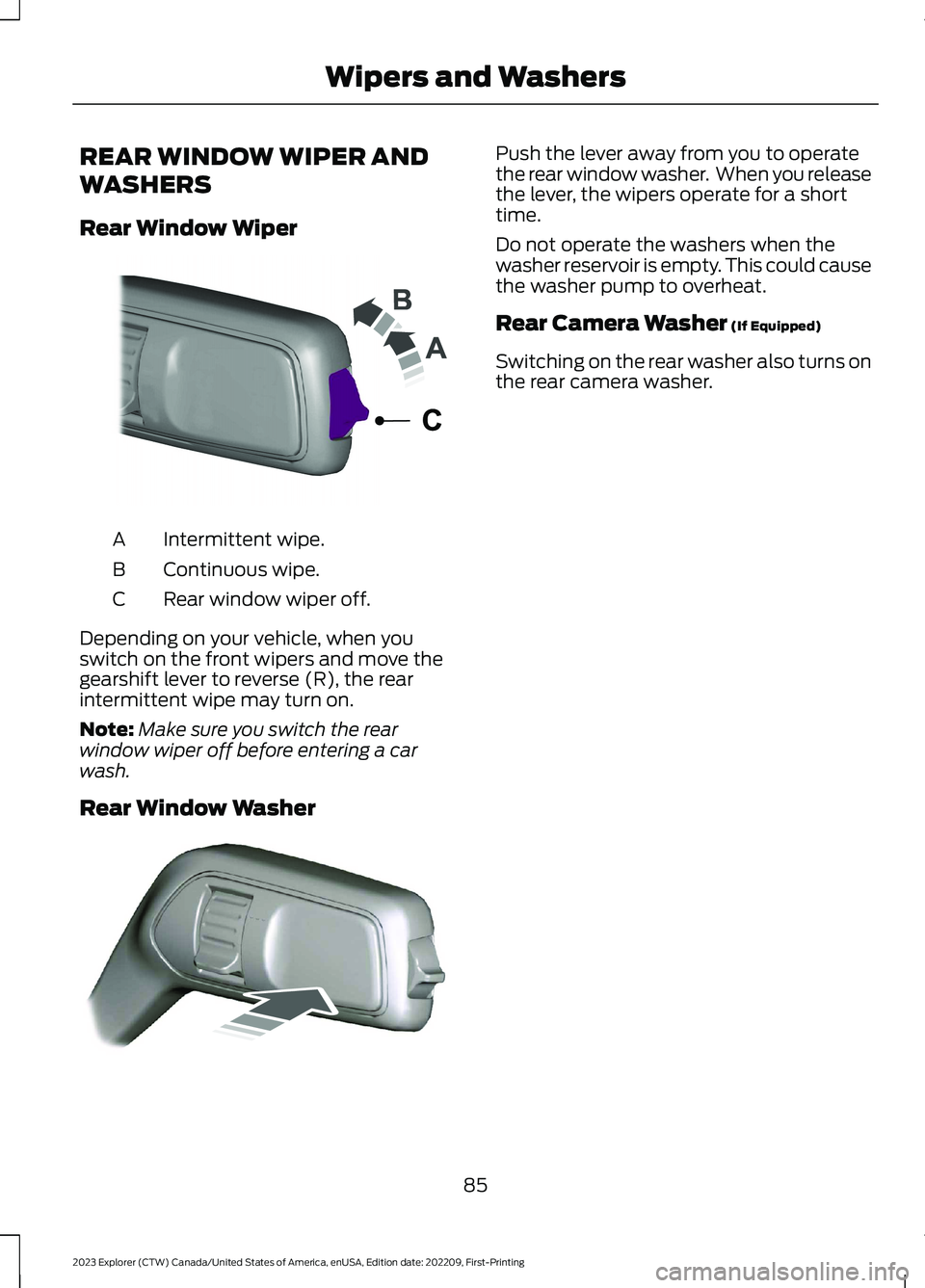
REAR WINDOW WIPER AND
WASHERS
Rear Window Wiper
Intermittent wipe.A
Continuous wipe.B
Rear window wiper off.C
Depending on your vehicle, when youswitch on the front wipers and move thegearshift lever to reverse (R), the rearintermittent wipe may turn on.
Note:Make sure you switch the rearwindow wiper off before entering a carwash.
Rear Window Washer
Push the lever away from you to operatethe rear window washer. When you releasethe lever, the wipers operate for a shorttime.
Do not operate the washers when thewasher reservoir is empty. This could causethe washer pump to overheat.
Rear Camera Washer (If Equipped)
Switching on the rear washer also turns onthe rear camera washer.
85
2023 Explorer (CTW) Canada/United States of America, enUSA, Edition date: 202209, First-PrintingWipers and WashersE242324 E242432
Page 96 of 573

WHAT IS AUTOMATIC HIGH
BEAM CONTROL
The system turns on high beams if it is darkenough and no other traffic is present. If itdetects an approaching vehicle’sheadlamps or tail lamps, or street lightingahead, the system turns the high beamsoff. Low beams remain on.
A camera sensor, centrally mountedbehind the windshield of your vehicle,continuously monitors conditions to turnthe high beams on and off.
SWITCHING AUTOMATIC HIGH
BEAM CONTROL ON AND OFF
WARNING: Do not use the systemin poor visibility, for example fog, heavyrain, spray or snow.
Use the touchscreen to select thefollowing:
1.Select Settings.
2.Select Vehicle.
3.Select Lighting.
Activating the Automatic HighBeam Control
Switch the lighting control to theautolamps position. SeeAutolamps (page 87).
Note:The lighting control defaults toautolamps each time you switch yourvehicle on.
When active, the high beams turn on if allthe following conditions occur:
•The ambient light level is low enough.
•There is no traffic in front of yourvehicle.
•The vehicle speed is greater thanapproximately 25 mph (40 km/h).
When active, the high beams turn off if atleast one of the following conditions occur:
•The ambient light level is high enoughthat you do not require high beams.
•The system detects an approachingvehicle's headlamps or tail lamps.
•The system detects severe rain, snowor fog.
•A blocked vehicle camera.
•The vehicle speed falls belowapproximately 19 mph (30 km/h).
Note:The deactivation speed is lower oncurves.
Note:Certain curvy road situations maydelay high beam reactivation.
Note:If you have a blocked sensor, thesystem may not operate properly. Keep thewindshield free from obstruction or damage.
Note:The system may not operate properlyin cold or inclement conditions. You canswitch on the high beams by overriding thesystem.
Note:If the system detects a blockage, forexample bird droppings, bug splatter, snowor ice, the system goes into low beam modeuntil you clear the blockage. If you have ablocked camera, a message may appear inthe information display.
Note:Using much larger tires or equippingvehicle accessories such as snowplows canmodify your vehicle's ride height anddegrade automatic high beam controlperformance.
92
2023 Explorer (CTW) Canada/United States of America, enUSA, Edition date: 202209, First-PrintingAutomatic High Beam ControlE281240
Page 100 of 573
You can switch this feature on and offthrough the information display. SeeGeneral Information (page 115).
You can fold the mirrors on demand bypressing the power-folding mirror controlon the door. The control lights and themirrors fold in toward the glass. Press thecontrol again to unfold the mirrors. Thecontrol light turns off.
Note:If you use the power-folding controlto fold the mirrors on demand with the autofold feature on, you must use the controlagain to unfold them.
Loose Mirror
If you manually fold your power-foldingmirrors, they may not work properly evenafter you re-position them. You need toreset them if:
•The mirrors vibrate when you drive.
•The mirrors feel loose.
•The mirrors do not stay in the folded orunfolded position.
•One of the mirrors is not in its normaldriving position.
To reset the power-fold feature, use thepower-folding mirror control to fold andunfold the mirrors. You may hear a loudnoise as you reset the power-foldingmirrors. This sound is normal. Repeat thisprocess as needed each time you manuallyfold the mirrors.
Heated Exterior Mirrors (If Equipped)
See Heated Exterior Mirrors (page 142).
Memory Mirrors (If Equipped)
You can save and recall the mirrorpositions through the memory function.See Memory Function (page 150).
Auto-dimming Feature (If Equipped)
The driver exterior mirror dims when theinterior auto-dimming mirror turns on.
Direction Indicator Mirrors (If Equipped)
When the vehicle is running, theforward-facing portion of the appropriatemirror housing blinks when you switch onthe direction indicator.
Puddle Lamps (If Equipped)
The lamps on the bottom part of the mirrorhousing light when you use yourtransmitter to unlock the doors or whenyou open a door.
360-Degree Camera (If Equipped)
See 360 Degree Camera (page 237).
Blind Spot Information System
See Blind Spot Information System(page 259).
EXTERIOR MIRRORS - ST
Power Exterior Mirrors
WARNING: Do not adjust themirrors when your vehicle is moving. Thiscould result in the loss of control of yourvehicle, serious personal injury or death.
96
2023 Explorer (CTW) Canada/United States of America, enUSA, Edition date: 202209, First-PrintingWindows and Mirrors
Page 102 of 573

Heated Exterior Mirrors
See Heated Exterior Mirrors (page 142).
Memory Mirrors
You can save and recall the mirrorpositions through the memory function.See Memory Function (page 150).
Auto-dimming Feature (If Equipped)
The driver exterior mirror dims when theinterior auto-dimming mirror turns on.
Direction Indicator Mirrors (If Equipped)
When the vehicle is running, theforward-facing portion of the appropriatemirror housing blinks when you switch onthe direction indicator.
Puddle Lamps
The lamps on the bottom part of the mirrorhousing illuminate when you use yourremote control to unlock the doors or whenyou open a door.
360-Degree Camera (If Equipped)
See 360 Degree Camera (page 237).
Blind Spot Information System
See Blind Spot Information System(page 259).
INTERIOR MIRROR
WARNING: Do not adjust themirrors when your vehicle is moving. Thiscould result in the loss of control of yourvehicle, serious personal injury or death.
Note:Do not clean the mirror housing orglass with harsh abrasives, fuel or otherpetroleum-based cleaning products.
You can adjust the interior mirror to yourpreference. Some mirrors also have asecond pivot point. This lets you move themirror head up or down and from side toside.
Manual Dimming Mirror
Pull the tab below the mirror toward youto reduce the effect of bright light frombehind.
Automatic Dimming Mirror (If Equipped)
Note:Do not block the sensors on the frontand back of the mirror. A rear centerpassenger or raised rear center headrestraint may also block light from reachingthe sensor.
The mirror dims to reduce the effect ofbright light from behind. It returns tonormal when the bright light from behindis no longer present or if you shift intoreverse (R).
SUN VISORS
Rotate the sun visor toward the sidewindow and extend it rearward for extrashade.
98
2023 Explorer (CTW) Canada/United States of America, enUSA, Edition date: 202209, First-PrintingWindows and MirrorsE138666
Page 131 of 573
Lane Keeping System
ActionMessage
The system has malfunctioned. Have the system checked as soonas possible.Lane Keeping Sys.MalfunctionService Required
The system has detected a condition that has caused the systemto be temporarily unavailable.Front CameraTemporarily NotAvailable
The system has detected a condition that requires the windshieldto be cleaned to operate properly.Front Camera LowVisibility CleanScreen
The system has malfunctioned. Have the system checked as soonas possible.Front CameraMalfunctionService Required
The system requests the driver to keep their hands on the steeringwheel.Keep Hands onSteering Wheel
Maintenance
ActionMessage
Stop your vehicle as soon as safely possible and turn off the engine.Check the oil level. If the warning stays on or continues to come onwith your engine running, have the system checked as soon aspossible.
Low Engine OilPressure
The engine oil life is low and needs to be changed soon.Change Engine OilSoon
The engine oil life is low and needs to be changed immediately.Oil ChangeRequired
The brake fluid level is low and the brake system should beinspected immediately. See Brake Fluid Check (page 328).Brake Fluid LevelLow
The brake system needs servicing. Stop the vehicle in a safe place.Contact an authorized dealer.Check BrakeSystem
The engine coolant temperature is excessively high.Engine CoolantOver Temperature
The washer fluid is low and needs to be refilled.Washer Fluid LevelLow
127
2023 Explorer (CTW) Canada/United States of America, enUSA, Edition date: 202209, First-PrintingInformation Displays
Page 223 of 573

REVERSE BRAKING ASSIST –FREQUENTLY ASKED QUESTIONS
Why is reverse braking assist unavailable?
•Make sure you switch the system on.See Switching Reverse BrakingAssist On and Off (page 217).
•Make sure that the liftgate, hood andall doors are closed.
•Make sure the cross traffic alert systemis on. See Cross Traffic Alert (page263).
•Make sure the rear parking aid systemis on. See Rear Parking Aid (page 225).
•Make sure traction control is on. SeeUsing Traction Control (page 220).
•The vehicle has sustained a rear endimpact. Have the sensors checked forproper coverage and operation.
•An ABS, traction control or stabilitycontrol event may have occurred. Thesystem resumes operation when theevent is complete.
•Make sure the rear view camera and360 degree camera are not dirty orobstructed. If it is dirty, clean thecamera. See Rear View Camera(page 234). See 360 Degree Camera(page 237). If the message still appearsafter cleaning the camera, wait a shorttime and the message should clear. Ifthe message does not clear, have thesystem checked.
•Make sure the sensors are not blockedor faulted. See Cross Traffic Alert(page 263). See Rear Parking Aid(page 225).
•You recently had your vehicle serviced,or the battery disconnected. Drive yourvehicle a short distance to resumesystem operation.
•The system does not function whenyou connect a trailer. Operationresumes when you disconnect thetrailer.
Note:If the answers to why the system isunavailable do not assist in returning reversebraking assist to available, have the systemchecked as soon as possible.
219
2023 Explorer (CTW) Canada/United States of America, enUSA, Edition date: 202209, First-PrintingReverse Braking Assist (If Equipped)